Looking Beyond the HP Z2 SFF Core i5? 6 Alternatives Worth a Look
As an Amazon Associate we earn from qualifying purchases. Links on this page are affiliate links.
The HP Z2 G5 SFF workstation offers 32GB of RAM and a 1TB SSD in a compact chassis. If you are exploring hp z2 g5 sff workstation alternatives, you likely need different specifications or form factors. This model serves office workers managing multi-screen productivity setups who do not need dedicated graphics. Its small footprint fits tight desks, and the Intel Core i5 processor handles daily tasks efficiently.
You might want another option if you require more processing power, dedicated graphics, or a different brand. Some users prefer larger towers for easier upgrades, while others need newer processors for AI workloads. The alternatives listed here were chosen because their specs overlap with the original. Each entry matches the core requirements of memory, storage, or professional use. You can compare these models to find the exact balance of performance and size for your specific workflow.
Our top pick: HP Z2 SFF Core i5 Desktop.
How each alternative compares
Dell Precision Quadro P620 Desktop
The Dell Precision 3431 replaces the HP Z2’s integrated graphics with a Quadro P620 dedicated card. This change benefits CAD and 3D modeling tasks that require professional drivers. However, it offers only 16GB of RAM compared to the HP’s 32GB. You lose memory capacity for heavy multitasking. The chassis is larger, measuring 13.3 by 12.1 inches. It remains a solid choice for professionals needing specific graphics support. You should pick this if your workflow prioritizes dedicated GPU performance over maximum memory bandwidth.
Dell Precision Compact i5 Quadro P620 PC
This Dell Precision model matches the HP Z2 with 32GB of RAM and a 1TB SSD. It also includes the Quadro P620 dedicated graphics card. The key difference is the inclusion of professional graphics hardware in a similar memory configuration. The chassis dimensions are identical to the previous Dell entry. You gain dedicated rendering power without sacrificing multitasking memory. This setup suits design professionals who need both ample RAM and specific GPU capabilities. It is a better fit than the HP if your applications rely on certified workstation graphics drivers.
Dell OptiPlex Tower i7 32GB RAM
The Dell OptiPlex 7060 Tower switches from a Core i5 to a Core i7 processor. It retains the 32GB RAM and 1TB SSD found in the HP Z2. The form factor changes significantly to a larger tower design. This model sacrifices the compact footprint for potentially higher single-core performance. It lacks dedicated workstation graphics, similar to the HP. You should choose this if you prefer a standard tower layout. It is ideal for office multitasking where physical space is less constrained. The internal expansion options are likely superior in this larger chassis.
HP Z2 G1i SFF Intel Core Ultra 7 Desktop
The HP Z2 G1i upgrades to a Core Ultra 7 processor with 20 cores. It also uses faster DDR5 RAM instead of the older DDR4. The storage remains at 1TB SSD. This represents a significant generational leap in processing power and memory speed. The chassis is larger, measuring 20 inches wide. It includes NVIDIA graphics for AI workloads. You gain modern architecture and enhanced performance for professional multitasking. Pick this if you need the latest processor technology. It is unsuitable if you require the smallest possible footprint or older hardware compatibility.
HP Z240 SFF Workstation Core i7
The HP Z240 SFF uses a Core i7 processor instead of the i5. It matches the 32GB RAM and 1TB SSD configuration. The form factor is similar, though dimensions differ slightly. This older generation model offers solid multitasking power. It lacks the newer processor architecture of the Z2 G5. You give up modern feature sets for a potentially lower entry point. It fits professionals who prioritize RAM and storage capacity. Choose this if you need a compact workstation with high memory. It is less ideal for tasks requiring the latest CPU speeds or efficiency.
HP Z240 Tower Core i5 Workstation
The HP Z240 Tower switches to a Core i5 processor but reduces storage to 512GB SSD. It keeps the 32GB RAM configuration. The form factor changes to a larger tower chassis. You gain more internal space for expansion but lose half the storage capacity. The processor generation is older than the Z2 G5. This model suits users who prioritize memory over storage volume. It is a viable option for office multitasking. Pick this if you need a tower layout and can manage with less SSD space. It is not recommended for users requiring large file storage.
Quick picks
Our 7 picks

HP Z2 SFF Core i5 Desktop
Best for: multi-monitor office and productivity workflows
- Graphics Card
- Intel UHD Graphics 630
- Processor Model
- Intel Core i5-10500
- System Memory
- 32 GB
- Storage Capacity
- 1 TB SSD
- Operating System
- Windows 11 Pro
- Form Factor
- Small Form Factor
View on Amazon: HP Z2 SFF Core i5 Desktop Affiliate link
This compact workstation pairs a six-core Intel Core i5-10500 processor with 32GB of DDR4 memory and a 1TB solid-state drive. You get Windows 11 Pro preinstalled, dual DisplayPort 1.4 video outputs, and eleven total USB ports across its front and rear panels. It suits your daily office workflows, remote conferencing, and multi-monitor productivity setups requiring a compact footprint.
Pros
- Intel Core i5-10500 processor with 6 cores and 12 threads
- 32GB DDR4 memory for multitasking
- 1TB solid-state drive for local storage
- Eleven USB ports including one USB Type-C port
Cons
- Integrated Intel UHD Graphics 630 instead of dedicated graphics hardware
- Factory seal opened to install upgraded memory and storage components
Good fit if
- You need 32GB of system memory for business multitasking.
- You want to connect up to three displays via DisplayPort.
- You require a small form factor chassis with extensive USB connectivity.
Skip if
- You need a dedicated graphics card for heavy 3D rendering workloads.
- You prefer a factory-sealed unit without third-party component upgrades.
Verdict: HP Z2 SFF Core i5 Desktop gives business professionals 32GB of memory and dual DisplayPort outputs in a space-saving chassis. It serves office workers managing multi-screen productivity setups who do not need dedicated graphics.

Dell Precision Quadro P620 Desktop
Best for: CAD, 3D modeling, and business productivity
- Graphics Card
- NVIDIA Quadro P620
- Processor Model
- Intel Core i5-9500
- System Memory
- 16GB
- Storage Capacity
- 1TB SSD
- Operating System
- Windows 11 Pro
- Use
- Workstation
View on Amazon: Dell Precision Quadro P620 Desktop Affiliate link
This Dell Precision 3431 workstation pairs an Intel Core i5-9500 processor with 16GB of RAM and a 1TB SSD. It includes a dedicated NVIDIA Quadro P620 graphics card, which supports CAD and 3D modeling tasks. The system runs Windows 11 Pro and comes with a wired keyboard and mouse. It is a compact, ready-to-use machine suited for business professionals and designers who need reliable performance for visual workloads.
Pros
- Intel Core i5-9500 hexa-core processor for efficient multitasking
- 16GB DDR4 RAM ensures smooth operation for business applications
- NVIDIA Quadro P620 GPU handles CAD and 3D modeling
- 1TB SSD provides fast boot times and ample storage
Cons
- 16GB RAM is lower than the 32GB found in most competing workstations
- Quadro P620 is an entry-level professional GPU with limited gaming capability
- Includes only a wired keyboard and mouse, lacking wireless options
Good fit if
- You need a dedicated GPU for CAD or 3D design work
- You prefer a pre-configured system with Windows 11 Pro
- You require a compact desktop with fast storage access
Skip if
- You require more than 16GB of system memory for heavy multitasking
- You are looking for a high-performance gaming graphics card
- You want a wireless keyboard and mouse included with the PC
Verdict: Dell Precision 3431 i5-9500 Workstation is a solid choice for professionals needing CAD support, though you should consider alternatives with 32GB RAM if your workflow demands heavier multitasking.

Dell Precision Compact i5 Quadro P620 PC
Best for: Professional design and engineering workflows
- Graphics Card
- NVIDIA Quadro P620
- Processor Model
- Intel Core i5-9500
- System Memory
- 32GB
- Storage Capacity
- 500GB NVMe + 1TB SSD
- Operating System
- Windows 11 Pro
- Use
- Workstation
View on Amazon: Dell Precision Compact i5 Quadro P620 PC Affiliate link
This Dell Precision 3431 workstation pairs an Intel Core i5-9500 processor with 32GB of RAM for steady multitasking. It includes a dedicated NVIDIA Quadro P620 graphics card, which supports professional design and engineering tasks. The storage combines a fast 500GB NVMe SSD with a 1TB SSD for ample space. It runs Windows 11 Pro and includes a wireless keyboard, mouse, and webcam, offering a complete setup for professional users.
Pros
- Intel Core i5-9500 hexa-core processor
- 32GB DDR4 system memory
- NVIDIA Quadro P620 2GB graphics card
- 500GB NVMe SSD and 1TB SSD storage
- Includes wireless keyboard, mouse, and 2K webcam
Cons
- Older 9th Gen Intel processor
- Entry-level Quadro P620 graphics card
- Bulky desktop form factor
Good fit if
- You need professional CAD or 3D rendering capabilities
- You require 32GB of RAM for heavy multitasking
- You want a complete desktop solution with peripherals
Skip if
- You need high-end gaming performance
- You require a compact small form factor
- You need the latest generation processor
Verdict: Dell Precision 3431 i5 Workstation is a solid choice for design professionals who prioritize dedicated graphics and ample memory over the newest processor generations.

Dell OptiPlex Tower i7 32GB RAM
Best for: memory-heavy office multitasking and storage expansion
- Graphics Card
- Intel HD 630
- Processor Model
- Intel Core i7-8700
- System Memory
- 32 GB
- Storage Capacity
- 1 TB SSD
- Operating System
- Windows 11 Pro
- Form Factor
- Tower
View on Amazon: Dell OptiPlex Tower i7 32GB RAM Affiliate link
This Dell Optiplex 7060 Tower provides a hexa-core Intel Core i7-8700 processor paired with 32GB of DDR4 memory and a 1TB solid-state drive. It gives you Windows 11 Pro and ten external USB ports, including one USB-C connection. It suits you if you need a standard tower footprint with room for internal drive expansion rather than a compact small-form-factor chassis.
Pros
- 32GB DDR4 memory for heavy multitasking
- 1TB solid-state drive primary storage
- Ten external USB ports including USB Type-C
- Three internal SATA ports for drive expansion
Cons
- Relies on integrated Intel HD 630 graphics instead of a dedicated GPU
- Standard tower chassis is heavier at 17.5 pounds than compact SFF cases
Good fit if
- You need 32GB of system memory for demanding office workflows.
- You prefer a full tower build with internal SATA expansion bays.
- You want native Windows 11 Pro installed out of the box.
Skip if
- You require a dedicated workstation graphics card for 3D tasks.
- You have limited desk space and need a small-form-factor case.
Verdict: Dell Optiplex 7060 Tower Core i7 delivers ample RAM and internal storage expansion for office multitaskers who do not require dedicated workstation graphics.

HP Z2 G1i SFF Intel Core Ultra 7 Desktop
Best for: AI workloads and professional multitasking
- Graphics Card
- NVIDIA 8 GB GDDR6
- Processor Model
- Intel Core Ultra 7 265
- System Memory
- 32 GB DDR5 SDRAM
- Storage Capacity
- 1 TB SSD
- Operating System
- Windows 11 Pro
- Form Factor
- Small Form Factor
View on Amazon: HP Z2 G1i SFF Intel Core Ultra 7 Desktop Affiliate link
This HP Z2 G1i Small Form Factor workstation features an Intel Core Ultra 7 265 processor with 20 cores and 32 GB of DDR5 RAM. It includes a 1 TB PCIe 4.0 SSD and NVIDIA 8 GB GDDR6 graphics. The system runs Windows 11 Pro. It suits professionals needing AI capabilities and high-speed multitasking in a compact 8.82-pound chassis.
Pros
- Intel Core Ultra 7 265 processor with 20 cores
- 32 GB DDR5 SDRAM expandable to 256 GB
- 1 TB PCIe 4.0 SSD for fast data access
- NVIDIA 8 GB GDDR6 dedicated graphics
- Windows 11 Pro operating system
Cons
- Small Form Factor limits extreme cooling options
- 8.82 pounds adds weight for a compact chassis
- Base clock speed of 2.40 GHz is modest
Good fit if
- You need AI-powered performance for professional workloads
- You require expandable DDR5 memory up to 256 GB
- You want a compact workstation with NVIDIA graphics
Skip if
- You need a Tower form factor for maximum airflow
- You require a processor with a higher base clock speed
- You prefer a lighter system under 8 pounds
Verdict: HP Z2 G1i Core Ultra 7 Workstation delivers 20-core processing power and 32 GB of DDR5 RAM in a compact chassis. It fits professionals who need AI capabilities and NVIDIA graphics without the bulk of a Tower system.
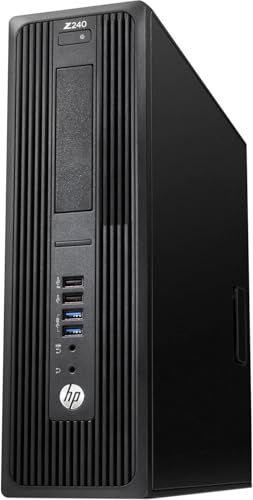
HP Z240 SFF Workstation Core i7
Best for: Compact professional workstations needing 32GB RAM
- Processor Model
- Intel Core i7-6700
- System Memory
- 32GB
- Storage Capacity
- 1TB SSD
- Operating System
- Windows 11 Pro
- Form Factor
- Small Form Factor
- Use
- Workstation
View on Amazon: HP Z240 SFF Workstation Core i7 Affiliate link
This HP Z240 SFF workstation pairs an Intel Core i7-6700 processor with 32GB of RAM and a 1TB SSD. The compact small form factor fits in tight spaces while offering robust multitasking capabilities. It runs Windows 11 Pro and includes essential connectivity like ten USB ports and three DisplayPort outputs. This setup suits users needing reliable performance for professional tasks without requiring a large desktop footprint.
Pros
- Intel Core i7-6700 processor for consistent performance
- 32GB RAM supports efficient multi-tasking
- 1TB SSD provides ample storage space
- Ten USB ports for peripheral connectivity
Cons
- Older generation i7-6700 processor lacks modern efficiency
- No built-in Wi-Fi; requires wireless adapter
- Compact size limits future hardware upgrades
Good fit if
- You need a compact workstation for professional software
- You require 32GB RAM for heavy multitasking
- You prefer a wired Ethernet connection over wireless
Skip if
- You need the latest processor generation for maximum speed
- You require built-in Wi-Fi without adapters
- You plan to upgrade components frequently
Verdict: HP Z240 SFF i7 Workstation delivers solid multitasking power in a small package. It fits professionals who prioritize RAM and storage over cutting-edge processor speeds.
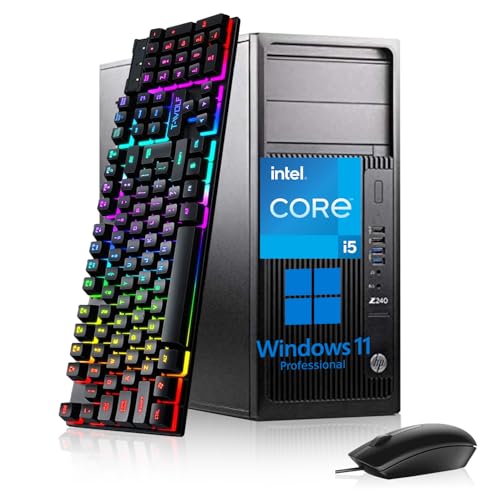
HP Z240 Tower Core i5 Workstation
Best for: Office multitasking and business computing
- Processor Model
- Intel Core i5-6500
- System Memory
- 32GB DDR4
- Storage Capacity
- 512GB SSD
- Operating System
- Windows 11 Pro
- Form Factor
- Tower
- Use
- Workstation
View on Amazon: HP Z240 Tower Core i5 Workstation Affiliate link
This HP Z240 Tower workstation pairs an Intel Core i5-6500 processor with 32GB of DDR4 RAM and a 512GB SSD. It runs Windows 11 Pro and includes dual DisplayPort outputs for multi-screen setups. The tower form factor offers ample space for upgrades. It suits users who need reliable performance for office tasks, web design, or business computing without requiring the latest CPU generation.
Pros
- 32GB DDR4 RAM for multitasking
- 512GB SSD for fast data access
- Windows 11 Pro preinstalled
- Tower form factor for easy upgrades
Cons
- 6th generation Intel Core i5-6500 is older
- No dedicated graphics card listed
- Limited to DisplayPort outputs
Good fit if
- You need a reliable desktop for business applications
- You prefer a tower chassis for future upgrades
- You require 32GB of system memory
Skip if
- You need the latest generation processor
- You require dedicated graphics for heavy rendering
- You prefer a small form factor
Verdict: HP Z240 Tower i5 32GB RAM 512GB SSD provides solid multitasking capability for office and design work. It fits users who prioritize memory and storage over cutting-edge processing speed.
Specifications side by side
| Spec | HP Z2 SFF Core i5 Desktop | Dell Precision Quadro P620 Desktop | Dell Precision Compact i5 Quadro P620 PC | Dell OptiPlex Tower i7 32GB RAM | HP Z2 G1i SFF Intel Core Ultra 7 Desktop | HP Z240 SFF Workstation Core i7 | HP Z240 Tower Core i5 Workstation |
|---|---|---|---|---|---|---|---|
| Graphics Card | Intel UHD Graphics 630 | NVIDIA Quadro P620 | NVIDIA Quadro P620 | Intel HD 630 | NVIDIA 8 GB GDDR6 | not specified | not specified |
| Processor Model | Intel Core i5-10500 | Intel Core i5-9500 | Intel Core i5-9500 | Intel Core i7-8700 | Intel Core Ultra 7 265 | Intel Core i7-6700 | Intel Core i5-6500 |
| System Memory | 32 GB | 16GB | 32GB | 32 GB | 32 GB DDR5 SDRAM | 32GB | 32GB DDR4 |
| Storage Capacity | 1 TB SSD | 1TB SSD | 500GB NVMe + 1TB SSD | 1 TB SSD | 1 TB SSD | 1TB SSD | 512GB SSD |
| Operating System | Windows 11 Pro | Windows 11 Pro | Windows 11 Pro | Windows 11 Pro | Windows 11 Pro | Windows 11 Pro | Windows 11 Pro |
| Form Factor | Small Form Factor | not specified | not specified | Tower | Small Form Factor | Small Form Factor | Tower |
| Processor | Core i5 | Core i5 | Core i5 | Core i7 | Core Ultra 7 | Core i7 | Core i5 |
| Memory | 32GB RAM | 16GB RAM | 32GB RAM | 32GB RAM | 32GB RAM | 32GB RAM | 32GB RAM |
| Storage | 1TB SSD | 1TB SSD | 1TB SSD | 1TB SSD | 1TB SSD | 1TB SSD | 512GB SSD |
| Use | Workstation | Workstation | Workstation | not specified | Workstation | Workstation | Workstation |
| Dimensions | 1.35 × 6.97 × 6.88 inches | 12.1 × 13.3 × 4 inches | 12.1 × 13.3 × 4 inches | 10.7 × 6.1 × 13.7 inches | 16 × 20 × 8 inches | 13.3 × 4 × 14.9 inches | not specified |
| Weight | 11.9 pounds | not specified | not specified | 17.5 pounds | 8.82 pounds | not specified | not specified |
| Size | 32GB RAM|1TB SSD | 13.3 x 12.1 x 4 inches | not specified | 32GB RAM | 1 TB SSD | not specified | i7|32-1TB | not specified |
| Color | Black | Black | not specified | Black | Black | Black | not specified |
| Model | HP Z2 G5 | 3431 | 3431 | 7060 | BN5L6UT#ABA | Z240 SFF | Z240 Tower |
Frequently asked questions
Which HP Z2 SFF alternative offers the best processor for AI workloads?
The HP Z2 G1i SFF Core Ultra 7 is the top choice for AI tasks. It features a 20-core processor and 32GB of DDR5 RAM. This setup handles professional multitasking efficiently. It also includes NVIDIA graphics, providing the power needed for complex computations without requiring a bulky tower system.
Do any alternatives provide dedicated graphics for CAD and 3D modeling?
Yes, the Dell Precision Quadro P620 Desktop includes a dedicated Quadro P620 graphics card. This is ideal for CAD and 3D modeling workflows that require professional drivers. It pairs this GPU with a Core i5 processor and 1TB SSD, making it a solid option for design professionals who need specific graphics performance.
Which workstation is best for heavy office multitasking and storage expansion?
The Dell OptiPlex Tower i7 is best for memory-heavy office multitasking. It comes with 32GB of RAM and a 1TB SSD. The tower form factor allows for internal storage expansion. This makes it suitable for users who manage large files and multiple applications simultaneously without needing dedicated workstation graphics capabilities.
Is there a compact option with 32GB of RAM and a Core i7?
The HP Z240 SFF Workstation Core i7 fits this requirement. It combines a Core i7 processor with 32GB of RAM and a 1TB SSD. This compact package delivers solid multitasking power. It is designed for professionals who prioritize ample memory and storage capacity over the fastest available processor speeds.
Which Dell Precision model offers the most memory for professional design work?
The Dell Precision Compact i5 Quadro P620 PC offers 32GB of RAM. It also includes a 1TB SSD and Windows 11 Pro. This configuration supports professional design and engineering workflows. It is a strong choice for users who need dedicated graphics and ample memory for demanding creative applications.
What is the smallest form factor available among these workstation alternatives?
The HP Z2 G5 SFF is a small form factor workstation measuring 6.97 inches in width. It weighs 11.9 pounds and fits well in space-constrained environments. It provides 32GB of RAM and a 1TB SSD, making it a practical choice for office workers who need a compact yet powerful machine for multi-screen setups.
Which workstation includes a 512GB SSD for office multitasking?
The HP Z240 Tower Core i5 Workstation includes a 512GB SSD. It also features 32GB of RAM and a Core i5 processor. This setup provides solid multitasking capability for office and design work. It is suited for users who prioritize memory and storage reliability over cutting-edge processing speed.