Best Mini PCs for Workstation in 2026: 9 Picks Ranked by Specs
As an Amazon Associate we earn from qualifying purchases. Links on this page are affiliate links.
You need reliable hardware for demanding tasks. These are the best mini PCs for workstation use, ranked by their published specifications. The GEEKOM Ryzen AI Max+ 395 Mini PC leads because it offers 128GB of RAM and dual 10GbE ports, which supports local AI inference and data-intensive workflows efficiently. We compared 9 options to find the most capable compact systems. Each pick focuses on raw specs like processor power, memory capacity, and connectivity options found on the listing pages. This guide helps you decide which machine fits your specific professional needs.
Quick picks
The best fit for you
- You need massive memory for local AI inference GEEKOM Ryzen AI Max+ 395 Mini PC It features 128GB of RAM and dual 10GbE ports for dense data workflows.
- You want the most compact model with an i9 Lenovo ThinkStation P3 Tiny Core i9 PC This 1-liter chassis holds a 24-core processor and quad-display output.
- You require high-speed networking for homelab virtualization MINISFORUM MS-01 Core i5 Workstation It includes dual 10G SFP+ ports and flexible drive options in a small size.
- You need certified CAD workflows in a tiny space Lenovo ThinkStation P3 Tiny Desktop It delivers ISV software certifications and 14th-gen power in a 3-pound chassis.
Our 9 picks

GEEKOM Ryzen AI Max+ 395 Mini PC
Best for: local AI inference and data-intensive workflows
- Use
- Workstation (what this guide is about)
- Processor
- AMD Ryzen AI Max+ 395
- Graphics Card
- Radeon 8060S
- RAM Capacity
- 128GB
- RAM Type
- LPDDR5X
- Storage Capacity
- 2TB
The GEEKOM A9 Mega is an ultra-compact workstation designed for heavy computational tasks and on-device machine learning. Inside its aluminum chassis, it features an AMD Ryzen AI Max+ 395 processor, 128GB of LPDDR5X unified memory, and a 2TB NVMe SSD. Dual 10GbE networking and support for four displays give you robust connectivity. This setup suits you if your daily workflow demands running local AI models or intensive data processing.
Pros
- AMD Ryzen AI Max+ 395 processor with 126 TOPS AI rating
- 128GB LPDDR5X memory with up to 96GB allocatable to the GPU
- Dual 10GbE Ethernet ports and Wi-Fi 7 connectivity
- Quad display output via dual 40Gbps USB4 and dual HDMI 2.1
Cons
- Integrated Radeon 8060S graphics instead of a dedicated desktop GPU
- Storage expansion is limited to two M.2 slots up to 8TB total
Good fit if
- You need 128GB of high-speed unified memory for local AI model inference.
- You require dual 10GbE networking for high-speed local NAS transfers.
- You run up to four displays using USB4 and HDMI 2.1 connections.
Skip if
- You need a dedicated PCIe desktop graphics card for your applications.
- You require more than two internal M.2 storage drives.
Verdict: GEEKOM A9 Mega Ryzen AI Mini Workstation delivers massive unified memory and dual 10GbE connectivity in a compact form factor. It provides the sustained compute needed for local AI inference and dense workstation workloads.

MINISFORUM MS-01 Core i5 Workstation
Best for: high-speed networking and compact homelab storage
- Use
- Workstation (what this guide is about)
- Processor
- Intel Core i5-12600H
- Graphics Card
- Intel Iris Xe Graphics
- RAM Capacity
- 32GB
- RAM Type
- DDR5
- Storage Capacity
- 1TB
The MINISFORUM MS-01 is a compact desktop built around an Intel Core i5-12600H processor with 12 cores, 32GB of DDR5 memory, and a 1TB PCIe 4.0 SSD. It provides dual 10G SFP+ ports alongside dual 2.5G Ethernet connections for high-bandwidth local networking. This mini PC suits you if you need a network-heavy homelab, storage server, or compact workstation without the footprint of a full desktop tower.
Pros
- Dual 10G SFP+ ports and dual 2.5G RJ45 network jacks
- Expansion support for U.2 enterprise SSDs and three M.2 NVMe drives
- Internal PCIe slot supporting add-in expansion cards
- Triple display output via two USB4 ports and one HDMI port
Cons
- Ships with integrated Intel Iris Xe graphics rather than a dedicated GPU
- PCIe x16 expansion slot is electrically wired for PCIe 4.0 x8
- Lacks dedicated native full-size DisplayPort jacks
Good fit if
- You need 10Gbps SFP+ connectivity for high-speed network environments.
- You plan to run multi-drive NVMe or enterprise U.2 storage arrays.
- You want 32GB DDR5 memory in a chassis under two inches tall.
Skip if
- You require a pre-installed discrete graphics card for heavy 3D rendering.
- You need native DisplayPort outputs without utilizing USB4 adapters.
Verdict: MINISFORUM MS-01 Core i5 Mini Workstation delivers unusual network and storage expandability for its size, combining dual 10G SFP+ ports with flexible drive options. It is a capable platform for network routing, homelab virtualization, and compact office workloads.

Lenovo ThinkStation P3 Tiny Core i9 PC
Best for: compact multi-display CAD and engineering tasks
- Use
- Workstation (what this guide is about)
- Processor
- Intel Core i9-14900 vPro
- Graphics Card
- T400 4GB
- RAM Capacity
- 16GB
- RAM Type
- DDR5
- Storage Capacity
- 1TB
The Lenovo ThinkStation P3 Tiny is an ultra-compact 1-liter workstation desktop designed for professional applications. Inside, you get a 24-core Intel Core i9-14900 vPro processor paired with a dedicated T400 4GB graphics card and 16GB of DDR5 memory. With a 1TB PCIe NVMe SSD and support for four displays, this build suits you if you run CAD, 3D modeling, or multi-monitor workloads in tight spaces.
Pros
- 24-core, 32-thread Intel Core i9-14900 vPro CPU
- Dedicated T400 4GB graphics card
- Four independent display outputs via DisplayPort and Mini DisplayPort
- Compact 1-liter chassis weighing 3.1 pounds
- Wi-Fi 6, Bluetooth 5.3, and Gigabit Ethernet
Cons
- Base configuration ships with 16GB of RAM
- Requires Mini DisplayPort connections for three of four video outputs
- Chassis seal opened for certified storage and memory installation
Good fit if
- You need 24-core Intel processing with hardware-level vPro management.
- You run up to four displays for CAD, modeling, or financial monitoring.
- You require a compact 3.1-pound chassis that fits in confined work areas.
Skip if
- You require more than 16GB of system memory out of the box.
- You need full-size HDMI or DisplayPort connections across every port.
Verdict: Lenovo ThinkStation P3 Tiny Core i9 Workstation delivers 24-core processing power and dedicated quad-display output in a compact 1-liter footprint. It provides enterprise remote management and dedicated graphics for demanding professional workloads.

HP Z2 Mini Core i7 Desktop PC
Best for: budget-conscious office multitasking and multi-display setups
- Use
- Workstation (what this guide is about)
- Processor
- Intel Core i7 8th Gen
- RAM Capacity
- 32GB
- RAM Type
- DDR4
- Storage Capacity
- 512GB SSD + 1TB HDD
- Storage Interface
- NVMe M.2
This compact workstation desktop pairs an 8th-generation 6-core Intel Core i7 processor with 32GB of DDR4 memory. You get dual-drive storage featuring a 512GB NVMe M.2 solid-state drive for fast booting alongside a 1TB hard drive for archiving projects. It includes Windows 11 Pro and supports multi-monitor setups through three DisplayPort outputs and one HDMI port. This setup suits you if you need a dedicated office workstation for everyday business tasks.
Pros
- 32GB DDR4 memory for multitasking
- Dual storage with 512GB NVMe SSD and 1TB HDD
- Three DisplayPort outputs and one HDMI port
- Built-in Wi-Fi 6E and Bluetooth connectivity
Cons
- Uses an older 8th-generation Intel Core i7 processor
- Secondary 1TB storage drive is a mechanical hard disk
- Employs DDR4 memory rather than DDR5
Good fit if
- You need 32GB of memory for office workloads and productivity applications.
- You connect multiple external displays via DisplayPort and HDMI.
- You want combined solid-state boot speeds with bulk secondary storage.
Skip if
- You require a modern processor with higher core and thread counts.
- You prefer an all-SSD setup without mechanical drive components.
- You need DDR5 memory bandwidth for heavy workstation computations.
Verdict: HP Z2 Mini Core i7 Workstation provides generous memory, multiple video outputs, and dual storage inside an ultra-compact chassis. It handles everyday workstation tasks reliably despite relying on an older processor architecture.

MINISFORUM Core i9 Mini PC
Best for: High-speed networking and compact GPU expansion
- Use
- Workstation (what this guide is about)
- Processor
- Intel Core i9-12900H
- Graphics Card
- Intel Iris Xe Graphics
- RAM Capacity
- 32GB
- RAM Type
- DDR5
- Storage Capacity
- 1TB
This compact workstation combines a 14-core Intel Core i9-12900H processor with 32GB of DDR5 memory and a 1TB PCIe 4.0 SSD. It provides dual 10G SFP+ ports alongside dual 2.5G network interfaces for fast wired bandwidth. You also get a PCIe slot supporting discrete graphics cards like the RTX 3050. It suits users who need high-speed connectivity and expandable storage.
Pros
- Intel Core i9-12900H CPU with 14 cores and up to 5.0 GHz boost
- Dual 10G SFP+ and dual 2.5G RJ45 high-speed networking ports
- PCIe 4.0 x8 expansion slot supporting add-in cards like the RTX 3050
- Expandable storage supporting three M.2 NVMe drives and U.2 SSDs
Cons
- Base configuration relies on integrated Intel Iris Xe graphics
- Heavier than standard mini PCs at 6.02 pounds
Good fit if
- You need dual 10G SFP+ ports for fast local network transfers.
- You plan to install a low-profile discrete GPU like the RTX 3050.
- You require multiple M.2 or U.2 drives configured in RAID arrays.
Skip if
- You want a full-size graphics card installed out of the box.
- You need a lightweight mini PC for frequent travel.
Verdict: MINISFORUM Mini Workstation Core i9 RTX 3050 delivers workstation-grade 10G networking and rare PCIe card expansion in a compact footprint. It gives you flexible multi-core processing power with ample room for high-speed storage upgrades.

Lenovo ThinkStation P3 Tiny Desktop
Best for: certified CAD workflows in compact office spaces
- Use
- Workstation (what this guide is about)
- Processor
- Intel Core i7-14700
- Graphics Card
- Intel UHD Graphics 770
- RAM Capacity
- 16 GB
- RAM Type
- DDR5
- Storage Capacity
- 512 GB
The Lenovo ThinkStation P3 Tiny Core i7 is an ultra-compact workstation designed for professional environments where desk space is scarce. It pairs a desktop-class Intel Core i7-14700 processor with 16GB of DDR5 memory and a 512GB SSD. Measuring 1.5 inches thick and weighing 3 pounds, it provides official ISV certifications for applications like AutoCAD and MATLAB. This setup suits you if you run standard CAD or data workloads in compact offices.
Pros
- Intel Core i7-14700 processor with 16GB DDR5 RAM
- ISV certifications for AutoCAD, SOLIDWORKS, Creo, and MATLAB
- Dual-display support with up to 8K output via DisplayPort 1.4
- Wi-Fi 6, Bluetooth 5.1, and seven total USB ports
Cons
- Relies on integrated Intel UHD Graphics 770 rather than dedicated graphics
- 512GB SSD base capacity limits local asset storage
- Resealed packaging from third-party system upgrading
Good fit if
- You need an ISV-certified system for software like AutoCAD, Creo, or MATLAB.
- You require a compact chassis measuring 1.5 inches tall and weighing 3 pounds.
- You want multi-display support up to 8K resolution via DisplayPort 1.4.
Skip if
- You need a dedicated graphics card for intensive 3D rendering.
- You require more than 512GB of internal storage out of the box.
Verdict: Lenovo ThinkStation P3 Tiny Core i7 delivers verified software certifications and 14th-generation computing power inside an exceptionally compact 3-pound chassis. It gives you dependable enterprise-grade multitasking without monopolizing valuable desk space.

Lenovo ThinkStation P3 Tiny i5-14500 Workstation
Best for: Compact certified CAD and enterprise office setups
- Use
- Workstation (what this guide is about)
- Processor
- Intel i5-14500 vPro
- Graphics Card
- Intel UHD 770
- RAM Type
- DDR5
- Storage Interface
- PCIe NVMe M.2
- Operating System
- Windows 11 Pro
View on Amazon: Lenovo ThinkStation P3 Tiny i5-14500 Workstation
The Lenovo ThinkStation P3 Tiny brings workstation capabilities to a compact 3.01-pound chassis measuring 1.5 inches tall. It runs on an Intel Core i5-14500 vPro processor paired with integrated Intel UHD 770 graphics and DDR5 memory. You get ISV certifications for professional applications like AutoCAD and SOLIDWORKS alongside dual video outputs. This setup suits you if you need certified stability and enterprise vPro management in a space-saving desktop format.
Pros
- Intel Core i5-14500 vPro processor with 14 cores
- ISV-certified for professional software like AutoCAD and SOLIDWORKS
- Compact chassis weighing 3.01 pounds and measuring 1.5 inches thick
- Supports dual displays via DisplayPort 1.4 and HDMI 2.1
Cons
- Relies on integrated Intel UHD 770 graphics instead of a dedicated GPU
- Resealed by a third party for memory and storage upgrades
Good fit if
- You need Intel vPro remote management features for enterprise deployment.
- You work in ISV-certified software such as MATLAB, AutoCAD, or SOLIDWORKS.
- You have limited desk space and need a chassis under two inches tall.
Skip if
- You require a discrete workstation graphics card for heavy 3D rendering.
- You prefer a factory-sealed machine directly from the original manufacturer.
Verdict: Lenovo ThinkStation P3 Tiny i5-14500 Workstation delivers enterprise vPro management and ISV certifications in an ultra-compact footprint. It offers dependable multi-core processing for office and CAD tasks where dedicated graphics hardware is not required.
Lenovo ThinkStation P3 Tiny Workstation
Best for: CAD drafting and compact office workstations
- Use
- Workstation (what this guide is about)
- Processor
- Intel Core i7-14700
- Graphics Card
- Intel UHD Graphics 770
- RAM Type
- DDR5
- Storage Interface
- PCIe NVMe M.2
- Operating System
- Windows 11 Pro
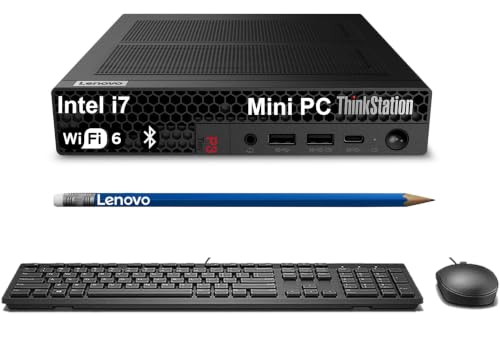
This Lenovo ThinkStation P3 Tiny is an ultra-compact desktop built for space-constrained work setups. Featuring an Intel Core i7-14700 processor and high-speed DDR5 memory, it delivers dependable compute performance for multi-display workflows and certified software like AutoCAD and MATLAB. The 3.01-pound chassis includes Windows 11 Pro, PCIe NVMe M.2 storage, and seven USB ports. It suits you if you need reliable productivity power without taking up valuable desk space.
Pros
- Intel Core i7-14700 processor paired with fast DDR5 memory
- ISV certified for professional applications including AutoCAD, SOLIDWORKS, and Creo
- Compact 3.01-pound design measuring just 1.5 inches thin
- Seven total USB ports along with HDMI 2.1 and DisplayPort 1.4
Cons
- Relies on integrated Intel UHD Graphics 770 rather than a dedicated graphics card
- Chassis is resealed by a third party for memory and storage upgrades
Good fit if
- You run certified CAD, STEM, or modeling applications like SOLIDWORKS and MATLAB.
- You need a 3.01-pound workstation that fits into tight or multi-display workspaces.
- You connect multiple peripherals using USB-A, USB-C, and dual monitors.
Skip if
- You require dedicated workstation graphics for heavy 3D rendering.
- You prefer a factory-sealed unit rather than a third-party upgraded system.
Verdict: Lenovo ThinkStation P3 Tiny Core i7 Workstation packs desktop-tier Intel Core i7 computing and ISV software certifications into a compact 3.01-pound chassis. It is a capable choice for engineering and office tasks that do not require dedicated graphics hardware.

HP Z2 Mini Ryzen AI Workstation
Best for: compact AI development and CAD workflows
- Use
- Workstation (what this guide is about)
- Processor
- AMD Ryzen AI Max PRO 380
- Graphics Card
- AMD Radeon 8040S
- RAM Capacity
- 32GB
- RAM Type
- LPDDR5X
- Operating System
- Windows 11 Pro
This compact workstation pairs a 6-core AMD Ryzen AI Max PRO 380 processor with a dedicated 50 TOPS NPU and 32GB of high-speed LPDDR5x memory. You get integrated AMD Radeon 8040S graphics, a 2TB NVMe solid-state drive, and dual Thunderbolt 4 ports. It suits engineers, data analysts, and designers running CAD or local machine learning tasks in a compact desk footprint.
Pros
- AMD Ryzen AI Max PRO 380 processor with dedicated 50 TOPS NPU
- Dual Thunderbolt 4 ports and support for up to four 8K displays
- High-speed 32GB LPDDR5x memory rated at 8533 MT/s
- Modern Wi-Fi 7 and Bluetooth 5.4 wireless support
Cons
- Uses integrated Radeon 8040S graphics instead of a discrete GPU
- 6-core CPU count is lower than many competing workstation chips
- Original packaging was opened and resealed for the third-party SSD upgrade
Good fit if
- You need a compact workstation certified for CAD and engineering applications.
- You run local AI models that leverage a 50 TOPS neural processing unit.
- You want modern connectivity including dual Thunderbolt 4 and Wi-Fi 7.
Skip if
- You require a discrete workstation graphics card for high-demand 3D rendering.
- You prefer a factory-sealed computer without third-party storage modifications.
Verdict: HP Z2 Mini AMD Ryzen AI Workstation packs reliable ISV certifications, 50 TOPS AI acceleration, and fast modern I/O into a chassis under eight inches long. It delivers balanced computing power for professional workflows that do not require discrete graphics.
Specifications side by side
| Spec | GEEKOM Ryzen AI Max+ 395 Mini PC | MINISFORUM MS-01 Core i5 Workstation | Lenovo ThinkStation P3 Tiny Core i9 PC | HP Z2 Mini Core i7 Desktop PC | MINISFORUM Core i9 Mini PC | Lenovo ThinkStation P3 Tiny Desktop | Lenovo ThinkStation P3 Tiny i5-14500 Workstation | Lenovo ThinkStation P3 Tiny Workstation | HP Z2 Mini Ryzen AI Workstation |
|---|---|---|---|---|---|---|---|---|---|
| Processor | AMD Ryzen AI Max+ 395 | Intel Core i5-12600H | Intel Core i9-14900 vPro | Intel Core i7 8th Gen | Intel Core i9-12900H | Intel Core i7-14700 | Intel i5-14500 vPro | Intel Core i7-14700 | AMD Ryzen AI Max PRO 380 |
| Graphics Card | Radeon 8060S | Intel Iris Xe Graphics | T400 4GB | not specified | Intel Iris Xe Graphics | Intel UHD Graphics 770 | Intel UHD 770 | Intel UHD Graphics 770 | AMD Radeon 8040S |
| RAM Capacity | 128GB | 32GB | 16GB | 32GB | 32GB | 16 GB | not specified | not specified | 32GB |
| RAM Type | LPDDR5X | DDR5 | DDR5 | DDR4 | DDR5 | DDR5 | DDR5 | DDR5 | LPDDR5X |
| Storage Capacity | 2TB | 1TB | 1TB | 512GB SSD + 1TB HDD | 1TB | 512 GB | not specified | not specified | not specified |
| Storage Interface | PCIe Gen4 NVMe | PCIe 4.0 M.2 2280 | PCIe NVMe | NVMe M.2 | PCIe 4.0 M.2 2280 | not specified | PCIe NVMe M.2 | PCIe NVMe M.2 | not specified |
| Operating System | not specified | not specified | Windows 11 Pro 64-bit | Windows 11 Pro | not specified | Windows 11 Pro | Windows 11 Pro | Windows 11 Pro | Windows 11 Pro |
| Wireless Connectivity | Wi-Fi 7 | WiFi 6E | Wi-Fi 6, Bluetooth 5.3 | Wi-Fi 6E, Bluetooth | not specified | Wi-Fi 6, Bluetooth 5.1 | Wi-Fi 6, Bluetooth 5.1 | Wi-Fi 6, Bluetooth 5.1 | Wi-Fi 7, Bluetooth 5.4 |
| Memory | 128GB RAM | 32GB RAM | 16GB RAM | 32GB RAM | 32GB RAM | 16GB RAM | 64GB RAM | 64GB RAM | not specified |
| Storage | 2TB SSD | 1TB SSD | 1TB SSD | 1TB HDD | not specified | 512GB SSD | not specified | not specified | 2TB SSD |
| Use | Workstation | Workstation | Workstation | Workstation | Workstation | Workstation | Workstation | Workstation | Workstation |
| Dimensions | 5.32 × 5.2 × 1.8 inches | not specified | 7.25 × 7 × 1.5 inches | 8.5 × 8.5 × 2.28 inches | not specified | 7 × 7.2 × 1.5 inches | 7.2 × 7 × 1.5 inches | 7.2 × 7 × 1.5 inches | 7.87 × 6.61 × 3.37 inches |
| Weight | not specified | not specified | 3.1 pounds | not specified | 6.02 pounds | 3 pounds | 3.01 pounds | 3.01 pounds | 5.07 pounds |
| Color | Silver‑Grey | Black | not specified | Black | Black | Black | Black | Black | Black |
| Model | GEEKOM A9 Mega | DeskMini | ThinkStation P3 Tiny | HP Z2 Mini G4 Workstation | DeskMini | ThinkStation P3 Tiny 30H1 | 30H1 | 30H1 | HP Z2 Mini G1a |
| Size | not specified | i5-12600H | 32+1T | 16GB RAM|1TB SSD | 32GB DDR4 | 512GB NVMe M.2 SSD + 1TB HDD | MS-02-S1290(32+1T) | 16GB|512GB | 8-64GB|256GB-2TB | 8-64GB|256GB-2TB | 32GB|1TB-2TB |
If you prefer this manufacturer, you can compare the best beelink mini PCs by their processor options and memory limits.
How to Choose the Right Mini Workstation
-
Match RAM to Your Workload
Memory capacity defines what you can run simultaneously. Local AI inference and dense data workflows require massive amounts of RAM, such as the 128GB found in the GEEKOM A9 Mega. Standard office multitasking or CAD drafting often suffices with 16GB to 32GB. Check the listed memory size carefully. If you plan to run virtual machines or large datasets, prioritize models with higher RAM configurations to avoid bottlenecks during intensive tasks.
-
Select the Right Processor Tier
Processor choice balances power and efficiency. High-end tasks like engineering simulations benefit from Core i9 or Ryzen AI chips. The Lenovo ThinkStation P3 Tiny offers a 24-core i9 for maximum throughput. For general office work or light virtualization, a Core i5 or i7 is often sufficient and more energy-efficient. Verify the specific model number in the specs, as performance varies significantly between generations and core counts.
-
Check Storage Type and Speed
Storage affects boot times and file access speed. Solid State Drives (SSDs) provide fast performance, while Hard Disk Drives (HDDs) offer bulk capacity at slower speeds. The HP Z2 Mini combines an NVMe SSD with an HDD for this balance. Most modern workstations use SSDs exclusively. Ensure the storage type matches your needs. If you store large media files, look for dual drive bays or high-capacity single drives in the specifications.
-
Verify Graphics Capabilities
Graphics processing impacts visual performance. Some workstations include dedicated GPUs like the RTX 3050 in the MINISFORUM Core i9 model for 3D rendering. Others rely on integrated graphics, which are fine for office tasks and 2D CAD. Check if your software requires ISV certifications for stability. Models like the Lenovo ThinkStation P3 Tiny offer certified drivers for professional applications, ensuring reliable performance in engineering and design environments.
-
Assess Network and Expansion Needs
Connectivity options determine how you link peripherals and servers. High-speed networking is crucial for homelab routing or data transfer. The MINISFORUM MS-01 features dual 10GbE ports for this purpose. Some models offer PCIe expansion slots for additional cards. Check the I/O panel specs for USB versions, display outputs, and network ports. Ensure the chassis size allows for the cables and adapters you plan to use in your setup.
Frequently asked questions
Which mini workstation has the most RAM for AI tasks?
The GEEKOM Ryzen AI Max+ 395 Mini PC leads with 128GB of RAM. This capacity supports local AI inference and data-intensive workflows. It also includes dual 10GbE ports for fast data transfer. The compact chassis measures 5.32 inches in length. This makes it ideal for dense computing needs in a small space.
Is there a mini PC with dual 10GbE networking?
Yes, the GEEKOM A9 Mega features dual 10GbE connectivity. This setup handles high-speed data movement for workstation tasks. The MINISFORUM MS-01 also offers dual 10G SFP+ ports. Both models support network routing and homelab virtualization efficiently. You get robust networking options without a large desktop footprint.
Which model supports four displays for CAD work?
The Lenovo ThinkStation P3 Tiny Core i9 supports dedicated quad-display output. It packs a 24-core processor into a 1-liter chassis. This setup suits compact multi-display CAD and engineering tasks. The unit weighs 3.1 pounds and provides enterprise remote management. You get professional graphics performance in a tiny form factor.
Does any mini workstation include a dedicated GPU?
The MINISFORUM Core i9 Mini PC includes an RTX 3050 graphics card. It offers workstation-grade 10G networking and PCIe card expansion. This model weighs 6.02 pounds and provides ample room for storage upgrades. You get flexible multi-core processing power with discrete graphics for demanding applications.
Are there ISV-certified options for professional software?
Several Lenovo ThinkStation P3 Tiny models carry ISV certifications. These include versions with Core Ultra 7 processors and up to 64GB of RAM. They are verified for certified CAD workflows and enterprise office setups. You get dependable multitasking with software compatibility for professional engineering and design tasks.
Which mini PC offers the best storage capacity?
The GEEKOM Ryzen AI Max+ 395 includes a 2TB SSD. The HP Z2 Mini Ryzen AI Workstation also supports up to 2TB of storage. These drives handle large datasets and professional files efficiently. You get fast access to your data without needing external drives. The compact designs keep your workspace organized and clean.
Can I find a mini workstation with Windows 11 Pro?
Yes, multiple Lenovo ThinkStation P3 Tiny models come with Windows 11 Pro. These units offer enterprise vPro management and certified performance. They are suitable for compact office setups and CAD drafting. You get a professional operating system with robust security features in a lightweight chassis.