11 Best Gaming Desktops Under $2000, Compared
As an Amazon Associate we earn from qualifying purchases. Links on this page are affiliate links.
Finding the right gaming desktop under 2000 requires balancing processing power, graphics capability, and system memory. This guide compares 11 systems based strictly on the specifications published on their listings.
The Alienware Intel Ultra 7 RTX 5060 Ti Gaming Desktop earns the top spot because it combines an Intel Core Ultra 7 processor with dedicated RTX 5060 Ti graphics in a full-sized chassis. This comparison helps you decide which processor, graphics card, and memory configuration fits your desktop gaming needs.
Quick picks
The best fit for you
- You want a balanced modern gaming desktop Alienware Intel Ultra 7 RTX 5060 Ti Gaming Desktop It combines an Intel Core Ultra 7 processor with dedicated RTX 5060 Ti graphics.
- You want the most powerful graphics card listed MSI Codex Z2 RTX 5070 Ryzen 7 Gaming Desktop This desktop features an RTX 5070 graphics card paired with a Ryzen 7 processor.
- You need massive memory in an ultralight footprint Lenovo ThinkCentre Tiny 64GB RAM Desktop It packs 64GB of DDR5 memory and a 1TB SSD into a 2.91-pound chassis.
- You need maximum CPU power and solid storage Dell Desktop Tower Core i9 64GB RAM 2TB SSD It provides an Intel Core i9 processor, 64GB of RAM, and a 2TB SSD.
Our 11 picks

Alienware Intel Ultra 7 RTX 5060 Ti Gaming Desktop
Best for: modern desktop gaming with onsite service support
- Graphics Card
- NVIDIA GeForce RTX 5060 Ti
- Processor Model
- Intel Core Ultra 7 265F
- Operating System
- Windows 11 Home
- Dimensions
- 18.1 × 7.76 × 16.5 inches
- Weight
- 13.1 pounds
View on Amazon: Alienware Intel Ultra 7 RTX 5060 Ti Gaming Desktop
This gaming desktop pairs an Intel Core Ultra 7 265F processor with an NVIDIA GeForce RTX 5060 Ti graphics card based on Blackwell architecture. It runs Windows 11 Home inside an extra-large chassis measuring 18.05 by 16.46 by 7.76 inches with AlienFX stadium lighting. It suits you if you want modern desktop components, software-driven power profile management, and Dell onsite hardware support.
Pros
- NVIDIA GeForce RTX 5060 Ti graphics card
- Intel Core Ultra 7 265F processor
- Chassis includes AlienFX customizable stadium lighting
- Includes 1-year Dell onsite hardware service
Cons
- Extra-large footprint requires over 18 inches of desk depth
- Exact base RAM and storage capacity depend on the selected configuration
Good fit if
- You want an Intel Core Ultra 7 processor paired with RTX 5060 Ti graphics.
- You need Alienware Command Center for managing lighting and power states.
- You prefer hardware covered by 1-year onsite service.
Skip if
- You have limited workspace for an 18.05-inch long desktop tower.
- You require an operating system other than Windows 11 Home.
Verdict: Alienware Intel Ultra 7 RTX 5060 Ti Gaming Desktop delivers current-generation processing and Blackwell graphics in a full-sized chassis. It provides dedicated performance profiles and onsite service for home gaming setups.

Lenovo ThinkCentre Tiny 64GB RAM Desktop
Best for: compact spaces requiring massive system memory
- Graphics Card
- Intel Graphics
- Processor Model
- Intel Core Ultra 3 205T
- System Memory
- 64GB DDR5
- Storage Capacity
- 1TB PCIe NVMe SSD
- Operating System
- Windows 11 Pro
- Form Factor
- Tiny
This compact desktop pairs an Intel Core Ultra 3 205T processor with 64GB of DDR5 memory and a 1TB PCIe NVMe SSD. Measuring just 1.36 inches tall and weighing 2.91 pounds, it fits extremely tight workspaces. You get integrated Intel graphics, Wi-Fi 6E, and Windows 11 Pro preinstalled. It suits you if you need massive memory and a minimal physical footprint for everyday multitasking rather than dedicated GPU gaming hardware.
Pros
- 64GB high-speed DDR5 memory
- Compact Tiny form factor weighing 2.91 pounds
- 1TB PCIe NVMe solid-state drive
- Wi-Fi 6E and Bluetooth connectivity
- DisplayPort, HDMI, and USB-C connectivity
Cons
- Relies on integrated Intel Graphics with no dedicated GPU listed
- Uses a low-power Intel Core Ultra 3 205T processor
Good fit if
- You need 64GB of DDR5 RAM for memory-heavy productivity in a small form factor.
- You want a compact 2.91-pound desktop that supports multi-monitor output via HDMI and DisplayPort.
Skip if
- You want a dedicated graphics card like an RTX series GPU for intensive gaming.
- You prefer a full-sized desktop tower with standard internal expansion space.
Verdict: Lenovo ThinkCentre Tiny 64GB RAM Desktop delivers substantial memory and solid-state storage in a sub-three-pound chassis. Its integrated graphics and low-power Core Ultra processor prioritize compact multitasking over heavy 3D rendering.

MSI Codex Z2 RTX 5070 Ryzen 7 Gaming Desktop
Best for: RTX 5070 gaming and heavy multitasking
- Graphics Card
- NVIDIA GeForce RTX 5070
- Processor Model
- AMD Ryzen 7 8700F
- System Memory
- 32 GB
- Storage Capacity
- 1 TB
- Operating System
- Windows 11 Home
- Dimensions
- 12.5 × 21.5 × 23.5 inches
View on Amazon: MSI Codex Z2 RTX 5070 Ryzen 7 Gaming Desktop
The MSI Codex Z2 gives you an NVIDIA GeForce RTX 5070 graphics card paired with an AMD Ryzen 7 8700F processor. It includes 32 GB of system memory and a 1 TB NVMe solid-state drive for fast storage access. Built with wireless LAN and HDMI connectivity, this tower suits you if you prioritize modern graphics performance and heavy multitasking capability for your gaming setup.
Pros
- NVIDIA GeForce RTX 5070 discrete graphics card
- AMD Ryzen 7 8700F processor
- 32 GB memory for heavy multitasking
- 1 TB NVMe solid-state drive
- Built-in wireless LAN support
Cons
- Chassis requires substantial desk clearance at 23.5 inches tall
- Base storage limited to 1 TB SSD
- Only HDMI interface specified for display connections
Good fit if
- You want an NVIDIA GeForce RTX 5070 graphics card for modern visual fidelity.
- You need 32 GB of RAM to run multiple demanding programs without slowdown.
- You prefer built-in wireless connectivity in a prebuilt desktop.
Skip if
- You require more than 1 TB of storage for large game libraries immediately.
- You have tight physical space unable to fit a 23.5-inch tall PC tower.
Verdict: MSI Codex Z2 RTX 5070 Ryzen 7 Gaming Desktop pairs a strong discrete GPU with high system memory in a full-sized chassis. It provides dependable computing power if you want current-generation gaming capability straight out of the box.

KOTIN Ryzen 7 8700F RTX 5060 Ti Gaming PC
Best for: Upgradable 1080p and 1440p mid-range gaming
- Graphics Card
- GeForce RTX 5060 Ti 8GB
- Processor Model
- AMD Ryzen 7 8700F
- System Memory
- 32GB
- Storage Capacity
- 1TB PCIe Gen4 NVMe SSD
- Operating System
- Windows 11 Home
- Form Factor
- Tower
This KOTIN desktop pairs an AMD Ryzen 7 8700F processor with a GeForce RTX 5060 Ti 8GB graphics card. You get 32GB of DDR5 memory alongside a 1TB PCIe Gen4 NVMe SSD for storage. Built with five 120mm ARGB fans, WiFi 7, and a 650W Gold power supply, this prebuilt machine suits you if you want reliable 1080p or 1440p gaming with open expansion slots.
Pros
- GeForce RTX 5060 Ti 8GB GPU supports DLSS 4 and ray tracing
- Motherboard provides four DDR5 DIMM slots and three M.2 SSD slots for upgrades
- Cooler includes six heat pipes, digital temperature display, and five ARGB fans
- Built-in WiFi 7 and Bluetooth support modern wireless connectivity
Cons
- Graphics card VRAM is capped at 8GB
- Requires adapters if you use legacy VGA or DVI monitors
Good fit if
- You target 1080p or 1440p resolution in esports and modern games.
- You plan to add more storage drives using the three onboard M.2 slots.
- You need ready-to-use WiFi 7 networking out of the box.
Skip if
- You require more than 8GB of video memory for your software.
- You need native VGA or DVI video outputs without using adapters.
Verdict: KOTIN Ryzen 7 8700F RTX 5060 Ti Gaming PC delivers balanced 1080p and 1440p gaming performance with modern WiFi 7 support. Its four memory slots and three M.2 positions offer practical expansion options for future upgrades.

Dell Core i7-13700 Desktop Tower
Best for: multitasking with Windows 11 Pro
- Processor Model
- Intel Core i7-13700
- System Memory
- 64 GB
- Storage Capacity
- 1 TB PCIe SSD
- Operating System
- Windows 11 Pro
- Form Factor
- Tower
This Dell desktop tower provides an Intel Core i7-13700 processor with 16 cores, 64GB of DDR5 memory, and a 1TB PCIe SSD. It comes installed with Windows 11 Pro, making it suitable for professional workloads and multitasking. You get dual 4K display support via HDMI 2.1 and DisplayPort, alongside integrated Wi-Fi and Bluetooth. However, it lacks a dedicated gaming graphics card, relying entirely on integrated processor graphics.
Pros
- Intel Core i7-13700 CPU with 16 cores and 24 threads
- 64GB high-speed DDR5 system memory
- Windows 11 Pro operating system pre-installed
- Dual 4K display output with HDMI 2.1 and DisplayPort
Cons
- No dedicated graphics card included
- Storage capped at 1TB SSD on this configuration
Good fit if
- You need Windows 11 Pro and 64GB of DDR5 memory for heavy multitasking.
- You require a 16-core Intel Core i7 processor for multi-threaded workloads.
- You plan to run dual 4K displays using HDMI 2.1 and DisplayPort.
Skip if
- You want a dedicated graphics card for high-end gaming.
- You need more than 1TB of internal SSD storage out of the box.
Verdict: Dell Core i7-13700 Desktop Tower delivers strong processor multitasking and massive memory with Windows 11 Pro. Its lack of a discrete GPU makes it better suited for CPU-heavy tasks than 3D gaming.
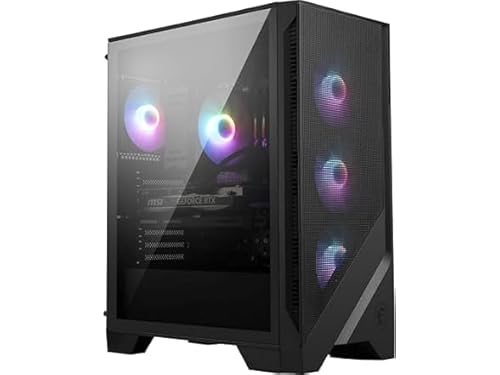
MSI Codex R2 RTX 5060 Ti Gaming Desktop
Best for: modern mid-range gaming with DDR5 memory
- Graphics Card
- NVIDIA GeForce RTX 5060Ti
- Processor Model
- Intel Ultra 7 265
- System Memory
- 32GB DDR5
- Storage Capacity
- 1TB NVMe SSD
- Operating System
- Windows 11 Home
- Form Factor
- Desktop
The MSI Codex R2 AI is a mid-tower gaming desktop equipped with an Intel Core Ultra 7 265 processor and an NVIDIA GeForce RTX 5060 Ti graphics card. It includes 32GB of DDR5 memory alongside a 1TB NVMe SSD for storage. Cooling relies on an air CPU cooler backed by four system fans. It suits you if you want modern processing power with dedicated graphics.
Pros
- Intel Core Ultra 7 265 processor with 32GB DDR5 memory
- NVIDIA GeForce RTX 5060 Ti dedicated graphics card
- Four chassis fans plus an RGB CPU air cooler
- Dedicated chassis LED button to cycle lighting presets
Cons
- Internal storage is limited to 1TB out of the box
- Uses an air cooler rather than a liquid cooling loop
- Comes with Windows 11 Home rather than Pro
Good fit if
- You want an Intel Core Ultra 7 processor paired with 32GB of DDR5 RAM.
- You prefer hardware buttons on the chassis to manage RGB lighting.
- You run games that benefit from an RTX 5060 Ti graphics card.
Skip if
- You require more than 1TB of factory-installed storage.
- You prefer liquid cooling over an air-cooled CPU setup.
- You need Windows 11 Pro pre-installed for work environments.
Verdict: MSI Codex R2 RTX 5060 Ti Gaming Desktop combines Intel Core Ultra 7 processing with dedicated RTX graphics and ample DDR5 memory. It delivers balanced desktop gaming performance inside a four-fan cooled tower.

Lenovo Legion Tower 5i Core Ultra 7 RTX 5060
Best for: expandable DDR5 memory and fast networking
- Graphics Card
- NVIDIA GeForce RTX 5060 Ti
- Processor Model
- Intel Core Ultra 7 265F
- System Memory
- 16 GB
- Storage Capacity
- 1 TB
- Form Factor
- Tower
- Dimensions
- 19.3 × 8.31 × 16.3 inches
View on Amazon: Lenovo Legion Tower 5i Core Ultra 7 RTX 5060
The Lenovo Legion Tower 5i combines an Intel Core Ultra 7 265F processor with NVIDIA GeForce RTX graphics and 16 GB of DDR5 memory. It includes a 1 TB storage drive, 2.5G Ethernet, and Wi-Fi 6E connectivity within an Eclipse Black chassis. This machine fits you if you need a reliable mid-tower desktop featuring tool-less internal access and memory that expands up to 128 GB for future upgrades.
Pros
- Memory expandable up to 128 GB DDR5
- Equipped with 2.5G Ethernet and Wi-Fi 6E
- Tool-less transparent side panel for easy access
- Up to 180W air cooling system
Cons
- Base configuration comes with 16 GB of memory
- Heavy tower chassis weighing 33.1 pounds
Good fit if
- You want an Intel Core Ultra 7 265F desktop with high-speed 2.5G Ethernet.
- You plan to expand your memory up to 128 GB over time.
- You prefer tool-less side panel access for hardware upgrades.
Skip if
- You want more than 16 GB of RAM out of the box.
- You need more than 1 TB of factory storage installed.
- You prefer a lightweight desktop that is easy to relocate.
Verdict: Lenovo Legion Tower 5i RTX 5060 Gaming PC pairs Intel Core Ultra processing with accessible internal expansion up to 128 GB RAM. Its tool-less chassis and 2.5G Ethernet make it a dependable foundation for desktop gaming.

Skytech Crystal Ryzen 7 RTX 5060 Ti Gaming PC
Best for: turnkey 1080p gaming with 32GB DDR5 memory
- Graphics Card
- NVIDIA GeForce RTX 5060 Ti 8GB
- Processor Model
- AMD Ryzen 7 7700
- System Memory
- 32GB
- Storage Capacity
- 1TB NVMe M.2 SSD
- Operating System
- Windows 11 Home 64-bit
- Dimensions
- 16.6 × 11.3 × 14.4 inches
View on Amazon: Skytech Crystal Ryzen 7 RTX 5060 Ti Gaming PC
This Skytech gaming desktop pairs an AMD Ryzen 7 7700 processor with an NVIDIA GeForce RTX 5060 Ti 8GB graphics card. You get 32GB of DDR5 memory and a 1TB NVMe solid-state drive inside a triple tempered glass case with ARGB cooling fans. It suits you if you want a dedicated 1080p gaming system with modern DDR5 memory, included peripherals, and a clean Windows 11 installation without pre-installed bloatware.
Pros
- AMD Ryzen 7 7700 processor paired with NVIDIA RTX 5060 Ti 8GB graphics
- 32GB DDR5 5600MHz gaming memory with heat spreaders
- 1TB NVMe M.2 solid-state drive
- Includes a gaming keyboard and mouse in the box
Cons
- Wireless connectivity relies on older 802.11ac Wi-Fi
- Video memory is limited to 8GB
- Only one HDMI and one DisplayPort display connection are guaranteed
Good fit if
- You want 32GB of DDR5 memory and a 1TB NVMe SSD out of the box.
- You prefer an AMD Ryzen 7 CPU alongside dedicated GeForce RTX hardware.
- You need included peripherals with a clean Windows 11 setup free of bloatware.
Skip if
- You need more than 8GB of VRAM for higher-resolution texture packs.
- You require the faster speeds and features of Wi-Fi 6 or newer standards.
Verdict: Skytech Crystal Ryzen 7 RTX 5060 Ti Gaming PC delivers a balanced AMD and NVIDIA hardware foundation built for smooth 1080p gameplay. With 32GB of fast DDR5 memory and a 1TB SSD, it offers solid internal specs in a multi-panel glass enclosure.

CyberPowerPC Gamer Master RTX 5060 Ti Desktop
Best for: AMD-based 1080p and 1440p gaming setups
- Graphics Card
- NVIDIA GeForce RTX 5060 Ti 8GB
- Processor Model
- AMD Ryzen 7 8700F 4.1GHz
- System Memory
- 16GB DDR5
- Storage Capacity
- 1TB PCIe 4.0 NVMe SSD
- Operating System
- Windows 11 Home
- Weight
- 39.1 pounds
View on Amazon: CyberPowerPC Gamer Master RTX 5060 Ti Desktop
The CyberPowerPC Gamer Master pairs an 8-core AMD Ryzen 7 8700F processor with an NVIDIA GeForce RTX 5060 Ti 8GB graphics card. You get 16GB of DDR5 memory and a 1TB PCIe 4.0 NVMe solid-state drive for storage. It connects via WiFi 6, Bluetooth 5.3, and eight USB ports. This desktop suits you if you want modern hardware on the AMD B850 chipset with bundled peripherals.
Pros
- NVIDIA GeForce RTX 5060 Ti 8GB graphics card
- AMD Ryzen 7 8700F 8-core processor
- Includes WiFi 6 and Bluetooth 5.3 connectivity
- Bundled keyboard and mouse
Cons
- 16GB system memory rather than 32GB or 64GB
- Heavy chassis weighing 39.1 pounds
Good fit if
- You want an 8-core Ryzen 7 processor with an RTX 5060 Ti GPU.
- You need built-in WiFi 6 and Bluetooth 5.3 wireless support.
- You prefer a system that includes a keyboard and mouse.
Skip if
- You need more than 16GB of system memory out of the box.
- You want a lightweight desktop that is easy to move.
Verdict: CyberPowerPC Gamer Master RTX 5060 Ti Gaming PC delivers an 8-core Ryzen 7 8700F processor and modern GeForce RTX graphics on an AMD B850 platform. It provides a balanced baseline for gaming setups requiring current-generation hardware and included accessories.

Dell Desktop Tower Core i9 64GB RAM 2TB SSD
Best for: high-RAM CPU multitasking and productivity
- Processor Model
- Intel Core i9-12900K
- System Memory
- 64 GB
- Storage Capacity
- 2 TB PCIe SSD
- Operating System
- Windows 11 Pro
- Form Factor
- Tower
This Dell desktop tower provides an Intel Core i9-12900K processor with 16 cores, paired with 64GB of DDR5 memory and a 2TB PCIe SSD. It comes with Windows 11 Pro, a keyboard, and a mouse. You get HDMI 2.1 and DisplayPort video outputs. This setup suits you if you need heavy multitasking, extensive memory, and fast local storage without a dedicated graphics card.
Pros
- Intel Core i9-12900K processor with 16 cores and up to 5.20GHz turbo frequency
- 64GB of high-speed DDR5 memory
- 2TB PCIe M.2 SSD storage
- Windows 11 Pro pre-installed with hardware TPM security
Cons
- No dedicated graphics card listed in specifications
- Uses 12th Gen Intel platform rather than newer generation processors
Good fit if
- You need 16 processor cores and 64GB of RAM for multi-threaded workloads.
- You want 2TB of internal PCIe SSD storage out of the box.
- You require Windows 11 Pro and built-in TPM security hardware.
Skip if
- You need a dedicated graphics card for modern 3D gaming.
- You prefer a newer generation CPU architecture.
Verdict: Dell Core i9-12900K 64GB RAM Desktop Tower delivers substantial compute power and memory capacity for heavy workloads. The absence of a dedicated graphics card limits its gaming capability compared to GPU-equipped alternatives.

Lenovo ThinkCentre Neo 50s SFF Desktop
Best for: compact spaces and everyday desktop productivity
- Processor Model
- Intel Core i5-14400
- System Memory
- 8GB
- Storage Capacity
- 512GB NVMe SSD
- Operating System
- Windows 11 Pro
- Form Factor
- SFF
- Use
- Business
The Lenovo ThinkCentre neo 50s SFF is a compact desktop running a 10-core Intel Core i5-14400 processor and Windows 11 Pro. Its small chassis measures 3.6 by 11.5 by 13.4 inches, saving desk space while offering DDR5 memory and NVMe SSD storage. Without a discrete graphics card listed, it suits lightweight gaming, standard everyday tasks, and office workloads where a full-sized gaming tower is too bulky for your setup.
Pros
- Intel Core i5-14400 processor with 10 cores and 16 threads
- Compact small form factor measuring 3.6 x 11.5 x 13.4 inches
- DisplayPort 1.4 and HDMI 2.0 video outputs
- Wi-Fi 6, Bluetooth 5.2, and Gigabit Ethernet connectivity
Cons
- No dedicated graphics card listed for demanding 3D games
- Base configuration starts with 8GB of system memory
Good fit if
- You need a space-saving desktop footprint for a compact desk
- You want modern 14th Gen Intel processing power for everyday productivity
- You run business applications requiring Windows 11 Pro
Skip if
- You need a dedicated graphics card for modern AAA gaming
- You want high baseline memory capacity without upgrading
Verdict: Lenovo ThinkCentre neo 50s SFF Desktop provides capable multi-core processing in a space-saving chassis, making it practical for light computing rather than graphics-heavy gaming.
Specifications side by side
| Spec | Alienware Intel Ultra 7 RTX 5060 Ti Gaming Desktop | Lenovo ThinkCentre Tiny 64GB RAM Desktop | MSI Codex Z2 RTX 5070 Ryzen 7 Gaming Desktop | KOTIN Ryzen 7 8700F RTX 5060 Ti Gaming PC | Dell Core i7-13700 Desktop Tower | MSI Codex R2 RTX 5060 Ti Gaming Desktop | Lenovo Legion Tower 5i Core Ultra 7 RTX 5060 | Skytech Crystal Ryzen 7 RTX 5060 Ti Gaming PC | CyberPowerPC Gamer Master RTX 5060 Ti Desktop | Dell Desktop Tower Core i9 64GB RAM 2TB SSD | Lenovo ThinkCentre Neo 50s SFF Desktop |
|---|---|---|---|---|---|---|---|---|---|---|---|
| Graphics Card | NVIDIA GeForce RTX 5060 Ti | Intel Graphics | NVIDIA GeForce RTX 5070 | GeForce RTX 5060 Ti 8GB | not specified | NVIDIA GeForce RTX 5060Ti | NVIDIA GeForce RTX 5060 Ti | NVIDIA GeForce RTX 5060 Ti 8GB | NVIDIA GeForce RTX 5060 Ti 8GB | not specified | not specified |
| Processor Model | Intel Core Ultra 7 265F | Intel Core Ultra 3 205T | AMD Ryzen 7 8700F | AMD Ryzen 7 8700F | Intel Core i7-13700 | Intel Ultra 7 265 | Intel Core Ultra 7 265F | AMD Ryzen 7 7700 | AMD Ryzen 7 8700F 4.1GHz | Intel Core i9-12900K | Intel Core i5-14400 |
| System Memory | not specified | 64GB DDR5 | 32 GB | 32GB | 64 GB | 32GB DDR5 | 16 GB | 32GB | 16GB DDR5 | 64 GB | 8GB |
| Storage Capacity | not specified | 1TB PCIe NVMe SSD | 1 TB | 1TB PCIe Gen4 NVMe SSD | 1 TB PCIe SSD | 1TB NVMe SSD | 1 TB | 1TB NVMe M.2 SSD | 1TB PCIe 4.0 NVMe SSD | 2 TB PCIe SSD | 512GB NVMe SSD |
| Operating System | Windows 11 Home | Windows 11 Pro | Windows 11 Home | Windows 11 Home | Windows 11 Pro | Windows 11 Home | not specified | Windows 11 Home 64-bit | Windows 11 Home | Windows 11 Pro | Windows 11 Pro |
| Form Factor | not specified | Tiny | not specified | Tower | Tower | Desktop | Tower | not specified | not specified | Tower | SFF |
| Processor | Core Ultra 7 | Core i7 | Ryzen 7 | Ryzen 7 | Core i7 | Core Ultra 7 | Core Ultra 7 | Ryzen 7 | Ryzen 7 | Core i9 | not specified |
| Memory | not specified | not specified | not specified | 32GB RAM | 64GB RAM | 32GB RAM | not specified | 32GB RAM | 16GB RAM | 64GB RAM | 64GB RAM |
| Storage | not specified | 1TB SSD | not specified | 1TB SSD | 1TB SSD | not specified | not specified | 1TB SSD | not specified | 2TB SSD | 2TB SSD |
| Use | not specified | Business | not specified | not specified | not specified | not specified | not specified | not specified | not specified | not specified | Business |
| Dimensions | 18.1 × 7.76 × 16.5 inches | 19.1 × 7.2 × 1.36 inches | 12.5 × 21.5 × 23.5 inches | 12.4 × 8.5 × 15.6 inches | not specified | 16 × 8.38 × 19 inches | 19.3 × 8.31 × 16.3 inches | 16.6 × 11.3 × 14.4 inches | not specified | not specified | 13.4 × 11.5 × 3.6 inches |
| Weight | 13.1 pounds | 2.91 pounds | 6.88 ounces | not specified | not specified | 21.3 pounds | 33.1 pounds | not specified | 39.1 pounds | not specified | not specified |
| Size | Extra Large | 64GB DDR5 | 1TB NVMe | not specified | not specified | 64GB RAM & 1TB SSD | 1TB | not specified | not specified | GMA2900A2 | 64GB RAM & 2TB SSD | 64GB RAM | 2TB SSD |
| Color | Black | Black | Black | not specified | not specified | Black | Eclipse Black | Black | Black | not specified | Black |
| Model | DACT1250-7377BLK-PUS | ThinkCentre M70q Gen 6 | Codex Z2 B8NVP-434US | KTD32BA787F32G506T8G | QCT1250 | CodR2AIA2NVM7455 | 90YA005BUS | ST-CRYSTAL-2766-B-AM | GMA2900A2 | QCT1250 | Lenovo ThinkCentre neo 50s |
Hardware Trade-Offs Across These Desktop Systems
When you evaluate desktops in this selection, hardware configurations reflect clear boundaries. Dedicated graphics options reach up to the RTX 5070, while most gaming models provide an RTX 5060 or RTX 5060 Ti. Solid-state storage tops out at 1TB or 2TB across all listings. If you choose a configuration with 64GB of memory, you give up a discrete graphics card entirely. Meanwhile, builds featuring dedicated GPUs limit you to 16GB or 32GB RAM. Operating systems split between Windows 11 Home and Windows 11 Pro, and none include a display.
- Graphics card: Dedicated GPU options top out at the RTX 5070, with most builds using an RTX 5060 Ti or RTX 5060.
- System memory: High-capacity 64GB RAM builds lack discrete GPUs, while dedicated gaming systems cap at 32GB RAM.
- Storage: Internal capacity reaches a maximum of 2TB SSD, with several models limited to 1TB SSD storage.
If you need portable hardware instead of an expandable chassis, compare these desktop specs with a gaming laptop under 2000.
How We Picked These Desktops
This guide covers 11 gaming desktops sourced from Amazon listings matching Under $2000. You see products in stock first, then by Amazon sales rank, placing better-selling models first. To keep your comparison clear and focused, the guide displays only one configuration or size variant per desktop product family.
All technical details come directly from published specifications and feature lists on the listings. Products are not physically handled. Live catalog data and stock update at least daily, so availability stays current on the page. Desktops enter or leave this guide whenever their qualifying criteria shift.
How to Choose the Best Gaming Desktop
-
Evaluate the Processor Platform
Check whether the system uses an Intel Core Ultra, a traditional Core i7, or an AMD Ryzen 7 processor. Modern configurations like the AMD Ryzen 7 8700F on the AMD B850 platform in the CyberPowerPC Gamer Master offer contemporary motherboard architectures for gaming. High-core productivity processors favor multi-threaded office tasks over gaming efficiency. Match your processor to your primary workload, prioritizing current-generation platforms if you plan to keep the motherboard for future component upgrades.
-
Select Your Target Graphics Tier
Review the exact graphics card model before you finalize a choice. Dedicated graphics options in this category range from the RTX 5060 and RTX 5060 Ti up to the RTX 5070. The MSI Codex Z2 features an RTX 5070, providing the highest 3D rendering performance among these options for heavy graphical loads. Desktops equipped with an RTX 5060 Ti handle 1080p and 1440p gaming workloads reliably. Verify that the GPU specification matches your display resolution targets.
-
Check Memory Capacity and Expansion
Look at both the pre-installed RAM and motherboard expansion limits. While 16GB handles basic gaming, 32GB provides a comfortable baseline for multitasking without memory bottlenecks. If you plan to expand your hardware later, inspect the physical motherboard slots and maximum capacity. The Lenovo Legion Tower 5i supports memory expansion up to 128GB of DDR5 RAM. Confirming open DIMM slots ensures you can increase system memory as future software and background workloads require more headroom.
-
Inspect Solid-State Storage Architecture
Review the internal drive capacity and available expansion slots. Solid-state drive sizes across these desktop listings typically provide 1TB or 2TB of fast NVMe storage. Modern game installations consume large amounts of drive space, making secondary storage interfaces practical. The KOTIN Ryzen 7 8700F provides three internal M.2 positions, allowing you to install additional high-speed solid-state drives over time. If a desktop only supplies one pre-installed drive without extra slots, storage management becomes restrictive.
-
Choose the Operating System Edition
Pay attention to the installed Windows edition listed on the spec sheet. Most dedicated gaming setups ship with Windows 11 Home, which includes standard gaming features and platform integrations. Hybrid and business-oriented desktop towers, such as the Dell Core i7-13700 Desktop Tower, come pre-installed with Windows 11 Pro. Select Windows 11 Pro if your setup requires advanced administrative management, enterprise security protocols, or network domain support. For personal entertainment, Windows 11 Home provides everything you need.
-
Consider Chassis Size and Cooling
Examine the physical dimensions and enclosure type before deciding where the desktop will sit. Full-sized towers require significant desk or floor clearance but accommodate larger airflow channels and cooling components. Compact units save valuable workspace but have tighter thermal limits. The Lenovo ThinkCentre Tiny measures just 1.36 inches tall and weighs under three pounds, fitting easily into restricted spaces. If your priority is sustained gaming performance, choose a standard tower chassis engineered for dedicated graphics cards.
Frequently asked questions
What graphics cards are available in prebuilt gaming desktops in this category?
You find GPUs ranging from the RTX 5060 up to the RTX 5070. The MSI Codex Z2 features the RTX 5070, offering the highest graphics specification in this lineup. Other configurations, such as the Alienware tower and the KOTIN gaming desktop, include the mid-range RTX 5060 Ti or standard RTX 5060.
Can business desktops with 64GB of RAM handle modern PC gaming?
Business desktops with 64GB of memory lack dedicated graphics cards, limiting their capability for 3D gaming. Models like the Lenovo ThinkCentre Tiny, Dell Core i7-13700, and Dell Core i9 tower rely on integrated graphics. While they handle heavy multitasking and office applications well, they cannot match systems equipped with discrete GeForce RTX cards.
How much internal memory is standard for these gaming desktops?
Dedicated gaming models provide between 16GB and 32GB of system memory. For instance, the CyberPowerPC Gamer Master carries 16GB of RAM, while models like the KOTIN, MSI Codex R2, and Skytech Crystal come equipped with 32GB of DDR5 memory. Desktops like the Lenovo Legion Tower 5i allow further expansion up to 128 GB.
Which desktop is best if you want compact physical dimensions?
The Lenovo ThinkCentre Tiny offers the smallest footprint on this list. It weighs 2.91 pounds and measures 1.36 inches high by 7.2 inches wide. If you need a compact small-form-factor tower instead of a mini PC, the Lenovo ThinkCentre Neo 50s measures 3.6 inches high and 11.5 inches wide.
What upgrade options should you look for in a gaming desktop chassis?
Look for accessible slots for memory and solid-state storage. The KOTIN gaming desktop features four memory slots and three M.2 positions for storage expansion. The Lenovo Legion Tower 5i provides a tool-less chassis design that supports memory expansion up to 128 GB of DDR5 RAM, allowing straightforward component installations later.
What networking capabilities do modern prebuilt gaming desktops include?
Prebuilt configurations feature modern wired and wireless connections for fast online play. The KOTIN Ryzen 7 gaming desktop comes equipped with WiFi 7 support for high-speed wireless connections. If you prefer low-latency wired setups, the Lenovo Legion Tower 5i includes a built-in 2.5G Ethernet port for local network connectivity.
Which operating systems come pre-installed on these prebuilt desktops?
Systems ship with either Windows 11 Home or Windows 11 Pro depending on their design focus. Dedicated gaming builds like the Alienware, CyberPowerPC, and MSI Codex R2 include Windows 11 Home. Productivity-oriented desktops from Dell and Lenovo feature Windows 11 Pro to support enterprise and business network environments.