6 Best All-In-One Desktops Under $3000, Compared
As an Amazon Associate we earn from qualifying purchases. Links on this page are affiliate links.
You need reliable hardware for demanding tasks without breaking the bank. This guide compares the best all in one desktops under $3000 to help you find the right fit. We analyzed 6 models based strictly on their published specifications. The Dell 27" AIO Intel Ultra 7 64GB takes the top spot because its 64GB of RAM handles heavy multitasking and creative workflows with ease. These picks are ranked by processing power, memory, and display features found in the official listings. Use this guide to decide which all-in-one desktop matches your specific performance needs.
Quick picks
The best fit for you
- You need heavy multitasking with ample RAM Dell 27" AIO Intel Ultra 7 64GB It has 64GB of memory and a Core Ultra 7 processor for demanding workflows.
- You want the most compact model on the list Dell 24 All-in-One Touchscreen Desktop The 24-inch screen and 64GB RAM fit productivity tasks in a small footprint.
- You prioritize 4K display quality and 32GB RAM HP OmniStudio X 31.5-Inch 4K All-in-One PC This 31.5-inch model delivers a bright 4K screen with solid Core Ultra performance.
- You need high storage and memory for Windows 11 Pro HP Pavilion 27 Touchscreen 4TB SSD All-in-One It offers 64GB of RAM and 4TB of SSD storage in a 27-inch package.
Our 6 picks

Dell 27" AIO Intel Ultra 7 64GB
Best for: Heavy multitasking and creative workflows
- Processor
- Intel Ultra 7 355
- System Memory
- 64 GB
- Storage Capacity
- 1 TB SSD
- Screen Size
- 27"
- Display Resolution
- Full HD
- Touchscreen
- Touchscreen
View on Amazon: Dell 27" AIO Intel Ultra 7 64GB Affiliate link
This Dell 27-inch all-in-one desktop pairs an Intel Ultra 7 355 processor with 64GB of DDR5 RAM and a 1TB SSD. You get a Full HD touchscreen with a variable 60Hz to 100Hz refresh rate and Windows 11 Pro. It includes a wireless keyboard and mouse. The system supports Wi-Fi 7 and Bluetooth 6.0. It suits users needing strong multitasking power in a space-saving design.
Pros
- Intel Ultra 7 355 processor with 8-core architecture
- 64GB high-speed DDR5 RAM for smooth multitasking
- 27-inch Full HD touchscreen with up to 100Hz refresh rate
- Includes Dell Pro 5 wireless keyboard and mouse combo
Cons
- Full HD resolution is lower than the 4K displays on other list items
- 1TB SSD storage is smaller than the 4TB options available elsewhere
- Single 130W power adapter included rather than a compact brick
Good fit if
- You need 64GB of RAM for heavy multitasking or creative workflows
- You prefer a 27-inch screen with touch capabilities
- You want a complete setup with a wireless keyboard and mouse included
Skip if
- You require a 4K UHD display for high-resolution content
- You need more than 1TB of internal storage
- You are looking for the lowest price point on the list
Verdict: Dell 27 AIO PC Ultra 7 64GB offers robust processing power and ample memory for demanding tasks. It fits users who prioritize RAM and touch interaction over maximum display resolution or storage capacity.

Dell 24 All-in-One Touchscreen Desktop
Best for: productivity and data-heavy home office tasks
- Processor
- Intel Core 7 150U
- System Memory
- 64GB DDR5 RAM
- Screen Size
- 23.8"
- Display Resolution
- Full HD (1920×1080)
- Graphics
- Intel integrated graphics
- Touchscreen
- Touchscreen
View on Amazon: Dell 24 All-in-One Touchscreen Desktop Affiliate link
This Dell 24-inch all-in-one desktop pairs a 23.8-inch Full HD touchscreen with 64GB of DDR5 RAM and a 4TB NVMe SSD. It uses an Intel Core 7 150U processor and includes Windows 11 Pro. The large memory and storage capacity handle heavy multitasking and large files. It suits users who need a compact, powerful system for home office work or business productivity without external peripherals cluttering the desk.
Pros
- 64GB DDR5 system memory for smooth multitasking
- 4TB M.2 PCIe NVMe SSD for fast storage
- 23.8-inch Full HD IPS touchscreen display
- Windows 11 Pro operating system included
Cons
- 23.8-inch screen is smaller than 27 or 32-inch competitors
- Intel integrated graphics limit heavy gaming performance
- Full HD resolution is lower than 4K options
Good fit if
- You need high RAM and storage for data work
- You prefer a compact 24-inch footprint
- You require Windows 11 Pro features
Skip if
- You need a 4K UHD display
- You want a dedicated graphics card for gaming
- You prefer a larger 27-inch or bigger screen
Verdict: Dell 24 AIO 64GB RAM 4TB SSD offers substantial memory and storage in a compact 24-inch form factor. It fits users who prioritize processing power and disk space over screen size or high-end graphics.

HP OmniStudio 27 Touchscreen All-in-One PC
Best for: multitasking and ergonomic adjustability
- Processor
- Intel Core Ultra 7 355U
- System Memory
- 64GB DDR5
- Storage Capacity
- 2TB SSD
- Screen Size
- 27"
- Display Resolution
- Full HD
- Touchscreen
- Touchscreen
View on Amazon: HP OmniStudio 27 Touchscreen All-in-One PC Affiliate link
This HP all-in-one pairs a 27-inch Full HD touchscreen with an Intel Core Ultra 7 355U processor and 64GB of DDR5 RAM. The 2TB SSD provides ample storage for large files. It includes a wireless keyboard and mouse. The adjustable stand allows height customization up to 20.69 inches. This setup suits users who need strong multitasking capabilities in a compact, clean design.
Pros
- Intel Core Ultra 7 355U with integrated NPU for AI workflows
- 64GB DDR5 system memory for heavy multitasking
- 27-inch Full HD touchscreen with anti-glare coating
- Wi-Fi 7 and USB-C 4 ports for fast connectivity
Cons
- Full HD resolution is lower than the 4K UHD screens on other list items
- 2TB SSD is smaller than the 4TB storage found on competing models
- Processor is the U-series variant, which prioritizes efficiency over peak speed
Good fit if
- You need high RAM for running multiple demanding applications simultaneously
- You prefer a touchscreen interface for direct navigation and creative tasks
- You want a height-adjustable stand to improve ergonomic comfort
Skip if
- You require 4K UHD resolution for detailed visual work
- You need maximum raw processing power for intensive video rendering
- You prefer a larger 31.5-inch display for immersive viewing
Verdict: HP OmniStudio 27" AIO offers a balanced mix of memory and modern connectivity for business and home use. It fits buyers who prioritize multitasking speed and ergonomic adjustability over screen resolution.
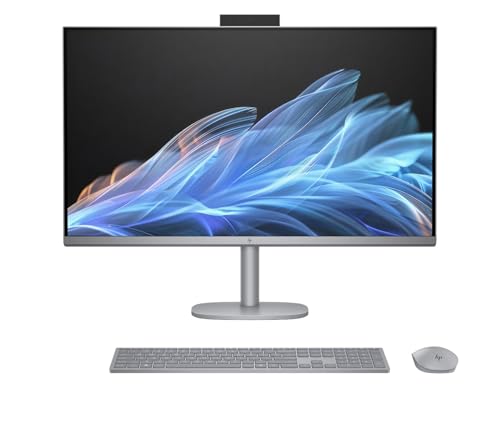
HP OmniStudio X 31.5-Inch 4K All-in-One PC
Best for: Users prioritizing 4K display quality and 32GB RAM
- Processor
- Intel Core Ultra 7 258V
- System Memory
- 32GB DDR5
- Storage Capacity
- 1TB PCIe NVMe M.2 SSD
- Screen Size
- 31.5"
- Display Resolution
- 4K UHD (3840x2160)
- Graphics
- Intel Arc Graphics
View on Amazon: HP OmniStudio X 31.5-Inch 4K All-in-One PC Affiliate link
The HP OmniStudio X 32 is a 31.5-inch all-in-one desktop featuring a 4K UHD IPS display with 550-nit brightness. It uses an Intel Core Ultra 7 258V processor paired with 32GB of DDR5 memory and a 1TB NVMe SSD. This setup suits users who need a large, sharp screen for creative work or media consumption, offering strong performance in a compact form factor.
Pros
- 31.5-inch 4K UHD (3840x2160) IPS display
- Intel Core Ultra 7 258V processor
- 32GB DDR5 5600 MHz memory
- 1TB PCIe NVMe M.2 SSD storage
- 550-nit anti-glare screen brightness
Cons
- 32GB RAM is less than the 64GB found in competing models
- 1TB storage is smaller than the 4TB options available elsewhere
- Runs Windows 11 Home instead of Pro
Good fit if
- You prioritize a high-resolution 4K display for visual clarity
- You need 32GB of RAM for multitasking and creative apps
- You want a modern Intel Core Ultra processor with AI frameworks
Skip if
- You require 64GB of system memory for heavy professional workloads
- You need more than 1TB of internal storage
- You require Windows 11 Pro for business management features
Verdict: HP OmniStudio X 32 31.5" 4K AIO delivers a bright 4K screen and solid Core Ultra performance, making it ideal for users who value display quality and 32GB of RAM over maximum storage or higher memory capacities.

HP Pavilion 27 Touchscreen 4TB SSD All-in-One
Best for: High storage and memory needs
- Processor
- Intel Core i7
- System Memory
- 64 GB
- Storage Capacity
- 4 TB SSD
- Screen Size
- 27"
- Display Resolution
- FullHD
- Touchscreen
- Touchscreen
View on Amazon: HP Pavilion 27 Touchscreen 4TB SSD All-in-One Affiliate link
This HP Pavilion 27 All-in-One pairs a 27-inch Full HD touchscreen with 64 GB of RAM and a 4 TB SSD. The Intel Core i7 processor boosts up to 5.40 GHz, handling demanding tasks smoothly. It runs Windows 11 Pro and includes Bang & Olufsen speakers. You get plenty of storage and memory for multitasking or media editing in a single compact unit.
Pros
- Intel Core i7 processor with Turbo Boost to 5.40 GHz
- 64 GB of system RAM for heavy multitasking
- 4 TB SSD for massive storage capacity
- 27-inch Full HD touchscreen display
Cons
- Full HD resolution is lower than 4K models on this list
- Wi-Fi 5 is slower than Wi-Fi 6 standards
- 19.6 pounds is heavier than many slim all-in-one designs
Good fit if
- You need large storage for media libraries
- You want a touchscreen for direct interaction
- You require Windows 11 Pro for work
Skip if
- You prioritize 4K display clarity over storage
- You want the latest Wi-Fi 6E connectivity
- You prefer a lighter, more portable setup
Verdict: HP Pavilion 27 Touch i7 delivers high memory and storage in a 27-inch touchscreen package. It suits users who need Windows 11 Pro and massive capacity more than 4K visuals.

HP OmniStudio X 31.5" 4K Core Ultra 7 All-in-One
Best for: Users needing 4K visuals and HDMI-in
- Processor
- Intel Core Ultra 7 258V
- System Memory
- 32 GB
- Storage Capacity
- 1 TB SSD
- Screen Size
- 31.5"
- Display Resolution
- 4K UHD
- Graphics
- Intel Arc Graphics 140V
View on Amazon: HP OmniStudio X 31.5" 4K Core Ultra 7 All-in-One Affiliate link
The HP OmniStudio X 32 features a 31.5-inch 4K UHD display with 550-nits brightness. It uses an Intel Core Ultra 7 258V processor and 32GB of LPDDR5X RAM. The system includes a 1TB SSD and Windows 11 Pro. This all-in-one desktop suits users who need high-resolution visuals and strong multitasking performance for professional or creative tasks.
Pros
- 31.5-inch 4K UHD IPS display with 550-nits brightness
- Intel Core Ultra 7 258V 8-core processor
- 32GB LPDDR5X memory for smooth multitasking
- Includes HDMI-in 2.1 for external device input
- Intel Wi-Fi 7 and Bluetooth 5.4 connectivity
Cons
- 32GB RAM is lower than the 64GB found in competing models
- 1TB storage is half the capacity of some rivals
- Intel Arc Graphics is integrated, not a dedicated GPU
Good fit if
- You need a large 4K screen for detailed work
- You want modern Wi-Fi 7 connectivity
- You require HDMI-in for external sources
Skip if
- You need 64GB of system memory
- You require a dedicated graphics card
- You want more than 1TB of storage
Verdict: HP OmniStudio X 32 4K AIO delivers sharp visuals and strong processing power for users who prioritize display quality and modern connectivity over maximum RAM capacity.
Specifications side by side
| Spec | Dell 27" AIO Intel Ultra 7 64GB | Dell 24 All-in-One Touchscreen Desktop | HP OmniStudio 27 Touchscreen All-in-One PC | HP OmniStudio X 31.5-Inch 4K All-in-One PC | HP Pavilion 27 Touchscreen 4TB SSD All-in-One | HP OmniStudio X 31.5" 4K Core Ultra 7 All-in-One |
|---|---|---|---|---|---|---|
| Processor | Intel Ultra 7 355 | Intel Core 7 150U | Intel Core Ultra 7 355U | Intel Core Ultra 7 258V | Intel Core i7 | Intel Core Ultra 7 258V |
| System Memory | 64 GB | 64GB DDR5 RAM | 64GB DDR5 | 32GB DDR5 | 64 GB | 32 GB |
| Storage Capacity | 1 TB SSD | not stated | 2TB SSD | 1TB PCIe NVMe M.2 SSD | 4 TB SSD | 1 TB SSD |
| Screen Size | 27" | 23.8" | 27" | 31.5" | 27" | 31.5" |
| Display Resolution | Full HD | Full HD (1920×1080) | Full HD | 4K UHD (3840x2160) | FullHD | 4K UHD |
| Graphics | not stated | Intel integrated graphics | not stated | Intel Arc Graphics | not stated | Intel Arc Graphics 140V |
| Touchscreen | Touchscreen | Touchscreen | Touchscreen | not stated | Touchscreen | not stated |
| Operating System | Windows 11 Pro | Windows 11 Pro 64-bit | Win11 Pro | Windows 11 Home | Win 11 PRO | Windows 11 Pro |
| Memory | not stated | 64GB RAM | not stated | 32GB RAM | 64GB RAM | 32GB RAM |
| Storage | not stated | 4TB SSD | 2TB SSD | 1TB SSD | 4TB SSD | 1TB SSD |
| Use | not stated | not stated | Business | not stated | not stated | not stated |
| Display Feature | Touchscreen | Touchscreen | Touchscreen | not stated | Touchscreen | not stated |
| Dimensions | 18.2 × 24.2 × 8.27 inches | not stated | 25.6 × 5.91 × 9.84 inches | 28.1 × 7.88 × 22.3 inches | 24.1 × 8.19 × 18.7 inches | 28.1 × 7.88 × 22.3 inches |
| Weight | 17.7 pounds | not stated | not stated | 21.6 pounds | 19.6 pounds | 21.6 pounds |
| Color | White | not stated | White | Meteor Silver | Sparkling Black | Meteor Silver |
| Model | EC27260 | 24 | 27-cy0074 | OmniStudio X 32 | HP PAVILION 27 EXTREME | OmniStudio X 32 |
| Size | not stated | 64GB RAM|4TB SSD | not stated | 1TB NVMe SSD | not stated | 1TB NVMe SSD |
Choosing the Right All-in-One Desktop
-
Match RAM to Workflows
Memory capacity defines how many applications run simultaneously. Models like the Dell 24 AIO offer 64GB RAM for heavy multitasking and data-heavy home office tasks. If you edit video or run virtual machines, prioritize higher memory. The Dell 27 AIO also provides 64GB for creative workflows. Users with lighter needs may find 32GB sufficient. Check the memory spec to ensure your browser tabs and software stay open without slowing down the system.
-
Evaluate Storage Needs
Storage capacity determines how much data you can keep locally. The Dell 24 AIO and HP Pavilion 27 both include 4TB SSDs for massive file storage. The HP OmniStudio X offers 1TB, which suits users with cloud storage habits. SSDs provide faster boot times and application loading compared to traditional drives. Consider your photo, video, and document archives. If you store large media files, aim for 4TB. For basic office work, 1TB or 2TB is often adequate for your daily operations.
-
Select Processor Generation
The processor handles core computing tasks. The Core Ultra 7 chips in the Dell 27 AIO and HP OmniStudio 27 offer modern efficiency and speed. These are ideal for demanding creative work and business multitasking. The HP Pavilion 27 uses a Core i7, which remains powerful for general use. Choose the Ultra series if you need the latest architecture features. Compare the processor model to ensure it meets your software requirements for smooth performance.
-
Choose Screen Size Wisely
Screen size affects workspace and desk footprint. The Dell 24 AIO fits tight spaces with a 24-inch display. The HP OmniStudio 27 and Pavilion 27 provide 27-inch screens for more room. The HP OmniStudio X models feature 31.5-inch displays for maximum visibility. Larger screens help with split-screen productivity but require more desk depth. Measure your available space before buying. A smaller screen saves room, while a larger one enhances detail visibility for design or data work.
-
Check Display Features
Touchscreen capability adds interaction flexibility. Most models in this guide, including the Dell 27 AIO and HP Pavilion 27, include touchscreens. This feature helps with navigation and presentations. The HP OmniStudio X 31.5-inch model offers 4K resolution for sharp visuals. If you do not need touch input, you might save space or cost elsewhere. Verify if the display includes high resolution or just touch support. Match the feature to your preference for direct screen interaction versus traditional mouse and keyboard use.
-
Consider Operating System
The operating system determines software compatibility. Most recommended models run Windows 11 Pro, offering advanced business features. The HP OmniStudio X 31.5-inch model comes with Windows 11 Home. Pro versions include tools like BitLocker and Remote Desktop. Choose Pro if you manage a business network or need enhanced security. Home editions suffice for personal use. Verify the OS version matches your licensing needs. This choice impacts long-term software availability and system management capabilities for your specific environment.
Frequently asked questions
Which all-in-one desktop offers the best balance of performance and value?
The Dell 27" AIO with a Core Ultra 7 processor and 64GB of RAM stands out as the best overall choice. It provides robust processing power for heavy multitasking and creative workflows. You get a touchscreen display and Windows 11 Pro in a compact form. This model prioritizes memory and interaction speed over maximum resolution.
What is the most compact all-in-one option for small spaces?
The Dell 24 All-in-One Touchscreen Desktop is the most compact model on this list. It features a 24-inch screen and includes 64GB of RAM and a 4TB SSD. This setup suits productivity and data-heavy home office tasks where space is limited. You get substantial memory and disk space in a smaller footprint.
Do any of these models include 4K display quality?
Yes, the HP OmniStudio X 31.5-Inch and the HP OmniStudio X 31.5" 4K Core Ultra 7 models both deliver 4K display quality. They feature 31.5-inch screens with Core Ultra 7 processors. These options are ideal for users who prioritize sharp visuals and modern connectivity over maximum RAM capacity or higher storage capacities.
Which all-in-one has the highest storage capacity?
Two models offer the highest storage capacity at 4TB SSDs. The Dell 24 All-in-One and the HP Pavilion 27 Touchscreen both include 4TB of storage. The Dell model pairs this with 64GB of RAM, while the HP version uses a Core i7 processor. Both are suitable for users with high storage needs.
Are there all-in-one desktops with Windows 11 Pro?
Several models run Windows 11 Pro for business and advanced use. The Dell 27" AIO, Dell 24, HP OmniStudio 27, HP Pavilion 27, and HP OmniStudio X 31.5" 4K all include this operating system. Only the HP OmniStudio X 31.5-Inch 4K model ships with Windows 11 Home.
Which model is best for users needing ergonomic adjustability?
The HP OmniStudio 27 Touchscreen All-in-One PC is best for ergonomic adjustability. It offers a balanced mix of memory and modern connectivity for business and home use. You get a 27-inch touchscreen with a Core Ultra 7 processor. This model fits buyers who prioritize multitasking speed and adjustability over screen resolution.
What is the largest screen size available in this list?
The largest screen size available is 31.5 inches. Two HP OmniStudio X models feature this display size. They provide 4K visuals and strong processing power with Core Ultra 7 chips. These units weigh 21.6 pounds and offer 32GB of RAM with 1TB NVMe SSDs for users valuing display quality.