2 Best RTX 5070 Ti Mini PCs, Compared
As an Amazon Associate we earn from qualifying purchases. Links on this page are affiliate links.
Finding the best RTX 5070 Ti mini PCs requires comparing raw specs rather than marketing claims. We evaluated 2 options to help you choose. The ASUS ROG NUC 16 RTX 5070 Ti Mini PC leads this list because it packs 32GB of RAM into a compact frame. This makes it ideal for compact high-performance gaming setups. All picks are based strictly on published specifications. This guide helps you decide which system fits your space and performance needs.
Quick picks
| # | Product | Best for | Price |
|---|---|---|---|
| 1 | ASUS ROG NUC 16 RTX 5070 Ti Mini PC Best overall | Compact high-performance gaming setups | Check price of ASUS ROG NUC 16 RTX 5070 Ti Mini PC on Amazon |
| 2 | Cooler Master NR2 Pro Mini ITX Gaming PC Best budget | 1440p gaming in a compact desktop | Check price of Cooler Master NR2 Pro Mini ITX Gaming PC on Amazon |
The best fit for you
- You want the most compact model on the list ASUS ROG NUC 16 RTX 5070 Ti Mini PC Its 3L frame and 7.05-pound weight offer top-tier specs in a tiny footprint.
- You need a ready-to-use system for 1440p gaming Cooler Master NR2 Pro Mini ITX Gaming PC This prebuilt delivers solid 1440p performance without requiring you to assemble the hardware yourself.
- You prioritize raw power in a small space ASUS ROG NUC 16 RTX 5070 Ti Mini PC The Ultra 9 290HX Plus CPU ensures high performance within the compact 3L chassis.
Our 2 picks

ASUS ROG NUC 16 RTX 5070 Ti Mini PC
Best for: Compact high-performance gaming setups
- Graphics Card
- RTX 5070 Ti (what this guide is about)
- Processor
- Ultra 9 290HX Plus
- RAM Capacity
- 32GB
- RAM Type
- DDR5
- Storage Capacity
- 1TB
- Operating System
- Windows 11
View on Amazon: ASUS ROG NUC 16 RTX 5070 Ti Mini PC Affiliate link
The ASUS ROG NUC 16 is a 3L mini PC built for high-end gaming. It pairs an Intel Ultra 9 290HX Plus processor with an NVIDIA RTX 5070 Ti GPU. You get 32GB of RAM and a 1TB SSD for smooth performance. The compact design includes Wi-Fi 7 and quiet cooling. It suits gamers who want desktop power in a small footprint.
Pros
- Intel Ultra 9 290HX Plus processor for high responsiveness
- NVIDIA RTX 5070 Ti GPU for advanced graphics
- 32GB RAM and 1TB SSD storage capacity
- Wi-Fi 7 and Bluetooth 5.4 connectivity
- Quiet operation under 4.5 BA with dual vapor chamber cooling
Cons
- 7.05 pounds is heavier than many competitors
- Only includes 1TB SSD storage
- Tool-free access limited to memory and storage upgrades
Good fit if
- You need desktop-class GPU performance in a small space
- You want the latest Wi-Fi 7 connectivity
- You prefer quiet operation during intense gaming sessions
Skip if
- You require more than 1TB of internal storage
- You need a lighter portable device under 5 pounds
- You want a larger chassis for easier component upgrades
Verdict: ASUS ROG NUC 16 Ultra 9 290HX Plus delivers top-tier specs in a compact 3L frame. It fits gamers who prioritize raw power and modern connectivity without sacrificing desk space.
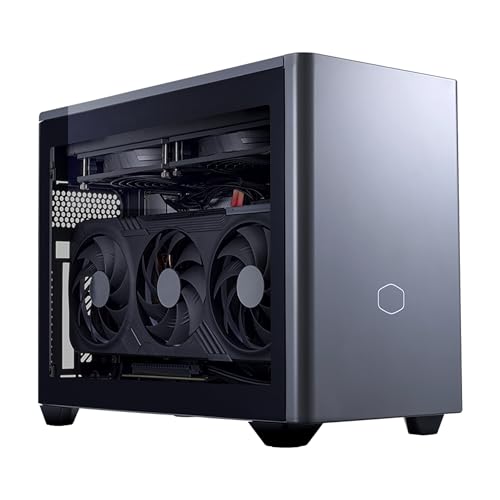
Cooler Master NR2 Pro Mini ITX Gaming PC
Best for: 1440p gaming in a compact desktop
- Graphics Card
- RTX 5070 Ti (what this guide is about)
- Processor
- AMD Ryzen 7 9800X3D
- RAM Capacity
- 32GB
- RAM Type
- DDR5
- Storage Capacity
- 2TB
- Storage Interface
- PCIe Gen4 NVMe M.2
View on Amazon: Cooler Master NR2 Pro Mini ITX Gaming PC Affiliate link
This compact ITX system pairs an AMD Ryzen 7 9800X3D processor with an RTX 5070 Ti graphics card. It includes 32GB of DDR5 RAM and a 2TB Gen4 SSD. The 18.25L chassis fits easily on a desk. You get strong 1440p gaming performance in a small footprint. The build includes a 280mm AIO cooler and an 850W power supply for reliable operation.
Pros
- AMD Ryzen 7 9800X3D processor for high-speed gaming
- RTX 5070 Ti with 16GB VRAM for 1440p visuals
- 32GB DDR5 RAM at 6000MHz for fast multitasking
- 2TB Gen4 NVMe SSD for quick load times
Cons
- 28-pound weight makes it less portable than lighter alternatives
- 18.25L volume is larger than some ultra-compact mini PCs
- Limited to one HDMI and two DisplayPort outputs
Good fit if
- You want a small desktop that handles 1440p gaming easily
- You need fast storage and memory for creative work
- You prefer a prebuilt system with no assembly required
Skip if
- You need maximum portability for travel
- You require more than two display outputs
- You are looking for the smallest possible form factor
Verdict: Cooler Master NR2 Pro RTX 5070 Ti Mini PC delivers solid 1440p performance in a manageable desktop size. It suits players who want a powerful, compact system without building it themselves.
Specifications side by side
| Spec | ASUS ROG NUC 16 RTX 5070 Ti Mini PC | Cooler Master NR2 Pro Mini ITX Gaming PC |
|---|---|---|
| Processor | Ultra 9 290HX Plus | AMD Ryzen 7 9800X3D |
| Graphics Card | NVIDIA GeForce RTX 5070 Ti | GeForce RTX 5070 Ti 16GB |
| RAM Capacity | 32GB | 32GB |
| RAM Type | DDR5 | DDR5 |
| Storage Capacity | 1TB | 2TB |
| Storage Interface | not stated | PCIe Gen4 NVMe M.2 |
| Operating System | Windows 11 | Windows 11 |
| Wireless Connectivity | Wi-Fi 7, Bluetooth 5.4 | WiFi, Bluetooth |
| Memory | 32GB RAM | 32GB RAM |
| Storage | 1TB SSD | not stated |
| Dimensions | 11.1 × 7.46 × 2.22 inches | 15 × 12 × 8 inches |
| Weight | 7.05 pounds | 28 pounds |
| Size | RTX 5070Ti|32GB RAM|1TB SSD | RTX 5070 Ti |
| Color | Black | Space Grey |
| Model | RNUC16JNK9X389AU | AYG-M297-N6CGAI32-N1 |
Choosing the Right Mini PC
-
Check physical dimensions first
Measure your desk space before purchasing. The ASUS ROG NUC 16 measures 7.46 by 11.1 inches and weighs just 7.05 pounds. This compact 3L frame fits tight setups. The Cooler Master NR2 Pro is larger at 12 by 15 inches and weighs 28 pounds. You must ensure your surface can support the weight and size. Verify the height clearance if you plan to stack components. Physical constraints often dictate your final choice more than raw performance numbers.
-
Verify memory and storage
Confirm the exact RAM and storage amounts. The ASUS ROG NUC 16 includes 32GB of RAM and a 1TB SSD. This ensures smooth multitasking and ample space for large games. The Cooler Master listing does not specify these details. Without confirmed memory, you cannot guarantee performance for modern titles. Always check the attributes section for these numbers. Missing specs create uncertainty about long-term usability. Prioritize systems that clearly state these values to avoid surprises upon arrival.
-
Match GPU to resolution
The RTX 5070 Ti targets high-refresh 1440p gaming. Both listed models feature this graphics card. This GPU handles demanding titles at medium to high settings. You should verify monitor compatibility with the card's output ports. Ensure your display supports the refresh rate you desire. The RTX 5070 Ti provides a strong balance of power and efficiency. It avoids the heat and power draw of higher-end cards. This makes it ideal for compact chassis where thermal management matters.
-
Consider processor efficiency
The ASUS ROG NUC 16 uses the Ultra 9 290HX. This processor delivers top-tier performance in a small form factor. High-end CPUs generate significant heat. You need adequate cooling to maintain boost speeds. The Cooler Master uses a different processor configuration. Check the CPU model to understand single-core speed. This affects gaming frame rates and general responsiveness. A powerful CPU ensures the GPU is not bottlenecked. Match the processor to your specific workload needs.
-
Evaluate prebuilt convenience
Prebuilt systems save time on assembly and compatibility. The ASUS ROG NUC 16 is a ready-to-use unit. You avoid the risk of mismatched components. The Cooler Master is also a complete system. Both options eliminate the need for manual building. This is ideal for users who want immediate gaming. Prebuilts often include optimized drivers and software. You get a tested system that works out of the box. This convenience comes at a premium but ensures reliability.
Frequently asked questions
Which RTX 5070 Ti mini PC has the smallest footprint?
The ASUS ROG NUC 16 offers the most compact design on this list. It measures 7.46 by 11.1 inches with a height of 2.22 inches. This 3L frame weighs only 7.05 pounds, making it ideal for tight desk spaces. The Cooler Master NR2 Pro is significantly larger at 12 by 15 inches.
Does the ASUS ROG NUC 16 include enough RAM for gaming?
Yes, the ASUS ROG NUC 16 comes with 32GB of RAM. This memory amount supports smooth multitasking and modern gaming workloads. The product data confirms this specification as part of its standard configuration. Other models on this list do not explicitly state their RAM capacity in the provided details.
What storage capacity does the top-rated mini PC have?
The ASUS ROG NUC 16 includes a 1TB SSD for storage. This provides ample space for your operating system and game library. The specification is listed clearly in the product attributes. You do not need to worry about immediate storage upgrades for most gaming needs.
Is the Cooler Master NR2 Pro suitable for 1440p gaming?
Yes, the Cooler Master NR2 Pro is designed for 1440p gaming. It features an RTX 5070 Ti graphics card to handle this resolution. The system is built for players who want compact power without assembling hardware. It delivers solid performance for this specific gaming tier.
How heavy is the ASUS ROG NUC 16?
The ASUS ROG NUC 16 weighs 7.05 pounds. This lightweight design contributes to its portability and ease of placement. The compact 3L frame keeps the mass low while housing high-end components. This weight makes it easy to move between desks or setups.
What color options are available for these mini PCs?
The ASUS ROG NUC 16 is available in black. The Cooler Master NR2 Pro comes in space grey. These color choices allow you to match the system to your existing desk setup. The data specifies these colors for each respective model.
Can I buy these systems without building them myself?
Yes, both the ASUS ROG NUC 16 and Cooler Master NR2 Pro are prebuilt systems. You receive a ready-to-use computer that requires no assembly. The ASUS model is noted for fitting gamers who want raw power without building. The Cooler Master option also suits players avoiding hardware assembly.