15 Best Gaming Desktops for VR, Compared
As an Amazon Associate we earn from qualifying purchases. Links on this page are affiliate links.
Finding the right gaming desktop for VR requires hardware that delivers steady performance for your headset. This guide compares 15 models based strictly on the specifications published on their listings. The MSI Codex Z2 RTX 5060 Gaming Desktop leads because it balances an AMD Ryzen R5-8400F processor with an RTX 5060 graphics card and 16GB DDR5 memory.
Comparing these hardware details helps you decide which processor, graphics chip, and memory capacity match your virtual reality setup.
Quick picks
The best fit for you
- You want a balanced baseline setup for VR gaming MSI Codex Z2 RTX 5060 Gaming Desktop The AMD Ryzen R5-8400F processor and RTX 5060 graphics supply dependable baseline power for tethered VR headsets.
- You want mid-tier graphics with 32GB system memory MSI Codex R2 Core i5 RTX 5070 Gaming PC An Intel Core i5 processor and RTX 5070 graphics card deliver steady VR frame rates alongside 32GB RAM.
- You need a large 2TB SSD for VR installations CyberpowerPC Gamer Xtreme RTX 5060 Gaming PC Its 2TB SSD offers ample high-speed capacity to store multiple virtual reality games alongside 32GB of RAM.
- You want top-tier processing power for demanding VR workloads MSI Aegis ZS2 RTX 5080 Gaming Desktop An AMD Ryzen R9-9900X CPU, RTX 5080 GPU, and 64GB DDR5 memory handle intensive virtual reality environments.
Our 15 picks

MSI Codex Z2 RTX 5060 Gaming Desktop
Best for: balanced VR gaming with next-generation Blackwell graphics
- Use
- VR (what this guide is about)
- Graphics Card
- NVIDIA GeForce RTX 5060
- Processor Model
- AMD Ryzen R5-8400F
- System Memory
- 16GB DDR5
- Storage Capacity
- 1TB m.2 NVMe SSD
- Operating System
- Windows 11 Home
The MSI Codex Z2 RTX 5060 Gaming Desktop gives you a dedicated prebuilt platform for VR and modern gaming. It pairs an AMD Ryzen R5-8400F processor with an NVIDIA GeForce RTX 5060 graphics card, 16GB of DDR5 memory, and a 1TB NVMe SSD. Cooling relies on an air cooler and four fans. This setup fits you if you want current-generation hardware balanced for standard VR titles and everyday multitasking without custom assembly.
Pros
- NVIDIA GeForce RTX 5060 graphics card
- AMD Ryzen R5-8400F 6-core processor boosting up to 4.7 GHz
- 16GB DDR5 memory and 1TB NVMe SSD
- Four system cooling fans with an ARGB air cooler
Cons
- Base configuration limited to 16GB RAM and 1TB storage
- Uses an air cooler rather than liquid cooling
- Includes Windows 11 Home rather than Windows 11 Pro
Good fit if
- You want an NVIDIA RTX 5060 graphics card paired with DDR5 memory for VR games.
- You need built-in USB Type-C connectivity and four chassis fans out of the box.
- You prefer a 6-core AMD Ryzen processor for modern gaming and multitasking.
Skip if
- You need 32GB of RAM or 2TB of storage immediately without upgrading options.
- You require Windows 11 Pro pre-installed for business workloads.
Verdict: MSI Codex Z2 RTX 5060 Gaming Desktop balances an AMD Ryzen R5-8400F processor with next-generation Blackwell graphics for dependable VR gaming. Its four cooling fans and 16GB DDR5 memory make it a capable overall entry point for tethered headsets.

MSI Codex R2 Core i5 RTX 5070 Gaming PC
Best for: balanced modern VR gaming performance
- Use
- VR (what this guide is about)
- Graphics Card
- NVIDIA GeForce RTX 5070 12GB
- Processor Model
- Intel Core i5-14400F
- System Memory
- 32GB
- Storage Capacity
- 1TB NVMe SSD
- Operating System
- Windows 11 Home
The MSI Codex R2 is a gaming desktop built with an Intel Core i5-14400F processor, 32GB of DDR5 RAM, and a 12GB NVIDIA GeForce RTX 5070 graphics card. It includes 1TB of NVMe storage, four cooling fans, and WiFi 6E connectivity. If you want high-bandwidth graphics and sufficient memory to power demanding virtual reality headsets without custom building, this tower delivers a balanced foundation.
Pros
- NVIDIA GeForce RTX 5070 12GB graphics card
- 32GB DDR5 system memory
- Four-fan cooling system with dedicated RGB CPU air cooler
- WiFi 6E wireless connectivity
Cons
- 1TB storage capacity requires expansion for large VR libraries
- Relies on CPU air cooling rather than liquid cooling
Good fit if
- You need 32GB of DDR5 RAM and an RTX 5070 GPU for VR workloads.
- You want standard, off-the-shelf components that allow future hardware upgrades.
Skip if
- You need more than 1TB of base storage out of the box.
- You require a liquid-cooled processor for heavy thermal loads.
Verdict: MSI Codex R2 RTX 5070 Gaming Desktop pairs an Intel Core i5-14400F CPU with 32GB DDR5 RAM and an RTX 5070 GPU for stable VR performance. Standard internal parts ensure you can expand storage or components down the line.

CyberPowerPC Gamer Xtreme RTX 5060 Gaming PC
Best for: entry-level VR gaming on modern hardware
- Use
- VR (what this guide is about)
- Graphics Card
- NVIDIA GeForce RTX 5060 8GB
- Processor Model
- Intel Core i5-13400F 2.5GHz
- System Memory
- 16GB DDR5
- Storage Capacity
- 1TB PCIe 4.0 NVMe SSD
- Operating System
- Windows 11 Home
View on Amazon: CyberPowerPC Gamer Xtreme RTX 5060 Gaming PC
The CyberpowerPC Gamer Xtreme RTX 5060 Desktop pairs a 10-core Intel Core i5-13400F processor with an 8GB NVIDIA GeForce RTX 5060 graphics card. You get 16GB of DDR5 memory and a 1TB PCIe 4.0 NVMe solid-state drive for storing virtual reality software. Equipped with WiFi 6, Bluetooth 5.3, and DisplayPort connectivity, this prebuilt setup serves you well if you want baseline modern hardware for tethered VR headsets.
Pros
- NVIDIA GeForce RTX 5060 graphics card with 8GB dedicated video memory
- Intel Core i5-13400F 10-core processor paired with Intel B760 chipset
- 16GB DDR5 RAM and 1TB PCIe 4.0 NVMe SSD storage
- Includes keyboard and mouse in the box
Cons
- Graphics memory limited to 8GB VRAM
- Six of the eight USB-A ports operate at USB 2.0 speeds
Good fit if
- You want an entry-level VR setup powered by an RTX 5060 and DDR5 RAM.
- You need included peripherals with your tower right out of the box.
Skip if
- You require more than 8GB of VRAM for demanding VR titles and super-sampling.
- You need more than three high-speed USB 3.2 ports for external sensors and peripherals.
Verdict: CyberpowerPC Gamer Xtreme RTX 5060 Desktop provides solid entry-tier VR hardware with its 10-core i5 processor, DDR5 memory, and modern video outputs. It offers essential baseline specs for virtual reality without unnecessary extras.

CyberpowerPC Gamer Xtreme RTX 5060 Ti PC
Best for: mid-range VR setups needing 2TB internal storage
- Use
- VR (what this guide is about)
- Graphics Card
- NVIDIA GeForce RTX 5060 Ti 8GB
- Processor Model
- Intel Core Ultra 5 225F 3.3GHz
- System Memory
- 16GB DDR5
- Storage Capacity
- 2TB PCIe 4.0 NVMe SSD
- Operating System
- Windows 11 Home
This CyberPowerPC Gamer Xtreme desktop is built for VR using an Intel Core Ultra 5 225F 10-core processor and an NVIDIA GeForce RTX 5060 Ti 8GB graphics card. You get 16GB of DDR5 memory and a spacious 2TB PCIe 4.0 NVMe SSD to store large game installs. It suits you if you want current-generation graphics, solid wired and wireless connectivity, and plenty of fast internal storage for your VR setup.
Pros
- NVIDIA GeForce RTX 5060 Ti 8GB dedicated graphics
- Generous 2TB PCIe 4.0 NVMe solid-state drive
- 10-core Intel Core Ultra 5 225F processor
- WiFi 6, Bluetooth 5.3, and USB-C 3.2 connectivity
Cons
- GPU memory is limited to 8GB VRAM
- Configured with 16GB system RAM rather than 32GB
Good fit if
- You want an RTX 5060 Ti graphics card paired with a 2TB NVMe SSD for large VR libraries.
- You need standard VR headset connectivity including USB-C 3.2 and DisplayPort.
Skip if
- You require 32GB of memory out of the box for demanding workloads.
- You want more than 8GB of video memory for heavily modded VR titles.
Verdict: CyberPowerPC Gamer Xtreme RTX 5060 Ti Gaming PC delivers a balanced VR setup powered by a 10-core Intel processor and an RTX 5060 Ti GPU. Its standout inclusion is the 2TB NVMe SSD, giving you substantial high-speed storage right out of the box.

CyberpowerPC Gamer Xtreme RTX 5060 Gaming PC
Best for: VR gaming with large SSD storage needs
- Use
- VR (what this guide is about)
- Graphics Card
- NVIDIA GeForce RTX 5060 8GB
- Processor Model
- Intel Core Ultra 5 225F
- System Memory
- 32GB DDR5
- Storage Capacity
- 2TB PCIe 4.0 NVMe SSD
- Operating System
- Windows 11 Home
View on Amazon: CyberpowerPC Gamer Xtreme RTX 5060 Gaming PC
This CyberpowerPC Gamer Xtreme desktop gives you an Intel Core Ultra 5 225F processor paired with an NVIDIA GeForce RTX 5060 8GB graphics card. For VR setups, it provides 32GB of DDR5 memory and a 2TB PCIe 4.0 NVMe SSD to store large game files. It suits you if you want modern DDR5 memory and ample solid-state storage for VR titles without needing immediate internal drive additions.
Pros
- 2TB PCIe 4.0 NVMe solid-state storage
- 32GB DDR5 system memory
- WiFi 6 and Bluetooth 5.3 connectivity
- Includes bundled keyboard and mouse
Cons
- Graphics memory limited to 8GB
- Display output restricted to three total ports
- Total system weight reaches 35 pounds
Good fit if
- You want 2TB of NVMe storage for large VR game installations.
- You need 32GB of DDR5 RAM for memory-heavy applications.
- You prefer an included mouse and keyboard with your desktop.
Skip if
- You need more than 8GB of video memory for high-resolution VR headsets.
- You require more than three display outputs for multi-display setups.
Verdict: CyberpowerPC Gamer Xtreme RTX 5060 Gaming PC pairs an Intel Core Ultra 5 processor with 32GB of DDR5 memory and a spacious 2TB SSD. It provides a solid baseline for VR titles, provided an 8GB graphics card fits your headset requirements.

HP OMEN 25L Ryzen 5 RX 5500 Gaming Desktop
Best for: entry-level AMD-powered VR gaming
- Use
- VR (what this guide is about)
- Graphics Card
- AMD Radeon RX 5500
- Processor Model
- AMD Ryzen 5 3500
- System Memory
- 8GB DDR4
- Storage Capacity
- 512GB PCIe NVMe SSD
- Operating System
- Windows 10 Home
The HP OMEN 25L is a dedicated gaming desktop built around an AMD Ryzen 5 3500 processor and an AMD Radeon RX 5500 graphics card. It includes 8GB of HyperX DDR4 memory and a 512GB PCIe NVMe SSD for storage. Built-in Wi-Fi and Bluetooth provide wireless connectivity. This prebuilt suits you if you need a straightforward VR-capable system with a metal chassis and raised feet for airflow.
Pros
- AMD Radeon RX 5500 graphics card
- AMD Ryzen 5 3500 processor
- 512GB PCIe NVMe solid-state storage
- Built-in Wi-Fi and Bluetooth connectivity
Cons
- Comes with 8GB RAM instead of 16GB
- Ships with Windows 10 Home
Good fit if
- You want a VR desktop powered by an AMD Ryzen 5 CPU and Radeon RX 5500 GPU.
- You need integrated Wi-Fi, Bluetooth, and fast PCIe NVMe storage.
Skip if
- You need more than 8GB of system RAM out of the box.
- You want more than 512GB of internal storage pre-installed.
Verdict: HP OMEN 25L RX 5500 Ryzen 5 Desktop delivers an AMD Radeon RX 5500 GPU and Ryzen 5 3500 processor in a sturdy metal chassis for entry-level VR gaming. Its 8GB RAM and 512GB SSD provide the baseline essentials for your setup.

MSI Aegis RS2 Ultra 7 RTX 4070 Super
Best for: liquid-cooled, high-bandwidth VR gaming
- Use
- VR (what this guide is about)
- Graphics Card
- NVIDIA GeForce RTX 4070 SUPER
- Processor Model
- Intel Ultra 7 265K
- System Memory
- 32GB
- Storage Capacity
- 2TB M.2 NVMe SSD
- Operating System
- Windows 11 Home
The MSI Aegis RS2 is a desktop built for demanding VR setups. It pairs an Intel Core Ultra 7 265K processor with an NVIDIA GeForce RTX 4070 Super graphics card to drive high-resolution VR headsets. You also get 32GB of DDR5 memory, a 2TB NVMe SSD for large VR titles, and a 360mm CPU liquid cooler. This fits you if you need fast components in a standard chassis.
Pros
- NVIDIA GeForce RTX 4070 Super graphics card
- Intel Core Ultra 7 265K processor
- 360mm CPU liquid cooler
- 32GB DDR5 RAM and 2TB M.2 NVMe SSD
- Standardized MSI components for system upgrades
Cons
- Substantial footprint at 19.4 inches tall and 26.9 pounds
- Ships with Windows 11 Home rather than Windows 11 Pro
Good fit if
- You want a dedicated 360mm liquid cooler for thermal management.
- You need 32GB of DDR5 RAM and 2TB of fast SSD storage for VR libraries.
- You plan to upgrade hardware later using standard MSI chassis components.
Skip if
- You have limited desk clearance for a 19.4-inch tall, 26.9-pound tower.
- You require Windows 11 Pro pre-installed for business environments.
Verdict: MSI Aegis RS2 RTX 4070 Super Gaming PC delivers potent VR performance using Intel Core Ultra processing and liquid-cooled hardware. Its standard parts layout makes future maintenance straightforward.
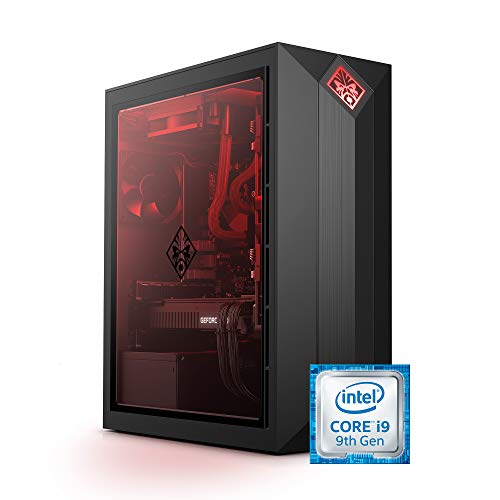
HP OMEN Obelisk RTX 2080 Super Core i9 Desktop
Best for: premium VR setups needing 32 GB RAM
- Use
- VR (what this guide is about)
- Graphics Card
- NVIDIA GeForce RTX 2080 Super 8 GB
- Processor Model
- Intel Core i9-9900K
- System Memory
- 32 GB
- Storage Capacity
- 1 TB SSD
- Operating System
- Windows 10 Home
View on Amazon: HP OMEN Obelisk RTX 2080 Super Core i9 Desktop
The HP OMEN Obelisk RTX 2080 Super Gaming Desktop provides dedicated hardware configured for VR gaming workloads. It runs an 8-core Intel Core i9-9900K processor clocked at 3.60 GHz alongside an NVIDIA GeForce RTX 2080 Super graphics card with 8 GB GDDR6 memory. You also get 32 GB of DDR4 RAM and a 1 TB NVMe SSD. This build suits you if you need a high-capacity prebuilt system with ample memory and solid-state storage.
Pros
- NVIDIA GeForce RTX 2080 Super GPU with 8 GB GDDR6 memory
- Intel Core i9-9900K 8-core processor at 3.60 GHz
- 32 GB DDR4 RAM expandable up to 64 GB
- 1 TB PCIe NVMe M.2 solid-state drive
Cons
- Does not include a VR headset
- System memory runs at DDR4-2666 speed
- Installed operating system is Windows 10 Home
Good fit if
- You want 32 GB of RAM and 1 TB of NVMe storage preinstalled for VR setups.
- You prefer an Intel Core i9 processor combined with dedicated 8 GB ray-tracing graphics.
- You need wired peripherals included in the box alongside the desktop.
Skip if
- You require an all-in-one bundle that already includes a VR headset.
- You want memory operating at speeds faster than DDR4-2666.
Verdict: HP OMEN Obelisk RTX 2080 Super Gaming Desktop delivers 8-core Core i9 processing, 32 GB RAM, and dedicated RTX graphics for VR applications. It provides high solid-state storage capacity and expandable desktop hardware in a tempered glass chassis.

MSI Aegis ZS2 RTX 5080 Gaming Desktop
Best for: High-end VR gaming and heavy multitasking
- Use
- VR (what this guide is about)
- Graphics Card
- NVIDIA GeForce RTX 5080
- Processor Model
- AMD Ryzen R9-9900X
- System Memory
- 64GB DDR5
- Storage Capacity
- 2TB M.2 NVMe SSD
- Operating System
- Windows 11 Home
This MSI Aegis ZS2 is a prebuilt desktop built for demanding VR setups. You get an AMD Ryzen R9-9900X processor paired with an NVIDIA GeForce RTX 5080 graphics card and 64GB of DDR5 memory. Storage sits at a 2TB NVMe SSD, and CPU temperatures are managed by a 360mm liquid cooler. It suits you if you need top-tier VR rendering performance, high memory capacity, and standard parts for future upgrades.
Pros
- NVIDIA GeForce RTX 5080 graphics
- AMD Ryzen R9-9900X processor
- 64GB DDR5 memory and 2TB NVMe SSD
- 360mm CPU liquid cooling setup
- Standardized MSI components for straightforward upgrades
Cons
- Heavy chassis weighing 26.9 pounds
- Large physical footprint measuring 19.4 inches tall
- Comes with Windows 11 Home rather than Windows 11 Pro
Good fit if
- You run demanding VR software requiring an RTX 5080 GPU.
- You want 64GB of DDR5 RAM for memory-heavy multitasking.
- You prefer built-in 360mm liquid cooling for processor thermals.
Skip if
- You have limited space for a 19.4-inch tall desktop tower.
- You require Windows 11 Pro included out of the box.
Verdict: MSI Aegis ZS2 RTX 5080 Gaming Desktop combines an AMD Ryzen R9-9900X processor with an RTX 5080 GPU and 64GB DDR5 RAM for high-end VR workloads. Its 360mm liquid cooler and standardized components make it a capable, upgrade-friendly system.

The Horizon Autherium Dragon RTX 5070 Gaming PC
Best for: VR gamers needing high RAM and storage
- Use
- VR (what this guide is about)
- Graphics Card
- NVIDIA GeForce RTX 5070 OC
- Processor Model
- Core i9
- System Memory
- 64 GB
- Storage Capacity
- 1 TB NVMe SSD + 4 TB HDD
- Operating System
- Windows 11 Pro
View on Amazon: The Horizon Autherium Dragon RTX 5070 Gaming PC
This full-tower desktop pairs an Intel Core i9 processor with an Nvidia GeForce RTX 5070 12GB graphics card and 64GB of RAM. For VR setups, the high system memory handles heavy modding and background multitasking, while the 360mm liquid cooler manages thermal output during demanding sessions. You also get 5TB of total storage out of the box. It suits enthusiasts who want extensive memory and massive local drive space for VR libraries.
Pros
- 64GB of RAM handles memory-intensive VR applications and multitasking
- Nvidia GeForce RTX 5070 12GB GPU supports DLSS 4.0 and multi-monitor output
- 5TB total storage via a 1TB fast NVMe SSD and 4TB HDD
- Thermal management includes 360mm liquid cooling and 11 system fans
Cons
- Bulk storage uses a 7200 RPM mechanical HDD instead of an SSD
- Large and heavy chassis weighing 35 pounds
- Exact Intel Core i9 model number is not specified
Good fit if
- You need 64GB of RAM for heavily modded VR titles and simulation software.
- You want 5TB of combined onboard storage for extensive game libraries.
- You need three DisplayPort outputs and one HDMI port for headsets and displays.
Skip if
- You want a fully solid-state storage configuration without mechanical hard drives.
- You need a compact, lightweight desktop for limited desk space.
Verdict: The Horizon Autherium Dragon RTX 5070 Gaming PC provides substantial memory and multi-terabyte capacity for demanding VR sessions. Its 64GB RAM and liquid-cooled Core i9 hardware easily handle intensive workloads.

CyberpowerPC Gamer Xtreme RTX 3050 Gaming PC
Best for: entry-level RTX 3050 VR setups
- Use
- VR (what this guide is about)
- Graphics Card
- NVIDIA GeForce RTX 3050 8GB
- Processor Model
- Intel Core i5-11400F
- System Memory
- 8GB DDR4
- Storage Capacity
- 500GB PCI-E NVMe SSD
- Operating System
- Windows 11 Home 64-bit
View on Amazon: CyberpowerPC Gamer Xtreme RTX 3050 Gaming PC
This desktop equips an Intel Core i5-11400F processor paired with an NVIDIA GeForce RTX 3050 8GB graphics card. You get 8GB of DDR4 memory and a 500GB NVMe SSD for storage. For display and headset connections, the video card provides one HDMI and one DisplayPort. Connectivity includes eight total USB ports and 802.11AC Wi-Fi. It suits you if you need an entry-level dedicated GPU configuration.
Pros
- NVIDIA GeForce RTX 3050 graphics card with 8GB dedicated memory
- Six USB 3.1 ports and two USB 2.0 ports for peripherals
- Built-in 802.11AC Wi-Fi and gigabit Ethernet networking
- Keyboard and 7-color RGB mouse included in the box
Cons
- 8GB DDR4 RAM is limited for demanding VR titles
- 500GB NVMe SSD offers modest base storage capacity
- Video card provides only two display outputs
Good fit if
- You want an RTX 3050 graphics card with 8GB VRAM.
- You need multiple USB ports for wired VR accessories and sensors.
Skip if
- You require 16GB or more system RAM out of the box.
- You need more than two direct display outputs from the graphics card.
Verdict: CyberpowerPC Gamer Xtreme i5 RTX 3050 PC delivers baseline GeForce performance with ample USB connectivity for entry VR setups. Its 8GB system memory and 500GB SSD mark clear hardware limits.
CyberpowerPC Gamer Xtreme GTX 1660 Super
Best for: entry-level VR setups needing GTX 1660 Super
- Use
- VR (what this guide is about)
- Graphics Card
- NVIDIA GeForce GTX 1660 Super 6GB
- Processor Model
- Intel Core i5-10400F
- System Memory
- 8GB DDR4
- Storage Capacity
- 500GB NVMe SSD
- Operating System
- Windows 10 Home
The CyberpowerPC Gamer Xtreme is an entry-level VR gaming desktop built with a 6-core Intel Core i5-10400F processor and an NVIDIA GeForce GTX 1660 Super graphics card with 6GB of VRAM. It includes 8GB of DDR4 memory and a 500GB PCIe NVMe SSD. This configuration suits you if you need a baseline system for standard VR setups, 802.11ac Wi-Fi connectivity, and essential display outputs including HDMI and DisplayPort.
Pros
- NVIDIA GeForce GTX 1660 Super 6GB graphics card
- 6-core Intel Core i5-10400F 2.9GHz processor
- 500GB PCIe NVMe solid-state drive
- Built-in 802.11ac Wi-Fi and gigabit Ethernet
- Six USB 3.1 and two USB 2.0 ports
Cons
- Limited to 8GB of DDR4 system memory
- 500GB base storage capacity fills quickly
- Video outputs limited to one HDMI and one DisplayPort
Good fit if
- You need a dedicated GTX 1660 Super 6GB GPU for entry-level VR gaming.
- You want built-in 802.11ac Wi-Fi alongside wired gigabit Ethernet.
- You use multiple external peripherals requiring USB 3.1 ports.
Skip if
- You require more than 8GB of pre-installed system RAM.
- You need more than 500GB of out-of-the-box storage.
- You plan to run more than two monitors simultaneously.
Verdict: CyberpowerPC Gamer Xtreme GTX 1660 Super Desktop delivers baseline VR capabilities via its 6-core Intel CPU and 6GB dedicated graphics card. Its 8GB memory and 500GB NVMe SSD handle essential tasks without extraneous hardware overhead.

Alienware Aurora R14 Ryzen 9 Gaming Desktop
Best for: VR gamers needing 12-core CPU power
- Use
- VR (what this guide is about)
- Graphics Card
- NVIDIA GeForce RTX 3080 10GB GDDR6X
- Processor Model
- AMD Ryzen 9 5900
- System Memory
- 32GB
- Storage Capacity
- 1TB SDD + 2TB HDD
- Operating System
- Windows 11 Home
The Alienware Aurora R14 is a prebuilt desktop built for VR gaming and multitasking. You get a 12-core AMD Ryzen 9 5900 processor paired with liquid CPU cooling and 32GB of 3466MHz DDR4 memory to handle demanding workloads. Dual storage provides a 1TB SSD alongside a 2TB hard drive for large game libraries, powered by a 1000W Platinum power supply. It suits you if you need high CPU thread counts.
Pros
- 12-core AMD Ryzen 9 5900 processor with liquid cooling
- 32GB 3466MHz XMP DDR4 memory
- 1000W Platinum power supply
- Hybrid storage with 1TB SSD and 2TB 7200 RPM HDD
Cons
- Wi-Fi 5 (802.11ac) rather than Wi-Fi 6
- DDR4 RAM rather than newer DDR5 standard
- Chassis weighs 36.4 pounds
Good fit if
- You need a 12-core Ryzen 9 processor for VR and multi-threaded tasks.
- You want 32GB of system memory and liquid cooling factory-installed.
- You need generous power headroom from a 1000W Platinum supply.
Skip if
- You require the newer Wi-Fi 6 wireless standard.
- You want a lightweight chassis that is easy to move.
Verdict: Alienware Aurora R14 Ryzen 9 Gaming Desktop delivers heavy multi-threaded computing power via its liquid-cooled 12-core processor and 1000W supply. It fits VR setups that benefit from 32GB of system RAM and high power overhead.

MSI Aegis RS2 RTX 5070 Gaming Desktop
Best for: Modern VR setups needing strong liquid-cooled performance
- Use
- VR (what this guide is about)
- Graphics Card
- NVIDIA GeForce RTX 5070
- Processor Model
- Intel Ultra 7 265K
- System Memory
- 32GB DDR5
- Storage Capacity
- 1TB M.2 NVMe SSD
- Operating System
- Windows 11 Home
The MSI Aegis RS2 is a dedicated VR gaming desktop built around the Intel Core Ultra 7 265K processor and an NVIDIA GeForce RTX 5070 graphics card. You get 32GB of DDR5 memory and a 1TB NVMe SSD, along with a 360mm CPU liquid cooler to manage operating temperatures. This system suits you if you need modern processing power and dedicated graphics for VR headsets, backed by standard modular components for future maintenance.
Pros
- NVIDIA GeForce RTX 5070 graphics card
- Intel Core Ultra 7 265K processor
- 32GB of DDR5 system memory
- 360mm CPU liquid cooling setup
- Standardized MSI parts for straightforward component swaps
Cons
- 1TB storage limit requires external or added drives for large VR libraries
- Large chassis footprint weighing 26.9 pounds
Good fit if
- You want an RTX 5070 GPU paired with 32GB DDR5 RAM for VR gaming.
- You prefer liquid CPU cooling to keep high-load temperatures under control.
- You plan to service or upgrade standard desktop components over time.
Skip if
- You need more than 1TB of base solid-state storage without manual upgrades.
- You have limited physical space for a 19.4-inch-tall tower case.
Verdict: MSI Aegis RS2 RTX 5070 Gaming PC provides solid VR capability using an Intel Core Ultra 7 265K and 360mm liquid cooling. Its standardized internal components make future maintenance and hardware management straightforward.

Evounic Xeon E5 RTX 2080 Ti Gaming PC
Best for: VR gaming with high VRAM requirements
- Use
- VR (what this guide is about)
- Graphics Card
- NVIDIA RTX 2080 Ti 11GB
- Processor Model
- Intel Xeon E5 up to 3.2GHz
- System Memory
- 16 GB
- Storage Capacity
- 512GB NVMe SSD + 1TB HDD
- Operating System
- Windows 11 Pro
The Evounic gaming desktop pairs an Intel Xeon E5 processor reaching up to 3.2GHz with an Nvidia GeForce RTX 2080 Ti graphics card packing 11GB of GDDR6 VRAM. You get 16GB of DDR4 memory, dual storage via a 512GB NVMe SSD and a 1TB HDD, and an 800W power supply. This setup suits you if you need dedicated workstation processing combined with plenty of video memory for tethered VR headsets.
Pros
- Nvidia GeForce RTX 2080 Ti graphics card with 11GB GDDR6 VRAM
- Dual-drive storage with a 512GB NVMe SSD and 1TB HDD
- Wi-Fi 6 and Bluetooth 5.4 wireless connectivity
- Includes an 800W power supply and Windows 11 Pro
Cons
- Intel Xeon E5 processor peak clock speed reaches only 3.2GHz
- Primary solid-state drive capacity is limited to 512GB
Good fit if
- You want 11GB of dedicated VRAM for VR headsets and creative tasks.
- You need a system pre-installed with Windows 11 Pro and an 800W power supply.
- You prefer having built-in Wi-Fi 6 and Bluetooth 5.4 wireless support.
Skip if
- You want a modern consumer Intel Core or AMD Ryzen desktop processor.
- You prefer an all-SSD storage configuration without a mechanical hard drive.
Verdict: Evounic Xeon E5 RTX 2080 Ti Gaming PC delivers 11GB of GDDR6 video memory and Windows 11 Pro for VR headsets, backed by dual storage and an 800W power supply.
Specifications side by side
| Spec | MSI Codex Z2 RTX 5060 Gaming Desktop | MSI Codex R2 Core i5 RTX 5070 Gaming PC | CyberPowerPC Gamer Xtreme RTX 5060 Gaming PC | CyberpowerPC Gamer Xtreme RTX 5060 Ti PC | CyberpowerPC Gamer Xtreme RTX 5060 Gaming PC | HP OMEN 25L Ryzen 5 RX 5500 Gaming Desktop | MSI Aegis RS2 Ultra 7 RTX 4070 Super | HP OMEN Obelisk RTX 2080 Super Core i9 Desktop | MSI Aegis ZS2 RTX 5080 Gaming Desktop | The Horizon Autherium Dragon RTX 5070 Gaming PC | CyberpowerPC Gamer Xtreme RTX 3050 Gaming PC | CyberpowerPC Gamer Xtreme GTX 1660 Super | Alienware Aurora R14 Ryzen 9 Gaming Desktop | MSI Aegis RS2 RTX 5070 Gaming Desktop | Evounic Xeon E5 RTX 2080 Ti Gaming PC |
|---|---|---|---|---|---|---|---|---|---|---|---|---|---|---|---|
| Graphics Card | NVIDIA GeForce RTX 5060 | NVIDIA GeForce RTX 5070 12GB | NVIDIA GeForce RTX 5060 8GB | NVIDIA GeForce RTX 5060 Ti 8GB | NVIDIA GeForce RTX 5060 8GB | AMD Radeon RX 5500 | NVIDIA GeForce RTX 4070 SUPER | NVIDIA GeForce RTX 2080 Super 8 GB | NVIDIA GeForce RTX 5080 | NVIDIA GeForce RTX 5070 OC | NVIDIA GeForce RTX 3050 8GB | NVIDIA GeForce GTX 1660 Super 6GB | NVIDIA GeForce RTX 3080 10GB GDDR6X | NVIDIA GeForce RTX 5070 | NVIDIA RTX 2080 Ti 11GB |
| Processor Model | AMD Ryzen R5-8400F | Intel Core i5-14400F | Intel Core i5-13400F 2.5GHz | Intel Core Ultra 5 225F 3.3GHz | Intel Core Ultra 5 225F | AMD Ryzen 5 3500 | Intel Ultra 7 265K | Intel Core i9-9900K | AMD Ryzen R9-9900X | Core i9 | Intel Core i5-11400F | Intel Core i5-10400F | AMD Ryzen 9 5900 | Intel Ultra 7 265K | Intel Xeon E5 up to 3.2GHz |
| System Memory | 16GB DDR5 | 32GB | 16GB DDR5 | 16GB DDR5 | 32GB DDR5 | 8GB DDR4 | 32GB | 32 GB | 64GB DDR5 | 64 GB | 8GB DDR4 | 8GB DDR4 | 32GB | 32GB DDR5 | 16 GB |
| Storage Capacity | 1TB m.2 NVMe SSD | 1TB NVMe SSD | 1TB PCIe 4.0 NVMe SSD | 2TB PCIe 4.0 NVMe SSD | 2TB PCIe 4.0 NVMe SSD | 512GB PCIe NVMe SSD | 2TB M.2 NVMe SSD | 1 TB SSD | 2TB M.2 NVMe SSD | 1 TB NVMe SSD + 4 TB HDD | 500GB PCI-E NVMe SSD | 500GB NVMe SSD | 1TB SDD + 2TB HDD | 1TB M.2 NVMe SSD | 512GB NVMe SSD + 1TB HDD |
| Operating System | Windows 11 Home | Windows 11 Home | Windows 11 Home | Windows 11 Home | Windows 11 Home | Windows 10 Home | Windows 11 Home | Windows 10 Home | Windows 11 Home | Windows 11 Pro | Windows 11 Home 64-bit | Windows 10 Home | Windows 11 Home | Windows 11 Home | Windows 11 Pro |
| Form Factor | not specified | not specified | not specified | not specified | not specified | not specified | not specified | not specified | not specified | not specified | not specified | not specified | not specified | not specified | Tower |
| Processor | Ryzen 5 | Core i5 | Core i5 | Core Ultra 5 | Core Ultra 5 | Ryzen 5 | Core Ultra 7 | Core i9 | not specified | Core i9 | Core i5 | Core i5 | Ryzen 9 | Core Ultra 7 | Intel Xeon |
| Memory | 16GB RAM | 32GB RAM | 16GB RAM | 16GB RAM | 32GB RAM | 8GB RAM | 32GB RAM | 32GB RAM | not specified | 64GB RAM | 8GB RAM | 8GB RAM | not specified | 32GB RAM | 16GB RAM |
| Storage | not specified | 1TB SSD | not specified | not specified | 2TB SSD | not specified | not specified | 1TB SSD | not specified | not specified | not specified | 512GB SSD | 2TB HDD | not specified | 1TB HDD |
| Use | VR | VR | VR | VR | VR | VR | VR | VR | VR | VR | VR | VR | VR | VR | VR |
| Dimensions | 16 × 8.38 × 19 inches | 16 × 8.38 × 19 inches | not specified | 17.7 × 8.58 × 19.9 inches | 17.7 × 8.6 × 19.9 inches | 17.1 × 15.5 × 6.5 inches | 9.1 × 19 × 19.4 inches | 20.5 × 19.8 × 14.8 inches | 9.1 × 19 × 19.4 inches | 17 × 18 × 18 inches | not specified | 18.8 × 8.2 × 18.6 inches | 23.2 × 8.86 × 20.1 inches | 9.1 × 19 × 19.4 inches | not specified |
| Weight | 21.3 pounds | 21.3 pounds | 28.6 pounds | 34.3 pounds | 35 pounds | not specified | 26.9 pounds | 23.2 pounds | 26.9 pounds | 35 pounds | 29.7 pounds | 30 pounds | 36.4 pounds | 26.9 pounds | not specified |
| Size | 19.1" x 8.4" x 16.1" | not specified | GXiVR8060A40 | GXiVR8060A35 | 32GB RAM I 2TB SSD | AMD Ryzen 5 3700X | 19.1 x 9.1 x 19.4 inches | 15.6" | 2 TB | not specified | i5-11400F/RTX 3050 | GeForce GTX 1660 Super | 32GB | not specified | not specified |
| Color | Black | Black | Black | Black | not specified | Shadow Black | Black | black | Black | Black | Black | Black | Dark Side | Black | white |
| Model | CodZ2B8NVL694 | CodR2D14NVP5613 | GXiVR8060A40 | GXiVR8060A35 | not specified | GT12-0010 | AeRS2C2NUE71075 | 5QB56AA#ABA | AeZS2C9NVV1277 | PITPJ7JXJ | GXiVR8060A12 | GXiVR8060A10 | AWAUR14-A771BLK-PUS | AeRS2AIC2NVP71445 | RGB Keyboard & Mouse |
Is a VR-Ready Gaming Desktop Worth It?
Choosing a desktop intended for VR means securing dedicated graphics from baseline GTX 1660 Super units up to RTX 5080 hardware. These systems integrate multi-core Intel or AMD processors alongside 8GB to 64GB of system memory. In daily operation, a VR-capable desktop provides compatible video outputs and high processing bandwidth for tethered headsets. This hardware profile also accommodates standard high-resolution PC gaming and multitasking without immediate hardware changes.
Worth it if
- You plan to connect a tethered VR headset requiring dedicated video ports and graphics processing.
- You need high-capacity configurations featuring up to 64GB of RAM and liquid cooling for demanding titles.
Skip it if
- You only play traditional non-VR PC games that do not need VR-specific display configurations.
- You prefer compact setups over full-sized desktop towers that weigh between 21 and 36 pounds.
If you plan to upgrade your cooling hardware for demanding VR sessions, compare specifications for the best heatsinks for desktop.
How We Picked VR Desktops
To select systems for this guide, we identified gaming desktops whose published Amazon listings specify VR in the title or product features. Each featured desktop represents a single variant from its model family, giving you a distinct look at different build options. All details come directly from manufacturer specifications and feature lists on the listings without physical handling.
The 15 systems are ordered with products in stock first, then by Amazon sales rank. You can evaluate each desktop using key hardware specifications such as the graphics card, processor model, system memory, and internal storage. Stock updates live on the page at least daily to help you compare current choices for 2026.
How to Choose the Right VR Desktop
-
Matching Graphics to Headset Resolution
VR headsets render two simultaneous high-resolution displays at high refresh rates. Baseline graphics cards like the GeForce GTX 1660 Super or RTX 3050 handle simpler virtual spaces. For modern tethered headsets with high native resolutions, look for modern GPUs such as the RTX 5070 or RTX 5080 found in the MSI Aegis ZS2. Pay attention to dedicated video memory alongside clock speeds. Higher-tier graphics prevent frame drops and reduce motion sickness caused by visual stutter during intense room-scale tracking sessions.
-
Selecting CPU Processing Power
VR software tracks head positioning, spatial audio, and controller input alongside standard game logic. A six-core processor like a Core i5 or Ryzen 5 handles baseline VR execution. If you plan to stream your VR sessions or run complex physics simulations, step up to a multi-core chip like the Intel Core Ultra 7 or AMD Ryzen 9. Desktops such as the Alienware Aurora R14 offer 12-core computing power. Comparing core counts and processor generations helps you avoid CPU bottlenecks that could disrupt headset frame timing.
-
Choosing Solid-State Storage Capacity
Modern VR games and interactive applications occupy significant drive space. Check whether a desktop includes a fast solid-state drive rather than a mechanical hard drive. Baseline options provide 500GB SSDs, which fill quickly after installing a few heavy VR titles and operating system updates. Models like the CyberpowerPC Gamer Xtreme RTX 5060 Ti feature a 2TB NVMe SSD directly out of the box. Prioritizing 1TB or 2TB of solid-state storage gives you sufficient space for large VR directories while ensuring swift level loading.
-
Evaluating Cooling and Thermal Design
VR titles place both the graphics card and processor under sustained loads for hours. Check whether a prebuilt desktop relies on traditional air fans or integrated liquid cooling. Air-cooled configurations with multiple intake and exhaust fans manage mid-tier components reliably. Higher-tier systems generate more heat and benefit from liquid setups. For example, the MSI Aegis RS2 uses 360mm liquid cooling to regulate processor temperatures. Adequate thermal management prevents thermal throttling, maintaining consistent frame delivery so your headset visuals remain smooth and comfortable throughout extended play.
-
Verifying Operating System Compatibility
Headset software, tether drivers, and VR runtimes rely on specific operating system features. Desktops in this category ship with Windows 10 Home, Windows 11 Home, or Windows 11 Pro. Systems like The Horizon Autherium Dragon provide Windows 11 Pro, which adds advanced management tools for specialized environments. Most current VR headsets recommend Windows 11 for broad hardware support and ongoing driver updates. Check the operating system specification on the desktop to ensure your intended headset runtime and platform software install without requiring an immediate OS upgrade.
-
Measuring Physical Clearance and Weight
VR setups require physical room for movement, sensors, and cable routing from the desktop chassis to your play zone. Desktop dimensions on this list vary significantly, ranging from compact cases around 16 inches tall to towers approaching 20 inches in height and 36 pounds in weight. For example, the MSI Codex Z2 weighs 21.3 pounds and measures 19.1 inches high. Check your desk clearance, floor stability, and cable access points before selecting a case footprint to ensure your VR tether reaches without strain.
Frequently asked questions
Which processor types handle VR titles across these desktops?
Desktops in this category feature multi-core processors from Intel and AMD, as well as server-grade chips. You find Intel Core i5, Core Ultra 5, Core Ultra 7, and Core i9 configurations, alongside AMD Ryzen 5 and 12-core Ryzen 9 chips. For instance, the Alienware Aurora R14 incorporates a Ryzen 9 processor, while the Evounic desktop operates on an Intel Xeon E5 CPU to manage compute-heavy background tasks.
What operating system comes preinstalled on VR gaming PCs?
Most featured VR desktops ship with Windows 11 Home, though certain builds use Windows 11 Pro or Windows 10 Home. Models like the CyberPowerPC Gamer Xtreme RTX 5060 run Windows 11 Home by default. Meanwhile, systems such as The Horizon Autherium Dragon provide Windows 11 Pro, and older configurations like the HP OMEN 25L and HP OMEN Obelisk include Windows 10 Home out of the box.
How much internal storage do these VR gaming desktops include?
Internal storage capacities range from 500GB solid-state drives up to 2TB configurations across solid-state and hard disk formats. The CyberpowerPC Gamer Xtreme GTX 1660 Super begins with a 500GB SSD for core software. In contrast, the CyberpowerPC Gamer Xtreme RTX 5060 Ti features a 2TB NVMe SSD, and the Alienware Aurora R14 provides a spacious 2TB hard disk drive to install multiple large games.
Does liquid cooling make a difference in prebuilt VR desktops?
Liquid cooling actively manages thermal dissipation during prolonged VR workloads to maintain stable clock speeds. Several higher-end systems on this list include liquid thermal solutions. For example, the MSI Aegis ZS2 RTX 5080 and MSI Aegis RS2 RTX 5070 integrate 360mm liquid coolers. The Alienware Aurora R14 also incorporates liquid cooling to handle the thermal demands of its 12-core processor.
Can you upgrade components in prebuilt VR gaming computers?
Yes, many models feature standardized layouts that allow you to expand memory, storage, or internal hardware over time. The MSI Codex R2 RTX 5070 and MSI Aegis RS2 use standard internal parts to make routine maintenance and component swaps straightforward. If you start with a base configuration, these standard layouts allow you to add additional drives or memory modules as your software library expands.
How much system RAM is required for high-end VR workloads?
While baseline setups function on 8GB or 16GB, advanced VR configurations benefit from 32GB to 64GB of RAM to prevent memory bottlenecks. Desktops like the MSI Codex R2 provide 32GB DDR5 RAM for stable multi-application performance. For heavier demands, the MSI Aegis ZS2 RTX 5080 and The Horizon Autherium Dragon pack 64GB of system memory to support intensive computing tasks effortlessly.
How heavy and large are prebuilt VR desktops?
Chassis dimensions and weights vary based on component layout, cooling radiators, and power supplies. Lighter mid-towers such as the MSI Codex Z2 weigh 21.3 pounds with dimensions of 19.1 by 8.4 by 16.1 inches. Heavier configurations like the Alienware Aurora R14 weigh 36.4 pounds and extend to 23.2 inches in length, requiring adequate desk or floor clearance to ensure unhindered ventilation.