15 Best 27-Inch All-In-One Desktops, Compared
As an Amazon Associate we earn from qualifying purchases. Links on this page are affiliate links.
Finding the best 27-Inch all in one desktops requires looking at how each model balances performance, display quality, and form factor. We compared 15 units based strictly on the specifications published on their listings. Our top pick is the HP OmniStudio 27 Ryzen AI 7 All-in-One, which leads because it includes 16GB of RAM and dedicated AI features for home office users. This guide helps you decide which machine fits your workflow by comparing memory, storage, and processor details side by side.
Quick picks
The best fit for you
- You need the best overall home office AI desktop HP OmniStudio 27 Ryzen AI 7 All-in-One The HP OmniStudio 27 Ryzen AI 7 AIO features 16GB RAM and AI capabilities for efficient multitasking.
- You want the most compact and lightweight 27-inch model MECHAZER 27-Inch Curved All-in-One PC The MECHAZER 27-Inch Curved PC weighs only 11.9 pounds and measures just 2.17 inches in depth.
- You require massive memory and storage for heavy multitasking Lenovo IdeaCentre 27-Inch Ryzen 5 AIO The Lenovo IdeaCentre includes 64GB RAM and a 4TB SSD to handle intensive productivity workflows.
- You seek entry-level gaming with a dedicated graphics card Suevery 27-inch RTX 3050 All-in-One The Suevery AIO features an RTX 3050 GPU and 32GB of memory for discrete graphics performance.
Our 15 picks

HP OmniStudio 27 Ryzen AI 7 All-in-One
Best for: home office users needing AI features
- Screen Size
- 27-Inch (what this guide is about)
- Processor
- AMD Ryzen AI 7 445
- System Memory
- 16 GB
- Storage Capacity
- 512 GB SSD
- Display Resolution
- FHD
- Graphics
- AMD Radeon 840M
This HP all-in-one pairs a 27-inch FHD display with an AMD Ryzen AI 7 445 processor and 16 GB of DDR5 RAM. The integrated AMD Radeon 840M graphics handle everyday tasks and light gaming. You get 512 GB of fast SSD storage and Windows 11 Home with Copilot. The adjustable stand and AI noise reduction make it a practical choice for home offices where you need clear video calls and a comfortable viewing angle.
Pros
- AMD Ryzen AI 7 445 processor for efficient multitasking
- 16 GB DDR5 RAM for smooth performance
- AMD Radeon 840M graphics for visual clarity
- FHD display with adjustable stand for comfort
- AI noise reduction for clearer video calls
Cons
- 512 GB SSD storage is smaller than some competitors
- FHD resolution is lower than QHD or 5K options
- No touchscreen included in this configuration
Good fit if
- You need a compact desktop for home office work
- You want AI-enhanced features like noise reduction
- You prefer an adjustable stand for ergonomic viewing
Skip if
- You require a touchscreen for navigation
- You need more than 512 GB of storage
- You want a higher resolution than FHD
Verdict: HP OmniStudio 27" Ryzen AI 7 AIO is a solid choice for users who prioritize AI features and ergonomic design over high-resolution displays. It suits home office workers who value clear video calls and efficient multitasking.

HP OmniStudio 27-Inch Ryzen 5 All-in-One
Best for: everyday office productivity and video meetings
- Screen Size
- 27-Inch (what this guide is about)
- Processor
- AMD Ryzen AI 5 330
- System Memory
- 16 GB
- Storage Capacity
- 512 GB SSD
- Display Resolution
- Full HD
- Use
- Business
This HP OmniStudio all-in-one desktop brings modern processing to your workspace with an AMD Ryzen AI 5 330 processor and 16GB of DDR5 memory. You get a spacious 27-inch Full HD anti-glare screen suited for spreadsheets and documents, backed by a 512GB NVMe solid-state drive. It fits you well if you need an uncluttered home office setup with built-in Wi-Fi 6, an integrated full high-definition camera, and dual speakers for calls.
Pros
- AMD Ryzen AI 5 330 processor with 16GB DDR5 RAM
- 27-inch Full HD anti-glare display
- Integrated Full HD camera and dual speakers
- Wi-Fi 6 wireless connectivity
- 512GB NVMe solid-state drive
Cons
- Full HD resolution provides modest pixel density on a 27-inch screen
- 512GB storage capacity may require external drives for large archives
- No touchscreen support listed
Good fit if
- You need an integrated setup for remote meetings and everyday office tasks.
- You want current DDR5 memory paired with an AMD Ryzen processor.
- You work in bright environments and need an anti-glare screen coating.
Skip if
- You require a sharper 1440p or 4K panel on a 27-inch display.
- You want touchscreen navigation on your desktop.
- You need more than 512GB of internal storage right out of the box.
Verdict: HP OmniStudio 27" Ryzen AI 5 All-in-One delivers dependable performance for home office tasks with modern DDR5 memory and built-in conferencing hardware. It keeps your desk uncluttered, though users needing fine graphic detail may prefer higher resolution.

Dell 27-Inch Core 5 All-in-One Desktop
Best for: Everyday home office productivity and video calls
- Screen Size
- 27-Inch (what this guide is about)
- Processor
- Intel Core 5 120U
- System Memory
- 16GB DDR5
- Storage Capacity
- 512GB SSD
- Display Resolution
- FHD
- Graphics
- Intel Graphics
This Dell all-in-one desktop combines a 27-inch FHD IPS display with an Intel Core 5 120U processor and integrated Intel UHD Graphics. Its screen covers 99% sRGB color space and includes hardware blue light reduction. You also get a 5MP pop-up HDR webcam, Dolby Atmos audio, and keyboard stowage space under the stand. It suits you if you want a clean, cable-free setup for productivity, remote work, and streaming.
Pros
- FHD IPS display with 99% sRGB coverage and ComfortView Plus blue light reduction
- Pop-up 5MP IR webcam with HDR and physical privacy retraction
- Dual Bluetooth speakers featuring Dolby Atmos spatial audio
- Built-in stand storage area designed to tuck away a keyboard
Cons
- Uses integrated Intel UHD Graphics rather than a dedicated GPU
- Display resolution is limited to 1080p FHD across a 27-inch screen
Good fit if
- You need a complete desktop setup with an integrated pop-up webcam and speakers for video calls.
- You want color accuracy across a 27-inch display with 99% sRGB coverage for office or visual work.
- You prefer a tidy desk with dedicated space under the monitor stand to store your keyboard.
Skip if
- You require a dedicated graphics card for heavy 3D gaming or intensive video rendering.
- You want a higher resolution display such as QHD or 4K on a 27-inch screen.
Verdict: Dell 27-Inch Intel Core 5 All-in-One Desktop delivers a balanced everyday computing package with its color-accurate 27-inch display, modern Core 5 processing, and clutter-reducing stand design. It is a solid, space-saving choice for daily office productivity, remote calls, and media playback.

Suevery 27-inch RTX 3050 All-in-One
Best for: entry-level gaming and graphics work
- Screen Size
- 27-Inch (what this guide is about)
- Processor
- Intel Core i5-13400F
- System Memory
- 32GB
- Storage Capacity
- 1TB M.2 NVMe SSD
- Display Resolution
- 2K
- Graphics
- RTX 3050 6G
This Suevery desktop gives you a 27-inch 2K display paired with a dedicated Nvidia GeForce RTX 3050 6GB graphics card. Powered by a 10-core Intel Core i5-13400F processor, 32GB of RAM, and a 1TB NVMe SSD, it handles multitasking and entry-level 3D workloads. The 120Hz panel tilts and rotates 360 degrees, making it a versatile option if you need graphics acceleration in an all-in-one format.
Pros
- Dedicated Nvidia RTX 3050 6GB graphics card
- 27-inch 2K screen with 120Hz refresh rate
- Intel Core i5-13400F CPU with 10 cores and 16 threads
- 32GB RAM and 1TB M.2 NVMe SSD
- Screen stand supports tilt and 360-degree rotation
Cons
- No touchscreen functionality listed
- F-series processor lacks integrated graphics fallback
Good fit if
- You want dedicated RTX graphics for gaming or editing on an all-in-one screen.
- You need a high-refresh 120Hz display with 360-degree rotation.
- You run memory-heavy workloads requiring 32GB of system RAM.
Skip if
- You require a touchscreen display for direct navigation.
- You need top-tier GPU performance beyond an entry-level RTX 3050.
Verdict: Suevery 27-Inch 2K RTX 3050 All-in-One PC delivers rare dedicated graphics performance and a 120Hz rotating screen in a unified desktop build. It is a capable choice if you need 32GB of memory and discrete GPU power without a separate tower.

Apple iMac 27-Inch Retina 5K Core i5
Best for: macOS users prioritizing high-resolution 5K visuals
- Screen Size
- 27-Inch (what this guide is about)
- Processor
- 3.2 GHz Intel Core i5
- System Memory
- 8GB DDR3
- Storage Capacity
- 1TB Fusion Drive
- Display Resolution
- Retina 5K
- Graphics
- AMD Radeon R9 M390
You get a 27-inch all-in-one desktop featuring a Retina 5K display and Mac OS X. Powered by a 3.2 GHz Intel Core i5 quad-core processor and dedicated AMD Radeon R9 M390 graphics, it delivers high-resolution visual workspace. It includes 8GB of DDR3 system memory and a 1TB Fusion Drive for storage. This system suits you if you need a high-density Apple display for daily tasks and basic visual work.
Pros
- Retina 5K display resolution on a 27-inch panel
- Dedicated AMD Radeon R9 M390 graphics
- 3.2 GHz quad-core Intel Core i5 processor
- 1TB Fusion Drive storage capacity
Cons
- Uses older DDR3 system memory instead of DDR4 or DDR5
- Ships with Mac OS X rather than modern macOS versions
- Recertified renewed hardware
Good fit if
- You need a 27-inch 5K screen for visual clarity.
- You prefer using Mac OS X with an Intel processor.
- You want dedicated AMD Radeon graphics in an all-in-one chassis.
Skip if
- You require modern DDR4 or DDR5 system memory.
- You need a Windows-based operating system.
- You want a brand-new factory-sealed machine.
Verdict: Apple iMac 27-Inch Retina 5K Desktop delivers ultra-sharp 5K resolution paired with dedicated Radeon graphics and Mac OS X. Its DDR3 memory and older quad-core processor keep it focused on general productivity.

Acer Aspire 27-Inch Ryzen 5 All-in-One
Best for: Smooth everyday multitasking and home office productivity
- Screen Size
- 27-Inch (what this guide is about)
- Processor
- AMD Ryzen 5 7430U
- System Memory
- 16GB DDR4 SODIMM
- Storage Capacity
- 1TB PCIe NVMe SSD
- Display Resolution
- FHD (1920x1080)
- Graphics
- AMD Radeon Integrated Graphics
This Acer Aspire all-in-one pairs a 27-inch 1080p IPS display with a fluid 120Hz refresh rate. Under the hood, you get a six-core AMD Ryzen 5 7430U processor, 16GB of DDR4 memory, and a 1TB PCIe NVMe SSD. It comes ready for daily work with an included webcam, wired keyboard, and mouse. It suits you if you need a responsive desktop setup for everyday multitasking and general home office duties.
Pros
- 27-inch IPS panel with a 120Hz refresh rate
- Six-core, 12-thread AMD Ryzen 5 7430U processor
- Generous 1TB PCIe NVMe solid-state storage
- Includes webcam, USB peripherals, and a portable data hub
Cons
- Uses DDR4 SODIMM memory rather than DDR5
- Relies on integrated AMD Radeon graphics
- 1080p resolution provides lower pixel density on a 27-inch screen
Good fit if
- You want a 27-inch screen with a faster 120Hz refresh rate for smoother motion.
- You need 1TB of solid-state storage out of the box for documents and media.
- You prefer an all-in-one that includes a webcam, keyboard, and mouse.
Skip if
- You need a dedicated graphics card for modern AAA gaming or heavy 3D rendering.
- You require 1440p or 4K resolution for fine graphic detail.
Verdict: Acer Aspire 27" 120Hz All-in-One Desktop delivers dependable six-core performance and generous 1TB storage for home or office tasks. Its 120Hz IPS display makes standard desktop interaction feel noticeably fluid.
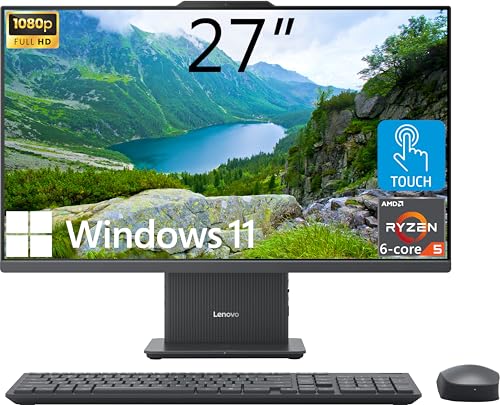
Lenovo IdeaCentre 27-Inch Ryzen 5 AIO
Best for: high-memory multitasking and massive local storage
- Screen Size
- 27-Inch (what this guide is about)
- Processor
- AMD Ryzen 5 8645HS
- System Memory
- 64GB DDR5
- Storage Capacity
- 4TB SSD
- Display Resolution
- FHD (1920x1080)
- Touchscreen
- Touchscreen
This all-in-one desktop pairs an AMD Ryzen 5 8645HS processor with 64GB of DDR5 RAM and a 4TB SSD behind a 27-inch touchscreen. It gives you heavy multitasking capacity and massive local file storage in a single unit. The base includes a wireless charging pad alongside HDMI input and output ports. It fits you if you need workstation-level memory and storage capacity for daily productivity without a separate tower.
Pros
- 64GB DDR5 memory handles heavy multitasking
- 4TB PCIe M.2 SSD provides large internal storage
- Built-in wireless charging pad in the base
- HDMI-in and HDMI-out video connections
Cons
- 1080p resolution offers lower pixel density on a 27-inch panel
- 300 nits display brightness limit
Good fit if
- You need high memory capacity and large internal storage out of the box.
- You want touchscreen controls and a wireless charging base on your desk.
- You need an HDMI input port to use the display with external devices.
Skip if
- You prefer a 1440p, 4K, or 5K display resolution on a 27-inch panel.
- You need a dedicated graphics card for high-end 3D rendering.
Verdict: Lenovo IdeaCentre 27-Inch Touchscreen AIO delivers exceptional system memory and storage capacity for intense productivity. Its 1080p screen resolution remains the primary tradeoff against higher-resolution alternatives.

Qehi 27-Inch QHD 120Hz All-in-One Desktop
Best for: users wanting a 120Hz QHD adjustable display
- Screen Size
- 27-Inch (what this guide is about)
- Processor
- Core i7-7700HQ
- System Memory
- 16GB
- Storage Capacity
- 256GB SSD
- Display Resolution
- QHD (2560×1440)
- Use
- Business
This 27-inch all-in-one desktop pairs a 2560x1440 IPS display with a 120Hz refresh rate and an Intel Core i7-7700HQ quad-core processor. Alongside 16GB of system memory and a 256GB SSD, you get an ergonomic stand supporting height, tilt, swivel, and pivot adjustments. It suits you if you want sharper QHD visuals, smooth motion, and an integrated 5MP pop-up webcam for everyday desktop multitasking without cluttering your workspace.
Pros
- 27-inch 2560x1440 QHD IPS display with 120Hz refresh rate
- Fully adjustable stand with height, tilt, swivel, and pivot support
- 5MP hidden pop-up webcam for physical privacy
- 16GB system memory for smooth multitasking
Cons
- 256GB solid-state drive provides limited local storage
- Processor is limited to four cores
Good fit if
- You want a 27-inch QHD display with a fast 120Hz refresh rate.
- You need an ergonomic stand that tilts, swivels, pivots, and adjusts height.
- You prefer an integrated 5MP pop-up webcam for video calls.
Skip if
- You require more than 256GB of internal storage out of the box.
- You need a processor with more than four cores for intensive workloads.
Verdict: Qehi 27-Inch QHD 120Hz All-in-One Desktop stands out on this 15-model list with its 2560x1440 120Hz display and fully articulated stand. It gives you a smooth visual experience and clean setup for daily work, provided 256GB of storage meets your needs.

HP 27" Touchscreen Ryzen AI 7 All-in-One
Best for: high-memory multitasking and AI tasks
- Screen Size
- 27-Inch (what this guide is about)
- Processor
- AMD Ryzen AI 7 350
- System Memory
- 64GB DDR5
- Storage Capacity
- 1TB SSD
- Display Resolution
- FHD (1920 x 1080)
- Graphics
- AMD Radeon
This HP 27-inch all-in-one desktop pairs an AMD Ryzen AI 7 350 processor with 64GB of DDR5 RAM. It includes a 1TB SSD and a 27-inch FHD touchscreen. The system runs Windows 11 Pro and features Wi-Fi 6 and Bluetooth 5.4. You get a clean workspace with included wireless peripherals. This configuration suits users who need high memory for multitasking and AI features.
Pros
- 64GB DDR5 RAM for heavy multitasking
- 27-inch FHD IPS touchscreen display
- AMD Ryzen AI 7 350 processor
- 1TB SSD storage capacity
- Includes wireless keyboard and mouse
Cons
- FHD resolution limits sharpness compared to 4K models
- Integrated AMD Radeon graphics lack dedicated power
- 14.8-pound weight reduces portability
Good fit if
- You need 64GB RAM for professional workflows
- You want a touchscreen for intuitive control
- You prefer Windows 11 Pro features
Skip if
- You require 4K display resolution
- You need a dedicated graphics card
- You want a lighter portable device
Verdict: HP 27" AIO Copilot PC 64GB delivers exceptional memory capacity and AI processing power. It fits professionals who prioritize multitasking speed and touchscreen interaction over high-resolution visuals.

Dell 27" AIO Ultra 7 Copilot PC
Best for: Multitasking and modern connectivity needs
- Screen Size
- 27-Inch (what this guide is about)
- Processor
- Intel Ultra 7 355
- System Memory
- 32GB DDR5
- Storage Capacity
- 1TB PCIe Gen4 SSD
- Display Resolution
- Full HD (1920 x 1080)
- Touchscreen
- Touchscreen
This Dell all-in-one desktop pairs a Core Ultra 7 355 processor with 32 GB of DDR5 RAM and a 1 TB SSD. The 27-inch Full HD touchscreen supports a variable 60Hz to 100Hz refresh rate for smooth interaction. It includes Windows 11 Pro, Wi-Fi 7, and a wireless keyboard and mouse. This setup suits users who need strong multitasking performance and modern connectivity in a single unit.
Pros
- Intel Core Ultra 7 355 processor with 8-core architecture
- 32 GB DDR5 system memory for fast multitasking
- 1 TB SSD storage for quick boot times
- 27-inch Full HD touchscreen with 60Hz-100Hz refresh rate
- Wi-Fi 7 and Bluetooth 6.0 connectivity
Cons
- Full HD resolution is lower than the 5K or QHD options on this list
- Touchscreen is limited to 100Hz maximum refresh rate
- Includes only one USB 3.0 port variant in this specific configuration
Good fit if
- You need a powerful CPU for demanding productivity tasks
- You want a touchscreen interface for intuitive navigation
- You require modern Wi-Fi 7 connectivity
Skip if
- You need a high-resolution display above Full HD
- You prefer a system with more than one USB 3.0 port
- You do not need Windows 11 Pro
Verdict: Dell 27" AIO Copilot PC delivers strong processing power and ample memory for heavy workflows. It fits users who prioritize multitasking speed and modern wireless standards over high-resolution visuals.

MECHAZER 27-Inch Curved All-in-One PC
Best for: curved-screen home and office productivity
- Screen Size
- 27-Inch (what this guide is about)
- Processor
- Core i7 7700HQ
- System Memory
- 16GB DDR3
- Storage Capacity
- 512GB SSD
- Display Resolution
- FHD
- Display Feature
- Curved
This MECHAZER all-in-one desktop combines a 27-inch curved Full HD display with an Intel Core i7-7700HQ four-core processor. You get 16GB of DDR3 memory and a 512GB SSD for everyday productivity and multimedia tasks. It also features integrated speakers and multiple connection options, including HDMI, VGA, and USB Type-C. It suits you if you need a wide curved workspace for office tasks, web browsing, and education without separate tower clutter.
Pros
- 27-inch curved Full HD display with narrow bezels
- Intel Core i7-7700HQ processor with 4 cores and 8 threads
- Generous port selection including USB Type-C, HDMI, and VGA
- Built-in speakers to save desktop space
Cons
- Uses older DDR3 RAM rather than DDR4 or DDR5
- Display resolution tops out at standard 1080p FHD
Good fit if
- You want a curved 27-inch screen for office work and media viewing.
- You need legacy and modern connections, including VGA and USB Type-C.
- You prefer built-in speakers to minimize cables and external hardware.
Skip if
- You require modern DDR4 or DDR5 system memory.
- You want a higher resolution display, such as 1440p or 4K.
Verdict: MECHAZER 27-Inch Curved All-in-One PC provides a space-saving curved display paired with versatile connectivity and 16GB of memory. It serves reliably for daily office assignments, web tasks, and general media playback.

Lenovo ThinkCentre 27-Inch All-in-One PC
Best for: business productivity and home office multitasking
- Screen Size
- 27-Inch (what this guide is about)
- Processor
- Intel Core i5-13420H
- System Memory
- 16 GB
- Storage Capacity
- 512 GB SSD
- Display Resolution
- FHD
- Touchscreen
- Non-touch
This Lenovo ThinkCentre is a 27-inch all-in-one desktop designed for productive workspaces. You get an eight-core Intel Core i5-13420H processor paired with 16GB of fast DDR5 memory and a 512GB SSD. Its anti-glare Full HD IPS screen features a smooth 100Hz refresh rate and 99% sRGB coverage. Running Windows 11 Pro, it suits professionals who need dependable daily performance and HDMI input for external video sources.
Pros
- Intel Core i5-13420H 8-core processor with up to 4.6 GHz turbo
- 100Hz refresh rate with 99% sRGB coverage on FHD IPS display
- Includes both HDMI-In and HDMI-Out 2.1 ports
- Pre-installed with Windows 11 Pro
Cons
- Non-touch display
- Includes wired rather than wireless keyboard and mouse
- Two of the USB-A ports run at USB 2.0 speeds
Good fit if
- You need Windows 11 Pro for work management and security features.
- You want an HDMI-in port to use the 27-inch panel with external devices.
- You prefer a 100Hz refresh rate for smoother everyday on-screen motion.
Skip if
- You need a touchscreen interface for direct panel interaction.
- You require more than 512GB of internal storage out of the box.
Verdict: Lenovo ThinkCentre 27-Inch Core i5 AIO delivers strong everyday productivity with fast DDR5 memory and a smooth 100Hz IPS display. It provides a clean, capable desktop setup with flexible HDMI input connectivity and Windows 11 Pro.
MECHAZER 27-Inch Curved Core i7 All-in-One PC
Best for: budget daily productivity on a curved screen
- Screen Size
- 27-Inch (what this guide is about)
- Processor
- Core i7 7700HQ
- System Memory
- 16 GB DDR3
- Storage Capacity
- 512 GB SSD
- Display Resolution
- FHD
- Display Feature
- Curved
View on Amazon: MECHAZER 27-Inch Curved Core i7 All-in-One PC
This 27-inch all-in-one desktop pairs an Intel Core i7-7700HQ quad-core processor with a curved Full HD display. It includes 16GB of DDR3 memory and a 512GB solid-state drive for everyday office, educational, and light computing tasks. You get integrated speakers, Bluetooth 5.0, and seven total USB ports including Type-C. It suits you if you want a dedicated curved screen setup for standard daily workloads without complex cabling.
Pros
- 27-inch curved Full HD display with narrow borders
- Generous port selection including seven USB ports, VGA, and HD ports
- Equipped with 16GB system memory and a 512GB solid-state drive
- Intel Core i7-7700HQ processor with 4 cores and 8 threads
Cons
- Employs older DDR3 memory rather than DDR4 or DDR5
- Equipped with an older generation Core i7-7700HQ mobile processor
Good fit if
- You want an all-in-one desktop with a 27-inch curved display.
- You need extensive legacy and modern ports, including VGA and USB Type-C.
- You handle basic productivity, education, and general media playback.
Skip if
- You need modern DDR4 or DDR5 memory architecture.
- You require display resolution higher than 1080p Full HD on a 27-inch panel.
Verdict: MECHAZER 27-Inch Curved All-in-One Desktop delivers a curved widescreen display and extensive port connectivity for everyday office tasks. Its older processor and DDR3 RAM keep its performance focused strictly on basic daily computing.

HP OmniStudio 27 Touchscreen All-in-One PC
Best for: Users needing 2TB storage and touch input
- Screen Size
- 27-Inch (what this guide is about)
- Processor
- Intel Core Ultra 7 355U
- System Memory
- 16 GB
- Storage Capacity
- 2 TB SSD
- Display Resolution
- Full HD
- Touchscreen
- Touchscreen
This HP all-in-one desktop pairs a 27-inch Full HD touchscreen with an Intel Core Ultra 7 355U processor and 16GB of DDR5 RAM. The standout feature is the 2TB SSD, offering ample storage for large files. It includes a height-adjustable stand, Wi-Fi 7, and Windows 11 Pro. This setup suits users who need a clean, ergonomic workspace with strong performance for multitasking and content creation.
Pros
- 2TB SSD provides generous storage capacity
- Intel Core Ultra 7 355U with NPU for AI workflows
- 27-inch Full HD touchscreen with 10-point multi-touch
- Height-adjustable stand for ergonomic positioning
- Wi-Fi 7 and USB-C 4 connectivity
Cons
- Full HD resolution is standard for 27-inch screens
- 16GB RAM may limit heavy multitasking compared to 32GB options
- No dedicated graphics card listed for gaming
Good fit if
- You need high storage capacity for media or documents
- You prefer a touchscreen for direct navigation
- You want an adjustable screen height for comfort
Skip if
- You require a 4K display for sharp text
- You need more than 16GB of RAM for professional workloads
- You are looking for a dedicated GPU for gaming
Verdict: HP OmniStudio 27" AIO with 2TB SSD is a practical choice for users who prioritize storage and ergonomics over high-resolution visuals. It fits home office professionals who need a responsive, all-in-one solution.

Suevery 27-Inch 2K Core i5 All-in-One PC
Best for: home office productivity and media consumption
- Screen Size
- 27-Inch (what this guide is about)
- Processor
- Core i5-7300U
- System Memory
- 16 GB
- Storage Capacity
- 512 GB SSD
- Display Resolution
- QHD (2560 x 1440)
- Use
- Business
This suevery all-in-one desktop features a 27-inch 2K IPS display with a 70Hz refresh rate. It is powered by a Core i5-7300U processor, paired with 16GB of RAM and a 512GB SSD. The unit includes a magnetic 5MP webcam with a privacy shutter and WiFi 6 connectivity. Its micro-edge design and quick-release stand simplify setup. This system suits home offices and students needing reliable daily computing performance.
Pros
- 27-inch 2K IPS micro-edge display
- Core i5-7300U processor for multitasking
- 16GB RAM and 512GB SSD storage
- Magnetic 5MP webcam with physical shutter
- Built-in WiFi 6 connectivity
Cons
- 70Hz refresh rate is lower than 120Hz options
- Core i5-7300U is an older generation processor
- No touchscreen on this specific configuration
Good fit if
- You need a high-resolution 2K display for clear text and media
- You want a quick tool-free setup with a detachable webcam
- You require reliable WiFi 6 for remote work or streaming
Skip if
- You require a high-refresh-rate screen for competitive gaming
- You need the latest generation processor for heavy workloads
- You prefer a touchscreen interface for direct navigation
Verdict: suevery 27" AIO Core i5 16GB delivers sharp 2K visuals and solid multitasking specs for everyday tasks. It is a practical choice for users prioritizing display clarity and privacy features over high refresh rates or cutting-edge processors.
Specifications side by side
| Spec | HP OmniStudio 27 Ryzen AI 7 All-in-One | HP OmniStudio 27-Inch Ryzen 5 All-in-One | Dell 27-Inch Core 5 All-in-One Desktop | Suevery 27-inch RTX 3050 All-in-One | Apple iMac 27-Inch Retina 5K Core i5 | Acer Aspire 27-Inch Ryzen 5 All-in-One | Lenovo IdeaCentre 27-Inch Ryzen 5 AIO | Qehi 27-Inch QHD 120Hz All-in-One Desktop | HP 27" Touchscreen Ryzen AI 7 All-in-One | Dell 27" AIO Ultra 7 Copilot PC | MECHAZER 27-Inch Curved All-in-One PC | Lenovo ThinkCentre 27-Inch All-in-One PC | MECHAZER 27-Inch Curved Core i7 All-in-One PC | HP OmniStudio 27 Touchscreen All-in-One PC | Suevery 27-Inch 2K Core i5 All-in-One PC |
|---|---|---|---|---|---|---|---|---|---|---|---|---|---|---|---|
| Processor | AMD Ryzen AI 7 445 | AMD Ryzen AI 5 330 | Intel Core 5 120U | Intel Core i5-13400F | 3.2 GHz Intel Core i5 | AMD Ryzen 5 7430U | AMD Ryzen 5 8645HS | Core i7-7700HQ | AMD Ryzen AI 7 350 | Intel Ultra 7 355 | Core i7 7700HQ | Intel Core i5-13420H | Core i7 7700HQ | Intel Core Ultra 7 355U | Core i5-7300U |
| System Memory | 16 GB | 16 GB | 16GB DDR5 | 32GB | 8GB DDR3 | 16GB DDR4 SODIMM | 64GB DDR5 | 16GB | 64GB DDR5 | 32GB DDR5 | 16GB DDR3 | 16 GB | 16 GB DDR3 | 16 GB | 16 GB |
| Storage Capacity | 512 GB SSD | 512 GB SSD | 512GB SSD | 1TB M.2 NVMe SSD | 1TB Fusion Drive | 1TB PCIe NVMe SSD | 4TB SSD | 256GB SSD | 1TB SSD | 1TB PCIe Gen4 SSD | 512GB SSD | 512 GB SSD | 512 GB SSD | 2 TB SSD | 512 GB SSD |
| Screen Size | 27" | 27" | 27" | 27" | 27-Inch | 27" | 27" | 27" | 27" | 27" | 27" | 27" | 27" | 27-inch | 27" |
| Display Resolution | FHD | Full HD | FHD | 2K | Retina 5K | FHD (1920x1080) | FHD (1920x1080) | QHD (2560×1440) | FHD (1920 x 1080) | Full HD (1920 x 1080) | FHD | FHD | FHD | Full HD | QHD (2560 x 1440) |
| Graphics | AMD Radeon 840M | not specified | Intel Graphics | RTX 3050 6G | AMD Radeon R9 M390 | AMD Radeon Integrated Graphics | not specified | not specified | AMD Radeon | not specified | not specified | not specified | not specified | not specified | not specified |
| Touchscreen | not specified | not specified | not specified | not specified | not specified | not specified | Touchscreen | not specified | Touchscreen | Touchscreen | not specified | Non-touch | not specified | Touchscreen | not specified |
| Operating System | Windows 11 Home | not specified | Windows 11 Home | not specified | Mac OS X | Windows 11 Home-64 | Windows 11 Home | not specified | Windows 11 Pro | Windows 11 Pro | not specified | Windows 11 Pro | not specified | Windows 11 Pro | not specified |
| Graphics Card | not specified | not specified | not specified | RTX 3050 | not specified | not specified | not specified | not specified | not specified | not specified | not specified | not specified | not specified | not specified | not specified |
| Memory | 16GB RAM | 16GB RAM | 16GB RAM | not specified | not specified | 16GB RAM | 64GB RAM | 16GB RAM | not specified | 32GB RAM | not specified | 16GB RAM | not specified | 16GB RAM | 16GB RAM |
| Storage | 512GB SSD | 512GB SSD | 512GB SSD | 1TB SSD | not specified | 1TB SSD | 4TB SSD | 256GB SSD | 1TB SSD | 1TB SSD | not specified | 512GB SSD | not specified | 2TB SSD | 512GB SSD |
| Use | not specified | Business | not specified | Business | not specified | not specified | not specified | Business | not specified | not specified | not specified | not specified | not specified | Business | Business |
| Display Feature | not specified | not specified | Touchscreen | not specified | not specified | not specified | Touchscreen | not specified | Touchscreen | Touchscreen | Curved | not specified | Curved | Touchscreen | not specified |
| Dimensions | 24.1 × 7.28 × 19.2 inches | not specified | 1.64 × 24.2 × 15.7 inches | 24.2 × 7.28 × 14.7 inches | 24 × 10 × 30 inches | not specified | 24.1 × 7.55 × 18.6 inches | not specified | not specified | 18.2 × 24.2 × 8.27 inches | 24.1 × 2.17 × 14.3 inches | not specified | 24.1 × 17.7 × 21.3 inches | not specified | 24.2 × 22.4 × 14.6 inches |
| Weight | 13.1 pounds | not specified | 13.6 pounds | 17.6 pounds | not specified | not specified | not specified | not specified | 14.8 pounds | 17.7 pounds | 11.9 pounds | not specified | 11.9 pounds | not specified | not specified |
| Color | Jet black | not specified | White | White | Silver | Ryzen 5 | not specified | White | Jet Black | White | 27inch 16+512GB | Luna Grey | 27inch 16+512GB | White | White |
| Model | D8YE5AA#ABA | ZK-DM-AOS27R5 | DEC27250-5208WHT-PUS | I22X W1-99 | MK472LL/A | Aspire | IdeaCentre | Qe24A | 27-ct2054 | Dell 27All-in-One AI Desktop | NX5 | ThinkCentre neo 50a 27 Gen 5 | NX5 | 27-cy0074 | I22X W1-99 |
| Size | not specified | not specified | UHD Graphics | not specified | 27-Inch Recertified | 16GB RAM|1TB SSD | 64GB RAM | 4TB SSD | not specified | not specified | not specified | 27inch 16+512GB | not specified | 27inch 16+512GB | not specified | 27inch |
If you prefer a separate display, see our list of the best 27 Inch ultrawide monitors ranked by specs.
Choosing Your 27-Inch All-in-One Desktop
-
Select Your Screen Resolution
Display resolution dictates clarity on a 27-inch panel. Standard 1080p full HD provides basic readability for daily tasks, but individual pixels can be noticeable at this screen size. If your work involves detailed visual editing or dense text, check for higher resolutions like 2560x1440 or 5K. The Apple iMac 27-Inch Retina 5K offers a 5K display specifically built for fine visual detail. Evaluate your daily visual tasks and select a resolution that matches your demand for desktop sharpness.
-
Check the Refresh Rate
Refresh rates indicate how many times per second the screen updates image data. While standard monitors operate at 60Hz, higher refresh rates deliver visibly smoother scrolling, cursor movement, and video rendering. If you spend long hours reading long web pages or reviewing motion content, look for 100Hz or 120Hz panels. The Acer Aspire 27-Inch All-in-One features a 120Hz IPS display that keeps basic motion fluid. Compare display specs to confirm whether the model includes a standard or high-refresh screen.
-
Evaluate Touchscreen Functionality
Touchscreen capability determines how you interact with your desktop environment. Touch displays allow direct taps, pinch-to-zoom gestures, and digital navigation without needing to move your mouse. However, touchscreen hardware is not necessary if you strictly use a keyboard and mouse on a static desk setup. The Dell 27-Inch Core 5 All-in-One Desktop includes a touchscreen display for users who prefer direct finger navigation on the panel. Verify your physical workspace reach and workflow habits before deciding between touch and non-touch panels.
-
Compare Solid-State and Mechanical Storage
Storage specifications affect both file capacity and system responsiveness. Solid-state drives deliver fast boot speeds, rapid application launches, and quick file transfers compared to older spinning hard drives. Capacities range from 256GB SSDs for simple cloud-focused work up to massive multi-terabyte drives for local archives. Older configurations like the Apple iMac 27-Inch Core i7 Desktop utilize a 1TB HDD, which provides ample space but slower mechanical read speeds. Verify the drive type and size to ensure adequate speed and capacity for your files.
-
Match the Operating System
Operating systems dictate software compatibility and administrative controls for your workstation. Most all-in-one models ship with Windows 11 Home for personal productivity, while business environments often require network management features found in Windows 11 Pro. Other units run legacy Mac OS X environments for Apple software workflows. The Lenovo ThinkCentre 27-Inch All-in-One PC includes Windows 11 Pro preinstalled for professional deployment. Check the operating system specification to ensure compatibility with your daily business applications and management software before you buy.
-
Consider Curved Screen Geometry
Screen geometry influences viewing angles and desk immersion across a 27-inch diagonal viewing area. Traditional flat panels maintain uniform visuals from wide off-center angles, which works well if multiple people view the screen simultaneously. In contrast, curved displays wrap slightly around your field of view to reduce peripheral eye movement during solo office sessions. The MECHAZER 27-Inch Curved All-in-One PC features a curved panel designed for focused personal use. Check the display features to decide whether a flat or curved profile fits your desk.
Frequently asked questions
Which 27-inch all-in-one desktop offers the most storage capacity?
The Lenovo IdeaCentre 27-Inch Touchscreen AIO provides the largest storage capacity with 4TB of SSD space. This configuration supports 64GB of system memory, making it ideal for users managing massive local libraries or intensive multitasking workflows. It stands out as the top choice for those prioritizing data retention over screen resolution.
Are there 27-inch all-in-one desktops with dedicated graphics cards?
Yes, the Suevery 27-inch RTX 3050 All-in-One includes a dedicated NVIDIA RTX 3050 graphics card. This model also features 32GB of memory and a 120Hz rotating screen, offering rare discrete GPU power in a unified desktop build. It is designed for entry-level gaming and graphics work without requiring a separate tower.
Which model provides the highest screen resolution?
The Apple iMac 27-Inch Retina 5K delivers the highest visual clarity with a 5K resolution display. Paired with dedicated Radeon graphics, it serves macOS users who prioritize sharp visuals for creative work. While it uses older DDR3 memory, the screen quality remains the primary advantage for detail-oriented tasks.
Do any of these all-in-ones support touchscreen input?
Several models support direct touch interaction, including the Dell 27-Inch Core 5, the Lenovo IdeaCentre, and the HP OmniStudio 27 Touchscreen. The Dell and HP models also feature AI processing capabilities. Touchscreens are useful for professionals who prefer direct manipulation over a mouse for daily office assignments and media playback.
Which all-in-one desktops feature curved displays?
MECHAZER offers two 27-inch models with curved screens: the NX5 with a Core i7 processor and the older variant with DDR3 RAM. These curved displays provide a more immersive viewing angle for home and office productivity. They maintain a space-saving footprint while delivering versatile connectivity for general web tasks and media consumption.
Which 27-inch all-in-one is the lightest to move?
The MECHAZER 27-Inch Curved All-in-One PC is the lightest option at 11.9 pounds. Its compact dimensions make it easy to reposition on a desk or shelf. This lightweight design serves well for users who need a portable, space-saving solution for daily office assignments without sacrificing a large 27-inch viewing area.
Which models include Windows 11 Pro instead of Home?
The Lenovo ThinkCentre 27-Inch and the HP OmniStudio 27 Touchscreen All-in-One PC both run Windows 11 Pro. These versions offer enhanced business features and flexible connectivity options. They are suitable for users who require advanced security settings or professional-grade multitasking capabilities for their home office or business environment.