Best All-In-One Desktops with 64GB RAM: 13 Spec-Based Picks
As an Amazon Associate we earn from qualifying purchases. Links on this page are affiliate links.
Finding the best all in one desktops with 64GB RAM requires careful attention to component details. You need a system that handles heavy multitasking without slowing down. We compared 13 models based strictly on the specifications published on their listings. Our top pick is the Lenovo IdeaCentre 27-Inch Ryzen 5 AIO. It leads because it offers 4TB of SSD storage alongside its massive memory capacity. This guide helps you decide which machine fits your workflow. We focus on raw data to ensure you make an informed choice.
Quick picks
The best fit for you
- You need massive local storage for heavy multitasking Lenovo IdeaCentre 27-Inch Ryzen 5 AIO It features 4TB SSD storage alongside 64GB DDR5 RAM for intensive data handling.
- You require a compact model for small desks Lenovo ThinkCentre 24" Core Ultra 5 AIO The 24-inch form factor provides high memory capacity in a space-saving design.
- You want a touchscreen for direct navigation HP 27-Inch Core Ultra 7 All-in-One Desktop The 27-inch touchscreen display offers convenient direct interaction with 64GB of RAM.
Our 13 picks
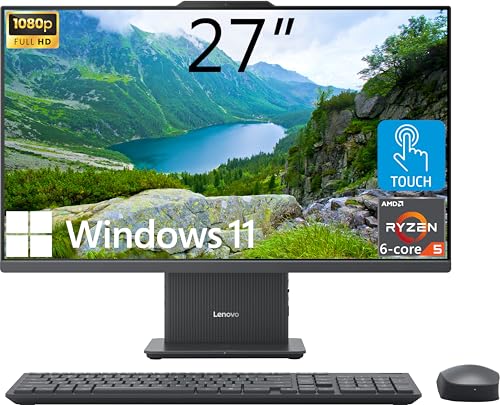
Lenovo IdeaCentre 27-Inch Ryzen 5 AIO
Best for: heavy multitasking with massive local file storage
- Memory
- 64GB RAM (what this guide is about)
- Processor
- AMD Ryzen 5 8645HS
- System Memory
- 64GB DDR5
- Storage Capacity
- 4TB SSD
- Screen Size
- 27"
- Display Resolution
- FHD (1920x1080)
This 27-inch all-in-one desktop pairs an AMD Ryzen 5 8645HS processor with 64GB of DDR5 RAM and a 4TB PCIe SSD. It features a Full HD touchscreen display with 300 nits of brightness. You get an integrated wireless charging base along with HDMI-in and HDMI-out connections. It suits you if you need massive local file storage alongside heavy multitasking capacity in a clean, single-cable desktop workspace.
Pros
- 64GB DDR5 memory paired with a 4TB PCIe M.2 SSD
- 6-core AMD Ryzen 5 8645HS processor with boost up to 5 GHz
- 27-inch IPS touchscreen with 99% sRGB coverage and 300 nits brightness
- Includes wireless charging base plus wireless keyboard and mouse
- Both HDMI-in and HDMI-out ports for display flexibility
Cons
- FHD 1920x1080 resolution is modest for a 27-inch display
- Comes with Windows 11 Home rather than Windows 11 Pro
Good fit if
- You run heavy memory workloads and store large files locally on a 4TB SSD.
- You want touchscreen interaction on a large 27-inch IPS workspace.
- You need HDMI-in to use the panel as an external monitor for another device.
Skip if
- You require higher display resolution than 1920x1080 across a 27-inch panel.
- You need Windows 11 Pro for domain management or business network features.
Verdict: Lenovo IdeaCentre 27" Touchscreen AIO delivers vast 4TB storage and 64GB DDR5 memory for intensive multitasking. Its AMD Ryzen 5 8645HS chip and versatile HDMI ports make it a capable centerpiece for demanding daily work.

Dell 24 All-in-One Touchscreen Desktop
Best for: high-capacity business multitasking and extensive local storage
- Memory
- 64GB RAM (what this guide is about)
- Processor
- Intel Core 7 150U
- System Memory
- 64 GB
- Storage Capacity
- 4 TB SSD
- Screen Size
- 23.8"
- Display Resolution
- Full HD
This Dell all-in-one desktop integrates a 23.8-inch Full HD touchscreen display with an Intel Core 7 150U processor. It pairs 64GB of DDR5 memory with a 4TB NVMe SSD, giving you vast local capacity and high multitasking bandwidth for data-heavy business workflows. It suits you if you need a space-saving workstation with Windows 11 Pro, modern Wi-Fi 6E connectivity, and massive onboard storage without external drives.
Pros
- Massive 4TB M.2 PCIe NVMe SSD
- High-speed 64GB DDR5 system memory
- 23.8-inch Full HD IPS touchscreen display
- 10-core Intel Core 7 150U processor
- Includes Wi-Fi 6E, Bluetooth 5.4, and Windows 11 Pro
Cons
- Uses integrated graphics rather than a dedicated GPU
- Display resolution capped at 1920x1080 Full HD
Good fit if
- You need extensive 4TB internal storage alongside 64GB RAM.
- You want a compact 23.8-inch touchscreen display for your workspace.
- You require Windows 11 Pro for business applications.
Skip if
- You require a dedicated graphics card for heavy 3D rendering or gaming.
- You prefer a larger 27-inch screen or higher than 1080p resolution.
Verdict: Dell 24-inch Touchscreen All-in-One PC delivers an exceptional combination of 64GB DDR5 RAM and 4TB SSD storage in a compact 23.8-inch profile. It is a capable choice for professionals who manage massive files and demanding multitasking without desk clutter.
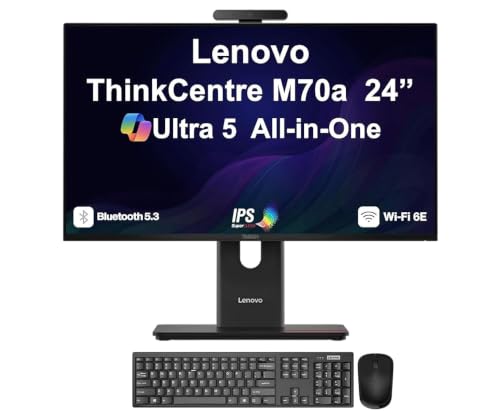
Lenovo ThinkCentre 24" Core Ultra 5 AIO
Best for: Compact desks requiring high-memory business computing
- Memory
- 64GB RAM (what this guide is about)
- Processor
- Ultra 5 245T vPro
- System Memory
- 64GB DDR5 SODIMM
- Storage Capacity
- 1TB PCIe NVMe SSD
- Screen Size
- 24"
- Display Resolution
- FHD (1920x1080)
This 24-inch all-in-one desktop pairs an Intel Core Ultra 5 245T vPro processor with 64GB of DDR5 memory and a 1TB NVMe SSD. Its compact 1080p IPS display features a 120Hz refresh rate, giving you smooth visuals during daily work. Integrated Intel graphics handle display output without a dedicated GPU. It suits you if you need heavy multitasking memory and modern processing in a space-saving business workstation.
Pros
- 64GB DDR5 memory paired with a 14-core Intel Core Ultra 5 245T processor
- 24-inch IPS 1080p display with a 120Hz refresh rate
- Includes HDMI, DisplayPort, Wi-Fi 6E, webcam, keyboard, and mouse
Cons
- Relies on integrated Intel graphics rather than a dedicated GPU
- Offers a smaller 24-inch viewing area than 27-inch models
- Comes configured with Windows 11 Home rather than Windows 11 Pro
Good fit if
- You want a 14-core Intel Core Ultra 5 processor backed by 64GB DDR5 RAM.
- You prefer a compact 24-inch workspace with a smooth 120Hz display.
- You need both HDMI and DisplayPort connections for peripheral displays.
Skip if
- You require a dedicated graphics card for 3D tasks or gaming.
- You prefer a larger 27-inch screen for your daily workflow.
- You need Windows 11 Pro out of the box for domain management.
Verdict: Lenovo ThinkCentre 24" Core Ultra 5 AIO delivers strong productivity through its 14-core processor, 64GB DDR5 RAM, and 120Hz IPS display. It provides modern processing and high memory capacity in a compact, desk-friendly design.

Lenovo IdeaCentre 27" AIO Core i7 4TB SSD
Best for: Large local storage and heavy multitasking
- Memory
- 64GB RAM (what this guide is about)
- Processor
- Intel Core i7-13620H
- System Memory
- 64 GB
- Storage Capacity
- 4 TB SSD
- Screen Size
- 27"
- Display Resolution
- Full HD
This Lenovo IdeaCentre all-in-one pairs an Intel Core i7-13620H processor with 64GB of DDR5 RAM and a 4TB SSD. The 27-inch Full HD IPS screen gives you a spacious workspace with anti-glare coating and hardware low blue light support. You get integrated dual 3W Harman speakers and bundled wireless peripherals. It suits you if you need massive local file storage alongside high-capacity system memory for dense multitasking without cable clutter.
Pros
- 64GB DDR5 system memory
- 4TB solid-state drive
- Intel Core i7-13620H processor
- Dual 3W Harman speaker system
- Includes wireless keyboard and mouse
Cons
- Full HD resolution yields lower pixel density on a 27-inch screen
- No touchscreen support listed
Good fit if
- You need 4TB of onboard SSD storage for local media and large data archives.
- You run memory-heavy workloads requiring 64GB of DDR5 RAM.
- You want a minimal setup with built-in speakers and wireless accessories.
Skip if
- You prefer higher display sharpness like 1440p or 4K on a 27-inch panel.
- You require a touchscreen display for input.
Verdict: Lenovo IdeaCentre 27" Core i7 64GB AIO delivers massive internal storage and high RAM capacity in a clean, cable-free form factor. It is a capable choice for intensive office multitasking and media management.

HP 27-Inch Core Ultra 7 All-in-One Desktop
Best for: heavy office multitasking on a touchscreen display
- Memory
- 64GB RAM (what this guide is about)
- Processor
- Intel Core Ultra 7 255U
- System Memory
- 64GB DDR5
- Screen Size
- 27"
- Display Resolution
- FHD
- Touchscreen
- Touchscreen
This HP all-in-one desktop pairs an Intel Core Ultra 7 255U processor with 64GB of DDR5 memory and a 1TB SSD. You get a 27-inch Full HD touchscreen display alongside modern connectivity like Wi-Fi 6, Bluetooth, and dual USB Type-C ports. Running Windows 11 Pro, it suits you if your daily office workflow requires heavy multitasking across multiple applications without sacrificing desk space to a separate tower.
Pros
- 64GB DDR5 RAM handles demanding multitasking workloads
- Intel Core Ultra 7 255U 12-core processor reaches up to 5.20 GHz
- 27-inch FHD interactive touchscreen
- Two USB Type-C and two USB 3.0 Type-A ports
- Pre-installed with Windows 11 Pro
Cons
- Display resolution tops out at FHD on a 27-inch screen
- Upgraded RAM and SSD are covered by a third-party warranty rather than the manufacturer
- Includes only one HDMI output port
Good fit if
- You run memory-heavy workloads that benefit from 64GB of DDR5 RAM.
- You prefer an interactive 27-inch touchscreen for navigation and work tasks.
- You need Windows 11 Pro pre-installed for office management features.
Skip if
- You need a higher screen resolution than 1080p on a 27-inch display.
- You prefer hardware where every internal component is covered solely by the original manufacturer warranty.
Verdict: HP 27" Core Ultra 7 Touchscreen All-in-One delivers 64GB of high-speed DDR5 memory and 12-core processing in a space-saving design. It offers substantial multitasking power and touchscreen convenience for busy office environments.

Lenovo IdeaCentre 27" AIO i7 64GB Desktop
Best for: heavy multitasking with dual-purpose monitor connectivity
- Memory
- 64GB RAM (what this guide is about)
- Processor
- Intel Core i7-13620H
- System Memory
- 64 GB
- Storage Capacity
- 2 TB SSD
- Screen Size
- 27"
- Touchscreen
- Non-touch
This Lenovo IdeaCentre all-in-one pairs a 10-core Intel Core i7-13620H processor with 64GB of DDR5 memory and a 2TB SSD. The 27-inch 100Hz 1080p display provides 99% sRGB coverage and includes dedicated HDMI input and output ports. It fits your workspace if you run memory-intensive office software, manage large file sets, and need dual-monitor capability or external display input without maintaining a separate computer tower.
Pros
- 64GB DDR5 RAM paired with a 2TB PCIe SSD
- 10-core Intel Core i7-13620H processor reaching up to 4.9 GHz
- 27-inch 100Hz IPS display with 99% sRGB color gamut
- Includes both HDMI-in and HDMI-out video ports
Cons
- Display lacks touchscreen functionality
- 1080p resolution offers lower pixel density across 27 inches
- Included keyboard and mouse connect via wired cables
Good fit if
- You need 64GB DDR5 memory and 2TB storage for large local datasets.
- You want HDMI-in to use the 27-inch panel as a standalone monitor.
- You require Windows 11 Pro for professional networking tools.
Skip if
- You need a touchscreen interface for your daily tasks.
- You require higher than 1080p resolution on a 27-inch display.
- You prefer out-of-the-box wireless peripherals to clear cable clutter.
Verdict: Lenovo IdeaCentre 27" Core i7 AIO Desktop delivers 64GB of DDR5 memory, a 10-core H-series processor, and flexible HDMI connectivity in a compact form factor. It balances heavy multitasking throughput with clean, single-screen desk organization.

Dell 27" AIO Core 7 64GB RAM
Best for: Designers needing 64GB RAM and color accuracy
- Memory
- 64GB RAM (what this guide is about)
- Processor
- Intel Core 7 Processor 150U
- System Memory
- 64 GB DDR5 RAM
- Storage Capacity
- 1 TB SSD
- Screen Size
- 27"
- Display Resolution
- Full HD
The Dell 27-inch all-in-one desktop pairs a Core 7 150U processor with 64GB of DDR5 RAM and a 1TB SSD. Its 27-inch FHD IPS display covers 99% sRGB, making it suitable for graphic design and content creation. The 5MP pop-up privacy camera and Dolby Atmos audio support video calls and media consumption. This configuration offers ample memory for multitasking and storage for large creative files.
Pros
- 64GB DDR5 RAM for heavy multitasking
- 27-inch FHD IPS display with 99% sRGB coverage
- 5MP IR pop-up privacy camera with HDR
- 1TB PCIe SSD for fast storage access
- WiFi 6E and dual HDMI ports
Cons
- 1TB storage is smaller than some competitors offering 2TB
- FHD resolution is lower than 4K options
- 27-inch screen size is smaller than larger business AIOs
Good fit if
- You need 64GB RAM for virtual machines or video editing
- You want a 27-inch display with accurate color for design work
- You require a physical privacy camera for secure video calls
Skip if
- You need 4K resolution for detailed image work
- You require more than 1TB of internal storage
- You prefer a smaller 24-inch footprint
Verdict: Dell 27" AIO Core 7 64GB is a strong option for designers and creators who prioritize color accuracy and massive multitasking memory in a mid-size form factor.

Acer Aspire 27" Ryzen 7 All-in-One
Best for: smooth 120Hz multitasking and high-memory productivity
- Memory
- 64GB RAM (what this guide is about)
- Processor
- AMD Ryzen 7 5825U
- System Memory
- 64 GB
- Storage Capacity
- 2 TB SSD
- Screen Size
- 27"
- Display Resolution
- FHD
This Acer Aspire all-in-one desktop integrates a 27-inch 120Hz FHD IPS display with an AMD Ryzen 7 5825U processor. Configured with 64GB of DDR4 memory and a 2TB PCIe SSD, it supplies substantial RAM and responsive solid-state capacity for heavy multitasking and office workloads. It suits you if you need extensive desktop screen space and memory for large datasets without adding a separate tower.
Pros
- 64GB DDR4 RAM paired with 2TB PCIe M.2 SSD
- 27-inch FHD IPS panel features 120Hz refresh rate
- Wi-Fi 6E and Bluetooth 5.2 wireless networking
- Dual-display expansion via HDMI and DisplayPort
Cons
- Display does not support touch input
- Uses DDR4 memory instead of DDR5 standard
- Pre-installed with Windows 11 Home rather than Pro
Good fit if
- You want 64GB RAM and 2TB storage in an integrated, single-cable footprint.
- You prefer a 120Hz refresh rate for smoother daily desktop motion.
- You need dual-monitor connectivity options alongside six USB ports.
Skip if
- You require a touchscreen interface for your workflow.
- You specifically need current-generation DDR5 memory bandwidth.
Verdict: Acer Aspire 27" Ryzen 7 All-in-One PC pairs 64GB of RAM and a 2TB SSD with a fluid 120Hz FHD screen for high-capacity desktop multitasking. It delivers broad port connectivity and wireless networking in a single compact footprint.
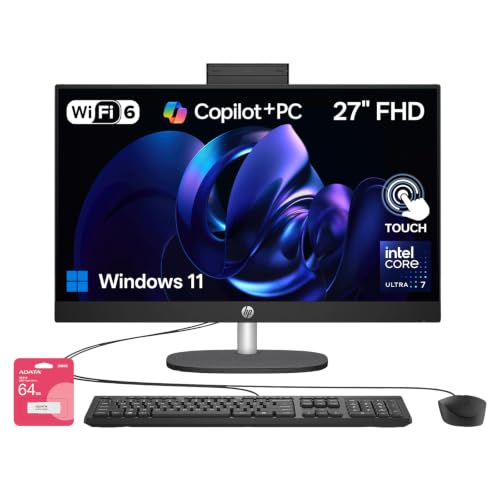
HP 27-Inch Touchscreen All-in-One Desktop
Best for: multitasking on a large touch-enabled workspace
- Memory
- 64GB RAM (what this guide is about)
- Processor
- Intel Core Ultra 7 255U
- System Memory
- 64GB DDR5
- Storage Capacity
- 2TB SSD
- Screen Size
- 27"
- Display Resolution
- Full HD
This HP 27-inch all-in-one desktop combines an Intel Core Ultra 7 155U processor with 64GB of RAM and a 2TB SSD. The system features a Full HD touchscreen display, wired peripherals, and Windows 11 Home. You get Ethernet, HDMI, and USB-C connectivity directly built in. This configuration suits you if you need extensive memory and local solid-state storage for heavy multitasking without setting up a separate desktop tower.
Pros
- 64GB RAM paired with 2TB SSD storage
- 27-inch Full HD touchscreen display
- Intel Core Ultra 7 155U processor
- Included wired keyboard and mouse
- Dedicated USB-C, HDMI, and RJ-45 Ethernet ports
Cons
- Full HD resolution on a 27-inch panel
- Original seal opened by third party for hardware upgrades
- Includes Windows 11 Home instead of Windows 11 Pro
Good fit if
- You need 64GB RAM and 2TB storage in a single space-saving chassis.
- You want direct touch navigation on a large 27-inch display.
- You prefer bundled wired peripherals ready out of the box.
Skip if
- You want higher resolution than 1080p on a 27-inch monitor.
- You require factory-sealed components directly from the manufacturer.
Verdict: HP 27" Core Ultra 7 Touchscreen All-in-One delivers 64GB RAM, 2TB SSD capacity, and direct touch navigation in a single uncluttered package. It provides ample memory and storage for demanding everyday workloads without a separate tower.

Lenovo IdeaCentre 27" AIO i7 64GB RAM 4TB SSD
Best for: Large local storage and heavy productivity multitasking
- Memory
- 64GB RAM (what this guide is about)
- Processor
- Intel Core i7-13620H
- System Memory
- 64GB DDR5
- Storage Capacity
- 4TB SSD
- Screen Size
- 27"
- Display Resolution
- Full HD
View on Amazon: Lenovo IdeaCentre 27" AIO i7 64GB RAM 4TB SSD
This Lenovo all-in-one desktop pairs a 10-core Intel Core i7-13620H processor with 64GB of DDR5 memory and a 4TB solid-state drive. Built around a 27-inch 1080p IPS display, it gives you generous screen space and high-capacity storage for heavy document handling and data tasks. It suits you if you need extensive local file space alongside modern memory capacity inside a single clean desktop footprint.
Pros
- High-capacity 4TB SSD storage
- Fast 64GB DDR5 memory paired with a 10-core Core i7-13620H
- Both HDMI-in and HDMI-out ports included
- 99% sRGB color coverage on an anti-glare IPS screen
Cons
- Full HD 1080p resolution rather than 1440p or 4K on a 27-inch screen
- No touchscreen support listed
Good fit if
- You need massive 4TB local storage alongside 64GB of DDR5 RAM.
- You want HDMI-in to use the 27-inch monitor with external devices.
Skip if
- You require higher than 1080p resolution on a 27-inch panel.
- You prefer a touchscreen interface for your daily workflow.
Verdict: Lenovo IdeaCentre 27" Core i7 AIO Desktop delivers expansive 4TB SSD storage and 64GB DDR5 RAM for demanding business workflows, though its display tops out at 1080p resolution.

HP Pavilion 27 Touchscreen 4TB SSD All-in-One
Best for: large local storage and heavy multitasking
- Memory
- 64GB RAM (what this guide is about)
- Processor
- Intel Core i7
- System Memory
- 64 GB
- Storage Capacity
- 4 TB SSD
- Screen Size
- 27"
- Display Resolution
- FullHD
View on Amazon: HP Pavilion 27 Touchscreen 4TB SSD All-in-One
This HP Pavilion 27-inch all-in-one pairs an Intel Core i7 processor with 64GB of RAM and a spacious 4TB solid-state drive. You get a 10-point touchscreen IPS display at 1080p resolution, dual HDMI ports for input and output, and Windows 11 Pro preinstalled. It suits users who manage large local file libraries and want smooth multitasking in a streamlined workspace.
Pros
- Spacious 4TB solid-state drive for extensive local storage
- 64GB RAM supports heavy multitasking
- 27-inch 10-point touchscreen IPS panel
- HDMI in and HDMI out ports for external display flexibility
- Integrated HP Wide Vision 5MP webcam
Cons
- Display capped at 1080p Full HD resolution across 27 inches
- Limited to Wi-Fi 5 rather than newer wireless standards
Good fit if
- You need high local storage capacity alongside 64GB of RAM.
- You want an all-in-one with both HDMI input and HDMI output options.
- You need a sharp 5MP integrated camera for video calls.
Skip if
- You require higher display clarity than 1080p on a 27-inch panel.
- You need the faster speeds and lower latency of Wi-Fi 6 or newer.
Verdict: HP Pavilion 27" Touchscreen All-in-One delivers massive 4TB storage and 64GB RAM for demanding multitasking. Its versatile HDMI input and output make it a flexible workstation if 1080p resolution fits your visual needs.

Dell 27 Touchscreen AIO (Intel Core 7, MX570A)
Best for: multitasking office work needing entry-level discrete graphics
- Memory
- 64GB RAM (what this guide is about)
- Processor
- Intel 7-150U
- System Memory
- 64GB
- Storage Capacity
- 1TB SSD
- Screen Size
- 27"
- Display Resolution
- Full HD
View on Amazon: Dell 27 Touchscreen AIO (Intel Core 7, MX570A)
This Dell 27 all-in-one desktop pairs an Intel Core 7 150U 10-core processor with 64GB of RAM and a dedicated GeForce MX570A graphics card. You get a 27-inch Full HD touchscreen display and a 1TB SSD for daily storage. It comes with Windows 11 Pro and bundled wireless peripherals. This setup suits you if you need high memory capacity, dedicated graphics acceleration for light visual workloads, and a clean desktop workspace.
Pros
- Intel Core 7 150U processor with 10 cores and 12 threads
- 64GB RAM supports heavy multitasking and large datasets
- Dedicated GeForce MX570A GPU with 2GB GDDR6 VRAM
- 27-inch Full HD IPS touchscreen display
- Includes Dell Pro wireless keyboard and mouse
Cons
- 1080p resolution yields lower pixel density on a 27-inch display
- 2GB VRAM limits graphics workloads to basic acceleration
- 1TB internal storage is lower than multi-terabyte alternatives
Good fit if
- You run memory-heavy productivity tools alongside light GPU-accelerated applications.
- You want a large 27-inch touchscreen with Windows 11 Pro included.
- You prefer bundled wireless peripherals ready out of the box.
Skip if
- You need 1440p or 4K resolution for sharp high-density design work.
- You require more than 1TB of local SSD storage from the start.
Verdict: Dell 27 Touchscreen AIO (Intel Core 7, MX570A) combines massive 64GB system memory with entry-level discrete graphics for multitasking office setups. Its 1080p panel limits fine display sharpness, but the hardware package easily handles demanding business software.

Dell Inspiron 27" Touchscreen All-in-One
Best for: storage-heavy multitasking and business productivity
- Memory
- 64GB RAM (what this guide is about)
- Processor
- Intel Core i7-1355U
- System Memory
- 64GB DDR4 RAM
- Storage Capacity
- 4TB PCIe SSD
- Screen Size
- 27"
- Display Resolution
- FHD
This Dell Inspiron 27-inch all-in-one desktop combines a 10-core Intel Core i7-1355U processor with 64GB of DDR4 RAM and a 4TB PCIe SSD. You get dedicated GeForce MX550 graphics and a full HD touchscreen panel running Windows 11 Pro. It suits you if you handle extensive multitasking, large local file libraries, and business workloads without needing a separate desktop tower.
Pros
- 64GB DDR4 RAM for heavy multitasking
- 4TB PCIe SSD storage
- Dedicated Nvidia GeForce MX550 graphics
- 27-inch FHD touchscreen
Cons
- Display resolution capped at 1080p FHD
- Uses DDR4 memory rather than DDR5
Good fit if
- You need massive local storage alongside 64GB of RAM.
- You prefer an interactive 27-inch touchscreen for daily tasks.
- You want entry-level dedicated graphics for business applications.
Skip if
- You require a sharper 1440p or 4K resolution on a 27-inch screen.
- You need faster DDR5 memory speeds for your workloads.
Verdict: Dell Inspiron 27" Touchscreen All-in-One delivers massive 4TB storage and dedicated MX550 graphics for heavy office productivity. It balances large memory capacity with touchscreen utility, though the panel remains limited to FHD resolution.
Specifications side by side
| Spec | Lenovo IdeaCentre 27-Inch Ryzen 5 AIO | Dell 24 All-in-One Touchscreen Desktop | Lenovo ThinkCentre 24" Core Ultra 5 AIO | Lenovo IdeaCentre 27" AIO Core i7 4TB SSD | HP 27-Inch Core Ultra 7 All-in-One Desktop | Lenovo IdeaCentre 27" AIO i7 64GB Desktop | Dell 27" AIO Core 7 64GB RAM | Acer Aspire 27" Ryzen 7 All-in-One | HP 27-Inch Touchscreen All-in-One Desktop | Lenovo IdeaCentre 27" AIO i7 64GB RAM 4TB SSD | HP Pavilion 27 Touchscreen 4TB SSD All-in-One | Dell 27 Touchscreen AIO (Intel Core 7, MX570A) | Dell Inspiron 27" Touchscreen All-in-One |
|---|---|---|---|---|---|---|---|---|---|---|---|---|---|
| Processor | AMD Ryzen 5 8645HS | Intel Core 7 150U | Ultra 5 245T vPro | Intel Core i7-13620H | Intel Core Ultra 7 255U | Intel Core i7-13620H | Intel Core 7 Processor 150U | AMD Ryzen 7 5825U | Intel Core Ultra 7 255U | Intel Core i7-13620H | Intel Core i7 | Intel 7-150U | Intel Core i7-1355U |
| System Memory | 64GB DDR5 | 64 GB | 64GB DDR5 SODIMM | 64 GB | 64GB DDR5 | 64 GB | 64 GB DDR5 RAM | 64 GB | 64GB DDR5 | 64GB DDR5 | 64 GB | 64GB | 64GB DDR4 RAM |
| Storage Capacity | 4TB SSD | 4 TB SSD | 1TB PCIe NVMe SSD | 4 TB SSD | not specified | 2 TB SSD | 1 TB SSD | 2 TB SSD | 2TB SSD | 4TB SSD | 4 TB SSD | 1TB SSD | 4TB PCIe SSD |
| Screen Size | 27" | 23.8" | 24" | 27" | 27" | 27" | 27" | 27" | 27" | 27" | 27" | 27" | 27" |
| Display Resolution | FHD (1920x1080) | Full HD | FHD (1920x1080) | Full HD | FHD | not specified | Full HD | FHD | Full HD | Full HD | FullHD | Full HD | FHD |
| Graphics | not specified | Intel Integrated Graphics | Intel Graphics | not specified | not specified | not specified | not specified | not specified | not specified | not specified | not specified | GeForce MX570A | GeForce MX550 |
| Touchscreen | Touchscreen | Touchscreen | not specified | not specified | Touchscreen | Non-touch | not specified | Non-touch | Touchscreen | not specified | Touchscreen | Touchscreen | Touchscreen |
| Operating System | Windows 11 Home | Windows 11 Pro | Windows 11 Home-64 | not specified | Windows 11 Pro | Windows 11 Pro | not specified | Windows 11 Home | Windows 11 Home | Windows 11 Pro | Win 11 PRO | Windows 11 Pro | Windows 11 Pro |
| Memory | 64GB RAM | 64GB RAM | 64GB RAM | 64GB RAM | 64GB RAM | 64GB RAM | 64GB RAM | 64GB RAM | 64GB RAM | 64GB RAM | 64GB RAM | 64GB RAM | 64GB RAM |
| Storage | 4TB SSD | 4TB SSD | 1TB SSD | 4TB SSD | 1TB SSD | 2TB SSD | 1TB SSD | 2TB SSD | 2TB SSD | 4TB SSD | 4TB SSD | 1TB SSD | not specified |
| Use | not specified | not specified | Business | not specified | not specified | not specified | not specified | Business | Business | Business | not specified | not specified | Business |
| Display Feature | Touchscreen | Touchscreen | not specified | not specified | not specified | not specified | not specified | not specified | Touchscreen | not specified | Touchscreen | Touchscreen | Touchscreen |
| Dimensions | 24.1 × 7.55 × 18.6 inches | not specified | not specified | 24.1 × 7.55 × 18.6 inches | 7.34 × 24.1 × 20.4 inches | not specified | not specified | 6.43 × 24.2 × 18 inches | 7.34 × 24.1 × 20.4 inches | 24.1 × 7.55 × 18.6 inches | 24.1 × 8.19 × 18.7 inches | 24.3 × 7.2 × 18.7 inches | 24.2 × 17.8 × 7.9 inches |
| Weight | not specified | not specified | not specified | not specified | 12.2 pounds | not specified | not specified | 8.82 pounds | 12.2 pounds | not specified | 19.6 pounds | 22.9 pounds | not specified |
| Size | 64GB RAM | 4TB SSD | 64GB RAM|4TB SSD | 64GB RAM | 1TB SSD | not specified | 64GB RAM | 1TB SSD | 64GB RAM | 2TB SSD | not specified | 64GB RAM | 2TB SSD | 64GB RAM | 2TB SSD | 64GB RAM | 4TB SSD | not specified | 7-150U | 64GB RAM | 1TB SSD | not specified |
| Model | IdeaCentre | 24 | ThinkCentre | LENOVO AIO i7-13620H | TPC-Q095-27 | 27IRH9 | Business Desktop | AC27R7 | TPC-Q095-27 | F0HM10TQAK | HP PAVILION 27 EXTREME | Dell 27 | 27 7710 |
| Color | not specified | not specified | not specified | not specified | Black | 27" | i7-13620H | White | not specified | Black | not specified | Sparkling Black | White | White |
If you plan to assemble a tower instead, compare specifications across best ddr4 RAMs for desktop.
Choose the right specs for your needs
-
Check the processor type
The CPU determines how quickly your computer handles tasks. Some models use AMD Ryzen chips, while others rely on Intel Core processors. For example, the Lenovo IdeaCentre 27-Inch Ryzen 5 AIO uses a Ryzen 5 8645HS chip. This processor is designed for demanding daily work and heavy multitasking. You should compare the specific processor model in each listing. A higher-end chip will manage multiple applications more smoothly. Ensure the processor matches your workload intensity before purchasing.
-
Evaluate storage capacity
Storage space holds your files, photos, and programs. Most listed models offer 1TB to 4TB of SSD storage. The Lenovo IdeaCentre 27-Inch Ryzen 5 AIO includes 4TB of storage. This is ideal if you keep massive local files on the device. Smaller capacities like 1TB may fill up quickly with large datasets. You should check the storage size to ensure it meets your long-term needs. SSDs provide faster access times than older hard drives.
-
Consider screen size
Screen size affects your workspace and desk footprint. Options range from 24-inch to 27-inch displays. The Dell 24 All-in-One Touchscreen Desktop offers a compact 23.8-inch profile. This is suitable for professionals with limited desk space. Larger 27-inch models provide more room for multitasking windows. You should measure your desk area before deciding. A larger screen does not always mean more productivity if space is tight.
-
Look for touchscreen features
Touchscreen displays allow direct interaction with the interface. Many models in this list include this feature. The HP 27-Inch Touchscreen All-in-One Desktop enables direct navigation. This can be useful for designers or users who prefer tactile control. However, not all models have touch capability. You should verify if the screen supports touch input. This feature adds convenience but may not be essential for all workflows.
-
Review the operating system
The operating system determines software compatibility and security. Most units run Windows 11, but the edition varies. The Dell 24 All-in-One uses Windows 11 Pro. This version offers advanced business features and security tools. Other models may include Windows 11 Home. You should choose the edition that matches your professional needs. Pro versions often provide better management tools for business environments.
Frequently asked questions
Which all in one desktop has the most storage with 64GB RAM?
Several models in this list offer 4TB SSD storage alongside 64GB of RAM. The Lenovo IdeaCentre 27-Inch Ryzen 5 AIO and the Dell 24 All-in-One both provide this massive capacity. The Lenovo IdeaCentre 27" AIO Core i7 also includes 4TB of storage. These systems allow you to keep extensive local files without needing external drives.
Do these 64GB RAM AIOs include touchscreens?
Many of the listed models feature touchscreen displays for direct interaction. The Lenovo IdeaCentre 27-Inch Ryzen 5 AIO and the Dell 24 All-in-One both include this feature. The HP 27-Inch Touchscreen All-in-One Desktop and the Lenovo ThinkCentre 24" Core Ultra 5 AIO also support touch input. This allows you to navigate your workspace directly on the screen.
What is the difference between the Lenovo IdeaCentre and ThinkCentre models?
The Lenovo IdeaCentre 27-Inch Ryzen 5 AIO focuses on heavy multitasking with 4TB storage and a Ryzen 5 processor. The Lenovo ThinkCentre 24" Core Ultra 5 AIO targets compact desks with a 14-core processor and a 120Hz IPS display. Both include 64GB of RAM, but the ThinkCentre offers a smaller footprint and faster refresh rate.
Are there options with discrete graphics for design work?
Yes, some models include dedicated graphics cards for design tasks. The Dell Inspiron 27" Touchscreen All-in-One features an MX550 GPU. The Dell 27 Touchscreen AIO uses an MX570A graphics chip. These discrete options help handle demanding creative software, though the display resolution on these specific units remains at 1080p.
Which model runs Windows 11 Pro?
Several systems come pre-installed with Windows 11 Pro for business features. The Dell 24 All-in-One, the Lenovo IdeaCentre 27" AIO i7 with 2TB SSD, and the HP Pavilion 27 Touchscreen all include this operating system. The Lenovo IdeaCentre 27" AIO i7 with 4TB SSD also ships with Windows 11 Pro. This version offers advanced security and management tools.
How much do these 64GB RAM all in ones weigh?
Weight varies significantly by brand and size. The Acer Aspire 27" Ryzen 7 All-in-One weighs 8.82 pounds. The HP 27-Inch Core Ultra 7 All-in-One Desktop weighs 12.2 pounds. The HP Pavilion 27 Touchscreen model is heavier at 19.6 pounds. The Dell 27 Touchscreen AIO with MX570A is the heaviest at 22.9 pounds.
Is there a 120Hz display option in this list?
Yes, the Lenovo ThinkCentre 24" Core Ultra 5 AIO features a 120Hz IPS display. The Acer Aspire 27" Ryzen 7 All-in-One also offers a fluid 120Hz FHD screen. These higher refresh rates provide smoother motion for multitasking and media consumption compared to standard 60Hz panels found on other models in this group.