Best Apple All-In-One Desktops: 12 Models Compared
As an Amazon Associate we earn from qualifying purchases. Links on this page are affiliate links.
These are the best apple all in one desktops available from Apple. We compared 12 models based strictly on the specifications published on their listings. Apple offers compact all-in-one units with screen sizes ranging from 21.5 to 27 inches. The lineup includes modern Apple Silicon models and older Intel-based systems. The Apple iMac 24-Inch M1 Desktop leads this group. It is the top pick for everyday productivity and high-resolution media tasks.
Quick picks
Our 12 picks

Apple iMac 24-Inch M1 Desktop
Best for: everyday productivity and high-resolution media tasks
- Processor
- Apple M1
- System Memory
- 8GB
- Storage Capacity
- 512GB SSD
- Screen Size
- 24-inch
- Display Resolution
- 4.5K Retina
- Graphics
- 8-core GPU
This Apple all-in-one desktop combines an eight-core M1 processor, an eight-core GPU, and 512GB of solid-state storage inside a 24-inch chassis. Its 4.5K Retina display outputs 500 nits of brightness across a P3 wide color gamut. You get 8GB of system memory alongside integrated speakers and a 1080p webcam. It suits you if you want a compact workstation with high-resolution visual output for everyday computing and creative tasks.
Pros
- 24-inch 4.5K Retina display with 500 nits brightness
- Apple M1 chip with 8-core CPU and 8-core GPU
- 512GB solid-state storage capacity
- Integrated 1080p FaceTime HD camera and six-speaker audio
Cons
- Fixed 8GB system memory cannot be upgraded later
- Port selection limited to Thunderbolt / USB 4 and USB 3
Good fit if
- You need a color-accurate 4.5K Retina display in a compact footprint.
- You want 512GB of built-in SSD storage for applications and files.
- You prefer an all-in-one setup with integrated audio, microphones, and camera.
Skip if
- You require more than 8GB of RAM for demanding workflows.
- You need a screen size larger than 24 inches.
Verdict: Apple 24-inch iMac M1 512GB delivers reliable everyday processing with an 8-core M1 chip, 512GB SSD, and sharp 4.5K display. It provides a clean single-cord workspace for users who do not need heavy memory configurations.

Apple iMac 24-Inch M4 All-in-One
Best for: everyday productivity and compact home office setups
- Processor
- Apple M4 (8-core CPU)
- System Memory
- 16GB Unified Memory
- Storage Capacity
- 256GB SSD
- Screen Size
- 24-inch
- Display Resolution
- 4.5K Retina
- Graphics
- 8-core GPU
This 24-inch all-in-one desktop runs on Apple's M4 chip with an 8-core CPU and 8-core GPU. It includes 16GB of unified memory, a 256GB SSD, and a 4.5K Retina display rated for 500 nits of brightness. You also get a 12MP Center Stage camera alongside a six-speaker sound system. It suits you if you need strong everyday performance, reliable multitasking, and a sharp screen without adding a separate computer tower.
Pros
- Apple M4 chip with 8-core CPU and 8-core GPU
- 24-inch 4.5K Retina display with 500 nits brightness
- 16GB unified memory for responsive multitasking
- 12MP Center Stage camera and six-speaker sound system
Cons
- Base internal storage capacity is limited to 256GB
- Comes with the 8-core GPU rather than the 10-core option
Good fit if
- You need 16GB of unified memory for productivity and creative software.
- You want a high-resolution 4.5K display and webcam integrated into one machine.
- You use an iPhone and want features like iPhone Mirroring on macOS.
Skip if
- You require more than 256GB of onboard storage for local files.
- You need the extra processing headroom of a 10-core GPU.
Verdict: Apple 24-inch iMac M4 8-Core delivers balanced everyday desktop capability with its 16GB memory baseline and crisp 4.5K Retina panel. It handles general productivity and multimedia tasks efficiently without requiring separate desktop components.

Apple iMac 21.5-Inch Core i5 All-in-One
Best for: everyday computing on a compact macOS desktop
- Processor
- 2.7GHz Core i5
- System Memory
- 8GB
- Storage Capacity
- 256GB Solid State Drive
- Screen Size
- 21.5in
- Operating System
- MacOS 10.12 Sierra
- Dimensions
- 27 × 11 × 24 inches
This Apple all-in-one desktop features a 21.5-inch display and runs on an Intel Core i5 processor clocked at 2.7GHz. You get 8GB of system memory alongside a 256GB solid-state drive for local storage. It comes installed with MacOS 10.12 Sierra and weighs 12.5 pounds in a silver chassis. This setup suits you if you need a compact macOS workstation for everyday computing and moderate file storage.
Pros
- 2.7GHz Intel Core i5 processor
- 256GB solid-state drive
- 21.5-inch integrated screen
- 8GB system memory
Cons
- Ships with older MacOS 10.12 Sierra
- 256GB storage capacity limits local file space
- May include generic accessories and packaging
Good fit if
- You want a compact 21.5-inch all-in-one form factor.
- You need 8GB of memory for everyday desktop tasks.
- You prefer an Intel Core i5 processor paired with solid-state storage.
Skip if
- You require a newer operating system out of the box than MacOS 10.12 Sierra.
- You need more than 256GB of internal storage.
- You want original factory accessories instead of generic replacements.
Verdict: Apple iMac 21.5-Inch Core i5 provides a 2.7GHz processor, 8GB of memory, and a 256GB solid-state drive in an integrated desktop package. It gives you a functional macOS workstation for daily use within a silver all-in-one form factor.

Apple iMac 24-Inch M4 10-Core GPU
Best for: heavy multitasking and creative macOS workflows
- Processor
- Apple M4
- System Memory
- 24GB
- Storage Capacity
- 512GB SSD
- Screen Size
- 24-inch
- Display Resolution
- 4.5K Retina
- Graphics
- 10-core GPU
This Apple all-in-one desktop pairs an M4 chip featuring a 10-core CPU and 10-core GPU with 24GB of unified memory and a 512GB SSD. Its 24-inch 4.5K Retina display outputs 500 nits of brightness. You also get a 12MP Center Stage camera and a six-speaker audio setup. It suits you if you need top-tier processing power and memory capacity for multitasking in macOS without attaching a separate desktop tower.
Pros
- M4 chip with 10-core CPU and 10-core GPU
- 24GB unified memory for heavy multitasking
- 24-inch 4.5K Retina display with 500 nits brightness
- 12MP Center Stage camera with six-speaker audio system
Cons
- Screen size limited to 24 inches
- 512GB onboard storage may require external drives for large media libraries
Good fit if
- You want 24GB of unified memory for intensive multitasking.
- You need a color-accurate 4.5K display and a 12MP webcam built into one compact body.
- You require the 10-core GPU configuration for graphics workloads.
Skip if
- You need a display larger than 24 inches.
- You require more than 512GB of internal storage.
Verdict: Apple iMac 24-Inch M4 24GB RAM delivers high unified memory and 10-core processing in a compact all-in-one format. It handles demanding macOS tasks smoothly without the footprint of a traditional tower.

Apple iMac 21.5-Inch Core i5 Desktop
Best for: everyday office tasks and basic home computing
- Processor
- Intel Core i5-7360U
- System Memory
- 8GB DDR4
- Storage Capacity
- 1TB HDD
- Screen Size
- 21.5-inch
- Display Resolution
- 1920x1080
- Graphics
- Intel Iris Plus Graphics 640
The Apple iMac 21.5-Inch Intel Core i5 1TB is an all-in-one desktop featuring a 1920x1080 display, a dual-core Intel Core i5-7360U processor, and 8GB of DDR4 memory. It offers 1TB of mechanical storage and multiple ports, including four USB 3.0 and two Thunderbolt connections. You get an integrated Mac OS X workstation suited for basic daily tasks, school work, and office duty.
Pros
- Large 1TB mechanical hard drive capacity
- Full HD 1920x1080 21.5-inch LED-backlit display
- Four USB 3.0 ports and two Thunderbolt ports
- Includes Gigabit Ethernet, 802.11n Wi-Fi, and Bluetooth 4.2
Cons
- Dual-core processor design limits multi-threaded speeds
- Traditional mechanical hard drive rather than solid-state storage
- Screen limited to 1080p resolution rather than Retina 4K or 5K
Good fit if
- You need a compact all-in-one setup for basic web browsing and schoolwork.
- You want 1TB of built-in storage for local files without external drives.
- You require wired networking via a dedicated Gigabit Ethernet port.
Skip if
- You need rapid application loading and boot times offered by solid-state drives.
- You run multi-threaded workloads that require more than two processor cores.
- You want a high-density Retina 4K or 5K resolution display.
Verdict: Apple iMac 21.5-Inch Intel Core i5 1TB serves as a practical desktop entry point with its 1080p screen and extensive connectivity. Its dual-core processor and mechanical drive make it strictly suited for lighter everyday duties.

Apple iMac 27-Inch Retina 5K Core i5
Best for: high-resolution 5K screen workspace and high storage
- Processor
- 3.2 GHz Intel Core i5
- System Memory
- 8GB DDR3
- Storage Capacity
- 1TB Fusion Drive
- Screen Size
- 27-Inch
- Display Resolution
- Retina 5K
- Graphics
- AMD Radeon R9 M390
This renewed Apple all-in-one desktop pairs a 27-inch Retina 5K display with a 3.2 GHz quad-core Intel Core i5 processor and AMD Radeon R9 M390 graphics. You get 8GB of DDR3 RAM and a 1TB Fusion Drive running Mac OS X. It suits you if you prioritize maximum screen resolution and ample storage space over the newest system architecture.
Pros
- 27-inch Retina 5K display
- AMD Radeon R9 M390 dedicated graphics
- 1TB Fusion Drive storage capacity
- 3.2 GHz quad-core Intel Core i5 processor
Cons
- Uses DDR3 memory rather than newer RAM standards
- Fusion Drive storage instead of a dedicated solid-state drive
- Base memory limited to 8GB
Good fit if
- You need a large 27-inch Retina 5K display for your workspace.
- You want 1TB of built-in storage for your files and applications.
- You prefer dedicated AMD Radeon graphics hardware.
Skip if
- You require an Apple silicon chip or unified memory.
- You want an all-flash solid-state drive.
- You need more than 8GB of system memory out of the box.
Verdict: Apple 27-Inch iMac Retina 5K Core i5 provides high-resolution 5K viewing and dedicated AMD graphics for visual desktop tasks. Its Intel Core i5 processor and 1TB storage handle standard daily workflows.

Apple iMac 21.5-Inch Core i5 Desktop
Best for: compact everyday macOS desktop tasks
- Processor
- 2.3GHz Intel Core i5
- System Memory
- 8GB
- Storage Capacity
- 256GB SSD
- Screen Size
- 21.5-inch
- Dimensions
- 6.9 × 20.8 × 17.7 inches
- Weight
- 21 pounds
This Apple all-in-one desktop pairs a 21.5-inch display with a 2.3GHz Intel Core i5 processor. You get 8GB of system memory alongside 256GB of solid-state storage. The silver chassis measures 20.8 inches wide and 17.7 inches tall, keeping your desk footprint contained. It suits you if you need a basic macOS workstation for everyday office software, web browsing, and simple daily computing tasks.
Pros
- 256GB SSD provides faster storage access than mechanical drives
- Compact 21.5-inch form factor fits smaller workspaces
- 8GB RAM handles standard desktop multitasking
Cons
- Included accessories are non-original third-party items
- 256GB internal capacity offers limited file headroom
- Unit weighs 21 pounds despite its compact screen size
Good fit if
- You need a compact 21.5-inch Apple workstation for general office applications.
- You want solid-state storage responsiveness for daily tasks.
Skip if
- You require original Apple-branded accessories directly in the box.
- You store large media libraries that exceed 256GB.
Verdict: Apple 21.5-inch iMac Intel Core i5 256GB SSD delivers a compact macOS setup for standard everyday computing. Its solid-state drive keeps system responsiveness steady, though internal capacity and third-party accessories limit heavier production use.

Apple 24-inch iMac M3 (Renewed)
Best for: everyday productivity on a 4.5K display
- Processor
- Apple M3
- System Memory
- 8GB
- Storage Capacity
- 256GB SSD
- Screen Size
- 24-inch
- Display Resolution
- 4.5K Retina
- Dimensions
- 21.5 × 5.79 × 18.2 inches
This renewed all-in-one desktop pairs an Apple M3 processor with a 24-inch 4.5K Retina display. You get 8GB of unified memory, a 256GB solid-state drive, a 1080p FaceTime HD camera, and a six-speaker sound system with Spatial Audio. The screen delivers 500 nits of brightness across a 23.5-inch viewable area. It suits you if you need a compact, modern workstation for everyday tasks, media streaming, and general office productivity.
Pros
- Apple M3 processor
- 24-inch 4.5K Retina display with 500 nits brightness
- 1080p FaceTime HD camera with studio-quality three-mic array
- Six-speaker sound system with Spatial Audio
Cons
- Base 8GB system memory
- 256GB solid-state drive storage capacity
- Renewed model may include non-original accessories and generic packaging
Good fit if
- You want an Apple M3 desktop with a built-in 4.5K Retina display.
- You need integrated 1080p video calling and a multi-mic array for daily work.
- You only require 256GB of local storage for standard productivity.
Skip if
- You need more than 8GB of system memory for demanding workflows.
- You require more than 256GB of internal storage space.
- You require original Apple retail packaging and accessories.
Verdict: Apple 24-inch iMac M3 8GB 256GB delivers modern M3 processing and a bright 4.5K Retina display in a compact desktop profile. It handles general productivity and multimedia tasks well if you do not need expanded memory or local storage.
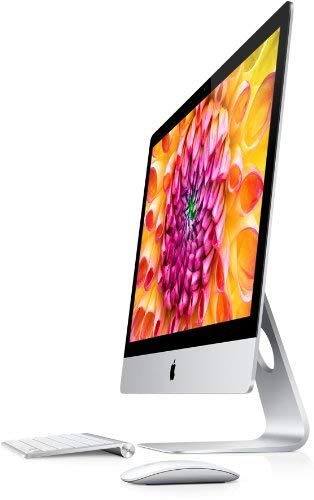
Apple iMac 27-Inch Core i7 Desktop
Best for: Intel Core i7 performance with 16GB RAM
- Processor
- 3.4 GHz Intel Core i7
- System Memory
- 16 GB
- Storage Capacity
- 1TB HDD
- Screen Size
- 27-Inch
- Operating System
- macOS High Sierra
This Apple all-in-one desktop pairs a 27-inch display with a 3.4 GHz Intel Core i7 processor and 16 GB of system memory. It includes a 1TB hard disk drive for internal file storage and comes configured with macOS High Sierra. If you need a large screen workspace along with higher baseline RAM than standard configurations on this list, this setup provides generous capacity for your daily computing tasks and local file archives.
Pros
- 3.4 GHz Intel Core i7 processor
- 27-inch display
- 16 GB system memory
- 1TB HDD storage capacity
Cons
- Uses mechanical hard drive storage instead of an SSD
- Comes preinstalled with older macOS High Sierra
Good fit if
- You need 16 GB of system memory for multitasking.
- You prefer a spacious 27-inch display.
- You want 1TB of built-in storage capacity.
Skip if
- You require high-speed solid-state drive storage.
- You need an operating system newer than macOS High Sierra.
Verdict: Apple iMac 27-Inch Core i7 Desktop pairs a 3.4 GHz processor and 16 GB of RAM with a 27-inch screen. Its storage relies on a 1TB mechanical hard drive running macOS High Sierra.

Apple 21.5-Inch iMac Core i5
Best for: everyday computing requiring large local storage
- Processor
- Intel Core i5-7360U
- System Memory
- 8GB DDR4
- Storage Capacity
- 1TB HDD
- Screen Size
- 21.5"
- Display Resolution
- 1920 x 1080
- Graphics
- Intel Iris Plus Graphics 640
This Apple all-in-one desktop pairs a 21.5-inch 1920 x 1080 IPS display with a dual-core Intel Core i5-7360U processor and 8GB of DDR4 memory. For local file capacity, it includes a 1TB hard drive alongside integrated Intel Iris Plus Graphics 640. It comes with Mac OS 10.12 pre-installed. It suits you if you need a compact Mac desktop for general productivity, everyday web browsing, and generous onboard storage.
Pros
- 1TB hard drive provides large local storage capacity
- 21.5-inch 1920 x 1080 IPS widescreen display
- 8GB DDR4 RAM handles standard multitasking
- Integrated Intel Iris Plus Graphics 640
Cons
- Mechanical hard drive lacks solid-state drive transfer speeds
- Dual-core processor provides fewer cores than newer alternatives
- Comes with older Mac OS 10.12 pre-installed
Good fit if
- You need 1TB of built-in storage for local files and media.
- You want a compact 21.5-inch full HD all-in-one setup for daily tasks.
- You prefer an Intel-based Mac desktop with 8GB DDR4 memory.
Skip if
- You require fast solid-state drive boot and loading speeds.
- You need a quad-core or higher processor for heavy workloads.
- You want a 4K or 5K high-resolution display.
Verdict: Apple iMac 21.5-Inch Core i5 1TB HDD gives you an integrated full HD workstation with ample mechanical drive capacity for everyday home or office use.
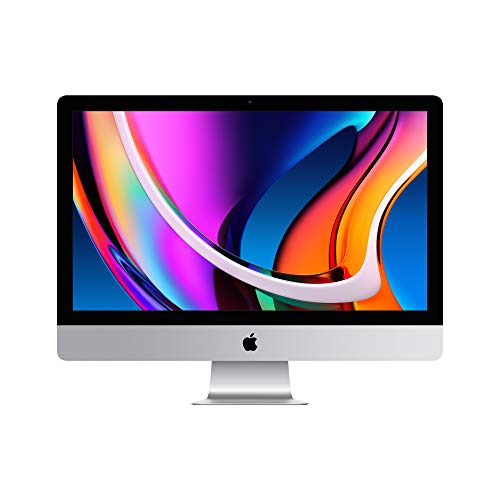
Apple iMac 27-Inch Retina 5K Core i5
Best for: high-resolution 5K workspace and dedicated graphics
- Processor
- 10th-generation Intel Core i5
- System Memory
- 8GB
- Storage Capacity
- 512GB SSD
- Screen Size
- 27-inch
- Display Resolution
- Retina 5K
- Graphics
- AMD Radeon Pro 5300
This all-in-one desktop pairs a 27-inch 5120-by-2880 Retina 5K display with a 10th-generation 6-core Intel Core i5 processor running at 3.3GHz. You get dedicated AMD Radeon Pro 5300 graphics, 512GB of SSD storage, and two Thunderbolt 3 ports. It suits you if you need expansive screen real estate for visual work alongside discrete graphics hardware, though base system memory sits at 8GB.
Pros
- 27-inch Retina 5K display with 5120-by-2880 resolution
- Dedicated AMD Radeon Pro 5300 graphics
- Two Thunderbolt 3 USB-C ports
- 512GB solid-state storage
Cons
- Base system memory limited to 8GB
- Total weight is 19.7 pounds
Good fit if
- You need a 5120-by-2880 5K 27-inch desktop workspace.
- You want dedicated AMD Radeon Pro 5300 graphics with a 512GB SSD.
Skip if
- You need more than 8GB of system memory preinstalled.
- You want an all-in-one that weighs less than 19.7 pounds.
Verdict: Apple iMac 27-inch Retina 5K Core i5 delivers a 5120-by-2880 display paired with dedicated AMD Radeon Pro 5300 graphics. It gives you 512GB of SSD storage and dual Thunderbolt 3 ports for demanding desktop setups.

Apple iMac 24-inch M4 All-in-One
Best for: macOS multitasking with 16GB memory
- Processor
- Apple M4
- System Memory
- 16GB
- Storage Capacity
- 256GB SSD
- Screen Size
- 24-inch
- Display Resolution
- 4.5K Retina
- Operating System
- macOS
The Apple 24-inch M4 iMac pairs Apple's M4 processor with 16GB of system memory and a 256GB solid-state drive. You get a built-in 4.5K Retina display that reaches 500 nits of brightness, along with a 12MP Center Stage webcam and six speakers. This all-in-one desktop suits you if you need a compact macOS workstation with double the base memory for smoother multitasking across productivity applications.
Pros
- Apple M4 processor with 16GB system memory
- 24-inch 4.5K Retina display with 500 nits brightness
- 12MP Center Stage camera and six-speaker sound system
- Compact all-in-one build weighing under 10 pounds
Cons
- Baseline 256GB SSD capacity fills quickly
- Screen size limited to 24 inches
Good fit if
- You want 16GB of memory for demanding multitasking in macOS.
- You need an integrated 4.5K display with a high-resolution 12MP webcam.
- You have limited desk space and want a single-unit desktop.
Skip if
- You need more than 256GB of onboard storage for local files.
- You require a larger 27-inch screen size.
Verdict: Apple 24-Inch M4 iMac 16GB RAM delivers modern Apple Silicon performance and generous memory in a compact 4.5K setup. It handles intensive daily workloads efficiently, provided 256GB of onboard storage matches your needs.
Specifications side by side
| Spec | Apple iMac 24-Inch M1 Desktop | Apple iMac 24-Inch M4 All-in-One | Apple iMac 21.5-Inch Core i5 All-in-One | Apple iMac 24-Inch M4 10-Core GPU | Apple iMac 21.5-Inch Core i5 Desktop | Apple iMac 27-Inch Retina 5K Core i5 | Apple iMac 21.5-Inch Core i5 Desktop | Apple 24-inch iMac M3 (Renewed) | Apple iMac 27-Inch Core i7 Desktop | Apple 21.5-Inch iMac Core i5 | Apple iMac 27-Inch Retina 5K Core i5 | Apple iMac 24-inch M4 All-in-One |
|---|---|---|---|---|---|---|---|---|---|---|---|---|
| Processor | Apple M1 | Apple M4 (8-core CPU) | 2.7GHz Core i5 | Apple M4 | Intel Core i5-7360U | 3.2 GHz Intel Core i5 | 2.3GHz Intel Core i5 | Apple M3 | 3.4 GHz Intel Core i7 | Intel Core i5-7360U | 10th-generation Intel Core i5 | Apple M4 |
| System Memory | 8GB | 16GB Unified Memory | 8GB | 24GB | 8GB DDR4 | 8GB DDR3 | 8GB | 8GB | 16 GB | 8GB DDR4 | 8GB | 16GB |
| Storage Capacity | 512GB SSD | 256GB SSD | 256GB Solid State Drive | 512GB SSD | 1TB HDD | 1TB Fusion Drive | 256GB SSD | 256GB SSD | 1TB HDD | 1TB HDD | 512GB SSD | 256GB SSD |
| Screen Size | 24-inch | 24-inch | 21.5in | 24-inch | 21.5-inch | 27-Inch | 21.5-inch | 24-inch | 27-Inch | 21.5" | 27-inch | 24-inch |
| Display Resolution | 4.5K Retina | 4.5K Retina | not specified | 4.5K Retina | 1920x1080 | Retina 5K | not specified | 4.5K Retina | not specified | 1920 x 1080 | Retina 5K | 4.5K Retina |
| Graphics | 8-core GPU | 8-core GPU | not specified | 10-core GPU | Intel Iris Plus Graphics 640 | AMD Radeon R9 M390 | not specified | not specified | not specified | Intel Iris Plus Graphics 640 | AMD Radeon Pro 5300 | not specified |
| Operating System | not specified | macOS | MacOS 10.12 Sierra | macOS | Mac OS X | Mac OS X | not specified | not specified | macOS High Sierra | Mac OS 10.12 | not specified | macOS |
| Memory | 8GB RAM | not specified | not specified | not specified | 8GB RAM | not specified | 8GB RAM | 8GB RAM | not specified | 8GB RAM | 8GB RAM | 16GB RAM |
| Storage | 512GB SSD | 256GB SSD | not specified | 512GB SSD | not specified | not specified | 256GB SSD | 256GB SSD | 1TB HDD | 1TB HDD | 512GB SSD | 256GB SSD |
| Dimensions | 27.2 × 6.89 × 23.8 inches | 21.5 × 5.79 × 18.1 inches | 27 × 11 × 24 inches | 21.5 × 5.79 × 18.1 inches | 17.7 × 20.8 × 6.9 inches | 24 × 10 × 30 inches | 6.9 × 20.8 × 17.7 inches | 21.5 × 5.79 × 18.2 inches | not specified | 25 × 8 × 20 inches | 7.99 × 25.6 × 20.3 inches | 21.5 × 5.79 × 18.1 inches |
| Weight | 9.83 pounds | 9.74 pounds | 12.5 pounds | 9.79 pounds | 18.3 pounds | not specified | 21 pounds | 15.6 pounds | not specified | not specified | 19.7 pounds | 9.74 pounds |
| Size | 8GB - 512GB | not specified | not specified | 24GB Unified Memory, 512GB SSD Storage | 21.5" 1080p Display | 27-Inch Recertified | not specified | 256GB | 3.4 Core i7, 1TB, 16GB Memory | not specified | 512GB | not specified |
| Color | Green | Pink | Silver | Pink | Silver | Silver | Silver | Blue | Silver | Silver | Silver | Blue |
| Model | MGPG3LL/A | MWUG3LL/A | DDMD086_8M256D_R | MD2U4LL/A | A1418 | MK472LL/A | MMQA2LL/A | MQRQ3LL/A | not specified | MMQA2LL/A | MXWU2LL/A | not specified |
Apple iMac Models Compared
The lineup splits into two clear groups. Modern M-series models like the iMac M1 and M4 offer fast Apple Silicon processing with 4.5K displays. These suit users needing sharp visuals and efficient multitasking. The M4 variant with 24GB RAM handles heavy creative workflows best.
Older Intel Core i5 and i7 models provide traditional desktop performance. They feature larger 27-inch screens and mechanical drives for high storage capacity. These units work well for basic office tasks or users who prefer dedicated AMD graphics. You choose based on whether you need modern speed or classic display size.
Where Apple Fits the Market
Apple’s iMac range spans 21.5, 24, and 27-inch screens. You get compact aluminum all-in-one designs in silver, pink, blue, and green. The lineup covers basic office tasks with older Core i5 models up to heavy creative workflows via the M4 with 24GB unified memory. You do not need separate towers for these units. However, none of the listed models offer large gaming monitors or high-refresh-rate displays. If you require extensive internal upgradeability or RGB lighting, this brand’s sealed all-in-one form factor does not support those needs.
When you also research child travel equipment, compare height limits for best all in one convertible car seats.
Choosing the Right Apple iMac
-
Check Memory for Multitasking
Unified memory affects how many apps run smoothly at once. The iMac M4 with 24GB RAM handles heavy creative workflows better than the 8GB baseline models. If you edit video or run many browser tabs, aim for 16GB or 24GB. The 8GB options in the M1 and M3 models work fine for light office tasks but may slow down with complex projects. Match your memory to your daily software load to avoid lag.
-
Match Storage to Your Files
Solid-state drives offer faster boot times and app loading than mechanical hard drives. The iMac M1 includes a 512GB SSD, which suits most users. The M4 models start at 256GB, which fills up quickly with large media files. Older Intel models like the Core i5 1TB use slower HDDs. If you store many photos or videos locally, prioritize higher SSD capacity or plan for external storage solutions.
-
Select Screen Size for Your Space
Screen size impacts both desk footprint and visual clarity. The 21.5-inch models are compact but use lower-resolution 1080p displays. The 24-inch and 27-inch units feature 4.5K or 5K Retina panels for sharp text and images. The 27-inch iMac is heavier and wider, requiring more desk space. Choose 24-inch for a balanced setup or 27-inch if you need maximum screen real estate for detailed work.
-
Choose Processor for Performance Needs
Apple Silicon chips provide efficient power for everyday tasks. The M1 and M3 chips handle standard productivity well. The M4 chip offers faster processing for demanding applications. Older Intel Core i5 or i7 processors are slower but may suit users who prefer traditional architecture. The 10-core GPU in the M4 model boosts graphics performance for creative apps. Select the chip that matches your software requirements.
-
Consider Graphics for Visual Work
Integrated graphics handle most daily tasks, but dedicated GPUs assist with video editing and 3D rendering. The 27-inch iMac with AMD Radeon Pro graphics delivers better performance for visual-heavy workflows. The M-series models use unified memory for graphics tasks, which is efficient for most users. If you do not edit video or play games, integrated graphics are sufficient. Check the GPU cores if you run graphic-intensive software regularly.
Frequently asked questions
Which Apple iMac has the best screen resolution?
The 27-inch models offer the highest resolution with Retina 5K displays. These units provide a 5120-by-2880 pixel count for sharp visuals. The 24-inch M1, M3, and M4 versions use 4.5K Retina panels. The older 21.5-inch models feature standard 1080p screens, which are less detailed.
What is the difference between the M1 and M4 iMacs?
The M4 models use newer Apple Silicon chips for improved performance and efficiency. They often start with 16GB of memory, whereas the M1 base model includes 8GB. The M4 also supports higher memory configurations, such as 24GB, to handle more demanding multitasking and creative workflows than the M1.
Do Apple all-in-one desktops have solid-state drives?
Most modern models use solid-state drives for faster boot times and app loading. The M1, M3, and M4 iMacs include SSDs ranging from 256GB to 512GB. Some older Core i5 models still rely on mechanical hard drives, which offer more storage capacity but slower performance.
Which iMac is best for heavy multitasking?
The iMac with 24GB of unified memory is designed for heavy multitasking. It handles demanding macOS tasks smoothly without requiring a traditional tower footprint. This model features a 10-core GPU and sufficient storage for creative workflows, making it the top choice for users running many applications simultaneously.
Are there compact options under 24 inches?
Yes, the 21.5-inch models provide a compact footprint for smaller desks. These units weigh between 12.5 and 21 pounds depending on the generation. They integrate the processor, screen, and speakers into a single silver aluminum chassis, saving space compared to larger 24-inch or 27-inch all-in-one designs.
What graphics options are available on the 27-inch iMacs?
The 27-inch Retina 5K models include dedicated AMD Radeon Pro graphics. This setup supports visual desktop tasks and high-resolution workspace needs. These units pair the powerful graphics with Intel Core i5 processors and SSD storage to handle demanding creative applications efficiently.
Is 16GB of RAM standard on new iMacs?
The baseline M4 iMac models start with 16GB of unified memory. This configuration handles general productivity and multimedia tasks efficiently. Older models and the base M1 version typically include 8GB of RAM, which is sufficient for everyday use but less ideal for intensive multitasking.