How to Choose All-In-One Desktops: A Complete Buying Guide for 2026
As an Amazon Associate we earn from qualifying purchases. Links on this page are affiliate links.
This all in one desktop buying guide helps you choose the right integrated system for your workspace. You will decide between compact designs and larger screens by comparing published specifications. We evaluate each model based on its processor, memory, and display size to ensure the hardware matches your actual needs. The eight recommended products were selected strictly from their published specifications, focusing on practical performance rather than marketing claims. You can see how different brands balance power efficiency with visual quality. Some models prioritize high-resolution displays for creative work, while others focus on space-saving dimensions for small desks. Understanding these technical differences allows you to match the machine to your specific workflow. You will learn which systems offer sufficient storage and memory for daily tasks. This approach removes guesswork from the selection process. You can confidently pick a device that fits your physical environment and software requirements without unnecessary bulk or wasted power.
Our top pick: HP 21.5-inch All-in-One Intel N100 Desktop.
What to look for in AIOs
Screen size and resolution
Screen size determines how much workspace you have. Larger displays like the 27-inch HP OmniStudio offer more room for multitasking and better viewing angles for media. Smaller 21.5-inch or 24-inch models fit tighter desks. Resolution matters for clarity. The Apple iMac M1 provides sharp 4.5K visuals, making text and images crisp. Lower resolution screens may look pixelated when you sit close. You must balance physical footprint with visual comfort. A larger screen takes up more desk depth. Consider your viewing distance. If you work with spreadsheets or edit photos, a bigger, sharper display reduces eye strain and improves productivity. Choose based on your desk dimensions and visual needs.
- 24 to 27-inch options for ample space
- 4.5K Retina display for sharp detail
- 21.5-inch size for compact setups
Processor speed and efficiency
The processor drives everyday responsiveness. Entry-level chips like the Intel N100 in the HP and Lenovo models handle office tasks and web browsing efficiently. They use less power and stay cool. Higher-end processors, such as the Apple M4 or Ryzen AI 7, handle heavier workloads faster. The M4 delivers fast performance for macOS users. The Core i5 in the older Apple iMac is sufficient for light Mac users but may lag with modern demands. You should match the chip to your workload. If you only browse and write, an N100 is adequate. For video editing or heavy multitasking, choose a more powerful CPU. Faster processors cost more and may generate more heat.
- Intel N100 for basic office tasks
- Apple M4 for high-speed macOS performance
- Ryzen AI 7 for capable mid-range power
Memory capacity for multitasking
Memory, or RAM, allows you to run multiple apps simultaneously. The Lenovo IdeaCentre with 16GB RAM handles multitasking better than models with 8GB. The HP 21.5-inch and Apple iMac M1 use 8GB, which is fine for light work but may slow down if you open many tabs or programs. More RAM prevents lag when switching between applications. If you keep dozens of browser windows open, 16GB is safer. The HP OmniStudio offers 16GB, supporting comfortable daily use. Check if memory is upgradeable. Some models allow you to add more later, while others have soldered RAM. Plan for future needs. If you expect your workload to grow, start with higher memory to avoid performance bottlenecks.
- 16GB RAM for smooth multitasking
- 8GB RAM for light daily use
- Upgradeable memory for future expansion
Storage type and capacity
Storage holds your files and operating system. Solid-state drives (SSDs) are faster than traditional hard drives. The Lenovo IdeaCentre includes a 1TB PCIe SSD, providing ample space and quick load times. The Apple iMac M4 has only 256GB, which may fill up quickly if you store many photos or videos. The HP OmniStudio offers 512GB, a balanced middle ground. Larger capacity means you store more data without needing external drives. Speed affects how fast apps open. PCIe SSDs are generally faster than SATA SSDs. You should estimate your storage needs. If you keep large files locally, choose 1TB or more. For cloud-based workflows, 256GB or 512GB may suffice. Check if the drive is replaceable.
- 1TB SSD for large file storage
- 512GB SSD for balanced capacity
- 256GB SSD for cloud-heavy users
Operating system compatibility
Your chosen operating system must support your software. Windows 11 Home, found on the HP OmniStudio, runs most PC applications and games. macOS, used by Apple iMacs, is ideal for Apple ecosystem users. The older Core i5 iMac runs macOS but may not support the latest features. You must ensure your essential apps are available on your chosen OS. If you rely on specific Windows-only software, an Apple iMac will not work. Conversely, macOS offers unique creative tools. Consider your current workflow. Switching systems requires learning new interfaces and potentially buying new software. Stick with the OS that matches your existing tools. Check software compatibility before buying to avoid frustration.
- Windows 11 for broad software support
- macOS for Apple ecosystem integration
- Verify app availability on the OS
Physical dimensions and weight
All-in-one desktops integrate the computer into the monitor, saving space. However, they still have a footprint. The Apple iMac M4 is slim and lightweight at 9.74 pounds, fitting small desks. The HP 21.5-inch model is 15 pounds and wider. The Lenovo IdeaCentre is 21.2 inches long. You must measure your desk. Ensure the depth and width fit your workspace. Weight matters if you plan to move the unit. Lighter models are easier to reposition. The Apple iMacs are notably lighter than HP and Lenovo options. Consider cable management. AIOs have fewer cables than towers, but power and peripheral cables still exist. Choose a size that leaves room for keyboard and mouse. Compact models suit small offices, while larger screens need more desk surface.
- Under 10 pounds for easy mobility
- Under 22 inches wide for small desks
- Slim profile for tidy workspaces
All-In-One Desktop Categories
Compact Entry Models
These systems prioritize space savings with screens under 24 inches. The HP 21.5-inch Intel N100 and Apple iMac 21.5-inch Core i5 fit small desks. They use low-power processors and limited memory, such as 8GB RAM. This keeps power draw low but restricts heavy multitasking. You get a tidy setup for basic office tasks or study. The trade-off is reduced performance for complex workloads. These models suit users who need a minimal footprint and do not require high-end graphics or extensive storage capacity.
Mid-Range Productivity Units
Mid-range all-in-ones balance screen size with capable hardware. The Lenovo IdeaCentre 24-inch and HP OmniStudio 24-inch offer 24-inch displays with 16GB RAM options. They support multitasking and reliable connectivity for home offices. The Apple iMac 24-inch M1 provides sharp 4.5K visuals in an ultra-slim chassis. These systems handle routine productivity and student workloads well. You gain more workspace and better color accuracy than entry models. The main limitation is that they still lack the raw graphical power of gaming towers, focusing instead on daily efficiency and display quality.
Large Screen Workstations
These models feature 27-inch displays for users needing maximum screen real estate. The HP OmniStudio 27-inch Ryzen AI 7 All-in-One fits this category. It offers ample memory and a comfortable viewing angle for media and productivity. The larger panel allows for detailed work and better ergonomics without a separate monitor. You benefit from a unified design that reduces cable clutter. However, the increased size requires more desk space. These units are ideal for professionals who prioritize visual clarity and multitasking space over compact portability or high-end gaming performance.
Common Mistakes When Buying AIOs
Ignoring upgradability limits of AIOs
All-in-one designs often seal internal components, preventing RAM or storage upgrades. You should check if the memory slots are accessible before buying. If you plan to keep the system for years, prioritize models with expandable slots to avoid premature replacement when needs grow.
Overlooking thermal constraints in small frames
Compact chassis restrict airflow, causing processors to throttle under heavy loads. Gaming workloads generate significant heat that small AIOs struggle to dissipate. Verify the cooling system specifications and ensure the processor has sufficient thermal headroom for sustained performance without overheating or slowing down.
Assuming all AIOs suit gaming
Many all-in-ones use integrated graphics or low-power mobile chips unsuitable for modern games. Check the GPU specifications carefully. Dedicated graphics cards are rare in this form factor. If you intend to play demanding titles, verify that the included graphics solution meets the minimum requirements.
Neglecting port placement and quantity
Ports are often located on the rear or side, making access difficult. Ensure you have enough USB, HDMI, and display outputs for your peripherals. Rear-facing ports can be hard to reach once the unit is mounted on the wall. Plan your cable management carefully.
Choosing based on screen size alone
A large screen does not guarantee good performance for your specific tasks. Balance display size with processing power and memory capacity. A 27-inch display with weak internals will struggle with multitasking. Ensure the CPU and RAM match the resolution and intended workload for smooth operation.
Quick picks
Our 8 picks

HP 21.5-inch All-in-One Intel N100 Desktop
Best for: compact spaces and daily office tasks
- Processor
- Intel N100
- System Memory
- 8GB RAM
- Storage Capacity
- 384GB
- Screen Size
- 21.5"
- Display Resolution
- 1920 x 1080
- Graphics
- Intel UHD Graphics
This HP all-in-one desktop pairs an entry-level quad-core Intel N100 processor with a compact 21.5-inch 1080p display. You get 8GB of system memory alongside 384GB of storage, which combines the internal drive with an included SD card. Its tilt-adjustable screen, Wi-Fi 6 connectivity, and bundled docking hub fit general productivity, web browsing, and schoolwork where desk space is limited.
Pros
- Compact 21.5-inch Full HD anti-glare display
- Adjustable display tilt from -6° to 21°
- Wi-Fi 6 and Ethernet port for networking options
- Includes USB-C 3.1 and multiple USB-A ports
Cons
- Entry-level 4-core Intel N100 processor with basic integrated graphics
- Part of the 384GB storage relies on an external SD card via dock
- Built-in webcam is limited to 720p resolution
Good fit if
- You need a compact all-in-one desktop for tight desk spaces.
- You handle basic office tasks, web browsing, and document editing.
- You want built-in Wi-Fi 6 connectivity and tilt adjustment.
Skip if
- You require dedicated graphics or high-tier processing power for demanding software.
- You prefer all internal high-capacity drive storage without relying on SD cards.
Verdict: HP 21.5-Inch Intel N100 All-in-One PC provides a space-saving workstation suited for everyday office tasks and study. Its low-power hardware and combined storage setup keep power draw down but limit it to light workloads.

Apple iMac 24-Inch M1 Desktop
Best for: compact setups needing high-resolution visuals
- Processor
- Apple M1
- System Memory
- 8GB
- Storage Capacity
- 512GB SSD
- Screen Size
- 24-inch
- Display Resolution
- 4.5K Retina
- Graphics
- 8-core GPU
This Apple all-in-one desktop pairs an 8-core Apple M1 processor and 8-core GPU with a 24-inch 4.5K Retina display. You get 8GB of system memory, a 512GB solid-state drive, and an 11.5 mm thin profile weighing 9.83 pounds. It includes a 1080p FaceTime HD camera, six-speaker audio, and two Thunderbolt or USB 4 ports. It suits you if you need a compact, color-accurate workspace for daily multitasking.
Pros
- 24-inch 4.5K Retina display with 500 nits brightness and P3 wide color
- Apple M1 chip with 8-core CPU and 8-core GPU
- Six-speaker sound system and three-mic array
- Built-in 1080p FaceTime HD camera
Cons
- Base configuration limited to 8GB system memory
- Port selection restricted to two Thunderbolt/USB 4 and up to two USB 3 ports
Good fit if
- You want a high-resolution 4.5K display for creative visual work.
- You need an all-in-one system with integrated 1080p video calling hardware.
Skip if
- You require more than 8GB of memory for heavier multitasking.
- You need legacy connection ports without using external adapters.
Verdict: Apple iMac 24-Inch M1 Desktop delivers sharp 4.5K visuals and responsive everyday speed inside an ultra-slim 11.5 mm chassis. It is an efficient desktop choice if your workload fits within an 8GB memory footprint.
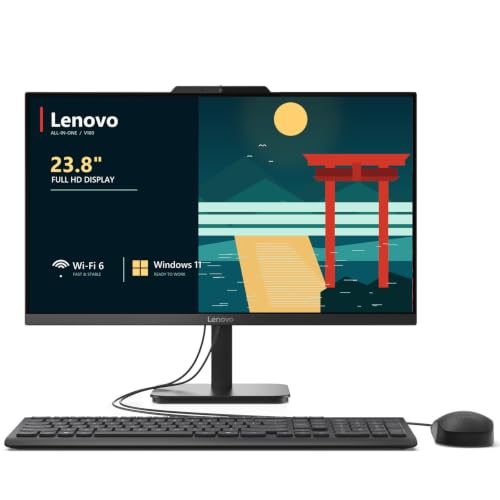
Lenovo IdeaCentre 24" Intel N100 Desktop
Best for: productivity and home office use
- Processor
- Intel N100
- System Memory
- 32 GB DDR4
- Storage Capacity
- 2 TB NVMe SSD
- Screen Size
- 23.8"
- Display Resolution
- Full HD
- Graphics
- Intel UHD Graphics
The Lenovo IdeaCentre 24 is a 23.8-inch all-in-one desktop featuring an Intel N100 quad-core processor and 16GB of DDR4 RAM. It includes a 256GB NVMe SSD and a Full HD IPS display with 99% sRGB coverage. This system suits home offices and students needing reliable multitasking and a clutter-free design. It runs Windows 11 Home and offers comprehensive connectivity options.
Pros
- 16GB DDR4 RAM for smooth multitasking
- 23.8-inch Full HD IPS display with 99% sRGB
- Intel N100 quad-core processor up to 3.4GHz
- 256GB PCIe NVMe SSD for fast boot times
- Wi-Fi 6 and Bluetooth 5.2 connectivity
Cons
- 256GB storage is smaller than some competitors
- Intel UHD Graphics limits gaming performance
- No mention of an included webcam privacy shutter mechanism in key specs
Good fit if
- You need ample RAM for office productivity
- You want a compact desktop with Wi-Fi 6
- You prefer a Full HD display with wide viewing angles
Skip if
- You require high-end graphics for gaming
- You need more than 256GB of internal storage
- You prefer a larger 27-inch or 24-inch screen
Verdict: The Lenovo IdeaCentre 24 AIO is a solid choice for users prioritizing multitasking capability and display color accuracy over raw graphical power. It fits well in home offices where space is limited and reliable connectivity is essential.

Lenovo IdeaCentre 24-inch All-in-One PC
Best for: everyday home office and student workloads
- Processor
- Intel N100
- System Memory
- 8 GB
- Storage Capacity
- 512 GB SSD
- Screen Size
- 23.8"
- Display Resolution
- Full HD
- Graphics
- Intel UHD Graphics
This Lenovo all-in-one desktop combines a 23.8-inch Full HD IPS screen with an entry-level Intel N100 4-core processor. It includes 8GB of DDR4 RAM and a 512GB PCIe SSD for storage. You get modern connectivity through Wi-Fi 6, Gigabit Ethernet, and a 10Gbps USB-C port. It suits you if you need a clean, space-saving desktop for web browsing, office applications, media streaming, and schoolwork without complex cable setups.
Pros
- 23.8-inch Full HD IPS display with 99% sRGB coverage
- 512GB PCIe SSD with memory expandable up to 32GB
- Fast port selection including 10Gbps USB-C and HDMI-out
- Intel Wi-Fi 6 AX203 and Bluetooth 5.2 support
Cons
- Intel N100 processor with 4 threads limits heavy workloads
- Screen brightness peaks at 250 nits
- No built-in optical drive
Good fit if
- You need a compact computer for general office tasks, web browsing, and video calls.
- You want the option to add an external monitor via HDMI-out.
- You value low-clutter setups with bundled wired peripherals.
Skip if
- You need dedicated graphics hardware for high-demand visual software.
- You work in spaces requiring a display brighter than 250 nits.
Verdict: Lenovo 24" IdeaCentre Intel N100 Desktop is a compact, power-efficient system built for routine productivity and home tasks. Its 512GB solid-state drive and upgradeable memory provide dependable capacity for everyday users.

HP OmniStudio 27 Ryzen AI 7 All-in-One
Best for: Productivity and casual use on a large screen
- Processor
- AMD Ryzen AI 7 445
- System Memory
- 16 GB
- Storage Capacity
- 512 GB SSD
- Screen Size
- 27"
- Display Resolution
- FHD
- Graphics
- AMD Radeon 840M
This HP OmniStudio is a 27-inch all-in-one desktop with an AMD Ryzen AI 7 445 processor and 16 GB of DDR5 RAM. It pairs these with a 512 GB SSD and AMD Radeon 840M graphics. The FHD display includes HP Eye Ease for reduced blue light. You get a Windows 11 Home system with Microsoft Copilot. This setup suits users who want a spacious screen and solid multitasking performance for work or casual play.
Pros
- 27-inch FHD display with adjustable stand
- AMD Ryzen AI 7 445 processor
- 16 GB DDR5 RAM for multitasking
- 512 GB PCIe NVMe SSD storage
- AMD Radeon 840M integrated graphics
Cons
- FHD resolution limits sharpness on a 27-inch screen
- Integrated graphics lack dedicated VRAM for heavy gaming
- No mention of Thunderbolt or USB4 connectivity
Good fit if
- You need a large 27-inch screen for productivity
- You want 16 GB of RAM for smooth multitasking
- You prefer an adjustable stand for ergonomic comfort
Skip if
- You require 4K resolution for detailed work
- You need dedicated graphics for high-end gaming
- You prefer a compact 21.5-inch footprint
Verdict: HP OmniStudio 27" AIO Ryzen AI 7 is a capable mid-range all-in-one for users who prioritize screen real estate and ample memory. It fits those who want a comfortable viewing angle and solid daily performance without the bulk of a tower.

Apple iMac 24-Inch M4 All-in-One
Best for: macOS users wanting a high-resolution compact desktop
- Processor
- Apple M4 (8-core CPU)
- System Memory
- 16GB Unified Memory
- Storage Capacity
- 256GB SSD
- Screen Size
- 24-inch
- Display Resolution
- 4.5K Retina
- Graphics
- 8-core GPU
This Apple all-in-one desktop integrates an 8-core M4 processor, an 8-core GPU, and 16GB of unified memory into a slim 24-inch display. You get a sharp 4.5K Retina screen with 500 nits of brightness, alongside a 256GB SSD. It suits you if you need a compact, color-accurate macOS workstation for creative tasks, everyday productivity, and seamless integration with your other Apple devices.
Pros
- 24-inch 4.5K Retina display with 500 nits brightness
- Apple M4 chip with 8-core CPU and 8-core GPU
- 16GB unified memory for smooth multitasking
- 12MP Center Stage camera and six-speaker sound system
Cons
- 256GB base SSD storage fills up quickly
- Fixed 24-inch display size with no larger panel option
Good fit if
- You want a high-resolution 4.5K display for detailed creative or office work.
- You use macOS and want direct integration with your iPhone.
- You need a compact all-in-one setup with built-in mics, camera, and speakers.
Skip if
- You require more than 256GB of local internal storage out of the box.
- You prefer a Windows operating system or a screen larger than 24 inches.
Verdict: Apple iMac 24-inch M4 8-Core delivers fast M4 performance and a sharp 4.5K Retina screen in a compact profile. It is an ideal macOS all-in-one if 256GB of storage meets your workflow requirements.

HP 24-Inch OmniStudio All-in-One PC
Best for: Home office users needing clean design
- Processor
- Intel Core
- System Memory
- 8 GB DDR5
- Storage Capacity
- 128 GB UFS
- Screen Size
- 23.8"
- Operating System
- Windows 11 Home
- Dimensions
- 21.3 × 7.28 × 17.6 inches
This HP all-in-one desktop features a 23.8-inch FHD IPS display with 99% sRGB coverage. It pairs an Intel Core processor with 8GB of DDR5 RAM and 128GB of UFS storage. The system includes WiFi 6, Bluetooth 5.2, and a built-in HD webcam. Its compact design saves desk space while providing essential ports for peripherals. This setup suits users needing a clean, connected workspace for everyday tasks.
Pros
- 23.8-inch FHD IPS display with 99% sRGB color accuracy
- 8GB DDR5 RAM for efficient multitasking
- WiFi 6 and Bluetooth 5.2 connectivity
- Built-in HD webcam and mono microphone for calls
Cons
- 128GB UFS storage is limited for large file libraries
- Mono speaker setup lacks rich audio depth
- Base configuration has only 8GB of system memory
Good fit if
- You want a clutter-free desk with a built-in webcam
- You need accurate color reproduction for basic content work
- You prefer modern DDR5 memory and WiFi 6 speeds
Skip if
- You require high-end gaming performance
- You need extensive storage for large media files
- You prefer stereo or surround sound audio
Verdict: HP OmniStudio 24" AIO PC offers a balanced mix of display quality and modern connectivity for home office users. It fits buyers who prioritize a tidy workspace and reliable video conferencing over raw processing power.

Apple iMac 21.5-Inch Core i5 All-in-One
Best for: Light Mac users with small desks
- Processor
- 2.7GHz Core i5
- System Memory
- 8GB
- Storage Capacity
- 256GB Solid State Drive
- Screen Size
- 21.5in
- Operating System
- MacOS 10.12 Sierra
- Dimensions
- 27 × 11 × 24 inches
This 21.5-inch all-in-one desktop features a 2.7GHz Core i5 processor, 8GB of system memory, and a 256GB solid-state drive. It runs macOS 10.12 Sierra. The unit weighs 12.5 pounds and measures 27 inches wide. It is a renewed product inspected by qualified suppliers. You should consider this if you need a compact Mac for basic tasks and light media consumption.
Pros
- 21.5-inch integrated display
- 2.7GHz Core i5 processor
- 256GB solid-state drive storage
- Compact 12.5-pound build
Cons
- Only 8GB of system memory
- Limited 256GB storage capacity
- Outdated macOS 10.12 Sierra operating system
Good fit if
- You need a small footprint for a desk
- You prefer the macOS ecosystem
- You perform basic office or web tasks
Skip if
- You require modern macOS versions
- You need high performance for gaming
- You store large media libraries
Verdict: Apple iMac 21.5in Core i5 is a compact entry point for light Mac users. It suits those who prioritize space savings over raw power or modern software support.
Specifications side by side
| Spec | HP 21.5-inch All-in-One Intel N100 Desktop | Apple iMac 24-Inch M1 Desktop | Lenovo IdeaCentre 24" Intel N100 Desktop | Lenovo IdeaCentre 24-inch All-in-One PC | HP OmniStudio 27 Ryzen AI 7 All-in-One | Apple iMac 24-Inch M4 All-in-One | HP 24-Inch OmniStudio All-in-One PC | Apple iMac 21.5-Inch Core i5 All-in-One |
|---|---|---|---|---|---|---|---|---|
| Processor | Intel N100 | Apple M1 | Intel N100 | Intel N100 | AMD Ryzen AI 7 445 | Apple M4 (8-core CPU) | Intel Core | 2.7GHz Core i5 |
| System Memory | 8GB RAM | 8GB | 32 GB DDR4 | 8 GB | 16 GB | 16GB Unified Memory | 8 GB DDR5 | 8GB |
| Storage Capacity | 384GB | 512GB SSD | 2 TB NVMe SSD | 512 GB SSD | 512 GB SSD | 256GB SSD | 128 GB UFS | 256GB Solid State Drive |
| Screen Size | 21.5" | 24-inch | 23.8" | 23.8" | 27" | 24-inch | 23.8" | 21.5in |
| Display Resolution | 1920 x 1080 | 4.5K Retina | Full HD | Full HD | FHD | 4.5K Retina | not specified | not specified |
| Graphics | Intel UHD Graphics | 8-core GPU | Intel UHD Graphics | Intel UHD Graphics | AMD Radeon 840M | 8-core GPU | not specified | not specified |
| Operating System | Windows 11 Home | not specified | Windows 11 Home | Windows 11 Home | Windows 11 Home | macOS | Windows 11 Home | MacOS 10.12 Sierra |
| Memory | 8GB RAM | 8GB RAM | 16GB RAM | 8GB RAM | 16GB RAM | not specified | 8GB RAM | not specified |
| Storage | not specified | 512GB SSD | not specified | 512GB SSD | 512GB SSD | 256GB SSD | not specified | not specified |
| Dimensions | 19.4 × 6.69 × 15.1 inches | 27.2 × 6.89 × 23.8 inches | 21.2 × 7.3 × 16.7 inches | not specified | 24.1 × 7.28 × 19.2 inches | 21.5 × 5.79 × 18.1 inches | 21.3 × 7.28 × 17.6 inches | 27 × 11 × 24 inches |
| Weight | 15 pounds | 9.83 pounds | not specified | not specified | 13.1 pounds | 9.74 pounds | 11 pounds | 12.5 pounds |
| Color | White | Green | White | Carbon Black | Jet black | Pink | White | Silver |
| Model | HP All In One | MGPG3LL/A | 24 | 24 | D8YE5AA#ABA | MWUG3LL/A | D2QH6LA | DDMD086_8M256D_R |
| Size | not specified | 8GB - 512GB | 32GB DDR4 RAM, 1TB PCIe SSD | not specified | not specified | not specified | 16GB RAM | 512GB SSD | not specified |
If you also evaluate kitchen hardware, you can consult the saucepan buying guide to review material and base specifications.
Frequently asked questions
Which all-in-one desktop has the best screen resolution?
The Apple iMac 24-Inch M1 and M4 models deliver sharp 4.5K Retina visuals. These displays provide high pixel density for clear text and vibrant images. Other models, like the HP 21.5-inch Intel N100, focus on space savings rather than ultra-high resolution. If visual clarity is your priority, the 24-inch iMacs are the top choice.
How much RAM do I need for multitasking?
For smooth multitasking, aim for at least 16GB of RAM. The Lenovo IdeaCentre 24" Intel N100 and HP OmniStudio 27 Ryzen AI 7 both include 16GB, allowing you to run multiple apps without slowdowns. Models with only 8GB, such as the HP 21.5-inch Intel N100, are better suited for single-task office work or light study.
Which all-in-one is best for small desks?
Compact models like the Apple iMac 24-Inch M1 and HP 21.5-inch Intel N100 are ideal for tight spaces. The M1 iMac measures 11.5 mm thick and weighs under 10 pounds. The HP 21.5-inch model is also lightweight at 15 pounds. These designs minimize footprint while providing a complete desktop experience for daily tasks.
Does the Lenovo IdeaCentre 24 support upgrades?
Yes, the Lenovo IdeaCentre 24-inch All-in-One PC features upgradeable memory. It comes with a 512GB solid-state drive and allows for RAM expansion. This makes it a practical choice for users who plan to keep the system for years. Upgradability helps extend the device's lifespan as your storage and processing needs grow.
What is the largest screen size available?
The HP OmniStudio 27 Ryzen AI 7 offers the largest display at 27 inches. It provides ample screen real estate for comfortable viewing and multitasking. This model is suitable for users who want a desktop-like experience without the bulk of a tower. The larger panel also improves viewing angles for media consumption.
Which all-in-one is best for home office use?
The Lenovo IdeaCentre 24" Intel N100 is a solid choice for home offices. It offers 16GB RAM and reliable connectivity for productivity tasks. The HP OmniStudio 24" also fits well, providing clean design and video conferencing capabilities. Both models balance performance with space efficiency for everyday professional work.