The Best ASUS All-In-One Desktops in 2026: 2 Picks
As an Amazon Associate we earn from qualifying purchases. Links on this page are affiliate links.
Finding the best ASUS all in one desktops requires looking at the specs that matter. This guide compares 2 models based strictly on published listing data. ASUS offers compact and spacious units with touchscreen capabilities and varying processor speeds. The top pick is the ASUS 23.8-inch Core i5 Touch All-in-One PC, which leads for compact home office setups with video needs due to its retractable camera and DDR5 performance. These selections focus on practical specifications like display size and memory rather than marketing claims.
Quick picks
| # | Product | Best for | Price |
|---|---|---|---|
| 1 | ASUS 23.8-inch Core i5 Touch All-in-One PC Best overall | compact home office setups with video needs | Check price of ASUS 23.8-inch Core i5 Touch All-in-One PC on Amazon |
| 2 | ASUS V470 27-Inch Touchscreen All-in-One Best budget | Home offices needing large touchscreens | Check price of ASUS V470 27-Inch Touchscreen All-in-One on Amazon |
Our 2 picks
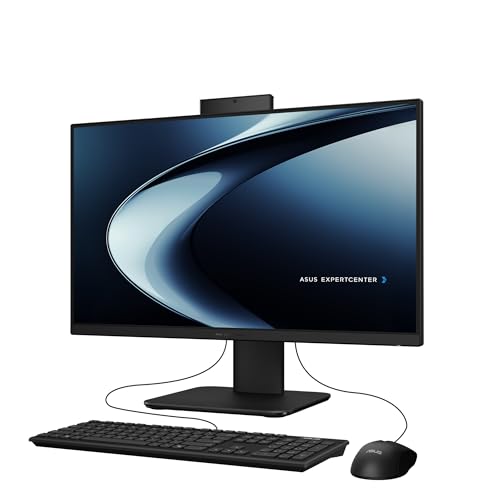
ASUS 23.8-inch Core i5 Touch All-in-One PC
Best for: compact home office setups with video needs
- Processor
- Intel Core i5-13420H
- System Memory
- 16GB DDR5
- Storage Capacity
- 1TB PCIe 4.0 SSD
- Screen Size
- 23.8"
- Display Resolution
- Full HD
- Touchscreen
- Touchscreen
View on Amazon: ASUS 23.8-inch Core i5 Touch All-in-One PC Affiliate link
The ASUS P440VA is a 23.8-inch all-in-one desktop with an FHD anti-glare touchscreen. It uses an Intel Core i5-13420H processor, 16GB DDR5 RAM, and a 1TB PCIe 4.0 SSD. This configuration delivers fast multitasking and ample storage for everyday tasks. It includes a retractable 1080p camera and AI noise-canceling for clear video calls. The compact design fits well in home offices.
Pros
- Intel Core i5-13420H processor with up to 4.6 GHz boost
- 16GB DDR5 RAM for efficient multitasking
- 1TB PCIe 4.0 SSD for quick file access
- Retractable 1080p FHD camera with AI noise-canceling
Cons
- 23.8-inch screen is smaller than the 27-inch alternative
- HDMI-out is limited to version 1.4
- One USB 2.0 port on the side
Good fit if
- You need a compact desktop for standard office work
- You want a touchscreen for intuitive navigation
- You require a retractable camera for privacy
Skip if
- You need a display larger than 23.8 inches
- You require HDMI 2.0 or higher for 4K output
- You prefer a 27-inch screen for media consumption
Verdict: The ASUS P440VA 23.8" i5 AIO is a capable compact desktop for users who value a retractable camera and fast DDR5 performance in a smaller footprint. It suits those who prioritize portability and clear video conferencing over a larger screen size.

ASUS V470 27-Inch Touchscreen All-in-One
Best for: Home offices needing large touchscreens
- Processor
- Intel Core i5-13420H
- System Memory
- 16GB DDR5
- Storage Capacity
- 1TB SSD
- Screen Size
- 27"
- Display Resolution
- Full HD
- Touchscreen
- Touchscreen
View on Amazon: ASUS V470 27-Inch Touchscreen All-in-One Affiliate link
The ASUS V470 is a 27-inch all-in-one desktop featuring a Full HD anti-glare touchscreen. It uses an Intel Core i5-13420H processor and 16GB of DDR5 RAM for responsive performance. The 1TB PCIe SSD provides ample storage. This unit includes a 1080p camera with AI noise-canceling for clear calls. It suits users who want a clean workspace with modern connectivity options.
Pros
- 27-inch Full HD anti-glare touchscreen display
- Intel Core i5-13420H processor with up to 4.6 GHz boost
- 16GB DDR5 RAM and 1TB PCIe SSD storage
- 1080p camera with AI noise-canceling technology
Cons
- HDMI-out is limited to version 1.4
- Only one USB 2.0 Type-A port on the side
- No mention of Thunderbolt or Wi-Fi 6E support
Good fit if
- You need a large 27-inch touchscreen for easy navigation
- You require fast DDR5 memory for multitasking
- You work remotely and need a high-quality camera with noise reduction
Skip if
- You need HDMI 2.1 for high-refresh-rate external monitors
- You prefer a smaller 23.8-inch footprint
- You require USB 3.0 ports on the side for quick access
Verdict: ASUS V470 27-inch AIO delivers solid performance for daily tasks with its i5 processor and DDR5 RAM. It is a strong option for home offices that value screen size and clear video calls over maximum port variety.
Specifications side by side
| Spec | ASUS 23.8-inch Core i5 Touch All-in-One PC | ASUS V470 27-Inch Touchscreen All-in-One |
|---|---|---|
| Processor | Intel Core i5-13420H | Intel Core i5-13420H |
| System Memory | 16GB DDR5 | 16GB DDR5 |
| Storage Capacity | 1TB PCIe 4.0 SSD | 1TB SSD |
| Screen Size | 23.8" | 27" |
| Display Resolution | Full HD | Full HD |
| Touchscreen | Touchscreen | Touchscreen |
| Operating System | Windows 11 Home | Windows 11 Home |
| Memory | 16GB RAM | 16GB RAM |
| Storage | 1TB SSD | 1TB SSD |
| Display Feature | Touchscreen | Touchscreen |
| Dimensions | 21.3 × 16.4 × 0.67 inches | 24.1 × 17.6 × 0.67 inches |
| Weight | 6.9 pounds | 9 pounds |
| Size | 16.38 x 21.3 x 0.67 inches | 16GB | 1TB SSD |
| Color | Black | Black |
| Model | P440VA-DS504T | V470VA-MS504T |
ASUS All-in-One Desktops Overview
The ASUS lineup splits into two main groups based on screen size and physical footprint. The first group features the 23.8-inch ASUS P440VA. It measures just 0.67 inches thick and weighs 6.9 pounds. This compact unit suits shoppers who need a retractable camera and DDR5 performance in a smaller space. It is ideal for home offices where portability matters more than screen real estate.
The second group includes the 27-inch ASUS V470. This model offers a larger 24.1-inch display width while maintaining similar internal specs like 16GB of RAM and a 1TB SSD. It weighs 9 pounds. This group fits users who prioritize a large touchscreen for daily tasks. Both options run Windows 11 Home and use Core i5 processors, ensuring solid performance for video calls and standard computing needs.
Who ASUS All-in-One Desktops Suit
ASUS all-in-one desktops prioritize compact designs with integrated touchscreens. The range spans from the slim 23.8-inch P440VA to the wider 27-inch V470. Both models feature black chassis and retractable or built-in cameras for video calls. You get consistent DDR5 memory and SSD storage across these picks. However, the lineup lacks non-touch displays or larger screen sizes. If you need a 32-inch monitor or a standard non-touch interface, these specific ASUS options do not cover that gap. This brand suits users who want a clean, space-saving setup with modern connectivity in a small footprint.
Choosing the right ASUS all in one
-
Match screen size to space
Your desk dimensions dictate the best display size. The 23.8-inch P440VA measures 16.4 inches wide and weighs only 6.9 pounds. It fits compact home offices or small workspaces. The 27-inch V470 is wider at 17.6 inches and weighs 9 pounds. Choose the smaller model if you need portability or have limited surface area. Select the larger unit if you prioritize screen real estate for multitasking. Both units share the same slim 0.67-inch profile. Measure your available space before deciding which footprint suits your setup.
-
Verify processor performance needs
Both listed models use Intel Core i5 processors. This chip handles daily tasks and video conferencing efficiently. You do not need a high-end chip for office work or web browsing. The i5 provides balanced performance for general use. If your workflow involves heavy video editing or gaming, consider a dedicated graphics card instead. These all-in-one units rely on integrated graphics. The Core i5 is sufficient for most users who need a reliable desktop for emails, documents, and streaming. It ensures smooth operation without excessive power consumption.
-
Ensure adequate memory for multitasking
Look for 16GB of RAM for smooth multitasking. Both the P440VA and V470 include DDR5 memory. This faster RAM type improves system responsiveness. You can run multiple browser tabs and applications simultaneously. Less memory might cause slowdowns when switching between programs. The DDR5 standard ensures efficient data transfer speeds. This spec is crucial for maintaining performance over time. Check that the listing confirms 16GB rather than 8GB. Adequate memory prevents lag during heavy workloads. It is a key factor for long-term usability in a shared or busy environment.
-
Check storage capacity and type
SSD storage speeds up boot times and file access. Both models feature 1TB solid-state drives. This capacity stores thousands of documents and photos. You avoid the noise and slowness of traditional hard drives. The 1TB size offers ample room for most users. If you store large video files, verify if this is enough. SSDs also improve overall system snappiness. Ensure the listing specifies SSD rather than HDD. This choice affects how quickly you open programs. It is a practical spec that impacts daily workflow efficiency significantly.
-
Confirm touchscreen utility
Touchscreen displays add versatility for navigation and drawing. Both the P440VA and V470 include this feature. You can interact directly with the interface. This is useful for presentations or creative work. It also aids accessibility for some users. If you prefer keyboard and mouse input, this feature is optional. However, it adds value for interactive tasks. Verify the touchscreen is responsive in the description. It enhances the all-in-one experience by combining display and input. This spec distinguishes these models from standard desktops.
Frequently asked questions
Which ASUS all-in-one is best for small spaces?
The ASUS P440VA is the best choice for tight areas. It measures only 0.67 inches thick and weighs 6.9 pounds. This compact size fits easily on smaller desks. It also includes a retractable camera, which helps save space when not in use.
Does the ASUS V470 have a touchscreen?
Yes, the ASUS V470 features a 27-inch touchscreen display. This allows you to interact directly with the interface using your fingers. It is designed for users who prefer tactile control over a mouse or keyboard for daily tasks and navigation.
What processor do these ASUS all-in-ones use?
Both the P440VA and V470 models use Intel Core i5 processors. This chip provides solid performance for everyday computing needs. You can handle office applications, web browsing, and media consumption without significant lag or slowdowns during regular use.
How much RAM is in the ASUS AIOs?
Each listed ASUS all-in-one desktop includes 16GB of RAM. This memory ensures smooth multitasking between multiple browser tabs and applications. The DDR5 specification further enhances data transfer speeds for improved overall system responsiveness during heavy workloads.
Is storage sufficient for photos and documents?
Both models come equipped with a 1TB SSD. This storage capacity is ample for storing thousands of photos, documents, and media files. The solid-state drive also contributes to faster boot times and quicker file access compared to traditional hard drives.
Do these computers include Windows 11?
Yes, both the P440VA and V470 ship with Windows 11 Home. This operating system provides a modern interface and standard security features. You get immediate access to the Microsoft Store and built-in apps for productivity and entertainment right out of the box.