ASUS 23.8-inch Core i5 Touch Review: Specs, Pros and Cons
As an Amazon Associate we earn from qualifying purchases. Links on this page are affiliate links.
This asus p440va all in one review covers a desktop that combines processing power with interactive input. The system is built around an Intel Core i5-13420H processor and includes 16GB of DDR5 RAM. It also features a 23.8-inch Full HD touchscreen. These components work together to handle daily tasks efficiently. The 1TB PCIe 4.0 SSD ensures quick boot times and file access. You get a complete unit with a retractable camera and stereo speakers. This setup is designed for users who want a clean desk and reliable performance without complex assembly.
What stands out
- Intel Core i5-13420H processor with up to 4.6 GHz boost speed
- 23.8-inch Full HD anti-glare touchscreen for intuitive navigation
- 16GB DDR5 RAM paired with a 1TB PCIe 4.0 SSD
- Retractable 1080p FHD camera with AI noise-canceling technology
Who it fits
Good fit for
This PC suits home offices and small businesses that value a tidy workspace. The touchscreen is ideal for users who prefer direct interaction over a mouse. The 16GB of RAM and fast SSD handle multitasking, web browsing, and document editing with ease. If you need a reliable machine for video calls, the retractable camera and AI noise cancellation are useful additions. It is also good for students or light creators who want a single, compact unit that does not take up much floor space.
Who should skip it
You should look elsewhere if you need high-end gaming performance. The Core i5-13420H is a mobile processor, not a desktop-grade chip designed for heavy graphical loads. There is no dedicated graphics card listed, so it cannot run modern games well. If you require multiple external monitors, note that there is only one HDMI-out port. Users needing extensive rear connectivity for many peripherals may find the port selection limited compared to a traditional tower.
Verdict: The ASUS P440VA offers a solid blend of speed and interactivity for everyday computing. Its touchscreen and clean design make it a practical choice for office and home use.
Key specs explained
Intel Core i5-13420H
This eight-core processor runs at 2.1 GHz and boosts to 4.6 GHz. You get strong performance for multitasking and demanding applications. The 12MB cache helps keep data accessible quickly. This chip suits users who need reliable speed for office work, media editing, or light gaming without lag.
16GB DDR5 RAM
This amount of memory allows you to run many programs simultaneously without slowing down. DDR5 technology offers faster data transfer rates than older standards. You benefit from smoother switching between tabs, apps, and virtual machines. This spec ensures your system remains responsive even under heavy workloads.
1TB PCIe 4.0 SSD
This solid-state drive provides ample space for your files, games, and operating system. PCIe 4.0 technology delivers rapid read and write speeds. You will experience quick boot times and fast loading for large applications. This storage level is ideal for users who keep significant amounts of data locally.
23.8-inch Full HD touchscreen
This display offers a 1920x1080 resolution with interactive touch capabilities. The anti-glare coating reduces reflections for clearer viewing in bright rooms. You can navigate menus or draw directly on the screen. This feature is useful for creative tasks, presentations, or users who prefer direct interaction over a mouse.
Design and Build Analysis
According to the listing, this ASUS all-in-one measures 21.3 inches in length, 16.4 inches in width, and just 0.67 inches in height. The black finish keeps the visual profile simple. At 6.9 pounds, the unit is light for an all-in-one. This low weight makes it easy to move between rooms or reposition on a desk without needing two people. The compact footprint saves valuable desk space compared to traditional tower setups.
The layout prioritizes connectivity. You get three USB 3.2 Type-A ports and one USB 3.2 Type-C port on the back. An HDMI-out 1.4 port allows you to connect a second monitor if needed. The side panel includes a USB 2.0 port and a 3.5mm combo jack for quick access to peripherals or headsets. A Kensington lock slot adds security for office environments. The DC-in port keeps the power cable discreetly placed.
The 23.8-inch Full HD anti-glare touchscreen dominates the front. This display choice supports intuitive navigation for users who prefer direct interaction over a mouse. The anti-glare coating helps reduce reflections in bright rooms. The retractable 1080p camera and built-in speakers with Dolby Atmos are integrated into the bezel. This design reduces cable clutter and keeps the workspace clean. You get a unified device that handles both computing and media tasks without extra hardware.
Setup and Daily Use Overview
Setting up this ASUS all-in-one is straightforward. The unit includes Windows 11 Home, so you begin with a familiar interface. You connect the power cable to the DC-in port on the back. For internet, you use the RJ45 Ethernet port. This wired connection offers stability for updates and downloads. You can also connect peripherals using the various USB ports. The back panel provides three USB 3.2 Gen 1 Type-A ports and one Type-C port. The side panel adds a USB 2.0 port and a 3.5mm combo jack for headphones or a microphone. This layout keeps frequently used connections accessible while hiding less common ones. The retractable 1080p camera sits discreetly when not in use. For audio, built-in speakers with Dolby Atmos provide sound without external devices. The AI noise-canceling technology helps during video calls by filtering background sounds. Daily use feels responsive thanks to the 16GB DDR5 RAM. This memory allows smooth switching between apps. The 1TB PCIe 4.0 SSD ensures fast boot times and quick file access. The 23.8-inch Full HD anti-glare touchscreen makes navigation intuitive. You can touch icons or scroll pages directly. The wide viewing angle ensures the display looks clear from different positions. This setup suits users who want a clean desk with reliable performance.
Before You Buy This AIO
This ASUS all-in-one is designed for productivity rather than high-end gaming. Its Core i5 processor and 16GB of DDR5 RAM handle office tasks smoothly. However, it lacks a dedicated graphics card. If you plan to play modern games, this system will not meet your needs. You should check your existing peripherals for compatibility. The side ports include only one USB 2.0 Type-A and a headphone jack. You may need a USB hub for multiple devices. The HDMI-out port allows you to connect a second monitor. Keep the vents clear for proper airflow. Dust accumulation can affect performance over time. This unit fits well alongside other office-focused desktops in our guide. It is not suitable for users seeking gaming performance. Consider other options if you need strong graphical capabilities. This machine is best for users who prioritize a clean setup and touch input.
Check before you buy
- Verify if you need a dedicated GPU for gaming.
- Check if your peripherals fit the limited side ports.
- Ensure you have space for a second monitor via HDMI.
- Confirm this model suits office work, not heavy gaming.
The product at a glance
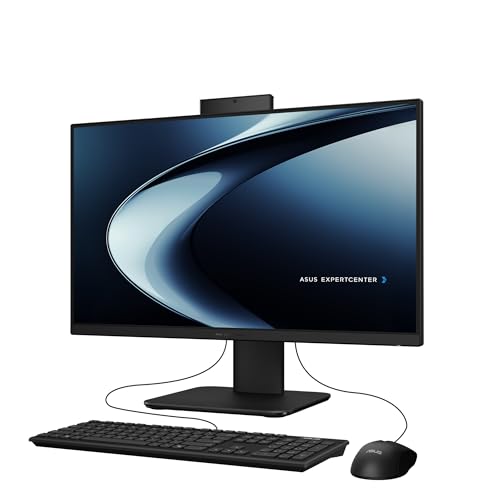
ASUS 23.8-inch Core i5 Touch All-in-One PC
Best for: Office tasks and touch-friendly desktop use
- Processor
- Intel Core i5-13420H
- System Memory
- 16GB DDR5
- Storage Capacity
- 1TB PCIe 4.0 SSD
- Screen Size
- 23.8"
- Display Resolution
- Full HD
- Touchscreen
- Touchscreen
View on Amazon: ASUS 23.8-inch Core i5 Touch All-in-One PC Affiliate link
This ASUS all-in-one pairs a 23.8-inch Full HD touchscreen with an Intel Core i5-13420H processor and 16GB of DDR5 RAM. The 1TB PCIe 4.0 SSD ensures fast storage access. You get a retractable 1080p camera and AI noise cancellation for clear calls. It fits well on desks where touch input and clean cable management matter.
Pros
- Intel Core i5-13420H processor with up to 4.6 GHz boost
- 23.8-inch Full HD anti-glare touchscreen display
- 16GB DDR5 RAM for multitasking
- 1TB PCIe 4.0 SSD for fast storage
- Retractable 1080p camera with AI noise cancellation
Cons
- HDMI-out is version 1.4, limiting higher refresh rates
- Side ports include only one USB 2.0 Type-A
- No mention of built-in Wi-Fi or Bluetooth
Good fit if
- You want a touchscreen for intuitive navigation
- You need strong multitasking with 16GB DDR5 RAM
- You value clean desk aesthetics with retractable camera
Skip if
- You require high-end gaming performance
- You need multiple high-speed USB ports on the side
- You want wireless connectivity without adapters
Verdict: ASUS 23.8" Touch i5 AIO is a practical desktop for office work and media consumption. You get reliable performance from the i5 and DDR5 RAM, plus the convenience of a touchscreen interface.
Specifications side by side
| Spec | ASUS 23.8-inch Core i5 Touch All-in-One PC |
|---|---|
| Processor | Intel Core i5-13420H |
| System Memory | 16GB DDR5 |
| Storage Capacity | 1TB PCIe 4.0 SSD |
| Screen Size | 23.8" |
| Display Resolution | Full HD |
| Touchscreen | Touchscreen |
| Operating System | Windows 11 Home |
| Memory | 16GB RAM |
| Storage | 1TB SSD |
| Display Feature | Touchscreen |
| Dimensions | 21.3 × 16.4 × 0.67 inches |
| Weight | 6.9 pounds |
| Size | 16.38 x 21.3 x 0.67 inches |
| Color | Black |
| Model | P440VA-DS504T |
Frequently asked questions
Is the ASUS P440VA suitable for heavy gaming?
No, this all-in-one is not built for heavy gaming. It lacks a dedicated graphics card, relying instead on integrated graphics from the Core i5 processor. The system is optimized for office tasks and media consumption. You will not get the frame rates required for modern, graphically intensive games. It is best suited for casual use and productivity.
Does this all-in-one PC include a touchscreen?
Yes, the ASUS P440VA features a 23.8-inch Full HD touchscreen display. This allows you to interact directly with Windows 11 Home using your finger. The touch interface adds convenience for navigating menus or viewing media. It makes the desktop feel more like a tablet for simple tasks while maintaining full desktop functionality.
How much storage space does the ASUS P440VA have?
The system includes 1TB of SSD storage. This solid-state drive provides ample space for documents, photos, and applications. The SSD format ensures faster boot times and quicker file access compared to traditional hard drives. You can store a significant amount of data without needing external drives for basic office and media workflows.
What operating system comes with this ASUS desktop?
It ships with Windows 11 Home pre-installed. You get a familiar interface with modern design elements and standard productivity tools. The OS is ready to use right out of the box. This ensures compatibility with most current software and allows for easy setup of your user accounts and preferences immediately upon powering on the device.
Is the RAM in this PC upgradeable?
The specifications list 16GB of DDR5 RAM. While the data confirms this amount, it does not explicitly state if the slots are user-accessible. DDR5 memory offers high bandwidth for smooth multitasking. You should verify the motherboard layout in the manual if you plan to add more memory later, as some all-in-ones have soldered RAM.
What are the physical dimensions of this all-in-one?
The unit measures 21.3 inches in length, 16.4 inches in width, and 0.67 inches in height. It weighs 6.9 pounds, making it relatively light for an all-in-one desktop. The compact profile fits easily on most desks. The black finish provides a simple, professional look that blends well into office or home environments.
Can I use this PC for video conferencing?
Yes, this system is well-suited for video conferencing. The Core i5 processor and 16GB of RAM handle multiple applications smoothly. Windows 11 Home supports standard communication apps like Zoom or Teams. The touchscreen interface can also simplify navigation during calls. It serves as a practical desktop for remote work and online meetings.