Lenovo or ACEMAGIC? Mini PCs Compared in 2026
As an Amazon Associate we earn from qualifying purchases. Links on this page are affiliate links.
This lenovo vs ACEMAGIC mini PC comparison helps you choose between two compact desktops. Both machines offer 16GB of RAM and 256GB of storage with Windows 11 Pro. The main difference lies in the processor and physical design. The Lenovo ThinkCentre M70q Tiny uses an Intel Core i5 10th Gen, while the ACEMAGIC K1 relies on an AMD Ryzen 3 Pro 7330U. You also need to consider the form factor, as the Lenovo is larger but includes peripherals, whereas the ACEMAGIC is significantly smaller and lighter.
Key differences
| Aspect | Lenovo ThinkCentre Tiny Intel i5 Mini PC | ACEMAGIC Ryzen 7330U Mini PC |
|---|---|---|
| Processor | Intel Core i5 10th Gen | AMD Ryzen 3 Pro 7330U |
| Memory Type | DDR4 | LPDDR4 3200MT/S |
| Dimensions | 9 x 8 x 3 inches | 5.04 x 5.04 x 1.61 inches |
| Included Peripherals | Wired keyboard and mouse | Not listed |
| Wireless Connectivity | WiFi | WiFi 5 and Bluetooth 4.2 |
| Warranty | 90 days | 3 years |
Which one should you choose?
Choose Lenovo ThinkCentre Tiny Intel i5 Mini PC if
- You need a ready-to-use setup with a keyboard and mouse included.
- You prefer a larger chassis that allows for standard DDR4 memory upgrades.
- You want a device backed by a well-known brand with established corporate support.
Choose ACEMAGIC Ryzen 7330U Mini PC if
- You require a significantly smaller footprint for tight spaces or VESA mounting.
- You want a longer warranty period of three years for peace of mind.
- You need built-in Bluetooth for connecting wireless accessories without adapters.
Verdict: Choose the Lenovo ThinkCentre M70q Tiny if you want a complete office setup with included peripherals and a familiar Intel platform. Select the ACEMAGIC K1 if you prioritize a ultra-compact silver chassis, built-in Bluetooth, and a longer three-year warranty. Both devices provide adequate performance for general productivity tasks.
Lenovo vs ACEMATIC Mini PC
Processor performance
The Lenovo ThinkCentre M70q Tiny relies on a 10th Gen Intel Core i5. This is a mature, stable chip suitable for general office tasks and web browsing. In contrast, the ACEMAGIC K1 uses an AMD Ryzen 3 Pro 7330U. This newer processor features four cores and eight threads with a boost clock up to 4.3GHz. The ACEMAGIC claims significantly higher performance metrics compared to older low-power chips. While the Lenovo offers reliable legacy support, the ACEMAGIC provides more modern computational power for multitasking and heavier workloads.
Memory type
Both systems come equipped with 16GB of RAM, which is sufficient for smooth multitasking and running Windows 11 Pro without lag. However, the technology differs. The Lenovo uses standard DDR4 memory, which is widely compatible and generally easier to upgrade if the motherboard allows. The ACEMAGIC utilizes LPDDR4 running at 3200MT/s. This type of memory is soldered directly to the board, meaning you cannot upgrade it later. The higher speed of the ACEMAGIC may offer slightly better bandwidth, but the Lenovo offers potential for future expansion.
Storage capacity
Each mini PC provides 256GB of storage, which is adequate for your operating system, essential applications, and a moderate number of files. The Lenovo ThinkCentre M70q Tiny uses an NVMe SSD interface, ensuring fast boot times and quick data access for standard office work. The ACEMAGIC K1 also features a 256GB SSD but highlights its expandability options. You can add additional M.2 NVMe or SATA SSDs to the ACEMAGIC to reach up to 2TB. If you anticipate needing more space later, the ACEMAGIC offers clearer upgrade paths for storage.
Display and graphics
The Lenovo ThinkCentre M70q Tiny supports dual monitor setups, allowing you to connect two screens for extended productivity. This is ideal for traders or office workers who need multiple windows open. The ACEMAGIC K1 takes a different approach by supporting triple displays via HDMI, DisplayPort, and USB-C. It also features integrated AMD Radeon Graphics capable of 4K UHD output. For users who need three screens or higher resolution media playback, the ACEMAGIC provides more versatile connectivity and graphical capability than the Lenovo's dual-monitor limitation.
Physical size
Size matters when you have limited desk space. The Lenovo ThinkCentre M70q Tiny measures 9 inches long, 8 inches wide, and 3 inches high. It is designed to mount behind monitors or in tight office cubicles. The ACEMAGIC K1 is significantly smaller, measuring just 5.04 inches square and 1.61 inches thick. It weighs only 1.1 pounds, making it highly portable. You can easily slip the ACEMAGIC into a bag for business trips. If compactness and portability are your top priorities, the ACEMAGIC is the clear winner in physical dimensions.
Wireless connectivity
Both machines include Wi-Fi and Bluetooth for wireless peripherals and internet access. The Lenovo ThinkCentre M70q Tiny lists generic WiFi support, which typically implies a standard connection suitable for browsing and streaming. The ACEMAGIC K1 specifies Wi-Fi 5 and Bluetooth 4.2. While Wi-Fi 5 is faster than older standards, it is not the latest Wi-Fi 6. The ACEMAGIC also includes a Gigabit Ethernet port for stable wired connections. Both systems provide the essential wireless tools you need, with the ACEMAGIC offering slightly more detailed specification transparency.
Which Mini PC Should You Buy
Home office users needing peripherals
The Lenovo ThinkCentre M70q Tiny includes a wired keyboard and mouse in the box. This allows you to plug in and start working immediately without buying extra accessories. It also features Windows 11 Pro and supports dual monitors, making it a complete, ready-to-use solution for your daily productivity tasks and multitasking needs.
Users wanting triple display support
The ACEMAGIC K1 supports three simultaneous displays via HDMI, DisplayPort, and USB-C. This creates a larger workspace for multitasking or trading. It also includes Bluetooth 4.2 for connecting wireless mice and keyboards. The compact 5-inch square design and VESA mount option allow for flexible placement on walls or behind monitors.
Buyers seeking longer warranty coverage
The ACEMAGIC K1 offers a three-year quality assurance period, which is significantly longer than the Lenovo's 90-day warranty. This provides greater peace of mind for long-term use. Additionally, it includes lifetime technical support. The AMD Ryzen 3 Pro processor and non-expandable LPDDR4 RAM ensure consistent performance over time.
The products compared

Lenovo ThinkCentre Tiny Intel i5 Mini PC
Best for: compact office setups with dual monitors
- Processor
- Intel Core i5 10th Gen
- RAM Capacity
- 16GB
- RAM Type
- DDR4
- Storage Capacity
- 256GB
- Storage Interface
- NVMe
- Operating System
- Windows 11 Pro
View on Amazon: Lenovo ThinkCentre Tiny Intel i5 Mini PC Affiliate link
This Lenovo ThinkCentre M70q Tiny desktop packs a 10th Gen Intel Core i5 processor and 16GB of DDR4 RAM into a compact chassis. It includes a 256GB NVMe SSD for fast storage access and runs Windows 11 Pro. The unit supports dual monitors and comes with a wired keyboard and mouse. It is designed for users who need reliable performance in a small footprint for office or home tasks.
Pros
- 10th Gen Intel Core i5 processor for solid multitasking
- 16GB DDR4 RAM ensures smooth workflow performance
- 256GB NVMe SSD provides quick boot times
- Includes wired keyboard and mouse for immediate use
Cons
- 10th Gen Intel Core is an older generation compared to newer Ryzen options
- 256GB storage capacity is limited for large media libraries
- Only supports dual monitor output
Good fit if
- You need a small form factor PC for a desk
- You want a system ready to use with included peripherals
- You require Windows 11 Pro for business features
Skip if
- You need the latest generation processor for heavy gaming
- You require more than 256GB of internal storage
- You prefer a larger desktop tower for easier upgrades
Verdict: Lenovo M70q Tiny i5 16GB is a compact, ready-to-use system for users who prioritize a small footprint and included peripherals over the latest processor generations. It fits well in tight spaces where dual monitors and basic productivity are the main goals.
ACEMAGIC Ryzen 7330U Mini PC
Best for: light office tasks and multi-monitor setups
- Processor
- AMD Ryzen 7330U Pro
- Graphics Card
- AMD Radeon Graphics
- RAM Capacity
- 16GB
- RAM Type
- LPDDR4
- Storage Capacity
- 256GB
- Operating System
- Win 11 Pro
View on Amazon: ACEMAGIC Ryzen 7330U Mini PC Affiliate link
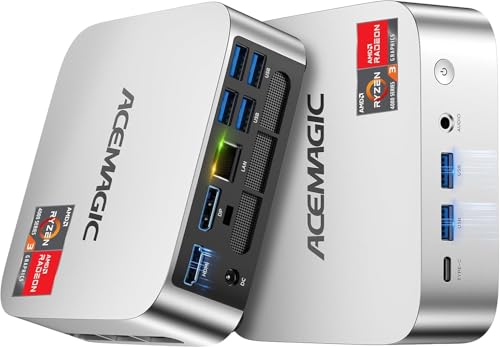
The ACEMAGIC K1 is a compact desktop powered by an AMD Ryzen 3 Pro 7330U processor with 16GB of non-expandable LPDDR4 RAM. It includes a 256GB M.2 SSD and supports triple 4K displays via HDMI, DisplayPort, and USB-C. This silver unit runs Windows 11 Pro and features built-in WiFi 5 and Bluetooth 4.2. It is designed for users who need a small, efficient machine for office tasks or media playback.
Pros
- AMD Ryzen 3 Pro 7330U processor with up to 4.3GHz boost
- 16GB LPDDR4 RAM for responsive multitasking
- Supports triple 4K displays through HDMI, DP, and USB-C
- VESA mountable and compact 5x5x1.6 inch chassis
- Includes Windows 11 Pro and 3-year warranty
Cons
- Memory is non-expandable LPDDR4
- Only 256GB of internal storage
- Uses older WiFi 5 and Bluetooth 4.2
Good fit if
- You need a small PC for office work
- You want to run multiple monitors
- You prefer a compact VESA-mountable design
Skip if
- You require high-end gaming performance
- You need to upgrade RAM later
- You want the latest WiFi 6E standard
Verdict: ACEMAGIC K1 Mini PC Ryzen 3 Pro is a practical desktop for light office work and multi-screen setups. It suits users who prioritize a small footprint and integrated Windows 11 Pro over raw processing power.
Specifications side by side
| Spec | Lenovo ThinkCentre Tiny Intel i5 Mini PC | ACEMAGIC Ryzen 7330U Mini PC |
|---|---|---|
| Processor | Intel Core i5 10th Gen | AMD Ryzen 7330U Pro |
| Graphics Card | not stated | AMD Radeon Graphics |
| RAM Capacity | 16GB | 16GB |
| RAM Type | DDR4 | LPDDR4 |
| Storage Capacity | 256GB | 256GB |
| Storage Interface | NVMe | not stated |
| Operating System | Windows 11 Pro | Win 11 Pro |
| Wireless Connectivity | WiFi | WiFi 5, Bluetooth 4.2 |
| Memory | 16GB RAM | not stated |
| Use | not stated | Business |
| Dimensions | 9 × 8 × 3 inches | 5.04 × 5.04 × 1.61 inches |
| Weight | not stated | 1.1 pounds |
| Size | 648 cubic inches | Ryzen 7330U+16GB+256GB |
| Color | Black | Ryzen 7330U+16GB+256GB |
| Model | MJ0HCJGZ | V1 |
Frequently asked questions
Is the Lenovo ThinkCentre Tiny good for dual monitors?
Yes, it is designed for compact office setups with dual monitors. Its small footprint allows it to fit well in tight spaces where you need two screens for productivity. The system includes Windows 11 Pro and 16GB of RAM to handle the extra display load without issue.
What is the size difference between the Lenovo and ACEMAGIC models?
The Lenovo ThinkCentre M70q Tiny is larger, measuring 9 inches long, 8 inches wide, and 3 inches high. The ACEMAGIC V1 is significantly more compact at 5.04 inches square and 1.61 inches high. You should choose the ACEMAGIC if space is extremely limited, or the Lenovo if you need more internal room.
Does the ACEMAGIC Mini PC come with a keyboard and mouse?
The provided data does not mention included peripherals for the ACEMAGIC K1. In contrast, the Lenovo ThinkCentre M70q Tiny includes a wired keyboard and mouse in the box. If you want a ready-to-use system without buying extra accessories, the Lenovo option is the practical choice for immediate setup.
Which mini PC has better processor performance?
The Lenovo ThinkCentre M70q Tiny uses an Intel Core i5 processor, which offers more processing power than the AMD Ryzen 3 Pro in the ACEMAGIC K1. The ACEMAGIC is suitable for light office tasks, but the Lenovo i5 provides a more robust experience for general office work and web browsing.
Are both mini PCs compatible with Windows 11?
Yes, both systems come with Windows 11 Pro pre-installed. This ensures you have the latest operating system features right out of the box. You do not need to perform a separate installation or purchase a license, as both the Lenovo ThinkCentre and the ACEMAGIC V1 include the professional version of the OS.
Is the ACEMAGIC V1 lightweight?
Yes, the ACEMAGIC V1 weighs only 1.1 pounds. Its small dimensions and light weight make it very portable compared to traditional desktops. This makes it ideal for users who prioritize a small footprint and might need to move the device occasionally, unlike the heavier Lenovo ThinkCentre M70q Tiny.
Which mini PC is better for multi-monitor setups?
Both brands support multi-monitor setups, but the Lenovo ThinkCentre M70q Tiny is specifically noted for compact office setups with dual monitors. The ACEMAGIC K1 is also described as practical for multi-screen setups. However, the Lenovo includes peripherals, making it a more complete solution for users who need to connect two displays immediately.