Best Lenovo Mini PCs with 512GB SSD: 6 Spec-Based Picks
As an Amazon Associate we earn from qualifying purchases. Links on this page are affiliate links.
Finding the best lenovo mini PCs with 512GB SSD requires checking the actual hardware inside. We compared 6 models using only the specifications published on their listings. This approach ensures you get facts, not marketing fluff. Our top pick is the Lenovo ThinkCentre neo 50q Gen 5 Mini PC. It leads because it combines a compact 1.44-inch height with reliable business productivity for small office spaces. These picks are based strictly on published data. Use this guide to decide which compact desktop fits your workspace and performance needs.
Quick picks
The best fit for you
- You need the smallest physical footprint available Lenovo ThinkCentre neo 50q Gen 5 Mini PC Its 1.44-inch height makes it the thinnest unit in the group.
- You require high memory for heavy multitasking Lenovo ThinkStation P3 Tiny i5-13500 It includes 32GB of RAM, doubling the capacity of most peers.
- You want the strongest processor core count Lenovo ThinkStation P3 Tiny Core i7 Desktop The Core i7 processor offers 20 cores for demanding workloads.
Our 6 picks

Lenovo ThinkCentre neo 50q Gen 5 Mini PC
Best for: small office spaces and business productivity
- Storage
- 512GB SSD (what this guide is about)
- Processor
- Intel Core 5 210H
- RAM Capacity
- 8GB
- RAM Type
- DDR5
- Storage Capacity
- 512GB
- Storage Interface
- PCIe 4.0x4 NVMe
View on Amazon: Lenovo ThinkCentre neo 50q Gen 5 Mini PC Affiliate link
This Lenovo mini PC fits in a 1L chassis, measuring just 1.44 inches tall. It uses an Intel Core 5 210H processor with 8 cores and 512GB of PCIe 4.0 NVMe storage. You get 8GB of DDR5 RAM and Windows 11 Pro pre-installed. The compact design supports dual 4K displays and includes Wi-Fi 6E. It suits professionals needing a small footprint for office tasks.
Pros
- Intel Core 5 210H with 8 cores and up to 4.8GHz speed
- 512GB PCIe 4.0x4 NVMe SSD for fast data access
- Ultra-compact 1L form factor at 1.44 inches tall
- Windows 11 Pro with TPM 2.0 security
- Wi-Fi 6E and Bluetooth 5.3 connectivity
Cons
- Only 8GB of DDR5 RAM limits heavy multitasking
- No dedicated graphics card for gaming or video editing
- Includes only a 90W power adapter
Good fit if
- You need a small desktop for office productivity
- You want a VESA-mountable PC for clean setups
- You require Windows 11 Pro for business features
Skip if
- You need more than 8GB of RAM for demanding apps
- You plan to play modern 3D games
- You require a dedicated graphics card
Verdict: Lenovo neo 50q Gen 5 1L Mini is a compact business PC for users who prioritize space-saving design and fast storage over high-end performance.
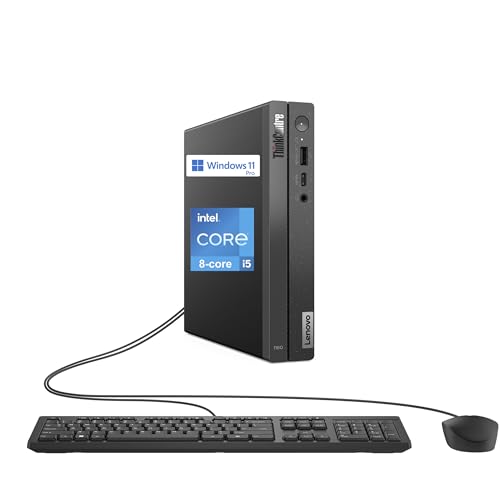
Lenovo ThinkCentre Mini Desktop Core i5
Best for: Compact office work and daily computing
- Storage
- 512GB SSD (what this guide is about)
- Processor
- Intel Core i5-13420H
- RAM Capacity
- 16GB
- RAM Type
- DDR4
- Storage Capacity
- 512GB
- Storage Interface
- PCIe M.2
View on Amazon: Lenovo ThinkCentre Mini Desktop Core i5 Affiliate link
This Lenovo mini desktop features an 8-core Intel Core i5-13420H processor and 16GB of DDR4 RAM. It includes a 512GB PCIe M.2 SSD for storage and runs Windows 11 Pro. The compact chassis supports dual monitors via DisplayPort and HDMI. It connects to networks using WiFi 6 and Bluetooth 5.3. This setup suits users who need reliable performance in a small footprint without requiring the latest DDR5 memory speeds.
Pros
- 8-core Intel Core i5-13420H processor with up to 4.6 GHz turbo
- 16GB DDR4 RAM capacity
- 512GB PCIe M.2 SSD storage
- Windows 11 Pro operating system
- WiFi 6 and Bluetooth 5.3 connectivity
Cons
- Uses DDR4 RAM instead of DDR5
- Base processor frequency is low at 2.1 GHz
- Includes only two monitor output ports
Good fit if
- You need a compact desktop for daily tasks
- You prefer Windows 11 Pro for business features
- You want a reliable connection with WiFi 6
Skip if
- You require DDR5 memory for maximum bandwidth
- You need more than two display outputs
- You want a processor with a higher base clock speed
Verdict: Lenovo neo 50q Gen 4 Mini PC offers solid multitasking with its 8-core i5 and 16GB RAM. It fits users who value a small form factor and Windows 11 Pro over the newest memory standards.

Lenovo ThinkStation P3 Tiny i5-13500
Best for: Memory-heavy productivity and multitasking workflows
- Storage
- 512GB SSD (what this guide is about)
- Processor
- Intel Core i5-13500
- Graphics Card
- Intel UHD 770 Shared
- RAM Capacity
- 32GB
- RAM Type
- DDR5 SODIMM
- Storage Capacity
- 512GB
View on Amazon: Lenovo ThinkStation P3 Tiny i5-13500 Affiliate link
This Lenovo ThinkStation P3 Tiny gives you 32GB of DDR5 memory paired with a 14-core Intel Core i5-13500 processor and a 512GB PCIe NVMe SSD. It suits you if you run memory-heavy office workflows, virtual machines, or dense browser sessions. The 3-pound chassis fits into tight workspaces while offering Windows 11 Pro, WiFi 6E, and multiple display outputs.
Pros
- 32GB DDR5 SODIMM system memory
- 14-core, 20-thread Intel Core i5-13500 processor
- WiFi 6E and Bluetooth 5.3 wireless support
- Compact 3-pound desktop footprint
Cons
- Relies on integrated Intel UHD 770 shared graphics
- Uses a 13th Gen processor instead of newer generation chips
Good fit if
- You need 32GB of RAM for memory-intensive multitasking.
- You want a compact 3-pound desktop running Windows 11 Pro.
Skip if
- You require a dedicated graphics card for GPU-heavy tasks.
- You want a newer 14th Gen or Core Ultra processor.
Verdict: Lenovo ThinkStation P3 Tiny 32GB RAM Mini PC delivers substantial DDR5 memory and 14 processing cores for professionals handling dense productivity workloads in limited desk space.

Lenovo ThinkStation P3 Core i5 Mini Workstation
Best for: Professional engineering and CAD workloads
- Storage
- 512GB SSD (what this guide is about)
- Processor
- Intel Core i5-14500 vPro
- RAM Capacity
- 16GB
- RAM Type
- DDR5
- Storage Capacity
- 512GB
- Operating System
- Windows 11 Pro
View on Amazon: Lenovo ThinkStation P3 Core i5 Mini Workstation Affiliate link
The Lenovo ThinkStation P3 is a 1-liter mini desktop powered by a 14-core Intel Core i5-14500 processor. It includes 16GB of RAM and a 512GB SSD. This unit is ISV-certified for professional software like AutoCAD and SOLIDWORKS. It features Intel vPro for business management and MIL-SPEC durability. The compact chassis supports up to six displays, making it suitable for engineers and architects who need reliable workstation performance in a small footprint.
Pros
- 14-core Intel Core i5-14500 processor with 5.0GHz turbo
- ISV-certified for AutoCAD, SOLIDWORKS, and MATLAB
- 1-liter chassis supports up to 6 displays
- Intel vPro enterprise manageability platform
- MIL-SPEC certified durability and ThinkShield security
Cons
- 16GB RAM may limit heavy multitasking
- 512GB SSD capacity is modest for large projects
- No mention of included monitor or mounting hardware
Good fit if
- You need ISV-certified performance for engineering software
- You require a compact unit for tight office spaces
- You want enterprise-grade security and manageability
Skip if
- You require more than 16GB of RAM out of the box
- You need more than 512GB of storage immediately
- You prefer a standard tower form factor
Verdict: The Lenovo ThinkStation P3 i5-14500 Mini is a durable, ISV-certified workstation for professionals who need reliable CAD performance in a tiny footprint. It fits engineers and architects who value stability over raw consumer gaming power.

Lenovo ThinkStation P3 Tiny Core i7 Desktop
Best for: demanding multi-threaded business and office workloads
- Storage
- 512GB SSD (what this guide is about)
- Processor
- Intel Core i7-14700
- RAM Capacity
- 16GB
- RAM Type
- DDR5
- Storage Capacity
- 512GB
- Storage Interface
- PCIe M.2
View on Amazon: Lenovo ThinkStation P3 Tiny Core i7 Desktop Affiliate link
This mini desktop pairs a 20-core Intel Core i7-14700 processor with 16GB of DDR5 memory and a 512GB PCIe M.2 SSD. Measuring 1.5 inches tall, it provides seven USB ports, HDMI, DisplayPort, and Intel vPro Enterprise management. You get high-thread-count workstation processing in a compact chassis, fitting heavy office multi-tasking and remote deployment setups.
Pros
- 20-core Intel Core i7-14700 processor reaching up to 5.3 GHz turbo
- Intel vPro Enterprise with AMT 16 remote management support
- Seven USB ports alongside dedicated DisplayPort and HDMI outputs
- Compact 1.5-inch tall chassis with included wired keyboard and mouse
Cons
- Base memory configuration supplies 16GB despite supporting up to 64GB
- Base 512GB SSD capacity requires upgrading to reach the 8TB chassis limit
Good fit if
- You need a 20-core CPU for high-thread productivity workloads.
- You require Intel vPro Enterprise management tools for office fleets.
- You want DDR5 RAM and Wi-Fi 6 connectivity in a 1.5-inch tall chassis.
Skip if
- You need more than 512GB of internal storage out of the box.
- You require more than 16GB of pre-installed system RAM.
Verdict: Lenovo ThinkStation Tiny Core i7 Desktop delivers high-performance 20-core processing and remote management for demanding multi-threaded business tasks. It suits users who prioritize CPU speed and compact dimensions over high out-of-the-box storage capacity.
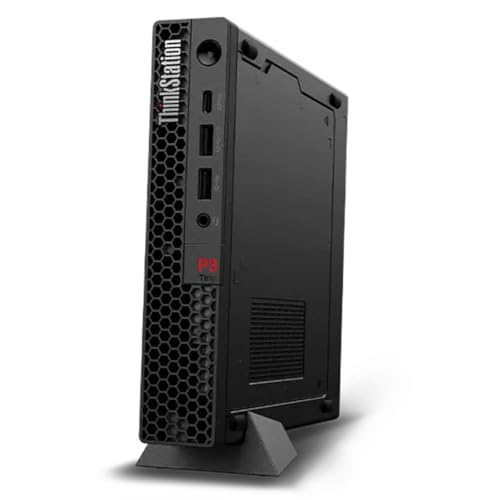
Lenovo ThinkStation P3 Tiny Core Ultra 5 Mini PC
Best for: compact business workstations with AI features
- Storage
- 512GB SSD (what this guide is about)
- Processor
- Intel Core Ultra 5 235 vPro
- Graphics Card
- Integrated Intel Graphics
- RAM Capacity
- 16GB
- RAM Type
- DDR5
- Storage Capacity
- 512GB
View on Amazon: Lenovo ThinkStation P3 Tiny Core Ultra 5 Mini PC Affiliate link
This 1L mini desktop uses an Intel Core Ultra 5 235 vPro processor with 16GB of DDR5 RAM and a 512GB SSD. It includes Wi-Fi 7 and a built-in NPU for AI tasks. The compact size fits tight spaces, while vPro adds security and manageability for business users.
Pros
- Intel Core Ultra 5 235 vPro processor
- 16GB DDR5 RAM
- 512GB SSD storage
- Wi-Fi 7 connectivity
- 1L compact form factor
Cons
- Integrated Intel Graphics only
- No dedicated GPU listed
- 8.64 pounds weight
Good fit if
- You need a small business PC with vPro management
- You want AI acceleration via the NPU
- You require Wi-Fi 7 for faster speeds
Skip if
- You need dedicated graphics for heavy gaming
- You prefer a larger chassis for easier upgrades
- You do not need vPro security features
Verdict: Lenovo ThinkStation P3 Tiny Ultra 5 is a compact, secure workstation for business users who need vPro management and AI capabilities. It suits professionals who value small footprints and modern connectivity over raw gaming power.
Specifications side by side
| Spec | Lenovo ThinkCentre neo 50q Gen 5 Mini PC | Lenovo ThinkCentre Mini Desktop Core i5 | Lenovo ThinkStation P3 Tiny i5-13500 | Lenovo ThinkStation P3 Core i5 Mini Workstation | Lenovo ThinkStation P3 Tiny Core i7 Desktop | Lenovo ThinkStation P3 Tiny Core Ultra 5 Mini PC |
|---|---|---|---|---|---|---|
| Processor | Intel Core 5 210H | Intel Core i5-13420H | Intel Core i5-13500 | Intel Core i5-14500 vPro | Intel Core i7-14700 | Intel Core Ultra 5 235 vPro |
| Graphics Card | not stated | not stated | Intel UHD 770 Shared | not stated | not stated | Integrated Intel Graphics |
| RAM Capacity | 8GB | 16GB | 32GB | 16GB | 16GB | 16GB |
| RAM Type | DDR5 | DDR4 | DDR5 SODIMM | DDR5 | DDR5 | DDR5 |
| Storage Capacity | 512GB | 512GB | 512GB | 512GB | 512GB | 512GB |
| Storage Interface | PCIe 4.0x4 NVMe | PCIe M.2 | PCIe NVMe | not stated | PCIe M.2 | not stated |
| Operating System | Windows 11 Pro | Windows 11 Pro | Windows 11 Pro-64 | Windows 11 Pro | Windows 11 Pro | Windows 11 Pro |
| Wireless Connectivity | Wi-Fi 6E, Bluetooth 5.3 | WiFi 6, Bluetooth 5.3 | WiFi 6E, Bluetooth 5.3 | Wi-Fi 6, Bluetooth | WiFi 6, Bluetooth 5.1 | WiFi 7 |
| Memory | not stated | 16GB RAM | 32GB RAM | 16GB RAM | 16GB RAM | 16GB RAM |
| Storage | 512GB SSD | 512GB SSD | 512GB SSD | 512GB SSD | 512GB SSD | 512GB SSD |
| Use | not stated | not stated | not stated | Workstation | not stated | Workstation |
| Dimensions | 7.05 × 7.2 × 1.44 inches | 7.2 × 7.05 × 1.44 inches | 7 × 7.05 × 1.75 inches | 7 × 1.5 × 7.2 inches | 7.2 × 7 × 1.5 inches | not stated |
| Weight | not stated | not stated | 3 pounds | 3.01 pounds | not stated | 8.64 pounds |
| Color | Carbon Black | Black | Black | Black | not stated | Black |
| Model | Gen 5 | neo 50q Gen 4 | 7d157945-0335-4f52-b6da-0f9a8bc79ffc | ThinkStation P3 | P3 Tiny | 31P30K6000AUS |
| Size | not stated | 16GB RAM | 512GB SSD | 32GB RAM|512GB SSD | 16GB RAM | 512GB SSD | 16GB RAM | 512GB SSD | Ultra5-235|16GB|512GB |
Choosing the right Lenovo mini PC
-
Match processor to tasks
Your workload dictates the necessary CPU power. Basic office tasks run smoothly on Core i5 chips. If you handle demanding multi-threaded business workloads, consider a Core i7 like the ThinkStation P3 Tiny. For modern features and AI capabilities, the Core Ultra 5 offers enhanced performance. Check the processor generation and core count to ensure the machine handles your specific applications without lag or bottlenecks during heavy use.
-
Check RAM capacity
Memory determines how many programs you can run simultaneously. Most models include 16GB RAM, which suits compact office work and daily computing. However, if you manage memory-heavy productivity workflows, look for 32GB RAM. The ThinkStation P3 Tiny with 32GB handles dense workloads better than its peers. Sufficient RAM prevents slowdowns when switching between multiple browser tabs and complex software applications.
-
Verify operating system
The included OS affects security and management features. Many units ship with Windows 11 Pro, which provides advanced business tools. This version is ideal for users needing remote management capabilities or enhanced security protocols. Check the listing to confirm the OS version. Standard home editions may lack specific enterprise features required for professional environments or IT management setups.
-
Assess physical dimensions
Space constraints often drive mini PC purchases. Measure your desk area carefully. The ThinkCentre neo 50q Gen 5 is only 1.44 inches high, making it one of the thinnest options. Other models vary slightly in height and width. Ensure the chassis fits your monitor mount or desk clamp. Compact dimensions allow for flexible placement, but exact measurements are critical for tight spaces or VESA mount compatibility.
-
Consider specialized certification
Professional workflows may require specific hardware certifications. Engineers and architects should look for ISV-certified workstations. The ThinkStation P3 Core i5 Mini Workstation offers this stability for CAD applications. This certification ensures compatibility with professional software suites. General business users might not need this feature, but it is essential for reliability in technical design and simulation tasks.
Frequently asked questions
Which Lenovo mini PC has the best processor for demanding business tasks?
The Lenovo ThinkStation P3 Tiny Core i7 Desktop features a 20-core processor. This high core count supports demanding multi-threaded business workloads. It also includes remote management capabilities for IT administrators. The unit measures 7.2 by 7 by 1.5 inches and includes 16GB of RAM with a 512GB SSD.
Is there a Lenovo mini PC with 32GB of RAM and a 512GB SSD?
Yes, the Lenovo ThinkStation P3 Tiny i5-13500 includes 32GB of RAM. It pairs this memory with a 512GB SSD and Windows 11 Pro. This configuration handles memory-heavy productivity tasks and dense multitasking workflows. The black unit weighs 3 pounds and measures 7 by 7 by 1.75 inches.
Which model is best for professional engineering and CAD work?
The Lenovo ThinkStation P3 Core i5 Mini Workstation is designed for professional engineering and CAD workloads. It is ISV-certified, ensuring stability for specialized software. The system includes a Core i5 processor, 16GB of RAM, and a 512GB SSD. It measures 7 by 7.2 by 1.5 inches and weighs 3.01 pounds.
Does any Lenovo mini PC in this list include Windows 11 Pro?
Several models include Windows 11 Pro. The ThinkCentre neo 50q Gen 4, ThinkStation P3 Tiny i5-13500, ThinkStation P3 Tiny Core i7, and ThinkCentre neo 50q Gen 5 all run this operating system. This provides business-grade security and management features. Each unit retains the standard 512GB SSD storage capacity.
Which Lenovo mini PC is the thinnest in this group?
The Lenovo ThinkCentre neo 50q Gen 5 is the thinnest unit at 1.44 inches in height. It measures 7.05 by 7.2 by 1.44 inches. This compact design suits small office spaces where desk space is limited. It includes a 512GB SSD and prioritizes space-saving over high-end performance.
Which model offers the latest Intel Core Ultra processor?
The Lenovo ThinkStation P3 Tiny Core Ultra 5 Mini PC features an Intel Core Ultra 5 processor. It includes 16GB of RAM and a 512GB SSD. This model supports vPro management and AI capabilities. It is designed for business users who need compact dimensions and modern connectivity features.
What is the difference between the neo 50q Gen 4 and Gen 5?
The Gen 5 is the latest iteration with a slightly different internal configuration. The Gen 4 includes an 8-core i5 processor and 16GB of RAM. The Gen 5 focuses on a space-saving design for business productivity. Both share a 512GB SSD and similar compact dimensions around 7 inches wide.