GEEKOM or ACEMAGIC? Mini PCs Compared in 2026
As an Amazon Associate we earn from qualifying purchases. Links on this page are affiliate links.
This GEEKOM vs ACEMAGIC mini PC comparison looks at two distinct approaches to compact computing. Both units offer small footprints suitable for office or home use. The primary difference lies in their performance tiers. The GEEKOM model targets intensive creative and AI workloads with high-end components. The ACEMAGIC unit focuses on efficient daily tasks with a more modest configuration. You should review the specifications below to see which fits your needs.
Key differences
| Aspect | GEEKOM Ultra 9 24GB RAM Mini PC | ACEMAGIC Ryzen 7330U Mini PC |
|---|---|---|
| Processor | Intel Core Ultra 9 185H | AMD Ryzen 3 Pro 7330U |
| Memory | 24GB LPDDR5 | 16GB LPDDR4 |
| Storage | 500GB SSD | 256GB SSD |
| Display Outputs | Quad 4K/8K output | Triple 4K display |
| Connectivity | Dual Ethernet | Single Gigabit Ethernet |
Which one should you choose?
Choose GEEKOM Ultra 9 24GB RAM Mini PC if
- You need powerful local AI processing for creative workflows
- You require support for four simultaneous high-resolution displays
- You want dual Ethernet ports for network flexibility
Choose ACEMAGIC Ryzen 7330U Mini PC if
- You prioritize a lighter and more compact chassis
- You need Windows 11 Pro pre-installed
- You want expandable storage via additional M.2 slots
Verdict: The GEEKOM IT13 MAX suits professionals needing heavy multitasking and AI acceleration. The ACEMAGIC K1 is better for basic office tasks and users who value a smaller size. Choose the GEEKOM for performance and the ACEMAGIC for simplicity and portability.
GEEKOM vs ACEMAGIC Mini PC Specs
processor performance
The GEEKOM IT13 MAX uses an Intel Core Ultra 9 185H processor configured up to 65W. This chip includes a dedicated NPU for AI workloads and delivers significantly higher performance than the ACEMAGIC K1. The ACEMAGIC K1 relies on an AMD Ryzen 3 Pro 7330U with four cores and eight threads. Its base clock is 2.3GHz, boosting to 4.3GHz at 28W. While the Ryzen chip is efficient and outperforms older N-series processors, the Intel Ultra 9 is designed for intensive creative workflows and local AI inference. The GEEKOM processor offers substantially more raw power and specialized acceleration capabilities for heavy multitasking and video editing tasks.
memory speed
Memory bandwidth plays a key role in system responsiveness. The GEEKOM IT13 MAX is equipped with 24GB of LPDDR5 RAM running at 5600 MT/s. This speed is approximately 75% faster than DDR4-3200 and 17% faster than DDR5-4800. The ACEMAGIC K1 features 16GB of LPDDR4 memory with a data rate of 3200 MT/s. The GEEKOM model not only provides more capacity but also significantly higher transfer speeds. This difference means the GEEKOM can handle larger datasets and more complex applications with less latency, making it better suited for demanding professional tasks compared to the standard multitasking capabilities of the ACEMAGIC.
storage capacity
Internal storage determines how much data you can keep locally. The GEEKOM IT13 MAX includes a 500GB SSD, which provides ample space for operating system files, applications, and media projects. The ACEMAGIC K1 comes with a smaller 256GB SSD. Both units use M.2 form factors, though the ACEMAGIC explicitly notes expansion options for additional drives up to 2TB. The GEEKOM offers double the base storage capacity out of the box. This larger initial drive reduces the immediate need for external storage or secondary internal drives, which is advantageous for users who store large files directly on the main system.
display connectivity
Visual output options vary significantly between the two models. The GEEKOM IT13 MAX supports up to four simultaneous displays, including 8K output via USB-C and 4K via HDMI. It also features dual Ethernet ports for robust networking. The ACEMAGIC K1 supports triple displays using HDMI, Type-C, and DP interfaces, all limited to 4K resolution. For users requiring multiple monitors for trading, coding, or video editing timelines, the GEEKOM provides greater flexibility and higher resolution support. The ACEMAGIC is sufficient for standard dual or triple monitor setups but lacks the advanced multi-display and 8K capabilities of the GEEKOM.
portability and size
Both mini PCs are designed for compact environments, but their dimensions differ. The ACEMAGIC K1 measures 5.04 inches by 5.04 inches by 1.61 inches and weighs 1.1 pounds. The GEEKOM IT13 MAX is slightly larger at 4.4 inches by 4.6 inches by 1.9 inches, weighing 1.44 pounds. The ACEMAGIC unit is lighter and has a more square footprint, which may fit better in tight spaces or on VESA mounts. The GEEKOM is marginally heavier and taller due to its more powerful internal components and cooling system. For maximum portability and minimal desk footprint, the ACEMAGIC holds a slight advantage.
wireless connectivity
Network standards affect how quickly you connect to the internet and peripherals. The ACEMAGIC K1 includes WiFi 5 and Bluetooth 4.2. These are reliable standards for basic browsing, streaming, and connecting older wireless accessories. The GEEKOM IT13 MAX specifications do not explicitly list its wireless module version in the provided data, though it includes dual Ethernet ports for wired connections. For users who prioritize wireless convenience, the ACEMAGIC offers known WiFi 5 and Bluetooth 4.2 support. The GEEKOM emphasizes wired networking with dual ports, which is ideal for stable, high-bandwidth connections in office or studio environments.
Which Mini PC Fits Your Needs
AI and video editing professionals
The GEEKOM IT13 MAX features an Intel Core Ultra 9 185H with a dedicated NPU for local AI workloads. Its 24GB LPDDR5 memory at 5600 MT/s handles heavy multitasking and 4K video editing efficiently. This setup reduces cloud dependency and keeps sensitive data private while maintaining quiet operation for creative studios.
General office and home users
The ACEMAGIC K1 uses an AMD Ryzen 3 Pro 7330U processor suitable for light office tasks and web browsing. It includes 16GB of LPDDR4 memory and a 256GB SSD. The compact silver chassis supports triple displays and fits easily on a desk or wall mount, making it ideal for basic computing needs.
Budget-conscious students or families
This ACEMAGIC model offers solid performance for everyday tasks like homework, streaming, and social media. The Ryzen 7330U delivers reliable speed for non-intensive applications. With Windows 11 Pro pre-installed and expandable storage options, it provides a practical and affordable solution for households needing a second PC for daily use.
The products compared

GEEKOM Ultra 9 24GB RAM Mini PC
Best for: Local AI workloads and multi-monitor setups
- Processor
- Intel Core Ultra 9 185H
- Graphics Card
- Arc Graphics
- RAM Capacity
- 24GB
- RAM Type
- LPDDR5
- Storage Capacity
- 500GB
- Storage Interface
- PCIe
View on Amazon: GEEKOM Ultra 9 24GB RAM Mini PC Affiliate link
The GEEKOM IT13 MAX is a compact desktop built for intensive local workloads. It features an Intel Core Ultra 9 185H processor and 24GB of LPDDR5 memory running at 5600 MT/s. This high-speed RAM supports heavy multitasking and AI tasks with reduced heat. You get 500GB of storage for your files. The unit includes dual Ethernet ports and supports up to four displays. It is designed for users who need strong performance in a small footprint without excessive noise.
Pros
- Intel Core Ultra 9 185H processor with dedicated NPU for local AI workloads
- 24GB LPDDR5 memory at 5600 MT/s for high-bandwidth multitasking
- Dual Ethernet ports and support for up to four simultaneous 4K/8K displays
- IceBlast 3.0 cooling system maintains quiet operation under load
Cons
- 500GB SSD storage is smaller than some competitors offering 1TB
- Memory is soldered LPDDR5 and cannot be upgraded later
- No mention of built-in Wi-Fi or Bluetooth capabilities in the data
Good fit if
- You need local AI processing power for creative or engineering tasks
- You require multiple monitors for trading, coding, or video editing
- You want a quiet desktop for shared or noise-sensitive spaces
Skip if
- You need to upgrade RAM or storage after purchase
- You require extensive wireless connectivity options like Wi-Fi or Bluetooth
- You need a larger storage capacity than 500GB without external drives
Verdict: GEEKOM IT13 MAX Intel Ultra 9 Mini PC delivers strong local AI and multitasking performance for professionals who need multiple displays and quiet operation. It fits users who prioritize raw processing speed and connectivity over upgradability.
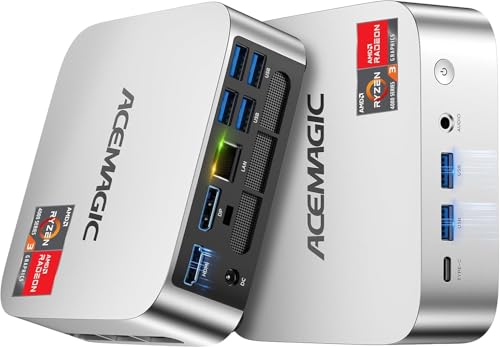
ACEMAGIC Ryzen 7330U Mini PC
Best for: Basic office work and triple display setups
- Processor
- AMD Ryzen 7330U Pro
- Graphics Card
- AMD Radeon Graphics
- RAM Capacity
- 16GB
- RAM Type
- LPDDR4
- Storage Capacity
- 256GB
- Operating System
- Win 11 Pro
View on Amazon: ACEMAGIC Ryzen 7330U Mini PC Affiliate link
The ACEMAGIC K1 is a compact mini PC powered by an AMD Ryzen 3 Pro 7330U processor. It includes 16GB of LPDDR4 RAM and a 256GB SSD. This unit supports triple displays via HDMI, DisplayPort, and USB-C. It runs Windows 11 Pro and features built-in power supply design. You get reliable connectivity with WiFi 5 and Bluetooth 4.2. It is suitable for basic office tasks and media consumption.
Pros
- AMD Ryzen 3 Pro 7330U processor with up to 4.3GHz boost
- 16GB LPDDR4 RAM for multitasking
- Triple display support via HDMI, DP, and USB-C
- Compact 5x5x1.6 inch chassis with VESA mount
- Pre-installed Windows 11 Pro operating system
Cons
- WiFi 5 and Bluetooth 4.2 are older standards
- 256GB storage capacity is limited for large files
- LPDDR4 RAM is non-expandable
Good fit if
- You need a small form factor for a desk or monitor mount
- You require triple screen output for productivity
- You want a pre-installed Windows 11 Pro system
Skip if
- You need modern WiFi 6E or Bluetooth 5.0 connectivity
- You require expandable RAM beyond 16GB
- You need high-end gaming performance
Verdict: ACEMAGIC K1 Ryzen 3 Pro Mini PC is a practical desktop replacement for users who need triple displays and a compact footprint. It fits office workflows but lacks modern wireless standards and high storage capacity.
Specifications side by side
| Spec | GEEKOM Ultra 9 24GB RAM Mini PC | ACEMAGIC Ryzen 7330U Mini PC |
|---|---|---|
| Processor | Intel Core Ultra 9 185H | AMD Ryzen 7330U Pro |
| Graphics Card | Arc Graphics | AMD Radeon Graphics |
| RAM Capacity | 24GB | 16GB |
| RAM Type | LPDDR5 | LPDDR4 |
| Storage Capacity | 500GB | 256GB |
| Storage Interface | PCIe | not stated |
| Operating System | not stated | Win 11 Pro |
| Wireless Connectivity | WiFi 7 | WiFi 5, Bluetooth 4.2 |
| Storage | 512GB SSD | not stated |
| Use | not stated | Business |
| Dimensions | 4.6 × 4.4 × 1.9 inches | 5.04 × 5.04 × 1.61 inches |
| Weight | 1.44 pounds | 1.1 pounds |
| Size | Intel Ultra 9 185H | Ryzen 7330U+16GB+256GB |
| Color | Diamond Black | Ryzen 7330U+16GB+256GB |
| Model | IT13 MAX 2026 | V1 |
Frequently asked questions
Which mini PC is better for local AI tasks?
The GEEKOM IT13 MAX is the superior choice for local AI workloads. It features an Intel Core Ultra 9 185H processor with a dedicated NPU. This hardware accelerates machine learning tasks efficiently. The ACEMAGIC K1 lacks this specialized AI processing unit. You should select the GEEKOM model if AI performance is a primary requirement for your workflow.
How do the physical dimensions compare between these two units?
Both devices are compact, but the ACEMAGIC K1 is slightly lighter. The GEEKOM IT13 MAX measures 4.4 by 4.6 by 1.9 inches and weighs 1.44 pounds. The ACEMAGIC K1 is 5.04 by 5.04 by 1.61 inches and weighs 1.1 pounds. The GEEKOM unit is taller but narrower. The ACEMAGIC unit has a square footprint and is lighter for portability.
Can these mini PCs support multiple monitors simultaneously?
Yes, both models support multiple display outputs. The GEEKOM IT13 MAX is optimized for multi-monitor setups, handling complex visual tasks. The ACEMAGIC K1 specifically supports triple displays. This makes it suitable for office environments requiring extended screen real estate. You can connect multiple screens to either device depending on your connectivity needs.
What is the storage capacity on the GEEKOM model?
The GEEKOM IT13 MAX includes a 512GB SSD. This provides ample space for operating system files and applications. The ACEMAGIC K1 offers 256GB of storage. If you require more internal space for large files, the GEEKOM option provides double the capacity. Both units use solid-state drives for fast data access.
Is the GEEKOM IT13 MAX suitable for professional multitasking?
It is designed for high-performance multitasking. The unit features 24GB of RAM and a powerful Intel Core Ultra 9 processor. This configuration handles heavy workloads and professional applications smoothly. The ACEMAGIC K1 has 16GB of RAM. You should choose the GEEKOM model if you run memory-intensive programs or many tabs simultaneously.
Which device is quieter during operation?
The GEEKOM IT13 MAX is noted for quiet operation. It is built for users who prioritize a silent environment during intensive tasks. The ACEMAGIC K1 is a basic office replacement. While likely quiet for light use, the GEEKOM model is explicitly described as suitable for those needing quiet operation during heavy processing.