3 Best GEEKOM Mini PCs with 32GB RAM, Compared
As an Amazon Associate we earn from qualifying purchases. Links on this page are affiliate links.
We compared 3 best GEEKOM mini PCs with 32GB RAM to help you find the right machine. The GEEKOM A9 Max Ryzen AI 9 Mini PC leads this list. It takes the top spot because of its powerful Ryzen AI 9 HX 470 processor. This spec ensures strong performance for local AI tasks and heavy professional workloads. Our picks rely strictly on the specifications published on the official listings. We focused on how these hardware details impact your daily use. This guide helps you decide which mini PC fits your specific needs for memory and processing power.
Quick picks
| # | Product | Best for | Price |
|---|---|---|---|
| 1 | GEEKOM A9 Max Ryzen AI 9 Mini PC Best overall | local AI and professional multitasking | Check price of GEEKOM A9 Max Ryzen AI 9 Mini PC on Amazon |
| 2 | GEEKOM A8 Max Ryzen 9 Mini PC Also great | Quiet productivity with dual Ethernet | Check price of GEEKOM A8 Max Ryzen 9 Mini PC on Amazon |
| 3 | GEEKOM IT13 Intel Core i9 Mini PC Best budget | High-performance multitasking and multi-display setups | Check price of GEEKOM IT13 Intel Core i9 Mini PC on Amazon |
The best fit for you
- You need the best all-around performance for AI tasks GEEKOM A9 Max Ryzen AI 9 Mini PC The Ryzen AI 9 HX 470 processor handles local AI and professional workloads efficiently.
- You require quiet operation with dual Ethernet connectivity GEEKOM A8 Max Ryzen 9 Mini PC This model offers dual networking ports and quiet performance for productivity tasks.
- You want high-performance multitasking with Intel Core i9 GEEKOM IT13 Intel Core i9 Mini PC The Core i9-13900H provides strong processing power for complex multitasking scenarios.
Our 3 picks

GEEKOM A9 Max Ryzen AI 9 Mini PC
Best for: local AI and professional multitasking
- Memory
- 32GB RAM (what this guide is about)
- Processor
- AMD Ryzen AI 9 HX 470
- Graphics Card
- AMD Radeon 890M
- RAM Capacity
- 32GB
- RAM Type
- DDR5
- Storage Capacity
- 2TB
View on Amazon: GEEKOM A9 Max Ryzen AI 9 Mini PC Affiliate link
The GEEKOM A9 Max packs an AMD Ryzen AI 9 HX 470 processor and 32GB of DDR5 RAM into a compact chassis. It includes a 2TB PCIe Gen4 NVMe SSD and AMD Radeon 890M graphics. This setup supports 8K visuals and local AI workloads. It suits professionals needing strong CPU performance and high-speed memory for demanding tasks.
Pros
- AMD Ryzen AI 9 HX 470 processor with 86 TOPS AI acceleration
- 32GB DDR5 RAM expandable to 128GB
- 2TB PCIe Gen4 NVMe SSD storage
- AMD Radeon 890M integrated graphics
- Dual 2.5GbE LAN and WiFi 7 connectivity
Cons
- Integrated Radeon 890M graphics limit high-end gaming performance
- No dedicated discrete graphics card included
- Limited to four display outputs
Good fit if
- You need strong multi-core CPU performance for local AI or data analysis
- You require high-speed DDR5 memory for multitasking
- You want a compact workstation with dual 2.5GbE ports
Skip if
- You require dedicated graphics for heavy 3D rendering or AAA gaming
- You need more than four simultaneous display outputs
- You prefer a system with a discrete GPU installed
Verdict: The GEEKOM A9 Max Ryzen AI 9 Mini PC delivers robust processing power and fast memory for AI and professional workloads. It fits users who prioritize CPU performance and connectivity over dedicated graphics capabilities.

GEEKOM A8 Max Ryzen 9 Mini PC
Best for: Quiet productivity with dual Ethernet
- Memory
- 32GB RAM (what this guide is about)
- Processor
- AMD Ryzen 9 8945HS
- Graphics Card
- Radeon 780M Graphics
- RAM Capacity
- 32GB
- RAM Type
- DDR5
- Storage Capacity
- 2TB
View on Amazon: GEEKOM A8 Max Ryzen 9 Mini PC Affiliate link
The GEEKOM A8 Max packs an AMD Ryzen 9 8945HS processor and 32GB of DDR5 RAM into a compact chassis. It includes a 2TB NVMe SSD for fast storage. This model stands out with dual 2.5G LAN ports and a quiet cooling system. It suits users who need strong multitasking performance and reliable connectivity for home or small office setups.
Pros
- AMD Ryzen 9 8945HS processor with 8 cores
- 32GB DDR5 RAM expandable to 128GB
- Dual 2.5G Ethernet ports for stable networking
- Operates below 36 decibels for quiet work
- Comes with Windows 11 pre-installed
Cons
- Slightly bulkier dimensions than some competitors
- Only two USB-C ports available
- No dedicated graphics card included
Good fit if
- You need dual Ethernet ports for networking
- You want quiet operation for office work
- You require expandable DDR5 memory
Skip if
- You need dedicated gaming graphics
- You prefer a smaller footprint
- You need more than two USB-C ports
Verdict: The GEEKOM A8 Max Ryzen 9 Mini PC delivers strong processing power and quiet operation for productivity tasks. It fits users who value dual networking ports and expandable memory over a tiny form factor.
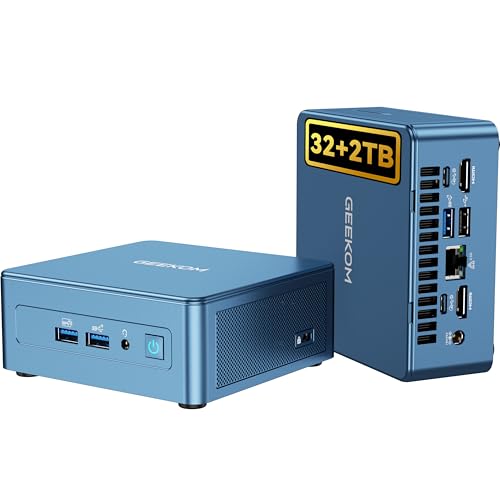
GEEKOM IT13 Intel Core i9 Mini PC
Best for: High-performance multitasking and multi-display setups
- Memory
- 32GB RAM (what this guide is about)
- Processor
- Intel Core i9-13900HK
- Graphics Card
- Intel Iris Xe Graphics
- RAM Capacity
- 32GB
- Storage Capacity
- 2TB
- Storage Interface
- PCIe Gen4 NVMe
View on Amazon: GEEKOM IT13 Intel Core i9 Mini PC Affiliate link
The GEEKOM IT13 Mini PC pairs a 13th Gen Intel Core i9-13900H processor with 32GB of RAM and a 2TB NVMe SSD. This configuration supports up to 64GB of memory and includes dual storage slots for expansion. It features tri-band Wi-Fi 6E and supports eight simultaneous displays. The metal chassis provides structural stability and heat dissipation for sustained performance.
Pros
- Intel Core i9-13900H processor with up to 5.4GHz speed
- 32GB RAM upgradeable to 64GB
- 2TB PCIe Gen4 NVMe SSD
- Metal mid-frame and baseplate construction
- Supports up to eight displays simultaneously
Cons
- Uses integrated Intel Iris Xe Graphics
- Heavier at 3.7 pounds
- Limited to Bluetooth 5.2
Good fit if
- You need high CPU power for multitasking
- You require support for multiple displays
- You want expandable storage and RAM
Skip if
- You require a dedicated graphics card
- You prefer a lighter portable form factor
- You need the latest Bluetooth standard
Verdict: The GEEKOM IT13 i9 Mini PC delivers strong processing power and display flexibility for users who prioritize CPU performance and multitasking capabilities over dedicated graphics.
Specifications side by side
| Spec | GEEKOM A9 Max Ryzen AI 9 Mini PC | GEEKOM A8 Max Ryzen 9 Mini PC | GEEKOM IT13 Intel Core i9 Mini PC |
|---|---|---|---|
| Processor | AMD Ryzen AI 9 HX 470 | AMD Ryzen 9 8945HS | Intel Core i9-13900HK |
| Graphics Card | AMD Radeon 890M | Radeon 780M Graphics | Intel Iris Xe Graphics |
| RAM Capacity | 32GB | 32GB | 32GB |
| RAM Type | DDR5 | DDR5 | not stated |
| Storage Capacity | 2TB | 2TB | 2TB |
| Storage Interface | PCIe Gen4 NVMe | M.2 2280 NVMe Gen4*4 | PCIe Gen4 NVMe |
| Operating System | Windows | not stated | not stated |
| Wireless Connectivity | WiFi 7, BT 5.4 | not stated | Tri-Band WiFi 6E, Bluetooth 5.4 |
| Memory | 32GB RAM | 32GB RAM | 32GB RAM |
| Storage | 2TB SSD | 2TB SSD | 2TB SSD |
| Use | Workstation | Business | not stated |
| Dimensions | 5.32 × 5.2 × 1.8 inches | 5.31 × 5.2 × 1.81 inches | not stated |
| Weight | 3.68 pounds | not stated | 3.7 pounds |
| Size | Ryzen AI 9 HX 470, 32GB+2TB | R9-8945HS, 32GB+2TB | i9-13900H, 32+2T |
| Color | Silver White | Sliver | Blue |
| Model | GEEKOM A9 Max | GEEKOM A8 Max | IT13 |
Choosing the Right GEEKOM Mini PC
-
Prioritize AI Processing Power
If your work involves local artificial intelligence or heavy professional multitasking, the processor is your most critical spec. The GEEKOM A9 Max features the Ryzen AI 9 HX 470. This chip is designed specifically to handle complex AI computations efficiently. You should choose this model if CPU performance matters more than dedicated graphics. It ensures smooth operation for demanding software without relying on a separate video card. This makes it ideal for users who need raw processing strength for creative or technical tasks.
-
Check Network Connectivity Options
Your connectivity needs should dictate your choice if you require stable wired connections. The GEEKOM A8 Max includes dual Ethernet ports. This feature supports robust networking setups for productivity tasks. You should select this model if you value dual networking capabilities over a smaller footprint. It offers quiet operation alongside strong processing power from the Ryzen 9 processor. This makes it a practical choice for users who need reliable internet access and expandable memory options.
-
Consider Display Flexibility
Users with multi-monitor setups should look at display support capabilities. The GEEKOM IT13 is built for high-performance multitasking across several screens. It uses the Intel Core i9-13900H processor to manage heavy workloads. You should pick this model if you prioritize display flexibility and CPU power. It fits users who need to run multiple applications simultaneously without lag. This makes it suitable for professional environments where screen real estate is essential for workflow efficiency.
-
Evaluate Storage Requirements
All three models in this list come with 2TB of solid-state storage. This amount of space is sufficient for most users who need room for large files. You do not need to worry about running out of space quickly. The 2TB SSD ensures fast load times for your operating system and applications. This consistent storage capacity means you can focus on processor and connectivity features. It provides a reliable foundation for storing documents, media, and software without needing external drives.
-
Assess Physical Dimensions
Space constraints may influence your decision when choosing a mini PC. The A9 Max measures 5.2 by 5.32 inches and weighs 3.68 pounds. The A8 Max is similar in size but slightly taller at 1.81 inches. The IT13 weighs 3.7 pounds. You should check these dimensions to ensure the unit fits your desk or mount. All models are compact, but slight variations exist. Measuring your available space beforehand helps you select the model that fits your physical setup best.
Frequently asked questions
Which GEEKOM mini PC is best for local AI tasks?
The GEEKOM A9 Max is the top choice for local AI workloads. It features the Ryzen AI 9 HX 470 processor, which is designed for high-performance computing and AI acceleration. This model also includes 32GB of RAM and a 2TB SSD, ensuring fast data access for demanding applications.
Does the GEEKOM A8 Max have dual Ethernet ports?
Yes, the GEEKOM A8 Max includes dual Ethernet connectivity. This feature supports robust networking for productivity tasks and stable connections. It pairs the Ryzen 9 processor with 32GB of RAM and 2TB of storage, making it a quiet and powerful option for users who value reliable network performance.
What processor does the GEEKOM IT13 use?
The GEEKOM IT13 uses the Intel Core i9-13900H processor. This chip delivers strong processing power for high-performance multitasking and multi-display setups. It comes equipped with 32GB of RAM and a 2TB SSD, providing ample resources for users who prioritize CPU capabilities over dedicated graphics performance.
Are all these models available with 32GB of RAM?
Yes, all three listed GEEKOM mini PCs come with 32GB of RAM. This configuration ensures smooth performance for professional multitasking and heavy workloads. Each model also includes 2TB of SSD storage, allowing you to store large files and run multiple applications simultaneously without running out of memory.
Which GEEKOM model is best for quiet operation?
The GEEKOM A8 Max is noted for its quiet operation. It is ideal for users who need a silent environment for productivity tasks. The Ryzen 9 processor handles workloads efficiently while maintaining low noise levels. It also offers dual Ethernet ports and includes 32GB of RAM with 2TB of storage.
How much storage do these GEEKOM mini PCs have?
Each of the three GEEKOM mini PCs includes 2TB of SSD storage. This generous capacity allows you to store extensive libraries of media, large datasets, and numerous applications. Combined with 32GB of RAM, the storage ensures fast load times and ample space for your most critical files and projects.
Can the GEEKOM IT13 support multiple displays?
Yes, the GEEKOM IT13 supports multi-display setups. Its Intel Core i9-13900H processor provides the necessary power to drive multiple screens simultaneously. This makes it suitable for users who require extensive workspace flexibility. It also features 32GB of RAM and a 2TB SSD for robust performance.