Apple iMac 24-Inch M1 Desktop Review: Who It Fits and Who Should Skip It
As an Amazon Associate we earn from qualifying purchases. Links on this page are affiliate links.
This apple imac apple m1 review focuses on the 2021 24-inch model. It pairs an Apple M1 chip with 8GB of RAM and a 256GB SSD. The design is strikingly thin at 11.5 mm. You get a 4.5K Retina display with P3 wide color. The system uses a 7-core GPU for graphics. This combination defines the core experience. It is a compact desktop that integrates performance into a slim form factor. The specs suggest a balance of speed and storage for everyday tasks.
What stands out
- 24-inch 4.5K Retina display with 500 nits brightness
- Apple M1 chip with 8-core CPU and 7-core GPU
- 8GB system memory and 256GB SSD storage
- 1080p FaceTime HD camera with M1 ISP
- Six-speaker sound system for robust audio
Who it fits
Good fit for
This setup suits users who want a clean, space-saving desktop. The 24-inch 4.5K screen is ideal for office work and media consumption. The M1 chip handles daily tasks efficiently. If you need a reliable machine for web browsing, document editing, or light photo editing, this fits well. The integrated camera and six-speaker system make it good for video calls and casual entertainment without extra gear.
Who should skip it
You should look elsewhere if you need more than 8GB of RAM. The 256GB SSD fills up quickly with large files. Heavy video editing or 3D rendering will strain the 7-core GPU. Gamers seeking high frame rates will find the graphics insufficient. If you require extensive storage or multi-tasking power, consider configurations with 16GB RAM and larger SSDs, or a different desktop entirely.
Verdict: The Apple iMac 24-Inch M1 Desktop offers a sleek, capable package for general users. Its compact design and efficient chip make it a solid choice for everyday computing needs.
Key specs explained for this iMac
Processor: Apple M1
The Apple M1 chip combines an 8-core CPU and a 7-core GPU on one silicon piece. This unified architecture handles daily tasks and light creative work efficiently. For prebuilt gaming PCs, you will typically find separate CPUs and GPUs. This chip prioritizes power efficiency and integrated performance over raw gaming horsepower.
System Memory: 8GB
This unit includes 8GB of RAM, which supports smooth multitasking for web browsing and office applications. Modern prebuilt gaming desktops usually start with 16GB or more to handle demanding games. Eight gigabytes is sufficient for general use but may limit heavy multitasking or future-proofing compared to higher-end gaming rigs.
Storage Capacity: 256GB SSD
The 256GB solid-state drive offers fast boot times and quick application loading. However, the capacity is quite small for a primary computer. Prebuilt gaming PCs often include 1TB or more of storage for large game libraries. You may need external drives or cloud storage to manage media files and software installations effectively.
Display Resolution: 4.5K Retina
The 24-inch screen delivers a 4.5K Retina resolution with P3 wide color gamut. This provides sharp text and vibrant images for creative work. Standard prebuilt gaming monitors often focus on high refresh rates rather than pixel density. This display is excellent for visual clarity but lacks the high frame rate support common in dedicated gaming setups.
Design and Build Overview
According to the listing, this iMac features a strikingly thin 11.5 mm design. The unit measures 27.2 inches in width, 23.8 inches in height, and 6.89 inches in depth. These dimensions indicate a compact footprint that fits well on standard desks without consuming excessive space. The available colors include Blue, Green, Silver, Pink, Orange, Purple, and Yellow. You can choose from various RAM and storage configurations, such as 8GB with 256GB or 512GB SSD options, or upgrade to 16GB with up to 1TB of storage.
The build integrates a 24-inch 4.5K Retina display with P3 wide color gamut and 500 nits of brightness. This screen size provides ample workspace for multitasking while maintaining a sleek profile. The device includes two Thunderbolt / USB 4 ports and up to two USB 3 ports. This port layout allows for direct connection to high-speed peripherals and displays without needing additional hubs.
A 1080p FaceTime HD camera and a six-speaker sound system are built into the chassis. The camera uses the M1 ISP for improved video quality. The six-speaker system delivers robust audio, reducing the need for external speakers in many scenarios. The combination of thin design, vibrant color options, and integrated audio-visual components makes this unit suitable for users who value aesthetics and all-in-one convenience. It suits environments where desk space is limited but visual appeal matters.
Setup and everyday use guide
Setting up this iMac is straightforward because the components are integrated into a single unit. You simply connect the power cord and wait for the system to boot. The 24-inch 4.5K Retina display is ready immediately, offering a P3 wide color gamut and 500 nits of brightness for clear visuals. This resolution ensures sharp text and detailed images for general productivity and media consumption.
The Apple M1 chip, featuring an 8-core CPU and 7-core GPU, handles daily operations efficiently. With 8GB of RAM, the system manages multiple browser tabs and office applications without significant lag. However, the 256GB SSD storage is limited. You will need to manage your files carefully or use external storage for large media libraries. The unified architecture means the processor and graphics core share memory, which optimizes performance for everyday tasks like web browsing, video calls, and light photo editing.
Connectivity includes two Thunderbolt / USB 4 ports and up to two USB 3 ports. These allow you to connect peripherals like keyboards, mice, or external drives. The six-speaker sound system provides robust audio, reducing the need for external speakers for casual listening. The 1080p FaceTime HD camera ensures clear video quality for remote work or communication. This setup is ideal for users who prioritize a clean, thin design and reliable performance for standard desktop duties.
Before You Buy This iMac
This iMac is a complete unit, but you may need external accessories. The listing notes two Thunderbolt USB 4 ports and up to two USB 3 ports. You might want a USB hub or additional storage if the 256GB SSD fills up quickly. The 8GB of unified memory is efficient for daily tasks, but it cannot be upgraded later. Check if your software requires macOS specifically, as this is not a Windows machine. It does not fit with high-end prebuilt gaming PCs that use discrete graphics cards. The M1 chip handles light creative work well, but heavy gaming or 3D rendering may exceed its limits. Consider your monitor needs too, though the 24-inch 4.5K Retina display is built in. Keep the area around the thin chassis clear for airflow. This model suits users who prioritize design and integrated performance over raw power or upgradability.
Check before you buy
- Verify your software is compatible with macOS.
- Check if 8GB RAM meets your workflow needs.
- Ensure you have space for the 24-inch unit.
- Confirm if the 256GB SSD is sufficient storage.
The product at a glance
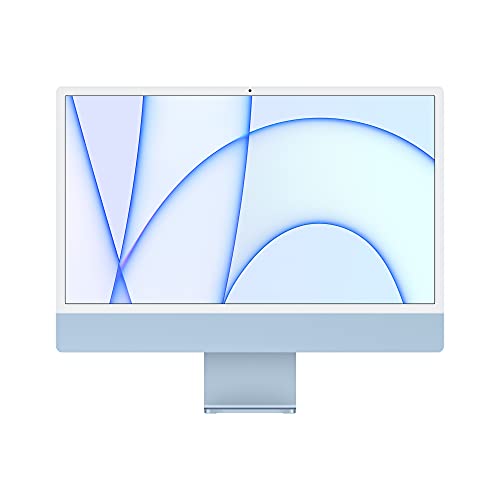
Apple iMac 24-Inch M1 Desktop
Best for: Everyday use and media consumption
- Processor
- Apple M1
- System Memory
- 8GB
- Storage Capacity
- 256GB SSD
- Screen Size
- 24-inch
- Display Resolution
- 4.5K Retina
- Graphics
- 7-core GPU
View on Amazon: Apple iMac 24-Inch M1 Desktop Affiliate link
This 24-inch iMac features an Apple M1 chip with an 8-core CPU and 7-core GPU. It includes 8GB of RAM and a 256GB SSD. The 4.5K Retina display offers vibrant colors and sharp detail. You get a 1080p camera and a six-speaker sound system. This all-in-one design suits users who want a compact, stylish desktop for everyday tasks and media consumption.
Pros
- 24-inch 4.5K Retina display with P3 wide color gamut
- Apple M1 chip with 8-core CPU and 7-core GPU
- Six-speaker sound system for robust audio
- 1080p FaceTime HD camera with M1 ISP
Cons
- Only 8GB of system RAM
- 256GB SSD storage capacity is limited
- No mention of expandable storage or RAM options
Good fit if
- You want a compact all-in-one design
- You need a vibrant 4.5K display for media
- You prioritize integrated audio quality
Skip if
- You require more than 8GB of RAM
- You need extensive storage beyond 256GB
- You plan to upgrade components later
Verdict: Apple iMac 24-Inch M1 Blue offers a sleek, integrated experience with strong visual and audio specs. It fits users who value design and simplicity over raw power or upgradability.
Specifications side by side
| Spec | Apple iMac 24-Inch M1 Desktop |
|---|---|
| Processor | Apple M1 |
| System Memory | 8GB |
| Storage Capacity | 256GB SSD |
| Screen Size | 24-inch |
| Display Resolution | 4.5K Retina |
| Graphics | 7-core GPU |
| Memory | 8GB RAM |
| Storage | 256GB SSD |
| Dimensions | 27.2 × 6.89 × 23.8 inches |
| Size | 8GB - 256GB |
| Color | Blue |
| Model | MJV93LL/A |
Frequently asked questions
Is the Apple iMac 24-Inch M1 good for gaming?
This model is not designed for heavy gaming. It features an Apple M1 chip with a 7-core GPU. While it handles casual titles well, it lacks the dedicated graphics power needed for demanding AAA games. You should look for prebuilt PCs with discrete GPUs for serious gaming performance.
Can I upgrade the RAM or storage on this iMac?
No, you cannot upgrade these components later. The Apple M1 chip integrates the CPU, GPU, and memory onto a single piece of silicon. The listing shows 8GB of RAM and a 256GB SSD. Since these parts are soldered, you must choose your desired specifications at the time of purchase.
What is the screen resolution of this iMac?
The display offers a 4.5K Retina resolution. This provides sharp text and detailed images for everyday use and media consumption. The screen also supports P3 wide color, which ensures accurate colors for photo editing or watching videos. The 24-inch size fits comfortably on most standard desks.
How much space does this desktop take up?
The unit has a compact footprint with a strikingly thin profile. It measures 27.2 inches in width, 23.8 inches in height, and 6.89 inches in depth. The overall design is only 11.5 mm thick. This slim form factor allows it to fit neatly into smaller workspaces without taking up excessive desk area.
Is the Apple iMac 24-Inch M1 suitable for video editing?
It is suitable for light creative work but not heavy professional editing. The M1 chip handles basic tasks efficiently. However, the 8GB of RAM may limit performance when running multiple resource-heavy applications. For complex video projects, you might need more memory and storage capacity than this base model provides.
What ports are available on this iMac?
The listing notes two Thunderbolt USB 4 ports and up to two USB 3 ports. These allow you to connect external drives, monitors, or peripherals. You may want a USB hub if you need to connect many devices simultaneously. The integrated design means you do not have access to internal expansion slots.