1TB SSD or 2TB SSD All-In-One Desktops? Compared by Specs
As an Amazon Associate we earn from qualifying purchases. Links on this page are affiliate links.
Choosing between a 1TB SSD vs 2TB SSD all in one desktop depends on your workflow. Both machines integrate display and computer components into a single unit. The Apple iMac offers a higher resolution Retina display and macOS. The Lenovo IdeaCentre provides a larger 27-inch touchscreen, significantly more RAM, and Windows 11. Storage capacity is the primary differentiator, with one offering 1TB and the other 2TB. You need to weigh display quality against processing power and operating system preference.
Key differences
| Aspect | Apple iMac 24-inch M1 1TB SSD | Lenovo IdeaCentre 27" Touchscreen Ryzen 5 |
|---|---|---|
| Processor | Apple M1 Chip with 8-core CPU | AMD Ryzen 5 8645HS |
| System Memory | 8GB unified memory | 64GB DDR5 |
| Storage Capacity | 1TB SSD | 2TB SSD |
| Screen Size | 24-inch | 27-inch |
| Display Resolution | 4.5K Retina (4480x2520) | FHD (1920x1080) |
| Display Feature | not listed | Touchscreen |
Which one should you choose?
Choose Apple iMac 24-inch M1 1TB SSD if
- You prioritize display sharpness for photo or video editing
- You prefer the macOS ecosystem and unified memory architecture
- You want a compact 24-inch form factor
Choose Lenovo IdeaCentre 27" Touchscreen Ryzen 5 if
- You need high multitasking performance with 64GB of RAM
- You require a 2TB storage capacity for large files
- You want a touchscreen interface and Windows 11
Verdict: The Apple iMac suits users who value screen fidelity and macOS integration. The Lenovo IdeaCentre is better for users needing extensive RAM, a larger screen, and Windows compatibility. Choose the iMac for visual precision and the Lenovo for raw capacity and interactivity.
Storage Capacity and System Specs
Storage Capacity
The Lenovo IdeaCentre offers 2TB of SSD storage, which is double the capacity found in the Apple iMac. The iMac provides 1TB of SSD storage. For users who store large libraries of games, high-resolution video projects, or extensive photo archives, the additional 1TB on the Lenovo model provides more breathing room. This extra space can delay the need for external drives or cloud subscriptions. The iMac’s 1TB is sufficient for moderate users, but the Lenovo configuration is better suited for heavy data retention without immediate management.
System Memory
Memory capacity differs significantly between these two machines. The Lenovo IdeaCentre comes with 64GB of DDR5 RAM, offering substantial headroom for multitasking and demanding applications. In contrast, the Apple iMac is equipped with only 8GB of unified memory. While Apple’s unified memory architecture is efficient, 64GB of standard DDR5 provides far more raw capacity for running multiple virtual machines, editing 4K video, or keeping dozens of browser tabs open alongside other software. The Lenovo configuration is vastly superior for memory-intensive workflows.
Processor
The processing power varies by architecture and core count. The Lenovo IdeaCentre uses an AMD Ryzen 5 8645HS processor with 6 cores and 12 threads, reaching up to 5 GHz. The Apple iMac features an M1 chip with an 8-core CPU. The Ryzen 5 offers high clock speeds and multi-threaded performance typical of modern Windows desktops. The M1 chip is optimized for macOS and offers strong single-core performance. For raw multi-core throughput in Windows applications, the Lenovo processor provides a clear advantage in processing capability.
Display Resolution
Visual clarity depends on the screen resolution and size. The Apple iMac features a 24-inch 4.5K Retina display with a resolution of 4480x2520 pixels. The Lenovo IdeaCentre has a 27-inch FHD display with a resolution of 1920x1080 pixels. The iMac offers significantly higher pixel density, resulting in sharper text and images. The Lenovo screen is larger but less detailed. If you prioritize sharpness and color accuracy for design work, the iMac’s high-resolution panel is superior. If you prefer a larger viewing area for media consumption, the Lenovo screen is bigger.
Display Features
Interaction capabilities differ between the two monitors. The Lenovo IdeaCentre includes a touchscreen, allowing you to control the interface with your fingers. The Apple iMac does not have a touchscreen. The Lenovo display also covers 99% of the sRGB color gamut and includes anti-glare coating. The iMac focuses on color fidelity typical of Retina displays but lacks touch input. For users who want to interact directly with the screen for navigation or drawing, the Lenovo’s touchscreen feature is a distinct advantage. The iMac relies on traditional input devices.
Which all-in-one desktop fits you best
Video editors needing high-res color accuracy
The Apple iMac features a 24-inch 4.5K Retina display with 4480x2520 resolution. This sharp screen delivers precise color for creative work. The M1 chip with 8-core CPU handles intensive tasks efficiently. You get 8GB of unified memory for smooth multitasking. The macOS environment supports professional creative software natively.
Power users requiring massive storage and RAM
The Lenovo IdeaCentre includes 64GB of DDR5 RAM and a 2TB SSD. This configuration supports heavy multitasking and large file storage. The AMD Ryzen 5 8645HS processor offers six cores and high turbo speeds. You receive Windows 11 Home for broad software compatibility. The 27-inch screen provides ample workspace for complex projects.
Users wanting touchscreen interaction and connectivity
This Lenovo model features a 27-inch FHD touchscreen for direct interaction. It includes four USB ports, HDMI-In, and HDMI-Out for versatile connections. The wireless keyboard and mouse simplify setup. The 2TB storage accommodates extensive media libraries. The anti-glare display ensures comfortable viewing in bright environments.
Quick picks
| # | Product | Best for | Price |
|---|---|---|---|
| 1 | Apple iMac 24-inch M1 1TB SSD | Users needing 1TB storage and 4.5K visuals | Check price of Apple iMac 24-inch M1 1TB SSD on Amazon |
| 2 | Lenovo IdeaCentre 27" Touchscreen Ryzen 5 | Users needing 2TB storage and 64GB RAM | Check price of Lenovo IdeaCentre 27" Touchscreen Ryzen 5 on Amazon |
The products compared

Apple iMac 24-inch M1 1TB SSD
Best for: Users needing 1TB storage and 4.5K visuals
- Storage
- 1TB SSD (what this guide is about)
- Processor
- Apple M1 Chip with 8-core CPU
- System Memory
- 8GB unified memory
- Storage Capacity
- 1TB SSD
- Screen Size
- 24-inch
- Display Resolution
- 4.5K Retina (4480x2520)
View on Amazon: Apple iMac 24-inch M1 1TB SSD Affiliate link
This 24-inch all-in-one desktop features an Apple M1 chip with an 8-core CPU and 8GB of unified memory. It includes 1TB of SSD storage and a 4.5K Retina display. The system supports Wi-Fi 6 and Bluetooth 5.0. It suits users who need a compact machine with high-resolution visuals and solid storage for everyday tasks.
Pros
- 24-inch 4.5K Retina display with 4480x2520 resolution
- 1TB SSD storage capacity
- Apple M1 chip with 8-core CPU
- 8GB unified memory
Cons
- 8GB RAM is lower than the 32GB found in comparable competitors
- No dedicated graphics card listed
- Limited to two Thunderbolt ports
Good fit if
- You prioritize high-resolution visuals for media consumption
- You need 1TB of fast SSD storage
- You prefer a compact all-in-one design
Skip if
- You require more than 8GB of system memory
- You need extensive port connectivity for multiple peripherals
- You are looking for high-end gaming performance
Verdict: Apple iMac M1 24-inch 1TB delivers a sharp 4.5K display and ample 1TB storage in a sleek form factor. It is a practical fit for users who value visual clarity and efficient storage over raw multitasking power.
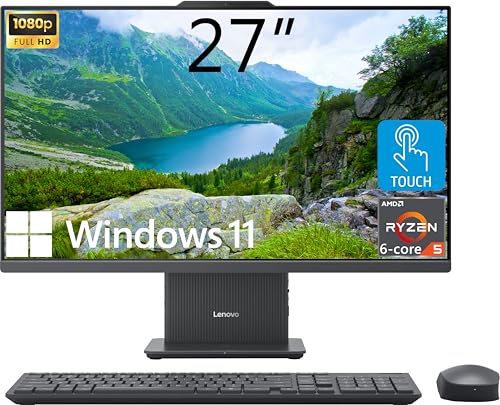
Lenovo IdeaCentre 27" Touchscreen Ryzen 5
Best for: Users needing 2TB storage and 64GB RAM
- Storage
- 2TB SSD (what this guide is about)
- Processor
- AMD Ryzen 5 8645HS
- System Memory
- 64GB DDR5
- Storage Capacity
- 2TB SSD
- Screen Size
- 27"
- Display Resolution
- FHD (1920x1080)
View on Amazon: Lenovo IdeaCentre 27" Touchscreen Ryzen 5 Affiliate link
This Lenovo IdeaCentre AIO pairs a 2TB SSD with 64GB of DDR5 RAM. It uses a 27-inch FHD touchscreen with 99% sRGB coverage. The AMD Ryzen 5 8645HS processor provides strong performance. You get a wireless keyboard, mouse, and charging base. This setup suits users who need large storage and high memory for multitasking.
Pros
- 2TB SSD storage capacity
- 64GB DDR5 system memory
- 27-inch FHD touchscreen display
- Includes wireless charging base
Cons
- FHD resolution limits sharpness on a 27-inch screen
- 300-nit brightness is lower than many competitors
- Windows 11 Home lacks advanced enterprise features
Good fit if
- You need 2TB of storage for large files
- You want a responsive touchscreen interface
- You require 64GB RAM for heavy multitasking
Skip if
- You prefer 4K display resolution
- You need high-brightness panels for bright rooms
- You want a smaller 24-inch footprint
Verdict: Lenovo IdeaCentre 27" Touch AIO is a high-capacity workstation for users who prioritize storage and memory over display sharpness. It fits those who need a large touchscreen and wireless accessories without buying separate components.
Specifications side by side
| Spec | Apple iMac 24-inch M1 1TB SSD | Lenovo IdeaCentre 27" Touchscreen Ryzen 5 |
|---|---|---|
| Processor | Apple M1 Chip with 8-core CPU | AMD Ryzen 5 8645HS |
| System Memory | 8GB unified memory | 64GB DDR5 |
| Storage Capacity | 1TB SSD | 2TB SSD |
| Screen Size | 24-inch | 27" |
| Display Resolution | 4.5K Retina (4480x2520) | FHD (1920x1080) |
| Touchscreen | not stated | Touchscreen |
| Operating System | not stated | Windows 11 Home |
| Memory | 8GB RAM | 64GB RAM |
| Storage | 1TB SSD | 2TB SSD |
| Display Feature | not stated | Touchscreen |
| Dimensions | 30 × 11 × 27 inches | 24.1 × 7.55 × 18.6 inches |
| Size | 8GB - 1TB | 64GB RAM | 2TB SSD |
| Color | Silver | not stated |
| Model | MGPD3LL/A | IdeaCentre |
Frequently asked questions
Is 1TB SSD enough for an all-in-one desktop?
Yes, 1TB SSD is sufficient for most users. It holds operating systems, applications, and thousands of photos or documents. The Apple iMac 24-inch with 1TB SSD offers ample space for daily tasks. It balances storage needs with a sleek design for general use.
Do I need 2TB SSD for gaming?
You likely need 2TB SSD if you store many large games. Modern titles often exceed 100GB each. The Lenovo IdeaCentre 27-inch provides 2TB SSD storage. This capacity allows you to keep multiple heavy games installed without constantly managing free space on your drive.
Which all-in-one has better display resolution?
The Apple iMac 24-inch M1 features a 4.5K Retina display. It delivers sharp visuals with high pixel density. The Lenovo IdeaCentre 27-inch has a larger screen but focuses on touch functionality. Choose the iMac if you prioritize color accuracy and image clarity for creative work.
Can I upgrade the RAM in these all-in-ones?
You cannot upgrade the RAM in these specific all-in-one models. The Apple iMac comes with 8GB RAM, which is fixed. The Lenovo IdeaCentre includes 64GB RAM, also integrated into the system. You must select the desired memory capacity at the time of purchase.
Is touchscreen functionality important for productivity?
A touchscreen is helpful for navigation and creative apps. The Lenovo IdeaCentre 27-inch includes a touchscreen display. This allows you to interact directly with content using your fingers. The Apple iMac does not feature touch input, relying instead on a keyboard and mouse for control.
Which system runs Windows versus macOS?
The Lenovo IdeaCentre runs Windows 11 Home. This is standard for most PC software and games. The Apple iMac operates on macOS. This system is optimized for Apple ecosystem integration. Your choice depends on whether you prefer the Windows or Apple operating environment.
How much physical space do these desktops take?
Both units are compact but differ in dimensions. The Lenovo IdeaCentre measures 24.1 inches in length and 18.6 inches in height. The Apple iMac is 30 inches long and 27 inches high. Measure your desk space to ensure the chosen model fits comfortably in your setup area.
Is 64GB RAM overkill for average users?
Yes, 64GB RAM is excessive for basic tasks. It is designed for heavy multitasking and professional workloads. The Lenovo IdeaCentre includes this high memory capacity. Most users only need 8GB to 16GB for browsing and office work. You pay for capacity you may never fully utilize.