Suevery vs OuuOee All-In-One Desktops: Which Brand Fits You?
As an Amazon Associate we earn from qualifying purchases. Links on this page are affiliate links.
The suevery vs OuuOee all in one desktop comparison highlights two distinct approaches to integrated computing. Both units combine the screen and computer into a single chassis, reducing cable clutter on your desk. The main difference lies in their intended use and power. Suevery targets heavy tasks with a dedicated graphics card and high-end processor. OuuOee focuses on portability and touch interaction with a smaller, lighter design.
Key differences
| Aspect | Suevery 27-inch RTX 3050 All-in-One | OuuOee 15.6-Inch Touchscreen All-in-One PC |
|---|---|---|
| Processor | Intel Core i5-13400F | Intel N5095 |
| Graphics | RTX 3050 6G | Integrated |
| Screen Size | 27-inch 2K | 15.6-inch FHD |
| Memory | 32GB | 8GB |
| Storage | 1TB SSD | 128GB ROM |
| Display Feature | Tilt and 360-degree rotation | Touchscreen and 360-degree rotation |
Which one should you choose?
Choose Suevery 27-inch RTX 3050 All-in-One if
- You need to run demanding games or edit video and 3D graphics.
- You want a large 27-inch screen for detailed work or media consumption.
- You require high memory and fast storage for heavy multitasking.
Choose OuuOee 15.6-Inch Touchscreen All-in-One PC if
- You prefer interacting with content using direct touch gestures.
- You need a lightweight unit that is easy to move or store.
- Your primary tasks are web browsing, office documents, and light media.
Verdict: Choose the Suevery if you need serious processing power and a large display for creative or gaming workloads. The OuuOee is better suited for users who prioritize a compact, touch-enabled form factor for basic computing tasks.
Suevery vs OuuOee Head to Head
Processor Power
The Suevery model uses an Intel Core i5-13400F processor with ten cores and sixteen threads, reaching speeds up to 4.6 GHz. This chip delivers strong multitasking capabilities for demanding tasks. In contrast, the OuuOee unit relies on an N5095 processor capped at 3.4 GHz. While the N5095 offers efficient low-energy operation, it lacks the raw computational strength of the 13th Gen Intel chip. You will notice a significant difference in processing speed when running complex applications or multiple programs simultaneously.
Graphics Performance
Suevery includes a dedicated NVIDIA RTX 3050 6G graphics card. This discrete GPU handles gaming, 3D rendering, and video editing with smooth frame rates and enhanced visual quality. The OuuOee product does not list a dedicated graphics card in its specifications. It relies on integrated graphics from the N5095 processor, which is suitable for basic display tasks but cannot match the graphical throughput of the RTX 3050. If you need to render 3D models or play modern games, the dedicated card is essential.
Memory Capacity
Suevery comes equipped with 32GB of system RAM, allowing for extensive multitasking and smooth performance when running memory-intensive applications. The OuuOee unit provides 8GB of RAM. While 8GB is sufficient for light office work and web browsing, it may limit your ability to run several heavy programs at once. The 32GB in the Suevery system offers four times the memory, ensuring you can keep many tabs and applications open without slowing down the computer.
Storage Space
Storage capacity differs significantly between these two units. Suevery features a 1TB M.2 NVMe solid-state drive, providing ample space for games, large video files, and extensive software libraries. The OuuOee model includes only 128GB of ROM. This limited storage fills up quickly with modern operating systems and applications. You will likely need external storage solutions for the OuuOee unit, whereas the Suevery system offers enough internal space to store most of your digital files locally.
Display Features
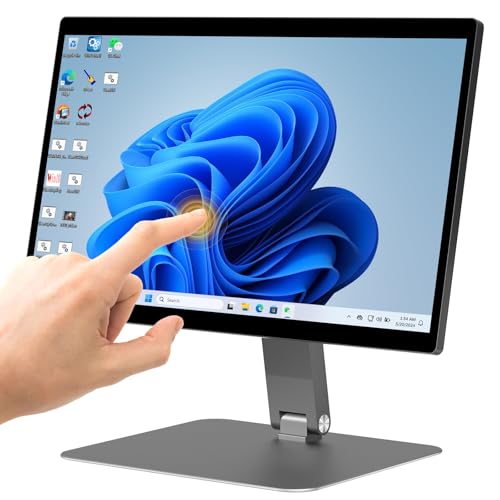
The OuuOee unit stands out with a 15.6-inch FHD touchscreen that supports 10-point touch input. It also rotates 360 degrees, allowing you to switch between laptop, stand, tent, and tablet modes. Suevery offers a larger 27-inch 2K display with a 120Hz refresh rate, but it lacks touch functionality. The Suevery screen tilts and rotates for viewing angles, but you cannot interact with the interface directly. Choose OuuOee for touch interaction and portability, or Suevery for larger, sharper visuals.
Which All-in-One Desktop Suits You
Gaming and video editing users
The Suevery model features an Intel Core i5-13400F processor and an RTX 3050 6G graphics card. This combination handles demanding tasks like 3D rendering and gaming smoothly. You also get 32GB of RAM and a 1TB SSD for fast multitasking and ample storage space for large files.
Touchscreen and portable display needs
The OuuOee unit offers a 15.6-inch FHD touchscreen with 360-degree rotation. You can switch between landscape and portrait modes easily. It includes Windows 11 Pro and Bluetooth connectivity. This setup is ideal for interactive presentations, standing work, or compact spaces where touch input is preferred.
Business and office productivity
This model runs Windows 11 Pro and includes a gigabit Ethernet port for stable wired connections. The N5095 processor handles daily office tasks efficiently. Its lightweight design at 7.54 pounds and flexible folding bracket make it easy to move or store. It supports multiple peripherals via USB and HDMI ports.
The products compared

Suevery 27-inch RTX 3050 All-in-One
Best for: home offices needing flexible, high-refresh displays
- Processor
- Intel Core i5-13400F
- System Memory
- 32GB
- Storage Capacity
- 1TB M.2 NVMe SSD
- Screen Size
- 27"
- Display Resolution
- 2K
- Graphics
- RTX 3050 6G
View on Amazon: Suevery 27-inch RTX 3050 All-in-One Affiliate link
This Suevery all-in-one desktop pairs a 27-inch 2K 120Hz touchscreen with an Intel Core i5-13400F processor and 32GB of RAM. The included RTX 3050 6G graphics card and 1TB SSD handle multitasking and moderate gaming. Its 360-degree rotating stand and integrated camera make it suitable for home offices or study spaces where screen flexibility matters.
Pros
- 27-inch 2K 120Hz touchscreen with 360-degree rotation
- Intel Core i5-13400F processor with 32GB RAM
- RTX 3050 6G dedicated graphics card
- 1TB NVMe SSD for fast storage
- Includes ergonomic keyboard, mouse, and 5MP camera
Cons
- 17.6-pound weight makes it less portable
- i5-13400F lacks integrated graphics, requiring the dedicated GPU
- Tilt range is limited to -5 to 25 degrees
Good fit if
- You need a large, high-refresh-rate screen for media or gaming
- You want a preconfigured system with all necessary peripherals included
- You require flexible screen positioning for video calls or presentations
Skip if
- You prioritize 4K display resolution over refresh rate
- You need a compact setup for frequent relocation
- You require higher-end graphics performance for heavy 3D rendering
Verdict: Suevery 27" 2K i5-13400F AIO delivers strong multitasking capabilities and a versatile display for users who value screen mobility and included accessories. It suits home offices and study environments where a flexible, high-quality visual experience is a priority.
OuuOee 15.6-Inch Touchscreen All-in-One PC
Best for: Compact touch-enabled desktop setups
- Processor
- N5095
- System Memory
- 8GB RAM
- Storage Capacity
- 128GB ROM
- Screen Size
- 15.6"
- Display Resolution
- FHD (1920 * 1080)
- Touchscreen
- Touchscreen
View on Amazon: OuuOee 15.6-Inch Touchscreen All-in-One PC Affiliate link
This OuuOee all-in-one desktop features a 15.6-inch FHD touchscreen with 360-degree rotation. It runs Windows 11 Pro on an Intel N5095 processor with 8GB RAM and 128GB storage. The design eliminates cable clutter and supports standing or portrait modes. It suits small workspaces needing flexible display angles. The compact build weighs 7.54 pounds. It is ideal for basic office tasks or interactive demonstrations where touch input is preferred.
Pros
- 15.6-inch FHD touchscreen with 10-point support
- 360-degree rotating screen for portrait or landscape use
- Intel N5095 processor with 8GB RAM
- Includes Gigabit Ethernet and Bluetooth connectivity
Cons
- 128GB storage is limited for large files
- 8GB RAM may struggle with heavy multitasking
- No mention of expandable storage or RAM
Good fit if
- You need a compact desktop for tight spaces
- You want touch input for presentations or kiosks
- You prefer a cable-free desk setup
Skip if
- You require high performance for gaming
- You need large storage for media libraries
- You want a larger display for detailed work
Verdict: OuuOee 15.6" Touchscreen AIO Desktop fits users who need a flexible, space-saving screen for light office or interactive use. It is not suitable for heavy multitasking or large data storage.
Specifications side by side
| Spec | Suevery 27-inch RTX 3050 All-in-One | OuuOee 15.6-Inch Touchscreen All-in-One PC |
|---|---|---|
| Processor | Intel Core i5-13400F | N5095 |
| System Memory | 32GB | 8GB RAM |
| Storage Capacity | 1TB M.2 NVMe SSD | 128GB ROM |
| Screen Size | 27" | 15.6" |
| Display Resolution | 2K | FHD (1920 * 1080) |
| Graphics | RTX 3050 6G | not stated |
| Touchscreen | not stated | Touchscreen |
| Operating System | not stated | Win 11 Pro |
| Graphics Card | RTX 3050 | not stated |
| Memory | not stated | 8GB RAM |
| Storage | 1TB SSD | not stated |
| Use | Business | Business |
| Display Feature | not stated | Touchscreen |
| Dimensions | 24.2 × 7.28 × 14.7 inches | not stated |
| Weight | 17.6 pounds | 7.54 pounds |
| Color | White | not stated |
| Model | I22X W1-99 | N5095-Support |
| Size | not stated | N5095-8+128-Desktop |
Frequently asked questions
Which all-in-one desktop has the larger screen?
The Suevery model features a 27-inch display, which is significantly larger than the OuuOee unit. The OuuOee desktop comes with a 15.6-inch touchscreen. You should choose the Suevery if you need more screen real estate for multitasking or detailed work. The OuuOee is better for compact spaces where a smaller footprint is essential.
Does the OuuOee desktop support touch input?
Yes, the OuuOee all-in-one desktop includes a touchscreen display. This allows you to interact directly with the interface using your fingers. The Suevery model does not list touch capabilities in its specifications. If you prefer navigating windows and apps by touch, the OuuOee is the suitable choice for your setup.
Which unit is lighter and easier to move?
The OuuOee desktop is much lighter, weighing only 7.54 pounds. The Suevery model weighs 17.6 pounds due to its larger screen and more powerful internal components. You will find the OuuOee easier to reposition on a desk or move between rooms. The Suevery is heavier and designed to stay in a fixed location.
Is the Suevery desktop suitable for gaming?
Yes, the Suevery unit includes an RTX 3050 graphics card and an Intel Core i5-13400F processor. These specs allow it to handle gaming and demanding visual tasks. The OuuOee uses a weaker processor and lacks dedicated graphics, making it unsuitable for gaming. You should pick the Suevery if you plan to play games.
Which all-in-one offers more storage space?
The Suevery desktop provides 1TB of SSD storage. The OuuOee unit comes with 128GB of storage, which is quite limited. You will have significantly more room for files, applications, and media on the Suevery. The OuuOee is not suitable for users who need to store large amounts of data locally.
Which brand is better for a home office?
The Suevery all-in-one is better for a home office needing power. It offers strong multitasking with its i5 processor and ample 1TB storage. The OuuOee is suited only for light office tasks due to its 8GB RAM and smaller screen. You should choose Suevery for serious work and OuuOee for simple, space-saving needs.