Msi vs Thermaltake: Gaming Desktops Compared by Specs
As an Amazon Associate we earn from qualifying purchases. Links on this page are affiliate links.
This msi vs thermaltake gaming desktop comparison looks at two distinct builds. Both systems run Windows 11 Home and include RGB lighting for visual customization. The main difference lies in their performance tiers. The MSI Codex Z2 offers a next-generation GPU and faster memory, targeting high-end gaming. The Thermaltake R66 provides a more entry-level configuration with DDR4 memory and a previous-generation processor, suitable for budget-conscious buyers.
Key differences
| Aspect | MSI Codex Z2 RTX 5070 Gaming Desktop | Thermaltake R66 Ryzen 5 5600 Gaming PC |
|---|---|---|
| Processor | AMD Ryzen 7 8700F | AMD Ryzen 5 5600 |
| Graphics Card | NVIDIA GeForce RTX 5070 | AMD Radeon RX 6600 |
| System Memory | 32GB DDR5 | 16GB DDR4 |
| Storage | 2TB SSD | 1TB NVMe M.2 |
Which one should you choose?
Choose MSI Codex Z2 RTX 5070 Gaming Desktop if
- You want the latest Blackwell GPU architecture for high-resolution gaming.
- You need 32GB of fast DDR5 RAM for heavy multitasking.
- You prefer a larger 2TB SSD for your game library.
Choose Thermaltake R66 Ryzen 5 5600 Gaming PC if
- You are on a tighter budget and need entry-level performance.
- You prefer a white PC case with tempered glass.
- You only play esports titles at 1080p resolution.
Verdict: The MSI Codex Z2 is the clear choice for performance-focused gamers who want modern components and future-proofing. The Thermaltake R66 suits casual players who prioritize aesthetics and lower costs over raw power.
MSI vs Thermaltake Desktop Specs
Graphics card
The MSI Codex Z2 features the NVIDIA GeForce RTX 5070, built on the next-generation Blackwell architecture. This GPU delivers significant improvements in rasterization and ray tracing performance compared to previous generations. In contrast, the Thermaltake R66 uses the AMD Radeon RX 6600. While the RX 6600 is a capable card for 1080p gaming, it lacks the advanced features and raw power of the RTX 5070. If you plan to play demanding AAA titles at higher settings or want to utilize ray tracing, the MSI setup provides a clear performance advantage. The Thermaltake option is sufficient for standard gaming but lags in next-generation capabilities.
Processor
CPU performance differs notably between these two builds. The MSI Codex Z2 is powered by the AMD Ryzen 7 8700F, which offers eight cores and sixteen threads. It can boost up to 5.0 GHz, handling multitasking, streaming, and heavy game loads with ease. The Thermaltake R66 relies on the AMD Ryzen 5 5600. This is a capable six-core processor, but it has fewer threads and generally lower boost clocks than the Ryzen 7 series. For users who stream while gaming or run background applications alongside intensive games, the eight-core MSI processor provides more headroom and smoother performance under load.
Memory
System memory capacity and speed vary between the two desktops. The MSI Codex Z2 includes 32GB of DDR5 RAM. DDR5 is the newer standard, offering higher bandwidth and efficiency than DDR4. The Thermaltake R66 comes with 16GB of DDR4 memory running at 3600MHz. While 16GB is adequate for many modern games, 32GB allows for better multitasking and future-proofs the system for more demanding applications. The combination of double the capacity and the newer DDR5 standard gives the MSI a distinct advantage in handling complex workflows and heavier gaming sessions without bottlenecking.
Storage
Both systems use fast solid-state drives, but storage capacity differs. The MSI Codex Z2 includes a 2TB SSD, providing ample space for a large game library and other files. The Thermaltake R66 features a 1TB NVMe M.2 SSD. Both drives offer quick load times and responsive system performance. However, the 2TB capacity in the MSI system allows you to install more high-resolution games and save files without needing to manage space as strictly. If you have a large collection of games or store media locally, the extra terabyte in the MSI build is a practical benefit over the Thermaltake option.
Build
Physical design and cooling solutions set these PCs apart. The MSI Codex Z2 is a larger tower measuring 19 inches in height and 16 inches in length. It includes four system cooling fans and an ARGB fan air cooler to manage heat effectively. The Thermaltake R66 is described as compact and white, featuring a 3mm thick tempered glass side panel and an ARGB tower air cooler. The Thermaltake also includes a full-length PSU cover for cable management. If you prefer a smaller footprint or a specific aesthetic, the Thermaltake offers a sleek, compact design, while the MSI prioritizes airflow and cooling capacity in a standard form factor.
Which Gaming Desktop Suits You
High-end AAA gamers seeking top performance
The MSI Codex Z2 uses the AMD Ryzen 7 8700F and NVIDIA RTX 5070. This combination delivers next-generation Blackwell architecture for superior ray tracing and rasterization. With 32GB DDR5 memory and a 2TB SSD, you handle heavy multitasking and large game libraries without bottlenecks. This system is built for maximum visual fidelity and smooth frame rates in demanding titles.
Budget-conscious players wanting solid 1080p gaming
The Thermaltake R66 features an AMD Ryzen 5 5600 and Radeon RX 6600. This setup provides reliable performance for mainstream gaming at 1080p resolution. It includes 16GB of DDR4 memory and a 1TB NVMe SSD. The compact white design with tempered glass offers a clean aesthetic. It is a practical choice for players who prioritize value over cutting-edge graphics technology.
Users needing high storage capacity and fast RAM
You get 32GB of DDR5 system memory on the MSI Codex Z2, which ensures faster data access compared to the DDR4 in the Thermaltake. The 2TB SSD provides double the storage space of the Thermaltake's 1TB drive. This extra capacity is useful for storing multiple large games and files. The higher memory bandwidth supports smoother performance in memory-intensive applications.
The products compared

MSI Codex Z2 RTX 5070 Gaming Desktop
Best for: High-performance gaming and multitasking
- Graphics Card
- NVIDIA GeForce RTX 5070
- Processor Model
- AMD Ryzen 7 8700F
- System Memory
- 32 GB
- Storage Capacity
- 2 TB SSD
- Operating System
- Windows 11 Home
- Use
- VR
View on Amazon: MSI Codex Z2 RTX 5070 Gaming Desktop Affiliate link
The MSI Codex Z2 pairs an AMD Ryzen 7 8700F processor with an NVIDIA RTX 5070 graphics card. It includes 32GB of DDR5 memory and a 2TB SSD. This setup handles AAA titles and streaming smoothly. The Blackwell architecture boosts ray tracing and rasterization. It runs Windows 11 Home. You get a compact black tower with ARGB lighting and a four-fan cooling system.
Pros
- AMD Ryzen 7 8700F with 8 cores and 16 threads
- NVIDIA GeForce RTX 5070 with Blackwell architecture
- 32GB DDR5 system memory
- 2TB SSD storage capacity
- Four system cooling fans for heat management
Cons
- Includes Windows 11 Home instead of Pro
- No mention of built-in Wi-Fi or Bluetooth
- Bulky 19-inch height compared to smaller desktops
Good fit if
- You want high-end ray tracing performance
- You need 32GB of RAM for multitasking
- You prefer a prebuilt with fast SSD storage
Skip if
- You require Windows 11 Pro out of the box
- You need a compact mini-ITX form factor
- You rely on built-in wireless connectivity
Verdict: MSI Codex Z2 RTX 5070 Gaming PC delivers strong next-gen graphics and ample memory for demanding gamers. It fits users who prioritize raw performance and large storage over compact size or included wireless features.
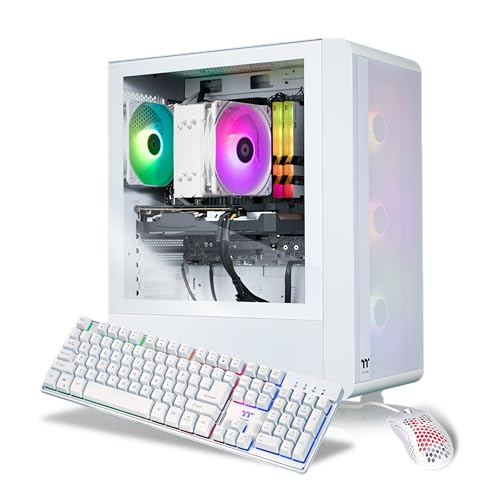
Thermaltake R66 Ryzen 5 5600 Gaming PC
Best for: 1080p gaming in a white compact case
- Graphics Card
- AMD Radeon RX 6600
- Processor Model
- AMD Ryzen 5 5600
- System Memory
- 16 GB
- Storage Capacity
- 1 TB NVMe M.2
- Operating System
- Windows 11 Home
- Weight
- 25 pounds
View on Amazon: Thermaltake R66 Ryzen 5 5600 Gaming PC Affiliate link
This Thermaltake desktop pairs an AMD Ryzen 5 5600 processor with an AMD Radeon RX 6600 graphics card. It includes 16GB of DDR4 memory and a 1TB NVMe SSD. The white compact case features a tempered glass side panel and ARGB cooling. You get Windows 11 Home and built-in WiFi. This system suits gamers who want a clean aesthetic for 1080p titles.
Pros
- AMD Ryzen 5 5600 CPU
- AMD Radeon RX 6600 GPU
- 16GB DDR4 3600MHz RGB memory
- 1TB NVMe M.2 storage
- Built-in WiFi and Windows 11
Cons
- Only 16GB of system memory
- Uses older DDR4 RAM instead of DDR5
- Single 1TB storage drive
Good fit if
- You want a white PC with RGB lighting
- You play esports and 1080p games
- You need built-in WiFi
Skip if
- You require high-end 1440p or 4K gaming
- You need more than 16GB of RAM for heavy multitasking
- You prefer DDR5 memory for future upgrades
Verdict: The Thermaltake LCGS Quartz R66 Gaming Desktop offers a solid 1080p experience with its Ryzen 5 5600 and RX 6600 combo. It is a practical choice for players who value a clean white design and built-in connectivity over raw power.
Specifications side by side
| Spec | MSI Codex Z2 RTX 5070 Gaming Desktop | Thermaltake R66 Ryzen 5 5600 Gaming PC |
|---|---|---|
| Graphics Card | NVIDIA GeForce RTX 5070 | AMD Radeon RX 6600 |
| Processor Model | AMD Ryzen 7 8700F | AMD Ryzen 5 5600 |
| System Memory | 32 GB | 16 GB |
| Storage Capacity | 2 TB SSD | 1 TB NVMe M.2 |
| Operating System | Windows 11 Home | Windows 11 Home |
| Processor | Ryzen 7 | not stated |
| Memory | 32GB RAM | not stated |
| Storage | 2TB SSD | not stated |
| Use | VR | not stated |
| Dimensions | 16 × 8.38 × 19 inches | not stated |
| Weight | 21.3 pounds | 25 pounds |
| Color | Black | White |
| Model | CodZ2A8NVP436 | S2QT-B550-R66-LCS |
| Size | not stated | Compact |
Frequently asked questions
Is the MSI Codex Z2 suitable for high-end gaming?
Yes, this system is designed for high-performance gaming and multitasking. It features an RTX 5070 graphics card and 32GB of RAM. These specs handle demanding titles and heavy workloads efficiently. You get ample storage with a 2TB SSD as well.
Does the Thermaltake R66 support 1080p gaming?
Yes, the Thermaltake R66 is built for 1080p gaming. It pairs a Ryzen 5 5600 processor with an RX 6600 graphics card. This combination provides a solid experience for standard resolution gaming. It is a practical choice for clear visuals at that level.
Which desktop has a more compact design?
The Thermaltake R66 offers a compact form factor. It weighs 25 pounds and fits smaller spaces better than larger towers. The MSI Codex Z2 is larger, measuring 16 inches in length and weighing 21.3 pounds. You should choose Thermaltake if space is a priority.
What color options are available for these gaming PCs?
The MSI Codex Z2 comes in a black finish. The Thermaltake R66 is available in white. You can pick the color that matches your desk setup or personal preference. Both systems include RGB lighting for additional visual customization inside the case.
How much storage does the MSI Codex Z2 include?
The MSI Codex Z2 includes 2TB of SSD storage. This provides plenty of space for games and large files. The Thermaltake R66 does not list specific storage capacity in the provided data. You should check the full specs for the Thermaltake model if storage is critical.
Does the MSI Codex Z2 use DDR5 memory?
The MSI Codex Z2 comes with 32GB of RAM. The provided data confirms the capacity but does not specify the DDR generation in the attributes. It targets users who prioritize raw performance. This memory amount supports smooth multitasking alongside heavy gaming applications.