Lenovo vs XFAATING: All-In-One Desktops Compared by Specs
As an Amazon Associate we earn from qualifying purchases. Links on this page are affiliate links.
This lenovo vs XFAATING all in one desktop comparison looks at two compact PCs for home and office use. Both systems run Windows 11 Home and include built-in Wi-Fi 6. They share a similar all-in-one form factor and 256GB NVMe SSD storage. The main difference lies in the processor and memory configuration. The Lenovo offers 16GB of RAM with an Intel N100 chip, while the XFAATING pairs an Intel Core i5 with 8GB of RAM. These choices affect multitasking and processing speed differently.
Key differences
| Aspect | Lenovo IdeaCentre 24" Intel N100 Desktop | XFAATING 24-Inch Core i5 All-in-One Desktop |
|---|---|---|
| Processor | Intel N100 Quad-Core | Intel Core i5 |
| System Memory | 16GB DDR4 | 8GB |
| Graphics | Intel UHD Graphics | not listed |
| Screen Size | 23.8 inches | 24 inches |
| Bluetooth | Bluetooth 5.2 | Bluetooth 5.3 |
Which one should you choose?
Choose Lenovo IdeaCentre 24" Intel N100 Desktop if
- You need more RAM for heavy multitasking with many browser tabs or applications open at once.
- You prefer a display with verified 99% sRGB color accuracy and wide viewing angles.
- You want comprehensive connectivity options including multiple high-speed USB ports and an HDMI-out for a second monitor.
Choose XFAATING 24-Inch Core i5 All-in-One Desktop if
- You prioritize a higher-tier Intel Core i5 processor for faster single-threaded performance.
- You want the latest Bluetooth 5.3 standard for peripheral connections.
- You prefer a slightly larger 24-inch screen size for your workspace.
Verdict: Choose the Lenovo if you need more memory and a more detailed specification sheet for media consumption. Choose the XFAATING if you want a more powerful Core i5 processor for general computing tasks. Both systems provide solid all-in-one solutions for everyday productivity.
Lenovo vs XFAATING AIO Specs
Processor Performance
The Lenovo IdeaCentre 24 uses an Intel N100 quad-core processor with a burst frequency up to 3.4GHz. This chip is designed for efficiency and handles everyday tasks like web browsing and video calls smoothly. The XFAATING model lists a generic Intel Core i5 processor without specifying the generation or core count. While a Core i5 is generally more powerful than the N100, the lack of specific details makes direct comparison difficult. If the XFAATING unit contains a modern i5, it likely offers superior multitasking and processing power for heavier workloads compared to the entry-level N100 in the Lenovo.
System Memory
Memory capacity directly impacts how many applications you can run simultaneously. The Lenovo IdeaCentre 24 comes standard with 16GB of DDR4-3200 RAM. This amount of memory allows for comfortable multitasking across multiple browser tabs and productivity software. In contrast, the XFAATING desktop is listed with only 8GB of RAM in its attributes, although the description mentions 16GB. Assuming the 8GB specification is accurate for the base model, the Lenovo provides double the memory. This gives the Lenovo a clear advantage in handling complex workflows without slowdowns.
Display Quality
Both machines feature 24-inch Full HD displays, but the Lenovo offers more specific panel details. The Lenovo IdeaCentre 24 uses an IPS panel with 178-degree viewing angles and 99% sRGB color accuracy. It also includes an anti-glare coating to reduce eye strain during long sessions. The XFAATING description mentions a clear display and privacy webcam but omits panel type, color accuracy, or brightness ratings. Without these specifics, the Lenovo’s verified IPS technology and color fidelity make it the more reliable choice for visual clarity and accurate color reproduction.
Connectivity
Both systems include Wi-Fi 6 for stable wireless connections. The Lenovo IdeaCentre 24 adds Bluetooth 5.2, providing reliable pairing for wireless peripherals like mice and headsets. It also includes four USB-A ports, with two supporting high-speed 10Gbps transfers, plus an HDMI-out port for a second monitor. The XFAATING listing confirms Wi-Fi 6 and Bluetooth 5.3, which is a slight version advantage. However, the Lenovo’s detailed I/O options, including high-speed USB ports and video output, offer more versatile connectivity for expanding your setup.
Storage and Boot Speed
Storage speed affects how quickly your computer starts and loads files. Both the Lenovo IdeaCentre 24 and the XFAATING desktop are equipped with 256GB PCIe NVMe SSDs. The specifications for both units indicate boot times under ten seconds. This shared technology ensures that both systems provide fast application launches and responsive file access. Since both utilize the same type and capacity of solid-state storage, there is no practical difference in storage performance between the two machines.
Which Lenovo or XFAATING AIO fits you
Users needing high multitasking capacity
The Lenovo IdeaCentre 24 includes 16GB of DDR4 RAM. This memory allows you to run multiple browser tabs and applications simultaneously without slowdowns. The XFAATING model lists only 8GB of RAM in its attributes. If your workflow involves heavy multitasking, the extra memory in the Lenovo system provides a smoother experience for everyday productivity tasks.
Buyers prioritizing a stronger CPU
The XFAATING desktop features an Intel Core i5 processor. This chip generally offers higher performance for demanding tasks compared to the entry-level Intel N100 found in the Lenovo IdeaCentre 24. If your primary need is raw processing power for document editing or video calls, the i5 in the XFAATING system is the more capable choice for your workflow.
Those wanting better display accuracy
The Lenovo IdeaCentre 24 specifies a 23.8-inch IPS display with 99% sRGB color accuracy and 250 nits of brightness. This panel technology ensures true-to-life colors and wide viewing angles. The XFAATING listing mentions an FHD display but lacks specific details on color gamut or panel type. For visual clarity and color precision, the Lenovo screen offers superior technical specifications.
The products compared
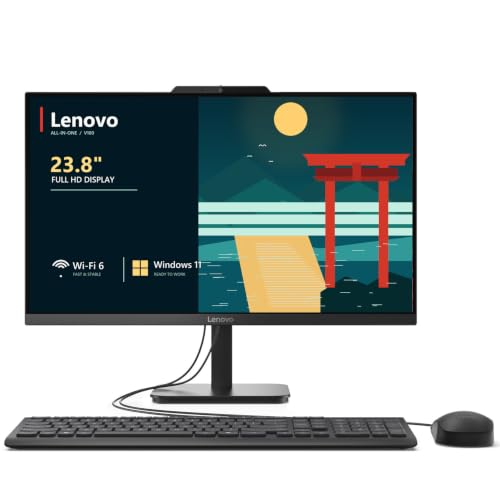
Lenovo IdeaCentre 24" Intel N100 Desktop
Best for: home office productivity and light multitasking
- Processor
- Intel N100
- System Memory
- 32 GB DDR4
- Storage Capacity
- 2 TB NVMe SSD
- Screen Size
- 23.8"
- Display Resolution
- Full HD
- Graphics
- Intel UHD Graphics
View on Amazon: Lenovo IdeaCentre 24" Intel N100 Desktop Affiliate link
The Lenovo IdeaCentre 24 is a 23.8-inch all-in-one desktop featuring an Intel N100 quad-core processor and 16GB of DDR4 RAM. It includes a 256GB NVMe SSD and a Full HD IPS display with 99% sRGB color accuracy. Wi-Fi 6 and Bluetooth 5.2 ensure reliable connectivity. This system suits home offices and students needing responsive multitasking and clear visuals for everyday productivity tasks.
Pros
- 16GB DDR4-3200 RAM for smooth multitasking
- 23.8-inch Full HD IPS display with 99% sRGB
- Intel N100 quad-core processor up to 3.4GHz
- 256GB PCIe NVMe SSD for fast boot times
- Wi-Fi 6 and Bluetooth 5.2 connectivity
Cons
- Intel UHD Graphics limits gaming performance
- 256GB SSD storage may fill quickly
- Dual 2W speakers lack audio depth
Good fit if
- You need reliable performance for office work
- You want a clutter-free desk setup
- You require a webcam with privacy shutter
Skip if
- You need high-end gaming capabilities
- You require extensive storage for large media libraries
- You prefer a larger than 24-inch screen
Verdict: Lenovo IdeaCentre 24 AIO Desktop delivers solid everyday performance with ample RAM and a color-accurate screen, making it a practical fit for students and remote workers who prioritize productivity over graphics intensity.

XFAATING 24-Inch Core i5 All-in-One Desktop
Best for: Basic home office productivity and remote work
- Processor
- i5
- Storage Capacity
- 256 GB NVMe SSD
- Screen Size
- 24"
- Operating System
- Windows 11 Home
- Memory
- 8GB RAM
- Dimensions
- 7.5 × 21.5 × 18.5 inches
View on Amazon: XFAATING 24-Inch Core i5 All-in-One Desktop Affiliate link
The XFAATING 24" All-in-One Desktop pairs an Intel Core i5 processor with 8GB of RAM and a 256GB NVMe SSD. It features a 24-inch Full HD display and includes WiFi 6 connectivity. This prebuilt Windows 11 system is designed for home office tasks, document editing, and video calls. It offers a clutter-free setup that saves desk space while handling daily productivity needs efficiently.
Pros
- Intel Core i5 processor for smooth multitasking
- 256GB NVMe SSD for fast boot and load times
- 24-inch Full HD (1920x1080) display
- Built-in WiFi 6 for stable wireless connectivity
- Preloaded with Windows 11 Home and drivers
Cons
- 8GB RAM is limited for heavy multitasking
- 256GB storage fills quickly with media files
- No mention of upgradeable components or ports
Good fit if
- You need a compact desktop for home office work
- You prioritize fast boot times and everyday responsiveness
- You want a single-unit solution with built-in webcam
Skip if
- You require large storage for extensive media libraries
- You need high-end performance for gaming or video editing
- You plan to upgrade RAM or storage later
Verdict: The XFAATING 24" i5 All-in-One Desktop is a practical entry-level system for users who need reliable daily computing without desk clutter. It fits buyers focused on basic productivity and remote work rather than power users.
Specifications side by side
| Spec | Lenovo IdeaCentre 24" Intel N100 Desktop | XFAATING 24-Inch Core i5 All-in-One Desktop |
|---|---|---|
| Processor | Intel N100 | i5 |
| System Memory | 32 GB DDR4 | not stated |
| Storage Capacity | 2 TB NVMe SSD | 256 GB NVMe SSD |
| Screen Size | 23.8" | 24" |
| Display Resolution | Full HD | not stated |
| Graphics | Intel UHD Graphics | not stated |
| Operating System | Windows 11 Home | Windows 11 Home |
| Memory | 16GB RAM | 8GB RAM |
| Storage | not stated | 256GB SSD |
| Dimensions | 21.2 × 7.3 × 16.7 inches | 7.5 × 21.5 × 18.5 inches |
| Weight | not stated | 10 pounds |
| Size | 32GB DDR4 RAM, 1TB PCIe SSD | not stated |
| Color | White | Black |
| Model | 24 | XFAATING-3 |
Frequently asked questions
Which Lenovo or XFAATING all-in-one desktop has more RAM?
The Lenovo IdeaCentre 24 offers significantly more memory than the XFAATING model. It comes equipped with 32GB of DDR4 RAM. This higher capacity supports heavy multitasking and smoother performance with many applications open. The XFAATING system lists only 8GB of RAM, which is sufficient for basic tasks but less ideal for intensive workloads.
Does the Lenovo IdeaCentre 24 have a larger storage drive?
Yes, the Lenovo system includes a much larger storage drive. It features a 1TB PCIe SSD for ample space for files and programs. In contrast, the XFAATING desktop provides only 256GB of SSD storage. You should choose the Lenovo model if you need to store large amounts of data, media, or software locally.
What processor does the XFAATING all-in-one desktop use?
The XFAATING 24-Inch model uses an Intel Core i5 processor. This chip is designed for reliable daily computing and basic productivity tasks. It handles web browsing, office applications, and remote work efficiently. It is a practical choice for users who do not require high-end gaming performance or complex video editing capabilities.
Is the Lenovo IdeaCentre 24 suitable for light multitasking?
The Lenovo IdeaCentre 24 is well-suited for light multitasking and home office productivity. Its 16GB to 32GB RAM configuration allows you to run multiple browser tabs and applications simultaneously. The system prioritizes productivity over graphics intensity, making it a practical fit for students and remote workers who need stable performance for everyday tasks.
What operating system comes with the XFAATING desktop?
The XFAATING 24-Inch Core i5 All-in-One Desktop runs Windows 11 Home. This operating system provides a familiar interface for everyday computing and remote work. It includes built-in features for productivity and connectivity. The system is designed for users who need a straightforward setup for basic home office duties without advanced enterprise features.
Which all-in-one desktop is better for remote work?
Both systems are suitable for remote work, but they serve different needs. The Lenovo IdeaCentre 24 is ideal if you need higher RAM for multiple applications. The XFAATING model is a practical entry-level system for users focused on basic productivity. It fits buyers who need reliable daily computing without desk clutter and do not require extensive multitasking.