Lenovo or Thermaltake? Gaming Desktops Compared in 2026
As an Amazon Associate we earn from qualifying purchases. Links on this page are affiliate links.
This lenovo vs thermaltake gaming desktop comparison looks at two very different machines. Both run Windows 11 and offer SSD storage for fast boot times. The Lenovo ThinkCentre is a compact business unit with a dual-core processor. The Thermaltake R66 is a dedicated gaming rig with a six-core CPU and a discrete graphics card. You need to decide if you prioritize small size and office tasks or raw gaming performance.
Key differences
| Aspect | Lenovo ThinkCentre SFF Core i3 Desktop | Thermaltake R66 Ryzen 5 5600 Gaming PC |
|---|---|---|
| Processor | Intel Core i3-6100 (Dual Core) | AMD Ryzen 5 5600 (Six Core) |
| Graphics | Integrated Intel HD Graphics | AMD Radeon RX 6600 |
| Memory | 8GB RAM | 16GB DDR4 RGB RAM |
| Storage | 256GB SSD | 1TB NVMe M.2 SSD |
| Operating System | Windows 11 Pro | Windows 11 Home |
Which one should you choose?
Choose Lenovo ThinkCentre SFF Core i3 Desktop if
- You need a small form factor for a tight workspace.
- You primarily use the PC for web browsing and office documents.
- You prefer Windows 11 Pro for enhanced business security features.
Choose Thermaltake R66 Ryzen 5 5600 Gaming PC if
- You want to play modern games at 1080p settings.
- You need more RAM and storage for multitasking or media.
- You prefer a desktop with an attractive RGB aesthetic.
Verdict: The Lenovo ThinkCentre is the better choice for basic office work and space-constrained environments. The Thermaltake R66 is the clear winner for gaming and heavy multitasking due to its powerful CPU and dedicated graphics card.
Lenovo vs Thermaltake Desktop Comparison
processor performance
The Lenovo ThinkCentre M710 uses a 6th Gen Intel Core i3-6100 dual-core processor running at 3.70 GHz. This chip is designed for basic office tasks like web browsing and document editing. It lacks the power for modern gaming. The Thermaltake R66 features an AMD Ryzen 5 5600 CPU. This is a significantly more powerful six-core processor built for high-performance computing. It handles complex games and multitasking with ease. If you need raw processing speed for gaming, the Thermaltake is the clear winner. The Lenovo is only suitable for light productivity work.
graphics capability
Graphics performance is critical for gaming. The Lenovo ThinkCentre M710 relies on integrated graphics via its VGA and DisplayPort outputs. It has no dedicated video card, meaning it cannot run modern 3D games. The Thermaltake R66 includes an AMD Radeon RX 6600 graphics card. This dedicated GPU provides substantial visual power for gaming at 1080p. It supports modern display standards through DisplayPort and HDMI. For any gaming purpose, the Thermaltake is superior. The Lenovo is strictly for non-gaming applications where visual fidelity is not a priority.
memory capacity
System memory affects how many applications you can run simultaneously. The Lenovo ThinkCentre M710 comes with 8GB of RAM. This is the minimum standard for Windows 11 and may feel limited when multitasking. The Thermaltake R66 includes 16GB of DDR4 memory running at 3600MHz. This doubled capacity allows for smoother performance in demanding games and heavy workloads. The faster speed of the Thermaltake’s RAM also helps the CPU communicate data more quickly. If you plan to keep many programs open, the Thermaltake offers a distinct advantage.
storage speed
Both systems use solid-state drives for fast boot times and application loading. The Lenovo ThinkCentre M710 has a 256GB SSD. This capacity is sufficient for the operating system and a few essential programs but fills up quickly. The Thermaltake R66 features a 1TB NVMe M.2 SSD. This drive is four times larger and uses the NVMe protocol for faster data transfer rates. The larger capacity allows you to store more games, files, and media without managing space constantly. The Thermaltake wins on both capacity and potential speed.
operating system
Both computers ship with Windows 11, ensuring you get the latest interface and security updates. The Lenovo ThinkCentre M710 includes Windows 11 Pro. This edition offers advanced security features, remote desktop capabilities, and enhanced productivity tools for business use. The Thermaltake R66 comes with Windows 11 Home. This is the standard version for consumers and lacks some enterprise-level features. For general gaming and home use, both versions function identically. The Lenovo has a slight edge for professional users who need Pro features.
Which desktop fits your specific needs
Office workers needing compact business PC
The Lenovo ThinkCentre M710 SFF is built for professional environments. It features a dual-core Intel Core i3-6100 processor that handles web browsing and document editing efficiently. The compact small form factor saves desk space. You get 8GB of RAM and a 256GB SSD for fast boot times. Windows 11 Pro adds security tools for work.
Gamers wanting modern graphics and speed
The Thermaltake R66 is a dedicated gaming rig. It uses an AMD Ryzen 5 5600 CPU and an AMD Radeon RX 6600 graphics card for modern gaming performance. You get 16GB of DDR4 3600MHz RGB memory and a 1TB NVMe M.2 SSD. This setup ensures smooth gameplay and quick load times for your favorite titles.
Users who want high storage capacity
If you need more room for files and games, the Thermaltake R66 offers a 1TB NVMe M.2 SSD. This is significantly larger than the Lenovo’s 256GB SSD. The faster NVMe drive also improves data access speeds. Combined with 16GB of RAM, this system handles large media libraries and extensive game installations with ease.
The products compared
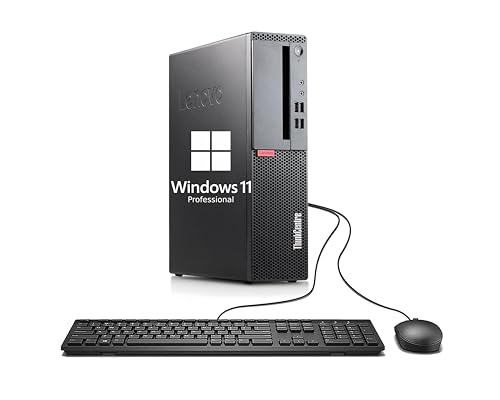
Lenovo ThinkCentre SFF Core i3 Desktop
Best for: Compact office and everyday computing
- Processor Model
- Dual Core i3-6100
- System Memory
- 8GB
- Storage Capacity
- 256GB SSD
- Operating System
- Windows 11 Pro
- Form Factor
- Small Form Factor
View on Amazon: Lenovo ThinkCentre SFF Core i3 Desktop Affiliate link
This Lenovo ThinkCentre M710 SFF desktop uses a 6th Gen Intel Core i3-6100 processor and 8GB of RAM. It includes a 256GB SSD for fast boot times. The small form factor fits tight spaces. It runs Windows 11 Pro. This setup handles web browsing and office tasks well. It is not built for heavy gaming. You should choose this if you need a reliable, compact machine for daily work.
Pros
- 6th Gen Intel Core i3-6100 processor at 3.7 GHz
- 8GB RAM for smooth multitasking
- 256GB SSD for quick load times
- Windows 11 Pro operating system
Cons
- Dual-core i3 processor limits gaming performance
- Small Form Factor restricts hardware upgrades
- No dedicated graphics card listed
Good fit if
- You need a compact PC for office work
- You want Windows 11 Pro for security features
- You have limited desk space
Skip if
- You plan to play modern AAA games
- You require high-end graphics rendering
- You need extensive internal expansion slots
Verdict: Lenovo ThinkCentre M710 SFF is a solid choice for users who prioritize a compact size and reliable performance for everyday tasks like browsing and document editing over gaming capability.
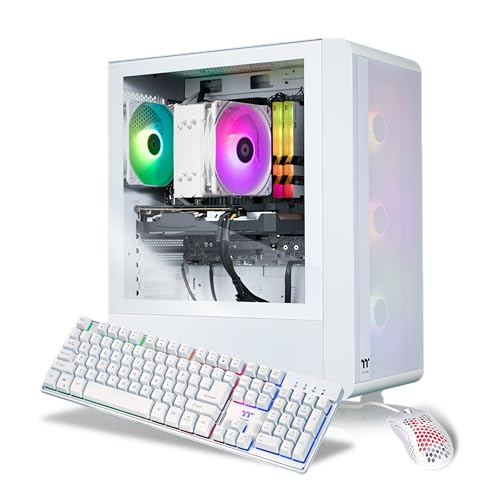
Thermaltake R66 Ryzen 5 5600 Gaming PC
Best for: Compact 1080p gaming with white aesthetics
- Graphics Card
- AMD Radeon RX 6600
- Processor Model
- AMD Ryzen 5 5600
- System Memory
- 16 GB
- Storage Capacity
- 1 TB NVMe M.2
- Operating System
- Windows 11 Home
- Weight
- 25 pounds
View on Amazon: Thermaltake R66 Ryzen 5 5600 Gaming PC Affiliate link
This Thermaltake desktop pairs an AMD Ryzen 5 5600 CPU with an AMD Radeon RX 6600 graphics card. It includes 16 GB of 3600 MHz DDR4 memory and a 1 TB NVMe SSD. The compact white tower features ARGB cooling and a tempered glass side panel. It runs Windows 11 Home and includes WiFi. This setup suits gamers seeking solid 1080p performance with clean aesthetics.
Pros
- AMD Ryzen 5 5600 processor for reliable multitasking
- AMD Radeon RX 6600 graphics for 1080p gaming
- 16 GB DDR4 3600 MHz RGB memory
- Fast 1 TB NVMe M.2 storage
- Built-in WiFi connectivity
Cons
- Only 16 GB of RAM limits heavy multitasking
- RX 6600 is entry-level for high-refresh gaming
- No mention of USB-C ports on the front panel
Good fit if
- You want a compact white PC for 1080p gaming
- You need WiFi built into the desktop
- You prefer RGB lighting accents in your setup
Skip if
- You require 32 GB of RAM for streaming
- You need high-end graphics for 4K gaming
- You want a larger mid-tower chassis
Verdict: Thermaltake LCGS Quartz R66 Gaming PC delivers balanced 1080p performance for casual gamers who value compact size and white aesthetics. It fits users who do not need extreme multitasking capabilities.
Specifications side by side
| Spec | Lenovo ThinkCentre SFF Core i3 Desktop | Thermaltake R66 Ryzen 5 5600 Gaming PC |
|---|---|---|
| Graphics Card | not stated | AMD Radeon RX 6600 |
| Processor Model | Dual Core i3-6100 | AMD Ryzen 5 5600 |
| System Memory | 8GB | 16 GB |
| Storage Capacity | 256GB SSD | 1 TB NVMe M.2 |
| Operating System | Windows 11 Pro | Windows 11 Home |
| Form Factor | Small Form Factor | not stated |
| Memory | 8GB RAM | not stated |
| Storage | 256GB SSD | not stated |
| Weight | not stated | 25 pounds |
| Size | Small | Compact |
| Color | Black | White |
| Model | Lenovo ThinkCentre M710 SFF | S2QT-B550-R66-LCS |
Frequently asked questions
Is the Lenovo ThinkCentre suitable for gaming?
No, it is not. The Lenovo ThinkCentre M710 SFF uses a dual-core Intel Core i3-6100 processor. This chip is designed for basic office tasks like web browsing and document editing. It lacks the power for modern gaming. You should choose the Thermaltake R66 if you need to play games.
Which PC is better for 1080p gaming?
The Thermaltake R66 is the better choice. It features a Ryzen 5 5600 processor that delivers balanced performance for casual 1080p gaming. The Lenovo ThinkCentre is a business unit optimized for productivity. It does not have the processing power required for smooth gameplay in modern titles.
Does the Thermaltake R66 have a white design?
Yes, the Thermaltake R66 features a white aesthetic. This compact gaming PC is designed for users who value a clean look. The Lenovo ThinkCentre M710 SFF comes in black. It has a standard business appearance that blends into office environments rather than gaming setups.
What operating system do these desktops run?
Both desktops run Windows 11. The Lenovo ThinkCentre includes Windows 11 Pro, which offers additional features for professional use. The Thermaltake R66 also runs Windows 11. This ensures both machines provide a familiar and modern interface for your daily computing tasks right out of the box.
How much storage does the Lenovo ThinkCentre have?
The Lenovo ThinkCentre M710 SFF includes 256GB of SSD storage. This provides fast boot times and quick access to your files. It is sufficient for everyday computing needs. The Thermaltake R66 also uses SSD storage, ensuring fast performance for both gaming and general use applications.
Which desktop is more compact?
The Lenovo ThinkCentre M710 SFF is a small form factor unit. It is designed to save space in tight office areas. The Thermaltake R66 is also compact but weighs 25 pounds. Both are smaller than traditional towers, but the Lenovo is specifically built for minimal footprint requirements.
Can the Lenovo ThinkCentre handle multitasking?
It is limited in this area. The dual-core processor and 8GB of RAM are designed for single-task efficiency. It handles web browsing and documents well. The Thermaltake R66 with its Ryzen 5 processor offers better multitasking capabilities for gaming and heavier workloads. The Lenovo is not built for extreme multitasking.