Lenovo vs Suevery All-In-One Desktops: Which Brand Fits You?
As an Amazon Associate we earn from qualifying purchases. Links on this page are affiliate links.
This lenovo vs suevery all in one desktop comparison helps you choose between two distinct prebuilt systems. Both units offer integrated displays and plug-and-play convenience for home or office use. The primary difference lies in their performance targets. The Lenovo IdeaCentre focuses on basic productivity with integrated graphics and a low-power processor. The Suevery model targets heavier workloads, featuring a powerful multi-core CPU and a dedicated graphics card for gaming and editing.
Key differences
| Aspect | Lenovo IdeaCentre 24" Intel N100 Desktop | Suevery 27-inch RTX 3050 All-in-One |
|---|---|---|
| Processor | Intel N100 (4 cores) | Intel Core i5-13400F (10 cores) |
| Graphics | Intel UHD Graphics | NVIDIA RTX 3050 6G |
| Memory | 16GB DDR4 RAM | 32GB RAM |
| Storage | 256GB PCIe NVMe SSD | 1TB NVMe SSD |
| Screen Size | 23.8 inches | 27 inches |
| Display Resolution | Full HD (1080p) | 2K |
Which one should you choose?
Choose Lenovo IdeaCentre 24" Intel N100 Desktop if
- You need a simple, quiet computer for web browsing and office work.
- You prefer a smaller footprint that saves desk space.
- You want a system with Wi-Fi 6 and a privacy shutter for the webcam.
Choose Suevery 27-inch RTX 3050 All-in-One if
- You plan to edit photos, videos, or play modern games.
- You require more storage space for large files and applications.
- You want a larger, higher-resolution screen for detailed visual work.
Verdict: The Lenovo IdeaCentre is the practical choice for students and remote workers who only need reliable performance for daily tasks. The Suevery desktop is the better option if you need serious processing power and dedicated graphics for creative work or gaming.
Lenovo vs Suevery AIO Comparison
Processor performance
The Suevery uses an Intel Core i5-13400F with ten cores and sixteen threads, reaching 4.6 GHz. This 13th Gen chip handles heavy multitasking, video editing, and complex calculations with ease. The Lenovo IdeaCentre relies on an Intel N100 quad-core processor capped at 3.4 GHz. While the N100 manages web browsing and office apps well, it lacks the raw power for demanding workloads. If you need serious processing speed for creative projects or intensive software, the Suevery’s modern architecture provides a clear advantage over the entry-level Lenovo chip.
Graphics capability
Graphics performance differs significantly between these two systems. The Suevery includes a dedicated NVIDIA RTX 3050 6GB graphics card. This discrete GPU acceler gaming, 3D rendering, and video editing tasks that integrated solutions cannot handle efficiently. The Lenovo IdeaCentre uses integrated Intel UHD Graphics. This shared memory solution is sufficient for watching HD videos, casual browsing, and light photo adjustments, but it will struggle with modern games or professional visual work. For any task requiring dedicated visual processing power, the Suevery is the superior choice.
Memory and storage
The Suevery comes with 32GB of RAM and a 1TB NVMe SSD. This large memory pool allows you to keep dozens of applications open without slowdowns, while the ample storage holds extensive media libraries and large files. The Lenovo IdeaCentre offers 16GB of DDR4 RAM and a 256GB PCIe NVMe SSD. This configuration is adequate for standard office work and basic media consumption. However, the limited storage space fills up quickly with modern software and updates. The Suevery provides more headroom for future growth and heavy multitasking.
Display quality
Screen specifications vary between the two models. The Suevery features a 27-inch 2K resolution display with a 120Hz refresh rate. The higher resolution offers sharper text and images, while the 120Hz rate ensures smoother motion for gaming and scrolling. The Lenovo IdeaCentre has a 23.8-inch Full HD IPS screen with a standard refresh rate. It provides good color accuracy and wide viewing angles for everyday use. However, the lower resolution and standard refresh rate make it less suitable for high-fidelity visual work or fast-paced gaming compared to the Suevery’s panel.
Connectivity and features
Both systems include essential connectivity options, but the Lenovo offers more specific ports. The Lenovo IdeaCentre includes Wi-Fi 6, Bluetooth 5.2, an HDMI-out port for dual monitors, and four USB-A ports, including high-speed 10Gbps options. It also features a privacy shutter for the webcam. The Suevery provides dual-band Wi-Fi and a 5-megapixel adjustable camera. However, the product data does not list specific USB speeds or additional video output ports for the Suevery. The Lenovo’s explicit support for dual displays and faster USB standards gives it an edge for peripheral-heavy setups.
Operating system
Both computers ship with Windows 11 Home pre-installed. This ensures you have the latest interface, security updates, and app compatibility right out of the box. The Lenovo model includes a TPM 2.0 security chip for hardware-based encryption, which is standard for modern Windows 11 installations. The Suevery also runs Windows 11 Home but does not explicitly mention TPM status in the provided data. Since both operate the same core software environment, there is no functional difference in the user experience or software capabilities between the two brands.
Which AIO Desktop Fits Your Needs
Users needing strong gaming and editing power
This Suevery model includes a dedicated RTX 3050 6G graphics card. It pairs this with an Intel Core i5-13400F processor featuring ten cores. The 27-inch 2K display supports 120Hz refresh rates for smooth visuals. You also get 32GB of RAM and a 1TB SSD. These specs handle gaming, video editing, and 3D rendering tasks efficiently.
Budget buyers wanting basic home office tasks
The Lenovo IdeaCentre uses an Intel N100 processor for everyday productivity. It features a 23.8-inch Full HD IPS screen with anti-glare coating. You receive 16GB of DDR4 RAM and a 256GB NVMe SSD. Wi-Fi 6 and Bluetooth 5.2 ensure stable connectivity. This setup is ideal for web browsing, document editing, and video conferencing without excess cost.
Viewers who prefer larger screen real estate
The Suevery all-in-one offers a larger 27-inch display compared to the Lenovo's 23.8-inch panel. Its 2K resolution provides sharper images for media consumption. The screen supports tilt adjustment and 360-degree rotation for flexible positioning. This larger canvas is better for multitasking with multiple windows or enjoying immersive movie experiences in a home setting.
Shoppers prioritizing portability and compact design
The Lenovo IdeaCentre measures 21.2 inches in length and weighs less than the Suevery unit. Its smaller footprint saves desk space in dorms or small offices. The integrated design eliminates cable clutter effectively. You get a complete package with a keyboard and mouse included. This compact form factor is perfect for users who value minimalism and easy setup.
The products compared
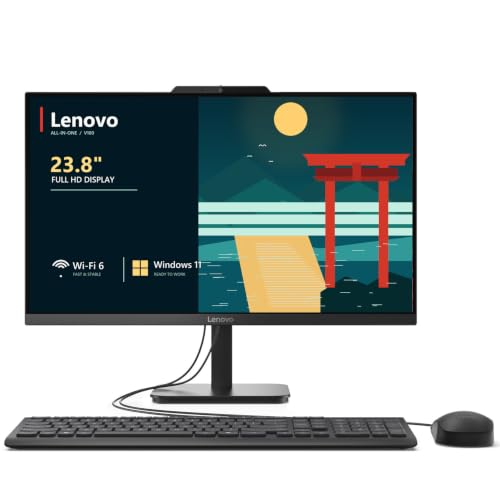
Lenovo IdeaCentre 24" Intel N100 Desktop
Best for: home offices and students needing tidy setups
- Processor
- Intel N100
- System Memory
- 32 GB DDR4
- Storage Capacity
- 2 TB NVMe SSD
- Screen Size
- 23.8"
- Display Resolution
- Full HD
- Graphics
- Intel UHD Graphics
View on Amazon: Lenovo IdeaCentre 24" Intel N100 Desktop Affiliate link
This Lenovo IdeaCentre 24 is a 23.8-inch all-in-one desktop powered by an Intel N100 processor. It includes 16GB of DDR4 RAM and a 256GB NVMe SSD for responsive daily tasks. The Full HD IPS display offers wide viewing angles and accurate colors. It runs Windows 11 Home and features Wi-Fi 6 and Bluetooth 5.2. This compact unit suits home offices, students, and small businesses needing reliable productivity without clutter.
Pros
- Intel N100 quad-core processor with up to 3.4GHz burst frequency
- 23.8-inch Full HD IPS display with 99% sRGB color accuracy
- 16GB DDR4 RAM and 256GB PCIe NVMe SSD for fast performance
- Wi-Fi 6 and Bluetooth 5.2 for modern connectivity
- Built-in HD webcam with privacy shutter and dual stereo speakers
Cons
- 256GB SSD storage is smaller than the 1TB option on the list
- Integrated Intel UHD Graphics limits heavy gaming or 3D rendering
- Only 16GB RAM compared to the 32GB available in other listings
Good fit if
- You need a clutter-free desktop for office work or school
- You want a screen with accurate colors for light photo editing
- You prefer a system with Wi-Fi 6 for stable connections
Skip if
- You require dedicated graphics for high-end gaming
- You need more than 256GB of internal storage
- You plan to run memory-intensive professional applications
Verdict: Lenovo IdeaCentre 24 23.8" AIO is a solid choice for users prioritizing display quality and connectivity over raw storage capacity. It fits home offices and students who value a tidy desk setup and reliable performance for everyday tasks.

Suevery 27-inch RTX 3050 All-in-One
Best for: multitasking and media consumption
- Processor
- Intel Core i5-13400F
- System Memory
- 32GB
- Storage Capacity
- 1TB M.2 NVMe SSD
- Screen Size
- 27"
- Display Resolution
- 2K
- Graphics
- RTX 3050 6G
View on Amazon: Suevery 27-inch RTX 3050 All-in-One Affiliate link
This Suevery all-in-one desktop pairs a 27-inch 2K 120Hz display with an Intel Core i5-13400F processor and 32GB of RAM. The included RTX 3050 6G graphics card handles gaming and creative workloads, while the 1TB SSD provides ample storage. It features a 360-degree rotating screen and a 5MP camera, making it a versatile choice for home offices, students, and casual gamers who need a complete, plug-and-play system.
Pros
- 27-inch 2K 120Hz display with 360-degree rotation
- Intel Core i5-13400F processor with 32GB RAM
- RTX 3050 6G dedicated graphics card
- 1TB NVMe SSD for fast storage
- Includes 5MP adjustable camera and peripherals
Cons
- 17.6-pound weight makes it difficult to move
- Intel Core i5-13400F lacks integrated graphics
- No mention of a built-in optical drive
Good fit if
- You need a large, high-refresh-rate screen for media or gaming
- You want a complete setup with a webcam and peripherals included
- You require 32GB of RAM for heavy multitasking
Skip if
- You need a portable computer that fits in a backpack
- You require a 4K display for professional color grading
- You want a system with integrated graphics for simpler upgrades
Verdict: Suevery 27" 2K AIO Desktop delivers strong performance for creative and gaming tasks with its 32GB RAM and RTX 3050. It is best for users who prioritize screen versatility and multitasking power over portability.
Specifications side by side
| Spec | Lenovo IdeaCentre 24" Intel N100 Desktop | Suevery 27-inch RTX 3050 All-in-One |
|---|---|---|
| Processor | Intel N100 | Intel Core i5-13400F |
| System Memory | 32 GB DDR4 | 32GB |
| Storage Capacity | 2 TB NVMe SSD | 1TB M.2 NVMe SSD |
| Screen Size | 23.8" | 27" |
| Display Resolution | Full HD | 2K |
| Graphics | Intel UHD Graphics | RTX 3050 6G |
| Operating System | Windows 11 Home | not stated |
| Graphics Card | not stated | RTX 3050 |
| Memory | 16GB RAM | not stated |
| Storage | not stated | 1TB SSD |
| Use | not stated | Business |
| Dimensions | 21.2 × 7.3 × 16.7 inches | 24.2 × 7.28 × 14.7 inches |
| Weight | not stated | 17.6 pounds |
| Size | 32GB DDR4 RAM, 1TB PCIe SSD | not stated |
| Color | White | White |
| Model | 24 | I22X W1-99 |
Frequently asked questions
Which all-in-one desktop is better for students and home offices?
The Lenovo IdeaCentre 24 is the better choice for tidy setups and everyday tasks. It features a 23.8-inch display and 32GB of DDR4 RAM. Its compact dimensions make it ideal for smaller desks. This model prioritizes display quality and connectivity over raw storage capacity.
Does the Suevery all-in-one support gaming?
Yes, the Suevery 27-inch model supports gaming thanks to its dedicated RTX 3050 graphics card. It pairs this GPU with an Intel Core i5-13400F processor. The 27-inch 2K display supports 120Hz refresh rates. This setup handles creative work and gaming tasks effectively.
How much RAM do these all-in-one computers have?
Both systems offer substantial memory for multitasking. The Lenovo IdeaCentre includes 32GB of DDR4 RAM. The Suevery 27-inch model also features 32GB of RAM. This amount of memory ensures smooth performance for media consumption and complex calculations.
What is the screen size difference between Lenovo and Suevery?
The Suevery model offers a larger viewing area. It features a 27-inch 2K display. The Lenovo IdeaCentre uses a smaller 23.8-inch screen. You should choose the Suevery if you prioritize screen versatility and larger visual real estate for media or editing.
Which all-in-one has more storage space?
Both systems provide ample storage for your files. The Lenovo IdeaCentre includes a 1TB PCIe SSD. The Suevery 27-inch model also comes with a 1TB SSD. Neither system lacks storage capacity, making both suitable for storing documents, media, and applications.
Are these all-in-one desktops available in white?
Yes, both listed models come in a white color option. The Lenovo IdeaCentre 24 is available in white. The Suevery 27-inch all-in-one is also offered in white. This allows you to match your existing home or office decor with a clean, modern aesthetic.
Which all-in-one is lighter to move?
The Suevery 27-inch model weighs 17.6 pounds. The Lenovo IdeaCentre dimensions are listed as 7.3 inches wide, 16.7 inches high, and 21.2 inches long, but its weight is not specified. If portability is a concern, the Suevery provides a known weight for comparison.