Lenovo vs STGAubron: Gaming Desktops Compared by Specs
As an Amazon Associate we earn from qualifying purchases. Links on this page are affiliate links.
This lenovo vs STGAubron gaming desktop comparison looks at two distinct machines. Both run Windows 11 and use solid-state drives for fast storage. They also both include Intel processors for general computing tasks. The main difference lies in their intended use and graphics capabilities. One is a compact business unit with integrated graphics, while the other is a dedicated gaming PC with a discrete video card and wireless connectivity options.
Key differences
| Aspect | Lenovo ThinkCentre SFF Core i3 Desktop | STGAubron Core i5 RX 550 Gaming Desktop |
|---|---|---|
| Processor | Dual Core i3-6100 | Core i5 |
| Graphics | VGA/DisplayPort (Integrated) | Radeon RX 550 4G GDDR5 |
| Memory | 8GB RAM | 16GB RAM |
| Storage | 256GB SSD | 512GB SSD |
| Operating System | Windows 11 Pro | Windows 11 Home |
| Connectivity | USB, VGA, RJ-45 | Wi-Fi 6, Bluetooth 5.0, HDMI, DisplayPort |
Which one should you choose?
Choose Lenovo ThinkCentre SFF Core i3 Desktop if
- You need a compact, space-saving computer for office work or basic web browsing.
- You prefer professional software features included with Windows 11 Pro.
- You want a reliable machine for document editing and light multimedia tasks.
Choose STGAubron Core i5 RX 550 Gaming Desktop if
- You want to play modern PC games at playable frame rates.
- You need more memory for multitasking or heavier applications.
- You require built-in Wi-Fi and Bluetooth for wireless peripherals.
Verdict: The Lenovo ThinkCentre is a practical choice for business tasks and basic home use due to its small size and professional operating system. The STGAubron desktop is the better option if you need dedicated graphics for gaming and more memory for demanding workflows. Your choice depends on whether you prioritize compact office efficiency or gaming performance.
Specs: Lenovo vs STGAubron
Graphics card
The STGAubron desktop includes a dedicated Radeon RX 550 4G GDDR5 graphics card. This discrete GPU handles modern gaming titles and visual tasks much better than integrated solutions. The Lenovo ThinkCentre M710 SFF relies on the processor’s integrated graphics, likely VGA or basic Intel HD output, as no dedicated GPU is listed in its specifications. For gaming, video editing, or 3D rendering, the STGAubron’s dedicated hardware provides a significant performance advantage. The Lenovo setup is sufficient only for basic display output and light office work, lacking the power for serious graphical demands.
Processor
The STGAubron system features an Intel Core i5 processor with speeds up to 3.6GHz. The Lenovo ThinkCentre uses a 6th generation Dual Core i3-6100 running at 3.7GHz. While the Lenovo CPU has a slightly higher base clock speed, the Core i5 is a newer architecture with more cores and threads than the dual-core i3. This makes the STGAubron better suited for multitasking and heavier workloads. The i3 is adequate for basic web browsing and document editing but will struggle with intensive applications. The STGAubron offers superior processing power for general computing tasks.
Memory
The STGAubron gaming desktop comes with 16GB of system memory. The Lenovo ThinkCentre M710 SFF is equipped with 8GB of RAM. Modern operating systems and applications, especially games and multitasking environments, benefit greatly from having more memory. The 16GB in the STGAubron allows for smoother performance when running multiple programs simultaneously or playing memory-intensive games. The 8GB in the Lenovo is the minimum for comfortable Windows 11 usage but may cause slowdowns when switching between many tabs or applications. The STGAubron provides double the capacity for better multitasking.
Storage
The STGAubron desktop includes a 512GB solid-state drive. The Lenovo ThinkCentre offers a 256GB SSD. Both drives use SSD technology, ensuring fast boot times and quick application loading compared to traditional hard drives. However, the STGAubron provides twice the storage capacity. This extra space is useful for installing larger game libraries, storing more video files, or keeping extensive documents. The Lenovo’s 256GB is sufficient for basic office files and a few applications but fills up quickly with modern games. The STGAubron offers more room for your data and media.
Operating system
Both computers run Windows 11, ensuring you have access to the latest features and security updates. The STGAubron ships with Windows 11 Home 64-bit, which is standard for personal and gaming use. The Lenovo ThinkCentre includes Windows 11 Pro, which adds business-oriented features like BitLocker encryption and Remote Desktop capabilities. For a typical gamer or home user, the Home edition is fully sufficient and often preferred for its simpler interface. The Pro version on the Lenovo is unnecessary for most users unless specific enterprise features are required. This is a tie for general use, though Pro offers extra security tools.
Which Gaming Desktop Should You Choose
Casual gamers and students needing graphics power
The STGAubron desktop features a dedicated Radeon RX 550 4G GDDR5 graphics card. This discrete GPU enables smooth performance in popular titles like Fortnite and Valorant. You get 16GB of RAM and a 512GB SSD for faster load times. The included Wi-Fi 6 and Bluetooth 5.0 connectivity ensures stable wireless connections for your peripherals and internet needs.
Office workers prioritizing compact size and stability
The Lenovo ThinkCentre M710 SFF is a small form factor machine designed for business environments. It runs Windows 11 Pro, which offers enhanced security and productivity tools. The 6th Gen Core i3 processor handles everyday tasks like web browsing and document editing efficiently. Its compact size fits easily on any desk while providing reliable performance for professional use.
Users needing more storage and memory capacity
If you require more space for files and applications, the STGAubron model provides 16GB of RAM and a 512GB SSD. This combination allows for smoother multitasking and ample room for games and media. The extra memory helps when running multiple programs simultaneously, while the larger drive ensures you have enough room for your growing digital library without needing external storage.
The products compared
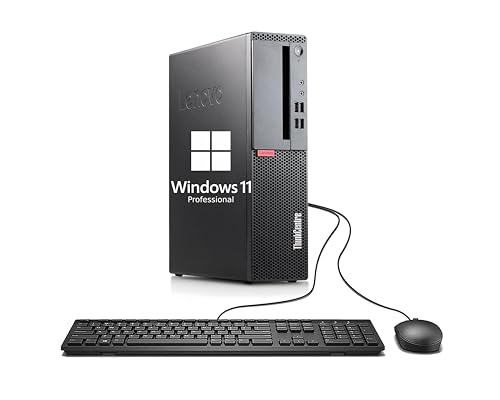
Lenovo ThinkCentre SFF Core i3 Desktop
Best for: compact office workstations and light productivity
- Processor Model
- Dual Core i3-6100
- System Memory
- 8GB
- Storage Capacity
- 256GB SSD
- Operating System
- Windows 11 Pro
- Form Factor
- Small Form Factor
View on Amazon: Lenovo ThinkCentre SFF Core i3 Desktop Affiliate link
This Lenovo ThinkCentre M710 SFF is a compact small form factor desktop designed for everyday tasks. It features a 6th Gen Dual Core i3-6100 processor running at 3.70 GHz, paired with 8GB of RAM and a 256GB SSD. The system includes Windows 11 Pro for enhanced security and productivity. It offers flexible expansion through various ports like USB 3.1 and DisplayPort. This setup suits users needing reliable performance for web browsing and document editing in a space-saving chassis.
Pros
- Compact Small Form Factor design saves desk space
- Fast bootups and load times with 256GB SSD
- Includes Windows 11 Pro for professional use
- Multiple connection options including USB 3.1 and DisplayPort
Cons
- Dual Core i3-6100 processor lacks power for modern gaming
- 8GB RAM is limited for heavy multitasking
- No dedicated graphics card for high-end visuals
Good fit if
- You need a small desktop for office work
- You prioritize fast storage over raw processing power
- You want a pre-installed professional operating system
Skip if
- You plan to play demanding modern games
- You require high-end graphics performance
- You need extensive RAM for video editing
Verdict: Lenovo ThinkCentre M710 SFF is a practical office machine for users who value compact size and fast storage over gaming capability.

STGAubron Core i5 RX 550 Gaming Desktop
Best for: esports gaming and multitasking on a budget
- Graphics Card
- Radeon RX 550 4G GDDR5
- Processor Model
- Intel Core i5
- System Memory
- 16 GB
- Storage Capacity
- 512 GB SSD
- Operating System
- Windows 11 Home
- Form Factor
- Tower
View on Amazon: STGAubron Core i5 RX 550 Gaming Desktop Affiliate link
This STGAubron desktop pairs an Intel Core i5 processor with 16GB of RAM and a 512GB SSD. It includes a Radeon RX 550 4GB graphics card for entry-level gaming. The system runs Windows 11 Home and features Wi-Fi 6 connectivity. It suits users who need a capable machine for esports titles and light creative work without requiring high-end hardware.
Pros
- Intel Core i5 processor with up to 3.6GHz clock speed
- 16GB system memory for smooth multitasking
- Radeon RX 550 4GB GDDR5 graphics card
- 512GB SSD for fast storage access
- Wi-Fi 6 and Bluetooth 5.0 connectivity
Cons
- RX 550 GPU limits performance in modern AAA titles
- Large chassis dimensions at 18.9 inches tall
- No mention of dedicated cooling solutions beyond RGB fans
Good fit if
- You want to play esports games like Valorant or League of Legends
- You need 16GB of RAM for general productivity tasks
- You prefer a desktop with built-in Wi-Fi 6
Skip if
- You plan to play demanding AAA games at high settings
- You have limited desk space for a large tower
- You require a dedicated workstation GPU for rendering
Verdict: STGAubron Core i5 RX 550 Gaming PC is a solid entry-level choice for gamers who prioritize esports titles and multitasking over graphical fidelity. It fits users who value modern connectivity and ample RAM for everyday computing.
Specifications side by side
| Spec | Lenovo ThinkCentre SFF Core i3 Desktop | STGAubron Core i5 RX 550 Gaming Desktop |
|---|---|---|
| Graphics Card | not stated | Radeon RX 550 4G GDDR5 |
| Processor Model | Dual Core i3-6100 | Intel Core i5 |
| System Memory | 8GB | 16 GB |
| Storage Capacity | 256GB SSD | 512 GB SSD |
| Operating System | Windows 11 Pro | Windows 11 Home |
| Form Factor | Small Form Factor | Tower |
| Processor | not stated | Core i5 |
| Memory | 8GB RAM | 16GB RAM |
| Storage | 256GB SSD | 512GB SSD |
| Dimensions | not stated | 18.1 × 10.2 × 18.9 inches |
| Size | Small | RX 550 4G |
| Color | Black | Black |
| Model | Lenovo ThinkCentre M710 SFF | ABR1222 |
Frequently asked questions
Can the STGAubron desktop run modern games?
Yes, it includes a dedicated Radeon RX 550 4G GDDR5 graphics card. This discrete GPU handles esports titles and multitasking better than integrated solutions. You also get 16GB of RAM for smooth performance. The Lenovo option lacks a dedicated card, making it unsuitable for gaming.
Is the Lenovo ThinkCentre suitable for gaming?
No, it is designed for compact office workstations and light productivity. It relies on the processor’s integrated graphics, which lack the power for gaming. It prioritizes compact size and fast storage over graphical capability, making it a practical machine for business tasks rather than entertainment.
How much RAM does the STGAubron have?
The STGAubron desktop comes with 16GB of RAM. This amount supports multitasking and esports gaming effectively. In contrast, the Lenovo ThinkCentre M710 SFF includes only 8GB of RAM. The higher memory capacity in the STGAubron model aids overall system responsiveness for demanding applications.
What operating system do these PCs use?
Both machines run Windows 11. The Lenovo ThinkCentre M710 SFF includes the Windows 11 Pro edition. The STGAubron desktop also operates on Windows 11. This shared OS ensures compatibility with standard software and drivers, though the Lenovo variant offers the additional features of the Pro version.
Which desktop has more storage space?
The STGAubron desktop features a 512GB SSD. The Lenovo ThinkCentre M710 SFF includes a smaller 256GB SSD. Both systems use solid-state drives for fast storage speeds. The STGAubron provides double the capacity, allowing you to store more games, applications, and large files without immediate concern for space.
Is the Lenovo ThinkCentre compact?
Yes, it is classified as a Small Form Factor (SFF) machine. This design prioritizes compact size for office environments. The STGAubron desktop is larger, measuring 18.9 inches in height. If you need a machine that fits in tight spaces, the Lenovo option is the more practical choice for your desk.