Lenovo vs OKAMUS Gaming Desktops: Which Brand Fits You?
As an Amazon Associate we earn from qualifying purchases. Links on this page are affiliate links.
When you compare lenovo vs OKAMUS gaming desktop options, you face a clear split in design philosophy. Both systems offer 8GB of RAM and 256GB of storage for basic tasks. The main difference lies in the processor generation and form factor. Lenovo provides a known business-grade small form factor with Windows 11 Pro. OKAMUS offers a newer Core i5 processor in a standard case with RGB lighting. Your choice depends on whether you prioritize compact business reliability or modern budget gaming aesthetics.
Key differences
| Aspect | Lenovo ThinkCentre SFF Core i3 Desktop | OKAMUS Core i5 Desktop with 8GB RAM |
|---|---|---|
| Processor | 6th Gen Core i3-6100 | Core i5 (up to 3.6GHz) |
| Graphics | VGA output | Integrated Graphics Only |
| Form Factor | Small Form Factor (SFF) | Standard Desktop Case |
| Operating System | Windows 11 Pro | Windows 11 Home |
| Cooling | Not listed | Four black RGB fans |
Which one should you choose?
Choose Lenovo ThinkCentre SFF Core i3 Desktop if
- You need a compact PC that fits in tight spaces.
- You prefer the security and tools of Windows 11 Pro.
- You want a proven business-grade chassis.
Choose OKAMUS Core i5 Desktop with 8GB RAM if
- You want a newer Core i5 processor for better multitasking.
- You prefer a standard desktop case with RGB lighting.
- You are on a budget and need integrated graphics for light gaming.
Verdict: Choose the Lenovo ThinkCentre if you value a compact footprint and professional operating system features for office work. Select the OKAMUS if you want a newer i5 processor and a standard case with aesthetic lighting for light gaming. Neither system includes a dedicated graphics card, so both are best for basic tasks.
Lenovo vs OKAMUS Spec Breakdown
Processor generation
Lenovo uses a 6th Gen Core i3-6100 dual-core processor with a 3.70 GHz base frequency. This is an older architecture designed for basic office tasks and web browsing. OKAMUS lists a generic Core i5 processor up to 3.6GHz. While the specific generation is not stated, i5 chips generally offer more cores and higher multitasking capabilities than dual-core i3 models. For gaming and heavier workloads, the OKAMUS i5 architecture likely provides better performance than the legacy Lenovo i3.
Graphics capability
OKAMUS explicitly states it uses integrated graphics only, with no dedicated GPU included. Performance is limited by shared system memory, which restricts serious gaming. Lenovo lists VGA and DisplayPort outputs but does not specify the graphics processor model. Typically, this generation of ThinkCentre uses Intel HD Graphics 530. Both systems rely on integrated graphics, meaning neither can run modern 3D games well. You must add a dedicated card to either machine for gaming.
Operating system
Lenovo ships with Windows 11 Pro. This version includes enhanced security features, BitLocker encryption, and remote desktop capabilities, which are useful for business environments. OKAMUS includes Windows 11 Home. This is the standard consumer edition that lacks some advanced management tools. If you need professional features like domain joining or advanced group policies, the Lenovo system is the better choice. For standard home use, both provide the latest Windows interface.
Memory and storage
Both systems offer identical baseline specifications for capacity. Lenovo provides 8GB of RAM and a 256GB SSD. OKAMUS also includes 8GB of RAM and a 256GB M.2 storage drive. The M.2 form factor in the OKAMUS unit may offer slightly faster data transfer speeds compared to standard SATA SSDs, but the capacity is the same. For everyday tasks like web browsing and document editing, both machines will perform similarly due to the equal memory and storage limits.
Build and form factor
Lenovo is a Small Form Factor (SFF) desktop, designed to save desk space while maintaining a professional business aesthetic. It includes a keyboard and mouse. OKAMUS is described as a pre-built gaming desktop with a matte black case, RGB lighting, and four black RGB fans. It features a vertical CPU cooler and a 400W power supply. The OKAMUS build focuses on visual appeal and cooling for potential future upgrades, while Lenovo prioritizes compact, quiet office operation.
Connectivity
Lenovo lists specific ports including USB 2.0, USB 3.1 Gen1, DisplayPort, VGA, RJ-45, and audio jacks. This provides flexible options for connecting multiple monitors and legacy peripherals. OKAMUS does not list specific port types in the provided data. However, as a modern pre-built, it likely includes standard USB and HDMI/DisplayPort outputs. Without explicit details, Lenovo offers more transparency regarding its connectivity options for users who need specific interface types.
Choose the Right PC for You
Office users needing Windows 11 Pro
You should choose the Lenovo ThinkCentre if you require Windows 11 Pro. This operating system provides enhanced security and productivity tools essential for professional environments. The compact Small Form Factor design saves desk space while delivering stable performance for web browsing and document editing. It is the reliable choice for business tasks.
Users wanting a newer i5 processor
If you prefer a newer processor architecture, the OKAMUS desktop features a Core i5 CPU. While it uses integrated graphics, the i5 chip offers stronger processing power for multitasking and general workloads compared to older dual-core options. The matte black case and RGB cooling fans add a modern aesthetic to your setup for home or light use.
Budget buyers seeking basic storage
Both systems include 8GB of RAM and 256GB of storage, but the OKAMUS model uses an M.2 SSD for faster boot times. You get a generic i5 processor that handles everyday tasks efficiently. The included vertical CPU cooler with RGB fans helps maintain stability during operation. This configuration suits users who need a straightforward, cost-effective machine for basic computing needs.
The products compared
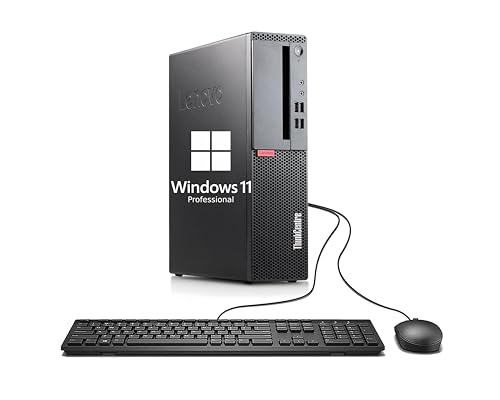
Lenovo ThinkCentre SFF Core i3 Desktop
Best for: compact office tasks and web browsing
- Processor Model
- Dual Core i3-6100
- System Memory
- 8GB
- Storage Capacity
- 256GB SSD
- Operating System
- Windows 11 Pro
- Form Factor
- Small Form Factor
View on Amazon: Lenovo ThinkCentre SFF Core i3 Desktop Affiliate link
This Lenovo ThinkCentre M710 SFF is a compact business desktop built for everyday tasks. It features a 6th Gen Dual Core i3-6100 processor running at 3.7 GHz. You get 8GB of RAM and a 256GB SSD for fast boot times and smooth application performance. It runs Windows 11 Pro and includes essential ports like VGA and DisplayPort. This system suits users who need reliable office work without gaming capabilities.
Pros
- 6th Gen Dual Core i3-6100 processor at 3.7 GHz
- 8GB RAM paired with a 256GB SSD
- Compact Small Form Factor design
- Includes Windows 11 Pro operating system
- Multiple connectivity options including USB 3.1 and DisplayPort
Cons
- Lacks a dedicated graphics card for gaming
- Only 8GB of system memory
- Uses older 6th generation Intel processor
Good fit if
- You need a compact PC for office work
- You require Windows 11 Pro for business features
- You prioritize fast boot times over heavy multitasking
Skip if
- You want to play modern video games
- You need high-end video editing capabilities
- You require more than 8GB of RAM
Verdict: Lenovo ThinkCentre M710 SFF i3 Desktop is a practical choice for users who need a small, reliable machine for web browsing and document editing. It fits those who value compact size and business-grade software over graphical performance.

OKAMUS Core i5 Desktop with 8GB RAM
Best for: basic gaming and office multitasking
- Graphics Card
- Integrated Graphics Only
- Processor Model
- i5
- System Memory
- 8 GB
- Operating System
- Win 11 Home
View on Amazon: OKAMUS Core i5 Desktop with 8GB RAM Affiliate link
This OKAMUS desktop features a Core i5 processor clocking up to 3.6GHz and 8GB of system memory. It includes a 256GB M.2 SSD for fast boot times and Windows 11 Home. The system relies on integrated graphics, meaning it lacks a dedicated video card. It is suited for basic tasks, light multitasking, and entry-level gaming at 1080p with adjusted settings.
Pros
- Core i5 processor delivers strong performance for multitasking
- 256GB M.2 SSD ensures fast boot and load times
- Integrated graphics handle 1080p gaming and content creation
- Vertical CPU cooler with RGB fans aids cooling
Cons
- No dedicated graphics card limits high-end gaming
- 8GB RAM may restrict heavy multitasking
- 400W power supply limits future GPU upgrades
Good fit if
- You need a budget-friendly PC for office work
- You want to play light titles at 1080p
- You prefer a compact system with RGB lighting
Skip if
- You require high-refresh-rate gaming
- You edit 4K video or use 3D rendering
- You plan to install a power-hungry GPU
Verdict: OKAMUS i5 8GB RAM Pre-Built PC is a capable entry-level system for users who prioritize CPU performance over graphical power. It fits those who need a reliable machine for daily tasks and casual gaming without the cost of a dedicated graphics card.
Specifications side by side
| Spec | Lenovo ThinkCentre SFF Core i3 Desktop | OKAMUS Core i5 Desktop with 8GB RAM |
|---|---|---|
| Graphics Card | not stated | Integrated Graphics Only |
| Processor Model | Dual Core i3-6100 | i5 |
| System Memory | 8GB | 8 GB |
| Storage Capacity | 256GB SSD | not stated |
| Operating System | Windows 11 Pro | Win 11 Home |
| Form Factor | Small Form Factor | not stated |
| Processor | not stated | Core i5 |
| Memory | 8GB RAM | 8GB RAM |
| Storage | 256GB SSD | not stated |
| Size | Small | not stated |
| Color | Black | i5 CPU+256GB+8GB |
| Model | Lenovo ThinkCentre M710 SFF | OKAMUS-7 |
Frequently asked questions
Is the Lenovo ThinkCentre suitable for gaming?
No. The Lenovo ThinkCentre M710 SFF is designed for compact office tasks and web browsing. It lacks a dedicated graphics card and uses an older dual-core processor. This system prioritizes business-grade reliability over graphical performance. You should not choose this model if you plan to play modern games or run graphics-intensive applications.
Does the OKAMUS desktop include a dedicated graphics card?
No. The OKAMUS Core i5 system is built for basic gaming and office multitasking without the cost of a dedicated graphics card. It relies on integrated graphics provided by the Core i5 processor. This configuration suits casual gaming and daily tasks but limits performance in demanding 3D environments.
Which OS comes with the Lenovo ThinkCentre?
The Lenovo ThinkCentre SFF includes Windows 11 Pro. This operating system offers enhanced security and productivity tools essential for professional environments. It is ideal for users who need business features. The OKAMUS model, by contrast, ships with Windows 11 Home, which is suited for standard personal use.
How does the Lenovo form factor compare to OKAMUS?
The Lenovo ThinkCentre M710 is a Small Form Factor (SFF) desktop. Its compact size saves desk space and fits easily into tight areas. The OKAMUS model is listed with a standard tower configuration. This difference matters if you have limited space or prefer a larger chassis for potential future upgrades.
Can the OKAMUS i5 handle office multitasking?
Yes. The OKAMUS Core i5 desktop is capable for basic gaming and office multitasking. The processor provides sufficient CPU performance for daily tasks and casual gaming. With 8GB of RAM and 256GB of storage, it handles multiple browser tabs and document editing smoothly without requiring high-end graphical components.
Is the Lenovo ThinkCentre good for web browsing?
Yes. The Lenovo ThinkCentre M710 is a practical choice for users who need a small, reliable machine for web browsing. It fits those who value compact size and business-grade software over graphical performance. The 8GB RAM and 256GB SSD ensure smooth operation for light daily computing needs.