Lenovo vs ASUS Gaming Desktops: Which Brand Fits You?
As an Amazon Associate we earn from qualifying purchases. Links on this page are affiliate links.
When comparing lenovo vs ASUS gaming desktop options, you face two distinct paths. Both brands offer Windows 11 systems with SSD storage for fast boot times. The main difference lies in their core architecture and form factor. One prioritizes compact efficiency with older dual-core technology. The other delivers modern multi-core power in a larger tower chassis. Your choice depends on whether you need raw processing speed or a smaller footprint for your workspace.
Key differences
| Aspect | Lenovo ThinkCentre SFF Core i3 Desktop | ASUS V500 Tower Core i7 Desktop |
|---|---|---|
| Processor | 6th Gen Dual Core i3-6100 | 10-core Intel Core i7-13620H |
| Memory | 8GB RAM | 16GB DDR5 RAM |
| Storage | 256GB SSD | 512GB SSD |
| Form Factor | Small Form Factor | Tower |
| Operating System | Windows 11 Pro | Windows 11 Home |
Which one should you choose?
Choose Lenovo ThinkCentre SFF Core i3 Desktop if
- You need a compact PC that fits in tight spaces.
- You require business-grade security features found in Windows 11 Pro.
- Your tasks are limited to basic web browsing and document editing.
Choose ASUS V500 Tower Core i7 Desktop if
- You want significantly faster multitasking with a 10-core processor.
- You prefer modern DDR5 memory for better system responsiveness.
- You need more storage space and expandability options.
Verdict: The ASUS V500 is the better choice for users who need serious processing power and modern components for demanding tasks. The Lenovo ThinkCentre is suitable only for those with very limited space or basic computing needs. For any serious gaming or heavy workloads, the ASUS configuration is clearly superior.
Lenovo vs ASUS Desktop Comparison
processor power
The ASUS V500 features a 10-core Intel Core i7-13620H processor with a base clock of 2.4 GHz and a max turbo frequency up to 4.9 GHz. This configuration provides significant multi-threading capability for demanding tasks. In contrast, the Lenovo ThinkCentre M710 SFF uses a 6th generation Dual Core i3-6100 processor running at a fixed 3.7 GHz base frequency. The i3 is designed for basic web browsing and document editing. The i7 offers substantially more processing cores and higher peak speeds, making it far more capable for heavy workloads or modern gaming. The ASUS architecture is clearly superior for performance.
system memory
Memory capacity directly impacts your ability to run multiple applications simultaneously without slowdowns. The ASUS V500 comes equipped with 16GB of DDR5 RAM, which is a newer and faster memory standard. It also supports upgrades up to 64GB. The Lenovo ThinkCentre M710 SFF is limited to 8GB of system memory. While 8GB is sufficient for light office work, it may struggle with modern multitasking or gaming. The 16GB configuration in the ASUS system provides a smoother experience when switching between programs. The ASUS memory specs offer a clear advantage for future-proofing and performance.
storage capacity
Both systems use solid-state drives for fast boot times and application loading. The ASUS V500 includes a 512GB SSD, which provides ample space for your operating system, essential software, and a moderate library of games or media files. The Lenovo ThinkCentre M710 SFF offers a 256GB SSD. This smaller capacity fills up quickly with modern applications and operating system updates. While both drives offer similar speed characteristics typical of SSDs, the ASUS storage volume is double that of the Lenovo. You will likely need external storage or earlier cleanup routines with the Lenovo to manage its limited space.
form factor
Physical size determines where you can place the computer and how much desk space it occupies. The Lenovo ThinkCentre M710 SFF is a Small Form Factor (SFF) desktop, designed to be compact and efficient. It fits easily into tight spaces or behind monitors. The ASUS V500 is a Tower desktop, measuring 24 inches in length, 12 inches in width, and 6 inches in height. This larger chassis allows for better airflow and potentially easier internal upgrades. If you have limited desk space, the Lenovo is the practical choice. For maximum expandability and cooling, the ASUS tower is better suited.
operating system
The operating system defines the software environment and security features available to you. The Lenovo ThinkCentre M710 SFF ships with Windows 11 Pro, which includes enhanced security tools and productivity features aimed at professional and business users. The ASUS V500 comes with Windows 11 Home, which is optimized for speed and general consumer use. While the Home edition is perfectly capable for gaming and daily tasks, the Pro edition on the Lenovo offers additional administrative controls. For most gamers, this difference is minor, but the Lenovo provides a more robust OS for business contexts.
Which Lenovo or ASUS Desktop Fits You?
Users needing maximum processing power
The ASUS V500 uses a 10-core Intel Core i7-13620H processor. This chip offers a base clock of 2.4 GHz and boosts up to 4.9 GHz. You get 16GB of DDR5 RAM and 512GB of SSD storage. These specs handle multitasking and demanding applications with ease. The tower form factor also allows for better airflow and future upgrades.
Buyers requiring a compact desktop
The Lenovo ThinkCentre M710 SFF is a Small Form Factor desktop. It uses a 6th Gen Core i3-6100 processor running at 3.70 GHz. You get 8GB of RAM and a 256GB SSD. This setup is efficient for web browsing and document editing. Its compact size saves desk space while still providing Windows 11 Pro and essential connectivity ports like VGA and USB 3.1.
Professionals needing business features
The Lenovo ThinkCentre M710 SFF runs Windows 11 Pro. This operating system includes enhanced security and productivity tools suitable for professional environments. It also supports multilingual interfaces. The included keyboard and mouse bundle adds value for immediate use. The dual-core processor and SSD storage provide reliable performance for everyday business tasks without unnecessary bulk.
The products compared
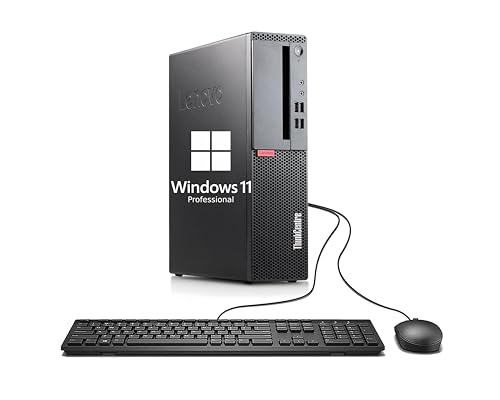
Lenovo ThinkCentre SFF Core i3 Desktop
Best for: basic office work and small spaces
- Processor Model
- Dual Core i3-6100
- System Memory
- 8GB
- Storage Capacity
- 256GB SSD
- Operating System
- Windows 11 Pro
- Form Factor
- Small Form Factor
View on Amazon: Lenovo ThinkCentre SFF Core i3 Desktop Affiliate link
This Lenovo ThinkCentre M710 SFF is a compact desktop built for office work, not gaming. It uses a 6th Gen Dual Core i3-6100 processor running at 3.7 GHz. You get 8GB of RAM and a 256GB SSD for fast boot times. It runs Windows 11 Pro and includes standard ports like VGA and USB 3.1. It fits well for basic tasks but lacks the power for modern games.
Pros
- Compact Small Form Factor design saves desk space
- 256GB SSD provides fast bootups and load times
- Windows 11 Pro offers enhanced security and productivity tools
- Includes VGA, DisplayPort, and USB 3.1 connectivity
Cons
- 6th Gen Dual Core i3-6100 is too weak for gaming
- 8GB RAM limits multitasking and heavy applications
- VGA port is an older standard with lower resolution support
Good fit if
- You need a small PC for web browsing and documents
- You require Windows 11 Pro for business features
- You have limited desk space
Skip if
- You want to play modern video games
- You need high-end graphics performance
- You require more than 8GB of RAM for heavy workloads
Verdict: Lenovo ThinkCentre M710 SFF is a solid office machine for basic tasks. It suits users who prioritize a small footprint and Windows 11 Pro over gaming power.

ASUS V500 Tower Core i7 Desktop
Best for: productivity and multitasking workflows
- Processor Model
- Intel Core i7-13620H
- System Memory
- 16 GB
- Storage Capacity
- 512 GB SSD
- Operating System
- Windows 11 Home
- Form Factor
- Tower
- Use
- Business
View on Amazon: ASUS V500 Tower Core i7 Desktop Affiliate link
The ASUS V500 is a business-oriented tower desktop featuring an Intel Core i7-13620H processor with 10 cores. It includes 16GB of DDR5 RAM and a 512GB SSD. This system supports dual monitors and offers extensive connectivity via WiFi 6 and seven USB ports. It runs Windows 11 Home and is designed for multitasking and productivity tasks.
Pros
- Intel Core i7-13620H with 10 cores and up to 4.9 GHz turbo speed
- 16GB DDR5 system memory for smooth multitasking
- Dual-monitor support via HDMI and DisplayPort
- WiFi 6 and Bluetooth 5.4 connectivity
Cons
- 512GB SSD storage is modest for large game libraries
- 13.2 pounds weight makes it less portable than smaller form factors
- Includes only a wired keyboard and mouse bundle
Good fit if
- You need a reliable desktop for office work and multitasking
- You want a tower with dual-monitor support
- You prefer wired peripherals for zero input lag
Skip if
- You require a compact mini-PC for limited desk space
- You need more than 512GB of storage pre-installed
- You are looking for a dedicated gaming GPU
Verdict: ASUS V500 Tower i7-13620H is a solid choice for users who prioritize processing power and connectivity for business or productivity tasks. It fits those who value a spacious tower layout for upgrades and dual displays over portability.
Specifications side by side
| Spec | Lenovo ThinkCentre SFF Core i3 Desktop | ASUS V500 Tower Core i7 Desktop |
|---|---|---|
| Processor Model | Dual Core i3-6100 | Intel Core i7-13620H |
| System Memory | 8GB | 16 GB |
| Storage Capacity | 256GB SSD | 512 GB SSD |
| Operating System | Windows 11 Pro | Windows 11 Home |
| Form Factor | Small Form Factor | Tower |
| Processor | not stated | Core i5 |
| Memory | 8GB RAM | 16GB RAM |
| Storage | 256GB SSD | 512GB SSD |
| Use | not stated | Business |
| Dimensions | not stated | 24 × 12 × 6 inches |
| Weight | not stated | 13.2 pounds |
| Size | Small | 32GB RAM | 1TB SSD |
| Color | Black | 32GB RAM | 1TB SSD |
| Model | Lenovo ThinkCentre M710 SFF | V500 |
Frequently asked questions
Is Lenovo good for gaming?
The Lenovo ThinkCentre M710 SFF is not designed for gaming. It uses an Intel Core i3 processor with only 8GB of RAM. This configuration handles basic office tasks and small spaces well. It lacks the processing power and graphics capability needed for modern games. You should choose a different system if you plan to play demanding titles.
Is ASUS good for gaming?
The ASUS V500 Tower is built for productivity rather than high-end gaming. It features a powerful Intel Core i7-13620H processor and 16GB of RAM. While this setup excels at multitasking and business workflows, it is not primarily marketed as a gaming machine. You get robust performance for creative work, but it may not support the latest graphics-intensive games.
Which is better for small spaces?
The Lenovo ThinkCentre M710 SFF is the better choice for limited areas. Its small form factor design allows it to fit easily into tight desks or corners. The ASUS V500 is a larger tower that requires more floor space. If your priority is minimizing footprint, the compact Lenovo system offers a practical solution for tight environments without sacrificing basic functionality.
Which has more RAM?
The ASUS V500 Tower includes 16GB of RAM, which is double the capacity of the Lenovo ThinkCentre. The Lenovo model comes with 8GB of RAM. More memory allows for smoother multitasking and handling larger applications. If you run many programs simultaneously, the ASUS system provides a significant advantage in memory capacity for your daily computing tasks.
Which has better storage?
The ASUS V500 Tower offers 512GB of SSD storage. The Lenovo ThinkCentre provides 256GB of SSD storage. Both systems use solid-state drives for fast boot times and quick file access. The ASUS model gives you twice the storage space for your files and applications. This extra capacity is useful if you store many documents, photos, or programs.
Which is better for office work?
Both systems are suitable for basic office work. The Lenovo ThinkCentre is optimized for small spaces and basic tasks. The ASUS V500 offers more processing power with its Core i7 chip. If you need heavy multitasking, the ASUS model is stronger. For simple word processing and web browsing, the compact Lenovo system is sufficient and space-efficient for your office setup.
Does ASUS offer upgradeable RAM?
The ASUS V500 Tower features a spacious layout that supports upgrades. It currently ships with 16GB of RAM. The design allows you to add more memory or storage later. This flexibility is useful for extending the life of your computer. You can enhance its performance for future productivity needs without buying a new machine entirely.