Lenovo vs Apple: All-In-One Desktops Compared by Specs
As an Amazon Associate we earn from qualifying purchases. Links on this page are affiliate links.
When you consider the lenovo vs apple all in one desktop options, you face two distinct paths. Both units integrate the display and computer into a single frame, saving desk space. The Lenovo IdeaCentre 24 offers Windows 11 and higher base memory. The Apple iMac provides a sharper 4.5K Retina screen and a more powerful M1 chip. Your choice depends on whether you prioritize operating system flexibility or display resolution and processing speed.
Key differences
| Aspect | Lenovo IdeaCentre 24" Intel N100 Desktop | Apple iMac 24-Inch M1 Desktop |
|---|---|---|
| Processor | Intel N100 Quad-Core | Apple M1 (8-core CPU) |
| System Memory | 16GB DDR4 RAM | 8GB |
| Storage | 256GB PCIe NVMe SSD | 512GB SSD |
| Display Resolution | Full HD (1920x1080) | 4.5K Retina |
| Operating System | Windows 11 Home | macOS |
Which one should you choose?
Choose Lenovo IdeaCentre 24" Intel N100 Desktop if
- You require Windows 11 for specific software compatibility.
- You need 16GB of RAM for heavy multitasking without buying upgrades.
- You want standard USB-A ports and Wi-Fi 6 connectivity.
Choose Apple iMac 24-Inch M1 Desktop if
- You prioritize a high-resolution 4.5K Retina display for media consumption.
- You prefer the processing power of the Apple M1 chip.
- You want a larger 512GB base storage capacity.
Verdict: The Lenovo IdeaCentre 24 is the practical choice for users who need Windows and ample base memory for productivity tasks. The Apple iMac suits those who value superior display clarity and the efficiency of the M1 processor. Select the Lenovo for versatility and the iMac for visual quality and integrated performance.
Specs: Processor, Display, Memory
Processor performance
The Apple iMac uses the Apple M1 chip with an 8-core CPU. This architecture delivers strong single-core and multi-core performance for macOS tasks. The Lenovo IdeaCentre 24 relies on the Intel N100 processor. This is a quad-core chip with a burst frequency up to 3.4GHz. It targets everyday productivity, web browsing, and light content creation. The M1 generally offers higher computational power for demanding workflows. The N100 focuses on efficiency and basic tasks. You get more raw processing speed with the Apple unit.
Display quality
The Apple iMac features a 24-inch 4.5K Retina display. It supports the P3 wide color gamut and reaches 500 nits of brightness. This provides sharp text and vibrant colors for creative work. The Lenovo IdeaCentre 24 has a 23.8-inch Full HD IPS screen. It offers 1920x1080 resolution, 99% sRGB color accuracy, and 250 nits brightness. While the Lenovo screen is good for general use, the Apple display has significantly higher resolution and color range. You get a sharper, brighter image with the Apple option.
System memory
Memory affects how many applications you can run simultaneously. The Lenovo IdeaCentre 24 comes with 16GB of DDR4-3200 RAM as a standard configuration. This allows for smoother multitasking with many browser tabs and office apps. The Apple iMac includes only 8GB of RAM in the base model. While Apple’s unified memory architecture is efficient, 16GB provides more headroom for heavy workloads. You get double the base memory with the Lenovo system.
Storage capacity
Storage holds your files, photos, and software. The Apple iMac base model includes 512GB of ultrafast SSD storage. This provides ample space for documents and media. The Lenovo IdeaCentre 24 offers 256GB of PCIe NVMe SSD storage in the base configuration. While both use fast solid-state drives, the Apple unit provides twice the base storage capacity. You get more room for your files with the Apple iMac.
Operating system
The Lenovo IdeaCentre 24 ships with Windows 11 Home. This gives you access to the widest range of PC software, games, and business applications. It also includes TPM 2.0 security and a Kensington lock slot. The Apple iMac runs macOS. This ecosystem is optimized for Apple software and creative tools. You must choose based on your software needs. Windows offers broader compatibility, while macOS offers a different interface.
Which All-In-One Desktop Suits Your Needs
Heavy multitaskers needing Windows and more RAM
You get 16GB of DDR4 RAM and a 256GB NVMe SSD with this Lenovo model. The Intel N110 quad-core processor handles multiple browser tabs and office apps smoothly. Windows 11 Home provides familiar productivity tools. The 23.8-inch Full HD IPS screen offers wide viewing angles. You also receive Wi-Fi 6 and four USB ports for connecting peripherals without lag.
Users prioritizing high-resolution display and audio
The Apple iMac features a stunning 24-inch 4.5K Retina display with P3 wide color gamut. It delivers 500 nits of brightness for vibrant visuals. The six-speaker sound system provides robust audio quality. The Apple M1 chip with an 8-core GPU handles creative tasks efficiently. The 1080p FaceTime HD camera ensures clear video calls. This setup is ideal for media consumption and design work.
Students or home office workers on a budget
This Lenovo desktop includes a USB wired keyboard and mouse in the box. It runs Windows 11 Home, which is suitable for standard educational and office software. The 16GB RAM ensures smooth performance for web browsing and document editing. The 256GB storage holds your files and applications. The compact all-in-one design saves desk space in dorms or small home offices.
The products compared
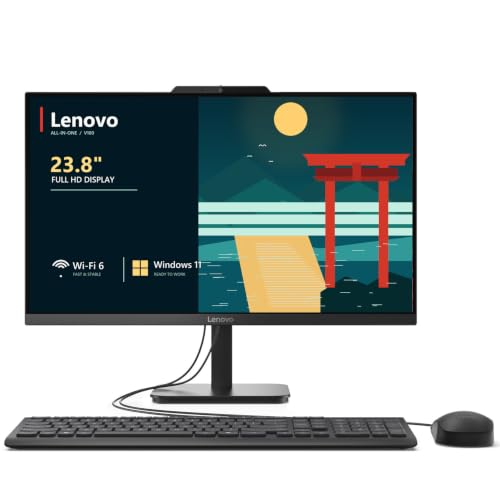
Lenovo IdeaCentre 24" Intel N100 Desktop
Best for: home office productivity and media viewing
- Processor
- Intel N100
- System Memory
- 32 GB DDR4
- Storage Capacity
- 2 TB NVMe SSD
- Screen Size
- 23.8"
- Display Resolution
- Full HD
- Graphics
- Intel UHD Graphics
View on Amazon: Lenovo IdeaCentre 24" Intel N100 Desktop Affiliate link
This Lenovo IdeaCentre 24 all-in-one desktop features a 23.8-inch Full HD IPS display and an Intel N100 quad-core processor. It includes 16GB of DDR4 RAM and a 256GB NVMe SSD for responsive performance. The system runs Windows 11 Home and supports Wi-Fi 6. It suits students and home office users who need reliable multitasking and a clutter-free design without high-end gaming capabilities.
Pros
- 16GB DDR4 RAM for smooth multitasking
- 23.8-inch Full HD IPS display with 99% sRGB
- Intel N100 processor with 4 cores
- 256GB PCIe NVMe SSD for fast boot times
- Wi-Fi 6 and Bluetooth 5.2 connectivity
Cons
- Intel UHD Graphics limits gaming performance
- 256GB storage fills up quickly with media
- 2-watt speakers lack audio depth
Good fit if
- You need a compact desktop for school or home office
- You want a large, bright screen for media consumption
- You prefer Windows 11 over macOS
Skip if
- You require dedicated graphics for gaming
- You need more than 256GB of internal storage
- You want a high-resolution 4K display
Verdict: The Lenovo IdeaCentre 24 AIO delivers solid everyday performance with its 16GB RAM and NVMe SSD. It fits students and remote workers who prioritize screen quality and multitasking over graphical power.

Apple iMac 24-Inch M1 Desktop
Best for: Compact home office setups
- Processor
- Apple M1
- System Memory
- 8GB
- Storage Capacity
- 512GB SSD
- Screen Size
- 24-inch
- Display Resolution
- 4.5K Retina
- Graphics
- 8-core GPU
View on Amazon: Apple iMac 24-Inch M1 Desktop Affiliate link
This 24-inch iMac features an Apple M1 chip with an 8-core CPU and 8-core GPU. It includes 8GB of RAM and 512GB of SSD storage. The display is a 4.5K Retina screen with P3 wide color. You get a 1080p camera and a six-speaker sound system. The design is thin and comes in vibrant colors like green. It suits users who want a compact, high-quality all-in-one for everyday tasks.
Pros
- 24-inch 4.5K Retina display with P3 wide color
- Apple M1 chip with 8-core CPU and GPU
- 512GB ultrafast SSD storage
- Six-speaker sound system
- 1080p FaceTime HD camera
Cons
- Only 8GB of system memory
- Limited to two Thunderbolt/USB 4 ports
- Fixed 24-inch screen size
Good fit if
- You want a compact desktop with a high-resolution display
- You need strong performance for everyday tasks
- You prefer a sleek, thin design
Skip if
- You require more than 8GB of RAM
- You need extensive port options beyond two Thunderbolt ports
- You want a larger screen than 24 inches
Verdict: Apple M1 iMac 24-inch Green is a compact, high-performance all-in-one for users who value display quality and portability over expandability.
Specifications side by side
| Spec | Lenovo IdeaCentre 24" Intel N100 Desktop | Apple iMac 24-Inch M1 Desktop |
|---|---|---|
| Processor | Intel N100 | Apple M1 |
| System Memory | 32 GB DDR4 | 8GB |
| Storage Capacity | 2 TB NVMe SSD | 512GB SSD |
| Screen Size | 23.8" | 24-inch |
| Display Resolution | Full HD | 4.5K Retina |
| Graphics | Intel UHD Graphics | 8-core GPU |
| Operating System | Windows 11 Home | not stated |
| Memory | 16GB RAM | 8GB RAM |
| Storage | not stated | 512GB SSD |
| Dimensions | 21.2 × 7.3 × 16.7 inches | 27.2 × 6.89 × 23.8 inches |
| Weight | not stated | 9.83 pounds |
| Size | 32GB DDR4 RAM, 1TB PCIe SSD | 8GB - 512GB |
| Color | White | Green |
| Model | 24 | MGPG3LL/A |
Frequently asked questions
Which all-in-one desktop has more RAM?
The Lenovo IdeaCentre 24 includes 16GB of DDR4 RAM. This is double the 8GB found in the Apple iMac 24-Inch M1. The higher memory capacity on the Lenovo model supports heavier multitasking. It allows you to keep more applications open simultaneously without slowdowns.
Do these all-in-ones come in different colors?
Yes, both brands offer color options. The Lenovo IdeaCentre 24 is available in White. The Apple iMac 24-Inch M1 comes in Green. These colors allow you to match the desktop to your existing desk or room decor choices.
How big is the Apple iMac screen?
The Apple iMac 24-Inch M1 features a 24-inch display. This size provides ample space for productivity tasks and media viewing. It fits well in compact home office setups where desk space is limited but screen real estate is still important.
What operating system does the Lenovo model run?
The Lenovo IdeaCentre 24 runs Windows 11 Home. This operating system is widely used for general productivity and media consumption. It offers compatibility with a broad range of software and games suitable for students and remote workers.
Which desktop is lighter?
The Apple iMac 24-Inch M1 weighs 9.83 pounds. The Lenovo IdeaCentre 24 is larger in physical dimensions, measuring 21.2 inches in length. The Apple unit is designed for portability within a home office environment due to its lighter build.
Is the Lenovo IdeaCentre good for media viewing?
Yes, the Lenovo IdeaCentre 24 is suited for media viewing. It combines solid everyday performance with a focus on screen quality. The 16GB RAM and NVMe SSD ensure smooth playback and quick loading times for videos and streaming services.
Does the Apple iMac have expandable storage?
The Apple iMac 24-Inch M1 comes with 512GB of SSD storage. It is not designed for user expandability. You must rely on the internal drive capacity or external storage solutions for additional space, as the all-in-one design limits internal upgrades.