Lenovo vs Acer: All-In-One Desktops Compared by Specs
As an Amazon Associate we earn from qualifying purchases. Links on this page are affiliate links.
When you compare lenovo vs acer all in one desktop options, you are looking at two distinct approaches to compact computing. Both machines offer 16GB of DDR4 RAM and run Windows 11 Home for smooth multitasking. They also include built-in webcams and standard connectivity ports. The main difference lies in the core components. The Lenovo features a smaller 23.8-inch screen with an Intel N100 processor, while the Acer provides a larger 27-inch display powered by a more robust AMD Ryzen 5 chip.
Key differences
| Aspect | Lenovo IdeaCentre 24" Intel N100 Desktop | Acer Aspire 27-Inch Ryzen 5 All-in-One |
|---|---|---|
| Processor | Intel N100 (4 cores, up to 3.4GHz) | AMD Ryzen 5 7430U (6 cores, up to 4.3GHz) |
| Screen Size | 23.8 inches | 27 inches |
| Graphics | Intel UHD Graphics | AMD Radeon Integrated Graphics |
| Storage | 256GB PCIe NVMe SSD | 1TB PCIe NVMe SSD |
| Display Refresh Rate | Not listed | 120Hz |
| Wi-Fi Standard | Wi-Fi 6 | 802.11ax (Wi-Fi 6) |
Which one should you choose?
Choose Lenovo IdeaCentre 24" Intel N100 Desktop if
- You need a compact setup that fits easily on smaller desks or in dorm rooms.
- You prioritize a lower price point and sufficient power for basic office tasks.
- You prefer a display with high color accuracy and wide viewing angles for media consumption.
Choose Acer Aspire 27-Inch Ryzen 5 All-in-One if
- You want a larger 27-inch screen for better visibility and workspace real estate.
- You require more processing power for heavier multitasking or light creative work.
- You need significantly more storage space for files, photos, and applications.
Verdict: The Lenovo IdeaCentre 24 is the practical choice for users who value space efficiency and adequate performance for everyday tasks. The Acer Aspire C27 is better suited for those who need a larger screen, more storage, and a stronger processor for demanding workflows.
Lenovo vs Acer AIO Specs
processor performance
The Lenovo IdeaCentre 24 uses an Intel N100 quad-core processor with a 3.4GHz burst frequency. It is designed for everyday productivity, web browsing, and light content creation. The Acer Aspire C27 features a Ryzen 5 7430U with six cores and twelve threads. This chip boosts up to 4.3GHz and includes 16MB of cache. The Ryzen 5 has more cores and a higher clock speed than the Intel N100. This suggests better multitasking capability and sustained performance for heavier workloads. The Acer processor offers more raw computational power for demanding tasks.
display size
Screen size significantly impacts your viewing experience and workspace efficiency. The Lenovo IdeaCentre 24 comes with a 23.8-inch Full HD IPS display. It offers 178-degree viewing angles and 99% sRGB color accuracy. The Acer Aspire C27 features a larger 27-inch IPS FHD screen. Both monitors provide 1920x1080 resolution for clear text and images. The Acer screen is noticeably larger, giving you more room for side-by-side windows. The Lenovo display is more compact, which may suit smaller desks better. The Acer wins for those prioritizing screen real estate.
storage capacity
Storage determines how many files, programs, and media you can keep on the device. The Lenovo IdeaCentre 24 is configured with a 256GB PCIe NVMe SSD. This provides fast boot times and quick application launches. The Acer Aspire C27 includes a 1TB PCIe NVMe SSD. This is four times the storage space of the Lenovo model. The larger capacity on the Acer allows you to store more photos, videos, and documents without needing external drives. For users with large libraries or extensive software installs, the Acer offers significantly more room.
graphics capability
Integrated graphics handle visual output and light gaming. The Lenovo IdeaCentre 24 uses Intel UHD Graphics. This is suitable for HD video playback and casual tasks. The Acer Aspire C27 features AMD Radeon Integrated Graphics. While both systems lack dedicated GPUs, the Radeon solution generally offers better performance for light gaming and video editing than Intel UHD. The Ryzen 5 processor also pairs well with Radeon graphics. If you plan to do any light creative work or play casual titles, the Acer provides a slight advantage in graphical processing.
connectivity options
Both systems offer modern wireless standards and wired ports. The Lenovo IdeaCentre 24 supports Wi-Fi 6 and Bluetooth 5.2. It includes four USB-A ports, HDMI-out, and an Ethernet port. The Acer Aspire C27 supports 802.11ax Wi-Fi and Bluetooth 5.3. It features a USB 3.2 Type-C port, a DisplayPort, HDMI, and USB 2.0 ports. The Acer includes a Type-C port and a DisplayPort, which the Lenovo lacks. The Lenovo has more USB-A ports. The Acer offers more versatile display and modern connection options for peripherals.
Which AIO fits your needs
Students needing portable compact design
The Lenovo IdeaCentre 24 measures 7.3 inches wide, making it easier to fit in small dorms or tight desks. Its 23.8-inch screen saves space while the Intel N100 processor handles Zoom calls and web browsing efficiently. The included keyboard and mouse let you start working immediately without extra setup.
Users wanting larger display and storage
The Acer Aspire C27 offers a 27-inch screen for better visibility and a 1TB NVMe SSD for storing large files. The Ryzen 5 7430U processor provides six cores for smoother multitasking. You also get a USB Type-C port and a DisplayPort, giving you more flexible connectivity options.
Buyers prioritizing high refresh rate display
The Acer Aspire C27 features a 120Hz display, which delivers smoother motion for videos and casual gaming compared to standard 60Hz panels. This higher refresh rate reduces blur during fast movements. Combined with 16GB of RAM, it ensures fluid performance for media consumption and everyday desktop tasks.
Shoppers seeking modern wireless standards
The Lenovo IdeaCentre 24 includes Wi-Fi 6 and Bluetooth 5.2 for stable connections and faster data transfer. These modern standards help maintain lower latency in crowded networks. The integrated Intel UHD Graphics also supports HD video playback without straining the system resources.
The products compared
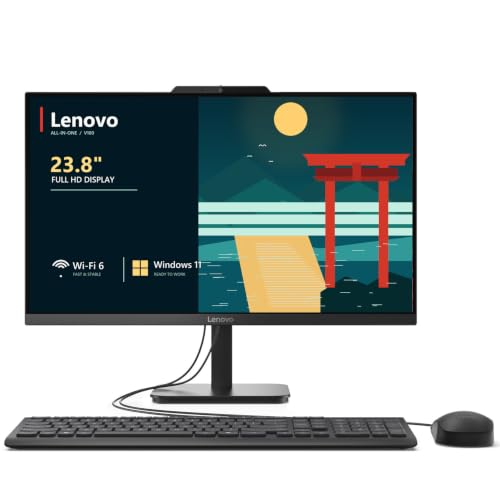
Lenovo IdeaCentre 24" Intel N100 Desktop
Best for: home office productivity and light multitasking
- Processor
- Intel N100
- System Memory
- 32 GB DDR4
- Storage Capacity
- 2 TB NVMe SSD
- Screen Size
- 23.8"
- Display Resolution
- Full HD
- Graphics
- Intel UHD Graphics
View on Amazon: Lenovo IdeaCentre 24" Intel N100 Desktop Affiliate link
The Lenovo IdeaCentre 24 is a 23.8-inch all-in-one desktop with an Intel N100 processor and 16GB of DDR4 RAM. It features a Full HD IPS display and 256GB of NVMe SSD storage. This compact unit includes Wi-Fi 6 and Windows 11 Home. It suits home offices and students needing reliable multitasking for productivity tasks and light media use.
Pros
- 16GB DDR4 RAM for smooth multitasking
- 23.8" Full HD IPS display with 99% sRGB
- Intel N100 quad-core processor up to 3.4GHz
- Wi-Fi 6 and Bluetooth 5.2 connectivity
- 256GB PCIe NVMe SSD for fast boot times
Cons
- 256GB storage is smaller than the 1TB on the Acer Aspire C27
- Intel N100 is a budget processor compared to the Ryzen 5 7430U
- Integrated Intel UHD Graphics limits gaming performance
Good fit if
- You need a compact desktop for home office work
- You prioritize fast multitasking with 16GB of RAM
- You want a clutter-free setup with built-in Wi-Fi 6
Skip if
- You require high-end gaming performance
- You need large storage capacity over 512GB
- You prefer a larger 27-inch display
Verdict: Lenovo IdeaCentre 24 23.8" AIO offers solid multitasking for students and home offices, though its smaller storage and budget processor make it less suitable than the Acer for power users.

Acer Aspire 27-Inch Ryzen 5 All-in-One
Best for: Everyday productivity and media consumption
- Processor
- AMD Ryzen 5 7430U
- System Memory
- 16GB DDR4
- Storage Capacity
- 1TB PCIe NVMe SSD
- Screen Size
- 27"
- Display Resolution
- FHD (1920x1080)
- Graphics
- AMD Radeon
View on Amazon: Acer Aspire 27-Inch Ryzen 5 All-in-One Affiliate link
The Acer Aspire C27 is a 27-inch all-in-one desktop featuring a Ryzen 5 7430U processor and 16GB of DDR4 RAM. It includes a 1TB PCIe NVMe SSD and a 120Hz Full HD IPS display. This configuration supports smooth multitasking and fast storage access. It suits users who want a spacious screen and reliable performance for everyday computing tasks without needing dedicated graphics hardware.
Pros
- 120Hz refresh rate on 27-inch FHD IPS display
- 16GB DDR4 RAM for efficient multitasking
- 1TB PCIe NVMe SSD for ample storage
- Ryzen 5 7430U processor with up to 4.3 GHz boost
Cons
- Integrated AMD Radeon graphics limit heavy gaming
- Uses DDR4 memory instead of newer DDR5
- Includes only a 1-year manufacturer warranty
Good fit if
- You need a large 27-inch screen for office work
- You want fast storage for quick file access
- You prefer AMD processors for your system
Skip if
- You require dedicated graphics for high-end gaming
- You need professional software requiring Windows 11 Pro
- You want the latest DDR5 memory technology
Verdict: Acer Aspire C27 Ryzen 5 AIO delivers solid everyday performance with its 16GB RAM and 1TB SSD. It fits users who prioritize screen size and storage speed over gaming capabilities.
Specifications side by side
| Spec | Lenovo IdeaCentre 24" Intel N100 Desktop | Acer Aspire 27-Inch Ryzen 5 All-in-One |
|---|---|---|
| Processor | Intel N100 | AMD Ryzen 5 7430U |
| System Memory | 32 GB DDR4 | 16GB DDR4 |
| Storage Capacity | 2 TB NVMe SSD | 1TB PCIe NVMe SSD |
| Screen Size | 23.8" | 27" |
| Display Resolution | Full HD | FHD (1920x1080) |
| Graphics | Intel UHD Graphics | AMD Radeon |
| Operating System | Windows 11 Home | Windows 11 Home |
| Memory | 16GB RAM | 16GB RAM |
| Storage | not stated | 1TB SSD |
| Dimensions | 21.2 × 7.3 × 16.7 inches | not stated |
| Size | 32GB DDR4 RAM, 1TB PCIe SSD | 16GB RAM|1TB SSD |
| Color | White | Ryzen 5 |
| Model | 24 | Aspire |
Frequently asked questions
Which all-in-one is better for students?
The Lenovo IdeaCentre 24 is better for students. Its compact 7.3-inch width fits easily on small dorm desks. The 16GB of RAM handles multitasking well. The Intel N100 processor is sufficient for web browsing and video calls. This makes it a practical choice for tight spaces and light workloads.
Does the Acer Aspire have a larger screen?
Yes, the Acer Aspire C27 has a larger display. It features a 27-inch screen compared to the Lenovo's 23.8-inch panel. This provides more visual real estate for media consumption. The larger size is ideal if you prioritize screen space over a smaller footprint.
How much storage does each model include?
Both desktops include 1TB of storage. The Lenovo IdeaCentre 24 uses a PCIe SSD for fast boot times. The Acer Aspire C27 also offers a 1TB SSD. This ample space is enough for documents, photos, and a large media library without needing external drives.
Which processor is more powerful?
The Acer Aspire C27 has a more powerful processor. It uses a Ryzen 5 7430U with six cores. The Lenovo IdeaCentre 24 relies on an Intel N100 quad-core chip. The Ryzen 5 offers better performance for heavier tasks, while the N100 is designed for basic productivity.
Is the Lenovo IdeaCentre suitable for gaming?
The Lenovo IdeaCentre 24 is not suitable for gaming. Its Intel N100 processor and integrated graphics lack the power for modern games. It is designed for home office productivity and light multitasking. You should look elsewhere if you need a machine for high-performance gaming.
What operating system do these all-in-ones run?
Both models run Windows 11 Home. This ensures compatibility with most standard software and apps. You get the latest interface and security features. Both the Lenovo and Acer systems come pre-installed with this operating system for immediate use out of the box.
Which model is more compact?
The Lenovo IdeaCentre 24 is more compact. It measures 7.3 inches in width. The Acer Aspire C27 is larger to accommodate its bigger screen. If you have limited desk space, the Lenovo's smaller dimensions make it easier to fit in tight areas like small offices or dorm rooms.
Can I use these for video editing?
The Acer Aspire C27 is better for basic video editing. Its Ryzen 5 processor handles more complex tasks than the N100. Both have 16GB of RAM, which helps with smooth playback. However, neither is designed for heavy professional editing. They are best for light content creation and media consumption.