Lenovo ThinkStation P3 Tiny Gen Review: Who It Fits and Who Should Skip It
As an Amazon Associate we earn from qualifying purchases. Links on this page are affiliate links.
This lenovo thinkstation p3 tiny gen review focuses on a compact workstation built for professional environments. The system centers on the Intel Core Ultra 5 235 vPro processor and 16GB of DDR5 memory. It offers 512GB of SSD storage and Wi-Fi 7 connectivity. Measuring just 1L, it saves significant desk space compared to standard towers. The integrated Intel Graphics handle daily tasks efficiently. You get a small package with serious business features like vPro management and remote maintenance capabilities for IT teams.
What stands out
- Intel Core Ultra 5 235 vPro processor for stable performance
- 16GB DDR5 RAM for smooth multitasking
- Wi-Fi 7 for lower latency and faster speeds
- 1L chassis volume, 96% smaller than typical desktops
- Up to 36 TOPS for AI inferencing via built-in NPU
Who it fits
Good fit for
This mini PC suits professionals in architecture, engineering, finance, healthcare, and education who need reliable power in a small footprint. If you work in a space-constrained office or need a secondary monitor host, the 1L size is ideal. The vPro platform helps IT departments manage devices remotely. Users who value fast Wi-Fi 7 connections and secure, stable performance will find this setup practical for daily workflows and moderate creative tasks.
Who should skip it
You should look elsewhere if you require dedicated graphics for heavy 3D rendering or high-end gaming. This system relies on integrated Intel Graphics, which lack the power for demanding visual workloads. If you need more than 512GB of storage or 16GB of RAM for large datasets, this configuration may feel limiting. Gamers seeking high frame rates will not find the integrated GPU sufficient for modern titles. Heavy video editors should consider larger systems with discrete GPUs.
Verdict: The ThinkStation P3 Tiny delivers solid business performance in an exceptionally small form factor. It is a practical choice for office professionals who prioritize space savings and enterprise manageability over raw graphical power.
Key specs explained for this unit
Processor: Intel Core Ultra 5 235 vPro
This processor includes vPro technology for business security and remote management. It also features a built-in NPU for AI tasks, delivering up to 36 TOPS of performance. You benefit from stable, secure computing suitable for professional workflows in engineering or finance. When comparing prebuilt gaming PCs, note that this chip prioritizes reliability and manageability over raw gaming frame rates.
RAM: 16GB DDR5
DDR5 is the latest memory standard, offering faster data transfer speeds than older DDR4. Sixteen gigabytes allows you to run multiple professional applications simultaneously without significant slowdowns. This capacity is standard for light to moderate multitasking. If you plan to edit large video files or run heavy simulations, you may need to compare this against systems with 32GB or more for smoother performance.
Graphics: Integrated Intel Graphics
This system uses the CPU's built-in graphics rather than a dedicated video card. It is sufficient for office tasks, web browsing, and displaying multiple monitors. However, it lacks the power for modern AAA gaming or complex 3D rendering. When shopping for gaming desktops, look for dedicated GPUs like NVIDIA RTX or AMD Radeon series for serious graphical workloads.
Storage: 512GB SSD
A solid-state drive provides fast boot times and quick application loading. Five hundred and twelve gigabytes holds your operating system, core software, and a moderate amount of files. This is a practical starting size for most users. If you store large media libraries or many games, you might compare this to models offering 1TB or 2TB of storage space for better long-term capacity.
Wireless Connectivity: Wi-Fi 7
Wi-Fi 7 is the newest wireless standard, offering faster speeds and lower latency than Wi-Fi 6. It performs better in congested networks with many connected devices. This ensures stable connections for cloud work and video calls. While not critical for local gaming, it future-proofs your connection. Compare this to older Wi-Fi 6 or 6E models to see the potential speed and stability improvements.
Compact Design and Build Quality
The Lenovo ThinkStation P3 Tiny Gen 2 measures just one liter in volume. According to the listing, this makes it 96% smaller than a typical desktop. You can place it in tight spaces where larger computers cannot fit. The unit weighs 8.64 pounds and features a black finish. This small form factor is ideal for architecture, engineering, finance, healthcare, and education professionals who need powerful tools without cluttering their desks. The compact size allows for flexible mounting or placement options, saving valuable workspace.
Port layout is practical for daily use. The front includes one USB-C port for data transfer, two USB-A ports, and a headphone jack. The rear offers another USB-A port, three more USB-A ports with smart power-on support, HDMI 2.1, DisplayPort 1.4, and Ethernet. This variety supports multiple monitors and peripherals without needing extra hubs. The integrated Intel Graphics handle routine tasks efficiently. Wi-Fi 7 provides faster speeds and lower latency in busy networks. The system’s design prioritizes stability and manageability through Intel vPro technology. You get a validated platform built for professional environments. The unopened retail packaging ensures the unit arrives as configured by Lenovo. This build quality supports long-term reliability in office settings.
Setup and everyday use
Setting up this mini PC is straightforward due to its small footprint. You can mount it behind a monitor or place it on a desk without taking up much space. The rear panel includes an HDMI 2.1 port and a DisplayPort 1.4, allowing you to connect to modern displays. You also have an Ethernet jack for stable wired internet, which is useful if you need consistent speeds for professional tasks.
For wireless needs, the built-in Wi-Fi 7 provides faster data transfer and lower latency. This helps when you are in congested network environments, ensuring your connection remains stable during heavy workloads. The front ports offer quick access to peripherals. You can plug in USB-C devices for data transfer or use the Always On USB-A port to charge phones even when the system is off.
Daily use is supported by 16GB of DDR5 RAM and a 512GB SSD. This combination handles office applications, data analysis, and multitasking without slowing down. The integrated Intel Graphics and the NPU assist with AI inferencing, reaching up to 36 TOPS. This means you can run AI-driven workflows efficiently without needing a separate graphics card. The Intel vPro platform adds a layer of security and remote manageability, which is essential for business environments. You benefit from a validated system that prioritizes stability and performance for architecture, engineering, or finance work.
Before You Buy This Tiny Workstation
You should verify monitor compatibility before purchase. This unit offers HDMI 2.1 and DisplayPort 1.4 outputs. Ensure your display supports these standards for optimal resolution. The one-liter chassis requires careful placement. You must check your desk or VESA mount for clearance. Wi-Fi 7 provides fast connectivity, but you may still need a wired Ethernet connection for stable professional workflows. The integrated graphics handle basic tasks well, but you should confirm they meet your specific software requirements. This tiny workstation fits a different niche than the larger gaming rigs on this page. It suits professionals who need vPro security and compact form factors. You should consider it if space is limited. However, gamers needing dedicated GPUs should skip this option. Regular dust cleaning will maintain performance. The small vents require unobstructed airflow to prevent thermal throttling during sustained workloads.
Check before you buy
- Check monitor compatibility with HDMI 2.1 and DisplayPort 1.4 outputs.
- Verify VESA mount or desk space for the one-liter chassis.
- Confirm integrated graphics meet your specific software needs.
- Ensure adequate airflow around the small vents.
The product at a glance
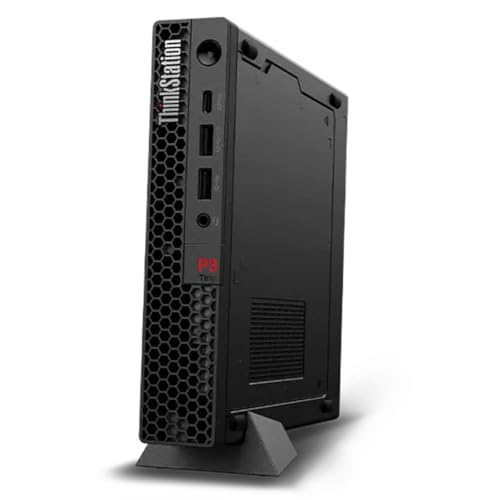
Lenovo ThinkStation P3 Tiny Core Ultra 5 Mini PC
Best for: compact professional workstations with AI support
- Processor
- Intel Core Ultra 5 235 vPro
- Graphics Card
- Integrated Intel Graphics
- RAM Capacity
- 16GB
- RAM Type
- DDR5
- Storage Capacity
- 512GB
- Operating System
- Windows 11 Pro
View on Amazon: Lenovo ThinkStation P3 Tiny Core Ultra 5 Mini PC Affiliate link
The Lenovo ThinkStation P3 Tiny Gen 2 packs an Intel Core Ultra 5 235 vPro processor and 16GB of DDR5 RAM into a 1L chassis. It includes 512GB of storage and Wi-Fi 7 for fast connectivity. The built-in NPU offers up to 36 TOPS for AI tasks. This compact desktop suits professionals in architecture, engineering, or finance who need reliable performance in a small footprint.
Pros
- Intel Core Ultra 5 235 vPro processor
- 16GB DDR5 RAM for multitasking
- 1L chassis is 96% smaller than typical desktops
- Built-in NPU delivers up to 36 TOPS for AI
- Wi-Fi 7 for lower latency and faster speeds
Cons
- Integrated Intel Graphics limits heavy gaming
- 16GB RAM may be insufficient for large datasets
- Front USB-C port supports data transfer only
Good fit if
- You need a small footprint for tight office spaces
- You require vPro security and remote management features
- You work in engineering or finance with moderate workloads
Skip if
- You need dedicated graphics for high-end gaming
- You require more than 16GB of RAM
- You need extensive front-panel connectivity options
Verdict: Lenovo ThinkStation P3 Tiny Gen 2 is a compact, secure workstation for professionals who value space savings and AI capabilities. It fits users who need vPro management and moderate processing power in a small form factor.
Specifications side by side
| Spec | Lenovo ThinkStation P3 Tiny Core Ultra 5 Mini PC |
|---|---|
| Processor | Intel Core Ultra 5 235 vPro |
| Graphics Card | Integrated Intel Graphics |
| RAM Capacity | 16GB |
| RAM Type | DDR5 |
| Storage Capacity | 512GB |
| Operating System | Windows 11 Pro |
| Wireless Connectivity | WiFi 7 |
| Memory | 16GB RAM |
| Storage | 512GB SSD |
| Use | Workstation |
| Weight | 8.64 pounds |
| Size | Ultra5-235|16GB|512GB |
| Color | Black |
| Model | 31P30K6000AUS |
Frequently asked questions
Is the Lenovo ThinkStation P3 Tiny Gen 2 suitable for AI tasks?
Yes, it includes a built-in Neural Processing Unit for AI workloads. The Intel Core Ultra 5 235 processor delivers up to 36 TOPS of performance for these tasks. This makes the system capable of handling local AI applications efficiently within its compact form factor.
Can I manage this PC remotely for business use?
Yes, the system features Intel vPro technology for business security and remote management. This allows IT administrators to monitor and maintain the device remotely. It is designed for professional environments where secure, centralized management of multiple units is required.
What graphics outputs are available on this mini PC?
The rear panel includes an HDMI 2.1 port and a DisplayPort 1.4 output. You can connect two displays simultaneously using these interfaces. Ensure your monitors support these standards for optimal resolution and performance in your setup.
How much storage does the base model include?
The listed configuration includes a 512GB SSD for storage. This provides space for your operating system, applications, and essential files. You can expand your storage later if needed, but this amount serves as the standard starting capacity for most professional workflows.
Does this unit support the latest Wi-Fi standard?
Yes, it is equipped with Wi-Fi 7 connectivity. This offers faster wireless speeds and better performance in crowded network environments. You benefit from improved reliability and throughput compared to older Wi-Fi standards when connecting to compatible routers.
What is the physical size of this workstation?
The chassis measures just one liter in volume. It is 96% smaller than a typical desktop tower. You can mount it behind a monitor or place it in tight spaces where larger computers cannot fit, saving valuable desk space.
Is this PC heavy or lightweight for its size?
The unit weighs 8.64 pounds. This makes it relatively lightweight for a workstation of this class. You can easily move it between locations or mount it securely without needing heavy-duty support structures for the VESA mount or desk placement.