Lenovo ThinkStation P3 Tiny Workstation vs Lenovo ThinkCentre SFF Core i7 (2026): Key Differences
As an Amazon Associate we earn from qualifying purchases. Links on this page are affiliate links.
The lenovo thinkcentre sff core i7 vs thinkstation p3 tiny workstation comparison highlights two distinct Lenovo business machines. Both offer solid processing power and reliable storage for professional tasks. The main difference lies in their form factor and target audience. One is a tiny, ISV-certified workstation designed for CAD and engineering software. The other is a slightly larger SFF desktop focused on general productivity with a higher core count processor. You need to choose based on your space constraints and specific software needs.
Key differences
| Aspect | Lenovo ThinkStation P3 Tiny Workstation | Lenovo ThinkCentre SFF Core i7 Desktop |
|---|---|---|
| Processor | Intel Core i5-14500 (14-core) | Intel Core i7-13620H (10-core) |
| Memory | 16GB RAM | 32GB DDR5 RAM |
| Form Factor | Mini Desktop (1L chassis) | Small Form Factor (SFF) |
| Certification | ISV-Certified for AutoCAD, SOLIDWORKS | Not listed |
| Weight | 3.01 pounds | 9.3 pounds |
Which one should you choose?
Choose Lenovo ThinkStation P3 Tiny Workstation if
- You need ISV-certified stability for professional CAD or engineering applications.
- You have limited desk space and require a tiny, mountable chassis.
Choose Lenovo ThinkCentre SFF Core i7 Desktop if
- You require more base RAM for heavy multitasking without upgrades.
- You prefer a traditional SFF tower with more internal expansion potential.
Verdict: The ThinkStation P3 Tiny is the better choice for professionals running specialized engineering software who need a compact footprint. The ThinkCentre SFF Core i7 is more suitable for general business users who need more standard memory and a larger case for future upgrades.
ThinkStation P3 vs ThinkCentre SFF Specs
processor
The ThinkStation P3 Tiny Workstation uses an Intel Core i5-14500. This 14-core, 20-thread processor reaches a turbo speed of 5.0GHz. It is part of the vPro business platform for enhanced manageability. The ThinkCentre SFF Core i7 Desktop features an Intel Core i7-13620H. This chip has 10 cores and 16 threads. It achieves a maximum turbo speed of 4.9GHz. The i5-14500 offers more physical cores and a slightly higher clock speed. However, the i7-13620H is a high-performance mobile-class CPU designed for density. Both provide strong compute power for business tasks, but the P3 has a higher core count.
memory
Memory capacity is a key differentiator between these two systems. The ThinkStation P3 Tiny Workstation comes with 16GB of system memory. This is sufficient for standard multitasking and office productivity. The ThinkCentre SFF Core i7 Desktop includes 32GB of DDR5 RAM. DDR5 memory offers higher bandwidth than the previous generation. The SFF model provides double the standard memory capacity of the P3. This extra RAM allows for heavier multitasking and handling larger datasets without slowdowns. If you need more headroom for complex applications, the SFF configuration is superior.
storage
Both desktops include 1TB of SSD storage for your files and operating system. The ThinkStation P3 Tiny Workstation features a 1TB SSD. The ThinkCentre SFF Core i7 Desktop also includes a 1TB PCIe SSD. This ensures ample space for documents, applications, and media. While the base storage capacity is identical, the ThinkCentre SFF model is configurable with options up to 4TB. The P3 supports up to 2TB in its variations. For the specific units compared, storage is equal, but the SFF offers greater expansion potential.
form factor
Size and physical footprint define the utility of each machine. The ThinkStation P3 Tiny Workstation is a 1-liter mini desktop. It measures 1.5 inches in width, 7 inches in length, and 7.2 inches in height. It weighs just 3.01 pounds. The ThinkCentre SFF Core i7 Desktop is a Small Form Factor unit. It measures 3.6 inches in width, 11.5 inches in length, and 13.4 inches in height. It weighs approximately 9.3 pounds. The P3 is significantly smaller and lighter, making it ideal for tight spaces or monitor mounting.
compatibility
Software certification matters for professional engineering and design work. The ThinkStation P3 Tiny Workstation is ISV-certified for AutoCAD, SOLIDWORKS, ArcGIS, Creo, and MATLAB. This ensures stability and performance for mission-critical professional applications. It also meets military-grade MIL-SPEC durability standards. The ThinkCentre SFF Core i7 Desktop is optimized for general business productivity and Windows 11 Pro. It does not list specific ISV certifications for engineering software. If you run specialized CAD or simulation tools, the P3 is the reliable choice.
connectivity
Port selection varies based on the chassis size. The ThinkStation P3 Tiny Workstation includes six USB 3.0-A ports, one USB-C, HDMI, DisplayPort, and RJ45 Ethernet. It supports up to six displays. The ThinkCentre SFF Core i7 Desktop offers one USB-C, four USB 5Gbps-A, two Hi-Speed-A, one HDMI 2.1, one VGA, and RJ45. The SFF lacks DisplayPort but includes VGA for legacy monitors. The P3 supports more simultaneous displays due to having both HDMI and DP. The SFF provides more USB-A ports overall.
Which Mini Or SFF Fits Your Needs
CAD and engineering professionals needing ISV certification
The ThinkStation P3 Tiny is ISV-certified for AutoCAD, SOLIDWORKS, and MATLAB. It uses an Intel Core i5-14500 with 14 cores and 20 threads. This 1-liter chassis is military-grade durable. It supports up to six displays. This certification ensures stability for mission-critical professional workloads that standard desktops cannot guarantee.
Users requiring high RAM for multitasking
The ThinkCentre SFF includes 32GB of DDR5 RAM. This allows for effortless multitasking and fast response times. The Intel Core i7-13620H processor has 10 cores. It pairs with a 1TB PCIe SSD. This configuration handles demanding day-to-day operations and heavy data handling with ease.
IT teams needing remote management capabilities
The ThinkStation P3 Tiny features the Intel vPro platform. This suite simplifies mass device deployment and troubleshooting. It boosts office operational efficiency for IT teams. The system includes ThinkShield security with TPM encryption. This makes it ideal for enterprise environments requiring secure and manageable business deployments.
The products compared

Lenovo ThinkStation P3 Tiny Workstation
Best for: Compact professional CAD and engineering work
- Processor Model
- Intel Core i5-14500
- System Memory
- 16 GB DDR5
- Storage Capacity
- 1 TB SSD
- Operating System
- Windows 11 Pro
- Form Factor
- Mini Desktop
- Use
- Workstation
View on Amazon: Lenovo ThinkStation P3 Tiny Workstation Affiliate link
The Lenovo ThinkStation P3 is a 1-liter mini desktop built for professional workloads. It features an Intel Core i5-14500 processor with 14 cores and runs on 16GB of RAM paired with a 1TB SSD. This ISV-certified machine supports up to six displays and includes Intel vPro for enterprise management. It suits engineers and architects who need stable performance in a compact form factor that fits tight office spaces.
Pros
- 14-core Intel Core i5-14500 processor with up to 5.0GHz turbo speed
- ISV-certified for AutoCAD, SOLIDWORKS, and other professional design software
- Supports up to six displays for expanded multitasking
- Intel vPro platform for remote IT management and deployment
Cons
- Base configuration includes only 16GB of system memory
- Compact 1-liter chassis limits internal upgrade flexibility
- Weighs 3.01 pounds, which is heavier than standard mini PCs
Good fit if
- You need ISV-certified stability for CAD or engineering applications
- You require a compact desktop that mounts behind a monitor
- You want enterprise-grade security features like ThinkShield and TPM
Skip if
- You need more than 16GB of RAM without upgrading
- You prefer a larger tower for easier component access
- You require a dedicated high-end graphics card for gaming
Verdict: Lenovo ThinkStation P3 Tiny Workstation is a compact, ISV-certified desktop ideal for professionals who need reliable performance in a small footprint. It fits engineers and architects who value stability and multi-display support over raw gaming power.
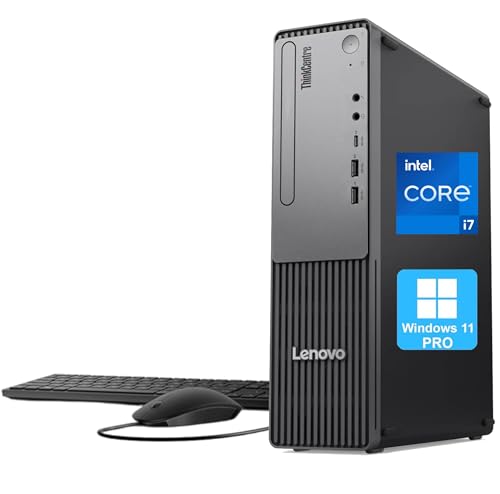
Lenovo ThinkCentre SFF Core i7 Desktop
Best for: compact business workstations needing 32GB RAM
- Processor Model
- Intel Core i7-13620H
- System Memory
- 32GB DDR5
- Storage Capacity
- 1TB PCIe SSD
- Operating System
- Windows 11 Pro
- Form Factor
- Small Form Factor (SFF)
- Use
- Business
View on Amazon: Lenovo ThinkCentre SFF Core i7 Desktop Affiliate link
The Lenovo ThinkCentre Neo 30s Gen 5 SFF desktop pairs an Intel Core i7-13620H processor with 32GB of DDR5 RAM. This configuration supports seamless multitasking and rapid data handling. It includes a 1TB PCIe SSD and runs Windows 11 Pro. The compact chassis measures 3.6 by 11.5 by 13.4 inches. It suits business users who need reliable performance in a small footprint.
Pros
- Intel Core i7-13620H processor with 10 cores
- 32GB DDR5 system memory for fast multitasking
- 1TB PCIe SSD for quick boot times
- Compact Small Form Factor design saves space
Cons
- Uses a mobile H-series processor instead of a desktop variant
- Lacks Thunderbolt connectivity for high-speed peripherals
- No dedicated graphics card listed in specifications
Good fit if
- You need a small desktop for office tasks
- You require 32GB of RAM for heavy multitasking
- You prefer Windows 11 Pro for business features
Skip if
- You need a dedicated graphics card for gaming
- You require Thunderbolt 4 connectivity
- You want a full-size desktop chassis
Verdict: Lenovo ThinkCentre Neo 30s SFF i7 delivers strong multitasking power for business environments. It fits users who value compact size and ample RAM over desktop-class processors.
Specifications side by side
| Spec | Lenovo ThinkStation P3 Tiny Workstation | Lenovo ThinkCentre SFF Core i7 Desktop |
|---|---|---|
| Processor Model | Intel Core i5-14500 | Intel Core i7-13620H |
| System Memory | 16 GB DDR5 | 32GB DDR5 |
| Storage Capacity | 1 TB SSD | 1TB PCIe SSD |
| Operating System | Windows 11 Pro | Windows 11 Pro |
| Form Factor | Mini Desktop | Small Form Factor (SFF) |
| Processor | Core i5 | Core i7 |
| Memory | 16GB RAM | 32GB RAM |
| Storage | 1TB SSD | 1TB SSD |
| Use | Workstation | Business |
| Dimensions | 7 × 1.5 × 7.2 inches | 11.5 × 3.6 × 13.4 inches |
| Weight | 3.01 pounds | not stated |
| Size | 16GB RAM | 1TB SSD | 32GB RAM | 1TB SSD |
| Color | Black | not stated |
| Model | ThinkStation P3 | Neo 30s |
Frequently asked questions
Which Lenovo desktop has more RAM?
The ThinkCentre SFF Core i7 Desktop includes 32GB of RAM. This is double the 16GB found in the ThinkStation P3 Tiny Workstation. More memory helps you run multiple applications simultaneously without slowdowns. It is ideal for heavy multitasking in business environments.
Which machine is better for CAD work?
The ThinkStation P3 Tiny Workstation is better for CAD. It is ISV-certified for professional software like AutoCAD and SOLIDWORKS. This certification ensures stability and reliability for engineering tasks. The ThinkCentre SFF focuses on general business multitasking rather than specialized design applications.
Which desktop is smaller in size?
The ThinkStation P3 Tiny Workstation is significantly smaller. It measures 1.5 inches in width and weighs just 3.01 pounds. The ThinkCentre SFF is larger, with a width of 3.6 inches and a height of 13.4 inches. The Tiny model fits easily in tight spaces.
Which processor is more powerful?
The ThinkCentre SFF uses a Core i7 processor, which is generally more powerful than the Core i5 in the ThinkStation P3. The i7 offers stronger performance for demanding business tasks. The ThinkStation uses an i5 optimized for stability and professional certification.
Does the ThinkCentre SFF include Windows 11 Pro?
Yes, the Lenovo ThinkCentre SFF Core i7 Desktop comes with Windows 11 Pro. This operating system provides advanced security and management features for business users. The ThinkStation P3 Tiny Workstation does not list its included operating system in the provided specifications.
Which workstation is best for architects?
The ThinkStation P3 Tiny Workstation is best for architects. It is ISV-certified for engineering and design software, ensuring compatibility with tools like MATLAB and SOLIDWORKS. Its compact size and professional certification make it a reliable choice for architectural modeling and technical work.