Lenovo ThinkCentre SFF Core i7 vs Lenovo ThinkCentre SFF Core i5 (2026): Key Differences
As an Amazon Associate we earn from qualifying purchases. Links on this page are affiliate links.
This lenovo thinkcentre sff core i7 vs thinkcentre sff core i5 comparison focuses on two compact desktops for office use. Both machines feature 16GB of RAM and Windows 11 Pro in a small form factor. The main difference lies in the processor generation and storage capacity. You get a sixth-gen i7 with a larger drive or an eighth-gen i5 with newer connectivity. Read on to see which spec sheet fits your workflow.
Key differences
| Aspect | Lenovo ThinkCentre SFF Core i7 Desktop | Lenovo ThinkCentre SFF Core i5 Desktop |
|---|---|---|
| Processor | Intel Core i7-6700 | Intel Core i5-8500 |
| Storage | 1TB SSD | 512GB SSD |
| Connectivity | USB wireless network adapter and Bluetooth adapter included | Built-in WiFi and USB Type-C port |
| Display Outputs | 2x DisplayPort, 1x VGA | 1x DisplayPort (implied by USB-C), 1x VGA |
Which one should you choose?
Choose Lenovo ThinkCentre SFF Core i7 Desktop if
- You need maximum storage space for large files or archives.
- You prefer the raw multi-threaded power of a quad-core i7.
- You want to use external USB adapters for network and Bluetooth.
Choose Lenovo ThinkCentre SFF Core i5 Desktop if
- You want a newer eighth-generation processor architecture.
- You need built-in WiFi without using a USB adapter.
- You require a USB Type-C port for modern peripherals.
Verdict: Choose the i7 model if you prioritize storage capacity and established quad-core performance. Select the i5 model if you prefer newer hardware generations and built-in wireless connectivity. Both systems handle office tasks efficiently with 16GB of RAM.
Processor, Storage, and Ports Compared
Processor Generation
The Lenovo ThinkCentre SFF Core i7 Desktop uses an Intel Core i7-6700, a sixth-generation quad-core chip. The Lenovo ThinkCentre SFF Core i5 Desktop features an Intel i5-8500, an eighth-generation processor. Although the i7 has a higher model number, the i5-8500 is two generations newer. Newer architectures often provide better efficiency and instruction set support. The i5-8500 runs at 3.6GHz with 6MB of cache. The i7-6700 is a strong performer but relies on older silicon. For background tasks and general office work, the i5-8500 may handle modern demands slightly better due to its recency.
Storage Capacity
Storage speed and size impact how quickly you load applications and save files. The Lenovo ThinkCentre SFF Core i7 Desktop includes a 1TB SSD. This offers ample space for large datasets, extensive media libraries, and numerous programs. The Lenovo ThinkCentre SFF Core i5 Desktop comes with a 512GB SSD. While still fast, this capacity is half that of the i7 model. If you store many local files, the 1TB drive provides more breathing room. Both drives are solid-state, ensuring fast boot times and responsive file access for everyday office tasks.
Memory Configuration
System memory determines how many applications you can run simultaneously without slowdowns. Both desktops are equipped with 16GB of DDR4 RAM. This amount is sufficient for multitasking, running multiple browser tabs, and using office suites like Microsoft Office. Neither machine offers more or less memory than the other. You will experience similar performance when switching between programs. The shared memory specification means this aspect does not differentiate the two systems. Your multitasking experience will be consistent regardless of which processor you choose.
Connectivity Ports
Port variety affects how many peripherals you can connect directly. The i7 model lists six USB 3.2 ports, one VGA port, two DisplayPort connectors, and an RJ-45 Gigabit Ethernet port. It also includes a combined headphone/microphone jack. The i5 model provides four USB 2.0 ports, four USB 3.1 ports, one USB 3.1 Gen 1 Type-C, one VGA, and one RJ-45. The i5 includes a Type-C port, which is useful for modern devices. The i7 offers more total USB 3.2 ports. Both support dual 4K displays for expanded workspaces.
Operating System
The operating system provides the interface and security features for your work. Both the Lenovo ThinkCentre SFF Core i7 Desktop and the Lenovo ThinkCentre SFF Core i5 Desktop come pre-installed with Windows 11 Pro. This edition includes enterprise-grade security features like BitLocker encryption and Remote Desktop support. These features are beneficial for professional users handling sensitive data. Since both machines run the exact same version of Windows, there is no functional difference in the software environment. You get the same update cycle and management tools on either system.
Which Lenovo ThinkCentre SFF Should You Buy
Users needing large local storage for files
This model includes a 1TB SSD, offering twice the storage capacity of the i5 option. The Intel Core i7-6700 processor handles multitasking efficiently. You get full port coverage with six USB 3.2 ports and dual DisplayPort outputs. It supports dual 4K displays for expanded workspaces. This setup is ideal if you store many documents or media locally.
Those preferring newer processor architecture
The Intel i5-8500 is an eighth-generation chip, which is two generations newer than the i7-6700. Newer architecture often brings better efficiency and updated instruction sets. It still provides four cores for stable performance. The 512GB SSD is sufficient for most office applications. This choice suits you if processor generation matters more than raw storage size.
Buyers wanting modern USB-C connectivity
This desktop includes a USB 3.1 Gen 1 Type-C port, which the i7 model lacks. It also offers four USB 3.1 ports alongside four USB 2.0 ports. The i5-8500 processor ensures smooth operation for daily tasks. You receive Windows 11 Pro for security features. This configuration is best if you need versatile connectivity options for modern peripherals.
The products compared
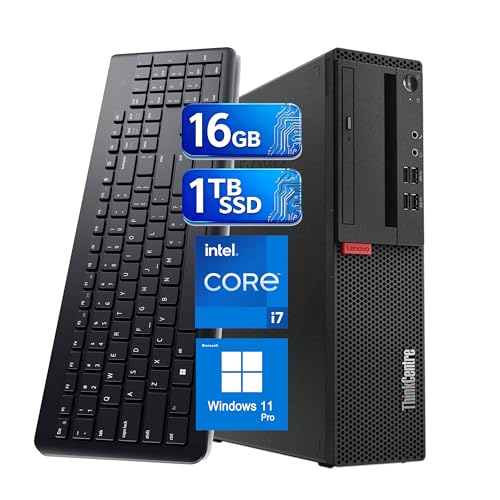
Lenovo ThinkCentre SFF Core i7 Desktop
Best for: compact office workstations
- Processor Model
- Intel Core i7-6700
- System Memory
- 16 GB
- Storage Capacity
- 1 TB SSD
- Operating System
- Windows 11 Pro
- Form Factor
- Small Form Factor
View on Amazon: Lenovo ThinkCentre SFF Core i7 Desktop Affiliate link
This Lenovo ThinkCentre M710s SFF desktop uses an Intel Core i7-6700 processor, 16GB of RAM, and a 1TB SSD. It runs Windows 11 Pro and supports dual 4K displays. The compact chassis saves space while providing full desktop performance. You get a wired keyboard and mouse included. This setup suits office work, video conferencing, and multitasking needs efficiently.
Pros
- Intel Core i7-6700 quad-core processor
- 16GB DDR4 system memory
- 1TB SSD storage capacity
- Windows 11 Pro operating system
- Dual 4K display support
Cons
- 6th generation processor is older technology
- Includes only USB wireless network adapter
- Requires separate monitor connections
Good fit if
- You need a compact desktop for office tasks
- You require Windows 11 Pro features
- You want fast boot times with an SSD
Skip if
- You need the latest generation CPU
- You want built-in Wi-Fi without adapters
- You need more than two monitors
Verdict: Lenovo ThinkCentre M710s i7 SFF PC is a solid choice for users needing reliable office performance in a small footprint. It fits professionals who value Windows 11 Pro and ample storage over cutting-edge processor speed.

Lenovo ThinkCentre SFF Core i5 Desktop
Best for: compact office work and daily computing
- Processor Model
- Intel i5-8500
- System Memory
- 16GB
- Storage Capacity
- 512GB SSD
- Operating System
- Windows 11 Pro
- Form Factor
- SFF
View on Amazon: Lenovo ThinkCentre SFF Core i5 Desktop Affiliate link
This Lenovo ThinkCentre M720S SFF desktop pairs an Intel Core i5-8500 processor with 16GB of RAM and a 512GB SSD. It runs Windows 11 Pro and includes WiFi, a keyboard, and a mouse. The compact form factor fits small spaces. You get reliable performance for office tasks and general computing. The included peripherals make it ready to use out of the box.
Pros
- Intel Core i5-8500 processor for stable performance
- 16GB RAM supports multitasking
- 512GB SSD provides ample storage
- Includes WiFi, keyboard, and mouse
Cons
- Older 8th Gen Intel processor
- Refurbished condition with non-original packaging
- Limited to SFF form factor upgrades
Good fit if
- You need a compact desktop for office work
- You want a complete setup with peripherals included
- You prefer Windows 11 Pro for security
Skip if
- You require the latest generation CPU
- You need a larger tower for easy upgrades
- You want a brand new unit with original box
Verdict: Lenovo ThinkCentre M720S SFF i5 is a solid choice for users who need a compact, ready-to-use machine for everyday tasks. It suits those who value included peripherals and a stable Windows 11 Pro environment over cutting-edge hardware.
Specifications side by side
| Spec | Lenovo ThinkCentre SFF Core i7 Desktop | Lenovo ThinkCentre SFF Core i5 Desktop |
|---|---|---|
| Processor Model | Intel Core i7-6700 | Intel i5-8500 |
| System Memory | 16 GB | 16GB |
| Storage Capacity | 1 TB SSD | 512GB SSD |
| Operating System | Windows 11 Pro | Windows 11 Pro |
| Form Factor | Small Form Factor | SFF |
| Processor | Core i7 | Core i5 |
| Memory | 16GB RAM | 16GB RAM |
| Storage | 1TB SSD | 512GB SSD |
| Color | Black | not stated |
| Model | Lenovo ThinkCentre M710s SFF | M720S |
Frequently asked questions
Which ThinkCentre SFF is better for heavy multitasking?
The Core i7 model is the stronger choice for demanding workflows. It features an Intel Core i7-6700 processor, which offers higher raw performance than the i5-8500 in the other unit. Both systems include 16GB of RAM, ensuring smooth operation when running multiple applications simultaneously.
Does the Lenovo ThinkCentre SFF Core i5 come with Windows 11 Pro?
Yes, the Core i5 desktop includes Windows 11 Pro. This operating system provides enhanced security features and management tools suitable for business environments. The Core i7 model also runs Windows 11 Pro, ensuring both machines meet professional software requirements right out of the box.
How much storage does the Core i7 ThinkCentre SFF have?
The Core i7 desktop is equipped with a 1TB SSD. This provides ample space for large files, applications, and the operating system. In comparison, the Core i5 model offers 512GB of storage, which is sufficient for general tasks but half the capacity of the i7 version.
Is the Core i5 processor faster than the Core i7?
No, the Core i7 processor is generally faster for intensive tasks. The i7 uses a sixth-generation chip, while the i5 uses an eighth-generation processor. Although the i5 is newer, the i7 architecture delivers higher performance for demanding office workloads and complex data processing.
Can I use both ThinkCentre SFF models for daily office tasks?
Yes, both models are designed for compact office work. The Core i5 is ideal for everyday computing and stable performance. The Core i7 is better for users needing reliable power in a small footprint. Both include 16GB of RAM to handle standard productivity applications efficiently.
What is the main difference between the two ThinkCentre SFF models?
The primary difference is the processor and storage capacity. The Core i7 model features a faster processor and double the storage with a 1TB SSD. The Core i5 model offers an eighth-generation processor and 512GB of storage. Both share the same 16GB RAM and compact form factor.