Lenovo ThinkCentre Mini PC Core Review: Who It Fits and Who Should Skip It
As an Amazon Associate we earn from qualifying purchases. Links on this page are affiliate links.
This lenovo thinkcentre mini PC core review covers the ThinkCentre neo 50q Gen 4. It is a compact desktop built for efficient daily computing. The system features an 8-core Intel Core i5-13420H processor. This CPU offers strong multitasking performance for office work and light creative tasks. You also get 16GB of DDR4 RAM. This memory amount handles multiple browser tabs and applications smoothly without slowdowns. The unit runs Windows 11 Pro, providing a familiar interface. Its small footprint makes it easy to place behind a monitor or in tight spaces. It is a practical choice for users who need reliable performance in a small package.
What stands out
- 8-core Intel Core i5-13420H processor with up to 4.6 GHz turbo speed
- 16GB DDR4 RAM for smooth multitasking
- 1TB PCIe M.2 SSD for fast storage access
- Windows 11 Pro operating system included
- Compact dimensions of 7.05 x 7.2 x 1.44 inches
Who it fits
Good fit for
This mini PC suits home office workers and students who need a reliable machine for web browsing, document editing, and video calls. The 16GB RAM ensures you can keep many programs open without lag. The 1TB SSD provides ample space for files and photos. Users who prefer a clean, minimal desk setup will appreciate the small size. It also fits well in environments where space is limited. The included keyboard and mouse make it ready to use right out of the box. If you need a straightforward, no-fuss desktop for everyday tasks, this is a solid option.
Who should skip it
You should look elsewhere if you plan to play modern 3D games. This system lacks a dedicated graphics card, so it is not built for high-end gaming. The DDR4 RAM is older technology compared to newer DDR5 options. If you need maximum future-proofing, you might want a newer standard. Heavy video editors or 3D modelers may find the integrated graphics limiting. The processor is capable, but it is not designed for intense rendering workloads. If your work requires specialized high-performance hardware, this compact form factor may not meet your needs.
Verdict: The Lenovo ThinkCentre neo 50q Gen 4 is a capable, space-saving desktop for general productivity. It offers solid performance for everyday tasks without taking up much room.
Key specs for this mini PC
Intel Core i5-13420H
This eight-core processor delivers reliable performance for everyday tasks. It handles office applications, web browsing, and video calls without lag. The turbo boost helps when you run multiple programs at once. It is not designed for heavy gaming, but it is strong enough for general productivity and light creative work on this compact desktop.
16GB DDR4 RAM
This memory amount allows you to switch between browser tabs and documents smoothly. It supports multitasking for most home and office users. If you plan to edit large files or run many apps simultaneously, consider upgrading to higher capacities. DDR4 is a standard type that balances speed and cost for this class of machine.
1TB PCIe M.2 SSD
This storage drive provides ample space for your operating system, files, and programs. The PCIe M.2 interface ensures fast boot times and quick file transfers. You can store thousands of documents, photos, and moderate amounts of media. It is much faster than older hard drives, making the system feel responsive during daily use.
Windows 11 Pro
This operating system includes advanced security features and management tools for business users. It offers a modern interface and better compatibility with enterprise software. You get access to the full Microsoft Store and enhanced virtualization capabilities. It is ideal for professionals who need reliable performance and added control over their computing environment.
WiFi 6 and Bluetooth 5.3
These wireless standards provide faster and more stable connections to your network and peripherals. WiFi 6 handles multiple devices in your home or office without slowing down. Bluetooth 5.3 connects headsets, mice, and keyboards with less latency. You do not need extra cables for connectivity, keeping your workspace tidy and efficient.
Compact Design and Build Quality
According to the listing, the Lenovo ThinkCentre neo 50q Gen 4 measures 7.05 inches wide, 7.2 inches long, and 1.44 inches high. This small form factor allows you to mount the unit behind a monitor or place it discreetly on a desk. The chassis is built for space efficiency rather than gaming aesthetics. You get a plain, functional enclosure that fits standard office environments without drawing attention. The compact footprint means it takes up minimal real estate, which is useful if you share a workspace or have limited desk area.
The rear panel includes six USB ports: three USB-A 3.2, two USB-A 2.0, and one USB-C 3.2. You also have DisplayPort and HDMI outputs for dual monitors. WiFi 6 and Bluetooth 5.3 provide wireless connectivity, while an RJ-45 Ethernet port ensures stable wired networking. This layout prioritizes practicality over flashy design. You can connect peripherals directly without needing extra hubs. The inclusion of a black wired keyboard and mouse completes the setup for immediate use. The finish is utilitarian, focusing on durability and ease of maintenance. This build suits users who need a reliable, no-nonsense desktop that integrates seamlessly into a professional or home office setup.
Setup And Everyday Use Guide
Setting up this mini PC is straightforward. The listing includes a black wired keyboard and mouse, so you do not need to purchase peripherals separately. You will need to connect the unit to a display. It supports two monitors via DisplayPort and HDMI outputs. This allows for a dual-screen workflow, which is useful for productivity tasks. The system runs Windows 11 Pro, providing a familiar interface for business and home users. You can connect to networks using WiFi 6 or the RJ-45 Ethernet port. Bluetooth 5.3 is also available for wireless audio devices or controllers. Storage and memory are handled internally. The 1TB PCIe M.2 SSD offers fast boot times and quick file access. The 16GB of DDR4 RAM supports smooth multitasking. You can open multiple browser tabs and office applications without slowdowns. The compact dimensions of 7.05 by 7.2 by 1.44 inches mean it fits easily on a desk or mounts behind a screen. Connectivity is ample with six USB ports, including USB-C. This setup is ideal for users who want a tidy workspace. It suits those who need reliable performance for daily tasks. It is not intended for heavy gaming or video editing. The included peripherals and OS make it ready to use out of the box.
Before You Buy This Mini PC
You should verify your monitor compatibility before purchasing. This unit requires a display and supports dual screens via DisplayPort and HDMI. If your setup uses older VGA connections, you will need an active adapter. The included wired keyboard and mouse are functional but basic. You may prefer ergonomic alternatives for long work sessions. Keep the ventilation clear. Its compact size means airflow is tight. Dust buildup can affect thermal performance over time. Regular cleaning of the vents is necessary. This model fits well in offices or home studios where space is limited. It suits users who prioritize processing power over graphical performance. It is not ideal for heavy gaming or video editing. Compare it with other options in our 1 product list. Choose this if you need reliable multitasking in a small footprint. Avoid it if you require dedicated graphics or expandability beyond the internal SSD and RAM slots.
Check before you buy
- Confirm your monitor supports DisplayPort or HDMI inputs.
- Check if you need wireless peripherals instead of wired ones.
- Ensure you have space for dust cleaning behind the unit.
- Verify that Windows 11 Pro meets your software needs.
The product at a glance
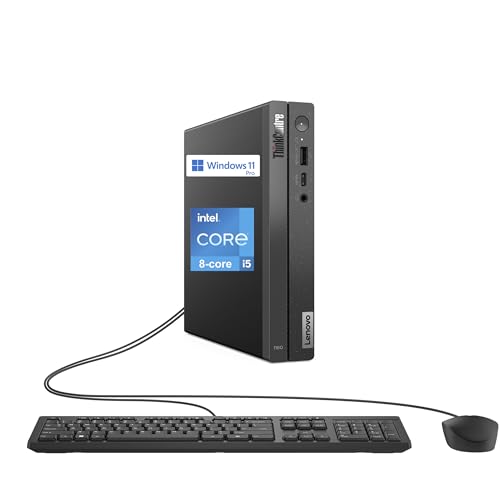
Lenovo ThinkCentre Mini PC Core i5
Best for: compact office workstations
- Processor
- Intel Core i5-13420H
- RAM Capacity
- 16GB
- RAM Type
- DDR4
- Storage Capacity
- 1TB
- Storage Interface
- PCIe M.2
- Operating System
- Windows 11 Pro
View on Amazon: Lenovo ThinkCentre Mini PC Core i5 Affiliate link
This Lenovo mini desktop features a 13th-gen Intel Core i5-13420H processor and 16GB of DDR4 RAM. It includes a 1TB PCIe SSD and runs Windows 11 Pro. The compact chassis measures 7.05 by 7.2 inches. It supports dual monitors via DisplayPort and HDMI. WiFi 6 and Bluetooth 5.3 provide wireless connectivity. It suits users needing a small, capable machine for office tasks.
Pros
- 8-core Intel Core i5-13420H processor with up to 4.6 GHz turbo
- 16GB DDR4 RAM and 1TB PCIe M.2 SSD
- Windows 11 Pro operating system
- WiFi 6 and Bluetooth 5.3 connectivity
- Compact dimensions of 7.05 x 7.2 x 1.44 inches
Cons
- Uses DDR4 RAM instead of newer DDR5
- Includes only wired keyboard and mouse
- Limited to two monitor outputs
Good fit if
- You need a small footprint for a desk
- You require Windows 11 Pro features
- You want reliable wired connectivity options
Skip if
- You need DDR5 memory for maximum bandwidth
- You require wireless input devices
- You plan to connect more than two displays
Verdict: Lenovo ThinkCentre neo 50q Gen 4 Mini PC is a compact office solution with a solid i5 processor and ample storage. It fits professionals who value a small chassis and Windows 11 Pro. It is less suitable for users needing wireless peripherals or multi-monitor setups.
Specifications side by side
| Spec | Lenovo ThinkCentre Mini PC Core i5 |
|---|---|
| Processor | Intel Core i5-13420H |
| RAM Capacity | 16GB |
| RAM Type | DDR4 |
| Storage Capacity | 1TB |
| Storage Interface | PCIe M.2 |
| Operating System | Windows 11 Pro |
| Wireless Connectivity | WiFi 6, Bluetooth 5.3 |
| Memory | 16GB RAM |
| Storage | 1TB SSD |
| Dimensions | 7.2 × 7.05 × 1.44 inches |
| Size | 16GB RAM | 1TB SSD |
| Model | neo 50q Gen 4 |
Frequently asked questions
Is the Lenovo ThinkCentre neo 50q Gen 4 suitable for gaming?
This mini PC is not designed for gaming. It features an Intel Core i5-13420H processor without a dedicated graphics card. The system prioritizes office efficiency and multitasking over graphical performance. You should look for a desktop with a discrete GPU if you plan to play modern titles or render complex 3D visuals.
How much storage does the top-rated model include?
The Lenovo ThinkCentre neo 50q Gen 4 comes with 1TB of solid-state drive storage. This capacity provides ample space for your operating system, applications, and large files. The SSD ensures fast boot times and quick access to your data compared to traditional hard drives.
Does this mini PC include a wireless mouse and keyboard?
No, the package includes a black wired keyboard and mouse. You do not need to buy these peripherals separately, but they are not wireless. If you prefer wireless input devices for a cleaner desk setup, you will need to purchase them separately before using the system.
What operating system is pre-installed on this device?
The system ships with Windows 11 Pro. This edition offers advanced features for professionals, such as enhanced security and remote desktop capabilities. It provides a familiar interface for users upgrading from older Windows versions while supporting modern business tools and multitasking workflows.
Can I connect two monitors to this mini PC?
Yes, the unit supports dual monitor setups. You can connect displays using the available DisplayPort and HDMI ports. This makes it easy to create a productive workspace with multiple screens for spreadsheets, coding, or video editing, provided your monitors have compatible inputs.
Is the RAM upgradeable on this model?
The listing specifies 16GB of RAM for this configuration. While the data confirms this amount is included, it does not explicitly state whether the memory modules are soldered or removable. You should check the official technical manual to confirm if you can add more memory later.
Who is this mini PC best suited for?
It is best for professionals who need a compact office workstation. The small chassis fits well in tight spaces, and the i5 processor handles daily tasks efficiently. It is less suitable for users requiring high-end graphics performance or those who strictly need wireless peripherals without buying extras.