Looking Beyond the Lenovo ThinkCentre M70t Gen 6? 6 Alternatives Worth a Look
As an Amazon Associate we earn from qualifying purchases. Links on this page are affiliate links.
You might be looking for lenovo thinkcentre m70t gen 6 alternatives because your needs differ from its standard tower design. This desktop offers an Intel Core Ultra 7 processor, 16 GB of RAM, and Windows 11 Pro in a spacious chassis. It provides solid reliability for business users who prioritize steady performance and ample internal space for upgrades. The system is built for professionals who need a robust workstation that can handle demanding office tasks without compromise.
However, you may prefer a smaller footprint, a different processor family, or dedicated graphics. The alternatives listed here were chosen because their specifications overlap with the original, ensuring they can handle similar workloads. Some options feature compact form factors ideal for tight desks, while others include higher RAM capacities or specialized workstation features. You can compare these models based on their exact attributes, such as storage speed, memory size, and chassis dimensions, to find the best fit for your specific environment and technical requirements.
Our top pick: Lenovo ThinkCentre M70t Tower Core Ultra 7.
How these alternatives compare to the M70t
HP Z2 SFF Core Ultra 7 Desktop
The HP Z2 SFF replaces the M70t’s large tower with a compact small form factor chassis. It measures 3.9 inches in height versus the Lenovo’s 14 inches, making it ideal for tight workspaces. Both machines share the Core Ultra 7 processor, 16 GB of RAM, and a 512 GB SSD. The HP unit weighs significantly less at 8.82 pounds compared to the Lenovo’s 15.3 pounds. You should choose this alternative if you need certified stability for CAD or simulation tasks but cannot accommodate a standard tower. It gives up physical size for a professional, space-saving design without sacrificing core processing power.
Lenovo ThinkStation P3 Tower Core Ultra 7
The Lenovo ThinkStation P3 Gen 2 Tower offers a much larger chassis than the M70t, measuring 23 inches in height. It retains the Core Ultra 7 processor, 16 GB of RAM, and 512 GB SSD found in the original. This model is classified as a workstation, targeting users who require high core counts and expandability for demanding professional workloads. While the M70t suits general office reliability, the ThinkStation is built for heavy multi-core tasks. You should pick this option if your workflow involves intensive rendering or engineering simulations. It provides similar storage and memory but in a bulkier frame designed for maximum thermal headroom and component access.
Dell Tower Plus RTX 5060 Desktop
This Dell Tower Desktop distinguishes itself by including an RTX 5060 dedicated graphics card, which the M70t lacks. It also doubles the system memory to 32 GB and increases storage to a 1 TB SSD. The processor remains the Core Ultra 7, and it runs Windows 11 Pro. You should select this alternative if your tasks require dedicated graphics for 3D work, video editing, or complex data visualization. It gives up the simpler, more streamlined office focus of the Lenovo in favor of high-end multimedia and creative capabilities. The larger memory and storage capacity make it suitable for users who handle large files and multitask heavily.
Dell OptiPlex Micro Core i5 Desktop
The Dell OptiPlex Micro Core i5 uses a significantly weaker Core i5 processor compared to the M70t’s Core Ultra 7. However, it matches the 16 GB of RAM and 512 GB SSD. Its primary advantage is its micro form factor, which is far smaller than the M70t tower. Weighing only 2.78 pounds, it is extremely portable and space-efficient. You should choose this option for home offices or light professional tasks where physical footprint is the top priority. It gives up raw processing power for extreme compactness. If you do not need the advanced features of the Ultra 7, this micro PC offers a practical, low-profile solution for everyday computing.
Dell OptiPlex Tower Core i5 Desktop
The Dell OptiPlex Tower Core i5 uses an older Core i5 processor, which is less powerful than the M70t’s Core Ultra 7. It matches the 16 GB of RAM and 512 GB SSD storage. The chassis is a standard tower, similar in role to the Lenovo but with a different internal configuration. It weighs 15.4 pounds, nearly identical to the M70t. You should consider this alternative if you prioritize memory and storage reliability over cutting-edge processor speed. It fits users who need a robust business desktop for standard office applications. It gives up the latest generation processing power but maintains the familiar tower form factor and essential business specifications.
HP ProDesk Core i5 16GB Desktop
The HP ProDesk Core i5 Desktop features a Core i5 processor, which is less powerful than the M70t’s Core Ultra 7. It includes 16 GB of RAM and a 512 GB SSD, matching the Lenovo’s memory and storage specs. This model is positioned for office multitasking and school work. You should pick this alternative if you prioritize value and included accessories over maximum processing speed. It gives up the premium performance of the Ultra 7 for a more budget-conscious approach to everyday tasks. It is a practical choice for users who need reliable Windows 11 Pro performance for standard document editing and web browsing without needing high-end hardware.
Quick picks
Our 7 picks

Lenovo ThinkCentre M70t Tower Core Ultra 7
Best for: Business users needing tower reliability
- Processor Model
- Intel Core Ultra 7 2nd Gen 265
- System Memory
- 16 GB
- Storage Capacity
- 512 GB SSD
- Operating System
- Windows 11 Pro
- Form Factor
- Tower
- Dimensions
- 12 × 6 × 14 inches
View on Amazon: Lenovo ThinkCentre M70t Tower Core Ultra 7 Affiliate link
This Lenovo desktop features an Intel Core Ultra 7 2nd Gen 265 processor and 16 GB of system memory. It includes a 512 GB SSD and runs Windows 11 Pro. The tower form factor offers more internal space than micro or small form factor alternatives. It suits users who need reliable performance for business tasks or general productivity without the bulk of a full-size case.
Pros
- Intel Core Ultra 7 2nd Gen 265 processor
- 16 GB system memory for multitasking
- 512 GB SSD storage capacity
- Windows 11 Pro operating system
Cons
- 15.3 pounds weight makes it less portable
- 6 inches width requires dedicated desk space
- No dedicated graphics card listed
Good fit if
- You need a reliable tower for business applications
- You prefer Windows 11 Pro over Home
- You want more internal space than a micro PC
Skip if
- You require a dedicated GPU for gaming
- You need a compact micro or small form factor
- You want a lightweight portable system
Verdict: Lenovo ThinkCentre M70t Gen 6 Tower is a solid choice for users who prioritize processor power and RAM in a standard tower case. It fits professionals who need Windows 11 Pro and steady performance for office work.

HP Z2 SFF Core Ultra 7 Desktop
Best for: compact professional design and engineering workloads
- Graphics Card
- NVIDIA RTX A1000 8GB GDDR6
- Processor Model
- Intel Core Ultra 7 265
- System Memory
- 16GB DDR5
- Storage Capacity
- 512GB SSD
- Operating System
- Windows 11 Pro
- Form Factor
- Small Form Factor
View on Amazon: HP Z2 SFF Core Ultra 7 Desktop Affiliate link
The HP Z2 SFF G1i is a compact workstation built for demanding professional tasks. It features an Intel Core Ultra 7 265 processor and an NVIDIA RTX A1000 GPU with 8GB of dedicated memory. You get 16GB of DDR5 RAM and a 512GB SSD for fast data access. This machine suits engineers, architects, and designers who need reliable performance for CAD and 3D modeling in a small footprint.
Pros
- Intel Core Ultra 7 265 processor with up to 5.3GHz speed
- NVIDIA RTX A1000 GPU with 8GB GDDR6 dedicated memory
- 16GB DDR5 RAM for seamless multitasking
- ISV certifications for AutoCAD, SOLIDWORKS, and ANSYS
- Native multi-display support up to 8K resolution
Cons
- 512GB SSD storage is modest for large project files
- 16GB RAM may limit heavy multitasking compared to higher tiers
- NVIDIA RTX A1000 is an entry-level professional GPU
Good fit if
- You need ISV-certified performance for engineering or design software
- You require a compact form factor for limited desk space
- You want a workstation with dedicated graphics for rendering
Skip if
- You need high-end gaming performance with consumer GPUs
- You require extensive storage for massive local datasets
- You prefer a tower case for easier internal upgrades
Verdict: The HP Z2 SFF Workstation delivers targeted professional power for CAD and simulation tasks. You should choose this if you need certified stability and a small footprint for business or creative workflows.

Lenovo ThinkStation P3 Tower Core Ultra 7
Best for: Professional workstation tasks requiring high core counts
- Processor Model
- Intel Core Ultra 7 265
- System Memory
- 16 GB
- Storage Capacity
- 512 GB SSD
- Operating System
- Windows 11 Pro
- Form Factor
- Tower
- Use
- Workstation
View on Amazon: Lenovo ThinkStation P3 Tower Core Ultra 7 Affiliate link
This Lenovo ThinkStation P3 Gen 2 is a 2025 tower workstation built for demanding tasks. It features an Intel Core Ultra 7 265 processor with 20 cores and 16 GB of DDR5 RAM. The system includes a 512 GB NVMe SSD and Windows 11 Pro. Its AI capabilities and vPro technology support secure, high-performance computing. This machine suits professionals who need reliable power in a desktop form factor.
Pros
- Intel Core Ultra 7 265 processor with 20 cores
- 16 GB DDR5 RAM expandable to 256 GB
- 512 GB NVMe SSD for fast data access
- Windows 11 Pro pre-installed
Cons
- Only 512 GB of storage capacity
- 16 GB RAM may limit heavy multitasking
- Large physical dimensions at 23 inches tall
Good fit if
- You need a powerful workstation for professional applications
- You prefer a standard tower form factor for easy upgrades
- You require vPro technology for enhanced security and manageability
Skip if
- You need more than 512 GB of internal storage
- You require a compact micro or small form factor
- You are looking for a budget-friendly consumer desktop
Verdict: The Lenovo ThinkStation P3 Gen 2 Tower delivers strong multi-core performance and professional features for demanding workloads. It is the right choice for users who prioritize processing power and expandability in a standard desktop chassis.
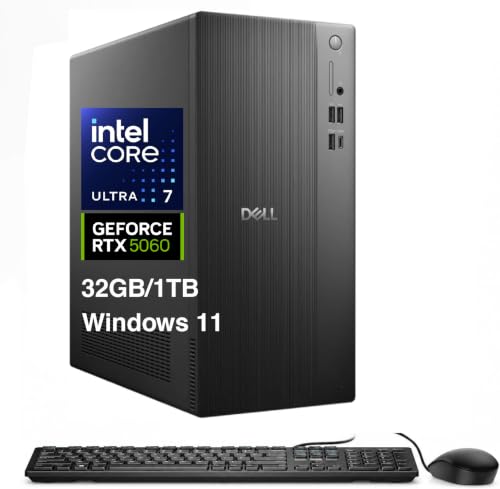
Dell Tower Plus RTX 5060 Desktop
Best for: Users needing dedicated graphics and 32GB RAM
- Graphics Card
- GeForce RTX 5060 8GB GDDR7
- Processor Model
- Ultra 7 265F
- System Memory
- 32 GB
- Storage Capacity
- 1TB 2230 PCIe NVMe SSD
- Operating System
- Windows 11 Pro-64
- Form Factor
- Tower
View on Amazon: Dell Tower Plus RTX 5060 Desktop Affiliate link
This Dell Tower Desktop pairs a 15th Gen Ultra 7 265F processor with an RTX 5060 graphics card. It includes 32GB of DDR5 RAM and a 1TB PCIe NVMe SSD. The system runs Windows 11 Pro and supports Wi-Fi 6 and Bluetooth 5.4. It suits users who need strong multitasking capabilities and dedicated graphics for creative work or gaming without the bulk of a full-size case.
Pros
- 15th Gen Intel Ultra 7 265F processor with up to 5.3 GHz boost
- NVIDIA GeForce RTX 5060 8GB GDDR7 dedicated graphics
- 32GB DDR5 system memory for smooth multitasking
- 1TB 2230 PCIe NVMe SSD for fast storage access
Cons
- Uses a 2230 form factor SSD which limits upgrade options
- Lacks built-in Wi-Fi antenna details in standard tower specs
- No mention of included peripherals like keyboard or mouse
Good fit if
- You need dedicated graphics for rendering or gaming
- You require 32GB of RAM for heavy multitasking
- You prefer a standard tower form factor for airflow
Skip if
- You need a compact micro or mini-ITX form factor
- You require a workstation with certified professional drivers
- You need a pre-installed operating system with no activation steps
Verdict: Dell Tower Desktop RTX 5060 delivers strong performance for users who need dedicated graphics and ample RAM. It fits those who prioritize processing power and storage speed in a standard tower chassis.

Dell OptiPlex Micro Core i5 Desktop
Best for: compact home office setups
- Processor Model
- Intel Core i5-13500T
- System Memory
- 16 GB DDR4
- Storage Capacity
- 512 GB PCIe SSD
- Operating System
- Windows 11 Pro
- Form Factor
- Micro (MFF)
- Dimensions
- 20 × 14 × 14 inches
View on Amazon: Dell OptiPlex Micro Core i5 Desktop Affiliate link
This compact desktop uses an Intel Core i5-13500T processor with 14 cores. It includes 16GB of DDR4 RAM and a 512GB PCIe SSD. The system runs Windows 11 Pro and features Intel WiFi 6. Its Micro form factor fits easily in tight spaces. You get a wireless keyboard and mouse bundle. This setup suits users who need reliable daily performance in a small footprint.
Pros
- Intel Core i5-13500T 14-core processor
- 16GB DDR4 system memory
- 512GB PCIe SSD storage
- Intel WiFi 6 connectivity
- Includes wireless keyboard and mouse
Cons
- Micro form factor limits internal expansion
- No dedicated graphics card listed
- Certified Refurbished condition
Good fit if
- You need a small desktop for office tasks
- You want included peripherals to save setup time
- You prefer Windows 11 Pro features
Skip if
- You require a dedicated graphics card for gaming
- You need maximum internal upgrade space
- You prefer brand new hardware
Verdict: Dell OptiPlex 7010 Micro i5-13500T offers solid processing power for everyday tasks in a tiny chassis. It is a practical choice for home offices or light professional work where space is limited.

Dell OptiPlex Tower Core i5 Desktop
Best for: Business users needing 16GB RAM
- Processor Model
- Intel Core i5-6500
- System Memory
- 16GB
- Storage Capacity
- 512GB SSD
- Operating System
- Windows 11 Pro
- Form Factor
- Tower
- Use
- Business
View on Amazon: Dell OptiPlex Tower Core i5 Desktop Affiliate link
This Dell OptiPlex Tower uses a 6th Gen Intel Core i5-6500 processor paired with 16GB of DDR4 RAM. It includes a 512GB SSD for storage and runs Windows 11 Pro. The system measures 16 by 7 by 19 inches and weighs 15.4 pounds. It suits users needing reliable business performance with ample memory and fast storage in a standard tower form factor.
Pros
- Intel Core i5-6500 processor
- 16GB DDR4 system memory
- 512GB SSD storage
- Windows 11 Pro included
Cons
- 6th Gen processor is older technology
- Large 19-inch depth requires space
- No dedicated graphics card listed
Good fit if
- You need a desktop with 16GB of RAM
- You prefer a standard tower case
- You require Windows 11 Pro
Skip if
- You need the latest generation CPU
- You require high-end gaming graphics
- You want a compact micro form factor
Verdict: Dell OptiPlex Tower i5-6500 offers solid business specs with 16GB RAM and a 512GB SSD. It fits users who prioritize memory and storage over cutting-edge processor speed.

HP ProDesk Core i5 16GB Desktop
Best for: office multitasking and school work
- Processor Model
- Intel Core i5 9th Gen
- System Memory
- 16GB DDR4
- Storage Capacity
- 500GB SSD
- Operating System
- Windows 11 Pro
- Use
- Business
View on Amazon: HP ProDesk Core i5 16GB Desktop Affiliate link
This HP ProDesk 600 G5 offers a 9th Gen Intel Core i5 processor paired with 16GB of DDR4 RAM. It includes a 500GB SSD for storage and runs Windows 11 Pro. The system supports WiFi and Bluetooth connectivity. It comes with an RGB keyboard and mouse. This setup suits users needing reliable performance for office tasks or school work.
Pros
- Intel Core i5 9th Gen processor
- 16GB DDR4 RAM for multitasking
- 500GB SSD storage
- Built-in WiFi and Bluetooth
- Windows 11 Pro installed
Cons
- 9th Gen processor is older than current 13th Gen or Ultra options
- 500GB SSD is smaller than 1TB drives in competitors
- Certified Renewed status means it is not brand new
Good fit if
- You need a budget-friendly desktop for office or school use
- You require Windows 11 Pro for business features
- You want included peripherals like an RGB keyboard and mouse
Skip if
- You need the latest high-performance CPU for heavy gaming
- You require more than 500GB of fast storage
- You prefer a brand-new unit with full manufacturer warranty
Verdict: HP ProDesk 600 G5 i5 Desktop provides solid multitasking capabilities for everyday tasks. It fits users who prioritize value and included accessories over cutting-edge processor speeds.
Specifications side by side
| Spec | Lenovo ThinkCentre M70t Tower Core Ultra 7 | HP Z2 SFF Core Ultra 7 Desktop | Lenovo ThinkStation P3 Tower Core Ultra 7 | Dell Tower Plus RTX 5060 Desktop | Dell OptiPlex Micro Core i5 Desktop | Dell OptiPlex Tower Core i5 Desktop | HP ProDesk Core i5 16GB Desktop |
|---|---|---|---|---|---|---|---|
| Graphics Card | not stated | NVIDIA RTX A1000 8GB GDDR6 | not stated | GeForce RTX 5060 8GB GDDR7 | not stated | not stated | not stated |
| Processor Model | Intel Core Ultra 7 2nd Gen 265 | Intel Core Ultra 7 265 | Intel Core Ultra 7 265 | Ultra 7 265F | Intel Core i5-13500T | Intel Core i5-6500 | Intel Core i5 9th Gen |
| System Memory | 16 GB | 16GB DDR5 | 16 GB | 32 GB | 16 GB DDR4 | 16GB | 16GB DDR4 |
| Storage Capacity | 512 GB SSD | 512GB SSD | 512 GB SSD | 1TB 2230 PCIe NVMe SSD | 512 GB PCIe SSD | 512GB SSD | 500GB SSD |
| Operating System | Windows 11 Pro | Windows 11 Pro | Windows 11 Pro | Windows 11 Pro-64 | Windows 11 Pro | Windows 11 Pro | Windows 11 Pro |
| Form Factor | Tower | Small Form Factor | Tower | Tower | Micro (MFF) | Tower | not stated |
| Processor | Core Ultra 7 | Core Ultra 7 | Core Ultra 7 | Core Ultra 7 | Core i5 | Core i5 | Core i5 |
| Memory | not stated | 16GB RAM | 16GB RAM | 32GB RAM | 16GB RAM | 16GB RAM | 16GB RAM |
| Storage | 512GB SSD | 512GB SSD | 512GB SSD | 1TB SSD | 512GB SSD | 512GB SSD | 512GB SSD |
| Use | not stated | Workstation | Workstation | not stated | not stated | Business | Business |
| Dimensions | 12 × 6 × 14 inches | 12.1 × 11.9 × 3.9 inches | 19.6 × 12.3 × 23 inches | not stated | 20 × 14 × 14 inches | 19 × 16 × 7 inches | not stated |
| Weight | 15.4 pounds | 8.82 pounds | not stated | not stated | 2.78 pounds | 15.4 pounds | not stated |
| Color | Multicolor | Black | Multicolor | not stated | not stated | not stated | not stated |
| Model | 12YH001MUS | HP Z2 SFF G1i | 30HT0053US | Tower | Optiplex 7010 | OptiPlex Tower | 600G5 |
| Size | not stated | 16GB|512GB | not stated | 32GB RAM|1TB SSD | Intel i5 | 16GB | 512GB | 16GB RAM + 512GB SSD | 16GB RAM | Pro Multitasking |
If you prefer a laptop over a desktop tower, evaluate lenovo thinkpad t14 gen 6 alternatives for mobile work.
Frequently asked questions
Which alternative offers the best dedicated graphics for creative work?
The Dell Tower Desktop with an RTX 5060 is the top choice for users needing strong dedicated graphics. It pairs this GPU with 32GB of RAM and a 1TB SSD. This configuration suits those who prioritize processing power and storage speed in a standard tower chassis for demanding visual tasks.
What is the most compact option for a small desk?
The HP Z2 SFF Workstation is designed for compact professional environments. It measures only 3.9 inches in height, offering a small footprint for business or creative workflows. It delivers targeted professional power for CAD and simulation tasks while maintaining certified stability in a tight space.
Which machine provides the most RAM for multitasking?
The Dell Tower Desktop includes 32GB of RAM, which is double the standard 16GB found in most other options. This ample memory supports heavy multitasking and professional workloads. It combines this capacity with an RTX 5060 graphics card for robust performance in a standard tower design.
Is there a budget-friendly workstation alternative available?
The Lenovo ThinkStation P3 Gen 2 Tower is rated as the best budget option for professional workstations. It delivers strong multi-core performance and professional features for demanding workloads. It prioritizes processing power and expandability, making it suitable for users who need high core counts in a standard desktop chassis.
Which alternative is best for a tiny home office setup?
The Dell OptiPlex 7010 Micro offers solid processing power for everyday tasks in a tiny chassis. It is a practical choice for home offices where space is limited. This micro form factor provides an Intel Core i5 processor with 16GB of RAM and a 512GB SSD for light professional work.
Do these alternatives run Windows 11 Pro?
Yes, all listed alternatives come pre-installed with Windows 11 Pro. This operating system is standard across the tower, SFF, and micro form factors in this guide. It ensures you have the professional features and security updates required for business environments, office work, and professional applications.
Which option has the largest internal storage capacity?
The Dell Tower Desktop features a 1TB SSD, which is the largest storage capacity among the listed alternatives. Most other models, including the HP Z2 SFF and Lenovo ThinkStation, include 512GB SSDs. This extra space is beneficial for users who need to store large files or extensive media libraries.