Lenovo IdeaCentre 24" Intel N100 Alternatives: 6 Similar Picks Compared
As an Amazon Associate we earn from qualifying purchases. Links on this page are affiliate links.
The Lenovo IdeaCentre 24 offers a quiet, compact solution for home offices and video calls. It pairs a 24-inch QHD display with 32GB of RAM and an Intel N100 processor. This setup handles multitasking and clear visuals well. However, you might look for lenovo ideacentre all in one desktop alternatives if you need more processing power or a different form factor. Some users prefer a touchscreen, while others want higher refresh rates or a different operating system.
We compared 6 similar picks based on overlapping specifications. These alternatives share key traits like 24-inch screens and substantial memory, but they differ in processors and features. For example, some models include 8-core Intel chips or Core Ultra processors for heavier tasks. Others offer Windows 11 Pro or touch capabilities. This list helps you find a machine that matches your specific needs for display quality, performance, and connectivity without sacrificing the clean aesthetic of an all-in-one design.
Our top pick: Lenovo IdeaCentre 24" Intel N100 32GB RAM AIO.
How alternatives differ from Lenovo
Lenovo ThinkCentre 24" AIO with 32GB RAM
The Lenovo ThinkCentre 24" AIO upgrades the processor to an 8-core Core i5, which handles heavier workloads better than the N100. It also includes Windows 11 Pro for business features. You get the same 32GB RAM and 512GB SSD storage. The main trade-off is the lack of a touchscreen. This model suits users who need raw processing speed and a professional operating system rather than touch interaction or quiet operation.
Dell 24 Touchscreen All-in-One Desktop
The Dell 24" AIO adds a touchscreen, which the Lenovo lacks. It uses an Intel Core 7 processor for stronger multitasking compared to the N100. You receive 32GB of RAM and 512GB of SSD storage, matching the Lenovo’s capacity. The form factor remains compact. This choice is best for home office users who value direct touch input and higher processing power. You sacrifice the Lenovo’s specialized noise-canceling audio features for this interactive display capability.
Lenovo ThinkCentre M70a Ultra 5 AIO
The Lenovo ThinkCentre M70a features a Core Ultra 5 processor, offering significantly more power than the N100. It includes a 120Hz display for smoother visuals compared to the Lenovo’s standard refresh rate. You get 32GB of DDR5 RAM and 512GB of SSD storage. This model targets business users who prioritize processing power and screen smoothness. It lacks the consumer-friendly webcam features of the IdeaCentre 24, making it better for professional tasks than casual video calls.
Apple iMac 24-Inch M1 Desktop
The Apple iMac 24" M1 offers a 4.5K Retina display, which is much sharper than the Lenovo’s QHD screen. However, it only has 8GB of RAM, which is less than the Lenovo’s 32GB. It uses an Apple M1 chip instead of an Intel processor. Storage is 512GB SSD. This option suits casual users who prioritize display quality and compact design. You give up high RAM capacity and Windows compatibility for macOS efficiency and superior screen resolution.
Apple iMac 24-Inch M4 10-Core GPU
The Apple iMac 24" M4 provides 24GB of unified memory and a 10-core GPU, delivering high-end performance. It lacks the Lenovo’s 32GB RAM configuration but offers strong creative processing power. The display is high-quality, though the exact resolution is not specified in the data. Storage is 512GB SSD. This model is ideal for macOS users seeking performance. You trade the Lenovo’s Windows ecosystem and specific office features for a slim design and advanced Apple silicon capabilities.
Lenovo 24-Inch All-in-One Core i3 Desktop
The Lenovo 24" AIO i3 uses an N305 processor, which is comparable to the N100 in everyday tasks. It includes 16GB of RAM, which is half the Lenovo IdeaCentre 24’s 32GB. Storage remains 512GB SSD. This model is a practical fit for home users and students. You sacrifice double the memory for a potentially lower cost. It suits those who value screen color accuracy and a tidy desk footprint over raw multitasking power and high RAM capacity.
Quick picks
Our 7 picks

Lenovo IdeaCentre 24" Intel N100 32GB RAM AIO
Best for: quiet home office and video calls
- Processor
- Intel Processor N100
- System Memory
- 16 GB
- Storage Capacity
- 512 GB SSD
- Screen Size
- 24"
- Display Resolution
- FHD
- Operating System
- Windows 11
View on Amazon: Lenovo IdeaCentre 24" Intel N100 32GB RAM AIO Affiliate link
This Lenovo IdeaCentre 24" All-in-One Desktop pairs a 24-inch FHD display with an Intel N100 processor and 32GB of RAM. It includes 512GB of SSD storage, though higher capacity options exist. The system features a 5MP webcam with IR for secure video calls and Harman-enhanced audio. It is designed for quiet, efficient performance in home or office settings.
Pros
- Intel N100 processor with 4 cores and 6M cache
- 32GB system memory for smooth multitasking
- 24-inch FHD display with low blue light technology
- 5MP webcam with IR camera for secure video calls
- Quiet operation with no fan noise mentioned
Cons
- Base model includes only 512GB SSD storage
- Processor is an entry-level N100 chip
- Screen resolution is limited to FHD
Good fit if
- You need a compact desktop for office work
- You prioritize quiet operation during video calls
- You want a clean setup with built-in audio
Skip if
- You require high-end gaming performance
- You need a 4K or QHD display
- You prefer a larger 27-inch screen
Verdict: Lenovo IdeaCentre 24" All-in-One Desktop suits users who value quiet performance and a clean desk setup. It is a practical choice for office tasks and video conferencing rather than heavy creative work.

Lenovo ThinkCentre 24" AIO with 32GB RAM
Best for: Users needing 8-core performance and high refresh rates
- Processor
- Intel Core i5-13420H
- System Memory
- 32GB DDR5
- Storage Capacity
- 512GB SSD
- Screen Size
- 23.8"
- Display Resolution
- FHD (1920x1080)
- Touchscreen
- Non-Touch
View on Amazon: Lenovo ThinkCentre 24" AIO with 32GB RAM Affiliate link
This Lenovo ThinkCentre all-in-one pairs a 23.8-inch FHD IPS display with an 8-core Intel Core i5-13420H processor. It includes 32GB of DDR5 RAM and a 512GB SSD. The screen offers 100Hz refresh and 99% sRGB coverage. You get Windows 11 Pro and a solid port selection. It suits users needing reliable performance for daily tasks and light creative work.
Pros
- 8-core Intel Core i5-13420H processor with up to 4.6 GHz turbo
- 32GB DDR5 system memory for smooth multitasking
- 23.8-inch FHD IPS display with 100Hz refresh rate
- 99% sRGB color gamut and anti-glare surface
- Windows 11 Pro operating system
Cons
- Non-touchscreen display limits interactive navigation
- 250-nit brightness is lower than some premium alternatives
- No HDMI input for direct device connection listed in key specs
Good fit if
- You need strong multitasking power from an 8-core CPU
- You prefer a high-refresh-rate display for smoother visuals
- You require Windows 11 Pro for business features
Skip if
- You require a touchscreen for direct interaction
- You need high-brightness panels for bright rooms
- You want a compact mini-PC form factor
Verdict: Lenovo ThinkCentre 24" AIO i5-13420H delivers robust performance with its 8-core i5 and 32GB DDR5 RAM. It is the best fit for users who prioritize processing power and display quality over touch interaction.

Dell 24 Touchscreen All-in-One Desktop
Best for: Productive home office tasks with touch
- Processor
- Intel Core 7 150U
- System Memory
- 32 GB
- Storage Capacity
- 512 GB SSD
- Screen Size
- 23.8"
- Display Resolution
- Full HD
- Graphics
- Intel integrated graphics
View on Amazon: Dell 24 Touchscreen All-in-One Desktop Affiliate link
The Dell 24 All-in-One pairs a 23.8-inch Full HD touchscreen with an Intel Core 7 150U processor and 32GB of DDR5 RAM. This configuration supports smooth multitasking and responsive performance for everyday productivity. The 512GB SSD provides adequate storage for daily files. It includes Wi-Fi 6E and Bluetooth 5.4 for modern connectivity. This desktop suits users who need a clean, space-saving setup with touch capabilities.
Pros
- Intel Core 7 150U processor with 10 cores
- 32GB DDR5 RAM for efficient multitasking
- 23.8-inch Full HD IPS touchscreen display
- 512GB M.2 PCIe NVMe SSD storage
- Wi-Fi 6E and Bluetooth 5.4 connectivity
Cons
- Intel integrated graphics limit gaming performance
- 512GB SSD is smaller than some competitors
- Windows 11 Home lacks business features
Good fit if
- You want a responsive touchscreen interface
- You need 32GB RAM for heavy multitasking
- You prefer a compact all-in-one design
Skip if
- You require dedicated graphics for gaming
- You need Windows 11 Pro
- You want more than 512GB of storage
Verdict: Dell 24 AIO Touchscreen Intel Core 7 delivers strong multitasking power and a useful touchscreen in a compact form. It fits home office users who value RAM capacity and touch input over dedicated graphics or business OS features.
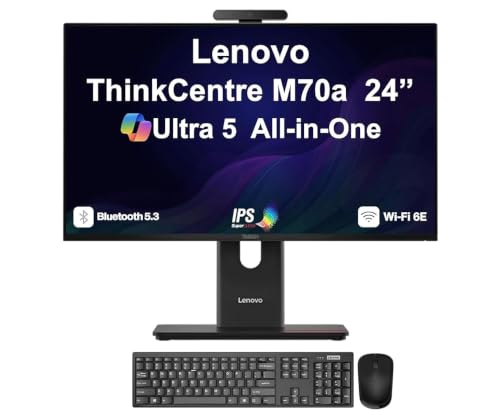
Lenovo ThinkCentre M70a Ultra 5 AIO
Best for: Business users needing high RAM and fast storage
- Processor
- Ultra 5 245T vPro
- System Memory
- 32GB DDR5 SODIMM
- Storage Capacity
- 512GB PCIe NVMe SSD
- Screen Size
- 24"
- Display Resolution
- FHD (1920x1080)
- Graphics
- Intel Graphics Integrated Graphics
View on Amazon: Lenovo ThinkCentre M70a Ultra 5 AIO Affiliate link
This Lenovo ThinkCentre M70a Gen 6 is a 24-inch business all-in-one desktop. It features a Core Ultra 5 245T processor with up to 5.1 GHz speed and 32GB of DDR5 RAM. The 512GB PCIe NVMe SSD provides fast storage. The 24-inch FHD IPS display supports 120Hz refresh rates. It includes Wi-Fi 6E and Bluetooth 5.3. This setup suits users needing strong multitasking performance in a compact, ergonomic form factor.
Pros
- Core Ultra 5 245T vPro processor with 14 cores
- 32GB DDR5 system memory for heavy multitasking
- 24-inch FHD IPS display with 120Hz refresh rate
- 512GB PCIe NVMe SSD for fast storage access
- Wi-Fi 6E and Bluetooth 5.3 connectivity
Cons
- Limited to 512GB storage capacity
- Integrated Intel Graphics only
- 1-year manufacturer warranty period
Good fit if
- You require high RAM for professional applications
- You want a 120Hz display for smoother motion
- You need vPro business-grade security features
Skip if
- You need dedicated graphics for gaming
- You require more than 512GB of built-in storage
- You prefer a larger than 24-inch screen
Verdict: Lenovo ThinkCentre M70a Ultra 5 AIO delivers strong business performance with 32GB DDR5 RAM and a 120Hz display. It fits professionals who prioritize processing power and screen smoothness over dedicated graphics.

Apple iMac 24-Inch M1 Desktop
Best for: Casual users prioritizing display quality
- Processor
- Apple M1
- System Memory
- 8GB
- Storage Capacity
- 512GB SSD
- Screen Size
- 24-inch
- Display Resolution
- 4.5K Retina
- Graphics
- 8-core GPU
View on Amazon: Apple iMac 24-Inch M1 Desktop Affiliate link
This 24-inch all-in-one desktop features an Apple M1 chip with an 8-core CPU and 8-core GPU. It includes 8GB of system memory and a 512GB SSD. The unit has a 4.5K Retina display and a thin 11.5 mm design. It suits users who want a compact, high-resolution screen and reliable daily performance without needing extensive RAM or upgrade options.
Pros
- 24-inch 4.5K Retina display with P3 wide color gamut
- Apple M1 chip with 8-core CPU and 8-core GPU
- 512GB ultrafast SSD storage
- Six-speaker sound system for robust audio
- Thin 11.5 mm profile
Cons
- Only 8GB of system memory limits heavy multitasking
- Non-upgradeable M1 chip restricts future performance gains
- Fixed storage capacity prevents adding more SSD space
Good fit if
- You need a vibrant 4.5K display for media consumption
- You want a compact all-in-one with strong integrated graphics
- You prefer a plug-and-play system with no assembly
Skip if
- You require more than 8GB of RAM for professional work
- You need to upgrade storage or memory later
- You rely on Windows-specific software or games
Verdict: Apple 24" iMac M1 8GB RAM offers a sharp 4.5K screen and efficient M1 performance for casual users. It fits those who value display quality and compact design over expandability or high RAM capacity.

Apple iMac 24-Inch M4 10-Core GPU
Best for: macOS users seeking high performance
- Processor
- Apple M4
- System Memory
- 24GB
- Storage Capacity
- 512GB SSD
- Screen Size
- 24-inch
- Display Resolution
- 4.5K Retina
- Graphics
- 10-core GPU
View on Amazon: Apple iMac 24-Inch M4 10-Core GPU Affiliate link
This 24-inch all-in-one desktop features an Apple M4 chip with a 10-core GPU and 24GB of unified memory. It includes a 512GB SSD and a 4.5K Retina display with 500 nits of brightness. The system runs macOS and supports Apple Intelligence. It suits users who want a colorful, thin design with strong performance for creative work and daily tasks.
Pros
- Apple M4 chip with 10-core GPU
- 24GB unified memory for fast multitasking
- 24-inch 4.5K Retina display with 500 nits brightness
- 12MP Center Stage camera and six speakers
Cons
- macOS operating system limits Windows software compatibility
- Only 512GB SSD storage capacity
- Non-upgradeable unified memory architecture
Good fit if
- You prefer macOS for creative workflows
- You want a compact, colorful desktop design
- You need strong performance for photo editing
Skip if
- You require Windows-specific software
- You need more than 512GB of storage
- You want to upgrade RAM later
Verdict: Apple 24" iMac M4 24GB delivers high-end performance in a slim, colorful package. It is ideal for macOS users who value display quality and creative processing power over expandability.

Lenovo 24-Inch All-in-One Core i3 Desktop
Best for: Home offices and students needing 16GB RAM
- Processor
- Intel Core i3-N305
- System Memory
- 16 GB
- Storage Capacity
- 512 GB SSD
- Screen Size
- 23.8"
- Display Resolution
- Full HD
- Graphics
- Intel UHD Graphics
View on Amazon: Lenovo 24-Inch All-in-One Core i3 Desktop Affiliate link
This Lenovo all-in-one desktop pairs an Intel Core i3-N305 processor with 16GB of DDR4 RAM and a 512GB PCIe SSD. The 23.8-inch Full HD IPS display offers wide viewing angles and 99% sRGB coverage. It includes Wi-Fi 6, Bluetooth 5.2, and Windows 11 Home. You get a compact unit with a tilt stand and included peripherals. It suits home offices and students needing reliable multitasking without a separate tower.
Pros
- 16GB DDR4-3200 RAM for smooth multitasking
- 23.8" FHD IPS display with 99% sRGB
- 512GB M.2 PCIe NVMe SSD storage
- Wi-Fi 6 and Bluetooth 5.2 connectivity
- Compact 24-inch all-in-one design
Cons
- Intel UHD Graphics limits gaming
- 250 nits brightness is modest
- Intel Core i3-N305 is entry-level
Good fit if
- You need 16GB RAM for multitasking
- You want a compact desktop setup
- You prioritize color accuracy for media
Skip if
- You require dedicated graphics for gaming
- You need a high-brightness display
- You want a more powerful CPU
Verdict: Lenovo 24" AIO i3-N305 16GB delivers solid everyday performance with ample memory and a quality display. It is a practical fit for home users who value screen color accuracy and a tidy desk footprint over raw processing power.
Specifications side by side
| Spec | Lenovo IdeaCentre 24" Intel N100 32GB RAM AIO | Lenovo ThinkCentre 24" AIO with 32GB RAM | Dell 24 Touchscreen All-in-One Desktop | Lenovo ThinkCentre M70a Ultra 5 AIO | Apple iMac 24-Inch M1 Desktop | Apple iMac 24-Inch M4 10-Core GPU | Lenovo 24-Inch All-in-One Core i3 Desktop |
|---|---|---|---|---|---|---|---|
| Processor | Intel Processor N100 | Intel Core i5-13420H | Intel Core 7 150U | Ultra 5 245T vPro | Apple M1 | Apple M4 | Intel Core i3-N305 |
| System Memory | 16 GB | 32GB DDR5 | 32 GB | 32GB DDR5 SODIMM | 8GB | 24GB | 16 GB |
| Storage Capacity | 512 GB SSD | 512GB SSD | 512 GB SSD | 512GB PCIe NVMe SSD | 512GB SSD | 512GB SSD | 512 GB SSD |
| Screen Size | 24" | 23.8" | 23.8" | 24" | 24-inch | 24-inch | 23.8" |
| Display Resolution | FHD | FHD (1920x1080) | Full HD | FHD (1920x1080) | 4.5K Retina | 4.5K Retina | Full HD |
| Graphics | not stated | not stated | Intel integrated graphics | Intel Graphics Integrated Graphics | 8-core GPU | 10-core GPU | Intel UHD Graphics |
| Touchscreen | not stated | Non-Touch | Touchscreen | not stated | not stated | not stated | not stated |
| Operating System | Windows 11 | Windows 11 Pro | Windows 11 Home | Windows 11 Home | not stated | macOS | Windows 11 Home |
| Memory | 16GB RAM | 32GB RAM | 32GB RAM | 32GB RAM | 8GB RAM | not stated | 16GB RAM |
| Storage | 512GB SSD | 512GB SSD | 512GB SSD | 512GB SSD | 512GB SSD | 512GB SSD | 512GB SSD |
| Use | Business | not stated | not stated | Business | not stated | not stated | Business |
| Display Feature | not stated | not stated | Touchscreen | not stated | not stated | not stated | not stated |
| Weight | 9.19 pounds | not stated | not stated | not stated | 9.83 pounds | 9.79 pounds | not stated |
| Dimensions | not stated | not stated | not stated | not stated | 27.2 × 6.89 × 23.8 inches | 21.5 × 5.79 × 18.1 inches | not stated |
| Model | A24A100AN | ThinkCentre AIO | 24 | ThinkCentre | MGPG3LL/A | MD2U4LL/A | 24 |
| Color | not stated | Luna Grey | not stated | not stated | Green | Pink | not stated |
| Size | not stated | not stated | 32GB RAM|512GB SSD | 32GB RAM | 512GB SSD | 8GB - 512GB | 24GB Unified Memory, 512GB SSD Storage | not stated |
If you prefer a compact display instead of a desktop, evaluate lenovo tab one alternatives for different hardware specifications.
Frequently asked questions
Which alternative offers the best performance for business tasks?
The Lenovo ThinkCentre M70a Ultra 5 AIO is designed for business users. It features a Core Ultra 5 processor and 32GB of DDR5 RAM. This combination provides strong processing power for professional workloads. The 120Hz display also ensures smooth visuals during multitasking. It is a practical choice for office environments.
Can I get a touchscreen option in this size?
Yes, the Dell 24 Touchscreen All-in-One Desktop includes this feature. It pairs a touchscreen display with an Intel Core 7 processor and 32GB of RAM. This setup supports productive home office tasks with direct input. You get a compact form factor without sacrificing processing power or touch capability.
Which model has the highest RAM capacity?
Several options in this list include 32GB of RAM. The Lenovo IdeaCentre 24, ThinkCentre 24, Dell 24, and ThinkCentre M70a all offer this capacity. This amount of memory supports heavy multitasking and smooth performance. It is ideal for users who run many applications simultaneously.
Is there a macOS alternative with a high-resolution screen?
The Apple iMac 24-Inch M4 offers a high-performance macOS experience. It features a 24GB Unified Memory configuration and a 10-Core GPU. This model is ideal for users who value display quality and creative processing power. It delivers high-end performance in a slim, colorful package.
Which option is best for students on a budget?
The Lenovo ThinkCentre 24" AIO with i5-13420H is the best budget pick. It provides an 8-core processor and 32GB of DDR5 RAM. This setup delivers robust performance for everyday tasks. It is a practical fit for users who prioritize processing power and display quality over touch interaction.
How much storage do these all-in-one desktops include?
Most models in this list include 512GB of SSD storage. This applies to the Lenovo IdeaCentre, ThinkCentre, Dell, and Apple iMac options. Solid-state drives provide fast boot times and quick file access. This capacity is sufficient for operating systems, applications, and personal files.
Which desktop is the lightest to move?
The Lenovo IdeaCentre 24" Intel N100 AIO weighs 9.19 pounds. This makes it one of the lighter options in the group. The Apple iMac M1 is slightly heavier at 9.83 pounds. These weights allow for easier placement on desks or stands without requiring heavy mounting hardware.