Lenovo IdeaCentre 24" Intel N100 vs Lenovo ThinkCentre 24" All-in-One Intel: Spec Comparison
As an Amazon Associate we earn from qualifying purchases. Links on this page are affiliate links.
You are comparing the lenovo ideacentre 24 intel n100 vs thinkcentre 24 all in one intel. Both units offer 24-inch Full HD displays and Windows 11. The IdeaCentre uses an Intel N100 processor with DDR4 memory and a 256GB drive. The ThinkCentre features a 13th Gen Intel U300 chip, faster DDR5 RAM, and a larger 512GB storage option. These differences affect multitasking speed and future upgradability.
Key differences
| Aspect | Lenovo IdeaCentre 24" Intel N100 Desktop | Lenovo ThinkCentre 24" All-in-One Intel U300 |
|---|---|---|
| Processor | Intel N100 (4 cores, up to 3.4GHz) | 13th Gen Intel U300 (5 cores, up to 4.4GHz) |
| Memory Type | 16GB DDR4-3200 | 16GB DDR5 |
| Storage | 256GB PCIe NVMe SSD | 512GB PCIe SSD |
| Operating System | Windows 11 Home | Windows 11 Home |
| Webcam | HD webcam with privacy shutter | IR privacy camera with dual-microphones |
Which one should you choose?
Choose Lenovo IdeaCentre 24" Intel N100 Desktop if
- You need a budget-friendly system for basic web browsing and office tasks.
- You prefer a white chassis to match a light-colored desk setup.
Choose Lenovo ThinkCentre 24" All-in-One Intel U300 if
- You want faster DDR5 memory and a more powerful 13th Gen processor.
- You require double the storage capacity for more files and applications.
- You need an IR camera for Windows Hello facial login security.
Verdict: The ThinkCentre offers superior processing power and faster memory, making it better for users who want longer-term performance. The IdeaCentre is a simpler choice for basic tasks if you prioritize a lower entry point and a white design. Choose the ThinkCentre for speed and storage; choose the IdeaCentre for simplicity.
Processor and Memory Comparison
Processor speed
The ThinkCentre uses a 13th Gen Intel U300 processor with five cores and a base speed of 1.2 GHz, reaching up to 4.4 GHz with an 8 MB cache. The IdeaCentre relies on an Intel N100 quad-core chip with a 3.4 GHz burst frequency and 6 MB smart cache. The ThinkCentre offers more cores and a higher maximum clock speed, which typically translates to better performance in demanding tasks. The IdeaCentre is sufficient for light multitasking, but the ThinkCentre has the edge for heavier workloads.
System memory
Both systems come equipped with 16 GB of RAM, which is a solid baseline for everyday computing. However, the technology differs significantly. The IdeaCentre utilizes DDR4-3200 memory, while the ThinkCentre features faster DDR5 RAM. DDR5 provides higher bandwidth and improved efficiency, allowing for quicker data processing between the CPU and memory modules. This means the ThinkCentre can handle multiple applications and large files with less latency, giving it a clear advantage in overall system responsiveness.
Storage capacity
Storage is a key differentiator between these two all-in-one desktops. The IdeaCentre is listed with a 256 GB PCIe NVMe SSD, which is adequate for documents and basic media. The ThinkCentre includes a larger 512 GB PCIe SSD. This double the storage space allows you to keep more applications, games, and high-resolution files on the drive without needing external storage solutions. Both use fast NVMe technology, but the ThinkCentre offers more room for your data.
Display features
Both units feature a 24-inch Full HD IPS display with anti-glare coating and 250 nits of brightness. The IdeaCentre highlights 99% sRGB color accuracy and wide 178-degree viewing angles. The ThinkCentre adds a borderless design and includes an HDMI-in port, allowing you to use the monitor as a secondary display for another device. While color accuracy is noted for the IdeaCentre, the ThinkCentre’s HDMI-in input and modern borderless aesthetic provide more versatile connectivity and a cleaner look.
Webcam and audio
Privacy and communication features vary between the models. The IdeaCentre includes a built-in HD webcam with a physical privacy shutter and dual 2-watt stereo speakers. The ThinkCentre steps up with an IR privacy camera that includes dual microphones and a privacy latch on the stand. It also features audio by Harman for enhanced sound quality. The ThinkCentre’s superior microphone array and branded audio speakers make it the better choice for video conferencing and media consumption.
Which Lenovo AIO suits your needs
Users needing fast multitasking and large storage
The ThinkCentre offers a 13th Gen Intel U300 processor with five cores and up to 4.4 GHz speed. It includes 16GB of DDR5 RAM and a 512GB SSD. This combination provides better processing power and faster memory access for demanding tasks compared to the IdeaCentre's N100 chip and DDR4 memory.
Buyers wanting modern connectivity and security features
This model features a USB Type-C port for versatile connections and an HDMI-in port for video input. It also includes an IR privacy camera with a physical latch and dual microphones. These hardware security and connectivity options are absent in the IdeaCentre, which only offers standard USB-A and HDMI-out ports.
Shoppers preferring included peripherals and lower cost
The IdeaCentre comes with a USB wired keyboard and mouse in the box, ready for immediate setup. It also features a Kensington lock slot for physical security. While it has less powerful specs, it provides a complete package with essential input devices, saving you from purchasing them separately.
The products compared
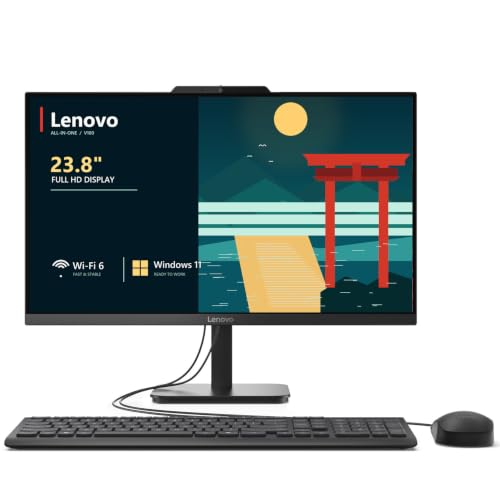
Lenovo IdeaCentre 24" Intel N100 Desktop
Best for: Home office productivity and light media use
- Processor
- Intel N100
- System Memory
- 32 GB DDR4
- Storage Capacity
- 2 TB NVMe SSD
- Screen Size
- 23.8"
- Display Resolution
- Full HD
- Graphics
- Intel UHD Graphics
View on Amazon: Lenovo IdeaCentre 24" Intel N100 Desktop Affiliate link
The Lenovo IdeaCentre 24" AIO pairs an Intel N100 processor with 16GB of DDR4 RAM and a 256GB NVMe SSD. It features a 23.8-inch Full HD IPS display with 99% sRGB color accuracy. This setup handles office work, web browsing, and video calls smoothly. The integrated Wi-Fi 6 and comprehensive ports make it a tidy desktop solution for home offices or students who need reliable daily performance.
Pros
- Intel N100 quad-core processor with up to 3.4GHz burst frequency
- 16GB DDR4-3200 RAM for smooth multitasking
- 23.8-inch Full HD IPS display with 99% sRGB coverage
- Wi-Fi 6 and Bluetooth 5.2 connectivity
- Includes USB wired keyboard and mouse
Cons
- 256GB storage capacity is limited for large media libraries
- Intel UHD graphics are not suited for modern gaming
- Maximum brightness is 250 nits, which may struggle in bright rooms
Good fit if
- You need a compact, clutter-free desktop for daily office tasks
- You prioritize color accuracy for light photo editing or media consumption
- You want a complete package with a keyboard and mouse included
Skip if
- You require high-end graphics for gaming or 3D rendering
- You need extensive local storage for large video files
- You prefer a processor with more cores for heavy multitasking
Verdict: Lenovo IdeaCentre 24" AIO N100 is a capable all-in-one for students and home office users who value a tidy setup and accurate colors over raw processing power or gaming performance.

Lenovo ThinkCentre 24" All-in-One Intel U300
Best for: Productivity and privacy-focused home offices
- Processor
- 13th Gen Intel Processor U300
- System Memory
- 16GB DDR5
- Storage Capacity
- 512GB PCIe SSD
- Screen Size
- 24"
- Display Resolution
- FHD (1920 x 1080)
- Graphics
- Intel UHD Graphics
View on Amazon: Lenovo ThinkCentre 24" All-in-One Intel U300 Affiliate link
This Lenovo ThinkCentre AIO 24 features a 13th Gen Intel U300 processor and 16GB DDR5 RAM. It includes a 24-inch FHD IPS display and 512GB PCIe SSD storage. The system runs Windows 11 Home and offers versatile connectivity with USB-C and HDMI-in ports. It suits users who need a compact desktop with strong multitasking capabilities and privacy-focused hardware like an IR camera.
Pros
- 13th Gen Intel U300 processor with up to 4.4 GHz boost speed
- 16GB DDR5 RAM for efficient multitasking
- 24-inch FHD IPS non-touch display with anti-glare coating
- 512GB PCIe SSD for fast data access
- IR privacy camera with dual-microphones and physical privacy latch
Cons
- Non-touch display limits interactive input options
- Integrated Intel UHD graphics restricts heavy gaming performance
- Single HDMI-in port limits simultaneous video input sources
Good fit if
- You need a compact all-in-one for office work and multitasking
- You prioritize fast DDR5 memory and modern processor speeds
- You want built-in privacy features like a physical camera latch
Skip if
- You require a touchscreen for direct display interaction
- You plan to play demanding 3D games
- You need multiple HDMI inputs for video switching
Verdict: Lenovo ThinkCentre AIO 24 Intel U300 delivers solid performance for productivity tasks through its DDR5 RAM and 13th Gen processor. It is a practical fit for home offices where privacy and compact design matter more than graphical power.
Specifications side by side
| Spec | Lenovo IdeaCentre 24" Intel N100 Desktop | Lenovo ThinkCentre 24" All-in-One Intel U300 |
|---|---|---|
| Processor | Intel N100 | 13th Gen Intel Processor U300 |
| System Memory | 32 GB DDR4 | 16GB DDR5 |
| Storage Capacity | 2 TB NVMe SSD | 512GB PCIe SSD |
| Screen Size | 23.8" | 24" |
| Display Resolution | Full HD | FHD (1920 x 1080) |
| Graphics | Intel UHD Graphics | Intel UHD Graphics |
| Touchscreen | not stated | Non-touch |
| Operating System | Windows 11 Home | Windows 11 Home |
| Memory | 16GB RAM | 16GB RAM |
| Storage | not stated | 512GB SSD |
| Dimensions | 21.2 × 7.3 × 16.7 inches | 7.56 × 21.3 × 17 inches |
| Size | 32GB DDR4 RAM, 1TB PCIe SSD | not stated |
| Color | White | Grey |
| Model | 24 | 12SC |
Frequently asked questions
Which Lenovo 24-inch all-in-one has more RAM?
Both the IdeaCentre and the ThinkCentre include 16GB of RAM. The IdeaCentre uses DDR4 memory, while the ThinkCentre utilizes faster DDR5 technology. This difference means the ThinkCentre handles multitasking more efficiently. You get the same memory capacity on both, but the newer standard in the ThinkCentre offers better performance for modern applications.
Does the IdeaCentre have a larger storage drive?
Yes, the IdeaCentre features a 1TB PCIe SSD, which is significantly larger than the ThinkCentre’s 512GB SSD. If you store many files, photos, or videos locally, the IdeaCentre provides double the space. The ThinkCentre’s smaller drive may require you to use cloud storage or external drives for large libraries.
Is the ThinkCentre better for privacy?
The ThinkCentre runs Windows 11 Pro, which includes enhanced security and privacy features not found in the standard Home edition. It is designed for productivity and privacy-focused home offices. If you need advanced administrative controls or business-grade security tools, the ThinkCentre is the more practical choice for your daily tasks.
Which model is more compact?
The IdeaCentre measures 7.3 inches in width and 16.7 inches in height. The ThinkCentre is slightly wider at 21.3 inches but has a different footprint. Both are all-in-one designs that save desk space by integrating the computer into the monitor. You should measure your desk area to ensure either model fits your specific workspace layout.
Can I use the IdeaCentre for light media work?
The IdeaCentre is best for home office productivity and light media use. Its Intel N100 processor handles everyday tasks well, though it is not built for heavy gaming or video editing. You will find it suitable for web browsing, document creation, and streaming content, provided you do not demand high graphical performance.
What colors are available for these models?
The IdeaCentre is available in White, while the ThinkCentre comes in Grey. Your choice may depend on your desk decor or personal preference. Both colors offer a clean, professional look that fits well in a home office environment. The color does not affect performance, so you can choose based on aesthetics.
Which processor is faster for multitasking?
The ThinkCentre uses a 13th Gen Intel U300 processor with five cores, whereas the IdeaCentre uses a quad-core Intel N100. The ThinkCentre’s higher core count and faster speeds make it better for running multiple applications simultaneously. If you keep many browser tabs and programs open, the ThinkCentre will handle the load more smoothly.