Lenovo IdeaCentre 24" Intel N100 or Lenovo IdeaCentre 24-inch All-in-One PC? Which Lenovo Model to Buy
As an Amazon Associate we earn from qualifying purchases. Links on this page are affiliate links.
You are comparing the lenovo ideacentre 24 intel n100 vs ideacentre 24 inch all in one PC. Both systems use the same Intel N100 processor and 23.8-inch Full HD display. They share Wi-Fi 6, Windows 11, and integrated graphics. The main difference lies in their configuration. One model offers more RAM for smoother multitasking, while the other provides larger storage capacity for your files. You need to decide which balance fits your daily workflow better.
Key differences
| Aspect | Lenovo IdeaCentre 24" Intel N100 Desktop | Lenovo IdeaCentre 24-inch All-in-One PC |
|---|---|---|
| Processor | Intel N100 Quad-Core | Intel N100 Quad-Core |
| System Memory | 16GB DDR4 RAM | 8GB DDR4 RAM |
| Storage Capacity | 256GB PCIe NVMe SSD | 512GB PCIe SSD |
| Color | White | Carbon Black |
| Included Peripherals | USB wired keyboard and mouse | USB Calliope keyboard |
Which one should you choose?
Choose Lenovo IdeaCentre 24" Intel N100 Desktop if
- You need more RAM for heavy multitasking or many browser tabs.
- You want a complete setup with a matching white mouse and keyboard.
- You prefer a lighter color scheme for your desk.
Choose Lenovo IdeaCentre 24-inch All-in-One PC if
- You need more storage space for files, photos, or videos.
- You prefer a black finish for your workspace.
- You want a USB-C port for modern peripheral connections.
Verdict: Choose the 16GB RAM model if you plan to run multiple applications simultaneously and want a complete peripheral set. Select the 512GB SSD model if storage capacity is your priority or you prefer the black aesthetic. Both machines offer identical performance for basic tasks thanks to the shared processor and display.
Memory and Storage Comparison
System Memory
The Lenovo IdeaCentre 24 Intel N100 Desktop comes equipped with 16GB of DDR4-3200 RAM. This higher capacity allows for smoother multitasking across multiple applications and browser tabs without experiencing slowdowns or lag. In contrast, the Lenovo IdeaCentre 24-inch All-in-One PC includes only 8GB of DDR4-3200 memory. While the base model supports expansion up to 32GB, the out-of-the-box configuration offers half the memory of the first option. For users running heavy workloads or many tabs simultaneously, the 16GB model provides a more immediate and robust performance foundation.
Storage Capacity
Storage speeds and capacity differ between these two configurations. The Lenovo IdeaCentre 24 Intel N100 Desktop features a 256GB PCIe NVMe SSD. This drive ensures fast boot times under 10 seconds and quick application launches. The Lenovo IdeaCentre 24-inch All-in-One PC offers a larger 512GB PCIe SSD. This double the storage space is beneficial for storing more documents, photos, videos, and business workloads. If you require more room for files without external drives, the 512GB option is the superior choice for data retention.
Graphics Performance
Both systems utilize the same integrated Intel UHD Graphics processor. Since the Lenovo IdeaCentre 24 Intel N100 Desktop and the Lenovo IdeaCentre 24-inch All-in-One PC share the identical Intel N100 CPU, their graphical capabilities are functionally equivalent. Neither machine includes a dedicated graphics card. Both handle HD video playback, casual gaming, and standard productivity tasks smoothly. You will not notice a difference in visual performance for everyday use, web browsing, or office applications between the two models.
Connectivity Ports
Port selection varies slightly between the two units. The Lenovo IdeaCentre 24 Intel N100 Desktop provides four USB-A ports, including two high-speed 10Gbps options. The Lenovo IdeaCentre 24-inch All-in-One PC includes one USB-C port with 10Gbps speed, alongside two USB-A 2.0 ports and two USB-A 10Gbps ports. The inclusion of a USB-C port on the All-in-One model offers more modern flexibility for newer peripherals. Both models retain HDMI-out, Gigabit Ethernet, and audio jacks for standard connections.
Design and Color
Physical aesthetics and color options distinguish these all-in-one designs. The Lenovo IdeaCentre 24 Intel N100 Desktop is available in a White finish. The Lenovo IdeaCentre 24-inch All-in-One PC features an Eclipse Black finish. Both models share a slim, space-saving all-in-one form factor that eliminates cable clutter. The black model may appeal to users preferring a professional office look, while the white option suits brighter or more modern home setups. Both include a Kensington lock slot for physical security in shared spaces.
Which Lenovo IdeaCentre 24 Suits You
Heavy multitaskers needing speed
You should choose the 16GB RAM model if you run many apps at once. The extra memory prevents lag during video calls or editing. While storage is smaller, the faster RAM ensures your system stays responsive under heavy daily loads and complex workflows.
Users prioritizing storage space
Pick this version if you store many files, photos, or documents locally. The 512GB SSD offers double the space of the competitor. This extra room keeps your media library accessible without needing external drives, making it ideal for students or small business archives.
Office workers wanting modern ports
This model includes a USB-C port for modern peripherals. You get faster data transfer options alongside standard USB-A connections. The inclusion of a keyboard and sleek black design makes it a practical, clutter-free choice for reception desks or home office setups.
The products compared
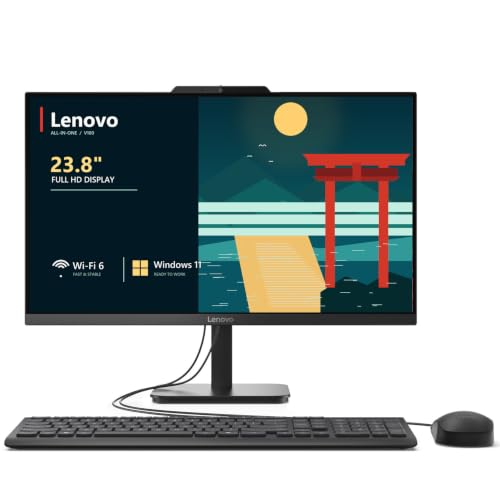
Lenovo IdeaCentre 24" Intel N100 Desktop
Best for: home offices and students needing reliable multitasking
- Processor
- Intel N100
- System Memory
- 32 GB DDR4
- Storage Capacity
- 2 TB NVMe SSD
- Screen Size
- 23.8"
- Display Resolution
- Full HD
- Graphics
- Intel UHD Graphics
View on Amazon: Lenovo IdeaCentre 24" Intel N100 Desktop Affiliate link
The Lenovo IdeaCentre 24 is a 23.8-inch all-in-one desktop powered by an Intel N100 processor. It includes 16GB of DDR4 RAM and a 256GB NVMe SSD for responsive multitasking. The Full HD IPS display offers wide viewing angles and accurate colors. This compact system suits home offices, students, and remote workers who need reliable performance without cable clutter.
Pros
- Intel N100 quad-core processor handles everyday tasks smoothly
- 16GB DDR4 RAM supports multitasking without slowdowns
- 23.8-inch Full HD IPS display with 99% sRGB color accuracy
- Wi-Fi 6 and Bluetooth 5.2 for fast wireless connectivity
- Includes wired keyboard and mouse for immediate setup
Cons
- 256GB storage capacity is limited for large media libraries
- Intel UHD Graphics is not suitable for demanding gaming
- No mention of a built-in webcam privacy shutter in specs
Good fit if
- You need a space-saving desktop for home or office use
- You prioritize fast multitasking with 16GB of RAM
- You want a clutter-free setup with a built-in display
Skip if
- You require high-end graphics for gaming or video editing
- You need more than 256GB of internal storage
- You prefer a larger screen than 23.8 inches
Verdict: Lenovo IdeaCentre 24 AIO is a practical all-in-one for users who value 16GB of RAM and a clean desk setup over raw gaming power or massive storage.

Lenovo IdeaCentre 24-inch All-in-One PC
Best for: home office and student computing tasks
- Processor
- Intel N100
- System Memory
- 8 GB
- Storage Capacity
- 512 GB SSD
- Screen Size
- 23.8"
- Display Resolution
- Full HD
- Graphics
- Intel UHD Graphics
View on Amazon: Lenovo IdeaCentre 24-inch All-in-One PC Affiliate link
The Lenovo IdeaCentre 24 is a 23.8-inch all-in-one desktop powered by an Intel N100 processor. It includes 8GB of DDR4 RAM and a 512GB PCIe SSD for everyday tasks. The Full HD IPS display offers 99% sRGB coverage and 250 nits of brightness. This compact system suits home offices, students, and web browsing needs. It runs Windows 11 Home and features Wi-Fi 6 connectivity.
Pros
- Intel N100 processor with 4 cores and 3.4GHz turbo speed
- 23.8-inch Full HD IPS display with 99% sRGB color coverage
- 512GB PCIe SSD for fast boot times and reliable storage
- 8GB DDR4-3200 memory supporting up to 32GB total expansion
- Intel Wi-Fi 6 and Bluetooth 5.2 for modern connectivity
Cons
- 8GB RAM is lower than the 16GB found on other models
- Intel UHD Graphics limits performance for demanding games
- 250 nits brightness is modest for bright rooms
Good fit if
- You need a space-saving desktop for office work
- You want a large screen for web browsing and media
- You require fast storage for documents and daily apps
Skip if
- You need high-end gaming performance
- You require more than 8GB of RAM out of the box
- You want a brighter display for sunny environments
Verdict: Lenovo IdeaCentre 24 Intel N100 AIO is a compact all-in-one PC suited for home office and student tasks. Its 512GB SSD and Full HD display handle daily productivity well. You should choose this model if you prioritize screen size and storage over raw processing power.
Specifications side by side
| Spec | Lenovo IdeaCentre 24" Intel N100 Desktop | Lenovo IdeaCentre 24-inch All-in-One PC |
|---|---|---|
| Processor | Intel N100 | Intel N100 |
| System Memory | 32 GB DDR4 | 8 GB |
| Storage Capacity | 2 TB NVMe SSD | 512 GB SSD |
| Screen Size | 23.8" | 23.8" |
| Display Resolution | Full HD | Full HD |
| Graphics | Intel UHD Graphics | Intel UHD Graphics |
| Operating System | Windows 11 Home | Windows 11 Home |
| Memory | 16GB RAM | not stated |
| Storage | not stated | 512GB SSD |
| Dimensions | 21.2 × 7.3 × 16.7 inches | not stated |
| Size | 32GB DDR4 RAM, 1TB PCIe SSD | not stated |
| Color | White | Carbon Black |
| Model | 24 | 24 |
Frequently asked questions
Does the Lenovo IdeaCentre 24 Intel N100 Desktop have enough RAM for multitasking?
Yes, it includes 32GB of DDR4 RAM. This high capacity ensures smooth performance when running multiple applications simultaneously. You will not experience lag during heavy workloads. The ample memory supports efficient browser tabs and background processes. This makes it ideal for users who need to switch between tasks quickly without slowdowns.
Which Lenovo model offers more internal storage space?
The Lenovo IdeaCentre 24 Intel N100 Desktop provides 1TB of PCIe SSD storage. The alternative 24-inch All-in-One PC features only 512GB of SSD capacity. If you store many files, videos, or large applications, the 1TB drive offers double the space. This extra room helps keep your system organized and responsive over time.
What color options are available for these Lenovo IdeaCentre models?
The Lenovo IdeaCentre 24 Intel N100 Desktop is available in White. The Lenovo IdeaCentre 24-inch All-in-One PC comes in Carbon Black. You can choose the color that best matches your desk setup or room decor. Both designs maintain a clean aesthetic suitable for home offices or student environments.
Is the Lenovo IdeaCentre 24 Intel N100 Desktop suitable for students?
Yes, it is well-suited for students needing reliable multitasking. The 32GB RAM and 1TB SSD handle school projects, research, and media consumption efficiently. Its compact dimensions fit well in small dorm rooms or study areas. This model supports consistent performance for daily academic tasks and light creative work.
Does the Lenovo IdeaCentre 24-inch All-in-One PC include a large SSD?
It includes a 512GB SSD. While smaller than the 1TB drive in the other model, this storage size is sufficient for most daily productivity tasks. You can store documents, photos, and essential applications. The SSD ensures fast boot times and quick access to your files without compromising system speed.
What are the physical dimensions of the Lenovo IdeaCentre 24 Intel N100 Desktop?
The desktop measures 21.2 inches in length, 16.7 inches in height, and 7.3 inches in width. These dimensions allow it to fit comfortably on most desks. The compact form factor saves space while providing a full 24-inch display experience. You can place it in tight corners or on smaller workstations easily.
Which model is better for users who value a clean desk setup?
The Lenovo IdeaCentre 24-inch All-in-One PC is ideal for a clean desk setup. It integrates the computer and monitor into a single unit, reducing cable clutter. This design keeps your workspace tidy and organized. If you prioritize aesthetics and minimalism over maximum RAM, this all-in-one solution fits your needs perfectly.
Can the Lenovo IdeaCentre 24 Intel N100 Desktop handle video calls smoothly?
Yes, the 32GB RAM ensures smooth video calls and multitasking. You can join meetings while running other applications without performance drops. The system handles background processes efficiently. This reliability makes it a strong choice for remote work or online classes where consistent connectivity and speed are essential.