Lenovo IdeaCentre 24 Intel N100 Review: Specs, Pros and Cons
As an Amazon Associate we earn from qualifying purchases. Links on this page are affiliate links.
This lenovo ideacentre 24 intel 4 core review examines a compact all-in-one desktop built for everyday tasks. It pairs an Intel N100 quad-core processor with 8GB of DDR4 RAM. The system runs Windows 11 Home and includes a 512GB NVMe SSD for fast storage. You get a 23.8-inch Full HD IPS display with wide viewing angles. This setup targets users who need reliable performance for office work, web browsing, and media streaming without the clutter of a traditional tower PC. It is designed to fit neatly into home offices or dorm rooms while delivering sufficient power for daily productivity needs.
What stands out
- Intel N100 processor with 4 cores and up to 3.4GHz burst frequency
- 23.8-inch Full HD IPS screen with 99% sRGB color accuracy
- 8GB DDR4-3200 RAM and 512GB PCIe NVMe SSD storage
- Wi-Fi 6 connectivity and Bluetooth 5.2 support
- Integrated Intel UHD Graphics with HDMI-out for dual displays
Who it fits
Good fit for
This machine suits students, remote workers, and small business owners who need a tidy desk solution. The quad-core N100 handles Microsoft Office, Zoom calls, and multiple browser tabs without lag. The fast NVMe SSD ensures quick boot times and instant app launches. If you primarily do web browsing, document editing, and light photo editing, this all-in-one delivers smooth performance. The built-in webcam and stereo speakers make it ready for video conferencing right out of the box.
Who should skip it
You should look elsewhere if you need serious gaming or heavy video editing capabilities. The integrated Intel UHD Graphics cannot handle modern 3D games or intensive rendering tasks. Eight gigabytes of RAM is sufficient for basic multitasking but may struggle with large datasets or many heavy applications open at once. Users requiring high-end graphical performance or extensive storage for large media libraries will find this system too limited for their professional workflows.
Verdict: The Lenovo IdeaCentre 24 offers a clean, capable all-in-one package for standard office and home use. It balances adequate processing power with a clutter-free design for everyday productivity.
Key specs explained for this PC
Processor: Intel N100
This quad-core chip offers a base speed that boosts up to 3.4GHz. It includes 6MB of smart cache to help manage data efficiently. You will find this sufficient for web browsing, video calls, and office apps. It is not designed for heavy 3D rendering or high-end gaming. Compare this to more powerful CPUs if you plan to run demanding creative software or modern titles.
System Memory: 8 GB
The system uses DDR4-3200 RAM to handle multitasking. This amount of memory allows you to keep several browser tabs and applications open without significant slowdowns. It is suitable for everyday productivity and light media consumption. If you frequently run multiple large programs simultaneously, you might notice limits. Higher memory capacities are recommended for heavy multitasking workflows.
Storage Capacity: 512 GB SSD
This NVMe PCIe solid-state drive provides fast boot times and quick application launches. You get ample space for documents, photos, and software installations. The speed difference compared to older hard drives is noticeable in daily use. This capacity is practical for most home users. Gamers requiring large libraries of modern titles may need to manage storage carefully or use external drives.
Graphics: Intel UHD Graphics
This integrated solution shares system memory and handles basic visual tasks. It supports HD video playback and casual gaming at lower settings. You can expect smooth performance for web browsing and media streaming. It is not capable of running graphically intensive games or professional video editing. If you need dedicated graphics power, look for systems with separate GPU modules.
Display Resolution: Full HD
The 23.8-inch screen offers a 1920x1080 resolution with IPS technology. You get wide viewing angles and accurate colors for everyday use. The anti-glare coating helps reduce eye strain during long sessions. This resolution is standard for office work and media consumption. It provides clear text and sharp images. Higher resolutions are available if you need more screen real estate or sharper detail.
Design and build overview
The Lenovo IdeaCentre 24 features a compact all-in-one chassis finished in white. According to the listing, the unit measures 21.2 inches in length, 16.7 inches in height, and 7.3 inches in width. This footprint eliminates the need for a separate tower, reducing cable clutter on your desk. The space-saving form factor makes it suitable for dorm rooms, reception areas, or small home offices where floor space is limited. You benefit from a cleaner visual setup without sacrificing essential computing power.
The 23.8-inch Full HD IPS display dominates the front profile. It offers 178-degree viewing angles and 99% sRGB color accuracy. An anti-glare coating helps reduce eye strain during long work sessions. Integrated dual 2-watt stereo speakers and a built-in HD webcam with privacy shutter are embedded directly into the bezel. This integration keeps the design streamlined while providing necessary audio and video capabilities for remote work or media consumption.
Connectivity options are distributed along the sides and rear. You get four USB-A ports, including two high-speed 10Gbps options, alongside HDMI-out and an RJ-45 Ethernet jack. A Kensington lock slot is included for physical security in shared environments. The package includes a wired USB keyboard and mouse, ensuring you can start using the system immediately. The overall build prioritizes functionality and minimalism for everyday productivity tasks.
Setup and daily workflow
You can begin using this all-in-one desktop immediately because the box includes a USB wired keyboard and mouse. The space-saving design eliminates cable clutter, which simplifies placement on desks in dorms, offices, or reception areas. You do not need to assemble a separate tower or connect multiple peripheral cables for basic operation. The compact chassis fits neatly into tight spaces while maximizing available desk surface area.
For connectivity, the system offers versatile options to support your daily workflow. You can connect to networks via Wi-Fi 6 or use the Gigabit Ethernet port for stable, high-speed wired connections. Bluetooth 5.2 allows you to pair wireless headphones, speakers, keyboards, and mice seamlessly. The rear panel includes four USB-A ports, an HDMI-out port, and a 3.5mm audio jack. You can use the HDMI-out to connect a second monitor or TV for dual-display productivity.
In daily use, the Intel N100 processor and 8GB of DDR4 RAM handle multitasking across multiple browser tabs, Microsoft Office applications, and video conferencing tools. The 512GB NVMe SSD ensures fast boot times and quick application launches. You can stream media, browse the web, and perform light photo editing without significant slowdowns. The 23.8-inch Full HD IPS display provides wide viewing angles and accurate colors for video playback and casual graphics tasks. Built-in dual stereo speakers and an HD webcam with privacy shutter support remote work and communication needs.
Before you buy this PC
This all-in-one unit is designed for basic productivity and media consumption. You should verify that your home network supports Wi-Fi 6 to fully utilize the AX203 adapter. While the HDMI-out port allows connection to a second display, ensure your monitor matches the output requirements. The integrated dual speakers are adequate for video calls, but you may prefer external audio for better immersion. Keep the 512GB SSD clear of large game files, as the Intel N100 processor and integrated graphics are not built for heavy gaming. This machine fits best for students, remote workers, or families needing a clutter-free desk solution. It sits below the performance tier of dedicated gaming rigs, offering reliability over raw power. Regularly update Windows 11 Home to maintain security via the TPM 2.0 chip. The included keyboard and mouse simplify setup, but you might want a wireless mouse for convenience. This device is a practical choice for light tasks, not for demanding creative workloads.
Check before you buy
- Confirm Wi-Fi 6 router compatibility for optimal speeds.
- Check if HDMI-out matches your secondary monitor's input.
- Verify storage needs exceed 512GB for large files.
- Ensure desk space fits the 21.2-inch width.
The product at a glance
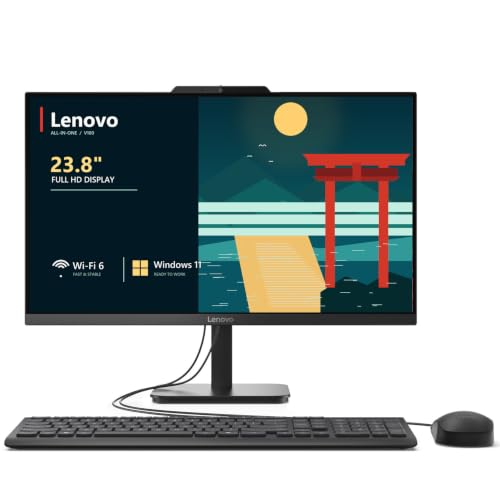
Lenovo IdeaCentre 24 Intel N100 All-in-One PC
Best for: basic home office and student tasks
- Processor
- Intel N100
- System Memory
- 8 GB
- Storage Capacity
- 512 GB SSD
- Screen Size
- 23.8"
- Display Resolution
- Full HD
- Graphics
- Intel UHD Graphics
View on Amazon: Lenovo IdeaCentre 24 Intel N100 All-in-One PC Affiliate link
The Lenovo IdeaCentre 24 is a white all-in-one desktop powered by an Intel N100 quad-core processor. It features a 23.8-inch Full HD IPS display with 99% sRGB color accuracy. You get 8GB of DDR4 RAM and a 512GB NVMe SSD for fast storage. The system includes Wi-Fi 6, Bluetooth 5.2, and Windows 11 Home. This compact unit suits home offices and students needing reliable daily performance.
Pros
- Intel N100 quad-core processor with up to 3.4GHz burst frequency
- 23.8-inch Full HD IPS screen with 178-degree viewing angles
- 512GB PCIe NVMe SSD for quick boot times and app launches
- Wi-Fi 6 and Bluetooth 5.2 for modern wireless connectivity
- Integrated privacy shutter on the HD webcam
Cons
- 8GB RAM may limit heavy multitasking
- Integrated Intel UHD Graphics lacks dedicated video memory
- No mention of RAM upgrade options in specifications
Good fit if
- You need a clutter-free desktop for home office work
- You require a reliable machine for video conferencing and web browsing
- You want a compact unit for a dorm or small desk
Skip if
- You need dedicated graphics for modern gaming
- You require extensive multitasking with many heavy applications
- You need high-end color grading for professional video editing
Verdict: The Lenovo IdeaCentre 24 AIO Desktop offers solid everyday performance for students and remote workers. Its compact design and fast SSD make it a practical choice for basic productivity tasks.
Specifications side by side
| Spec | Lenovo IdeaCentre 24 Intel N100 All-in-One PC |
|---|---|
| Processor | Intel N100 |
| System Memory | 8 GB |
| Storage Capacity | 512 GB SSD |
| Screen Size | 23.8" |
| Display Resolution | Full HD |
| Graphics | Intel UHD Graphics |
| Operating System | Windows 11 Home |
| Memory | 8GB RAM |
| Storage | 512GB SSD |
| Dimensions | 21.2 × 7.3 × 16.7 inches |
| Size | 8GB DDR4 RAM, 512GB PCIe SSD |
| Color | White |
| Model | 24 |
Frequently asked questions
Is the Lenovo IdeaCentre 24 good for students?
Yes, it is well-suited for student tasks. The Intel N100 processor handles web browsing and office applications efficiently. The 512GB SSD provides ample space for documents and projects. Its compact design fits easily in dorm rooms or small study areas.
Can I upgrade the RAM on this PC?
The listing specifies 8GB of DDR4 RAM. It does not explicitly state whether the memory is soldered or upgradeable. You should assume the 8GB configuration is fixed unless the manufacturer provides a service manual indicating otherwise. Plan your workflow around this capacity.
Does the Lenovo IdeaCentre 24 include a keyboard and mouse?
Yes, the package includes a USB wired keyboard and mouse. This setup allows you to start using the computer immediately after connecting the power. The included peripherals are sufficient for basic text entry and navigation tasks in an office or home setting.
What is the storage capacity of this all-in-one?
It features a 512GB PCIe SSD. This solid-state drive offers faster boot times and application loading compared to traditional hard drives. The capacity is suitable for storing operating system files, applications, and a moderate amount of personal data and media.
Is this PC suitable for heavy gaming?
No, it is not designed for heavy gaming. The Intel N100 is an entry-level processor focused on efficiency and basic tasks. It lacks the graphical power required for modern, demanding games. It is better suited for light productivity and media consumption.
How large is the Lenovo IdeaCentre 24 display?
The unit is a 24-inch all-in-one desktop. The chassis measures 21.2 inches in length, 16.7 inches in height, and 7.3 inches in width. This size provides a comfortable viewing area while maintaining a compact footprint that saves desk space compared to traditional setups.
Does it run Windows 11?
Yes, the system runs Windows 11 Home. This operating system provides a familiar interface for everyday tasks. It supports modern security features and app compatibility. The Intel N100 processor meets the requirements to run this version of Windows smoothly for basic usage.
Can I connect a second monitor to this PC?
Yes, it includes an HDMI-out port. You can connect a second display to extend your workspace or mirror content. This feature is useful for multitasking or presenting information. Ensure your external monitor supports the HDMI connection for proper video output.