Lenovo IdeaCentre 24" AIO Desktop Review: Who It Fits and Who Should Skip It
As an Amazon Associate we earn from qualifying purchases. Links on this page are affiliate links.
This lenovo ideacentre 24 aio desktop review looks at a compact all-in-one PC built for daily productivity. It pairs an Intel N100 processor with 32GB of RAM and a 2TB SSD. The 23.8-inch Full HD IPS display offers sharp visuals and decent color accuracy for general use. You get a clean, space-saving design that integrates the computer and monitor. This setup handles web browsing, office apps, and media consumption with ease. It is a practical choice for home offices or student workspaces where simplicity matters.
What stands out
- 32GB DDR4 RAM for smooth multitasking across many browser tabs and apps
- 2TB PCIe SSD for fast boot times and ample storage for files
- 23.8-inch Full HD IPS display with 99% sRGB color coverage
- Integrated Intel N100 processor with up to 3.4GHz turbo speed
- Dual HDMI ports allow connection of up to two displays total
Who it fits
Good fit for
This AIO suits students, remote workers, and home office users who need a tidy desk setup. The large RAM and fast storage handle everyday productivity tasks without lag. If you primarily browse the web, write documents, or attend video calls, this machine delivers a reliable experience. The included keyboard and mouse simplify the initial setup. It is ideal for anyone who values a single-cable connection and a screen that looks good for multimedia consumption.
Who should skip it
Gamers and video editors should look elsewhere. The Intel N100 and integrated UHD graphics lack the power for demanding titles or heavy rendering. If you need dedicated graphics performance, this all-in-one is not the right tool. The 250-nit brightness may feel dim in very bright rooms. Also, the built-in speakers are basic. You will likely want external audio gear for serious media enjoyment. Heavy users should consider a tower with discrete GPU options.
Verdict: The Lenovo IdeaCentre 24 AIO is a capable, space-saving desktop for everyday tasks. It offers ample memory and storage for users who prioritize simplicity and screen quality over raw power.
Lenovo IdeaCentre 24 Key Specs
Processor: Intel N100
This quad-core chip runs up to 3.4GHz. It handles web browsing, office apps, and video calls without lag. You should skip this if you need heavy gaming or video editing. It suits students and home office users who prioritize low power use and quiet operation over raw speed.
System Memory: 32GB
High RAM allows many browser tabs and programs to run at once. You will not see slowdowns when switching between apps. This amount is rare for this price tier. It ensures smooth performance for multitasking, making it ideal for users who keep many windows open simultaneously for work or research.
Storage Capacity: 2TB SSD
A 2TB solid-state drive holds thousands of photos, videos, and documents. SSDs boot Windows quickly and open files instantly. This large capacity removes the need for external drives. It is perfect for users who store lots of media or work with large local files without relying on cloud storage.
Display Resolution: Full HD
The 23.8-inch screen shows crisp text and clear images. This resolution is standard for productivity tasks like spreadsheets and word processing. It offers sharp detail without straining your eyes. You get 99% sRGB color accuracy for basic photo viewing. It is not suitable for professional color grading or high-end gaming.
Graphics: Intel UHD Graphics
Integrated graphics handle daily visuals and light media playback. You can watch HD videos and use multiple monitors via HDMI. This chip lacks the power for modern 3D games. You should choose a dedicated GPU if you plan to play demanding titles. It is sufficient for office work and web browsing.
Design and Build Analysis
According to the listing, the Lenovo IdeaCentre 24 measures 24.1 inches in length, 18.6 inches in width, and 7.55 inches in height. The unit weighs 5 pounds, making it light enough to move between rooms if needed. This compact form factor is ideal for small desks or tight office corners. The all-in-one design keeps your workspace clean by integrating the computer components directly behind the 23.8-inch display. You do not need a separate tower taking up floor space.
The build focuses on practical connectivity rather than flashy aesthetics. It includes four USB ports, an HDMI input, and an HDMI output. This layout allows you to connect peripherals easily or extend your screen to a second monitor. The included white wired keyboard and mouse support a tidy, cable-free setup. A dedicated headphone and microphone combo jack is also present for clear audio during video calls.
Finish details are not explicitly listed, but the white peripherals suggest a simple, modern look. The anti-glare IPS screen helps reduce eye strain in bright rooms. With its modest footprint and straightforward layout, this machine fits well in home offices or student dorms. You get a complete system without the clutter of multiple devices. It is a sensible choice for users who value space efficiency and reliable daily performance over raw gaming power.
Setup And Everyday Use Guide
Setup begins with plugging in the power cable and connecting the included Lenovo white wired keyboard and mouse. This bundle supports a clean, cable-free aesthetic on your desk. The system arrives with Windows 11 Home pre-installed, so you can skip manual OS installation. You simply follow the on-screen prompts to create your user account and connect to your network via the Gigabit Ethernet port for stable wired internet. Wireless connectivity options are not listed in the specifications, so you may need a separate adapter if your router is far from the desk.
The 23.8-inch Full HD IPS display delivers 250 nits of brightness and 99% sRGB color coverage. This panel handles daily visuals, web browsing, and document editing with sharp detail. The integrated Intel UHD Graphics chip manages these tasks efficiently without requiring external hardware. For multimedia, dual 2W speakers and a mono microphone support basic audio needs during video calls or media playback. An HD camera is also built into the bezel.
Connectivity includes four USB ports, an HDMI-in port, and an HDMI-out port. You can extend your workspace by connecting up to two additional displays via the HDMI-out. The 32GB of DDR4 RAM ensures smooth multitasking between office apps and browser tabs. The 2TB PCIe SSD provides ample space for files and quick boot times. This configuration suits students and home office users who prioritize a tidy workspace and reliable performance for everyday computing tasks.
Before You Buy This AIO
This all-in-one design simplifies your desk by integrating the monitor and computer into a single unit. You save space, but you must check your monitor compatibility if you plan to use the HDMI-out port. The listing notes you can connect up to two displays total, including the built-in screen. This means you can add one external monitor. Keep in mind that the Intel N100 processor is not designed for heavy gaming or video editing. It fits best alongside other budget-friendly productivity machines in our guide. Upkeep is minimal. You just need to keep the vents clear of dust. The 32GB of RAM ensures smooth multitasking for office apps. You will not need to upgrade components soon. This machine is a solid choice for students and home office workers who value a clean look and reliable performance over raw power.
Check before you buy
- Confirm you need only one external monitor for dual-screen setups.
- Ensure your desk has enough depth for the 24-inch width.
- Verify you do not require high-end gaming or video editing.
- Check if you need wireless peripherals instead of the included wired set.
The product at a glance
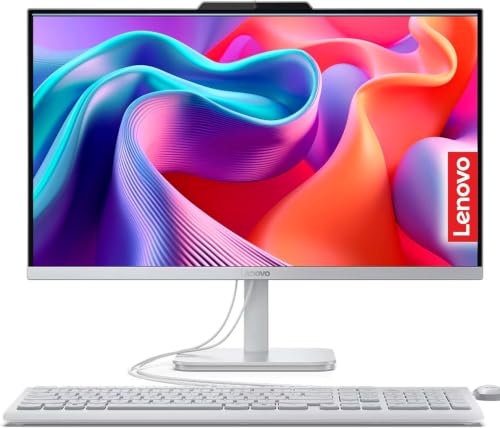
Lenovo IdeaCentre 24" AIO Desktop with 2TB SSD
Best for: Home office productivity and media storage
- Processor
- Intel N100
- System Memory
- 32GB DDR4
- Storage Capacity
- 2TB PCIe SSD
- Screen Size
- 23.8-inch
- Display Resolution
- Full HD
- Graphics
- Intel UHD Graphics
View on Amazon: Lenovo IdeaCentre 24" AIO Desktop with 2TB SSD Affiliate link
This Lenovo IdeaCentre 24 AIO pairs an Intel N100 processor with 32GB of RAM and a 2TB SSD. The 23.8-inch Full HD IPS screen offers 99% sRGB coverage for clear visuals. You get a clean, space-saving setup with wired peripherals included. It suits students and home office users who need reliable multitasking and ample storage for everyday documents and media without complex assembly.
Pros
- 32GB DDR4 RAM supports smooth multitasking
- 2TB PCIe SSD provides fast boot times and ample storage
- 23.8-inch Full HD IPS display with 99% sRGB coverage
- Includes wired keyboard and mouse for a tidy desk
Cons
- Intel N100 processor limits heavy gaming performance
- Integrated Intel UHD Graphics handles only basic visuals
- Only 250 nits brightness reduces visibility in bright rooms
Good fit if
- You need a compact all-in-one for home office tasks
- You require large storage for documents and media files
- You want a plug-and-play system with included peripherals
Skip if
- You plan to play modern 3D games
- You need high-brightness screens for sunny environments
- You require wireless connectivity options like Wi-Fi 6
Verdict: Lenovo IdeaCentre 24 AIO Desktop delivers strong multitasking and storage for everyday productivity. It fits users who value a tidy, space-saving design for office work and media consumption.
Specifications side by side
| Spec | Lenovo IdeaCentre 24" AIO Desktop with 2TB SSD |
|---|---|
| Processor | Intel N100 |
| System Memory | 32GB DDR4 |
| Storage Capacity | 2TB PCIe SSD |
| Screen Size | 23.8-inch |
| Display Resolution | Full HD |
| Graphics | Intel UHD Graphics |
| Operating System | Windows 11 Home 64-bit |
| Memory | 32GB RAM |
| Storage | 2TB SSD |
| Dimensions | 24.1 × 18.6 × 7.55 inches |
| Weight | 5 pounds |
| Model | A24A100AN |
Frequently asked questions
Is the Lenovo IdeaCentre 24 good for multitasking?
Yes, it handles multitasking well. The 32GB of RAM allows you to run many browser tabs and office apps at once. This memory capacity prevents slowdowns during heavy daily use. It is suitable for users who keep multiple programs open simultaneously.
Does this AIO have enough storage space?
It includes a 2TB SSD. This large capacity stores thousands of documents, photos, and videos. The solid-state drive ensures fast boot times and quick file access. You will not need external drives for most personal media or office files.
Can I use the Lenovo IdeaCentre 24 for gaming?
No, it is not designed for gaming. The Intel N100 processor lacks the power for modern games. It focuses on productivity and media consumption. You should skip this model if you need a dedicated graphics card for gaming or video editing.
How big is the screen on this desktop?
The screen is 24 inches. The listing specifies a 24-inch display size. This provides a clear view for office work and media. The compact form factor fits well on smaller desks while offering sufficient screen real estate for daily tasks.
Is the Lenovo IdeaCentre 24 easy to move?
Yes, it is relatively light. The unit weighs 5 pounds. This weight makes it manageable to move between rooms. The all-in-one design eliminates the need to move a separate tower, making it convenient for flexible workspace arrangements.
What is the best use case for this PC?
It fits home office productivity and media storage. The combination of strong RAM and large SSD supports everyday tasks. It is ideal for users who value a tidy, space-saving design. You should choose this for web browsing, documents, and media consumption.