HP Z240 Tower Core i5 Review: Specs, Pros and Cons
As an Amazon Associate we earn from qualifying purchases. Links on this page are affiliate links.
This hp z240 tower workstation desktop review examines a system built for sustained productivity. The HP Z240 is a tower workstation centered around the Intel Core i5-6500 processor and 32GB of DDR4 RAM. These two specs define its capability to handle demanding professional tasks. You get fast data access via a 512GB SSD and a clean Windows 11 Pro environment. It connects to peripherals through multiple USB and DisplayPort options. This machine targets users who need reliable computing power for office work or creative projects without the need for high-end gaming graphics.
What stands out
- 32GB DDR4 RAM allows seamless multitasking across many applications
- 512GB SSD provides quick boot times and rapid file transfers
- Intel Core i5-6500 processor handles professional web design and heavy apps
- Windows 11 Pro includes advanced security and management features
- Dual DisplayPort outputs support multi-screen expansion setups
Who it fits
Good fit for
This system suits business professionals, developers, and designers who run multiple browser tabs, virtual machines, or creative software simultaneously. The 32GB of RAM ensures smooth performance when switching between heavy applications. The 512GB SSD keeps your operating system and active projects responsive. If you need a stable, secure workstation for office computing or light content creation, this tower delivers the necessary processing power and memory headroom for daily tasks.
Who should skip it
You should look elsewhere if you require high-end gaming or 3D rendering. This unit lacks a dedicated graphics card, relying on integrated graphics from the i5-6500. It is not built for modern AAA titles or heavy GPU-accelerated workflows. Additionally, the 6th generation processor is older technology. If you need the latest CPU performance or advanced visual processing capabilities, this workstation will feel limited for those specific high-performance demands.
Verdict: The HP Z240 offers solid multitasking capability for office and creative work through its large memory and fast storage. It is a practical choice for users prioritizing system stability and application performance over graphical intensity.
HP Z240 Key Specs Explained
Processor Model: Intel Core i5-6500
This sixth-generation processor handles professional web design and high-running applications. It provides strong performance for sustained productivity tasks. While not the latest chip, it remains capable for office work and multitasking. You get reliable processing power without the premium cost of newer models. It suits users who prioritize stability and consistent performance over cutting-edge speed.
System Memory: 32GB DDR4
High-bandwidth memory allows you to run multiple applications and browser tabs simultaneously. This large capacity prevents slowdowns when switching between heavy programs. It enables fast data transfers and smooth multitasking. For prebuilt desktops, this amount of RAM is excellent for professional workflows. It ensures your system remains responsive even under heavy load.
Storage Capacity: 512GB SSD
A solid-state drive provides fast boot-ups and quick file access. This storage type is significantly faster than traditional hard drives. The 512GB capacity offers ample space for operating systems and essential applications. It reduces wait times when launching software or loading large files. This spec is standard for modern workstations aiming for efficiency and speed.
Operating System: Windows 11 Pro
This professional edition offers advanced security and management features. It is designed for business environments and power users. You get enhanced productivity tools and better remote access capabilities. The OS includes all standard Windows 11 functions plus enterprise-grade controls. This makes it ideal for users needing robust system management and security.
Form Factor: Tower
A tower case provides ample internal space for components and airflow. It is easier to upgrade or maintain than smaller form factors. This design supports multiple displays and peripheral connections via numerous ports. It is suitable for both home and office use. The tower style ensures the system can handle sustained workloads without overheating.
Design And Build Quality
The HP Z240 is listed as a tower workstation. This form factor provides a stable base for sustained productivity tasks. The chassis is designed to house professional components while maintaining a compact footprint for office or home use. According to the listing, this desktop is suitable for both business computing and home environments.
The build supports multiple peripherals through a variety of connection options. You get two DisplayPort outputs, which allows for multi-screen expansion. This layout supports creative workflows or data-heavy professional tasks. The rear panel includes four USB 3.0 ports and two USB 2.0 ports. An RJ-45 Ethernet jack ensures stable wired networking. A microphone jack is also present for communication needs.
Windows 11 Pro comes preinstalled. This operating system offers advanced security and management features. These traits are tailored for business environments. The design prioritizes functionality over flashy aesthetics. You get a practical machine that focuses on performance and connectivity. The tower shape allows for easy access to internal components if upgrades are needed later. This makes the system adaptable for growing professional demands.
Setup And Daily Workflow
Setup begins with connecting the tower to power and your display. The system includes two DisplayPort outputs, allowing you to attach one or two monitors for a multi-screen workflow. This setup supports the 32GB of DDR4 RAM, enabling you to run multiple applications and browser tabs simultaneously without significant slowdowns. The 512GB SSD ensures fast boot-ups and quick data transfers, reducing wait times when you start your workday.
Connectivity is handled by a variety of ports. You have access to four USB 3.0 ports and two USB 2.0 ports for peripherals like keyboards, mice, and external drives. An RJ-45 Ethernet jack provides a stable wired network connection, while built-in WiFi offers wireless flexibility. A microphone jack is also present for audio input.
The computer runs Windows 11 Pro, which comes preinstalled. This operating system provides advanced security and management features suitable for business environments. It integrates well with the Intel Core i5-6500 processor, allowing you to handle professional web design tasks and high-running applications efficiently. The combination of the workstation-grade chassis and these specs makes it a practical choice for sustained productivity. You can rely on this configuration for daily office computing and creative work, as the hardware is designed to support these demands consistently.
Before You Buy This Workstation
You need to verify your display connectors before ordering. This unit lists two DisplayPort outputs. If your monitor uses HDMI or DVI, you will require active adapters. Check your cable types to ensure a smooth setup. The 512GB SSD offers fast boot times, but storage fills quickly with large project files. You may need an external drive for backups or archival data. The system runs Windows 11 Pro, which includes advanced security features. Ensure your IT policies allow this edition if using it in a business environment. Keep the tower in a well-ventilated area to maintain performance. This workstation fits alongside other prebuilt options by prioritizing sustained productivity over raw gaming speed. It suits users who need reliable multitasking and professional stability rather than high-frame-rate graphics.
Check before you buy
- Confirm your monitor uses DisplayPort or buy active adapters.
- Check if 512GB storage meets your file retention needs.
- Verify Windows 11 Pro compatibility with your software.
- Ensure adequate ventilation space around the tower chassis.
The product at a glance
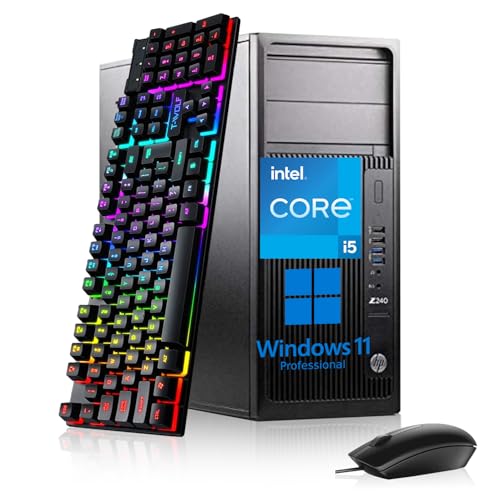
HP Z240 Tower Core i5 Workstation
Best for: heavy multitasking and business workflows
- Processor Model
- Intel Core i5-6500
- System Memory
- 32GB DDR4
- Storage Capacity
- 512GB SSD
- Operating System
- Windows 11 Pro
- Form Factor
- Tower
- Use
- Workstation
View on Amazon: HP Z240 Tower Core i5 Workstation Affiliate link
The HP Z240 Tower is a workstation built for heavy multitasking. It features an Intel Core i5-6500 processor and 32GB of DDR4 RAM. This high memory capacity lets you run many applications and browser tabs simultaneously without slowdowns. The 512GB SSD ensures fast boot times and quick data transfers. Windows 11 Pro provides professional security and management tools. This system suits users who need reliable performance for business or creative workflows.
Pros
- 32GB DDR4 RAM for heavy multitasking
- Intel Core i5-6500 processor handles demanding apps
- 512GB SSD for fast boot-ups and transfers
- Windows 11 Pro for advanced security features
Cons
- 6th generation processor is older technology
- No dedicated graphics card listed
- Limited to two DisplayPort outputs
Good fit if
- You need high RAM for many open applications
- You require a stable workstation for business tasks
- You want fast storage for quick data access
Skip if
- You need modern gaming performance
- You require multiple monitor setups beyond two displays
- You want the latest processor generation
Verdict: HP Z240 Tower i5 Workstation is a solid choice for users prioritizing memory and storage speed over cutting-edge processing power. It fits professionals who run many tabs and apps at once.
Specifications side by side
| Spec | HP Z240 Tower Core i5 Workstation |
|---|---|
| Processor Model | Intel Core i5-6500 |
| System Memory | 32GB DDR4 |
| Storage Capacity | 512GB SSD |
| Operating System | Windows 11 Pro |
| Form Factor | Tower |
| Processor | Core i5 |
| Memory | 32GB RAM |
| Storage | 512GB SSD |
| Use | Workstation |
| Model | Z240 Tower |
Frequently asked questions
Is the HP Z240 good for heavy multitasking?
Yes, this workstation is designed for heavy multitasking and business workflows. It features 32GB of DDR4 RAM, which allows you to run many applications and browser tabs simultaneously without slowdowns. The Intel Core i5 processor supports sustained productivity tasks, making it a solid choice for professionals who need reliability over cutting-edge speed.
What operating system does the HP Z240 come with?
The system ships with Windows 11 Pro. This professional operating system provides enhanced security features and management tools suitable for business environments. It ensures compatibility with enterprise software and offers a stable platform for your daily workstation duties. You get a fully licensed OS ready for immediate use upon setup.
Can I upgrade the storage on this desktop?
The HP Z240 comes equipped with a 512GB SSD for fast boot times and application loading. As a tower workstation, it typically offers internal expansion slots for additional drives. You can likely add more storage later to accommodate large files or extensive project libraries, ensuring your workspace remains organized and accessible.
Is the HP Z240 suitable for video editing?
It is best suited for business workflows and general productivity rather than intensive creative work. While the 32GB RAM helps with multitasking, the sixth-generation Core i5 processor may struggle with modern 4K video editing. You should consider this system for office tasks, web design, and data management rather than heavy media production.
Does this tower support dual monitors?
Yes, the HP Z240 includes two DisplayPort outputs on the rear panel. This allows you to connect two monitors for an extended desktop experience. This setup enhances your workflow by providing more screen real estate for spreadsheets, code, or research. Just ensure your monitors have DisplayPort inputs or use active adapters for other connection types.
How does the RAM affect performance?
The 32GB of DDR4 RAM is a key strength of this machine. It enables smooth operation when you have numerous applications open at once. This amount of memory prevents bottlenecks during heavy multitasking, allowing the Core i5 processor to focus on processing tasks rather than waiting for data. It ensures a responsive experience for professional users.