6 Best Alternatives to the HP Z2 G9 Tower Core (2026)
As an Amazon Associate we earn from qualifying purchases. Links on this page are affiliate links.
The HP Z2 G9 Tower Core i7-14700K delivers strong performance for heavy multitasking and professional workloads. It features a 20-core Intel processor, 32 GB of RAM, and an NVIDIA T1000 graphics card. This combination suits users who prioritize processing power and memory over large internal storage or advanced gaming capabilities. However, you might seek different options if you need a smaller footprint, a lower price point, or a specific brand preference.
These 6 best alternatives to the HP Z2 G9 workstation alternatives were chosen because their specifications overlap with the original model. Each entry shares key traits like the Intel Core i7 processor, Windows 11 Pro operating system, and 512 GB SSD storage. You will find variations in form factor, such as small form factor or mini tower designs, and differences in RAM capacity. Some options include monitors or different graphics cards for light gaming. This list helps you find a machine that matches your exact needs for business tasks, data storage, or compact office setups.
Comparing alternatives to HP Z2 G9
Dell Precision Tower i7 32GB RAM Desktop
The Dell Precision Tower i7-6700 offers 32 GB of RAM and a 512 GB SSD, matching the HP Z2 G9’s memory capacity. However, it uses a much older sixth-generation processor compared to the Z2’s fourteenth-gen i7-14700K. This means significantly lower processing speed and fewer cores for heavy multitasking. The Dell unit is larger, measuring 17.1 inches in height, whereas the HP is a standard tower. You should choose this Dell model if you need ample RAM for data storage tasks but can accept older hardware. It suits users who prioritize memory volume over raw computational power and modern features found in the Z2 G9.
Dell SFF Core i7 Workstation Desktop
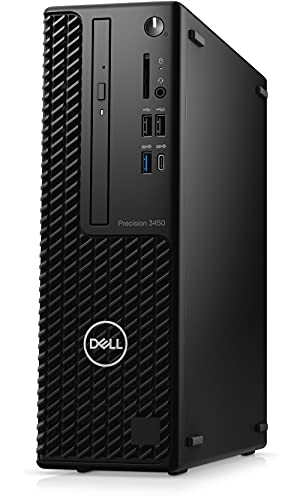
The Dell Precision 3450 SFF provides 32 GB of RAM and a 512 GB SSD, similar to the HP Z2 G9. Its key difference is form factor. This unit is a small form factor desktop, measuring just 11.4 inches in height. The HP Z2 is a larger tower, offering more expansion room. The Dell model fits professionals who need workstation performance but have limited desk space. It gives up the physical expansion potential of the Z2 tower for a compact footprint. You should pick this Dell if space is your primary constraint. It delivers comparable memory and storage in a package that sits smaller on your desk than the bulkier HP Z2 G9.
Dell Precision Mini Tower i7 Desktop
The Dell Precision 3620 Mini Tower differs significantly in performance. It includes only 16 GB of RAM, half the amount in the HP Z2 G9. It also uses an older sixth-generation i7 processor, lacking the modern 20-core architecture of the Z2’s i7-14700K. Storage is identical at 512 GB SSD. This Dell model is positioned as a budget entry-level option for basic office duties. You should choose it if your workload involves simple multitasking and business software rather than heavy professional applications. It gives up substantial processing power and memory capacity to offer a more affordable entry point into Dell’s Precision line compared to the high-end Z2 G9.
Dell Optiplex Tower Core i7 PC
The Dell OptiPlex Tower Core i7-7700 offers 16 GB of RAM and a 512 GB SSD. It uses a seventh-generation processor, which is older and less powerful than the Z2 G9’s fourteenth-gen chip. The OptiPlex is designed for basic office tasks and web browsing rather than heavy professional workloads. It includes Windows 11 Pro, matching the HP. You should select this Dell if you need a reliable machine for everyday business use without requiring high core counts or extensive memory. It gives up the significant processing advantage of the Z2 G9. This model suits users who prioritize basic functionality and stability over the advanced multitasking capabilities of the HP workstation.
Dell OptiPlex i7 GT 1030 Desktop with Monitor
The Dell OptiPlex i7 GT 1030 Desktop includes a 24-inch monitor, which the HP Z2 G9 does not. It has 16 GB of RAM and a 512 GB SSD. The processor is an i7, but the graphics card is an entry-level GT 1030, far weaker than the Z2’s T1000. This bundle suits users who want a complete setup without buying separate peripherals. You should choose this if you need light gaming or office work with a screen included. It gives up the superior processing power and professional graphics of the Z2 G9. The convenience of an all-in-one package comes at the cost of the raw performance and dedicated workstation features found in the HP tower.
Dell OptiPlex Tower GTX 1050 Ti Gaming PC
The Dell OptiPlex Tower GTX 1050 Ti Desktop offers 16 GB of RAM and a 512 GB SSD. It uses a sixth-generation i7 processor, which is older than the Z2 G9’s fourteenth-gen chip. The graphics card is a GTX 1050 Ti, providing basic gaming capability but lacking the professional optimization of the Z2’s T1000. This model fits casual gamers on a budget. You should pick it if you need light gaming performance alongside office tasks. It gives up the modern processing speed and professional-grade graphics of the HP Z2 G9. This Dell unit is a practical choice for users who prioritize basic gaming over heavy professional workloads and modern hardware efficiency.
Quick picks
Our 7 picks
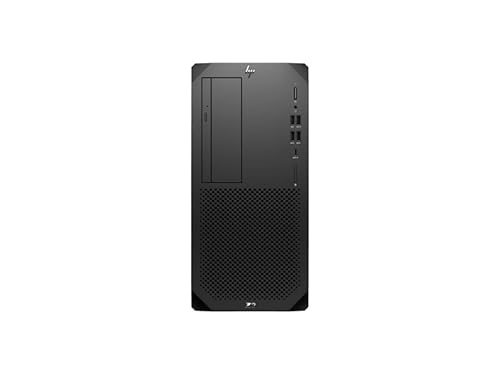
HP Z2 G9 Tower Core i7-14700K
Best for: Heavy multitasking and professional workloads
- Graphics Card
- T1000 8 GB
- Processor Model
- Intel Core i7-14700K
- System Memory
- 32 GB
- Storage Capacity
- 512 GB SSD
- Operating System
- Windows 11 Pro
- Form Factor
- Tower
View on Amazon: HP Z2 G9 Tower Core i7-14700K Affiliate link
This HP Z2 G9 Tower workstation features a 14th Gen Intel Core i7-14700K processor with 20 cores. It includes 32 GB of system memory and a 512 GB SSD for storage. The T1000 8 GB graphics card handles professional tasks. It runs Windows 11 Pro and is designed for heavy workloads. You get a reliable machine for demanding applications.
Pros
- 20-core Intel Core i7-14700K processor
- 32 GB system memory
- T1000 8 GB graphics card
- Windows 11 Pro operating system
Cons
- Only 512 GB SSD storage capacity
- No mention of included external display
- 15.9 pounds weight for tower form factor
Good fit if
- You need a 20-core CPU for heavy multitasking
- You require 32 GB of RAM for large datasets
- You prefer a Windows 11 Pro workstation
Skip if
- You need more than 512 GB of internal storage
- You require a dedicated high-end gaming GPU
- You are looking for a compact SFF form factor
Verdict: HP Z2 G9 Tower i7-14700K is a solid choice for professionals needing high core counts and ample RAM. It suits users who prioritize processing power over massive internal storage or advanced gaming graphics.

Dell Precision Tower i7 32GB RAM Desktop
Best for: Music production and data storage
- Graphics Card
- Intel HD Graphics 530
- Processor Model
- Intel i7-6700
- System Memory
- 32GB DDR4
- Storage Capacity
- 512GB SSD + 2TB HDD
- Operating System
- Windows 11 Pro
- Use
- Workstation
View on Amazon: Dell Precision Tower i7 32GB RAM Desktop Affiliate link
This Dell T3620 tower uses a Core i7-6700 processor and 32GB of DDR4 RAM. It includes a 512GB SSD for the operating system and a 2TB HDD for storage. The system runs Windows 11 Pro and relies on integrated Intel HD Graphics 530. It suits users who need high memory capacity for music production or data handling but do not require dedicated graphics power.
Pros
- 32GB DDR4 system memory
- 512GB SSD plus 2TB HDD storage
- Intel Core i7-6700 processor
- Windows 11 Pro operating system
Cons
- Integrated Intel HD Graphics 530 lacks dedicated video power
- Sixth-generation CPU is older than modern alternatives
- Large 17.1-inch height requires significant desk space
Good fit if
- You need 32GB of RAM for heavy multitasking
- You require large HDD storage for media files
- You use software that does not need a GPU
Skip if
- You play modern 3D games
- You edit 4K video with GPU acceleration
- You need a compact desktop footprint
Verdict: Dell T3620 i7-6700 Workstation is a capable machine for data-heavy tasks. It fits users who prioritize RAM and storage over graphical performance.
Dell SFF Core i7 Workstation Desktop
Best for: compact professional workstations
- Processor Model
- Intel Core i7-11700
- System Memory
- 32 GB
- Storage Capacity
- 512 GB SSD
- Operating System
- Windows 11 Pro
- Use
- Workstation
- Dimensions
- 11.5 × 3.65 × 11.4 inches
View on Amazon: Dell SFF Core i7 Workstation Desktop Affiliate link
The Dell Precision 3450 SFF Workstation packs an 11th Gen Intel Core i7-11700 processor with 32 GB of RAM and a 512 GB SSD. This compact form factor fits tight spaces while running Windows 11 Pro. It suits professionals needing reliable workstation performance without taking up much desk space. The eight cores handle demanding tasks efficiently.
Pros
- Intel Core i7-11700 processor with 8 cores
- 32 GB system memory for multitasking
- 512 GB SSD storage
- Windows 11 Pro operating system
Cons
- Small form factor limits upgrade options
- Older 11th Gen processor compared to newer alternatives
- No dedicated graphics card listed
Good fit if
- You need a compact workstation for professional tasks
- You require 32 GB of RAM for heavy workloads
- You prefer Windows 11 Pro for business features
Skip if
- You need the latest generation processor
- You require a dedicated graphics card for gaming
- You need a larger tower for extensive upgrades
Verdict: Dell Precision 3450 SFF Workstation offers solid workstation performance in a small package. It fits professionals who need RAM and processing power without a large footprint.

Dell Precision Mini Tower i7 Desktop
Best for: basic office productivity and multitasking
- Graphics Card
- Intel HD Graphics 530
- Processor Model
- Intel Core i7-6700
- System Memory
- 16 GB
- Storage Capacity
- 512GB SSD
- Operating System
- Windows 11 Pro
- Form Factor
- Mini Tower
View on Amazon: Dell Precision Mini Tower i7 Desktop Affiliate link
This Dell Precision 3620 Mini Tower uses an Intel Core i7-6700 processor with 16GB of DDR4 RAM and a 512GB SSD. It runs Windows 11 Pro and includes integrated Intel HD Graphics 530. The system offers standard connectivity via DisplayPort, HDMI, and USB ports. It suits users needing a reliable workstation for office tasks and productivity software rather than heavy gaming or 3D rendering.
Pros
- Intel Core i7-6700 6th Gen processor with up to 4.0GHz Turbo Boost
- 16GB DDR4 system memory for smooth multitasking
- 512GB SSD for fast boot times and quick loading
- Windows 11 Pro pre-installed for business features
Cons
- Integrated Intel HD Graphics 530 lacks dedicated GPU power
- 6th Gen processor is older than current 14th Gen alternatives
- Mini Tower form factor may not fit small desks
Good fit if
- You need a stable workstation for office productivity
- You require Windows 11 Pro for business security
- You want a reliable system with 16GB of RAM
Skip if
- You need dedicated graphics for gaming or CAD
- You want the latest high-speed processor technology
- You require a compact Small Form Factor design
Verdict: Dell Precision 3620 Mini Tower i7-6700 is a practical entry-level workstation for basic office duties. It fits users who prioritize stable performance and business software over raw processing speed or graphics capability.

Dell Optiplex Tower Core i7 PC
Best for: Basic office tasks and web browsing
- Processor Model
- Intel Core i7-7700
- System Memory
- 16GB
- Storage Capacity
- 512GB SSD
- Operating System
- Windows 11 Pro
- Form Factor
- Tower
- Use
- Business
View on Amazon: Dell Optiplex Tower Core i7 PC Affiliate link
This Dell OptiPlex tower uses a 7th Gen Core i7-7700 processor with 16 GB of RAM and a 512 GB SSD. It runs Windows 11 Pro. The build is a standard desktop tower measuring 19 by 16 by 7 inches. It suits office tasks and light productivity. You get a keyboard and mouse included. It is a practical entry-level business machine.
Pros
- Core i7-7700 7th Gen processor
- 16 GB DDR4 RAM
- 512 GB SSD for fast boot
- Windows 11 Pro included
- Keyboard and mouse included
Cons
- 7th Gen processor is older than 14th Gen competitors
- 16 GB RAM is lower than 32 GB options
- No dedicated graphics card listed
Good fit if
- You need Windows 11 Pro for business
- You want a ready-to-use desktop with peripherals
- You prioritize SSD speed over raw power
Skip if
- You require high-end gaming performance
- You need more than 16 GB of RAM
- You want the latest 14th Gen processor
Verdict: Dell OptiPlex i7-7700 Tower is a solid choice for basic office work and web browsing. It fits users who need Windows 11 Pro and included peripherals without needing heavy processing power.

Dell OptiPlex i7 GT 1030 Desktop with Monitor
Best for: light gaming and office work with a monitor
- Graphics Card
- GeForce GT 1030 2GB GDDR5
- Processor Model
- Intel Core i7
- System Memory
- 16 GB
- Storage Capacity
- 512 GB SSD
- Operating System
- Windows 11 Pro
- Screen Size
- 24-Inch
View on Amazon: Dell OptiPlex i7 GT 1030 Desktop with Monitor Affiliate link
This Dell OptiPlex desktop pairs an Intel Core i7 processor with 16 GB of RAM and a 512 GB SSD. It includes a GeForce GT 1030 graphics card and a 24-inch display. The system runs Windows 11 Pro and features customizable RGB lighting. It suits users who need a complete, ready-to-use workstation for light gaming and general productivity tasks without assembling components.
Pros
- Intel Core i7 quad-core processor for reliable performance
- 16 GB RAM supports multitasking across multiple applications
- 512 GB SSD provides fast boot times and ample storage
- Includes a 24-inch display for immediate use
- Customizable RGB lighting with remote control
Cons
- GeForce GT 1030 is an entry-level GPU with limited power
- Refurbished condition with a generic box
- 90-day warranty is shorter than standard new hardware
Good fit if
- You want a complete system with a monitor included
- You need a 24-inch display for office or light gaming work
- You prefer a pre-configured PC with Windows 11 Pro
Skip if
- You require high-end graphics for modern AAA titles
- You need a full manufacturer warranty for new equipment
- You want to upgrade the graphics card internally
Verdict: Dell OptiPlex 24-inch i7 Gaming PC is a practical all-in-one solution for users who value convenience and a complete package. It fits those who need a reliable machine for basic tasks and light gaming without the hassle of separate component purchases.

Dell OptiPlex Tower GTX 1050 Ti Gaming PC
Best for: Casual gaming on a budget
- Graphics Card
- GeForce GTX 1050 Ti 4G
- Processor Model
- Intel Core i7 6th Gen 3.40GHz
- System Memory
- 16GB DDR3L
- Storage Capacity
- 512GB SSD
- Operating System
- Windows 11 Pro
- Form Factor
- Tower
View on Amazon: Dell OptiPlex Tower GTX 1050 Ti Gaming PC Affiliate link
This Dell tower pairs a 6th Gen Core i7 with a GTX 1050 Ti and 16GB of DDR3L RAM. It includes a 512GB SSD and runs Windows 11 Pro. The setup features RGB lighting for peripherals. It suits budget gamers needing basic performance. The older processor and DDR3 memory limit modern multitasking. It is a functional entry-level option for casual play.
Pros
- Intel Core i7 6th Gen processor
- NVIDIA GeForce GTX 1050 Ti graphics
- 16GB DDR3L system memory
- 512GB SSD storage
- Windows 11 Pro included
Cons
- Uses older 6th generation processor
- DDR3L RAM limits speed
- GTX 1050 Ti lacks modern ray tracing
Good fit if
- You need a budget desktop for light gaming
- You want Windows 11 Pro preinstalled
- You prefer a tower form factor
Skip if
- You require high-end 4K gaming
- You need the latest generation CPU
- You prioritize fast DDR4 or DDR5 memory
Verdict: Dell RGB Gaming Tower i7-6th Gen offers basic gaming capability with its GTX 1050 Ti and 16GB RAM. It fits casual players who do not need top-tier speed or modern features.
Specifications side by side
| Spec | HP Z2 G9 Tower Core i7-14700K | Dell Precision Tower i7 32GB RAM Desktop | Dell SFF Core i7 Workstation Desktop | Dell Precision Mini Tower i7 Desktop | Dell Optiplex Tower Core i7 PC | Dell OptiPlex i7 GT 1030 Desktop with Monitor | Dell OptiPlex Tower GTX 1050 Ti Gaming PC |
|---|---|---|---|---|---|---|---|
| Graphics Card | T1000 8 GB | Intel HD Graphics 530 | not stated | Intel HD Graphics 530 | not stated | GeForce GT 1030 2GB GDDR5 | GeForce GTX 1050 Ti 4G |
| Processor Model | Intel Core i7-14700K | Intel i7-6700 | Intel Core i7-11700 | Intel Core i7-6700 | Intel Core i7-7700 | Intel Core i7 | Intel Core i7 6th Gen 3.40GHz |
| System Memory | 32 GB | 32GB DDR4 | 32 GB | 16 GB | 16GB | 16 GB | 16GB DDR3L |
| Storage Capacity | 512 GB SSD | 512GB SSD + 2TB HDD | 512 GB SSD | 512GB SSD | 512GB SSD | 512 GB SSD | 512GB SSD |
| Operating System | Windows 11 Pro | Windows 11 Pro | Windows 11 Pro | Windows 11 Pro | Windows 11 Pro | Windows 11 Pro | Windows 11 Pro |
| Form Factor | Tower | not stated | not stated | Mini Tower | Tower | not stated | Tower |
| Processor | Core i7 | Core i7 | Core i7 | Core i7 | Core i7 | Core i7 | Core i7 |
| Memory | not stated | 32GB RAM | 32GB RAM | 16GB RAM | 16GB RAM | 16GB RAM | 16GB RAM |
| Storage | 512GB SSD | 512GB SSD | 512GB SSD | 512GB SSD | 512GB SSD | 512GB SSD | 512GB SSD |
| Use | Workstation | Workstation | Workstation | Workstation | Business | not stated | not stated |
| Screen Size | not stated | not stated | not stated | not stated | not stated | 24-Inch | not stated |
| Weight | 15.9 pounds | not stated | not stated | not stated | not stated | 25.3 pounds | 14 pounds |
| Dimensions | not stated | 14.7 × 6.89 × 17.1 inches | 11.5 × 3.65 × 11.4 inches | not stated | 19 × 16 × 7 inches | 20 × 16 × 8 inches | 11.5 × 8 × 13.8 inches |
| Color | Information Not Available | Black | not stated | not stated | not stated | Intel Core I7 | Black |
| Model | A1NY0UT#ABA | T3620 | Precision T3450 SFF Desktop | 3620 | Optiplex | OptiPlex | DELL TOWER |
| Size | not stated | 1277.47 cubic inches | not stated | not stated | 16GB RAM + 512GB SSD | i7-16GB-512GB+GT1030+24 inch | 8 x 11.5 x 13.8 inches |
If you need a smaller chassis than this tower, evaluate hp elitedesk 800 g9 mini alternatives.
Frequently asked questions
Which HP Z2 G9 alternative offers the most RAM for heavy multitasking?
The Dell Precision Tower i7-6700 and the Dell Precision SFF Core i7 Workstation both provide 32 GB of RAM. This memory capacity matches the HP Z2 G9, making them suitable for users who need to run multiple applications simultaneously. The 512 GB SSD in each system supports efficient data access for these demanding workloads.
Is there a compact alternative to the HP Z2 G9 Tower?
Yes, the Dell Precision 3450 SFF Workstation offers a small form factor design. It measures 11.5 inches in length, 11.4 inches in height, and 3.65 inches in width. This compact package still includes a Core i7 processor and 32 GB of RAM, allowing professionals to save desk space without sacrificing essential workstation performance capabilities.
What is the best budget-friendly workstation alternative to the HP Z2 G9?
The Dell Precision 3620 Mini Tower is positioned as the best budget option. It features a Core i7 processor, 16 GB of RAM, and a 512 GB SSD. This configuration supports basic office productivity and multitasking. It provides stable performance for business software without the higher processing power found in more expensive models.
Does any alternative come with a monitor included?
The Dell OptiPlex i7 GT 1030 Desktop includes a 24-inch monitor. This all-in-one solution combines the computer and display into a single unit. It features an Intel Core i7 processor, 16 GB of RAM, and a GT 1030 graphics card. This setup is practical for users who want a complete package for light gaming and office work.
Which alternative is best for casual gaming on a budget?
The Dell OptiPlex Tower GTX 1050 Ti Gaming PC is suitable for casual gaming. It includes an NVIDIA GTX 1050 Ti graphics card and 16 GB of RAM. The system uses a sixth-generation Core i7 processor. This combination allows for basic gaming capabilities, though it does not offer top-tier speed or modern graphical features.
How does the storage capacity compare across these alternatives?
Most listed alternatives feature a 512 GB SSD. This includes the HP Z2 G9 Tower, Dell Precision Tower, Dell Precision SFF, Dell Precision 3620, Dell OptiPlex Tower, Dell OptiPlex with Monitor, and Dell OptiPlex with GTX 1050 Ti. This consistent storage size ensures sufficient space for operating systems and essential applications across different workstation models.
Which alternative is best for basic office tasks and web browsing?
The Dell OptiPlex Tower Core i7 PC is ideal for basic office tasks. It includes a Core i7 processor, 16 GB of RAM, and a 512 GB SSD. The system runs Windows 11 Pro and is designed for users who need reliable performance for web browsing and standard business applications without requiring heavy processing power.