HP vs OuuOee: All-In-One Desktops Compared by Specs
As an Amazon Associate we earn from qualifying purchases. Links on this page are affiliate links.
In this HP vs OuuOee all in one desktop comparison, you see two distinct approaches to compact computing. Both systems run Windows 11 and offer 8GB of RAM for basic multitasking. The main difference lies in their form factors and screens. The HP provides a larger 21.5-inch display for traditional desk work. The OuuOee features a smaller 15.6-inch touchscreen that rotates 360 degrees for flexible use.
Key differences
| Aspect | HP 21.5-inch All-in-One Intel N100 Desktop | OuuOee 15.6-Inch Touchscreen All-in-One PC |
|---|---|---|
| Processor | Intel N100 | Intel N5095 |
| Screen Size | 21.5 inches | 15.6 inches |
| Display Feature | Non-touch | Touchscreen |
| Operating System | Windows 11 Home | Windows 11 Pro |
| Storage Capacity | 384GB | 128GB |
Which one should you choose?
Choose HP 21.5-inch All-in-One Intel N100 Desktop if
- You need a larger 21.5-inch screen for spreadsheets or media.
- You want more internal storage for documents and files.
- You prefer a traditional non-touch desktop experience.
Choose OuuOee 15.6-Inch Touchscreen All-in-One PC if
- You want a portable device with a rotating touchscreen.
- You need Windows 11 Pro for business features.
- You require a compact unit for small spaces or standing desks.
Verdict: Choose the HP if you prioritize screen real estate and storage for standard office tasks. Pick the OuuOee if you need portability, touch interaction, and a professional operating system in a smaller footprint.
HP vs OuuOee AIO Spec Breakdown
screen size
The HP 21.5-inch All-in-One Intel N100 Desktop features a 21.5-inch display with a 1920 x 1080 resolution. This larger canvas provides more vertical space for documents and web pages, making it easier to view detailed spreadsheets or read long articles without constant scrolling. The OuuOee 15.6-Inch Touchscreen All-in-One PC offers a smaller 15.6-inch FHD screen. While the resolution is also 1920 x 1080, the reduced physical size means less real estate for multitasking. If you need a dedicated workspace for complex workflows, the HP screen is more practical. The OuuOee screen is better for tight desk spaces.
display feature
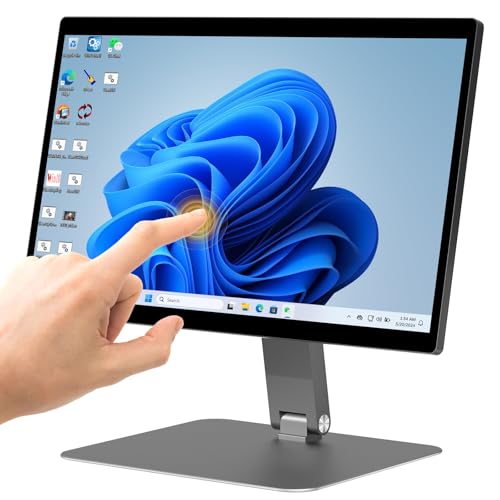
The OuuOee 15.6-Inch Touchscreen All-in-One PC includes a touchscreen display that supports 10-point synchronous touch. You can drag images, zoom, and type directly on the screen without a mouse or keyboard. This is useful for interactive demonstrations or casual use. The HP 21.5-inch All-in-One Intel N100 Desktop does not list touchscreen capabilities. It relies on traditional input methods like the included keyboard and mouse. For users who prefer tactile interaction or need to present content in portrait mode, the OuuOee touch interface is a distinct advantage. Standard desktop users may find the HP non-touch display sufficient.
processor
Both systems use Intel processors designed for efficiency. The HP 21.5-inch All-in-One Intel N100 Desktop is powered by an Intel N100 with four cores and four threads. It boosts up to 3.4GHz and includes 6MB of cache. The OuuOee 15.6-Inch Touchscreen All-in-One PC uses an Intel N5095 processor. This chip also reaches up to 3.4GHz but is a quad-core part as well. The N100 is a newer architecture than the N5095, which can offer better performance per watt. However, both chips are entry-level and suitable for basic office tasks, web browsing, and media playback. The HP has a slight architectural edge.
operating system
The operating systems differ significantly between the two models. The HP 21.5-inch All-in-One Intel N100 Desktop comes with Windows 11 Home. This version is optimized for consumer use and personal productivity. The OuuOee 15.6-Inch Touchscreen All-in-One PC ships with Windows 11 Pro. This edition includes additional business features such as BitLocker encryption, Remote Desktop, and Group Policy management. If you need advanced security or network management tools for a business environment, the OuuOee Pro OS is superior. For general home use, the HP Home OS is standard and sufficient.
storage capacity
Storage options vary between the two configurations. The HP 21.5-inch All-in-One Intel N100 Desktop is listed with up to 640GB of storage in its higher variation, which includes internal drive space and SD card expansion via the docking hub. The base model shown in key specs lists 384GB. The OuuOee 15.6-Inch Touchscreen All-in-One PC offers 128GB of ROM. This is significantly less space for files, applications, and the operating system. The HP provides more room for your data and media library. The OuuOee storage may require external drives for larger files.
connectivity
Both computers offer robust port selection. The HP 21.5-inch All-in-One Intel N100 Desktop includes one USB-C 3.1, two USB-A 2.0, two USB-A 3.0, an Ethernet port, HDMI, and a headphone jack. It also features Wi-Fi 6. The OuuOee 15.6-Inch Touchscreen All-in-One PC provides one USB-C, two USB 3.0, two USB 2.0, an HDMI 2.0 port, a Gigabit LAN port, and a TF card socket. Both support Bluetooth. The OuuOee explicitly mentions a Gigabit Ethernet port, ensuring high-speed wired internet. The HP lists a standard Ethernet port. Both support wireless connectivity for peripherals and internet access.
Which AIO Desktop Fits Your Workflow
Users needing large screen real estate
The HP model features a 21.5-inch display, offering significantly more vertical space than the OuuOee's 15.6-inch screen. This larger canvas makes viewing detailed spreadsheets and web pages easier. The 1920 x 1080 resolution ensures sharp text and images for comfortable daily office work and document editing.
Professionals requiring Windows 11 Pro
The OuuOee system includes Windows 11 Pro, providing advanced business features not found in the HP's Windows 11 Home edition. This operating system supports better security and management tools for corporate environments. It is the better choice if you need professional-grade OS capabilities for your daily tasks.
Users wanting flexible screen positioning
The OuuOee desktop offers a 360-degree rotating touchscreen. This allows you to switch between landscape, portrait, and folded modes for presentations or collaborative sharing. The HP has a fixed stand with limited tilt. If you need to adjust the screen angle frequently or use touch input, this flexibility is essential.
The products compared

HP 21.5-inch All-in-One Intel N100 Desktop
Best for: Basic office tasks and student study
- Processor
- Intel N100
- System Memory
- 8GB DDR5
- Storage Capacity
- 128GB SSD
- Screen Size
- 21.5"
- Display Resolution
- 1920 x 1080
- Graphics
- Intel UHD Graphics
View on Amazon: HP 21.5-inch All-in-One Intel N100 Desktop Affiliate link
This HP all-in-one desktop pairs an Intel N100 processor with 8GB of DDR5 RAM and a 384GB storage drive. It features a 21.5-inch FHD anti-glare display and Windows 11 Home. The unit includes a docking hub with an SD card slot for extra storage. It is designed for office tasks and study, offering a compact footprint with essential connectivity ports.
Pros
- Intel N100 quad-core processor with up to 3.4GHz boost clock
- 21.5-inch FHD anti-glare VA display with adjustable tilt stand
- 8GB DDR5 system memory for responsive multitasking
- Integrated Wi-Fi 6 and Bluetooth connectivity
- Front-facing 720p camera and DTS-tuned speakers
Cons
- Intel UHD Graphics lacks power for modern gaming
- Non-touchscreen display limits interaction options
- 8GB RAM is lower than the 16GB variant available
Good fit if
- You need a compact desktop for office work
- You want a built-in docking hub for storage
- You prefer a standard non-touchscreen monitor
Skip if
- You require high-end graphics for gaming
- You need a touchscreen for direct interaction
- You want more than 8GB of base RAM
Verdict: HP 21.5" FHD All-in-One Desktop is a practical choice for students and home offices who prioritize basic productivity over graphical performance. It fits users who need a tidy setup with essential ports and reliable daily computing.
OuuOee 15.6-Inch Touchscreen All-in-One PC
Best for: compact touch-enabled desktop tasks
- Processor
- N5095
- System Memory
- 8GB RAM
- Storage Capacity
- 128GB ROM
- Screen Size
- 15.6"
- Display Resolution
- FHD (1920 * 1080)
- Touchscreen
- Touchscreen
View on Amazon: OuuOee 15.6-Inch Touchscreen All-in-One PC Affiliate link
This OuuOee all-in-one desktop features a 15.6-inch FHD touchscreen powered by an Intel N5095 processor. It includes 8GB of RAM and 128GB of storage, running Windows 11 Pro. The unit supports 360-degree rotation and includes WiFi, Bluetooth, and a gigabit Ethernet port. It suits users needing a compact, interactive display for business or light tasks.
Pros
- 15.6-inch FHD touchscreen with 10-point touch support
- 360-degree rotating screen for flexible viewing angles
- Intel N5095 processor with 8GB RAM
- Includes gigabit Ethernet and WiFi connectivity
Cons
- 128GB storage capacity is limited for large files
- 15.6-inch screen is smaller than standard desktop monitors
- No mention of dedicated graphics processing
Good fit if
- You need a compact desktop with touch input
- You require a screen that rotates for presentations
- You want a lightweight unit for small spaces
Skip if
- You need high-end gaming performance
- You require large storage capacity for media
- You prefer a standard fixed monitor setup
Verdict: OuuOee 15.6" Touchscreen AIO is a practical option for users who prioritize touch interaction and flexible positioning over raw power or large screen real estate.
Specifications side by side
| Spec | HP 21.5-inch All-in-One Intel N100 Desktop | OuuOee 15.6-Inch Touchscreen All-in-One PC |
|---|---|---|
| Processor | Intel N100 | N5095 |
| System Memory | 8GB DDR5 | 8GB RAM |
| Storage Capacity | 128GB SSD | 128GB ROM |
| Screen Size | 21.5" | 15.6" |
| Display Resolution | 1920 x 1080 | FHD (1920 * 1080) |
| Graphics | Intel UHD Graphics | not stated |
| Touchscreen | not stated | Touchscreen |
| Operating System | Windows 11 Home | Win 11 Pro |
| Memory | 8GB RAM | 8GB RAM |
| Storage | 128GB SSD | not stated |
| Use | not stated | Business |
| Display Feature | not stated | Touchscreen |
| Dimensions | 24 × 21 × 7 inches | not stated |
| Weight | 18 pounds | 7.54 pounds |
| Color | White | not stated |
| Model | HP22 | N5095-Support |
| Size | not stated | N5095-8+128-Desktop |
Frequently asked questions
Which all-in-one desktop is better for students?
The HP 21.5-inch model is the better choice for students. Its larger screen provides more vertical space for reading documents and writing essays. It is designed for basic office tasks and study routines. The 8GB RAM handles standard productivity apps without issue. The OuuOee is smaller and less suited for long study sessions.
Does the OuuOee support touch input?
Yes, the OuuOee 15.6-inch All-in-One PC includes a touchscreen display. This feature allows you to navigate Windows 11 Pro using your fingers. It is useful for interactive tasks or flexible positioning. The HP model does not list touch capabilities in its specifications. You must use a mouse and keyboard with the HP system.
How much RAM do these computers have?
Both systems come equipped with 8GB of RAM. This memory level supports basic multitasking and everyday computing needs. It is sufficient for web browsing, document editing, and media playback. Neither machine offers higher memory configurations in this comparison. You should ensure your software requirements fit within this 8GB limit.
Which device is lighter and more portable?
The OuuOee is significantly lighter than the HP desktop. It weighs 7.54 pounds, making it easier to move or reposition. The HP model weighs 15 pounds, which is heavier due to its larger chassis. If you need a compact unit for flexible placement, the OuuOee is the practical option. The HP is designed for a fixed desk location.
What operating system runs on these units?
Both all-in-one desktops run Windows 11. The OuuOee specifically ships with Windows 11 Pro, which offers additional business features. The HP runs the standard Windows 11 version. Both systems provide a familiar interface for general users. You can expect similar core functionality and app compatibility on both machines.
Is the HP suitable for home office work?
Yes, the HP 21.5-inch All-in-One is practical for home offices. It prioritizes basic productivity over graphical performance. The 21.5-inch screen offers ample space for spreadsheets and multiple windows. It includes essential ports for connecting peripherals. This setup is ideal for users who need a tidy, reliable daily computing station.