HP vs Lenovo: All-In-One Desktops Compared by Specs
As an Amazon Associate we earn from qualifying purchases. Links on this page are affiliate links.
This HP vs lenovo all in one desktop comparison looks at two compact systems built for home and office use. Both machines share the same Intel N100 quad-core processor and run Windows 11 Home. The main difference lies in their display sizes and memory configurations. The HP model offers a smaller 21.5-inch screen with higher maximum RAM options, while the Lenovo features a larger 23.8-inch panel with more standard system memory. You should review the specific specs below to see which fits your workflow.
Key differences
| Aspect | HP 21.5-inch All-in-One Intel N100 Desktop | Lenovo IdeaCentre 24" Intel N100 Desktop |
|---|---|---|
| Screen Size | 21.5 inches | 23.8 inches |
| Display Panel | VA with anti-glare | IPS with 99% sRGB |
| System Memory | 8GB (up to 32GB in variations) | 16GB DDR4 |
| Storage | 384GB SSD | 256GB PCIe NVMe SSD |
| Webcam | 720p front-facing | HD with privacy shutter |
Which one should you choose?
Choose HP 21.5-inch All-in-One Intel N100 Desktop if
- You need a smaller footprint for tight desk spaces
- You want the option to upgrade RAM up to 32GB
- You prefer a VA panel for higher contrast ratios
Choose Lenovo IdeaCentre 24" Intel N100 Desktop if
- You want a larger 23.8-inch screen for multitasking
- You need 16GB of RAM pre-installed for smoother multitasking
- You value IPS color accuracy and wide viewing angles
Verdict: The Lenovo IdeaCentre is the better choice if you prioritize screen real estate and come with 16GB of RAM ready for immediate use. The HP model suits those who need a physically smaller unit or want the flexibility to configure higher RAM capacities. Both systems handle basic productivity tasks efficiently with their shared N100 processor.
Specs Comparison: HP vs Lenovo AIO
Screen Size
The Lenovo IdeaCentre 24 features a larger 23.8-inch display, while the HP model offers a 21.5-inch panel. Both systems deliver Full HD resolution at 1920 x 1080 pixels, ensuring sharp text and clear images for daily tasks. The Lenovo screen utilizes IPS technology, providing 178-degree wide viewing angles and 99% sRGB color accuracy. This allows you to see consistent colors from various positions without washout. The HP uses a VA panel, which also expands vertical space for better document viewing. If you need more screen real estate for multitasking or media consumption, the Lenovo gives you extra inches. However, the HP remains compact enough for smaller desks. Both include anti-glare coatings to reduce eye strain during long work sessions.
Memory
Memory capacity significantly impacts how smoothly you can run multiple applications simultaneously. The Lenovo IdeaCentre 24 comes equipped with 16GB of DDR4-3200 RAM as its standard configuration. This higher capacity helps prevent slowdowns when you have numerous browser tabs, office suites, and communication apps open at once. The HP desktop is listed with 8GB of system memory in its key specifications, though some features mention options up to 32GB DDR5. Based on the primary listed spec, the HP starts with less RAM. For users who frequently switch between heavy programs, the Lenovo’s 16GB provides a more robust foundation for multitasking without lag. The HP’s configuration may require more careful management of open applications to maintain performance.
Storage
Storage type and speed affect how quickly your computer boots and launches programs. The Lenovo IdeaCentre 24 includes a 256GB PCIe NVMe solid-state drive. NVMe SSDs are known for lightning-fast boot times, often under 10 seconds, and instant application loading. The HP desktop lists a 384GB storage capacity in its key specs, but the specific drive type is not explicitly defined as NVMe in the provided data. The HP does mention an SD card slot in a docking hub for expanded space, which offers a different approach to storage management. For pure speed and responsiveness in daily operations, the Lenovo’s NVMe SSD is the superior choice. The HP’s larger total capacity might suit users with many files, but the Lenovo ensures faster system performance.
Display Feature
Display technology influences visual quality and comfort. The Lenovo IdeaCentre 24 uses IPS panel technology, which is praised for accurate color reproduction and wide viewing angles. It offers 99% sRGB coverage, making it suitable for photo editing and media consumption where color fidelity matters. The HP desktop utilizes a VA panel, which typically offers higher contrast ratios but may have narrower viewing angles compared to IPS. Both screens share the same 1920 x 1080 resolution and anti-glare properties. The Lenovo’s emphasis on color accuracy and viewing consistency gives it an edge for visual tasks. The HP’s VA panel is still effective for general office work and web browsing, providing a comfortable experience for text-heavy documents.
Connectivity
Both systems offer comprehensive connectivity options for peripherals and networks. The HP includes one USB-C 3.1 port, two USB-A 2.0 ports, and two USB-A 3.0 ports. It also features an Ethernet port, HDMI, and a headphone/microphone combo jack. The Lenovo IdeaCentre 24 provides four USB-A ports, including two high-speed 10Gbps USB 3.2 Gen 2 ports, along with an HDMI-out, RJ-45 Ethernet, and audio jack. The Lenovo’s inclusion of faster 10Gbps USB ports allows for quicker data transfers with compatible devices. Both support Wi-Fi 6 and Bluetooth, with the Lenovo specifying Bluetooth 5.2 for better peripheral pairing. The Lenovo’s port selection offers more high-speed options for modern peripherals.
Which AIO Desktop Fits Your Needs
Office workers needing extra screen space
The Lenovo IdeaCentre 24 offers a larger 23.8-inch display compared to the HP's 21.5-inch panel. Both provide Full HD resolution, but the extra inches on the Lenovo allow for more content on screen. This makes multitasking with multiple windows easier for daily productivity tasks in an office setting.
Users wanting high capacity storage
The HP model includes an 8-in-1 docking hub with an SD card slot. This feature allows you to expand storage by inserting an SD card. The Lenovo relies solely on internal NVMe SSDs. If you frequently manage large media files or need flexible external storage options, the HP design provides a practical advantage.
Those prioritizing fast boot times
The Lenovo IdeaCentre 24 uses a PCIe NVMe SSD, which delivers faster boot times and quicker application launches than traditional drives. The HP model lists storage capacity but does not specify the drive type in its key specs. If you value immediate system responsiveness and rapid file access, the Lenovo's storage technology is the better choice.
Buyers needing physical security features
The Lenovo includes a Kensington lock slot for physical security in shared spaces. The HP data does not mention this feature. If you plan to use the computer in a public area, office, or library where theft prevention is important, the Lenovo provides a dedicated hardware solution to secure the device to your desk.
The products compared

HP 21.5-inch All-in-One Intel N100 Desktop
Best for: Home office and student tasks
- Processor
- Intel N100
- System Memory
- 8GB DDR5
- Storage Capacity
- 128GB SSD
- Screen Size
- 21.5"
- Display Resolution
- 1920 x 1080
- Graphics
- Intel UHD Graphics
View on Amazon: HP 21.5-inch All-in-One Intel N100 Desktop Affiliate link
This HP all-in-one desktop pairs an Intel N100 quad-core processor with 8GB of DDR5 RAM and a 384GB SSD. The 21.5-inch Full HD display uses VA panel technology for better viewing angles. It includes Wi-Fi 6, Bluetooth, and a front-facing 720p camera. The adjustable stand tilts for comfort. This setup handles daily office tasks and web browsing efficiently without requiring a dedicated graphics card.
Pros
- Intel N100 processor with up to 3.4GHz boost clock
- 21.5-inch 1920 x 1080 VA display with anti-glare coating
- Includes Wi-Fi 6 and Bluetooth connectivity
- Adjustable stand tilts from -6° to 21°
Cons
- Intel UHD Graphics limits gaming and heavy video editing
- 8GB RAM may restrict heavy multitasking with many apps open
- 720p webcam resolution is lower than modern 1080p standards
Good fit if
- You need a compact desktop for office work and school assignments
- You want a system with built-in Wi-Fi 6 and Bluetooth
- You prefer a display that tilts to reduce neck strain
Skip if
- You require dedicated graphics for gaming or 3D rendering
- You need 1080p or higher video conferencing quality
- You plan to run memory-intensive professional software
Verdict: HP 21.5" AIO Intel N100 Desktop suits students and home office users who need reliable performance for web browsing and document editing. It is not suitable for gamers or creative professionals requiring high-end graphics or extensive multitasking capabilities.
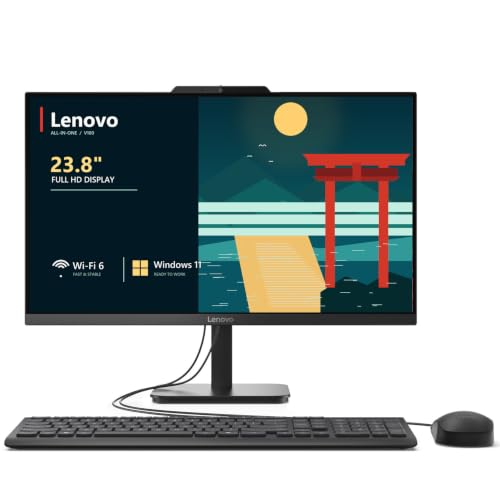
Lenovo IdeaCentre 24" Intel N100 Desktop
Best for: home office and student productivity
- Processor
- Intel N100
- System Memory
- 32 GB DDR4
- Storage Capacity
- 2 TB NVMe SSD
- Screen Size
- 23.8"
- Display Resolution
- Full HD
- Graphics
- Intel UHD Graphics
View on Amazon: Lenovo IdeaCentre 24" Intel N100 Desktop Affiliate link
The Lenovo IdeaCentre 24 is a 23.8-inch all-in-one desktop featuring an Intel N100 quad-core processor and 16GB of DDR4 RAM. It includes a 256GB NVMe SSD and Wi-Fi 6 for reliable connectivity. This system suits home offices and students needing a clutter-free setup with a Full HD IPS display and integrated webcam.
Pros
- 16GB DDR4 RAM for smooth multitasking
- 23.8-inch Full HD IPS display with 99% sRGB
- Intel N100 quad-core processor up to 3.4GHz
- Wi-Fi 6 and Bluetooth 5.2 connectivity
- Includes wired keyboard and mouse
Cons
- 256GB SSD storage is limited for large media libraries
- Intel UHD Graphics only suitable for light tasks
- No dedicated graphics card for gaming
Good fit if
- You need a compact desktop for home office work
- You want a single-unit solution for video conferencing
- You prefer a clutter-free desk setup
Skip if
- You require high-end gaming performance
- You need extensive local storage for large files
- You plan to edit 4K video regularly
Verdict: Lenovo IdeaCentre 24 AIO offers solid everyday performance for office tasks and light media use. It fits users who prioritize a clean, space-saving design with reliable connectivity over raw processing power.
Specifications side by side
| Spec | HP 21.5-inch All-in-One Intel N100 Desktop | Lenovo IdeaCentre 24" Intel N100 Desktop |
|---|---|---|
| Processor | Intel N100 | Intel N100 |
| System Memory | 8GB DDR5 | 32 GB DDR4 |
| Storage Capacity | 128GB SSD | 2 TB NVMe SSD |
| Screen Size | 21.5" | 23.8" |
| Display Resolution | 1920 x 1080 | Full HD |
| Graphics | Intel UHD Graphics | Intel UHD Graphics |
| Operating System | Windows 11 Home | Windows 11 Home |
| Memory | 8GB RAM | 16GB RAM |
| Storage | 128GB SSD | not stated |
| Dimensions | 24 × 21 × 7 inches | 21.2 × 7.3 × 16.7 inches |
| Weight | 18 pounds | not stated |
| Color | White | White |
| Model | HP22 | 24 |
| Size | not stated | 32GB DDR4 RAM, 1TB PCIe SSD |
Frequently asked questions
Which all-in-one desktop has more RAM?
The Lenovo IdeaCentre 24 includes 16GB of RAM. In contrast, the HP 21.5-inch model comes with 8GB of RAM. If you plan to run multiple applications simultaneously or keep many browser tabs open, the Lenovo provides more memory headroom. This extra capacity helps maintain smooth performance during heavier multitasking sessions without slowing down.
Are both systems suitable for home office work?
Yes, both machines are designed for home office and student productivity. They share the same Intel N100 processor, which handles web browsing and document editing reliably. The HP is ideal for basic tasks, while the Lenovo offers additional RAM for users who need to juggle more applications at once without performance drops.
Do these all-in-ones support gaming?
No, neither system is suitable for gaming. Both rely on the entry-level Intel N100 processor and lack dedicated graphics cards. They are built for everyday productivity rather than high-end graphics or extensive multitasking. If you require strong performance for modern games or creative professional workloads, these compact units will not meet your needs.
What is the difference in screen size?
The Lenovo IdeaCentre 24 features a 23.8-inch display, while the HP model has a 21.5-inch panel. Both screens offer Full HD resolution for clear images. The larger Lenovo screen allows you to fit more content on your desktop, which can improve workflow efficiency if you frequently compare documents or use split-screen layouts.
Which model is lighter and more compact?
The HP 21.5-inch desktop weighs 15 pounds and measures 19.4 inches in length. The Lenovo IdeaCentre 24 is slightly larger, measuring 21.2 inches in length and 16.7 inches in height. If space is limited on your desk, the HP offers a smaller footprint. However, the Lenovo provides a bigger display within a similarly compact all-in-one form factor.
Can I use these for student tasks?
Both systems are excellent for student tasks. They run Windows 11 Home and handle web research, online classes, and document creation with ease. The HP is great for basic study needs, while the Lenovo’s 16GB of RAM better supports students who need to run several programs simultaneously, such as a word processor and multiple browser windows.