HP Desktop Tower Intel i3 Review: Who It Fits and Who Should Skip It
As an Amazon Associate we earn from qualifying purchases. Links on this page are affiliate links.
This hp desktop tower review focuses on the HP Desktop 2026 Tower, a machine built for heavy multitasking rather than gaming. It pairs a 13th Gen Intel Core i3-13100 processor with a massive 64GB of DDR4 RAM. You also get a spacious 2TB PCIe SSD for fast storage. This configuration targets users who need to run many applications simultaneously without slowdowns. The system runs Windows 11 Home and includes essential peripherals like a keyboard and mouse. It is designed for productivity environments where stability and memory capacity matter more than graphical power.
What stands out
- 13th Gen Intel Core i3-13100 processor with up to 4.5GHz boost speed
- 64GB DDR4 system memory for extensive multitasking
- 2TB PCIe SSD for rapid data access and ample storage
- Dual monitor support via HDMI and VGA outputs
- Includes HP 125 wired keyboard and mouse for immediate use
Who it fits
Good fit for
This setup suits remote professionals managing multiple video calls and large documents. Students handling coding assignments or research with many browser tabs will benefit from the high RAM. Business users needing stable connections via Gigabit Ethernet and secure TPM 2.0 features will find it reliable. The large storage helps those storing extensive financial records or customer databases. If your work involves heavy office suites and cloud applications, this tower provides the necessary resources without cluttering your desk.
Who should skip it
Gamers should look elsewhere because this unit lacks a dedicated graphics card. The integrated graphics in the i3 processor cannot handle modern 3D titles or high-refresh-rate displays. Video editors requiring GPU acceleration for rendering will also find it limiting. Users seeking high-end audio processing or specialized hardware expansion may need a different chassis. If your workflow depends on graphical performance rather than raw CPU and memory throughput, this configuration will not meet your needs.
Verdict: This HP Desktop Tower is a robust productivity machine defined by its exceptional memory and storage capacity. It is an ideal choice for heavy multitasking but unsuitable for graphics-intensive tasks.
Key specs explained for this HP tower
Intel Core i3-13100
This 13th Gen processor has four cores and eight threads. It boosts up to 4.5GHz for responsive performance. You will find it handles office apps, web browsing, and video calls smoothly. It is not designed for heavy gaming. If you need raw power for video editing or 3D rendering, look for higher-end i5 or i7 models instead.
64GB DDR4 RAM
This system includes a large amount of memory for multitasking. You can run many browser tabs, office programs, and communication apps at once without lag. This is unusual for a standard desktop. Most users need 16GB or 32GB. This high capacity suits professionals who keep dozens of windows open simultaneously for work or research.
2TB PCIe SSD
The solid-state drive offers two terabytes of fast storage. You get quick boot times and rapid file access. The space holds thousands of documents, photos, and moderate media libraries. It is much faster than older hard drives. If you store massive 4K video files or large game libraries, you might need external storage later.
Windows 11 Home
The computer comes with Microsoft's latest consumer operating system pre-installed. It provides a familiar interface for productivity and web use. You get standard security features and app compatibility. This is the standard version for home users. It lacks advanced management tools found in Pro editions, which is fine for personal or small office use.
Tower
The desktop case stands upright on your desk. This form factor allows for better airflow and easier upgrades than smaller mini PCs. You can access internal components to add more storage or RAM. It takes up more floor space than a SFF model. Choose this if you want a traditional, expandable desktop setup.
Design and build quality
The HP Desktop 2026 Tower measures 13.3 inches in height, 11.9 inches in length, and 6.1 inches in width. This vertical form factor allows it to stand upright on a desk or fit into tight spaces. The listing notes the use of 15% post-consumer recycled plastic in its construction. This choice suggests a focus on sustainability without compromising the structural integrity needed for daily office use.
You get a complete setup right out of the box. The package includes an HP 125 wired keyboard and mouse. This means you can start working immediately without searching for separate peripherals. The tower itself features a practical layout of ports. You have four USB 5Gbps and four USB 2.0 ports on the front and rear. These allow you to connect multiple peripherals, from flash drives to external hard drives, without needing extra hubs.
Connectivity is straightforward and reliable. The unit includes HDMI and VGA outputs for dual monitor support. This is useful for extending your workspace when handling large spreadsheets or research papers. A built-in Gigabit Ethernet port ensures stable wired internet. This is preferable to Wi-Fi for large file downloads or remote server access. The design prioritizes function over flash. It is a solid, no-nonsense machine for professionals who need a reliable workstation that fits neatly into a standard office environment.
Setup And Everyday Use
You can begin using this HP Desktop Tower immediately after unboxing, as it includes a wired HP keyboard and mouse. This eliminates the need to purchase separate input devices before your first session. The system arrives with Windows 11 Home pre-installed, providing a familiar interface for productivity tasks right away. You do not need to search for drivers or configure the operating system manually.
For your daily workflow, the 64GB of DDR4 RAM allows you to run multiple applications simultaneously without slowdowns. You can keep numerous browser tabs open alongside heavy office suites or coding environments. The 2TB PCIe SSD ensures that large files, such as video lectures or database records, load quickly. This storage capacity supports extensive research projects and document archives.
Connectivity is straightforward. You can connect up to eight USB devices using the front and rear ports. Dual monitors are supported via HDMI and VGA outputs, which is useful for extended desktop productivity. A built-in Gigabit Ethernet port provides a stable wired internet connection for cloud storage and large file transfers. The universal audio jack allows you to plug in headsets or speakers directly. TPM 2.0 security is included to protect your personal and school data. The 180W power adapter delivers reliable performance with high efficiency. This setup is ideal for students, remote professionals, and business users who need a ready-to-use workstation.
Before You Buy This HP Tower
You already have a monitor, keyboard, and mouse for this HP Desktop Tower. The listing includes a wired HP keyboard and mouse, but you must provide your own display. Check that your monitor has HDMI or VGA inputs to match the rear ports. You also need to verify your internet connection. The unit relies on Gigabit Ethernet for stable performance, so ensure you have an available RJ-45 port near your desk. Wireless adapters are not mentioned, so you may need to buy one separately if you lack wired access. This model uses 64GB of RAM, which is unusually high for a Core i3 system. You might find other configurations in our 1 product guide that offer better balance between CPU power and memory for your specific budget. Keep the tower upright for proper airflow. Dust the vents occasionally to maintain efficiency. This setup is ideal for users who need massive storage and memory for heavy multitasking but do not require dedicated graphics processing power.
Check before you buy
- Confirm your monitor has HDMI or VGA inputs for display connection.
- Ensure you have a wired Ethernet port for stable internet access.
- Verify your desk space accommodates a 13.3-inch tall vertical tower.
- Check if you need a wireless adapter since Ethernet is primary.
The product at a glance
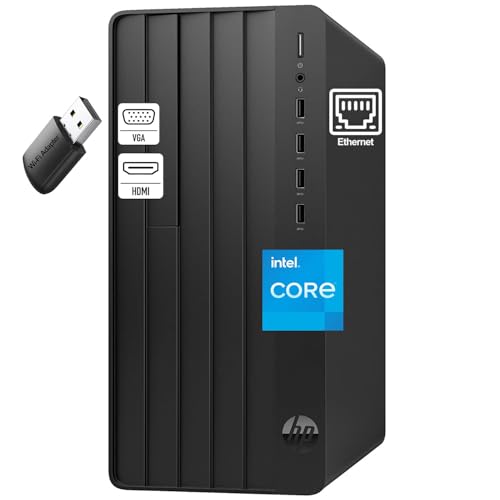
HP Desktop Tower Intel i3 64GB RAM 2TB SSD
Best for: office multitasking and large file storage
- Processor Model
- Intel Core i3-13100
- System Memory
- 64 GB
- Storage Capacity
- 2 TB PCIe SSD
- Operating System
- Windows 11 Home
- Form Factor
- Tower
- Use
- Business
View on Amazon: HP Desktop Tower Intel i3 64GB RAM 2TB SSD Affiliate link
This HP Desktop Tower uses a 13th Gen Intel Core i3-13100 processor to handle everyday multitasking. It includes 64GB of DDR4 RAM and a 2TB PCIe SSD for fast storage and smooth performance across many applications. The system comes with Windows 11 Home, a wired keyboard, and a mouse. It supports dual monitors and includes built-in security features. This setup is designed for users who need reliable performance for office work, school projects, and remote tasks without complex gaming requirements.
Pros
- 64GB DDR4 RAM supports heavy multitasking
- 2TB PCIe SSD offers ample fast storage
- 13th Gen Intel Core i3-13100 processor
- Includes wired keyboard and mouse
Cons
- No dedicated graphics card for gaming
- Only includes wired input devices
- Base model lacks high-end processing power
Good fit if
- You need high RAM for many browser tabs
- You require large storage for documents
- You want a ready-to-use office setup
Skip if
- You play modern 3D games
- You need wireless peripherals
- You require professional video editing tools
Verdict: HP 290 G9 i3-13100 64GB 2TB Tower is a solid choice for office workers and students who prioritize memory and storage over graphics performance. It fits users who need a complete, plug-and-play system for daily productivity tasks.
Specifications side by side
| Spec | HP Desktop Tower Intel i3 64GB RAM 2TB SSD |
|---|---|
| Processor Model | Intel Core i3-13100 |
| System Memory | 64 GB |
| Storage Capacity | 2 TB PCIe SSD |
| Operating System | Windows 11 Home |
| Form Factor | Tower |
| Memory | 64GB RAM |
| Use | Business |
| Dimensions | 11.9 × 6.1 × 13.3 inches |
| Size | 64GB DDR4 RAM, 2TB PCIe SSD |
| Model | 290 G9 |
Frequently asked questions
Is this HP tower suitable for gaming?
No. This model lacks a dedicated graphics card. It relies on integrated graphics from the Intel Core i3-13100 processor. You should skip it if you plan to play modern 3D titles. It is designed for office productivity and light multimedia tasks instead of high-performance gaming.
Does the HP 290 G9 support DDR5 memory?
No. The specifications list 64GB of DDR4 RAM. DDR5 is a newer, faster memory standard that this specific motherboard does not support. You get a large capacity of RAM, but it uses the previous generation technology. This is typical for budget-friendly office towers focused on value.
What operating system comes pre-installed?
Windows 11 Home is included out of the box. This provides a familiar interface for daily tasks and productivity. You do not need to purchase a separate license. The system is ready to use immediately after setup, offering standard Microsoft features and updates for home or office use.
Can I connect a standard monitor to this PC?
Yes. The system supports standard display connections. You must provide your own monitor, as it is not included. Check that your display has HDMI or VGA inputs to ensure compatibility. This allows you to use any existing screen you have on hand for your desktop setup.
Is the 2TB SSD fast enough for daily use?
Yes. The 2TB PCIe SSD offers ample storage and quick load times. It is significantly faster than traditional hard drives. You can store large files, documents, and applications without slowing down the system. This speed ensures smooth multitasking and rapid access to your data during everyday office work.
How much space does the HP 290 G9 take up?
It measures 13.3 inches in height, 11.9 inches in length, and 6.1 inches in width. This vertical tower design fits into tight desk spaces or under monitors. The compact form factor allows for flexible placement. It is small enough for small offices but large enough to house internal components.