GMKtec vs ACEMAGIC: Mini PCs Compared by Specs
As an Amazon Associate we earn from qualifying purchases. Links on this page are affiliate links.
This GMKtec vs ACEMAGIC mini PC guide compares two compact desktops built for different workflows. Both units feature 16GB of RAM and support triple 4K displays. The main difference lies in their processor generations and network capabilities. The GMKtec G11 uses a newer Ryzen Embedded chip with dual 2.5GbE ports. The ACEMAGIC K1 relies on a Ryzen 3 Pro 7330U with standard Gigabit Ethernet. You need to decide which connectivity and processing power best fit your specific needs.
Key differences
| Aspect | GMKtec Mini PC Dual 2.5GbE | ACEMAGIC Ryzen 7330U Mini PC |
|---|---|---|
| Processor | AMD Ryzen Embedded R2514 | AMD Ryzen 3 Pro 7330U |
| Ethernet Ports | Dual 2.5GbE | Single 1GbE |
| Memory Type | Dual-channel DDR4 | LPDDR4 |
| Wi-Fi | Wi-Fi 6E | Wi-Fi 5 |
| Storage | Not listed | 256GB M.2 SSD |
Which one should you choose?
Choose GMKtec Mini PC Dual 2.5GbE if
- You need dual 2.5GbE ports for a home lab or firewall setup.
- You require Wi-Fi 6E for faster, lower-latency wireless connections.
- You prefer a system designed for continuous 24/7 commercial operation.
Choose ACEMAGIC Ryzen 7330U Mini PC if
- You want a pre-installed Windows 11 Pro operating system.
- You need a larger, more traditional chassis size for easier expansion.
- You are looking for a unit with a longer 3-year warranty period.
Verdict: The GMKtec G11 is the better choice for networking enthusiasts and users who need modern wireless standards. The ACEMAGIC K1 suits those who want a ready-to-use Windows 11 Pro system with standard connectivity. Your decision should depend on whether you prioritize network flexibility or out-of-the-box convenience.
GMKtec vs ACEMAGIC Mini PC Comparison
processor performance
The GMKtec G11 uses the AMD Ryzen Embedded R2514, a chip based on Zen+ architecture designed for 24/7 continuous operation. It claims to beat Intel's N150 by 30% and offers higher throughput than the Ryzen 4300U. In contrast, the ACEMAGIC K1 features the AMD Ryzen 3 Pro 7330U, which runs at a base of 2.3GHz and boosts to 4.3GHz. This processor delivers 28% higher PassMark scores than the N150 and improves GPU performance by at least 23% over older models like the N95. Both chips offer strong efficiency, but the R2514 targets industrial stability while the 7330U focuses on desktop speed.
memory configuration
Both systems come with 16GB of RAM, but the architecture differs significantly. The GMKtec G11 supports dual-channel DDR4 memory, effectively doubling the data pathway between the RAM and processor. This setup helps eliminate memory bottlenecks for the GPU, potentially boosting gaming frame rates by 30% and improving multitasking responsiveness. The ACEMAGIC K1 uses 16GB of LPDDR4 3200MT/S memory, which is non-expandable. While LPDDR4 offers fast transfer speeds for snappier performance, it lacks the dual-channel bandwidth advantages of the GMKtec design. For heavy multitasking or professional workloads, the GMKtec memory structure provides a clearer technical edge.
network connectivity
Networking capabilities highlight a major divergence between these two mini PCs. The GMKtec G11 includes dual 2.5GbE Ethernet ports, allowing it to function as a high-speed router, firewall, or NAS server using software like pfSense. This dual-port setup is ideal for home labs or isolated IoT networks. The ACEMAGIC K1 relies on a single 10/100/1000M Gigabit Ethernet port, which is standard for general office use but lacks the throughput for advanced networking tasks. Additionally, the GMKtec offers WiFi 6E with the 6GHz band for lower latency, while the ACEMAGIC provides WiFi 5 and Bluetooth 4.2. The GMKtec wins for connectivity flexibility.
storage and expansion
Storage options vary in capacity and expandability. The ACEMAGIC K1 comes with a 256GB M.2 2280 SSD and allows expansion via M.2 NVMe PCIe 3.0 or SATA slots up to 2TB. This gives users room to grow their storage over time. The GMKtec G11 specifications do not explicitly list internal storage capacity or expansion slots in the provided data, focusing instead on the processor and memory. While the ACEMAGIC offers clear storage versatility, the GMKtec data is silent on this point. Without confirmed storage specs for the GMKtec, this round remains a tie based on available information.
display support
Both mini PCs support triple 4K@60Hz displays, making them suitable for multitasking or digital signage. The GMKtec G11 achieves this through dual HDMI 2.0 ports and a USB-C DisplayPort Alt Mode. The ACEMAGIC K1 uses HDMI, Type-C, and DP 1.4 interfaces to drive three screens. The GMKtec’s AMD Radeon GPU is noted for outperforming Intel UHD by 480% in benchmarks, suggesting better graphics throughput for high-intensity tasks. The ACEMAGIC’s Radeon Graphics runs at 1400MHz with five cores. Both handle 4K video playback well, but the GMKtec’s higher GPU performance metrics give it a slight advantage for graphic-heavy workloads.
build and design
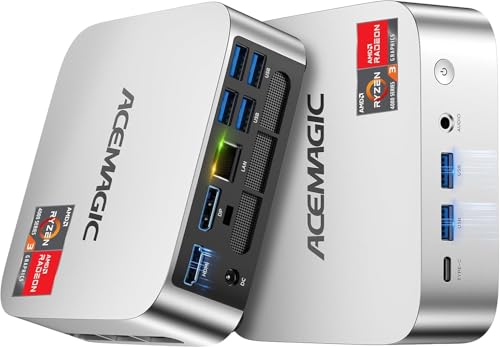
Physical dimensions and weight differ between the two units. The ACEMAGIC K1 is larger at 5.04 x 5.04 x 1.61 inches and weighs 1.1 pounds, featuring a silver-toned body and an internal power supply to reduce cable clutter. It supports VESA mounting for wall or monitor attachment. The GMKtec G11 is more compact at 3.42 x 3.42 x 1.55 inches and weighs 1.65 pounds, constructed from black steel. The ACEMAGIC’s lighter weight and internal power design offer portability and desk cleanliness, while the GMKtec’s smaller footprint saves more space. The choice depends on whether you prioritize compactness or integrated power management.
Which GMKtec or ACEMAGIC Mini PC suits you?
Home lab and networking enthusiasts
The GMKtec G11 features dual 2.5GbE Ethernet ports, allowing you to build a high-speed firewall, router, or NAS server. This dual NIC setup is essential for isolated networks, virtual machines, and secure remote access. The 16GB dual-channel RAM ensures smooth multitasking for these intensive networking tasks without bottlenecks.
Office users needing simple setup
The ACEMAGIC K1 includes a built-in power supply, requiring only one cable to reduce desktop clutter. It ships with Windows 11 Pro, offering a familiar, secure environment for daily business tasks. The 16GB LPDDR4 RAM and 256GB SSD provide responsive performance for office applications and media consumption right out of the box.
Users prioritizing modern wireless speed
The GMKtec G11 supports WiFi 6E on the 6GHz band, delivering faster speeds and lower latency with less interference. It also includes Bluetooth 5.2 for reliable peripheral connections. These modern wireless standards ensure a stable, high-speed connection for streaming and data transfer, outperforming the older WiFi 5 and Bluetooth 4.2 found in the ACEMAGIC.
Users wanting longer warranty coverage
The ACEMAGIC K1 offers a 3-year quality assurance period, which is significantly longer than the 1-year limited warranty provided with the GMKtec G11. This extended coverage gives you greater peace of mind regarding product durability and defects. If you plan to keep the device for several years, this longer support term is a practical advantage.
The products compared

GMKtec Mini PC Dual 2.5GbE
Best for: networking hubs and home labs
- Processor
- AMD Ryzen Embedded R2514
- Graphics Card
- AMD Radeon
- RAM Capacity
- 16GB
- RAM Type
- DDR4
- Storage Capacity
- 256GB
- Storage Interface
- NVMe
View on Amazon: GMKtec Mini PC Dual 2.5GbE Affiliate link
The GMKtec G11 uses the AMD Ryzen Embedded R2514 processor for continuous 24/7 operation. It includes 16GB of dual-channel DDR4 RAM and a dedicated AMD Radeon GPU. The unit features dual 2.5GbE ports, WiFi 6E, and support for three 4K displays. It suits users needing reliable networking hubs, home labs, or multi-display workstations.
Pros
- AMD Ryzen Embedded R2514 processor for 24/7 reliability
- 16GB dual-channel DDR4 RAM
- Dual 2.5GbE Ethernet ports
- Supports three independent 4K displays
Cons
- Only 256GB SSD capacity in this configuration
- No mention of included operating system
- 1-year limited warranty coverage
Good fit if
- You need a dedicated firewall or router
- You run virtual machines or containers
- You require three 4K monitors
Skip if
- You need more than 256GB storage
- You prefer Windows pre-installed
- You want extended warranty coverage
Verdict: GMKtec G11 Mini PC is a compact server built for networking and virtualization tasks. It fits users who need dual 2.5GbE ports and multi-display support for home labs or dedicated network roles.
ACEMAGIC Ryzen 7330U Mini PC
Best for: compact office work and triple displays
- Processor
- AMD Ryzen 7330U Pro
- Graphics Card
- AMD Radeon Graphics
- RAM Capacity
- 16GB
- RAM Type
- LPDDR4
- Storage Capacity
- 256GB
- Operating System
- Win 11 Pro
View on Amazon: ACEMAGIC Ryzen 7330U Mini PC Affiliate link
This ACEMAGIC K1 Mini PC uses an AMD Ryzen 3 Pro 7330U processor with 16GB of non-expandable LPDDR4 RAM and a 256GB M.2 SSD. It runs Windows 11 Pro and supports triple displays via HDMI, DisplayPort, and USB-C. The compact 5x5x1.6-inch chassis includes WiFi 5 and Bluetooth 4.2. It suits users needing a quiet, space-saving desktop for office tasks or media playback.
Pros
- AMD Ryzen 3 Pro 7330U processor with up to 4.3GHz boost
- 16GB LPDDR4 3200MT/S RAM for multitasking
- Triple display support via HDMI, DP, and USB-C
- Compact 5x5x1.6-inch silver chassis with VESA mount
- Internal power supply reduces cable clutter
Cons
- LPDDR4 RAM is non-expandable
- 256GB SSD storage is limited
- WiFi 5 and Bluetooth 4.2 are older standards
Good fit if
- You need a compact PC for office work
- You want triple monitor support
- You prefer a quiet system for light tasks
Skip if
- You require high-end gaming performance
- You need to upgrade RAM later
- You want the latest WiFi and Bluetooth standards
Verdict: ACEMAGIC K1 Ryzen 7330U Mini PC fits users who need a compact, quiet desktop for office work or media playback. It offers triple display support and a compact chassis, but the non-expandable RAM and older wireless standards limit its longevity for power users.
Specifications side by side
| Spec | GMKtec Mini PC Dual 2.5GbE | ACEMAGIC Ryzen 7330U Mini PC |
|---|---|---|
| Processor | AMD Ryzen Embedded R2514 | AMD Ryzen 7330U Pro |
| Graphics Card | AMD Radeon | AMD Radeon Graphics |
| RAM Capacity | 16GB | 16GB |
| RAM Type | DDR4 | LPDDR4 |
| Storage Capacity | 256GB | 256GB |
| Storage Interface | NVMe | not stated |
| Operating System | not stated | Win 11 Pro |
| Wireless Connectivity | WiFi 6E, Bluetooth 5.2 | WiFi 5, Bluetooth 4.2 |
| Use | not stated | Business |
| Dimensions | 3.42 × 3.42 × 1.55 inches | 5.04 × 5.04 × 1.61 inches |
| Weight | 1.65 pounds | 1.1 pounds |
| Size | 16GB+256GB R2514 | Ryzen 7330U+16GB+256GB |
| Color | Black Steel | Ryzen 7330U+16GB+256GB |
| Model | G11 | V1 |
Frequently asked questions
Which mini PC is better for a home lab?
The GMKtec G11 is the stronger choice for networking hubs and home labs. It features dual 2.5GbE ports, which allow you to create isolated networks or run virtual machines efficiently. This setup is ideal for dedicated network roles, unlike the ACEMAGIC model which lacks this specific connectivity.
How do the sizes of these mini PCs compare?
The GMKtec G11 measures 3.42 by 3.42 by 1.55 inches and weighs 1.65 pounds. The ACEMAGIC V1 is slightly wider at 5.04 by 5.04 by 1.61 inches but lighter at 1.1 pounds. You can mount either unit behind a monitor, though the GMKtec has a more compact footprint.
Does the GMKtec Mini PC support multiple displays?
Yes, the GMKtec G11 supports multi-display setups for your home lab or office. It fits users who need to connect several screens for virtualization tasks or network monitoring. This capability ensures you can manage complex workflows without needing a full-sized desktop tower.
Is the ACEMAGIC Mini PC good for office work?
The ACEMAGIC K1 Ryzen 7330U Mini PC is designed for compact office work and media playback. It offers triple display support and a quiet chassis. However, its non-expandable RAM and older wireless standards may limit its longevity if you plan to use it for heavy multitasking over several years.
What is the main difference between these two brands?
The GMKtec G11 focuses on networking and virtualization with dual 2.5GbE ports. The ACEMAGIC V1 targets general office use with a Ryzen processor and triple display output. Your choice depends on whether you need specialized network hardware or a standard compact desktop for daily tasks.
Can I use the GMKtec as a server?
Yes, the GMKtec G11 is built as a compact server for networking and virtualization. It supports the demands of home labs and dedicated network roles. Its design accommodates the continuous operation needed for server tasks, making it a practical alternative to larger, noisier server units.