Dell vs Suevery Gaming Desktops: Which Brand Fits You?
As an Amazon Associate we earn from qualifying purchases. Links on this page are affiliate links.
This guide covers the dell vs suevery gaming desktop options to help you pick the right machine. Both systems include 16GB of DDR4 RAM and a 512GB SSD for fast storage. The main difference lies in their core components. The Dell OptiPlex 7060 uses an Intel Core i7-8700 processor and lacks a dedicated graphics card. The Suevery R5 features an AMD Ryzen 5 5500 and includes an RX 6500 XT GPU. This makes the Suevery better for gaming, while the Dell suits office tasks.
Key differences
| Aspect | Dell OptiPlex SFF Intel Core i7 Desktop | Suevery R5 5500 RX 6500 XT Gaming PC |
|---|---|---|
| Processor | Intel Core i7-8700 | AMD Ryzen 5 5500 |
| Graphics Card | Integrated graphics only | RX 6500 XT 4GB |
| Form Factor | Small Form Factor (SFF) | Tower |
| Operating System | Windows 11 Pro | Not listed |
Which one should you choose?
Choose Dell OptiPlex SFF Intel Core i7 Desktop if
- You need a compact desktop for office work or web browsing.
- You prefer a professional operating system like Windows 11 Pro.
- You do not require dedicated graphics for gaming or video editing.
Choose Suevery R5 5500 RX 6500 XT Gaming PC if
- You want to play games or use graphic design software.
- You prefer a tower case with RGB lighting effects.
- You need a dedicated GPU like the RX 6500 XT for visual tasks.
Verdict: Choose the Dell OptiPlex 7060 if your priority is a small footprint and business-grade reliability for productivity tasks. Select the Suevery R5 if you need actual gaming performance from its dedicated RX 6500 XT graphics card. Your choice depends entirely on whether you prioritize physical size or graphical power.
Dell vs Suevery: Key Specs Compared
Processor
The Dell OptiPlex 7060 relies on an Intel 8th Gen Core i7-8700. This is a six-core processor that offers solid multi-threaded performance for productivity tasks. The Suevery desktop uses an AMD Ryzen 5 5500. This chip also features six cores and twelve threads, with a maximum clock speed of 4.4 GHz. Both processors provide capable computing power for general use. The Dell chip is an older architecture, while the AMD chip is newer but lacks some advanced features. You will find both sufficient for office work and light gaming.
Graphics Card
Graphics performance is where these systems diverge significantly. The Dell OptiPlex 7060 does not list a dedicated graphics card in its specifications. It likely relies on integrated graphics from the Intel processor, which limits gaming capabilities to very basic titles. The Suevery desktop includes a dedicated AMD Radeon RX 6500 XT with 4GB of VRAM. This allows for playable frame rates in many modern games at lower settings. If you plan to game, the Suevery system is the clear choice due to its dedicated GPU.
Memory
Both desktops come equipped with 16GB of DDR4 system memory. This amount of RAM is standard for modern computing and handles multitasking well. The Suevery specification notes that the memory runs at 3200MHz, which provides fast data transfer speeds. The Dell listing confirms DDR4 type but does not specify the speed in the provided data. In practice, 16GB is enough for most users to run multiple applications simultaneously without slowdowns. Neither system offers an immediate advantage in raw capacity.
Storage
Storage speed and capacity are similar for both machines. The Dell OptiPlex 7060 includes a 512GB NVMe M.2 SSD. NVMe drives are known for their high speed, allowing quick boot times and fast file access. The Suevery desktop also features a 512GB M.2 SSD. Both systems use this modern storage interface, ensuring that your operating system and applications load rapidly. You will not notice a significant difference in storage performance between the two, as both offer ample space and fast read/write speeds.
Operating System
The software experience differs between the two brands. The Dell OptiPlex 7060 ships with Windows 11 Pro. This edition includes additional business features like BitLocker encryption and Remote Desktop, which may appeal to professionals. The Suevery desktop description mentions it boots Windows but does not specify the edition in the key specs. It likely includes a standard version of Windows 11. If you need advanced security and management tools, the Dell Pro edition is superior. For general users, the standard OS is sufficient.
Build and Design
Physical design serves different purposes. The Dell OptiPlex 7060 is a Small Form Factor (SFF) unit, measuring 14 x 18 x 6 inches. Its compact size makes it easy to fit in tight spaces or under desks. The Suevery desktop is a White Tower model. Towers generally offer better airflow and easier internal upgrades. The Suevery unit also includes RGB fans and a tempered glass side panel for aesthetic customization. If you prefer a discreet look, choose Dell. If you want visibility and cooling, choose Suevery.
Which prebuilt gaming desktop fits you best?
Office workers needing Windows 11 Pro
The Dell OptiPlex 7060 includes Windows 11 Pro, which offers enhanced security and management features for business environments. Its Intel Core i7-8700 processor provides reliable multi-threaded performance for productivity tasks. The Small Form Factor design saves desk space. This system is ideal if you prioritize professional operating system capabilities and compact dimensions over gaming power.
Casual gamers wanting dedicated graphics
The Suevery desktop features an AMD Ryzen 5 5500 paired with an RX 6500 XT graphics card. This discrete GPU offers 4GB of VRAM, enabling you to play modern games at lower settings. The tower form factor allows for better airflow and easier upgrades. If your primary goal is playing titles rather than just office work, this dedicated graphics solution is the better choice.
Users preferring AMD processors
The Suevery system utilizes an AMD Ryzen 5 5500 processor with six cores and twelve threads. This chip delivers strong multi-threaded performance for multitasking and content creation. It pairs with fast DDR4 3200MHz memory. If you prefer the AMD ecosystem or want a processor that balances well with the included RX 6500 XT graphics card for general computing and light gaming, this configuration suits your needs.
The products compared

Dell OptiPlex SFF Intel Core i7 Desktop
Best for: compact office work and light tasks
- Processor Model
- Intel 8th Gen i7-8700
- System Memory
- 16GB DDR4
- Operating System
- Windows 11 Pro
- Form Factor
- SFF
- Dimensions
- 18 × 14 × 6 inches
View on Amazon: Dell OptiPlex SFF Intel Core i7 Desktop Affiliate link
This Dell Optiplex 7060 is a small form factor desktop powered by an 8th Gen Intel Core i7-8700 processor. It includes 16GB of DDR4 RAM and a 512GB NVMe SSD. The system runs Windows 11 Pro. Its compact 14 x 18 x 6 inch size fits tight spaces. This setup suits users who need reliable office performance or light gaming in a small footprint.
Pros
- Intel 8th Gen i7-8700 6-core processor
- 16GB DDR4 system memory
- 512GB NVMe M.2 SSD storage
- Windows 11 Pro operating system
Cons
- Small form factor limits internal expansion
- 8th Gen CPU is older generation hardware
- No dedicated graphics card listed
Good fit if
- You need a compact desktop for tight spaces
- You require Windows 11 Pro features
- You want fast SSD storage for daily tasks
Skip if
- You need high-end gaming performance
- You require extensive internal upgrade options
- You prefer a standard tower size
Verdict: Dell Optiplex 7060 SFF i7 is a compact business-class machine best for users needing reliable daily computing in a small footprint.
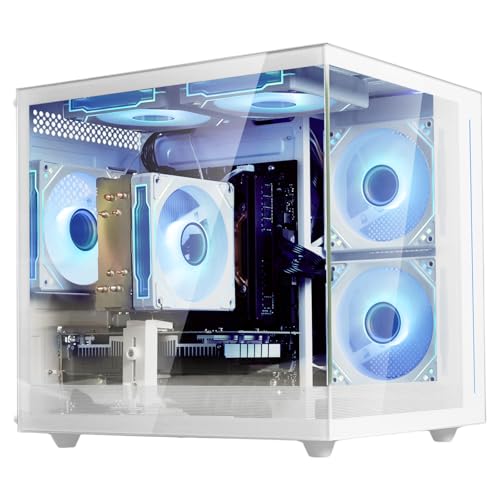
Suevery R5 5500 RX 6500 XT Gaming PC
Best for: Basic gaming and white aesthetic preference
- Graphics Card
- Radeon RX 6500 XT 4G
- Processor Model
- AMD Ryzen 5 5500
- System Memory
- 16 GB
- Storage Capacity
- 512 GB SSD
- Form Factor
- Tower
- Use
- Business
View on Amazon: Suevery R5 5500 RX 6500 XT Gaming PC Affiliate link
The Suevery R5 White Tower features an AMD Ryzen 5 5500 processor with 16GB of DDR4 memory and a 512GB M.2 SSD. It includes an AMD RX 6500 XT graphics card with 4GB of VRAM. This prebuilt desktop is designed for straightforward setup and includes customizable RGB lighting. It suits users who want a white aesthetic and basic gaming capabilities without complex configuration.
Pros
- AMD Ryzen 5 5500 processor with 6 cores
- 16GB DDR4 3200MHz system memory
- 512GB M.2 SSD for fast boot times
- Customizable RGB lighting effects
Cons
- RX 6500 XT graphics card has only 4GB VRAM
- Not suitable for top-tier gaming performance
- Limited to basic graphic design tasks
Good fit if
- You want a white tower PC with RGB lighting
- You need a prebuilt system for basic gaming
- You prefer a simple setup process
Skip if
- You require high-end gaming performance
- You need professional-grade graphic design capabilities
- You want more than 4GB of VRAM
Verdict: Suevery R5 White Tower PC is a practical entry-level option for users who prioritize aesthetics and basic functionality. It fits those who need a ready-to-use desktop for light gaming and general tasks, rather than high-performance demands.
Specifications side by side
| Spec | Dell OptiPlex SFF Intel Core i7 Desktop | Suevery R5 5500 RX 6500 XT Gaming PC |
|---|---|---|
| Graphics Card | not stated | Radeon RX 6500 XT 4G |
| Processor Model | Intel 8th Gen i7-8700 | AMD Ryzen 5 5500 |
| System Memory | 16GB DDR4 | 16 GB |
| Storage Capacity | not stated | 512 GB SSD |
| Operating System | Windows 11 Pro | not stated |
| Form Factor | SFF | Tower |
| Processor | Core i7 | Ryzen 5 |
| Memory | 16GB RAM | not stated |
| Storage | not stated | 512GB SSD |
| Use | not stated | Business |
| Dimensions | 18 × 14 × 6 inches | not stated |
| Size | 14 x 18 x 6 inches | 16G-512G-RX6500XT 4G |
| Color | (16 GB | 512 GB) | White |
| Model | Optiplex 7060 | SUV9W1-SUV9W9 |
Frequently asked questions
Is the Dell OptiPlex 7060 suitable for modern gaming?
No, it is not designed for gaming. This model is a compact business-class machine built for reliable daily computing and light tasks. It lacks the dedicated graphics hardware needed for modern titles. You should choose this if you prioritize office work over visual performance.
Does the Suevery desktop come with Windows installed?
The provided data does not specify the operating system for the Suevery R5. In contrast, the Dell OptiPlex 7060 explicitly includes Windows 11 Pro. You should check the product listing directly to confirm the software state of the Suevery unit before purchasing.
Which PC is better for a small office space?
The Dell OptiPlex 7060 is the better choice for tight spaces. It features a small form factor measuring 14 x 18 x 6 inches. The Suevery R5 is a white tower that likely requires more desk real estate. Choose the Dell for its compact footprint.
Can I use the Dell OptiPlex for heavy video editing?
It is not recommended for heavy video editing. The Intel Core i7-8700 is an older 8th Gen processor. While it handles productivity well, it lacks the modern cores needed for demanding creative workloads. The system is optimized for basic office tasks rather than intensive media creation.
What graphics card is in the Suevery R5?
The Suevery R5 includes an AMD Radeon RX 6500 XT graphics card. This GPU supports 4GB of VRAM. It is suitable for entry-level gaming and basic visual tasks. It is not intended for high-end gaming or professional graphic design workloads.
Is the Dell system good for business use?
Yes, it is ideal for business environments. The Dell OptiPlex 7060 comes with Windows 11 Pro, which offers enhanced security and management features. Its reliable performance and compact design make it suitable for office workers who need a dependable machine for daily professional tasks.
Does the Suevery desktop support basic gaming?
Yes, it is designed for basic gaming. The combination of an AMD Ryzen 5 5500 processor and an RX 6500 XT GPU allows for light gaming. It fits users who need a ready-to-use desktop for general tasks and casual play rather than high-performance demands.