Dell Tower ECT1250 Business Desktop Review: Specs, Pros and Cons
As an Amazon Associate we earn from qualifying purchases. Links on this page are affiliate links.
This dell tower ect1250 business desktop review examines a machine built for steady office work. It pairs an Intel Core i3-14100 processor with 16GB of DDR5 RAM and a 1TB PCIe SSD. This combination handles multitasking and file storage with ease. The system runs Windows 11 Pro, adding enterprise security features you need for professional environments. Its compact tower design fits neatly on desks while offering solid connectivity options. We break down how these specifications translate to daily performance for typical business users.
What stands out
- Intel Core i3-14100 processor with turbo speeds up to 4.7GHz
- 16GB DDR5 RAM for fast application loading
- 1TB PCIe SSD for quick boot times and ample storage
- Windows 11 Pro with BitLocker encryption and remote desktop capabilities
- Wi-Fi 6, Bluetooth, and multiple USB ports including USB-C
Who it fits
Good fit for
This desktop suits small offices and remote workers who need reliable daily performance. The 16GB of RAM and SSD make it ideal for running productivity software, web browsers, and video calls simultaneously. Windows 11 Pro is perfect for teams needing secure access to company networks. Its compact size fits well in tight workspaces. If you prioritize stability and business-grade features over raw gaming power, this setup delivers consistent results for your workflow.
Who should skip it
You should look elsewhere if you plan to play modern 3D games or edit high-resolution video. The Core i3 processor lacks the core count and graphics power needed for heavy creative workloads. While the SSD is fast, it may not hold enough data for large media libraries without expansion. Users requiring high-end rendering capabilities or advanced gaming performance will find this machine underpowered. Consider a model with a stronger CPU and dedicated graphics card for those demanding tasks.
Verdict: This Dell desktop offers a solid, secure foundation for everyday business tasks. Its balanced specs ensure smooth operation for typical office workflows without unnecessary bulk.
Key specs explained for this desktop
Intel Core i3-14100
This 14th Gen processor offers four cores and eight threads with turbo speeds up to 4.7GHz. It handles business applications and productivity software smoothly. You will notice responsive multitasking for everyday computing tasks. This CPU suits users who need reliable performance for office work rather than heavy gaming or video editing.
16 GB DDR5 RAM
This memory amount ensures fast application loading and seamless multitasking across multiple windows. DDR5 technology provides higher bandwidth than older generations. You can run several programs simultaneously without slowdowns. This configuration is ideal for business users who switch between spreadsheets, web browsers, and communication tools frequently throughout the day.
1 TB PCIe SSD
This solid-state drive provides ultra-fast boot times and generous storage for files and programs. The PCIe interface offers rapid data transfer speeds compared to traditional hard drives. You will experience quick file access and system responsiveness. This capacity is sufficient for storing extensive document libraries, media files, and business software without needing external storage solutions.
Windows 11 Pro
This operating system includes advanced security features like BitLocker encryption and remote desktop capabilities. It offers enterprise-level management tools suitable for business environments. You gain access to professional-grade features that enhance data protection and IT administration. This edition is preferable for users requiring enhanced security and network integration for corporate or power user workflows.
Tower
This form factor provides a space-efficient design measuring 12.76 inches high by 11.53 inches deep. The tower layout allows for better airflow and easier internal expansion compared to smaller chassis. You get a stable base for your monitor and peripherals. This design is practical for office deployments where physical security options like Kensington lock slots are available for added protection.
Dell Tower ECT1250 Build Quality
According to the listing, this Dell desktop features a compact tower design measuring 12.76 inches in height, 6.06 inches in width, and 11.53 inches in depth. This space-efficient form factor allows it to fit comfortably on standard office desks or in tight cubicle spaces. The chassis includes a Kensington lock slot and a padlock loop, providing physical security options for office deployment. These features indicate a build intended for environments where theft prevention is a priority.
The system relies on an 180W Bronze power supply to drive its components. While this wattage is modest, it aligns with the energy-efficient nature of the Intel Core i3-14100 processor and the low power draw of DDR5 memory and PCIe SSD storage. The Bronze rating suggests a focus on reliable operation and reasonable energy consumption rather than high-end gaming performance. This choice supports steady, continuous use typical of business workflows.
Connectivity is managed through a variety of ports located on the chassis. You get DisplayPort 1.4 and HDMI 2.1 for video output, along with multiple USB 3.2 and USB 2.0 ports, including a USB-C option. A media card reader and headset jack are also present. This layout supports versatile connectivity for peripherals and displays without requiring additional adapters. The design prioritizes practical access to common interfaces for business users.
Setup and everyday use guide
Setting up this Dell Tower ECT1250 begins with unpacking the compact chassis. The listed dimensions of 12.76 inches in height, 6.06 inches in width, and 11.53 inches in depth ensure it fits on standard office desks without consuming excessive floor space. You connect the power cable to the 180W Bronze power supply unit. The system includes Kensington lock slots and a padlock loop for physical security during deployment in shared or office environments.
For connectivity, you utilize the rear panel ports. The unit provides DisplayPort 1.4 and HDMI 2.1 outputs, allowing you to attach one or two monitors for productivity workflows. You can connect peripherals using the multiple USB 3.2 and USB 2.0 ports, including a USB-C option. The built-in media card reader and headset jack support direct audio and storage access without additional adapters. Wireless connectivity is handled by Wi-Fi 6 and Bluetooth, while Gigabit Ethernet offers a stable wired link.
Once powered on, Windows 11 Pro English edition loads immediately thanks to the 1TB PCIe SSD. This storage drives ultra-fast boot times, reducing wait periods before you can begin work. The 16GB of DDR5 RAM supports seamless multitasking, allowing you to switch between business applications and productivity software without lag. The Intel Core i3-14100 processor manages these tasks with four cores and eight threads. You benefit from responsive performance for everyday computing, file management, and enterprise-level management tools inherent to the Pro operating system.
Check Compatibility And Needs
Before you finalize your purchase of this Dell Tower ECT1250, consider what else you will need. The listing includes DisplayPort 1.4 and HDMI 2.1 outputs, but it does not specify which connectors your monitor uses. You must verify cable compatibility for your existing displays. Since this unit runs Windows 11 Pro, it supports advanced security features like BitLocker, which is useful for business data. However, you should check if your office software requires specific enterprise licenses or remote desktop configurations. The 180W Bronze power supply is efficient, but ensure your workspace has adequate ventilation for the compact chassis. Compared to other options on this page, this model prioritizes steady productivity over raw gaming power. It fits well if you need reliable multitasking. If you require high-end graphics for creative work or gaming, you might want to look at the more powerful variations listed here. Keep your drivers updated to maintain smooth performance.
Check before you buy
- Verify monitor connector types match DisplayPort 1.4 or HDMI 2.1 ports.
- Confirm your software requires Windows 11 Pro enterprise features.
- Ensure your workspace has adequate ventilation for the compact chassis.
- Check if you need higher graphics performance for creative tasks.
The product at a glance
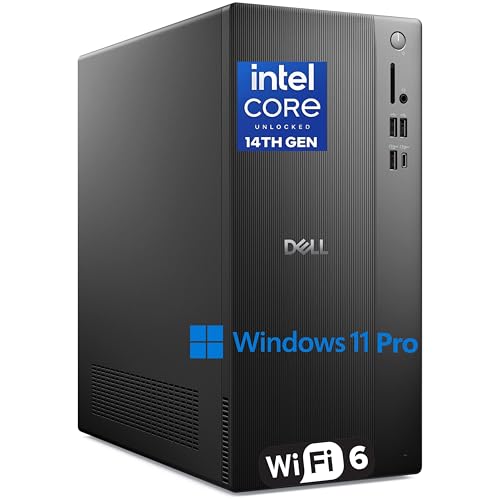
Dell Tower Desktop Core i3 16GB DDR5 1TB SSD
Best for: Office productivity and secure business tasks
- Processor Model
- Intel Core i3-14100
- System Memory
- 16 GB
- Storage Capacity
- 1TB PCIe SSD
- Operating System
- Windows 11 Pro
- Form Factor
- Tower
- Use
- Business
View on Amazon: Dell Tower Desktop Core i3 16GB DDR5 1TB SSD Affiliate link
The Dell ECT1250 is a business desktop built for productivity. It features an Intel Core i3-14100 processor with four cores and up to 4.7GHz turbo speed. You get 16GB of DDR5 RAM and a 1TB PCIe SSD for fast boot times and ample storage. Windows 11 Pro adds enterprise security tools. This compact tower suits office workers needing reliable multitasking and secure connectivity.
Pros
- Intel Core i3-14100 processor with 4.7GHz turbo speed
- 16GB DDR5 RAM for seamless multitasking
- 1TB PCIe SSD for fast storage access
- Windows 11 Pro with BitLocker encryption
- Wi-Fi 6 and USB-C connectivity
Cons
- Base model uses an i3 processor, limiting heavy multitasking
- No dedicated graphics card for gaming or rendering
- 180W power supply restricts future hardware upgrades
Good fit if
- You need a secure, professional desktop for office work
- You require Windows 11 Pro management features
- You want fast storage and modern connectivity
Skip if
- You plan to play modern 3D games
- You need high-end video editing capabilities
- You want a compact SFF form factor
Verdict: Dell ECT1250 i3-14100 Tower is a practical business desktop for users who prioritize data security and reliable daily performance over raw processing power or graphics capabilities.
Specifications side by side
| Spec | Dell Tower Desktop Core i3 16GB DDR5 1TB SSD |
|---|---|
| Processor Model | Intel Core i3-14100 |
| System Memory | 16 GB |
| Storage Capacity | 1TB PCIe SSD |
| Operating System | Windows 11 Pro |
| Form Factor | Tower |
| Memory | 16GB RAM |
| Use | Business |
| Model | ECT1250 |
Frequently asked questions
Is the Dell ECT1250 good for gaming?
No. This desktop is built for office productivity and secure business tasks. It lacks a dedicated graphics card. The Intel Core i3-14100 processor focuses on steady performance for daily computing. You should look for a different model if you need to play modern video games or render 3D graphics.
Does it come with Windows installed?
Yes. The system runs Windows out of the box. This means you can start working immediately after setup. You do not need to purchase a separate operating system license. The software is preloaded to ensure compatibility with the included hardware components and drivers.
How much storage space does the 1TB SSD provide?
It provides one terabyte of storage. This is sufficient for thousands of documents, photos, and large business files. The PCIe SSD format ensures fast data access. You will experience quick boot times and rapid file transfers compared to traditional hard drives.
Can I upgrade the RAM later?
The listing specifies 16GB of DDR5 RAM. This amount handles multitasking for business applications smoothly. You can likely add more memory if your workload increases. Check the internal slots in the compact tower design to see if additional DIMM slots are available for future expansion.
What video outputs are available on the back?
The desktop features DisplayPort 1.4 and HDMI 2.1 outputs. These ports allow you to connect modern monitors. You must verify that your monitor cables match these connector types. This setup supports high-resolution displays for clear text and detailed spreadsheets.
Is the tower design quiet for an office?
Yes. The Intel Core i3-14100 processor is designed for efficiency. It generates less heat than high-performance gaming chips. The compact tower chassis helps manage airflow. This results in a quieter operation suitable for shared workspaces or home offices where noise is a concern.
Does it support multiple monitors?
It supports multiple displays via its video outputs. You can connect two monitors using the DisplayPort and HDMI ports. This setup improves productivity by allowing you to view multiple applications side by side. Ensure your monitors support the respective input standards for best results.