Looking Beyond the Dell Precision Desktop Quadro GPU? 6 Alternatives Worth a Look
As an Amazon Associate we earn from qualifying purchases. Links on this page are affiliate links.
The Dell Precision Desktop with Quadro GPU offers a reliable workstation setup for professionals who need dedicated graphics and business-grade stability. If you are considering dell precision workstation PC alternatives, you might want to look at other models that share similar core specifications but offer different configurations. This original unit features an Intel Core i5-9500 processor, 16GB of RAM, and a 1TB SSD, paired with a Quadro P620 graphics card for CAD and design tasks. It also includes a 24-inch monitor for a complete office experience.
You may prefer other options if you need more memory, a smaller form factor, or a different display setup. The alternatives listed here were chosen because their specs overlap with the original, ensuring they can handle similar professional workloads. Some models provide higher RAM capacities for multitasking, while others offer compact designs for tighter spaces. Others include dual monitors out of the box, which saves you the trouble of buying separate displays. Each option focuses on practical performance for business and design environments, allowing you to select the configuration that best fits your specific workflow needs.
Our top pick: Dell Precision Desktop with Quadro GPU and Monitor.
How alternatives differ from Dell
Dell Precision Dual 24-Inch Workstation
This Dell Precision model doubles your system memory to 32GB while keeping the same 1TB SSD and Quadro P620 graphics. You gain significant headroom for heavy multitasking or larger datasets compared to the standard 16GB configuration. It retains the professional Windows 11 Pro environment and includes dual 24-inch monitors instead of one. If your workflow involves complex CAD files or multiple virtual machines, the extra RAM reduces bottlenecks. You trade slightly higher cost for enhanced stability in memory-intensive tasks. This setup is ideal for engineers who need more power than the base model provides without switching to a different processor generation.
Dell OptiPlex Tower Core i5 Desktop
The Dell OptiPlex Tower uses an older i5-6500 processor instead of the i5-9500 found in the Precision. It offers the same 16GB RAM and 1TB SSD storage but lacks dedicated workstation graphics, relying on integrated visuals. The tower form factor is larger, measuring 19 inches in length, which may not fit small desks. You get a stable business environment with Windows 11 Pro but sacrifice the Quadro P620’s certified drivers for design software. This machine suits users who prioritize storage capacity and basic office reliability over professional graphics performance. It is a practical choice for general computing tasks where dedicated GPU power is unnecessary.
Dell Core i5 GT 1030 Desktop Bundle
This bundle includes a dedicated NVIDIA GT 1030 graphics card, which differs from the Quadro P620 in the Precision. It features a smaller 512GB SSD instead of 1TB, reducing storage space by half. The system includes a 24-inch monitor and uses a Core i5 processor, though the specific generation is not detailed in the summary. The GT 1030 offers better light gaming performance than the Quadro P620 but lacks professional driver certifications. You get a complete office package with convenient peripherals. This option is best for users who need occasional gaming or video playback rather than strict CAD reliability. It trades storage capacity for a more versatile graphics solution.
Dell OptiPlex Dual 24-Inch Monitor Desktop
The Dell OptiPlex 3090 includes dual 24-inch monitors, matching the premium Precision bundle’s display setup. It uses an i5 processor with 16GB RAM but only offers 512GB SSD storage, which is half the capacity of the original. The system lacks a dedicated graphics card, relying on integrated visuals instead of the Quadro P620. It runs Windows 11 Pro for business features. This compact tower is designed for office productivity rather than creative workloads. You gain the convenience of two screens and ample RAM but lose the professional GPU and half the storage space. It is suitable for users who need a multi-monitor office setup without the need for specialized design applications.
Dell i5 16GB Workstation PC
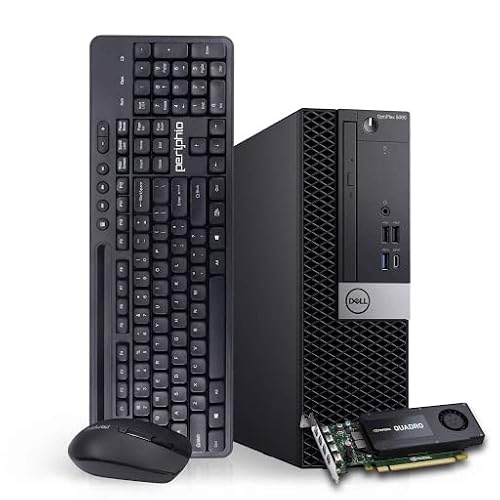
This Dell Workstation PC features an 8th Gen Core i5 processor, which is older than the 9th Gen i5-9500 in the Precision. It includes 16GB RAM and professional GPU capabilities, similar to the Quadro P620, but storage details are not fully specified in the summary. The model number 5060 indicates a different chassis design. It is ISV-certified for engineering and design software, providing stability similar to the Precision. You get a reliable workstation environment but with potentially slower processing speeds due to the older CPU. This machine is ideal for users who need certified software compatibility but do not require the latest processor performance. It offers a balance of professional graphics and stable business operations.
Dell OptiPlex SFF with Dual 24-inch Displays
The Dell OptiPlex SFF includes dual 24-inch monitors and uses an i5-10500 processor, which is newer than the i5-9500 in the Precision. However, it only has 256GB SSD storage, significantly less than the 1TB drive in the original. It lacks a dedicated graphics card, relying on integrated visuals instead of the Quadro P620. The small form factor makes it easy to place on a desk. You gain a newer CPU and dual displays but lose substantial storage and professional graphics performance. This system is best for business users who need a compact, complete office setup with modern processing power but do not require heavy creative workloads or large data storage.
Quick picks
Our 7 picks
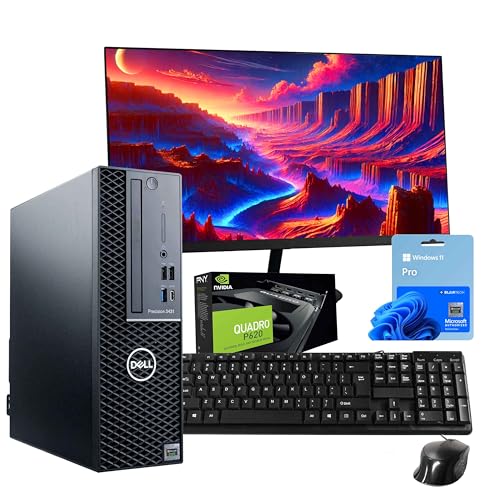
Dell Precision Desktop with Quadro GPU and Monitor
Best for: complete professional workstation setups
- Graphics Card
- NVIDIA Quadro P620
- Processor Model
- Intel Core i5-9500
- System Memory
- 16GB
- Storage Capacity
- 1TB SSD
- Operating System
- Windows 11 Pro
- Use
- Workstation
View on Amazon: Dell Precision Desktop with Quadro GPU and Monitor Affiliate link
This Dell Precision 3431 workstation pairs an Intel Core i5-9500 processor with 16GB of RAM and a 1TB SSD. It includes a Quadro P620 graphics card for CAD and 3D modeling tasks. The system runs Windows 11 Pro and comes with a 24-inch monitor, keyboard, and mouse. It suits professionals needing reliable multitasking and enterprise security features for office environments.
Pros
- Intel Core i5-9500 hexa-core processor for efficient multitasking
- 16GB DDR4 RAM supports smooth workflow operations
- 1TB SSD provides fast boot times and ample storage
- NVIDIA Quadro P620 GPU optimized for professional visual workloads
- Includes 24-inch LCD monitor, keyboard, and mouse
Cons
- Quadro P620 lacks the power for modern gaming
- 9th Gen processor is older than current 10th Gen alternatives
- Desktop form factor requires dedicated desk space
Good fit if
- You need a complete workstation setup with a monitor included
- You require Windows 11 Pro for business security features
- You perform CAD or 3D modeling tasks
Skip if
- You want the latest generation processors
- You need high-end gaming performance
- You prefer a compact Mini Tower or SFF form factor
Verdict: Dell Precision 3431 i5-9500 Workstation is a practical choice for professionals who need a ready-to-use office setup with dedicated workstation graphics. It fits users who prioritize business reliability and included peripherals over cutting-edge processing speed.

Dell Precision Dual 24-Inch Workstation
Best for: CAD design and professional multitasking
- Graphics Card
- NVIDIA Quadro P620
- Processor Model
- Intel Core i5-9500
- System Memory
- 32GB
- Storage Capacity
- 500GB NVMe + 1TB SSD
- Operating System
- Windows 11 Pro
- Use
- Workstation
View on Amazon: Dell Precision Dual 24-Inch Workstation Affiliate link
This Dell Precision 3431 workstation pairs an Intel Core i5-9500 processor with 32GB of RAM and an NVIDIA Quadro P620 graphics card. It includes a hybrid storage setup of a 500GB NVMe SSD and a 1TB SSD. The package comes with dual 24-inch monitors, making it a complete solution for design and engineering tasks that require professional graphics and multitasking.
Pros
- Intel Core i5-9500 hexa-core processor for reliable multitasking
- 32GB DDR4 RAM supports demanding professional workloads
- NVIDIA Quadro P620 2GB GPU optimized for CAD and rendering
- Hybrid storage with 500GB NVMe SSD and 1TB SSD
- Includes dual 24-inch LCD monitors for expanded workspace
Cons
- Quadro P620 is an entry-level professional GPU with limited 3D power
- Intel Core i5-9500 is a 9th Gen processor, not the latest generation
- System is a refurbished unit rather than brand new hardware
Good fit if
- You need a complete dual-monitor setup for CAD or design work
- You require 32GB of RAM for heavy multitasking
- You are looking for a workstation with Windows 11 Pro
Skip if
- You need high-end gaming performance
- You require the latest generation processor
- You want a brand new system without refurbishment
Verdict: Dell Precision 3431 Workstation with P620 is a solid choice for professionals who need a ready-to-use dual-monitor setup for CAD and design tasks. It suits users who prioritize ample RAM and professional graphics over the newest processor generation.

Dell OptiPlex Tower Core i5 Desktop
Best for: office work and general computing
- Processor Model
- Intel Core i5-6500
- System Memory
- 16GB DDR4
- Storage Capacity
- 1TB SSD
- Operating System
- Windows 11 Pro
- Form Factor
- Tower
- Use
- Business
View on Amazon: Dell OptiPlex Tower Core i5 Desktop Affiliate link
This Dell OptiPlex Tower uses a 6th Gen Intel Core i5-6500 processor paired with 16GB of DDR4 RAM and a 1TB SSD. It runs Windows 11 Pro out of the box. The 1TB storage provides ample space for files and applications. This setup suits users who need reliable business performance and fast boot times without needing high-end graphics capabilities.
Pros
- 1TB SSD for quick boot speeds
- 16GB DDR4 RAM for multitasking
- Windows 11 Pro included
- Tower form factor allows airflow
Cons
- 6th Gen processor is several generations old
- No dedicated graphics card for gaming
- Lacks modern connectivity ports
Good fit if
- You need a reliable desktop for office tasks
- You want a large 1TB storage drive
- You prefer a standard tower case
Skip if
- You require high-end gaming performance
- You need the latest CPU generation
- You want a compact mini PC
Verdict: Dell OptiPlex Tower i5-6500 is a solid choice for users who prioritize storage capacity and stable business performance over raw processing speed or gaming graphics.

Dell Core i5 GT 1030 Desktop Bundle
Best for: Light gaming and complete office setups
- Graphics Card
- GeForce GT 1030 2GB GDDR5
- Processor Model
- Intel Core i5
- System Memory
- 16GB
- Storage Capacity
- 512GB SSD
- Operating System
- Windows 11 Pro
- Screen Size
- 24-Inch
View on Amazon: Dell Core i5 GT 1030 Desktop Bundle Affiliate link
This Dell desktop pairs an Intel Core i5 processor with 16GB of RAM and a 512GB SSD. It includes a dedicated GeForce GT 1030 graphics card with 2GB GDDR5 memory. The system runs Windows 11 Pro and comes with a 24-inch Full HD monitor. It is designed for users who need a complete, ready-to-use setup for basic gaming and standard office tasks.
Pros
- Intel Core i5 processor up to 3.6GHz
- 16GB system memory for multitasking
- Dedicated GeForce GT 1030 2GB GDDR5 graphics
- Includes 24-inch Full HD monitor
Cons
- GT 1030 is an entry-level GPU for light gaming
- No mention of Ethernet port, only USB Wi-Fi
- 2GB VRAM limits high-resolution texture performance
Good fit if
- You want a complete desktop with a monitor included
- You need Windows 11 Pro for business features
- You perform light gaming or standard office work
Skip if
- You require high-end gaming performance
- You need a dedicated Ethernet connection
- You want a workstation-grade GPU
Verdict: Dell i5 GT 1030 Gaming Desktop is a practical all-in-one solution for users who prioritize convenience and a complete package. It suits those who need a capable machine for everyday tasks and light entertainment without buying separate components.

Dell OptiPlex Dual 24-Inch Monitor Desktop
Best for: Office work and home productivity
- Processor Model
- Intel Core i5-10505
- System Memory
- 16 GB
- Storage Capacity
- 500 GB SSD
- Operating System
- Windows 11 Pro
- Screen Size
- 24-Inch
- Dimensions
- 11.5 × 3.65 × 11.4 inches
View on Amazon: Dell OptiPlex Dual 24-Inch Monitor Desktop Affiliate link
This Dell OptiPlex 3090 desktop uses an Intel Core i5-10505 processor and 16 GB of DDR4 RAM. It includes a 500 GB SSD for fast storage and runs Windows 11 Pro. The package comes with dual 24-inch monitors, a keyboard, and a mouse. It is suitable for everyday office work and home use. The included monitors make it ready to use out of the box.
Pros
- Intel Core i5-10505 hexa-core processor
- 16 GB DDR4 system memory
- 500 GB SSD storage
- Includes dual 24-inch monitors
- Windows 11 Pro operating system
Cons
- No dedicated graphics card for gaming
- Small form factor limits upgrade space
- Refurbished condition not new
Good fit if
- You need a complete desktop setup with monitors
- You require 16 GB of RAM for multitasking
- You want a compact PC for a small desk
Skip if
- You need high-end gaming performance
- You require a dedicated GPU for 3D work
- You prefer a brand new unit
Verdict: Dell OptiPlex 3090 i5 16GB 500GB SSD is a practical office machine for users who need a complete setup with monitors and ample RAM for productivity tasks.
Dell i5 16GB Workstation PC
Best for: ISV-certified design and engineering work
- Graphics Card
- NVIDIA GeForce K1200 4GB
- Processor Model
- Intel Core i5 (8th Gen)
- System Memory
- 16 GB
- Storage Capacity
- 120GB NVMe + 500GB SSD
- Operating System
- Windows 11 Pro
- Use
- Workstation
View on Amazon: Dell i5 16GB Workstation PC Affiliate link
This Dell Workstation PC pairs an 8th Gen Intel Core i5 processor with 16GB of DDR4 RAM. It includes a NVIDIA GeForce K1200 4GB GPU, which supports creative tasks like photo editing, 3D design, and AutoCAD. The system features ISV-certified software compatibility for Adobe and 3DS Max. Storage combines a 120GB NVMe boot drive with a 500GB SSD. It runs Windows 11 Pro and offers extensive connectivity options for professional workflows.
Pros
- Intel Hexa-Core i5 (8th Gen) processor
- 16GB DDR4 system memory
- NVIDIA GeForce K1200 4GB graphics card
- Dual storage: 120GB NVMe + 500GB SSD
- ISV certified for Adobe, AutoCAD, and 3DS Max
Cons
- GeForce K1200 is an entry-level professional GPU
- 120GB NVMe drive provides limited boot space
- 8th Gen processor is older than current 10th Gen models
Good fit if
- You need ISV-certified software for engineering or design
- You require reliable dual storage for projects
- You want a workstation with Windows 11 Pro
Skip if
- You need high-end gaming performance
- You require the latest generation CPU
- You prioritize large primary boot storage
Verdict: Dell Workstation PC i5-8th Gen 16GB suits users who need certified stability for design software rather than raw gaming power. Its dual storage and professional GPU make it a solid tool for specific creative workflows.

Dell OptiPlex SFF with Dual 24-inch Displays
Best for: business users needing dual monitors
- Graphics Card
- Intel UHD Graphics 630
- Processor Model
- Intel Core i5-10500
- System Memory
- 16 GB
- Storage Capacity
- 256 GB SSD
- Operating System
- Windows 11 Pro
- Form Factor
- SFF
View on Amazon: Dell OptiPlex SFF with Dual 24-inch Displays Affiliate link
This Dell OptiPlex SFF desktop features a 10th Gen Intel Core i5-10500 processor with 6 cores and 16GB of DDR4 RAM. It includes a 256GB SSD for fast storage and Intel UHD Graphics 630. The package comes with dual 24-inch monitors, a wireless keyboard and mouse, and Windows 11 Pro. It is a complete setup for business tasks and casual multimedia use.
Pros
- Intel Core i5-10500 10th Gen processor
- 16GB DDR4 RAM for multitasking
- 256GB SSD storage
- Includes dual 24-inch monitors
Cons
- Integrated Intel UHD Graphics 630 limits gaming
- Small Form Factor chassis restricts upgrades
- 256GB storage capacity is modest
Good fit if
- You need a complete office setup with monitors
- You require Windows 11 Pro for business
- You want a compact desktop for limited space
Skip if
- You need dedicated graphics for heavy editing
- You require high-end gaming performance
- You need more than 256GB of storage
Verdict: Dell OptiPlex SFF i5-10500 Desktop is a ready-to-use business system that includes dual monitors. It suits professionals who need a compact, complete workstation for standard office applications rather than creative or gaming workloads.
Specifications side by side
| Spec | Dell Precision Desktop with Quadro GPU and Monitor | Dell Precision Dual 24-Inch Workstation | Dell OptiPlex Tower Core i5 Desktop | Dell Core i5 GT 1030 Desktop Bundle | Dell OptiPlex Dual 24-Inch Monitor Desktop | Dell i5 16GB Workstation PC | Dell OptiPlex SFF with Dual 24-inch Displays |
|---|---|---|---|---|---|---|---|
| Graphics Card | NVIDIA Quadro P620 | NVIDIA Quadro P620 | not stated | GeForce GT 1030 2GB GDDR5 | not stated | NVIDIA GeForce K1200 4GB | Intel UHD Graphics 630 |
| Processor Model | Intel Core i5-9500 | Intel Core i5-9500 | Intel Core i5-6500 | Intel Core i5 | Intel Core i5-10505 | Intel Core i5 (8th Gen) | Intel Core i5-10500 |
| System Memory | 16GB | 32GB | 16GB DDR4 | 16GB | 16 GB | 16 GB | 16 GB |
| Storage Capacity | 1TB SSD | 500GB NVMe + 1TB SSD | 1TB SSD | 512GB SSD | 500 GB SSD | 120GB NVMe + 500GB SSD | 256 GB SSD |
| Operating System | Windows 11 Pro | Windows 11 Pro | Windows 11 Pro | Windows 11 Pro | Windows 11 Pro | Windows 11 Pro | Windows 11 Pro |
| Form Factor | not stated | not stated | Tower | not stated | not stated | not stated | SFF |
| Processor | Core i5 | Core i5 | Core i5 | Core i5 | Core i5 | Core i5 | Core i5 |
| Memory | 16GB RAM | 32GB RAM | 16GB RAM | 16GB RAM | 16GB RAM | 16GB RAM | 16GB RAM |
| Storage | 1TB SSD | 1TB SSD | 1TB SSD | 512GB SSD | 512GB SSD | not stated | 256GB SSD |
| Use | Workstation | Workstation | Business | not stated | not stated | Workstation | Business |
| Screen Size | 24-Inch | 24-Inch | not stated | 24-Inch | 24-Inch | not stated | 24-Inch |
| Dimensions | 12.1 × 13.3 × 4 inches | 12.1 × 13.3 × 4 inches | 19 × 16 × 7 inches | 13.5 × 11.4 × 3.6 inches | 11.5 × 3.65 × 11.4 inches | 3.6 × 11.5 × 11.4 inches | 24 × 17 × 15 inches |
| Weight | not stated | not stated | 15.4 pounds | not stated | 11.3 pounds | 11.6 pounds | not stated |
| Model | 3431 | 3431 | OptiPlex Tower | Dell G3-3479 | 3090 | 5060 | 3080/5080/7080 |
| Size | not stated | not stated | 16GB RAM + 1TB SSD | i5-16GB-512GB+GT1030+24 inch | not stated | core i5 | 16GB RAM | not stated |
| Color | not stated | not stated | not stated | Intel Core I5 | Black | Black | not stated |
Looking Beyond the Dell Precision Desktop Quadro GPU? See the dell latitude 5490 ultrabook PC alternatives for similar picks compared.
Frequently asked questions
What is the best Dell workstation for CAD design?
The Dell Precision Dual 24-Inch Workstation is the top choice for CAD tasks. It features 32GB of RAM and a Quadro P620 GPU, providing ample memory for complex models. The dual 24-inch monitors help you manage multiple views efficiently. This setup prioritizes professional graphics and multitasking stability over the newest processor speeds.
Which Dell desktop is best for general office work?
The Dell OptiPlex Tower Core i5 Desktop is ideal for standard office computing. It includes 16GB of RAM and a 1TB SSD for stable performance and ample storage. This business-focused machine offers reliable processing without the need for dedicated gaming or workstation graphics, making it a practical choice for everyday tasks.
Does any alternative include dual monitors?
Yes, the Dell Precision Dual 24-Inch Workstation and the Dell OptiPlex Dual 24-Inch Monitor Desktop both include two 24-inch screens. The Precision model suits design work with its 32GB RAM, while the OptiPlex is better for general productivity. Both provide ready-to-use setups that eliminate the need to buy displays separately.
What is the best budget Dell workstation option?
The Dell OptiPlex Tower Core i5 Desktop is the best budget-friendly option. It offers a Core i5 processor, 16GB of RAM, and a 1TB SSD. This configuration provides solid business performance and storage capacity. It is a practical choice for users who need stability and capacity without the premium cost of specialized graphics cards.
Are there Dell PCs with ISV-certified stability?
The Dell i5 16GB Workstation PC (Model 5060) is designed for ISV-certified design and engineering work. It features a Core i5 processor and 16GB of RAM. This system prioritizes certified stability for professional software over raw gaming power. Its professional GPU and dual storage options make it suitable for specific creative workflows.
Which Dell desktop is most compact?
The Dell OptiPlex SFF with Dual 24-inch Displays is a compact solution for business users. It features a small form factor tower that saves desk space while including two monitors. This setup is ready for standard office applications. It suits professionals who need a complete, space-efficient workstation without the bulk of larger towers.
Is there a Dell bundle for light gaming?
The Dell Core i5 GT 1030 Desktop Bundle is suitable for light gaming and entertainment. It includes a GT 1030 graphics card, 16GB of RAM, and a 512GB SSD. This all-in-one package offers convenience for users who want a capable machine for everyday tasks and light media without buying separate components.