Core i7 or Core i9 Mini PCs? Compared by Specs
As an Amazon Associate we earn from qualifying purchases. Links on this page are affiliate links.
This Core i7 vs Core i9 mini PC comparison looks at two distinct machines. Both offer compact designs for desktop use. The main difference lies in performance tiers and memory. The Dell OptiPlex uses an older Core i7 with 8GB RAM, targeting basic office tasks. The ACEMAGIC M5 features a newer Core i9 with 32GB RAM and 1TB storage, built for heavy multitasking and content creation. You need to decide if you require professional-grade power or standard business utility.
Key differences
| Aspect | Dell OptiPlex SFF Core i7 Desktop | ACEMAGIC Core i9 Mini PC |
|---|---|---|
| Processor | Intel Core i7-10700 | Intel Core i9-13900HX |
| RAM Capacity | 8GB | 32GB |
| Storage Capacity | 256GB SSD | 1TB SSD |
| Operating System | not listed | Windows 11 Pro |
| Connectivity | Standard peripherals | WiFi 6E, USB4, 2.5GbE |
Which one should you choose?
Choose Dell OptiPlex SFF Core i7 Desktop if
- You need a reliable machine for basic office work and web browsing.
- You prefer a established brand like Dell for business-class durability.
- You have limited desk space and require a small form factor for light tasks.
Choose ACEMAGIC Core i9 Mini PC if
- You edit 4K video or run demanding creative software.
- You need 32GB of RAM for heavy multitasking and virtual machines.
- You want fast WiFi 6E and high-speed USB4 connectivity for external drives.
Verdict: The ACEMAGIC M5 is the clear choice for power users who need significant RAM and storage for creative work. The Dell OptiPlex 7080 suits those who only need a compact system for standard business applications and basic productivity.
Core i7 vs Core i9 Mini PC Specs
Processor
The ACEMAGIC M5 features the Intel Core i9-13900HX, a 13th-generation mobile processor with 24 cores and 32 threads. It boosts up to 5.4GHz, offering significant multi-core throughput for heavy workloads. The Dell OptiPlex uses the older Core i7-10700, which reaches 4.8GHz. While the i7 handles standard office tasks well, the i9’s higher core count and clock speed provide a clear advantage for demanding applications like video editing or complex multitasking. The newer architecture in the ACEMAGIC also supports more efficient processing for intensive creative projects.
Memory
Memory capacity directly impacts how many applications you can run simultaneously. The ACEMAGIC M5 comes with 32GB of DDR4 RAM, which is four times the amount found in the Dell OptiPlex. The Dell model includes only 8GB of RAM, which is sufficient for basic web browsing and document editing but may limit performance when switching between multiple heavy programs. The ACEMAGIC’s larger memory pool allows for smoother operation during resource-intensive tasks. Additionally, the ACEMAGIC is expandable up to 64GB, whereas the Dell’s 8GB is a fixed constraint for daily business use.
Storage
Storage speed and capacity affect boot times and file access. The ACEMAGIC M5 includes a 1TB PCIe 4.0 NVMe SSD, providing ample space for large media files and fast data transfer rates. The Dell OptiPlex offers a smaller 256GB SSD. While both drives help reduce startup times, the ACEMAGIC’s larger capacity is more practical for users storing videos, images, or extensive software libraries. The PCIe 4.0 interface in the ACEMAGIC also ensures quicker read and write speeds compared to standard storage configurations, making it better suited for handling large datasets efficiently.
Connectivity
Connectivity options define how you link peripherals and networks. The ACEMAGIC M5 supports WiFi 6E, Bluetooth 5.2, and a 2.5GbE LAN port, along with a USB4 port capable of 40Gbps transfer speeds. This allows for high-speed data movement and modern wireless standards. The Dell OptiPlex 7080 supports common peripherals but does not list WiFi 6E or USB4 in its provided specifications. The ACEMAGIC’s inclusion of USB4 and faster networking standards provides greater flexibility for connecting high-bandwidth devices and future-proofing your setup compared to the Dell’s standard business-class ports.
Operating System
The operating system determines the software environment and security features. The ACEMAGIC M5 ships with Windows 11 Pro preinstalled, which includes enterprise-level security features and enhanced multitasking capabilities. The Dell OptiPlex 7080 is a business desktop that typically includes Windows 10 or 11 Pro, but the specific OS version is not explicitly detailed in the provided data. Assuming both run modern Windows versions, the ACEMAGIC’s explicit inclusion of Windows 11 Pro ensures you have the latest interface and security protocols out of the box, ready for professional use without additional configuration steps.
Which Mini PC Fits Your Workflow
Users needing basic office productivity
The Dell OptiPlex 7080 offers sufficient performance for daily tasks. Its Core i7-10700 processor handles web browsing and spreadsheets smoothly. The compact Small Form Factor design saves desk space. With 8GB of RAM and a 256GB SSD, it boots quickly. This setup is ideal for general business use and light multitasking without unnecessary complexity.
Content creators and heavy multitaskers
The ACEMAGIC M5 delivers high performance for demanding workloads. Its Core i9-13900HX features 24 cores and boosts to 5.4GHz. You get 32GB of DDR4 RAM and a 1TB PCIe 4.0 NVMe SSD for fast data access. This combination supports 4K video editing and running multiple applications simultaneously with ease and stability.
Professionals requiring fast connectivity
Connectivity is a key advantage for the ACEMAGIC M5. It includes a USB4 port for 40Gbps transfer speeds and WiFi 6E for stable networking. The 2.5GbE LAN port ensures reliable wired connections. You can also drive triple displays and connect high-speed peripherals. These features make it suitable for data-intensive professional environments.
Quick picks
| # | Product | Best for | Price |
|---|---|---|---|
| 1 | Dell OptiPlex SFF Core i7 Desktop | compact office workstations and light productivity | Check price of Dell OptiPlex SFF Core i7 Desktop on Amazon |
| 2 | ACEMAGIC Core i9 Mini PC | content creation and heavy multitasking | Check price of ACEMAGIC Core i9 Mini PC on Amazon |
The products compared

Dell OptiPlex SFF Core i7 Desktop
Best for: compact office workstations and light productivity
- Processor
- Core i7 (what this guide is about)
- RAM Capacity
- 8GB
- Storage Capacity
- 256GB
- Memory
- 8GB RAM
- Use
- Business
View on Amazon: Dell OptiPlex SFF Core i7 Desktop Affiliate link
The Dell OptiPlex 7080 is a small form factor desktop powered by an Intel Core i7-10700 processor. It includes 8GB of RAM and a 256GB SSD for quick boot times. This machine is designed for business and office tasks like web browsing, email, and spreadsheets. It saves desk space while providing reliable daily performance for general productivity needs.
Pros
- Intel Core i7-10700 processor for smooth multitasking
- Compact Small Form Factor design saves desk space
- 256GB SSD for quick boot and load times
- Suitable for business and office productivity tasks
Cons
- Only 8GB of RAM limits heavy multitasking
- 256GB storage fills up quickly with large files
- 10th Gen processor is older than current models
Good fit if
- You need a compact PC for office work
- You run light productivity applications like spreadsheets
- You want a reliable business-class workstation
Skip if
- You require high-end gaming performance
- You need more than 8GB of RAM
- You want the latest generation processor
Verdict: Dell OptiPlex 7080 Small Form Factor is a practical choice for users who prioritize a small footprint and reliable business performance over raw power. It fits those who need a dedicated machine for standard office tasks and web browsing.
ACEMAGIC Core i9 Mini PC
Best for: content creation and heavy multitasking
- Processor
- Core i9 (what this guide is about)
- RAM Capacity
- 32GB
- RAM Type
- DDR4
- Storage Capacity
- 1TB
- Storage Interface
- PCIe 4.0 NVMe
- Operating System
- Windows 11 Pro
View on Amazon: ACEMAGIC Core i9 Mini PC Affiliate link
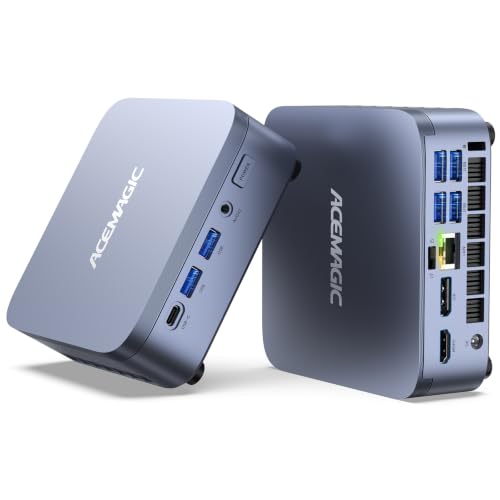
The ACEMAGIC M5 packs an Intel Core i9-13900HX processor with 24 cores into a compact chassis. It includes 32GB of DDR4 RAM and a 1TB PCIe 4.0 NVMe SSD. This setup handles heavy multitasking and 4K video editing. The unit features USB4, WiFi 6E, and Windows 11 Pro. It suits creators needing strong mobile processor performance in a small footprint.
Pros
- Intel Core i9-13900HX with 24 cores and 5.4GHz turbo
- 32GB DDR4 RAM expandable to 64GB
- 1TB PCIe 4.0 NVMe SSD
- USB4 port with 40Gbps transfer speeds
- Windows 11 Pro preinstalled
Cons
- Uses DDR4 RAM instead of newer DDR5
- Mobile H-series CPU may run warm in small case
- No dedicated GPU listed for heavy gaming
Good fit if
- You need high core counts for video rendering
- You want USB4 connectivity for fast peripherals
- You prefer Windows 11 Pro for work
Skip if
- You require DDR5 memory for maximum bandwidth
- You need a dedicated graphics card for gaming
- You want a desktop tower for easy upgrades
Verdict: The ACEMAGIC M5 Core i9 Mini PC delivers serious multi-core power for creators. It fits users who prioritize CPU performance and compact size over gaming graphics.
Specifications side by side
| Spec | Dell OptiPlex SFF Core i7 Desktop | ACEMAGIC Core i9 Mini PC |
|---|---|---|
| Processor | Intel Core i7-10700 | Intel Core i9-13900HX |
| RAM Capacity | 8GB | 32GB |
| RAM Type | not stated | DDR4 |
| Storage Capacity | 256GB | 1TB |
| Storage Interface | not stated | PCIe 4.0 NVMe |
| Operating System | not stated | Windows 11 Pro |
| Wireless Connectivity | not stated | WiFi 6E, Bluetooth 5.2 |
| Memory | 8GB RAM | 32GB RAM |
| Storage | 256GB SSD | 1TB SSD |
| Use | Business | not stated |
| Model | 7080 | M5 |
| Size | not stated | Intel Core i9 13900HX 32+1TB |
| Color | not stated | AI 9 365 32GB+1TB |
Frequently asked questions
Is a Core i9 mini PC better for video editing than a Core i7?
Yes, if your workflow demands heavy multitasking. The ACEMAGIC Core i9 model includes 32GB of RAM and a 1TB SSD, which supports content creation tasks efficiently. The Core i7 option provides only 8GB of RAM, limiting its ability to handle large media files or complex renders without slowing down.
Does the Core i7 mini PC support modern gaming?
It is not designed for gaming. The Dell OptiPlex with the Core i7 processor targets business use and light productivity. It lacks the dedicated graphics capabilities and high memory bandwidth needed for modern games. You should choose a system with a dedicated GPU if gaming is your priority.
Which mini PC has more storage capacity?
The Core i9 ACEMAGIC model offers significantly more storage. It comes equipped with a 1TB SSD, providing ample space for large files and applications. The Core i7 Dell OptiPlex includes a 256GB SSD, which is sufficient for basic documents but fills up quickly with media or software libraries.
Can I upgrade the RAM on these mini PCs?
The data does not specify upgradeability for either unit. The ACEMAGIC Core i9 ships with 32GB of RAM, which is generally sufficient for most creative tasks. The Dell OptiPlex Core i7 includes 8GB, which may be limiting for future-proofing. You should check the manufacturer's specifications for memory slot availability.
Is the Core i9 processor faster for multitasking?
Yes, the Core i9 processor is built for higher throughput. The ACEMAGIC M5 uses the Intel Core i9-13900HX, which features 24 cores and 32 threads. This architecture allows it to manage multiple heavy applications simultaneously much better than the older Core i7 processor found in the Dell OptiPlex.
Which mini PC is better for office work?
The Core i7 Dell OptiPlex is ideal for standard office tasks. It is designed for compact office workstations and handles web browsing and spreadsheets smoothly. Its Small Form Factor design saves desk space while providing reliable performance for daily business operations without the excess power of a Core i9 system.