Best MINISFORUM Mini PCs Under $2000: 4 Spec-Based Picks
As an Amazon Associate we earn from qualifying purchases. Links on this page are affiliate links.
Finding the best MINISFORUM mini PCs under $2000 requires looking closely at what each model offers. We compared 4 options based strictly on published specifications. The MINISFORUM Core Ultra 9 Mini Workstation leads this list because it prioritizes CPU power and 25G networking for professional tasks. This guide helps you decide which machine fits your workflow. You will see clear distinctions between workstation-focused models and compact gaming units. Each selection addresses specific needs like memory capacity or graphics performance.
Quick picks
| # | Product | Best for | Price |
|---|---|---|---|
| 1 | MINISFORUM Core Ultra 9 Mini Workstation Best overall | network-intensive workstation tasks | Check price of MINISFORUM Core Ultra 9 Mini Workstation on Amazon |
| 2 | MINISFORUM Core Ultra 5 Mini Workstation Best core ultra 5 | network-heavy workstation tasks | Check price of MINISFORUM Core Ultra 5 Mini Workstation on Amazon |
| 3 | MINISFORUM RTX 5060 Ryzen 9 Mini PC Best budget | compact gaming and content creation | Check price of MINISFORUM RTX 5060 Ryzen 9 Mini PC on Amazon |
| 4 | MINISFORUM G1 Pro RTX 5060 Mini PC Also great | Multi-monitor setups and compact gaming | Check price of MINISFORUM G1 Pro RTX 5060 Mini PC on Amazon |
The best fit for you
- You need the best overall workstation performance MINISFORUM Core Ultra 9 Mini Workstation The Core Ultra 9 processor and 25G networking suit intensive workstation tasks.
- You want a budget-friendly option with high storage MINISFORUM Core Ultra 5 Mini Workstation The Core Ultra 5 CPU and 2TB SSD provide reliable performance for data work.
- You need compact gaming with dedicated graphics MINISFORUM RTX 5060 Ryzen 9 Mini PC The Ryzen 9 processor and RTX 5060 GPU deliver strong gaming power.
Our 4 picks

MINISFORUM Core Ultra 9 Mini Workstation
Best for: network-intensive workstation tasks
- Processor
- Intel Core Ultra 9 285HX
- Graphics Card
- Intel Graphics
- RAM Capacity
- 32GB
- RAM Type
- DDR5
- Storage Capacity
- 1TB
- Wireless Connectivity
- Wi-Fi 7, Bluetooth 5.4
View on Amazon: MINISFORUM Core Ultra 9 Mini Workstation Affiliate link
The MINISFORUM MS-02 Ultra is a high-performance mini workstation built for heavy workloads. It features an Intel Core Ultra 9 285HX processor with 24 cores and 32GB of DDR5 RAM. You get extensive connectivity with dual 25G SFP+ ports and Wi-Fi 7. The system supports four displays and offers significant expandability with multiple M.2 slots. This setup suits users needing serious computing power and network speed in a compact form.
Pros
- Intel Core Ultra 9 285HX CPU with 24 cores
- Dual 25G SFP+ network ports for high-speed LAN
- Supports up to 256GB DDR5 RAM
- Wi-Fi 7 and Bluetooth 5.4 connectivity
- Four video outputs for multi-monitor setups
Cons
- Integrated Intel Graphics limits dedicated gaming performance
- XMP overclocking is not supported for RAM
- One PCIe 4.0 x16 slot is occupied by the NIC
Good fit if
- You need ultra-fast wired network speeds for local storage
- You require a powerful CPU for rendering or virtualization
- You want to expand storage with multiple M.2 SSDs
Skip if
- You rely on a dedicated graphics card for gaming
- You want to easily overclock your RAM for speed
- You need maximum PCIe slots for additional expansion cards
Verdict: The MINISFORUM MS-02 Ultra Core Ultra 9 delivers workstation-grade processing and networking in a small chassis. It is the right choice for professionals who prioritize CPU power and 25G connectivity over gaming graphics.

MINISFORUM Core Ultra 5 Mini Workstation
Best for: network-heavy workstation tasks
- Processor
- Intel Core Ultra 5 336H
- Graphics Card
- Intel Graphics
- RAM Capacity
- 64GB
- RAM Type
- DDR5
- Storage Capacity
- 2TB
- Storage Interface
- PCIe 4.0
View on Amazon: MINISFORUM Core Ultra 5 Mini Workstation Affiliate link
The MINISFORUM MS-03 Mini Workstation pairs an Intel Core Ultra 5 336H processor with 64GB of DDR5 RAM and a 2TB PCIe 4.0 SSD. It targets users needing high memory capacity and fast storage in a compact form. The unit includes dual 10G SFP+ ports and one 10G RJ45 port for robust network connectivity. It also supports triple video outputs via HDMI and USB4. This setup suits professionals requiring reliable performance for engineering or data tasks.
Pros
- 64GB DDR5 RAM for heavy multitasking
- Dual 10G SFP+ network ports for high-speed LAN
- 2TB PCIe 4.0 SSD for fast storage
- Triple display support via HDMI and USB4
- Expandable with U.2 SSD and PCIe slot
Cons
- Uses integrated Intel Graphics only
- No discrete graphics card for gaming
- Limited to 1.89 inches in height
Good fit if
- You need 64GB of RAM for workstations
- You require 10G network connectivity
- You run CAD or data processing software
Skip if
- You need a dedicated graphics card
- You want to play modern games
- You prefer a larger desktop chassis
Verdict: The MINISFORUM MS-03 Core Ultra 5 Mini PC is a compact workstation for users who prioritize memory and network speed over graphical power. It fits engineers and data analysts who need reliable, high-throughput computing in a small footprint.

MINISFORUM RTX 5060 Ryzen 9 Mini PC
Best for: compact gaming and content creation
- Processor
- AMD Ryzen 9 8945HX
- Graphics Card
- NVIDIA GeForce RTX 5060
- RAM Capacity
- 32GB
- RAM Type
- DDR5
- Storage Capacity
- 1TB
- Wireless Connectivity
- Wi-Fi 7
View on Amazon: MINISFORUM RTX 5060 Ryzen 9 Mini PC Affiliate link
This compact desktop pairs a 16-core AMD Ryzen 9 8945HX processor with a full-power 145W NVIDIA GeForce RTX 5060 graphics card. It includes 32GB of DDR5 memory and a 1TB SSD. The system supports up to 96GB of RAM and features Wi-Fi 7 connectivity. It is designed for users who need strong multi-core performance and dedicated graphics in a small form factor.
Pros
- Full-power 145W NVIDIA GeForce RTX 5060 with 8GB GDDR7 memory
- AMD Ryzen 9 8945HX with 16 cores, 32 threads, and 5.4GHz boost
- 32GB DDR5 RAM with expandability up to 96GB
- Supports quad 4K display output via three DisplayPorts and two HDMI ports
- Wi-Fi 7 and 5Gb Ethernet for high-speed connectivity
Cons
- 1TB storage capacity is limited compared to larger desktops
- 32GB RAM may require upgrades for heavy professional workloads
- Vertical chassis design may restrict airflow in tight spaces
Good fit if
- You need a compact PC with desktop-class GPU performance
- You require high core counts for multitasking or content creation
- You want a system with modern connectivity like Wi-Fi 7
Skip if
- You need more than 1TB of built-in storage
- You prefer a horizontal desktop case for easier component access
- You require more than 32GB of RAM pre-installed
Verdict: MINISFORUM G1 Pro Ryzen 9 RTX 5060 Mini PC delivers strong gaming and creation performance in a small package. It suits users who prioritize GPU power and core count in a compact form factor.
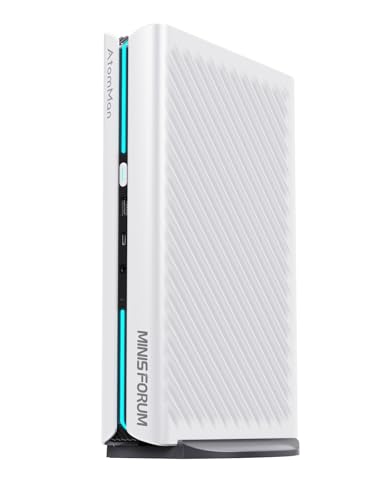
MINISFORUM G1 Pro RTX 5060 Mini PC
Best for: Multi-monitor setups and compact gaming
- Processor
- AMD Ryzen 9 8945HX
- Graphics Card
- GeForce RTX 5060 8GB
- RAM Capacity
- 32GB
- RAM Type
- DDR5
- Storage Capacity
- 1TB
- Storage Interface
- PCIe 4.0 M.2 2280
View on Amazon: MINISFORUM G1 Pro RTX 5060 Mini PC Affiliate link
The MINISFORUM G1 Pro packs a 16-core AMD Ryzen 9 8945HX processor and a dedicated GeForce RTX 5060 graphics card into a compact chassis. It includes 32GB of DDR5 RAM and a 1TB PCIe 4.0 SSD for fast storage. You get Wi-Fi 7 and five display outputs, allowing you to connect four monitors simultaneously. This setup handles heavy multitasking and gaming with ease.
Pros
- AMD Ryzen 9 8945HX processor with up to 5.4GHz boost
- Dedicated GeForce RTX 5060 8GB graphics card
- 32GB DDR5 RAM and 1TB PCIe 4.0 SSD
- Wi-Fi 7 and Bluetooth 5.4 connectivity
- Supports four displays via two HDMI and three DisplayPort outputs
Cons
- 1TB storage is smaller than some competitors
- Base 32GB RAM is not upgradeable beyond 64GB
- Only two HDMI ports limit dual-HDMI monitor setups
Good fit if
- You need a compact PC for multi-monitor workflows
- You want dedicated graphics for gaming or video editing
- You prioritize fast Wi-Fi 7 connectivity
Skip if
- You require more than 1TB of built-in storage
- You need more than four simultaneous display outputs
- You prefer a larger desktop tower for easier upgrades
Verdict: The MINISFORUM G1 Pro Ryzen 9 RTX 5060 Mini PC is a strong option for users who need dedicated graphics and multi-monitor support in a small form factor. It fits professionals and gamers who value connectivity and performance over maximum expandability.
Specifications side by side
| Spec | MINISFORUM Core Ultra 9 Mini Workstation | MINISFORUM Core Ultra 5 Mini Workstation | MINISFORUM RTX 5060 Ryzen 9 Mini PC | MINISFORUM G1 Pro RTX 5060 Mini PC |
|---|---|---|---|---|
| Processor | Intel Core Ultra 9 285HX | Intel Core Ultra 5 336H | AMD Ryzen 9 8945HX | AMD Ryzen 9 8945HX |
| Graphics Card | Intel Graphics | Intel Graphics | NVIDIA GeForce RTX 5060 | GeForce RTX 5060 8GB |
| RAM Capacity | 32GB | 64GB | 32GB | 32GB |
| RAM Type | DDR5 | DDR5 | DDR5 | DDR5 |
| Storage Capacity | 1TB | 2TB | 1TB | 1TB |
| Storage Interface | not stated | PCIe 4.0 | not stated | PCIe 4.0 M.2 2280 |
| Wireless Connectivity | Wi-Fi 7, Bluetooth 5.4 | not stated | Wi-Fi 7 | Wi-Fi 7, Bluetooth 5.4 |
| Memory | not stated | not stated | 32GB RAM | 32GB RAM |
| Storage | 1TB SSD | 2TB SSD | 1TB SSD | not stated |
| Use | Workstation | Workstation | not stated | not stated |
| Size | MS02-285HX(32+1T) | MS-03-S336H(64+2T) | G1 Pro(32+1TB) | G1 Pro(32+1T) |
| Color | Black | Black | not stated | White |
| Model | DeskMini | DeskMini | G1 Pro | DeskMini |
How to choose the right one
-
Match the processor to your workload
Your daily tasks determine which CPU is right for you. The MINISFORUM Core Ultra 9 Mini Workstation offers workstation-grade processing power for network-intensive professional tasks. If you need high throughput for engineering or data analysis, the Core Ultra 5 model provides reliable performance. Choose the Ultra 9 if you prioritize raw CPU strength. Select the Ultra 5 if you want a budget-friendly option that still handles heavy data work efficiently in a compact form factor.
-
Check memory capacity for multitasking
Memory size affects how many applications you can run simultaneously. The MINISFORUM Core Ultra 5 Mini Workstation includes 64GB of RAM, which is ideal for users who run multiple virtual machines or large datasets. The Core Ultra 9 model comes with 32GB, which is sufficient for most workstation tasks. If you need maximum headroom for heavy multitasking, prioritize the 64GB configuration. For standard professional use, 32GB provides ample space for smooth operation without unnecessary cost.
-
Select storage based on data volume
Storage capacity determines how much data you can keep locally. The Core Ultra 5 Mini Workstation features a 2TB SSD, offering double the space of the 1TB SSD found in the Core Ultra 9 model. This makes the Core Ultra 5 a better choice for users who store large files, such as video editors or data analysts. If you rely on cloud storage or external drives, the 1TB option may be sufficient. Always consider your future growth when choosing between 1TB and 2TB.
-
Prioritize graphics for gaming or creation
Dedicated graphics cards are essential for gaming and content creation. The MINISFORUM G1 Pro models feature the RTX 5060 GPU, providing strong performance for compact gaming and video editing. The Core Ultra workstations lack dedicated graphics, relying on integrated solutions suitable only for professional tasks. If you need to play games or render 3D content, choose a G1 Pro model. If your work involves only office applications or data processing, the integrated graphics in the Core Ultra series are adequate.
-
Consider network speed for connectivity
Network interfaces impact how fast you can transfer data. The Core Ultra 9 Mini Workstation supports 25G networking, which is significantly faster than standard Gigabit connections. This is crucial for professionals who move large files across a local network daily. The other models do not highlight this specific high-speed capability. If you work in a high-bandwidth environment, prioritize the model with 25G support. For general home or office use, standard networking speeds are likely sufficient for your needs.
Frequently asked questions
Which MINISFORUM mini PC is best for heavy workstation tasks?
The MINISFORUM Core Ultra 9 Mini Workstation is the top choice for network-intensive professional duties. It features a powerful Core Ultra 9 processor and 25G networking capabilities. This model prioritizes CPU performance and high-speed connectivity over graphical power, making it ideal for engineers and data analysts who need reliable, high-throughput computing in a small chassis.
Can I use a MINISFORUM mini PC for gaming?
Yes, the MINISFORUM G1 Pro Ryzen 9 RTX 5060 Mini PC is suitable for compact gaming. It combines a Ryzen 9 processor with an RTX 5060 graphics card and 32GB of RAM. This configuration delivers strong gaming performance and content creation capabilities within a small form factor, appealing to users who value dedicated graphics in a portable setup.
What is the difference between the Core Ultra 9 and Core Ultra 5 models?
The Core Ultra 9 model offers higher processing power and 25G networking for intensive workstation tasks. The Core Ultra 5 model provides a more budget-friendly option with a 2TB SSD and 64GB of RAM. While both are designed for network-heavy work, the Ultra 9 focuses on raw CPU speed, whereas the Ultra 5 emphasizes storage capacity and memory.
Does the MINISFORUM G1 Pro support multiple monitors?
Yes, the MINISFORUM G1 Pro supports multi-monitor setups. It is designed for users who need dedicated graphics and connectivity in a small form factor. The system includes an RTX 5060 graphics card and 32GB of RAM, allowing for smooth performance across multiple displays while maintaining a compact footprint suitable for professional and gaming environments.
Is the MINISFORUM Core Ultra 5 good for data analysis?
Yes, the MINISFORUM Core Ultra 5 Mini PC is well-suited for data analysis. It features a Core Ultra 5 processor, 64GB of RAM, and a 2TB SSD. This combination provides reliable performance and high storage capacity for handling large datasets. The compact design makes it an excellent choice for engineers and analysts who need efficient, network-capable computing.
What storage options are available in these MINISFORUM mini PCs?
Storage capacities vary by model. The Core Ultra 9 Mini Workstation includes a 1TB SSD. The Core Ultra 5 model offers a larger 2TB SSD. The G1 Pro Ryzen 9 RTX 5060 models also come with 1TB SSDs. These options provide sufficient space for operating systems, applications, and large files depending on your specific workflow needs.