Best HP All-In-One Desktops with Windows 11 Pro in 2026: 15 Picks
As an Amazon Associate we earn from qualifying purchases. Links on this page are affiliate links.
We compared 15 models to find the best HP all in one desktops with Windows 11 Pro. Our top pick is the HP 22" FHD All-in-One Intel N100 Desktop. It leads because it offers 8GB RAM and 128GB storage in a compact 11-pound frame. This makes it ideal for small office desks and daily administrative work. All selections are based strictly on published specifications. This guide helps you decide which system fits your workspace and performance needs.
Quick picks
The best fit for you
- You need the most compact model for small desks HP 22" FHD All-in-One Intel N100 Desktop It measures just 6.69 inches deep and weighs 11 pounds.
- You want the largest 4K display for detailed work HP OmniStudio X 31.5" 4K Core Ultra 7 All-in-One It features a 31.5-inch 4K screen for expansive visual space.
- You require maximum memory for heavy multitasking HP 27-Inch Core Ultra 7 All-in-One Desktop It includes 64GB of RAM to handle demanding workloads.
- You need the largest available storage capacity HP OmniStudio 27 Touchscreen All-in-One PC It comes with a 2TB SSD for extensive file storage.
Our 15 picks

HP 22" FHD All-in-One Intel N100 Desktop
Best for: compact office desks and daily administrative work
- Operating System
- Windows 11 Pro (what this guide is about)
- Processor
- Intel N100
- System Memory
- 8GB DDR5
- Storage Capacity
- 128GB SSD
- Screen Size
- 21.5"
- Display Resolution
- Full HD
View on Amazon: HP 22" FHD All-in-One Intel N100 Desktop Affiliate link
This HP all-in-one desktop integrates a 21.5-inch Full HD anti-glare display with an Intel N100 quad-core processor. You get 8GB of system memory, 128GB of internal storage, and pre-installed Windows 11 Pro for remote desktop support and business security tools. With Wi-Fi 6, Bluetooth 5.3, an HD privacy webcam, and HDMI-out, it suits everyday office work, web browsing, and administrative tasks in compact spaces.
Pros
- Pre-installed Windows 11 Pro operating system
- Built-in HD webcam with physical privacy shutter
- Wi-Fi 6 and Bluetooth 5.3 wireless connectivity
- Anti-glare 21.5-inch Full HD 1080p display
Cons
- Base internal storage capacity limited to 128GB
- Entry-level Intel N100 processor with integrated graphics
- USB Type-C port supports data transfer only
Good fit if
- You need Windows 11 Pro management tools for everyday office work.
- You want a compact 21.5-inch desktop with built-in audio and an HD camera.
- You run standard productivity tasks like document editing and video meetings.
Skip if
- You require large onboard drive space beyond 128GB for local files.
- You run demanding multithreaded applications or 3D software requiring dedicated graphics.
Verdict: HP 21.5-inch FHD Intel N100 All-in-One provides essential Windows 11 Pro productivity features in a compact, space-saving design. It delivers reliable daily performance for basic office duties and routine browsing.

HP ProOne 21.5-Inch All-in-One PC
Best for: budget-conscious office workstations with limited desk space
- Operating System
- Windows 11 Pro (what this guide is about)
- Processor
- Intel Core i5-8500T
- System Memory
- 8GB DDR4
- Storage Capacity
- 256GB SSD
- Screen Size
- 21.5"
- Display Resolution
- Full HD
View on Amazon: HP ProOne 21.5-Inch All-in-One PC Affiliate link
This HP ProOne all-in-one desktop pairs an Intel Core i5-8500T processor with Windows 11 Pro for professional use. You get an integrated 21.5-inch Full HD display, 8GB of DDR4 memory, and a 256GB solid-state drive. It includes four USB 3.1 ports, DisplayPort video output, and wired peripherals right out of the box. It suits you if you need a compact, business-oriented workspace for basic computing tasks without taking up excess desk real estate.
Pros
- Pre-installed Windows 11 Pro operating system
- Intel Core i5-8500T processor with up to 3.5GHz clock speed
- Comprehensive connectivity with four USB 3.1 ports, DisplayPort, and Gigabit Ethernet
- Includes keyboard, mouse, and power adapter in the box
Cons
- Modest 8GB DDR4 RAM allocation
- 256GB SSD offers limited local storage
- Compact 21.5-inch screen offers less screen area than larger alternatives
Good fit if
- You need Windows 11 Pro for office productivity in a compact space.
- You want an all-in-one desktop bundled with a keyboard and mouse.
- You require wired DisplayPort and Gigabit Ethernet connectivity.
Skip if
- You need more than 256GB of local storage for large media files.
- You run multitasking workloads that exceed 8GB of system memory.
- You prefer a display larger than 21.5 inches for daily work.
Verdict: HP ProOne 21.5-inch All-in-One Desktop delivers essential Windows 11 Pro functionality and practical connectivity in a space-saving form factor. Its Core i5 CPU and compact Full HD monitor handle everyday business and office tasks efficiently.

HP 27" FHD Touch AIO, Ultra 7
Best for: Business users needing a large touchscreen
- Operating System
- Windows 11 Pro (what this guide is about)
- Processor
- Intel Core Ultra 7 155U
- System Memory
- 16GB DDR5
- Storage Capacity
- 1TB SSD
- Screen Size
- 27"
- Display Resolution
- FHD
View on Amazon: HP 27" FHD Touch AIO, Ultra 7 Affiliate link
This HP all-in-one desktop features a 27-inch FHD touchscreen and runs Windows 11 Pro. It is powered by an Intel Core Ultra 7 155U processor and includes 16GB of DDR5 RAM with a 1TB SSD. The system comes with a USB-C docking station to simplify desk connectivity. It is designed for business users who need a clean workspace with reliable multitasking performance for modern applications.
Pros
- 27-inch FHD touchscreen display
- Intel Core Ultra 7 155U processor
- 16GB DDR5 RAM and 1TB SSD
- Windows 11 Pro operating system
- Includes USB-C docking station
Cons
- 16GB RAM is lower than the 32GB or 64GB options available on other models in this list
- FHD resolution is lower than the 4K UHD display found on the HP OmniStudio X model
Good fit if
- You need a clean desk setup with integrated cable management
- You require Windows 11 Pro for business security features
- You want a touchscreen for intuitive navigation
Skip if
- You need 4K UHD resolution for detailed visual work
- You require more than 16GB of RAM for heavy data workloads
- You prefer a smaller 21.5-inch or 23.8-inch footprint
Verdict: HP 27" FHD Touch AIO, Core Ultra 7 offers a balanced mix of business-grade performance and a large touchscreen. It fits professionals who value a tidy workspace and solid multitasking capabilities over maximum screen resolution or memory capacity.

HP 23.8" Touchscreen AIO, 16GB RAM, 1TB SSD
Best for: Compact home offices and everyday productivity
- Operating System
- Windows 11 Pro (what this guide is about)
- Processor
- Intel Core i3-N300
- System Memory
- 16 GB
- Storage Capacity
- 1 TB SSD
- Screen Size
- 23.8"
- Display Resolution
- Full HD
View on Amazon: HP 23.8" Touchscreen AIO, 16GB RAM, 1TB SSD Affiliate link
This HP all-in-one desktop combines a 23.8-inch FHD touchscreen with a Core i3-N300 processor and 16GB of RAM. It includes a 1TB SSD for storage and runs Windows 11 Pro. The compact design integrates the display, webcam, and speakers into one unit. It suits users needing responsive everyday performance for web browsing, office tasks, and video calls in a space-saving form factor.
Pros
- 16GB RAM for responsive multitasking
- 1TB SSD for ample storage
- 23.8-inch FHD touchscreen display
- Windows 11 Pro operating system
Cons
- Core i3-N300 processor is less powerful than the i5 and i7 options on this list
- 23.8-inch screen is smaller than the 27-inch and 31.5-inch displays available elsewhere
Good fit if
- You need a compact desktop for a small workspace
- You want a touchscreen for intuitive navigation
- You require Windows 11 Pro for professional features
Skip if
- You need high-end gaming performance
- You prefer a larger 27-inch or bigger display
- You require a faster processor for heavy workloads
Verdict: HP 23.8" Touchscreen AIO i3 16GB is a solid choice for users who prioritize a compact footprint and touchscreen interaction over raw processing power or screen size. It fits home offices and study spaces where everyday productivity is the main goal.
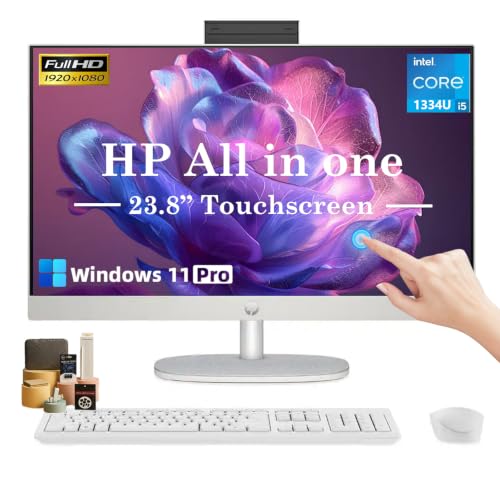
HP 23.8" FHD Touch AIO
Best for: Small home offices needing touch input
- Operating System
- Windows 11 Pro (what this guide is about)
- Processor
- Intel Core i5-1334U
- System Memory
- 16 GB
- Storage Capacity
- 1 TB SSD
- Screen Size
- 23.8"
- Display Resolution
- Full HD (1920 x 1080)
View on Amazon: HP 23.8" FHD Touch AIO Affiliate link
This HP all-in-one desktop features a 23.8-inch Full HD touchscreen and a 13th Gen Intel Core i5-1334U processor. It comes with 16GB of RAM and a 1TB SSD, running Windows 11 Pro. The integrated webcam and Wi-Fi 6 support make it suitable for remote work. It offers a compact footprint for home offices.
Pros
- 23.8-inch Full HD IPS touchscreen
- 13th Gen Intel Core i5-1334U processor
- 16GB RAM and 1TB SSD storage
- Built-in 1080p privacy webcam
- Wi-Fi 6 connectivity
Cons
- 23.8-inch display is smaller than the 27-inch models on this list
- DDR4 RAM is slower than the DDR5 found in higher-end options
- Base 16GB RAM is less than the 64GB configurations available elsewhere
Good fit if
- You need a compact desktop for a small workspace
- You require Windows 11 Pro for business tasks
- You want a touchscreen for easy navigation
Skip if
- You need a larger 27-inch or 31.5-inch display
- You require DDR5 memory for maximum speed
- You want a 4K UHD resolution screen
Verdict: HP 23.8" FHD Touch AIO provides solid performance for office tasks in a space-saving design. It fits users who prioritize a smaller footprint and touch input over maximum screen size or memory capacity.

HP 27" AIO Ultra 7 155U
Best for: multitasking users needing a large touchscreen
- Operating System
- Windows 11 Pro (what this guide is about)
- Processor
- Intel Core Ultra 7 155U
- System Memory
- 32 GB
- Storage Capacity
- 1 TB SSD
- Screen Size
- 27"
- Display Resolution
- FHD
View on Amazon: HP 27" AIO Ultra 7 155U Affiliate link
This HP all-in-one desktop pairs a 27-inch FHD touchscreen with an Intel Core Ultra 7 155U processor. It includes 32 GB of DDR5 RAM and a 1 TB SSD for fast multitasking and ample storage. The system runs Windows 11 Pro and features Wi-Fi 6 connectivity. It suits users who need a capable, modern workspace with a large, interactive display for everyday productivity.
Pros
- Intel Core Ultra 7 155U processor with 12 cores
- 32 GB DDR5 RAM for smooth multitasking
- 27-inch FHD IPS touchscreen display
- 1 TB SSD for fast boot times and storage
- Windows 11 Pro operating system
Cons
- 13.1 pounds weight is heavier than lighter competitors
- 1 TB SSD capacity is lower than 2 TB or 4 TB options available in variations
- FHD resolution is lower than 4K UHD models on the list
Good fit if
- You need a large 27-inch touchscreen for interactive work
- You require 32 GB of RAM for heavy multitasking
- You want Windows 11 Pro with built-in security features
Skip if
- You prefer a lighter desktop under 10 pounds
- You need 4K UHD resolution for detailed visual work
- You require more than 1 TB of internal storage
Verdict: HP 27" Ultra 7 All-in-One Desktop delivers strong performance with its Ultra 7 chip and 32 GB RAM, making it ideal for users who prioritize multitasking capability and a large touchscreen interface.

HP 24" Touchscreen Core i3-N300 All-in-One
Best for: small desks and everyday productivity
- Operating System
- Windows 11 Pro (what this guide is about)
- Processor
- Intel Core i3-N300
- System Memory
- 16GB DDR4
- Storage Capacity
- 1TB SSD
- Screen Size
- 23.8"
- Display Resolution
- 1920 x 1080 Full HD
View on Amazon: HP 24" Touchscreen Core i3-N300 All-in-One Affiliate link
This HP all-in-one desktop pairs a 23.8-inch FHD touchscreen with an 8-core Intel Core i3-N300 processor. It includes 16GB of DDR4 RAM and a 1TB SSD for smooth multitasking and ample storage. The system runs Windows 11 Pro, offering business-focused security and features. With Wi-Fi 6 and a 1080p webcam, it suits home offices and students who need reliable daily computing.
Pros
- Intel Core i3-N300 8-core processor
- 23.8-inch FHD IPS touchscreen
- 16GB DDR4 RAM for multitasking
- 1TB SSD for fast file access
- Windows 11 Pro operating system
Cons
- Core i3-N300 processor is lower performance than the i5 or Ultra 7 options on this list
- 16GB RAM is less than the 64GB found in the top-tier models
- 23.8-inch screen is smaller than the 27-inch and 31.5-inch displays available elsewhere
Good fit if
- You need a compact 24-inch display for a small desk
- You require Windows 11 Pro for business or school features
- You want 1TB of storage for documents and media
Skip if
- You need a large 27-inch or larger monitor for detailed work
- You require high-end performance for heavy video editing or gaming
- You want the maximum 64GB RAM for extensive multitasking
Verdict: HP 24" AIO i3-N300 16GB RAM is a practical entry-level all-in-one for users who prioritize screen size and storage over raw processing power. It fits students and home office workers who need a responsive touchscreen and business OS without the bulk of larger models.

HP 27 All-in-One Ryzen 5 7520U
Best for: Home offices needing large touchscreens
- Operating System
- Windows 11 Pro (what this guide is about)
- Processor
- AMD Ryzen 5 7520U
- System Memory
- 16 GB LPDDR5
- Storage Capacity
- 1 TB SSD
- Screen Size
- 27"
- Display Resolution
- FHD (1920 x 1080)
View on Amazon: HP 27 All-in-One Ryzen 5 7520U Affiliate link
This HP all-in-one desktop pairs a 27-inch FHD touchscreen with an AMD Ryzen 5 7520U processor. You get 16 GB of onboard LPDDR5 RAM and a 1 TB PCIe NVMe SSD for storage. The display offers 99% sRGB coverage and anti-glare coating. It includes a wireless keyboard and mouse combo. This setup suits users who want a clean workspace with solid everyday performance and ample storage for documents and media.
Pros
- 27-inch FHD IPS touchscreen with 99% sRGB color accuracy
- AMD Ryzen 5 7520U processor for efficient multitasking
- 16 GB LPDDR5-5500 MHz onboard RAM
- 1 TB PCIe NVMe M.2 SSD for fast storage
- Includes HP white wireless keyboard and mouse combo
Cons
- Ryzen 5 7520U is an entry-level mobile processor compared to higher-tier options
- RAM is onboard and cannot be upgraded later
- Display brightness is limited to 250 nits
Good fit if
- You need a large 27-inch screen for detailed work
- You want a complete setup with included wireless peripherals
- You prioritize color accuracy for photo editing or design
Skip if
- You require upgradable RAM for heavy professional workloads
- You need a brighter display for well-lit environments
- You prefer a desktop tower for maximum expandability
Verdict: HP 27" AIO Ryzen 5 7520U delivers a balanced mix of screen size and storage for home offices. It fits buyers who value a tidy, all-in-one design with decent color reproduction for everyday tasks.

HP 27-Inch Core Ultra 7 All-in-One Desktop
Best for: Users needing 64GB RAM for heavy multitasking
- Operating System
- Windows 11 Pro (what this guide is about)
- Processor
- Intel Core Ultra 7 255U
- System Memory
- 64GB DDR5
- Screen Size
- 27"
- Display Resolution
- FHD
- Touchscreen
- Touchscreen
View on Amazon: HP 27-Inch Core Ultra 7 All-in-One Desktop Affiliate link
This HP all-in-one desktop features a 27-inch FHD touchscreen and an Intel Core Ultra 7 255U processor. It stands out with 64GB of DDR5 RAM and a 1TB SSD, offering substantial memory for heavy multitasking. Running Windows 11 Pro, it includes Wi-Fi 6 and business-grade security. This configuration suits users who need high-capacity memory for demanding workflows without sacrificing screen real estate.
Pros
- 64GB DDR5 system memory for extensive multitasking
- Intel Core Ultra 7 255U processor with 12 cores
- 27-inch FHD touchscreen display
- 1TB PCIe M.2 SSD storage
- Windows 11 Pro operating system
Cons
- Processor clock speed maxes out at 5.20 GHz
- Display resolution is limited to FHD rather than 4K
- Includes only a 1-year warranty on upgraded components
Good fit if
- You require 64GB of RAM for virtualization or large datasets
- You prefer a 27-inch screen for detailed work
- You need Windows 11 Pro for enterprise management features
Skip if
- You need 4K UHD resolution for professional color grading
- You want a processor with higher boost speeds than 5.20 GHz
- You prefer a 4K display for media consumption
Verdict: HP 27" All-in-One 64GB RAM delivers exceptional memory capacity for demanding tasks. It fits professionals who prioritize RAM volume and screen size over 4K resolution.

HP OmniStudio 27 Touchscreen All-in-One PC
Best for: modern office productivity and video conferencing
- Operating System
- Windows 11 Pro (what this guide is about)
- Processor
- Intel Core Ultra 7 355U
- System Memory
- 16 GB
- Storage Capacity
- 2 TB SSD
- Screen Size
- 27-inch
- Display Resolution
- Full HD
View on Amazon: HP OmniStudio 27 Touchscreen All-in-One PC Affiliate link
This HP OmniStudio all-in-one pairs an Intel Core Ultra 7 355U processor with 16GB of DDR5 memory and a 1TB SSD, running Windows 11 Pro out of the box. You get a 27-inch Full HD touchscreen mounted on a height-adjustable stand, plus modern Wi-Fi 7 and dual USB-C 4 ports. It suits you if you want a clean workspace, integrated video conferencing hardware, and responsive performance for daily multitasking and office workloads.
Pros
- Intel Core Ultra 7 355U processor with built-in NPU and 16GB DDR5 RAM
- Dual USB-C 4 ports with 40Gbps transfer speeds and Wi-Fi 7 support
- Height-adjustable stand with up to 20.69 inches of vertical travel
- Included 1080p privacy webcam, dual microphones, and wireless peripherals
Cons
- 1080p resolution provides lower pixel density on a 27-inch panel
- Uses a U-series power-efficient processor rather than high-wattage desktop silicon
Good fit if
- You need an adjustable 27-inch touchscreen for everyday business multitasking.
- You want high-speed external connectivity via Wi-Fi 7 and dual USB-C 4 ports.
- You want an integrated setup with a 1080p privacy webcam and bundled wireless peripherals.
Skip if
- You prefer a higher-resolution 1440p or 4K panel on a 27-inch screen.
- You require a dedicated graphics card for heavy 3D rendering or gaming.
Verdict: HP OmniStudio 27" Touchscreen All-in-One delivers dependable everyday productivity with its Core Ultra 7 processor, modern Wi-Fi 7 connectivity, and height-adjustable stand. It gives you a complete, clutter-free desktop workstation for Windows 11 Pro business tasks.

HP 27" FHD Ultra 7 Business AIO
Best for: Business multitasking with high RAM needs
- Operating System
- Windows 11 Pro (what this guide is about)
- Processor
- Intel Core Ultra 7 155U
- System Memory
- 64GB DDR5
- Storage Capacity
- 1TB SSD
- Screen Size
- 27"
- Display Resolution
- 1920 x 1080
View on Amazon: HP 27" FHD Ultra 7 Business AIO Affiliate link
This HP all-in-one desktop pairs a 27-inch FHD display with a 12-core Intel Core Ultra 7 155U processor. It includes 64GB of DDR5 RAM and a 1TB PCIe NVMe SSD for high-speed multitasking. The system runs Windows 11 Pro and features a touchscreen. It suits business users who need substantial memory and a large, clear workspace for demanding applications.
Pros
- 12-core Intel Core Ultra 7 155U processor with up to 4.8 GHz boost
- 64GB DDR5 high-bandwidth RAM for smooth multitasking
- 1TB PCIe NVMe M.2 SSD for fast data transfer
- 27-inch IPS FHD+ touchscreen display
- Windows 11 Pro operating system
Cons
- 250-nits display brightness is lower than typical premium monitors
- 13.1 pounds weight is heavier than smaller 22-inch models
- FHD+ resolution is lower than 4K options on this list
Good fit if
- You need 64GB of RAM for heavy virtualization or multitasking
- You prefer a 27-inch screen for detailed work
- You require Windows 11 Pro for business features
Skip if
- You need a 4K UHD display for precise color work
- You want a lighter desktop under 10 pounds
- You prefer a non-touchscreen design
Verdict: HP 27 Ultra 7 Business AIO delivers massive 64GB RAM and a 12-core processor for power users. It fits business professionals who prioritize memory capacity and screen real estate over ultra-high resolution.

HP 24" FHD Touchscreen Core i5 All-in-One
Best for: compact touchscreen office setups needing Windows 11 Pro
- Operating System
- Windows 11 Pro (what this guide is about)
- Processor
- 13th Gen Intel Core i5-1334U
- System Memory
- 16 GB DDR4
- Storage Capacity
- 1 TB SSD
- Screen Size
- 23.8"
- Display Resolution
- Full HD
View on Amazon: HP 24" FHD Touchscreen Core i5 All-in-One Affiliate link
This HP all-in-one desktop pairs a 23.8-inch Full HD IPS touchscreen with a 13th Gen Intel Core i5-1334U processor and Windows 11 Pro. With 16GB of DDR4 memory and a 1TB SSD, you get ample responsive storage and smooth multitasking for professional workflows. An integrated 1080p IR webcam enables facial login, while Wi-Fi 6 keeps your setup wireless. It suits you if you need a mid-sized, touch-enabled workspace.
Pros
- 23.8-inch Full HD IPS touchscreen with anti-glare coating
- 13th Gen Intel Core i5-1334U processor with 16GB DDR4 RAM
- 1TB SSD for internal storage and fast boot times
- HP True Vision 1080p IR camera supporting facial recognition logins
- Wi-Fi 6, Bluetooth 5.3, and included wireless keyboard and mouse
Cons
- Uses DDR4 memory rather than newer DDR5
- No dedicated graphics card listed in the specifications
- Screen resolution tops out at standard 1080p
Good fit if
- You want an interactive 23.8-inch touchscreen for Windows 11 Pro tasks.
- You need secure facial recognition logins alongside a 1080p conference webcam.
- You prefer an all-in-one footprint with included wireless accessories.
Skip if
- You require a high-resolution 1440p or 4K panel.
- You need a dedicated graphics processing unit for heavy 3D workloads.
Verdict: HP 24-Inch Touchscreen Core i5 All-in-One provides a balanced 23.8-inch workspace with Windows 11 Pro, reliable Intel processing, and built-in IR facial recognition. It handles daily business workloads and virtual meetings cleanly without desk clutter.

HP 27" Touchscreen Ryzen AI 7 All-in-One
Best for: Business users needing high RAM and AI tools
- Operating System
- Windows 11 Pro (what this guide is about)
- Processor
- AMD Ryzen AI 7 350
- System Memory
- 64 GB
- Storage Capacity
- 1 TB SSD
- Screen Size
- 27"
- Graphics
- AMD Radeon
View on Amazon: HP 27" Touchscreen Ryzen AI 7 All-in-One Affiliate link
This HP All-in-One pairs a 27-inch FHD touchscreen with a powerful AMD Ryzen AI 7 350 processor. You get 64GB of DDR5 RAM and a 1TB SSD for heavy multitasking. The bundle includes a wireless keyboard, mouse, and pen. It runs Windows 11 Pro and features Wi-Fi 6. This setup suits business users who need high memory capacity and AI tools in one compact unit.
Pros
- 64GB DDR5 RAM for extensive multitasking
- AMD Ryzen AI 7 350 processor with Copilot+ support
- 27-inch FHD IPS touchscreen with adjustable stand
- 1TB SSD storage for large files
- Includes wireless keyboard, mouse, and touchscreen pen
Cons
- 14.8 pounds weight is heavier than many competitors
- FHD resolution is lower than 4K options on the list
- AMD Radeon integrated graphics limit heavy gaming performance
Good fit if
- You need 64GB of RAM for professional workflows
- You want a complete bundle with pen and peripherals
- You prefer Windows 11 Pro for business features
Skip if
- You require 4K UHD display clarity
- You prioritize a lightweight desktop under 10 pounds
- You need dedicated NVIDIA graphics for gaming
Verdict: HP 27" AIO Ryzen AI 7 350 offers massive memory and a full accessory bundle for business users. It fits professionals who need high RAM and AI tools more than gamers or media consumers.

HP 23.8" Touch All-in-One Desktop
Best for: basic productivity and touchscreen use
- Operating System
- Windows 11 Pro (what this guide is about)
- Processor
- Intel Core i3 N300
- System Memory
- 8 GB
- Storage Capacity
- 512 GB SSD
- Screen Size
- 23.8"
- Display Resolution
- Full HD
View on Amazon: HP 23.8" Touch All-in-One Desktop Affiliate link
This HP all-in-one desktop features a 23.8-inch Full HD IPS touchscreen and an Intel Core i3 N300 processor. It includes 8GB of DDR4 RAM and a 512GB SSD for everyday tasks. Windows 11 Pro ensures a professional environment. The compact design fits well in offices or homes. You get reliable connectivity with Wi-Fi 6 and Bluetooth 5.3. It is a practical choice for basic productivity and media consumption.
Pros
- 23.8-inch Full HD IPS touchscreen display
- Intel Core i3 N300 processor with Intel UHD Graphics
- 512GB SSD storage for fast data access
- Windows 11 Pro operating system
- Wi-Fi 6 and Bluetooth 5.3 connectivity
Cons
- 8GB RAM is lower than many competitors offering 16GB
- 512GB SSD capacity is smaller than the 1TB drives found in other options
- Intel N300 processor is less powerful than the i5 or Ultra 7 chips in higher-end models
Good fit if
- You need a touchscreen interface for intuitive navigation
- You require Windows 11 Pro for business features
- You want a compact desktop for everyday tasks
Skip if
- You need more than 8GB of RAM for heavy multitasking
- You require a 1TB or larger SSD for extensive storage
- You need a high-performance processor for gaming or video editing
Verdict: HP 23.8" i3 N300 Touchscreen AIO is a solid entry-level all-in-one for users who prioritize a touchscreen and Windows 11 Pro over raw power or large storage capacity.

HP OmniStudio X 31.5" 4K Core Ultra 7 All-in-One
Best for: large-screen 4K multitasking and productivity
- Operating System
- Windows 11 Pro (what this guide is about)
- Processor
- Intel Core Ultra 7 258V
- System Memory
- 32 GB
- Storage Capacity
- 1 TB SSD
- Screen Size
- 31.5"
- Display Resolution
- 4K UHD
View on Amazon: HP OmniStudio X 31.5" 4K Core Ultra 7 All-in-One Affiliate link
This HP all-in-one pairs a 31.5-inch 4K UHD anti-glare display with an Intel Core Ultra 7 258V processor and Windows 11 Pro. You get 32GB of high-speed LPDDR5X memory and a 1TB NVMe SSD for intensive multitasking. With HDMI-in and DisplayPort-in capabilities, it doubles as an external monitor. It suits professionals who need expansive screen real estate, sharp ultra-high-definition visuals, and modern connectivity like Wi-Fi 7.
Pros
- 31.5-inch 4K UHD 550-nit IPS anti-glare panel
- 32GB fast LPDDR5X memory and 1TB NVMe SSD
- Modern Intel Wi-Fi 7 BE200 and Bluetooth 5.4
- HDMI 2.1 video input and USB-C DisplayPort in/out
Cons
- Uses integrated Intel Arc graphics instead of a discrete GPU
- HDMI output is limited to version 1.4
- Does not include touchscreen functionality
Good fit if
- You need a large 31.5-inch 4K screen for high-detail workflows.
- You want 32GB of memory and Wi-Fi 7 for demanding daily tasks.
- You plan to connect external devices via HDMI-in or USB-C DisplayPort.
Skip if
- You require a dedicated graphics card for heavy 3D workloads or gaming.
- You prefer a touchscreen interface.
Verdict: HP OmniStudio X 31.5-inch 4K All-in-One delivers an expansive ultra-high-definition display, high-speed memory, and versatile video inputs for high-end productivity.
Specifications side by side
| Spec | HP 22" FHD All-in-One Intel N100 Desktop | HP ProOne 21.5-Inch All-in-One PC | HP 27" FHD Touch AIO, Ultra 7 | HP 23.8" Touchscreen AIO, 16GB RAM, 1TB SSD | HP 23.8" FHD Touch AIO | HP 27" AIO Ultra 7 155U | HP 24" Touchscreen Core i3-N300 All-in-One | HP 27 All-in-One Ryzen 5 7520U | HP 27-Inch Core Ultra 7 All-in-One Desktop | HP OmniStudio 27 Touchscreen All-in-One PC | HP 27" FHD Ultra 7 Business AIO | HP 24" FHD Touchscreen Core i5 All-in-One | HP 27" Touchscreen Ryzen AI 7 All-in-One | HP 23.8" Touch All-in-One Desktop | HP OmniStudio X 31.5" 4K Core Ultra 7 All-in-One |
|---|---|---|---|---|---|---|---|---|---|---|---|---|---|---|---|
| Processor | Intel N100 | Intel Core i5-8500T | Intel Core Ultra 7 155U | Intel Core i3-N300 | Intel Core i5-1334U | Intel Core Ultra 7 155U | Intel Core i3-N300 | AMD Ryzen 5 7520U | Intel Core Ultra 7 255U | Intel Core Ultra 7 355U | Intel Core Ultra 7 155U | 13th Gen Intel Core i5-1334U | AMD Ryzen AI 7 350 | Intel Core i3 N300 | Intel Core Ultra 7 258V |
| System Memory | 8GB DDR5 | 8GB DDR4 | 16GB DDR5 | 16 GB | 16 GB | 32 GB | 16GB DDR4 | 16 GB LPDDR5 | 64GB DDR5 | 16 GB | 64GB DDR5 | 16 GB DDR4 | 64 GB | 8 GB | 32 GB |
| Storage Capacity | 128GB SSD | 256GB SSD | 1TB SSD | 1 TB SSD | 1 TB SSD | 1 TB SSD | 1TB SSD | 1 TB SSD | not stated | 2 TB SSD | 1TB SSD | 1 TB SSD | 1 TB SSD | 512 GB SSD | 1 TB SSD |
| Screen Size | 21.5" | 21.5" | 27" | 23.8" | 23.8" | 27" | 23.8" | 27" | 27" | 27-inch | 27" | 23.8" | 27" | 23.8" | 31.5" |
| Display Resolution | Full HD | Full HD | FHD | Full HD | Full HD (1920 x 1080) | FHD | 1920 x 1080 Full HD | FHD (1920 x 1080) | FHD | Full HD | 1920 x 1080 | Full HD | not stated | Full HD | 4K UHD |
| Graphics | Intel UHD Graphics | not stated | not stated | Intel UHD Graphics | Intel UHD Graphics | not stated | not stated | AMD Radeon Graphics | not stated | not stated | not stated | not stated | AMD Radeon | Intel UHD Graphics | Intel Arc Graphics 140V |
| Touchscreen | not stated | not stated | Touchscreen | Touchscreen | Touchscreen | Touchscreen | Touchscreen | Touchscreen | Touchscreen | Touchscreen | not stated | Touchscreen | Touchscreen | Touchscreen | not stated |
| Operating System | Windows 11 Pro | Windows 11 Pro | Windows 11 Pro | Windows 11 Pro | Windows 11 Pro | Windows 11 Pro | Windows 11 Pro | Windows 11 Pro | Windows 11 Pro | Windows 11 Pro | Windows 11 Pro | Windows 11 Pro | Windows 11 Pro | Windows 11 Pro | Windows 11 Pro |
| Memory | not stated | 8GB RAM | 16GB RAM | 16GB RAM | 16GB RAM | 32GB RAM | 16GB RAM | 16GB RAM | 64GB RAM | 16GB RAM | not stated | 16GB RAM | not stated | 8GB RAM | 32GB RAM |
| Storage | not stated | 256GB SSD | 1TB SSD | 1TB SSD | 1TB SSD | 1TB SSD | 1TB SSD | 1TB SSD | 1TB SSD | 2TB SSD | 1TB SSD | 1TB SSD | 1TB SSD | 512GB SSD | 1TB SSD |
| Use | not stated | not stated | Business | Business | Business | not stated | Business | not stated | not stated | Business | Business | not stated | Business | Business | not stated |
| Display Feature | not stated | not stated | Touchscreen | Touchscreen | Touchscreen | Touchscreen | Touchscreen | Touchscreen | not stated | Touchscreen | Touchscreen | Touchscreen | Touchscreen | Touchscreen | not stated |
| Dimensions | 6.69 × 19.4 × 15.1 inches | not stated | not stated | 21.3 × 7.33 × 16.1 inches | not stated | 24.1 × 7.34 × 20.4 inches | 21.3 × 16.1 × 7.3 inches | 7.33 × 24.1 × 17.4 inches | 7.34 × 24.1 × 20.4 inches | not stated | not stated | not stated | not stated | not stated | 28.1 × 7.88 × 22.3 inches |
| Weight | 11 pounds | not stated | not stated | not stated | not stated | 13.1 pounds | 11.6 pounds | 14.2 pounds | 12.2 pounds | not stated | 13.1 pounds | not stated | 14.8 pounds | 11.6 pounds | 21.6 pounds |
| Size | 8GB RAM | 128GB STORAGE | not stated | 16GB DDR5 | 1TB SSD | not stated | not stated | 27" | not stated | 16GB DDR5 | 1TB Storage | 64GB RAM | 1TB SSD | not stated | 64GB 1TB | 16 GB RAM | 1 TB SSD | not stated | Intel UHD Graphics | 1TB NVMe SSD |
| Color | Black | not stated | not stated | White | White | White | White | White | Black | White | White | White | Jet Black | Shell White | Meteor Silver |
| Model | 0009 | 600 G4 All-in-One | cr100t | HP 23.8 All in One Computer | Intel Core i5 1334U | HP 27 inch all-in-one desktop computer | hp all in one desktop computer | HP All-in-One Desktop | TPC-Q095-27 | 27-cy0074 | cr1000t | 1334U | 27-ct2054 | HP 23.8" Touch-Screen All-in-One | OmniStudio X 32 |
If you prefer a separate monitor rather than an integrated display, consider the best HP mini PCs with Windows 11.
How to choose the right HP AIO
-
Match processor to workload
Your daily tasks dictate the necessary processing power. Basic office duties and web browsing run well on entry-level chips like the Intel N100 or Athlon Gold. These models handle routine administration without strain. For more demanding workflows, consider a Core i5 or Core Ultra 7. These processors manage heavier multitasking and complex applications more efficiently. Avoid underpowered CPUs if you plan to keep many tabs open or run specialized business software. Check the processor name in the specs to ensure it meets your performance needs.
-
Select adequate RAM capacity
Random Access Memory determines how many programs you can run simultaneously. Eight gigabytes is sufficient for single-task users who browse the web or type documents. If you multitask frequently, aim for sixteen gigabytes to keep your system responsive. Power users who edit large files or run virtual machines should look for thirty-two or sixty-four gigabytes. More RAM prevents slowdowns when switching between applications. Compare the memory specifications across models to find the level that supports your specific workflow without unnecessary expense.
-
Choose storage for your files
Storage capacity determines how many documents, photos, and programs you can keep on the machine. Eighty to one hundred twenty-eight gigabytes is tight and may fill up quickly. Two hundred fifty-six gigabytes offers a moderate buffer for everyday files. Larger workflows benefit from two terabytes or more, which provide ample space for extensive media libraries or large databases. All models in this guide use solid-state drives for faster boot times. Verify the storage size in the specifications to ensure it aligns with your long-term data retention requirements.
-
Pick the right screen size
Screen size affects both workspace real estate and physical footprint. Twenty-one to twenty-four inch monitors fit well on compact desks and small workspaces. They provide enough clarity for standard office tasks without taking up too much room. Twenty-seven inch displays offer more screen space for splitting windows and viewing detailed spreadsheets. Thirty-one and a half inch models are ideal for users who need maximum visibility for multitasking. Measure your desk area before buying to ensure the monitor dimensions fit comfortably within your available space.
-
Consider touchscreen utility
Touchscreen displays add an alternative input method for navigating Windows 11 Pro. This feature is useful for interactive presentations, digital signatures, or users who prefer direct screen manipulation. If you rarely use touch, a standard display is sufficient and may save space or complexity. Touchscreen models are available across various sizes and price points. Check the display features in the specifications to confirm if the panel supports touch input. Decide if this convenience aligns with your daily interaction habits before making a final selection.
Frequently asked questions
Which HP all-in-one has the largest screen?
The HP OmniStudio X 31.5-inch 4K Core Ultra 7 All-in-One features the largest display at 31.5 inches. It delivers ultra-high-definition visuals for expansive multitasking. This model also includes 32GB RAM and a 1TB SSD. Its substantial footprint measures 28.1 inches wide and weighs 21.6 pounds, making it ideal for dedicated workspaces rather than small desks.
Does HP offer all-in-one desktops with Ryzen processors?
Yes, HP provides all-in-one desktops with AMD Ryzen processors. The HP 27 All-in-One Ryzen 5 7520U and the HP 27-inch Touchscreen Ryzen AI 7 All-in-One are available options. Both models include 1TB SSDs and 16GB RAM. They feature 27-inch touchscreens and run Windows 11 Pro, offering a balanced mix of performance and display size for home offices.
What is the smallest HP all-in-one by footprint?
The HP 22-inch FHD Intel N100 Desktop is the most compact model. It measures 19.4 inches wide, 15.1 inches high, and 6.69 inches deep. Weighing just 11 pounds, it fits easily on small desks. This unit runs Windows 11 Pro and includes 8GB RAM with 128GB storage, making it suitable for basic administrative tasks and daily browsing.
Which HP all-in-one has the most RAM?
The HP 27-Inch Core Ultra 7 All-in-One Desktop offers the highest memory capacity with 64GB RAM. It pairs this with a 1TB SSD and a 27-inch display. This configuration supports heavy multitasking and demanding professional workloads. Another model, the HP 27-inch FHD Ultra 7 Business AIO, also provides 64GB RAM for users prioritizing memory volume over resolution.
Are there HP all-in-one desktops with Wi-Fi 7?
The HP OmniStudio 27 Touchscreen All-in-One PC includes modern Wi-Fi 7 connectivity. It features a Core Ultra 7 processor, 16GB RAM, and a 2TB SSD. This model also comes with a height-adjustable stand and a 27-inch touchscreen. It is designed for reliable business productivity and video conferencing while maintaining a clutter-free desktop setup.
Which model includes facial recognition for security?
The HP 24-inch FHD Touchscreen Core i5 All-in-One includes built-in IR facial recognition. This security feature works with Windows 11 Pro to streamline login processes. The unit features a 23.8-inch touchscreen, 16GB RAM, and a 1TB SSD. It handles daily business workloads and virtual meetings efficiently while providing a secure and clean workspace without additional desk clutter.
Does the top pick have a touchscreen?
No, the top pick, the HP 22-inch FHD Intel N100 Desktop, does not feature a touchscreen. It focuses on a compact, space-saving design for daily administrative work. It runs Windows 11 Pro and includes 8GB RAM with 128GB storage. If you require touch input, consider the HP 23.8-inch Touchscreen AIO or other models in the list that explicitly include this display feature.